

To prevent carpal tunnel at work, keep your wrists straight while typing and mousing, take a break every hour, and check your desk height first. OSHA recommends a five-minute break from computer tasks every hour. NIOSH’s review found the strongest evidence links carpal tunnel to repetitive and forceful hand movements combined, not wrist posture alone.
- NIOSH’s review found the clearest evidence for carpal tunnel links repetitive and forceful hand movements combined; wrist posture alone had weaker evidence on its own, but adds risk when combined with those factors.
- OSHA recommends a five-minute break from computer tasks every hour, enough time to stretch, get up, or walk.
- A 1999 study found split keyboards reduced ulnar deviation from about 12 degrees to within 5 degrees of neutral, compared with a standard keyboard.
- Mayo Clinic notes symptoms usually start with tingling or numbness in the thumb, index, and middle fingers, often at night or first thing in the morning.
This article is for general educational purposes and is not medical advice. If you have persistent pain, numbness, or tingling, talk to a doctor or physical therapist before changing your equipment or routine. For general workplace ergonomics guidance, see resources from OSHA and NIOSH.
In this article:
- Why carpal tunnel happens when you type and use a mouse
- 5 ways to prevent carpal tunnel at work
- How to set up your workspace to prevent carpal tunnel
- When to see a doctor
- Frequently asked questions
Why Carpal Tunnel Happens When You Type and Use a Mouse
Carpal tunnel syndrome develops from sustained pressure on the median nerve as it passes through the wrist. A NIOSH review of the occupational research found the clearest evidence for a link with work involving highly repetitive hand movements and, separately, forceful hand movements, with the evidence growing stronger when both are present together (NIOSH, Carpal Tunnel Syndrome and Work). Wrist posture on its own had weaker evidence in that review, but it adds to the risk on top of repetition and force, which is exactly the combination a lot of computer work involves: constant small movements, gripping a mouse, and a keyboard that isn’t at the right height.

5 Ways to Prevent Carpal Tunnel at Work
These five changes address the modifiable risk factors research points to, starting with the one you control most directly.
1. Keep Your Wrists Straight While Typing and Mousing
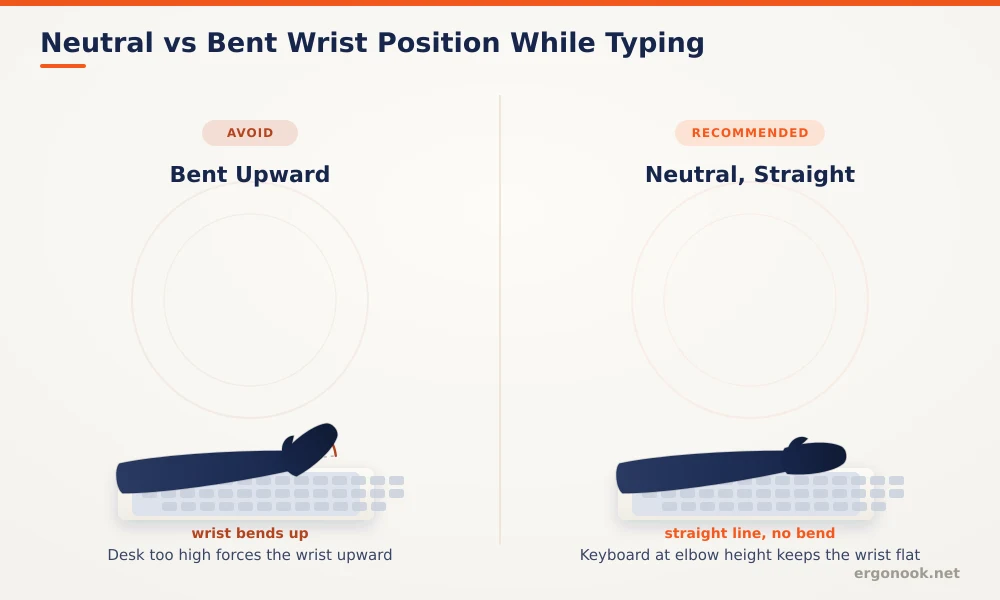
Keeping your wrists straight rather than bent up, down, or to the side while typing and using a mouse reduces pressure inside the carpal tunnel. That’s harder than it sounds with a standard flat keyboard on a desk that’s too high, which forces your wrists to bend upward to reach the keys, or a mouse positioned too far from your body, which pulls your wrist outward with every movement.
2. Fix Your Desk and Chair Height First
Desk and chair height set up the conditions for good wrist position before you even touch the keyboard. If your elbows aren’t near a 90 degree angle when your hands rest on the keys, your wrists compensate by bending to reach a comfortable typing position, and that compensation is the repeated motion linked to symptoms building up over months of daily use. Check chair and desk height first, before assuming the keyboard or mouse itself is the problem.
3. Lighten Your Typing and Click Force
How hard you press the keys and click the mouse also contributes, since force is one of the two factors NIOSH’s review found the clearest evidence for. Many people type and click with more force than the action actually requires, especially under stress or time pressure, which adds unnecessary strain on top of whatever position your wrists are already in. Lightening your touch on both keyboard and mouse is a free adjustment that works alongside any equipment change.
4. Take Short Breaks Every 20 to 30 Minutes
Short, frequent breaks matter more than people expect, and they’re free, unlike new equipment. Stretching your wrists and shaking out your hands for even 15 to 30 seconds every 20 to 30 minutes gives the tissue around the nerve a chance to recover instead of staying under constant load all day without a pause. OSHA’s broader guidance recommends a five-minute break from computer tasks every hour on top of this (OSHA).
5. Add Equipment That Supports a Neutral Position
Equipment changes support good wrist position, they don’t create it on their own. A keyboard tray positioned at the right height keeps your typing surface level with your seated height, which a keyboard sitting directly on a too-tall desk often can’t achieve. A wrist rest that supports the heel of your hand without propping your wrist up higher than the keyboard also helps keep the wrist neutral while you’re not actively typing. A split or angled keyboard can help too. Our guide on ergonomic keyboard vs regular keyboard covers how much of a difference the shape actually makes.
How to Set Up Your Workspace to Prevent Carpal Tunnel
Combining correct desk and chair height, a lighter typing touch, regular short breaks, and a keyboard tray if your desk doesn’t naturally support good wrist position addresses most of the modifiable risk factors at once, rather than relying on a single change to fix everything. Mouse choice matters too, since gripping a standard mouse for hours is part of the same repetitive load. Our guide on whether vertical mice help with wrist pain covers what the research actually shows there. If a standard mouse is part of the problem, our picks for the best ergonomic mouse for carpal tunnel are built around that same repetitive-load concern.
Treating any one of these in isolation, like buying a new keyboard while leaving the desk far too high, limits how much difference the change actually makes, since the other contributing factors are still in place.
When to See a Doctor
Mayo Clinic notes that carpal tunnel symptoms typically start gradually with tingling or numbness in the thumb, index, and middle fingers, often at night or right after waking up (Mayo Clinic). If symptoms interfere with normal activities, including sleep, or persist despite the changes above, that’s beyond what setup changes alone can address, and it’s worth getting evaluated by a doctor or physical therapist before symptoms progress further.
Frequently Asked Questions
Can a wrist rest cause carpal tunnel?
A wrist rest that’s too high can tilt the wrist upward during pauses in typing, which is why keeping it level with the keyboard’s base matters more than the cushioning itself.
How often should I take breaks to prevent carpal tunnel?
Short breaks every 20 to 30 minutes are commonly recommended, on top of a longer five-minute break from computer tasks each hour.
Is carpal tunnel syndrome always caused by typing?
Typing and mouse use are contributing factors for many office workers, but the condition can also be linked to other repetitive hand use, injury, or underlying health conditions unrelated to computer work.
Does an ergonomic mouse alone reduce carpal tunnel risk without other changes?
It helps with one contributing factor, but desk height, chair height, typing force, and break frequency all play a role too, so a mouse change alone addresses only part of the picture.
Preventing carpal tunnel at work comes down to reducing repetition, force, and awkward wrist posture together, not chasing any single fix. Most people notice fewer symptoms within a few weeks of combining desk height, typing force, and regular breaks, and it’s worth seeing a doctor if symptoms persist despite consistent changes.





Write Your Review
No reviews yet. Be the first to share your experience!