

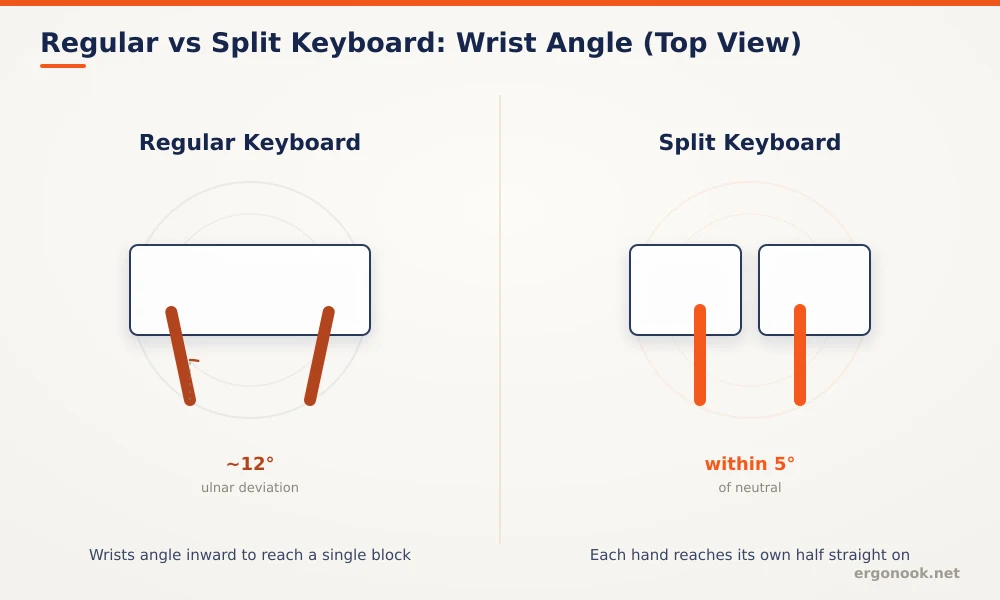
Ergonomic keyboard vs regular keyboard: a split design measurably reduces wrist strain, but position matters more than shape. A 1999 study found split keyboards cut ulnar deviation from about 12 degrees to within 5 degrees of neutral. Cornell’s ergonomics lab notes a regular keyboard placed correctly, flat and at elbow height, can reach a similar neutral posture on its own.
- A 1999 study in Human Factors found split keyboards reduced mean ulnar deviation from about 12 degrees to within 5 degrees of neutral, compared with a standard keyboard.
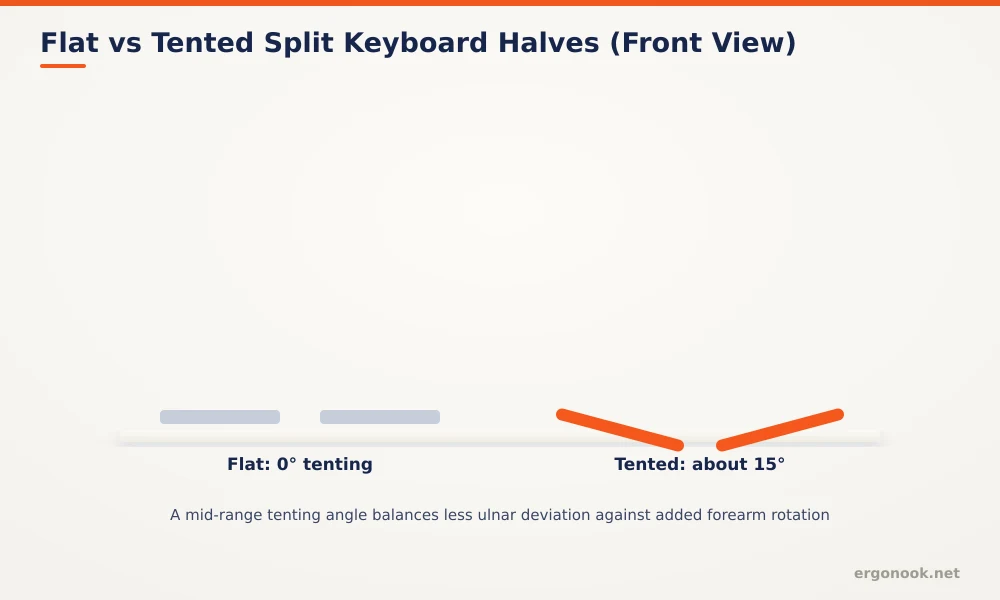
- The same research found a mid-range opening angle, around 15 degrees, balanced less ulnar deviation against added forearm rotation better than wider angles.
- Cornell University’s ergonomics lab notes there’s no consistent research showing split keyboards beat a correctly positioned regular keyboard on posture; placement matters as much as shape.
- Typing speed often dips for the first couple of weeks on a fully split layout while muscle memory adjusts.
Ergonomic Keyboard vs Regular Keyboard: Quick Comparison
| Criteria | Regular Keyboard | Ergonomic Keyboard |
|---|---|---|
| Wrist posture | Depends entirely on correct placement | Split or angled shape reduces ulnar deviation by design |
| Learning curve | None | Real, especially on a fully split layout |
| Typing speed | No change | Often dips for 1 to 2 weeks, then recovers |
| Numpad and shortcuts | Standard, unchanged | Often dropped or moved on split designs |
| Price | Lower | Higher, more for fully split mechanical models |
| Best for | Occasional typing, laptop-first users | Hours of daily typing, existing wrist discomfort |
In this article:
- What is a regular keyboard?
- What is an ergonomic keyboard?
- Ergonomic keyboard vs regular keyboard: wrist and forearm posture
- Ergonomic keyboard vs regular keyboard: learning curve
- Ergonomic keyboard vs regular keyboard: layout and key feel
- When a regular keyboard is the better choice
- When an ergonomic keyboard is the better choice
- Can you try one before committing?
- Frequently asked questions
What Is a Regular Keyboard?
A regular keyboard is flat and laid out as a single block, which forces your wrists to bend inward toward your body, called ulnar deviation, to reach the far edges of the keys, especially reaching for keys like P or Enter with your right hand. It’s the default on nearly every laptop and prebuilt desktop setup, and it works fine for short, occasional typing sessions.
What Is an Ergonomic Keyboard?
Ergonomic keyboards aren’t one category. A tented or angled keyboard, like many curved designs, reduces wrist bend without changing your hand spacing much, a smaller adjustment. A fully split keyboard, where the two halves separate completely, goes further by letting your hands sit at shoulder width, which also opens up your chest and shoulders, but it’s a bigger relearning curve since your hands are positioned differently relative to each other, not just angled differently. Some split keyboards also add a vertical tilt to each half, called tenting, which further reduces forearm rotation on top of the wrist angle benefit.
Ergonomic Keyboard vs Regular Keyboard: Wrist and Forearm Posture
A 1999 study of 90 experienced office workers measured wrist posture on split and vertically inclined keyboards against a standard layout, and found that a correctly set up split keyboard reduced mean ulnar deviation from about 12 degrees to within 5 degrees of neutral (Marklin, Simoneau & Monroe, Human Factors, 1999). The same study found a mid-range opening angle, around 15 degrees, gave the best balance, reducing ulnar deviation without adding too much forearm rotation from the split itself.
That’s not the whole picture, though. Cornell University’s ergonomics lab points out there’s no consistent research showing split keyboards outperform a regular keyboard that’s positioned correctly, flat or slightly negative tilt, at elbow height (Cornell University Ergonomics, Neutral Posture Typing). In practice, that means a split keyboard makes good posture easier to achieve and harder to lose, but it isn’t the only path to a neutral wrist. A regular keyboard on a properly adjusted tray can get there too, it just takes more attention to keep it that way.
Ergonomic Keyboard vs Regular Keyboard: Learning Curve
The tradeoff is the learning curve, and it’s a real cost, not a minor inconvenience to gloss over. Split keyboards in particular change your finger positioning enough that typing speed usually drops for the first couple of weeks, sometimes longer if you’re a fast touch typist relearning muscle memory built over years. It’s worth planning for that dip, especially if your job depends on typing speed, rather than being surprised by it and abandoning the keyboard before your hands adapt.
Ergonomic Keyboard vs Regular Keyboard: Layout and Key Feel
Beyond the split or angle, ergonomic keyboards vary in key travel and switch type, similar to regular mechanical keyboards. A heavier actuation force means more finger effort per keystroke, which adds up over a long session the same way wrist angle does, while a lighter switch reduces finger fatigue but can lead to more accidental keystrokes if you rest your fingers on the keys between typing bursts. Many ergonomic keyboards, especially fully split designs, drop the numpad entirely or move it to a separate optional module, worth checking if you rely on numeric entry for spreadsheets or data work. Some also reorganize function rows or navigation clusters to fit the split design, which can interfere with muscle memory for shortcuts you use often.
When a Regular Keyboard Is the Better Choice
If you mostly use a laptop on the go and only type at a desk occasionally, the adjustment cost of an ergonomic keyboard may not be worth it, since you won’t get enough consistent hours on it to offset the relearning period, and you’ll still be typing on a flat laptop keyboard the rest of the time anyway. A regular keyboard positioned correctly, at elbow height with a flat or slightly negative tilt, is also a perfectly reasonable choice if you’re not seeing any wrist discomfort in the first place.
When an Ergonomic Keyboard Is the Better Choice
An ergonomic keyboard earns its cost for anyone typing for hours at a time, whether that’s writing, coding, or data entry, where the constant wrist bend on a flat keyboard adds up in a way a split or angled layout is specifically designed to avoid. It’s also worth prioritizing if you’re already noticing wrist or forearm discomfort, alongside checking your mouse setup. Our guide on how to prevent carpal tunnel at work covers keyboard position as one part of a broader setup, not a fix on its own. If you’ve decided the switch is worth it, our picks for the best split ergonomic keyboard are a good starting point.
Can You Try One Before Committing?
Some retailers and workplaces offer trial periods or generous return windows specifically because the adjustment dip is well known. Checking the return policy before buying is worth doing given how common that initial slowdown is, especially for a fully split layout. Reading buyer reviews that mention typing speed recovery time can also help set realistic expectations, since adjustment periods vary noticeably between different keyboard designs.
Frequently Asked Questions
Do ergonomic keyboards slow down typing permanently?
Most people recover their original typing speed after a few weeks of consistent use, though a fully split layout may take longer than a simply angled one.
Are ergonomic keyboards good for gaming?
Split or heavily reshaped layouts can complicate common gaming key combinations. A mildly angled keyboard is usually a smaller compromise for mixed use.
Do I need an ergonomic mouse too?
Wrist strain often comes from both typing and mouse use, so pairing an ergonomic keyboard with a more neutral mouse grip addresses more of the overall strain than either change alone.
Can I try an ergonomic keyboard before committing to buying one?
Some retailers and workplaces offer trial periods or generous return windows specifically because the adjustment period is well known. Checking the return policy before buying is worth doing.
Choosing between an ergonomic and a regular keyboard comes down to how many hours you actually spend typing and how much you’re willing to invest in a temporary adjustment period. For heavy daily use, the measured reduction in wrist strain usually outweighs the short-term dip in typing speed.





Write Your Review
No reviews yet. Be the first to share your experience!