

If you spend long hours at a computer, you know the toll it takes on your wrist and forearm. The constant reaching, clicking, and scrolling can lead to discomfort, fatigue, even repetitive strain injuries. An ergonomic mouse with programmable buttons lets you customize your workflow, reduce unnecessary movements, and keep your hand in a natural, relaxed position. In this guide, we have evaluated ten top-rated models to help you find the perfect match for your hand size, work style, and budget.
Whether you are a designer, coder, gamer, or office worker, the right mouse can transform your daily experience. We have focused on models that combine proven ergonomic shapes with programmable buttons, so you can assign your most-used commands to a single click. For more on how to set up your workspace, check out our guide on how to position keyboard and mouse ergonomically.
More buttons mean more software to configure, so anyone who just wants a simple plug-and-play mouse without customization software may find these models unnecessarily complex.
Disclosure: Ergonook is a participant in the Amazon Associates program. Links below are affiliate links, and we may earn a commission from qualifying purchases. This does not affect which products we recommend or how we rank them.
Pros
- Ergonomic design significantly reduces wrist strain for small to medium hands.
- Long battery life with convenient USB-C charging and pass-through use.
- Versatile connectivity options for multiple devices and low latency.
- Quiet clicks are ideal for shared workspaces.
- Customizable DPI and programmable buttons enhance productivity.
Cons
- Not recommended for users with large hands due to the smaller form factor.
- Only the left and right buttons are silent; other buttons make normal clicking sounds.
- RGB lighting significantly reduces battery life from 200 to 40 hours.
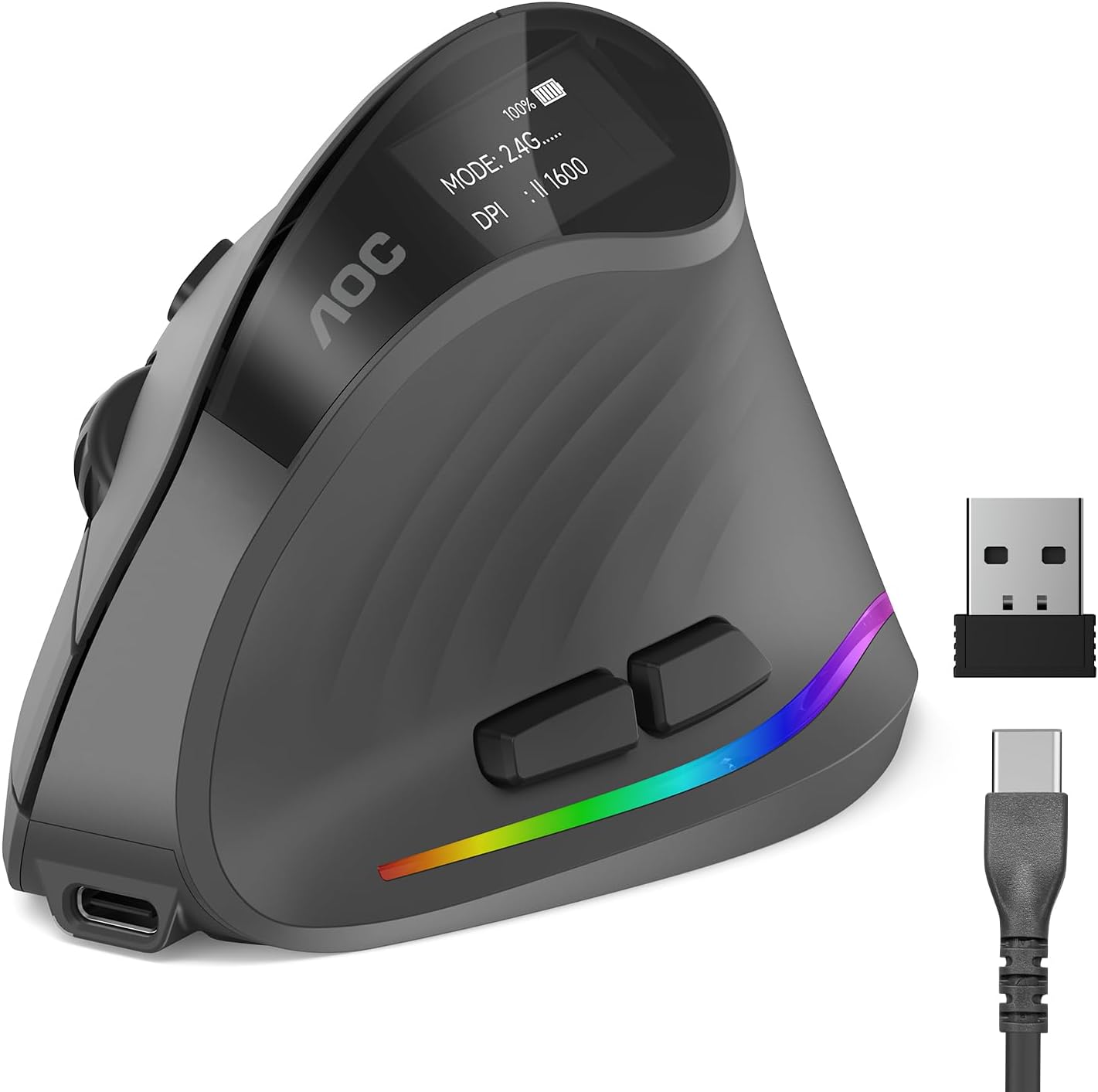
The AOC Ergonomic Vertical Mouse is designed for professionals who spend long hours at a computer and want to avoid wrist strain. Its 52-degree vertical angle places your hand in a natural handshake position, which reduces twisting and tension in the forearm. This mouse is optimized for small to medium hands, so it fits comfortably without forcing a stretch or cramp.
Performance is strong with adjustable DPI from 1000 to 4800, giving you precise control for tasks like photo editing, coding, or graphic design. The tracking is responsive and accurate, adapting to your movements without lag. The 800mAh rechargeable battery is a standout feature, offering up to 200 hours of use without RGB, and you can charge via USB-C while still working.
Build quality feels solid and professional, typical of AOC's reputation. The programmable buttons allow you to set shortcuts for common actions, boosting your efficiency. Triple-mode connectivity (Bluetooth 5.4, 2.4GHz, and wired) makes it easy to switch between devices, and the silent clicks keep noise under 35dB for quiet environments.
However, there are a few drawbacks. The mouse is only suitable for small to medium hands, so larger-handed users may find it uncomfortable. Also, only the left and right buttons are silent; the other buttons produce normal clicking sounds. RGB lighting is a nice touch but cuts battery life to 40 hours, so you may want to disable it for longer use.
Overall, the AOC Ergonomic Vertical Mouse delivers excellent comfort and performance for its target audience. If you have small to medium hands and need an ergonomic solution with versatile connectivity and long battery life, this mouse is a strong choice. It combines thoughtful design with reliable AOC quality, making it a smart investment for your workspace.

Pros
- Comfortable ergonomic design tailored for right-handed users.
- Exceptional battery life with quick USB-C charging.
- Smooth, reliable tracking on multiple surfaces.
- Customizable buttons and scroll wheel for personalized productivity.
- Stable Bluetooth 5.1 connectivity with dual-device pairing.
Cons
- Designed for right-handed users only; left-handed users may find it uncomfortable.
- No wired connection option; relies solely on Bluetooth.
- Full customization requires Lenovo software, which may have limited OS support.
The Lenovo Yoga Pro Mouse is a premium ergonomic mouse designed for right-handed users who value comfort and productivity. It pairs perfectly with Yoga laptops but works with any Bluetooth-enabled device. With a sleek Tidal Teal finish and soft-touch sides, it stands out as both a functional and stylish accessory.
Its standout features include a long-lasting rechargeable battery that lasts up to three months on a single charge, dual-mode Bluetooth 5.1 for effortless switching between two devices, and a blue optical sensor that tracks on almost any surface. The programmable buttons and two-way metal scroll wheel allow you to tailor the mouse to your workflow, while silent clicks ensure a quiet environment.
The design is thoughtfully ergonomic, with a thumb rest and contoured shape that reduce strain during long sessions. Build quality feels solid, and the USB-C charging is convenient. However, the mouse is strictly right-handed, which may alienate left-handed users. Additionally, there is no wired mode, so you must rely on Bluetooth at all times.
Customization is done via Lenovo's software, which offers DPI adjustment up to 4000 and button mapping. Some users may find the software limited compared to competitors, but for most office and creative tasks, it is sufficient. The mouse is lightweight and portable, making it a great travel companion.
Overall, the Lenovo Yoga Pro Mouse delivers excellent value for its price. It combines comfort, long battery life, and versatile connectivity in a stylish package. If you are a right-handed professional or student looking for a reliable wireless mouse, this is a strong contender.
Connectivity: Bluetooth 5.1 Low Energy, Dual-Host Quick Pairing
Battery: USB-C Rechargeable, up to 3 months life, <2 hours full charge
Sensor: Blue optical, DPI adjustable up to 4000 (3 on-the-fly stages)
Buttons: 6 buttons (programmable side and top, silent left/right)
Scroll Wheel: 2-way metal scroll wheel
Design: Right-handed, ergonomic with thumb rest and soft side grips
Color: Tidal Teal

Pros
- Seamless 3-device switching with 2.4GHz and dual Bluetooth connections
- Six fully programmable buttons with customization software
- Five adjustable DPI levels for versatile use
- Ergonomic design reduces wrist strain during long sessions
- Long battery life with USB-C charging and silent clicks
Cons
- Programming software is only available for Mac and Windows, limiting customization on other systems.
- The metal scroll wheels add a bit of extra weight, which may not suit everyone.
- The 2.4GHz USB-A receiver requires a free port, so ultra-thin laptops may need an adapter.
The INFINMIND L910 Pro+ is a feature-rich wireless mouse designed for multitaskers who juggle multiple devices. It supports one 2.4GHz USB-A connection and two Bluetooth connections, so you can pair a laptop, tablet, and PC at the same time and switch with a single button. This makes it ideal for professionals, students, and anyone who works across Mac, Windows, Chrome, or Linux systems.
Performance is where this mouse stands out. The 5-level DPI adjustment (1000 to 4800) lets you move from precise editing to fast screen sweeping without changing settings. The front and side metal scroll wheels add a cool, tactile feel, and the side wheel makes horizontal scrolling effortless. All six buttons are programmable through the companion software, but only on Mac and Windows, which is worth noting.
Comfort and build quality are also strong. The contoured shape fits naturally in the palm and reduces wrist strain during long sessions. The silent click mechanism keeps the noise down, which is great for shared spaces. The rechargeable USB-C battery lasts up to 90 days per charge, so you will not be hunting for batteries often.
The main drawbacks are the lack of programming support on Chrome and Linux, and the fact that the software is required to customize the buttons. Also, some users may prefer a lighter mouse, as the metal wheels and rechargeable battery add a little weight. These are minor issues for most people.
Overall, the INFINMIND L910 Pro+ delivers excellent value with its combination of multi-device connectivity, programmability, and ergonomic comfort. If you need a dependable silent wireless mouse for work or study, this is a strong contender.

Pros
- Ergonomic design effectively reduces wrist and shoulder strain for extended use.
- Tri-mode connectivity offers flexibility for multiple devices and setups.
- 12 programmable buttons and macro support allow deep customization for any game or task.
- High DPI range and precise sensor deliver accurate tracking for competitive gaming.
- The 5-direction rocker provides intuitive, quick control in FPS, MOBA, and MMO games.
Cons
- The configuration software may require manual approval on some security programs to install.
- Designed only for right-handed users, limiting accessibility for left-handed gamers.
- Battery life is not specified in the product data, which may concern heavy users.
The ATTOE Wireless Vertical Gaming Mouse is a versatile peripheral that blends ergonomic comfort with gaming-grade performance. Designed specifically to combat carpal tunnel syndrome and muscle strain, it promotes a natural handshake position that reduces wrist, shoulder, and tendon fatigue. This makes it an excellent choice for both competitive gamers and professionals who spend long hours at the computer.
Standout features include a high-precision PMW3325 sensor with up to 24000 DPI, providing smooth and accurate tracking across five adjustable presets. The 12 programmable buttons, supported by macro editing software, allow you to tailor controls to your favorite games or workflows. Additionally, the thumb-operated 5-direction rocker replaces five traditional keys, giving you faster, more intuitive inputs in fast-paced titles like shooters and MOBAs.
Build quality is solid for its price point, with a contoured shape that accommodates small to large hands. The tri-mode connectivity (dual Bluetooth 5.0, 2.4GHz wireless, and USB-C wired) ensures stable, low-latency performance up to 33 feet. Side RGB strips with five dynamic effects add visual flair without compromising ergonomics, making the mouse suitable for both work and play.
One potential drawback is the software installation, which may require users to manually approve the driver on some security-conscious systems. Also, the mouse is right-handed only, so left-handed users will need to look elsewhere. Battery life details are not provided in the product data, which could be a concern for heavy users who prefer long wireless sessions.
Overall, the ATTOE vertical gaming mouse offers an impressive combination of ergonomic relief, high performance, and customization at a reasonable price. It is a strong contender for anyone seeking to reduce wrist pain while maintaining gaming or productivity efficiency. With its unique rocker and programmable buttons, it delivers genuine value for the target audience.

Pros
- Compact vertical design suited to small and medium hands
- Long rated battery life
- Quiet clicks for shared workspaces
Cons
- Fixed for right-hand use only, with no left-handed version
- Smaller shape may feel cramped for larger hands
The Logitech Lift is a vertical mouse shaped around a 57 degree angle, intended to keep the forearm in a more natural rotation than a standard flat mouse.
Its grip is softly textured with a snug thumb rest, and it's sized specifically for small to medium right hands rather than a one-size-fits-all shape.
It connects over Bluetooth or the included USB receiver, with a battery rated to last up to two years, and the scroll wheel is designed to feel smooth and quiet.
The main limitation is fit: it's built for smaller hands and right-hand use only, so it won't suit everyone.
It's a strong option for anyone who wants a compact, all-day vertical mouse without a steep learning curve.
Connectivity: Bluetooth or the included USB receiver.
Buttons: Up to 6, with 4 customizable.
Battery life: Rated up to two years.
Hand fit: Right-handed, built for small to medium hands.
Sensor: Optical, up to 4000 DPI.
Who should buy this mouse? Anyone with a small to medium right hand who wants a compact vertical mouse with long battery life.
Who might want to look elsewhere? Left-handed users, or anyone with larger hands who may find the shape too compact.
What to compare before buying: Check hand size fit against the product's stated dimensions, since vertical mice vary more in shape than standard mice.
Setup tip: Give yourself a week or two to adjust to the vertical grip, since the wrist rotation feels different from a standard mouse at first.

Pros
- Reduces wrist and shoulder strain effectively.
- Silent clicks are great for shared offices.
- Easy to set up with no driver installation.
- Customizable buttons boost productivity.
- Rechargeable battery eliminates battery waste.
Cons
- Requires an adjustment period for users new to vertical mice.
- OLED screen placement may be inconvenient for left-handed use.
- No included carrying case for portability.
The Ergodriven Om is a vertical ergonomic mouse designed for professionals and gamers who spend hours at a computer. It aims to reduce the risk of repetitive strain injuries by promoting a natural handshake position.
Its standout features include silent micro-force buttons that reduce finger fatigue and noise, plus an onboard OLED screen for easy DPI adjustment among four levels. Users report significant improvement in posture and comfort from day one.
The Om is built with a high-quality plastic shell and a rechargeable Li-ion battery that lasts weeks. The dual wireless connectivity (Bluetooth and 2.4GHz) ensures stable connection across devices without driver installation.
Some users may need a short adjustment period to get used to the vertical grip. The mouse is not ambidextrous and may not fit very small or very large hands perfectly. The OLED screen, while useful, is small and could be hard to read in bright light.
Overall, the Ergodriven Om is an excellent choice for anyone seeking ergonomic relief and productivity enhancement. With its silent operation, customizable buttons, and solid build, it offers great value for the price. Highly recommended for office workers and heavy computer users.

Pros
- Ultra-low latency LIGHTSPEED wireless with 1 ms report rate
- Excellent battery life, up to 250 hours on one AA battery
- Lightweight and compact, easy to carry and maneuver
- High-precision HERO sensor with up to 12,000 DPI
- Six programmable buttons for personalized control
Cons
- Uses a single AA battery instead of a built-in rechargeable battery
- No Bluetooth, requires the included USB LIGHTSPEED receiver
- Compact shape may not be comfortable for large hands or palm grip users
The Logitech G305 LIGHTSPEED is a wireless gaming mouse built for players who want high-performance tracking and reliable low-latency connectivity without breaking the bank. It is designed for PC and laptop gamers of all skill levels, offering competition-level precision in a compact, portable package.
At the heart of the mouse is Logitech's HERO 12K optical sensor, which delivers up to 12,000 DPI sensitivity and 400 IPS precision while using significantly less power than earlier generations. Combined with LIGHTSPEED wireless's 1 ms report rate, the G305 feels responsive and accurate in fast-paced shooters, MOBAs, and battle royales.
The mouse weighs just 99 grams, making it easy to move quickly and comfortably during extended sessions. Its durable compact shell includes built-in nano receiver storage, so you can toss it in a bag and use it with a gaming laptop anywhere. Six programmable buttons and Logitech G HUB support let you tailor controls, DPI profiles, and macros to your play style.
Battery life is a major highlight: a single AA battery powers the G305 for up to 250 hours in performance mode, and Endurance mode can stretch that to around nine months. The main drawbacks are the lack of Bluetooth and the reliance on one AA battery, which may be a dealbreaker for users who prefer built-in rechargeable batteries. The compact sizing also may not suit large hands or palm grippers.
Overall, the Logitech G305 LIGHTSPEED is an excellent value-for-money wireless gaming mouse. It combines dependable wireless performance, a strong sensor, and long battery life in a lightweight design, making it a top pick for gamers who want a reliable, travel-friendly mouse.
Sensor: Logitech G HERO 12K optical, 200 to 12,000 DPI
Wireless Technology: LIGHTSPEED, 1 ms report rate
Battery Life: Up to 250 hours on one AA; up to 9 months in Endurance mode
Weight: 3.4 oz (99 g)
Programmable Buttons: 6
Connectivity: USB nano receiver
Design: Compact, built-in receiver storage
Compatibility: PC and gaming laptop with Windows/macOS

Pros
- Ergonomic vertical design reduces wrist strain and promotes natural hand position.
- Silent clicks ideal for shared workspaces or late-night use.
- Versatile connectivity with dual wireless and multi-device support.
- Adjustable DPI for different tasks from precision work to gaming.
- Affordable price point for a feature-rich ergonomic mouse.
Cons
- May take time to adjust to vertical design if you are used to traditional mice.
- Not rechargeable; requires AA battery replacement.
- Limited to one AA battery, though battery life is good.
The UGREEN Ergonomic Wireless Mouse is designed for users who spend long hours at a computer and want to reduce wrist strain. Its vertical handshake posture promotes a natural alignment, making it especially suitable for those with larger hands or anyone prone to discomfort from traditional mice.
The mouse features silent click buttons that keep your workspace peaceful, along with a practical 5-button layout for efficient navigation. With four adjustable DPI levels, you can easily switch between precise editing and fast scrolling. The dual wireless connectivity via Bluetooth or 2.4G ensures a stable connection up to 10 meters, and you can pair with up to three devices.
The build quality is solid for its price point, with PTFE glide feet providing smooth and quiet tracking on most surfaces. The vertical design may require a short adjustment period, but once accustomed, it offers noticeable relief in wrist and forearm fatigue. Battery life is extended by a smart sleep mode, powered by a single AA battery.
One potential drawback is that the mouse is not rechargeable, so you will need to replace the AA battery periodically. Additionally, the vertical shape might not be comfortable for everyone, especially those with smaller hands or who prefer a traditional grip. The lack of customizable software may also limit advanced users.
Overall, the UGREEN Ergonomic Wireless Mouse is an excellent budget-friendly choice for improving ergonomics and productivity. It delivers on comfort, quiet operation, and versatile connectivity, making it a strong recommendation for office workers, students, and home users seeking relief from repetitive strain.

Pros
- Designed specifically for medium to large hands with a taller profile and natural 57° grip angle.
- Versatile connectivity with support for three devices and easy switching.
- Long battery life with convenient USB-C charging and silent, discrete clicks.
- Programmable buttons and adjustable DPI provide customization for power users.
- Solid build quality at an affordable price point, reflected in positive user reviews.
Cons
- Software customization is only available for Windows, limiting features for Mac users.
- The vertical shape may require an adjustment period for users accustomed to traditional mice.
- The 30-day battery life claim can vary significantly depending on usage and DPI settings.
The SABLUTE MAM4 is a vertical wireless mouse designed for medium to large hands. Its 57 degree ergonomic grip promotes a natural handshake position, reducing wrist strain during long hours of office work, studying, or daily computer use.
Standout features include 3 device switching via dual Bluetooth and a 2.4GHz receiver, allowing seamless toggling between a PC, MacBook, and tablet. The quiet click technology and rechargeable 800mAh battery make it a practical choice for shared environments, providing up to 30 days of use per charge.
Performance is enhanced by a smooth scroll wheel and six programmable buttons that can be customized through Windows software. The DPI can be adjusted from 800 to 4000 with six color-coded levels, and further customized up to 8000 DPI for precision work.
One drawback is that the customization software is Windows only, so Mac users miss out on button remapping. Also, the vertical design may feel unfamiliar initially, but most users adapt quickly and appreciate the ergonomic relief.
Overall, the SABLUTE MAM4 delivers strong value with its combination of ergonomics, multi-device connectivity, and quiet operation. It is an excellent choice for anyone seeking comfort and productivity in a wireless mouse.
Brand: SABLUTE
Model: MAM4
Connectivity: Bluetooth 5.0 + 2.4GHz wireless
Device Switching: Up to 3 devices (dual Bluetooth + receiver)
DPI: 800/1200/1600/2400/3200/4000 (up to 8000 via software)
Battery: 800mAh rechargeable, up to 30 days
Buttons: 6 programmable (Windows only)
Compatibility: Windows, macOS, Android, iOS
Size: For medium to large hands

Pros
- Integrated palm cushion enhances ergonomics for extended use
- Quiet click technology reduces noise in shared spaces
- Long 24-month battery life minimizes interruptions
- Multi-device switching simplifies multitasking
- Broad platform compatibility
Cons
- Right-handed only, may not suit left-handed users
- No USB-C charging (uses AA battery); some prefer rechargeable
- Limited color options (only Graphite mentioned)
The Logitech Signature Comfort Plus M850 L is a wireless mouse designed for professionals and home office users who spend long hours at their desk. Its key innovation is a built-in palm cushion that supports the hand, reducing strain during extended work sessions.
The SmartWheel provides both ratchet and free-spin scrolling, allowing you to precisely navigate documents or quickly skim web pages. Quiet clicks keep the workspace focused, and the Bluetooth connection is stable across up to three devices thanks to Easy-Switch technology.
The mouse is sculpted for right-handed users with a comfortable contour and textured side grips. The graphite finish looks professional, and Logitech uses recycled plastics in its construction, appealing to eco-conscious buyers. Battery life reaches up to 24 months, so you rarely need to change the single AA battery.
The main limitation is that it is right-handed only, excluding left-handed users. Some may prefer a rechargeable battery over disposable AA, and the color options are limited to graphite. These are minor trade-offs for the ergonomic benefits.
Overall, the Logitech Signature Comfort Plus M850 L delivers excellent ergonomics and functionality for its price point. If you need a comfortable, quiet, multi-device mouse for productivity, this is a solid choice.
Buying Guide
Ergonomic Shape and Hand Size
The most important factor is how the mouse fits your hand. Vertical mice, like the AOC Ergonomic Mouse and the Ergodriven Om, place your hand in a handshake position, reducing wrist twist. Some models, such as the SABLUTE MAM4, are specifically designed for medium to large hands, while the Logitech Lift suits small to medium hands. Always check the size recommendations before buying.
A good ergonomic mouse should support your palm and encourage a relaxed grip. If you suffer from wrist pain, consider reading our best ergonomic mouse for carpal tunnel recommendations.
Programmable Buttons and Software
Programmable buttons let you assign shortcuts like copy, paste, undo, or app-specific commands. The INFINMIND L910 Pro+ offers six programmable buttons via software, while the ATTOE gaming mouse boasts twelve buttons plus a five-direction rocker. Some models, like the Ergodriven Om, allow on-device customization without downloading any software. For productivity, more buttons can mean fewer hand movements.
Make sure the software is compatible with your operating system. Most Windows and Mac mice offer robust customization, but Linux users may have limited options. The Logitech G305 uses G HUB software for extensive macro programming, ideal for gamers and power users.
Connectivity and Multi-Device Support
Modern ergonomic mice offer Bluetooth, 2.4GHz wireless, or both. Multi-device support lets you switch between a laptop, tablet, and desktop with a button press. The INFINMIND L910 Pro+ connects to three devices seamlessly, while the Lenovo Yoga Pro uses Bluetooth 5.1 for dual-device pairing. If you work across multiple screens, a mouse with easy-switch capabilities is a game-changer.
Battery life varies widely. Rechargeable models like the AOC and SABLUTE last weeks on a charge, while the Logitech Lift runs up to two years on a single AA battery. Consider your charging habits and whether you prefer USB-C convenience.
DPI and Tracking Performance
DPI (dots per inch) determines cursor speed. Most ergonomic mice offer adjustable DPI from 800 to 4800 or higher. The ATTOE gaming mouse reaches 24000 DPI, ideal for fast-paced gaming, while the UGREEN vertical mouse provides four sensible levels for daily work. A higher DPI range gives you flexibility for different tasks, but most users find 1600–3200 DPI sufficient.
Optical sensors on modern mice work on almost any surface. The Lenovo Yoga Pro uses a blue optical sensor for precise tracking on glass or wood. If you work on varied surfaces, look for a mouse with a high-quality sensor. For more tips on reducing strain, see our article on how to reduce wrist pain from typing.
Final Thoughts
Choosing the best ergonomic mouse with programmable buttons comes down to your hand size, preferred connectivity, and how many shortcuts you need. For most users, the AOC Ergonomic Mouse offers an excellent balance of comfort, customizable RGB, and triple-mode connectivity at a reasonable price. If you have smaller hands and want a proven vertical design, the Logitech Lift Vertical Ergonomic Mouse delivers whisper-quiet clicks, long battery life, and easy-to-reach programmable buttons. Both models will help you work more comfortably and efficiently.
Frequently Asked Questions
Are ergonomic mice with programmable buttons worth it?
Yes. They reduce wrist strain by promoting a natural hand position, and programmable buttons let you perform repetitive tasks with a single click, saving time and reducing fatigue. Many users report less pain after switching.
Can I use a vertical mouse for gaming?
Absolutely. Models like the ATTOE gaming mouse combine a vertical ergonomic shape with high DPI, programmable buttons, and RGB lighting. They work well for most games, though some competitive players may prefer a traditional shape for faster flicks.
How do I program the buttons on my ergonomic mouse?
Most mice come with downloadable software (e.g., Logi Options+, G HUB, or brand-specific apps). Install it on your computer, then assign functions like copy, paste, media controls, or keyboard shortcuts to each button. Some models, like the Ergodriven Om, let you program directly on the mouse without software.
What is the best ergonomic mouse for large hands in 2026?
For larger hands, the SABLUTE MAM4 and the UGREEN Ergonomic Wireless Mouse are excellent choices. Both have a taller profile and full-palm support. The Logitech Signature Comfort M850 L also features a built-in palm cushion that suits most hand sizes. For more options, browse our best vertical mouse for wrist pain guide.




Write Your Review
No reviews yet. Be the first to share your experience!