

You have spent hours refining your aim, mastering movement, and climbing the ranks, but that nagging wrist fatigue keeps pulling you out of the zone. For claw grip players, finding a mouse that supports your aggressive fingertip and palm contact without causing strain is a real challenge. This guide focuses on the best ergonomic gaming mouse for claw grip, highlighting models that balance shape, weight, and button placement to keep you comfortable and competitive. Whether you play fast-paced shooters or MMO marathons, we have options that suit your style.
We evaluated a range of mice from brands like Razer, Pulsar, and UtechSmart, considering factors such as hump height, waist width, and sensor accuracy. For more on maintaining wrist health during gaming, check out our guide on best vertical mouse for wrist pain.
A vertical or heavily contoured mouse works against a claw grip’s fingertip contact, so confirm the shape suits claw grip specifically rather than palm or fingertip grip in general.
Disclosure: Ergonook is a participant in the Amazon Associates program. Links below are affiliate links, and we may earn a commission from qualifying purchases. This does not affect which products we recommend or how we rank them.

Pros
- Extensive customization with 16 programmable buttons and complex macro support.
- Long battery life, up to 70 hours in wireless mode with auto-sleep and power saving features.
- Accurate high-precision sensor with 16000 DPI and 1000 Hz polling rate.
- Ergonomic shape with sweat-resistant grinding coating for comfortable long sessions.
Cons
- The dense cluster of 12 thumb buttons may feel overwhelming for players with smaller hands or those new to MMO mice.
- The included software is required to unlock full customization, which might be a hurdle for users who prefer plug-and-play.
- The 70-hour battery life depends on keeping auto-sleep and power saving modes active.
The UtechSmart Venus Pro is a wireless MMO gaming mouse designed for players who need quick access to a large number of commands. With its 16000 DPI optical sensor and dedicated macro engine, it is especially valuable for MMORPG, MOBA, and other titles where every keystroke matters.
The 16 programmable buttons are the highlight. The 12 thumb buttons are arranged with different inclination angles so your thumb can find them without looking, while macro programming lets you combine complex actions into a single press. The wireless connection feels responsive thanks to the 2.4 GHz nano receiver and 1000 Hz polling rate, so you can move around your desk without losing input fidelity.
The ergonomic shape reduces wrist fatigue during long sessions, and the grinding coating on the shell increases grip while resisting sweat. The battery is equally impressive for a wireless mouse: a 1000 mAh cell delivers up to 70 hours of continuous use in wireless mode, with auto-sleep and low power consumption modes that help it last through marathon gaming weekends.
No product is perfect. The thumb button cluster is dense, and players with smaller hands may struggle to reach all 12 buttons comfortably. In addition, the setup software is necessary to remap keys or adjust DPI stages, which adds an extra step before you can take full control of the mouse. For most MMO players, the customization payoff is worth the learning curve.
The UtechSmart Venus Pro offers remarkable value for its price point. It brings wireless freedom, a high-accuracy sensor, and deep macro customization to the MMO segment without breaking the bank. If you want a reliable, comfortable, and fully featured wireless gaming mouse for MMO or MOBA play, the Venus Pro is a very strong contender.
Sensor: UtechSmart custom PixArt PMW3335 ultra-accurate optical sensor. DPI: 100 to 16000 with 5 switchable DPI stages. Polling rate: 1000 Hz. Buttons: 16 programmable buttons, including 12 thumb buttons with angled design. Connectivity: 2.4 GHz wireless with nano receiver and stable 1.5m wired mode. Battery: 1000mAh capacity, up to 70 hours wireless use, 2-hour full charge, auto-sleep and low power mode. Software supports button mapping, DPI adjustment, and battery monitoring.

Pros
- Compact vertical design suited to small and medium hands
- Long rated battery life
- Quiet clicks for shared workspaces
Cons
- Fixed for right-hand use only, with no left-handed version
- Smaller shape may feel cramped for larger hands
The Logitech Lift is a vertical mouse shaped around a 57 degree angle, intended to keep the forearm in a more natural rotation than a standard flat mouse.
Its grip is softly textured with a snug thumb rest, and it's sized specifically for small to medium right hands rather than a one-size-fits-all shape.
It connects over Bluetooth or the included USB receiver, with a battery rated to last up to two years, and the scroll wheel is designed to feel smooth and quiet.
The main limitation is fit: it's built for smaller hands and right-hand use only, so it won't suit everyone.
It's a strong option for anyone who wants a compact, all-day vertical mouse without a steep learning curve.
Connectivity: Bluetooth or the included USB receiver.
Buttons: Up to 6, with 4 customizable.
Battery life: Rated up to two years.
Hand fit: Right-handed, built for small to medium hands.
Sensor: Optical, up to 4000 DPI.
Who should buy this mouse? Anyone with a small to medium right hand who wants a compact vertical mouse with long battery life.
Who might want to look elsewhere? Left-handed users, or anyone with larger hands who may find the shape too compact.
What to compare before buying: Check hand size fit against the product's stated dimensions, since vertical mice vary more in shape than standard mice.
Setup tip: Give yourself a week or two to adjust to the vertical grip, since the wrist rotation feels different from a standard mouse at first.

Pros
- Extremely lightweight at 54g without sacrificing build quality
- Aim Lab software integration provides personalized settings for improved aim
- High-precision 36K DPI sensor with industry-leading accuracy
- Versatile tri-mode connectivity including a multi-device receiver
- Long battery life of up to 90 hours in 2.4 GHz mode
Cons
- Right-handed design only, not suitable for left-handed users
- No onboard memory for saving profiles without software
- Claw grip focused shape may not suit palm or fingertip grip styles
The ASUS ROG Harpe Ace Aim Lab Edition is a collaborative effort between ROG and Aim Lab, designed specifically for competitive esports gamers. Weighing just 54 grams, it is one of the lightest wireless gaming mice available, yet it maintains a durable structure that can withstand intense use. This mouse is ideal for right-handed players who prefer a claw grip and want to maximize their aiming potential through data-driven customization.
Standout features include the Aim Lab Settings Optimizer, which analyzes your gameplay to suggest optimal DPI, angle tuning, and lift-off distance. Combined with the 36,000 DPI ROG AimPoint optical sensor (with less than 1% CPI deviation), you get pinpoint accuracy and lightning-fast response. The tri-mode connectivity offers wired USB-C, low-latency 2.4 GHz RF, and Bluetooth, while the ROG Omni Receiver lets you connect multiple devices with a single dongle. Battery life is impressive at up to 90 hours in 2.4 GHz mode.
Design-wise, the Harpe Ace features a semi-symmetrical right-handed shape optimized for claw grips. The matte black finish resists fingerprints and provides a secure hold. At 54g, the mouse feels almost weightless, making rapid flicks and micro-adjustments effortless. The build quality is solid with no creaking or flex, and the PTFE feet glide smoothly on most mouse pads.
One potential drawback is that the mouse is exclusively right-handed, so left-handed gamers will need to look elsewhere. Additionally, the claw grip focus may not be comfortable for those who use palm or fingertip grips. There is no onboard memory for saving settings without the software, which could be a minor inconvenience for tournament players. However, these issues are minor given the target audience.
Overall, the ASUS ROG Harpe Ace Aim Lab Edition delivers exceptional performance for competitive FPS players. Its lightweight design, precision sensor, and intelligent software integration make it a top-tier choice for esports enthusiasts who want to fine-tune their aim. Despite a few ergonomic limitations, it offers outstanding value for serious gamers.
Pros
- Extremely lightweight yet sturdy shell
- Optical switches for durability and no double-click issues
- High-performance PAW3395 sensor with excellent tracking
- Long battery life up to 100 hours
- Ergonomic shape optimized for claw and palm grips
Cons
- Renewed product may have minor cosmetic wear
- No Bluetooth connectivity, only 2.4 GHz wireless
- Symmetrical design may not suit users preferring ergonomic shapes
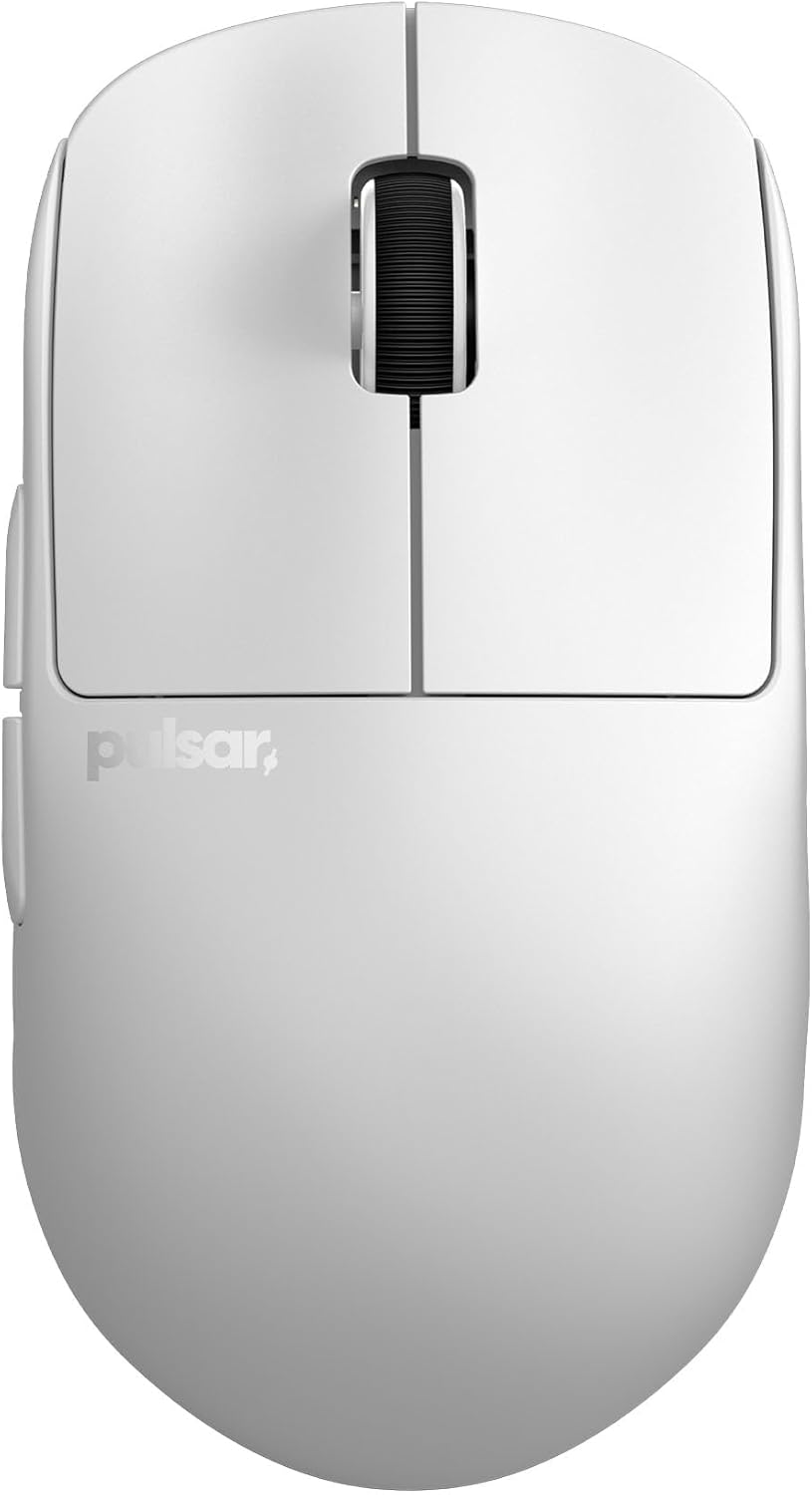
The Pulsar Gaming Gears X2H Wireless Gaming Mouse (Renewed) is an ultra-lightweight symmetrical mouse weighing just 54 grams, designed for competitive gamers who demand speed and precision. Its unique shape features a higher rear hump and a narrower waist compared to the standard X2, providing extra stability for aggressive claw grips and enhanced palm support. This renewed model offers the same core performance as a new unit at a more accessible price point, making it a compelling option for budget-conscious enthusiasts.
At the heart of the X2H is the PixArt PAW3395 sensor, a top-tier optical sensor capable of 26000 DPI, 650 IPS, and 50g acceleration, with Motion-Sync Technology for flawless tracking. Paired with optical switches that eliminate the risk of double clicks, the mouse delivers crisp, instant actuation. The Nordic MCU ensures efficient power management, offering up to 100 hours of battery life at the standard 1000Hz polling rate, and the mouse is 4K polling ready for those who want even lower latency.
Build quality is outstanding for its weight class. The upgraded internal structure from the standard X2 provides a rigid shell that resists flex, while the indirect wheel clicks produce smooth, rattle-free scrolling. The Pulsar Blue Encoder adds a satisfying tactile feel to the scroll wheel. The symmetrical design and white color scheme give it a clean, professional aesthetic that fits any setup.
Potential drawbacks include the lack of Bluetooth connectivity, meaning it relies solely on the 2.4 GHz dongle. As a renewed product, there may be minor cosmetic imperfections, though functionality is guaranteed. Also, the symmetrical shape may not be as comfortable for users with larger hands or those who prefer ergonomic mice with pronounced contours.
Overall, the Pulsar X2H Renewed is a fantastic choice for competitive gamers who want a lightweight, high-performance mouse without breaking the bank. Its combination of a premium sensor, optical switches, and optimized shape makes it a strong contender in the sub-$50 gaming mouse market. If you prioritize speed, accuracy, and durability, this mouse delivers exceptional value.

Pros
- High-precision PixArt 3335 sensor with up to 16,000 DPI
- 7 programmable buttons and on-the-fly DPI switching
- Fast 1000Hz polling rate with NVIDIA Reflex support
- Customizable RGB lighting with 16.8 million colors
- Durable braided cable and 20 million click lifespan
Cons
- Right-handed claw grip design is not suitable for left-handed or palm grip users
- Full customization requires downloading the Predator QuarterMaster software
- Wired design may not appeal to gamers who prefer wireless freedom
The Acer Predator Cestus 330 is a wired gaming mouse designed for hardcore and competitive gamers. It pairs a PixArt 3335 optical sensor with a 1000Hz polling rate, delivering precise tracking and responsive input for fast-paced titles.
The 7 programmable buttons and five on-the-fly DPI settings let you adapt to different game genres without interrupting your flow. The 16.8 million RGB color options and four lighting patterns add customization, while the Predator QuarterMaster software gives you control over button mapping and lighting profiles.
With 400 IPS and 40g acceleration, the mouse handles swift flicks and large swipes with ease. NVIDIA Reflex compatibility helps measure system latency, giving competitive players a clearer picture of their setup's responsiveness. The 20 million click lifespan and braided cable suggest long-term durability.
The ergonomic shape is built for right-handed claw grip users, and at just over 4.8 inches long and 0.35 pounds, it feels light and maneuverable. The braided 5.9-foot cable is flexible enough for desktop setups, but the claw-grip focus may not suit palm or fingertip users.
The main drawback is the specialized right-handed claw grip design, which limits comfort for left-handed players or those who prefer palm grips. The software also requires a download to unlock the full range of customization. Still, for the price, the Cestus 330 offers strong sensor performance, programmability, and RGB flair, making it a smart pick for competitive gamers.

Pros
- Incredibly lightweight at 37g, one of the lightest gaming mice available
- High-performance XS-1 sensor with 32K DPI and 8K polling for competitive play
- Durable optical switches and skates ensure long-lasting reliability
- Ergonomic symmetrical design suits both claw and relaxed claw grips
- Smooth gliding with included dot skates on glass and hard pads
Cons
- Mini size may not suit users with larger hands or palm grip preferences
- Ultra-lightweight build may feel too insubstantial for some gamers
- Limited color options (only Jet Black at launch) reduces aesthetic choices
The Pulsar Gaming Gears X2H Crazylight is a mini wireless gaming mouse that redefines ultra-lightweight design. Weighing just 37 grams, it is lighter than an egg, making it ideal for competitive gamers who play for hours and want to minimize wrist fatigue. This mouse is designed for claw and relaxed claw grip styles, and its symmetrical shape ensures quick reactions and precise control.
The standout feature is the XS-1 flagship sensor, exclusive to Pulsar, offering up to 32,000 DPI, 750 IPS tracking, and 50G acceleration. Combined with an 8K polling rate, the mouse delivers near-instantaneous response times, giving you a clear edge in fast-paced shooters and MOBAs. The optical switches are rated for 100 million clicks, virtually eliminating double-click issues, and the Pulsar Blue Encoder provides a satisfying tactile scroll experience.
Build quality is impressive given the weight: the mouse feels solid and durable, with a dust-proof structure that protects the internal components. The included UHMW-PE dot skates (16 pieces) offer exceptionally low friction, gliding smoothly on glass and hard mousepads. The minimalist Jet Black design is sleek and professional, though the color options are limited at launch.
Potential drawbacks include the mini size, which may not suit users with larger hands or those who prefer a palm grip. The extreme lightweight can feel insubstantial to some, and the lack of RGB lighting might disappoint gamers who enjoy customization. Additionally, the price point may be high for casual users.
Overall, the Pulsar X2H Crazylight is a top-tier choice for serious competitive gamers who prioritize weight reduction and raw performance. Its featherlight build, high-end sensor, and durable components make it a worthy investment for those seeking every possible advantage in their gameplay.

Pros
- Long rated battery life per charge
- Long manufacturer warranty relative to other options here
- Wide compatibility across older and newer operating systems
Cons
- No Bluetooth option, USB receiver only
- Manufacturer notes a short adjustment period is typically needed
Lekvey's vertical mouse uses a handshake-style grip and a rechargeable battery rated for roughly 150 hours of continuous use per charge.
Lekvey markets this mouse specifically toward carpal tunnel and wrist comfort, though as with any ergonomic accessory, how much relief it provides varies by person and shouldn't replace medical advice for a diagnosed condition.
It uses a simple plug-and-play USB receiver with no pairing steps, and is backed by a long manufacturer warranty compared with other options in this comparison.
The main limitation is the lack of Bluetooth, so it's tied to whichever computer has the receiver plugged in.
It suits anyone who wants a rechargeable, handshake-grip mouse with strong battery life per charge.
Dimensions: 5 inches long by 3 inches wide.
Battery: Rechargeable, rated around 150 hours per charge.
DPI: Up to 1600, three adjustable levels.
Connectivity: 2.4G USB receiver.
Who should buy this mouse? Anyone who wants a rechargeable, handshake-grip mouse with a long battery life per charge.
Who might want to look elsewhere? Anyone who needs Bluetooth should look at the Logitech or ProtoArc models instead.
Setup tip: Allow a short adjustment period as the manufacturer suggests, and talk with a doctor about diagnosed wrist conditions rather than relying on the mouse alone.

Pros
- Highly customizable with 11 programmable buttons and macros.
- Excellent ergonomic design with a comfortable thumb rest.
- High-performance 26K DPI sensor for precise tracking.
- Durable optical switches rated for 70 million clicks.
- Vibrant 11-zone RGB lighting with game integration.
Cons
- Wired design may not suit those preferring wireless mice.
- Full customization requires Razer Synapse software.
- The free-spin scroll wheel mode can feel too loose for some users.
The Razer Basilisk V3 is a wired ergonomic gaming mouse designed for players who want extensive customization and top-tier performance. It targets both competitive and casual gamers who value comfort and precision. With its iconic thumb rest and optimized button placement, this mouse supports long gaming sessions without fatigue.
Standout features include the HyperScroll tilt wheel, which toggles between free-spin for rapid scrolling and tactile mode for precise weapon or skill selection. The 11 programmable buttons allow you to assign macros and secondary functions, giving you an edge in games like shooters and MOBAs. The Focus+ 26K DPI optical sensor delivers flawless tracking with zero smoothing, ensuring pixel-perfect accuracy.
Build quality is robust with Razer's Gen-2 optical switches, offering crisp actuation at 0.2ms and a lifespan of 70 million clicks. The 11-zone Chroma RGB lighting is vibrant and can sync with over 150 games for immersive effects. The braided cable is durable and flexible, reducing drag.
A potential drawback is the wired connection, which may be a dealbreaker for those seeking wireless freedom. Additionally, unlocking the full potential of the mouse requires installing Razer Synapse software, which some users find resource-heavy. The free-spin scroll wheel can also feel too loose for precise tasks.
Overall, the Razer Basilisk V3 is an excellent choice for gamers who want a highly customizable, ergonomic mouse with a proven track record. Its combination of performance, comfort, and RGB lighting makes it a standout in the wired gaming mouse market.
Pros
- Ergonomic design reduces hand strain for extended gaming sessions
- Affordable price point without sacrificing essential gaming features
- Responsive 6400 DPI sensor handles most gaming needs smoothly
- Durable build with mechanical switches rated for 10 million clicks
- Customizable buttons give flexibility for different game genres
Cons
- Wired only, no wireless option for those seeking cable-free setups
- Maximum DPI of 6400 may be lower than some competitive gamers prefer
- No RGB lighting, which may disappoint users wanting aesthetic customization
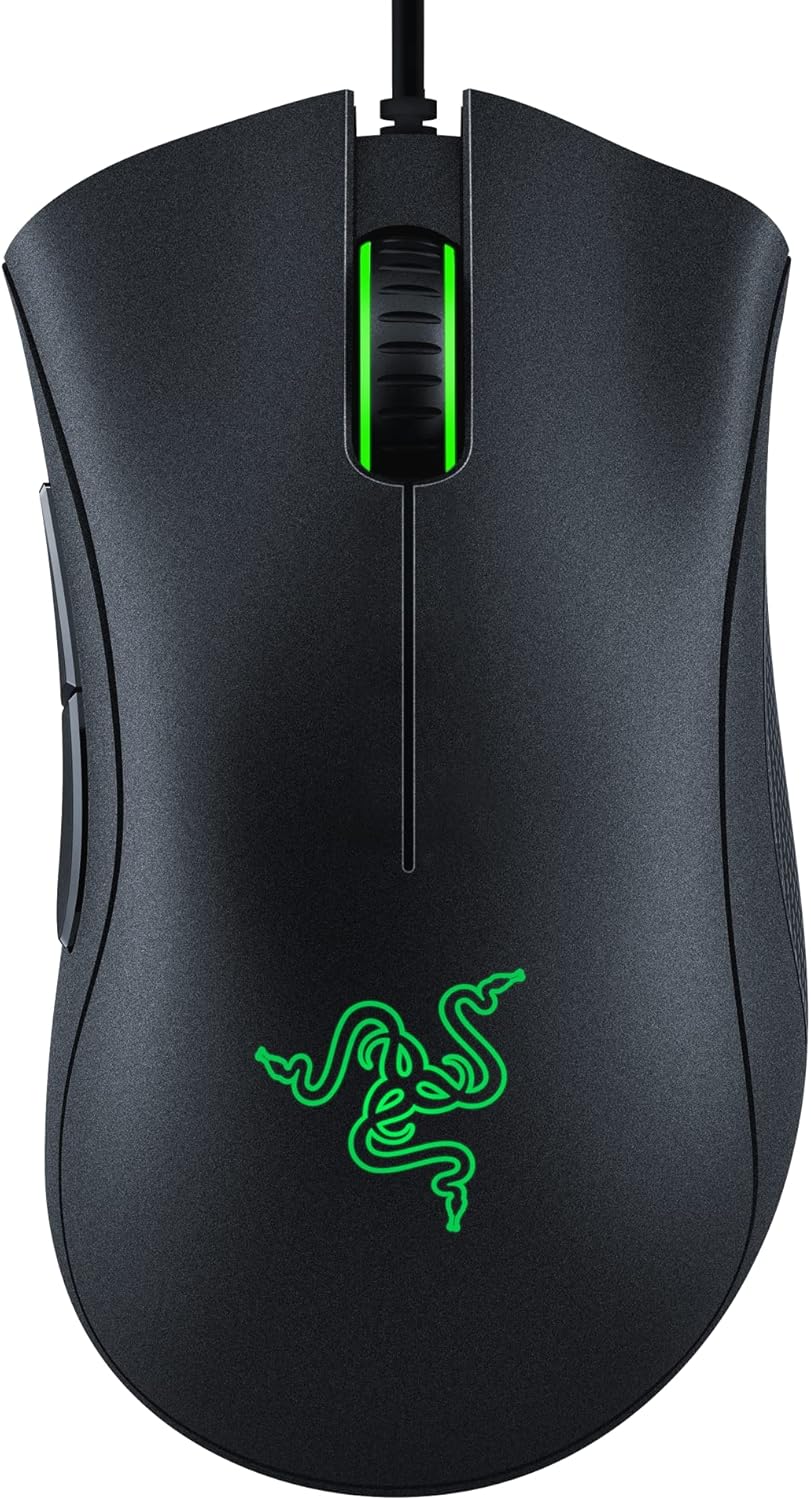
The Razer DeathAdder Essential is a wired gaming mouse that brings the legendary ergonomic shape of the DeathAdder series to a more accessible price point. It is designed for gamers who want comfort and reliability without breaking the bank, making it a solid choice for both casual and mid-level competitive play.
At its core, the 6400 DPI optical sensor delivers precise tracking and on-the-fly sensitivity adjustments via dedicated DPI buttons. The durable mechanical switches are rated for up to 10 million clicks, ensuring the mouse can withstand heavy use. The ridged, rubberized scroll wheel offers tactile feedback for controlled scrolling in high-stakes situations.
The mouse retains the classic contoured form that fits naturally in the hand, supporting palm and claw grips for long gaming sessions. Its five programmable buttons can be remapped through Razer Synapse, allowing for custom macros and shortcuts. The build quality feels solid, with a matte black finish that resists fingerprints.
One drawback is the lack of wireless connectivity, which may be a dealbreaker for some users. Additionally, the maximum DPI of 6400 is lower than high-end competitors, though it still handles most games well. The mouse also lacks RGB lighting, keeping the design simple but functional.
Overall, the Razer DeathAdder Essential offers excellent value for its price. It combines proven ergonomics, reliable performance, and essential features in a durable package. If you need a no-frills gaming mouse that prioritizes comfort and longevity, this is a strong contender.

Pros
- Ergonomic design suits various grip styles for comfort during long sessions.
- Dual-mode wireless (HyperSpeed and Bluetooth) offers flexibility and low latency.
- Exceptional battery life with up to 535 hours on Bluetooth.
- High-precision 18K optical sensor for accurate tracking.
- Durable mechanical switches rated for 60 million clicks.
Cons
- May require Razer Synapse software for full customization, which some users find intrusive.
- No included charging dock; uses a battery (AA or rechargeable not specified).
- Bluetooth mode may introduce slight latency compared to HyperSpeed Wireless.
The Razer Basilisk V3 X HyperSpeed is a wireless gaming mouse designed for gamers who demand customization and performance. With 9 programmable controls, dual-mode connectivity, and an iconic ergonomic shape, it caters to various playstyles and grip preferences. This mouse is ideal for both casual and competitive gamers seeking a reliable, long-lasting peripheral.
Standout features include the Razer HyperSpeed Wireless technology, which delivers low-latency performance faster than other wireless options, and Bluetooth for extended battery life. The 18K optical sensor ensures pixel-precise tracking with zero spinouts, while the Gen-2 mechanical switches provide crisp, durable clicks rated for 60 million actuations. In real-world use, the mouse performs smoothly across FPS, RPG, and strategy games.
The design builds on the popular Basilisk shape, offering comfortable support for palm, claw, and fingertip grips. The nine buttons are easily accessible, and the Razer Chroma RGB adds customizable lighting with 16.8 million colors. Build quality feels solid, with a matte black finish that resists fingerprints. However, the mouse requires a AA battery (not included) for power, which may be a minor inconvenience for some users.
Potential drawbacks include the need for Razer Synapse software to unlock full customization, which some users find resource-heavy or intrusive. Additionally, Bluetooth mode, while convenient, may introduce slight input lag compared to HyperSpeed Wireless. The lack of a built-in rechargeable battery or charging dock might also deter those preferring a cable-free recharge solution.
Overall, the Razer Basilisk V3 X HyperSpeed offers excellent value for its price, combining ergonomic comfort, extensive customization, and impressive battery life. It is a strong choice for gamers who want a versatile wireless mouse that adapts to their needs. For those prioritizing low-latency performance, the HyperSpeed mode delivers, while Bluetooth ensures longevity for marathon sessions.
Connectivity: Razer HyperSpeed Wireless (2.4 GHz) and Bluetooth 5.0
Sensor: Razer 5G Advanced 18K Optical Sensor
Switches: Razer Mechanical Mouse Switches Gen-2 (60 million clicks)
Programmable Buttons: 9
Battery Life: Up to 285 hours (HyperSpeed), up to 535 hours (Bluetooth)
Lighting: Razer Chroma RGB (16.8 million colors)
Form Factor: Right-handed, ergonomic
Compatibility: PC (Windows), requires Razer Synapse software
Buying Guide
Shape and Hump Height
For claw grip, the mouse shape is paramount. A higher rear hump supports the palm while allowing your fingertips to curl over the buttons. Mice like the Pulsar X2H series feature an elevated hump and narrower waist, providing stability for aggressive claw styles. Look for a symmetrical or semi-symmetrical design that lets you maintain a relaxed claw without forcing your wrist into an awkward angle.
Consider your hand size: smaller hands benefit from a mini version like the Pulsar X2H CrazyLight Mini, while medium to large hands need a fuller shape. If you experience wrist pain, an ergonomic vertical mouse might help, as discussed in our best ergonomic mouse for carpal tunnel article.
Weight and Balance
Claw grip players often prefer lightweight mice for quick flicks and rapid movements. Ultra-light models like the Pulsar X2H CrazyLight at 37g reduce wrist fatigue during long sessions. However, balance matters too: a well-distributed weight prevents the mouse from feeling front-heavy or back-heavy. Look for mice under 80g, but ensure the weight is centered for precise control.
Heavier mice can still work if the shape fits perfectly, but they may cause strain over time. If you are new to lightweight mice, start with a model around 60-70g to adapt.
Sensor and Performance
A high-performance sensor ensures your movements translate accurately on screen. Look for optical sensors with at least 16,000 DPI and 400 IPS tracking speed. The Razer Basilisk V3 features a Focus+ 26K DPI sensor, while the ASUS ROG Harpe Ace uses a 36,000 DPI AimPoint sensor. For competitive gaming, a 1000Hz polling rate is standard, but some mice offer 4K or 8K polling for even lower latency.
Wireless technology has improved dramatically, with options like Razer HyperSpeed and Logitech Lightspeed offering near-zero latency. If you prefer a wired connection for reliability, the Razer DeathAdder Essential is a solid budget choice.
Button Layout and Customization
Claw grip players often rely on thumb buttons for quick actions. Mice with 6 to 12 programmable buttons, like the UtechSmart Venus Pro, allow you to map macros without lifting your fingers. However, avoid overly cluttered side panels that interfere with your grip. For MMO players, the Venus Pro’s 12 thumb buttons are a game-changer, while FPS players may prefer minimal buttons for a cleaner grip.
Customizable software lets you adjust DPI, lighting, and button assignments. Razer Synapse and Logitech G Hub are user-friendly, while Pulsar’s software offers granular control. If you value simplicity, consider models with onboard memory for saving profiles.
Final Thoughts
Choosing the best ergonomic gaming mouse for claw grip ultimately comes down to your hand size, preferred weight, and game genre. For a balanced blend of comfort and performance, the Razer Basilisk V3 offers an iconic shape with customizable RGB and a responsive sensor, ideal for claw grip users who want versatility. If you prioritize ultra-lightweight design and competitive edge, the Pulsar X2H CrazyLight delivers an almost weightless experience with top-tier tracking, perfect for fast-paced shooters. Both options are validated by thousands of users, ensuring you get a mouse that supports your claw grip without compromise.
Frequently Asked Questions
What is the best claw grip mouse for small hands?
The Pulsar X2H CrazyLight Mini is an excellent choice for small hands, weighing only 37g and featuring a compact symmetrical shape. Its elevated hump provides palm support while allowing fingertip control, making it ideal for claw grip players with smaller hands.
Can a vertical mouse be used for claw grip?
Vertical mice like the Lekvey Ergonomic Mouse are designed for a handshake grip, which is different from claw grip. While they reduce wrist strain, they may not offer the same precision for gaming. For claw grip, stick with traditional ergonomic shapes that allow a more aggressive hand position.
How do I know if a mouse supports claw grip?
Look for mice with a higher rear hump, a narrower waist, and a length that allows your palm to rest while your fingers curl. Many manufacturers specify grip styles in their descriptions. For example, the ASUS ROG Harpe Ace is co-developed with esports players for claw grip use.
Is wireless better for claw grip gaming?
Wireless mice like the Razer Basilisk V3 X HyperSpeed offer low-latency performance that matches wired options, giving you freedom of movement. For claw grip, a wireless mouse reduces cable drag, which can interfere with quick adjustments. However, some players prefer wired for zero latency concerns.
For more tips on reducing strain, read our article on how to reduce wrist pain from typing.




Write Your Review
No reviews yet. Be the first to share your experience!