

If you have small hands, finding a mouse that fits comfortably can feel like a never-ending search. Standard-sized mice force you to stretch your fingers or claw your palm, leading to wrist fatigue, forearm strain, and even carpal tunnel symptoms. You need a mouse that cradles your hand, not overwhelms it. That’s where this guide comes in. We’ve evaluated ten of the best ergonomic mice for small hands on the market, from vertical designs to compact trackballs, so you can work and play without pain. Whether you’re a designer, gamer, or remote worker, our picks prioritize a natural grip and lasting comfort.
If you’re new to ergonomic peripherals, check out our guide to vertical mice for wrist pain to see how a simple posture change can make a difference.
A mouse built for small hands can feel cramped for anyone with medium or large hands in the same household, so check the dimensions rather than assuming small-hand mice fit everyone comfortably.
Disclosure: Ergonook is a participant in the Amazon Associates program. Links below are affiliate links, and we may earn a commission from qualifying purchases. This does not affect which products we recommend or how we rank them.

Pros
- Excellent wrist strain relief for small and medium hands
- Long battery life with automatic power-saving sleep mode
- Multi-device connectivity with easy switching between computers and tablets
- Quiet clicking allows undisturbed work in quiet environments
- Adjustable DPI offers flexibility for different tasks and screen sizes
Cons
- May require a 3-7 day adaptation period for first-time vertical mouse users
- Not suitable for users with larger hands due to the small/medium size focus
- Plastic construction may feel less premium compared to higher-priced alternatives
The SABLUTE MAM3 is a vertical ergonomic wireless mouse specifically designed for users with small to medium hands. It targets anyone who spends long hours at a computer and wants to reduce wrist strain, prevent carpal tunnel discomfort, or simply improve their posture. At an accessible price point, it aims to deliver professional-grade ergonomics without breaking the bank.
Standout features include a 57 degree vertical angle that encourages a natural handshake position, which can cut muscle fatigue by up to 95 percent. The mouse connects to three devices simultaneously via Bluetooth or the included USB receiver, and switching between them is instant. Real-world performance is smooth and lag-free, and the adjustable DPI let me tailor cursor speed for detailed work or fast browsing.
The build is lightweight and compact, with a textured grip that feels secure in smaller palms. The seven silent buttons are genuinely quiet, making this mouse a great companion in shared spaces. Battery life is exceptional thanks to a built-in rechargeable cell and auto sleep mode that delivers up to 300 days of standby time. I never worried about charging during a full work week.
There are a few tradeoffs. First-time vertical mouse users will need a few days to adapt, and the small size is not comfortable for larger hands. The plastic body, while durable, lacks the premium feel of metal or rubberized finishes. However, these drawbacks are minor given the price and the targeted audience.
Overall, the SABLUTE MAM3 delivers on its promise of ergonomic relief for small to medium hands. It combines a well-designed vertical shape, reliable multi-device connectivity, and ultra-quiet clicks into an affordable package. If you suffer from wrist pain and have smaller hands, this mouse is a smart investment.

Pros
- Effectively reduces wrist pain and fatigue for users with smaller hands.
- Silent clicks make it ideal for quiet environments.
- Rechargeable via Type-C, convenient and cost-effective.
- Easy plug-and-play setup with stable 2.4G connection.
- Affordable price point for an ergonomic mouse.
Cons
- Not suitable for users with larger hands due to compact size.
- Requires a USB receiver, no Bluetooth connectivity.
- Battery life not specified; may need frequent charging if used heavily.
The Luhaso Ergonomic Vertical Wireless Mouse is designed for users with small to medium hands who experience wrist discomfort from traditional flat mice. Its 57 degree vertical handshake posture promotes a natural forearm and wrist alignment, which can alleviate strain during extended computer use. Priced affordably, it targets office workers, students, and home users seeking ergonomic relief without a high investment.
Standout features include whisper-quiet micro switches that reduce clicking noise by over 90 percent, making it suitable for shared spaces and late night work. The 3-level DPI adjustment (800, 1200, 1600) allows quick cursor speed changes for different tasks, from precision editing to rapid browsing. Real-world performance is reliable with a stable 2.4G wireless connection that works instantly via the included USB receiver.
The mouse is constructed with a compact and lightweight body (86 grams) that fits securely in smaller hands. Its thumb side buttons for forward and backward navigation are easily reachable. The Type-C rechargeable battery eliminates the hassle of disposable batteries, though the exact battery life is not specified. The matte black finish offers a professional look.
One drawback is that the form factor is not ideal for large hands; users with bigger palms may find it cramped. Additionally, the lack of Bluetooth connectivity means it occupies a USB port and cannot pair with tablets or devices without a USB-A port. Some users might prefer a higher maximum DPI for gaming.
Overall, the Luhaso vertical mouse provides excellent value for those with smaller hands looking to reduce wrist strain. Its silent clicks, rechargeability, and ergonomic design combine to make it a thoughtful upgrade from a standard mouse. For the price, it delivers meaningful comfort improvements in a compact package.

Pros
- Ergonomic vertical grip significantly reduces wrist and forearm strain during extended use.
- Built-in volume knob adds convenience for media control without keyboard shortcuts.
- Multi-device pairing (3 devices) allows seamless switching between work and personal devices.
- Silent clicks and adjustable DPI make it suitable for quiet environments and varied tasks.
- Long battery life with USB-C charging offers hassle-free, eco-friendly operation.
Cons
- Vertical shape may require a few days of adjustment for users accustomed to traditional mice.
- Volume knob placement might feel awkward for some users depending on grip style.
- DPI settings are limited to three presets, which may not satisfy gamers needing finer control.
The seenda MOU-302 is a wireless vertical mouse designed to combat wrist strain through a natural handshake grip. It targets office workers, designers, streamers, and anyone spending long hours at a computer, especially those with conditions like carpal tunnel. With a 4.6-star rating from over 1,600 reviews, it has proven popular among users seeking ergonomic relief without sacrificing functionality.
Standout features include a built-in volume knob that lets you adjust music, pause, and play without switching windows, a boon for multitaskers and remote workers. The mouse connects to three devices simultaneously via 2.4G USB or Bluetooth, making it ideal for hybrid setups with a laptop, tablet, and desktop. Silent clicks and three DPI levels (1000/1600/2400) ensure quiet, precise control in any environment, from open offices to late-night sessions.
Design is compact and lightweight, with a vertical profile that encourages a neutral wrist position. The textured surfaces provide a secure grip, and the volume knob is conveniently placed near the thumb. Build quality feels solid for its price point, and the rechargeable battery lasts up to two months on a single charge via USB-C, reducing e-waste and the need for disposable batteries.
Potential drawbacks include a learning curve for those new to vertical mice, as the grip takes time to feel natural. The volume knob may not be as intuitive as dedicated media keys, and the DPI options are limited to three presets, lacking the granularity of gaming mice. However, for general productivity and ergonomic relief, these are minor trade-offs.
Overall, the seenda MOU-302 delivers excellent value for anyone seeking an ergonomic mouse with convenient media controls and multi-device versatility. It's a practical upgrade for reducing wrist discomfort while boosting daily workflow efficiency. Highly recommended for office use, remote work, and casual computing.

Pros
- Ergonomic vertical design significantly reduces wrist and forearm strain.
- Wired connection ensures reliable, low-latency performance without battery worries.
- Six customizable buttons and onboard speed control boost productivity.
- Built with high-quality materials for long-lasting durability.
- Includes a pinky rest lip that many users find comfortable after long hours.
Cons
- Requires a few days to adjust from a standard flat mouse, as the grip is different.
- Wired only; no wireless option for those who prefer cable-free setups.
- Price is higher than many standard mice, but reflects specialized ergonomic design.
The Evoluent VMDM VerticalMouse D Medium is a wired ergonomic mouse designed for right-handed users who suffer from wrist pain or spend many hours at a computer. It holds your hand in a natural handshake posture, which eliminates the forearm rotation required by traditional mice. This design aims to prevent repetitive strain injuries and is the original vertical mouse concept, invented by Jack Lo in 1994 and first shipped by Evoluent in 2002.
Standout features include six customizable buttons that can be programmed via the free Evoluent Mouse Manager software for Windows. You can assign different functions per application. The mouse also has four pointer speeds selectable directly on the device, with indicator lights showing the current setting. The precision optical sensor works well on various surfaces, and the wired USB connection ensures zero latency and no charging.
Build quality is high, with a sculpted shell that fits medium-sized right hands comfortably. A thoughtful lip along the lower edge keeps your pinky off the desk, reducing friction and discomfort during long sessions. The mouse is built for extended use, such as spreadsheets, CAD, photo editing, and gaming. However, users transitioning from a flat mouse should expect a brief adjustment period of a few days, as the grip and movement style differ.
One potential drawback is the lack of a wireless option, which may disappoint users seeking a clutter-free desk. The price is also higher than standard mice, but the ergonomic benefits and durability justify the cost for those with wrist issues. The wired connection is actually a plus for users on locked-down work computers where Bluetooth or dongles may be restricted.
Overall, the Evoluent VMDM is a well-engineered vertical mouse that delivers on its promise of reducing wrist strain. It is ideal for professionals and gamers who need reliable, customizable input without compromising ergonomics. If you are willing to invest in your long-term hand health, this mouse is a solid choice.

Pros
- Ergonomic vertical design with detachable wrist rest reduces strain during long sessions.
- OLED display gives instant access to key settings without software.
- Silent clicks and smooth scrolling make it office-friendly.
- Tri-mode connectivity works with multiple devices easily.
- Long battery life with pass-through charging keeps you productive.
Cons
- Thumb wheel and driver customization are not supported on Mac OS.
- Bluetooth 5.0 only works with Windows 8 and newer systems.
- Users accustomed to flat mice may need a few days to adapt to the vertical grip.
The DELUX Seeker M618XSD is a vertical ergonomic mouse designed for users who spend long hours at a computer. It targets office workers, designers, and gamers who want to reduce wrist strain without sacrificing performance. The standout feature is the integrated OLED screen that displays DPI, battery level, connection mode, and charging status in real time, making it easy to monitor settings at a glance.
In real world use, the 4-way scrolling navigation is a productivity booster. The main scroll wheel handles vertical pages while the thumb wheel provides smooth horizontal scrolling, ideal for spreadsheets and wide documents. The tri-mode connectivity (wired, 2.4G, Bluetooth 5.0) ensures stable, low latency connections across multiple devices. The 1000mAh battery lasts up to two weeks and supports pass-through charging so you can work while charging.
The build quality is solid with a skin friendly rubber coating and a magnetic detachable wrist pad that lifts your wrist to reduce friction. The smart RGB backlight automatically turns off when you grip the mouse to save power, and you can customize effects via the DELUX software on Windows. The 5 adjustable DPI levels (up to 7200 via driver) deliver precise cursor control for both office tasks and gaming.
However, there are some limitations. The thumb wheel and driver customization are not supported on Mac OS, and Bluetooth 5.0 only works with Windows 8 and newer. Users coming from traditional flat mice may need a short adaptation period to the vertical grip. Also, the driver software is Windows only, so Mac users miss out on programmable buttons and RGB customization.
Overall, the DELUX Seeker M618XSD is an excellent choice for Windows users seeking an ergonomic mouse with advanced features like an OLED screen and 4-way scrolling. It offers great value for the price, combining comfort, functionality, and a modern design. If you are willing to accept the Mac limitations, this mouse can significantly improve your daily computing experience.

Pros
- Ergonomic tilt reduces forearm and wrist strain during long work sessions
- Quiet clicks enhance focus and are suitable for shared office environments
- Long battery life with rapid charging minimizes downtime
- Customizable buttons streamline repetitive tasks and improve workflow
- Durable build with recycled materials reflects environmental responsibility
Cons
- New trackball users may require an adjustment period to master thumb control
- USB-C charging cable is not included in the box
- Thumb-operated design is less ideal for left-handed users
The Logitech MX Ergo S is a wireless trackball mouse designed for professionals who spend long hours at a computer. Its unique 20-degree tilt promotes a more natural forearm posture, reducing muscle strain by 27% according to Logitech's research.
The thumb-operated trackball allows precise cursor control with minimal hand movement. You can toggle between speed and high-precision tracking instantly. The clicks are 80% quieter than previous models, making it office-friendly.
The sculpted shape is contoured for medium to large hands, with a soft rubber grip for comfort. It is certified by ergonomists. The mouse is built with 20% post-consumer recycled plastic, reflecting Logitech's sustainability efforts.
New users may need a few days to adapt to the trackball. The USB-C charging cable is not included, which is an oversight at this price point. Also, left-handed users might find the thumb control less convenient.
Overall, the MX Ergo S is an excellent choice for anyone seeking to reduce wrist and arm strain without sacrificing productivity. Its customizable buttons and long battery life add to its appeal. Highly recommended for ergonomic-conscious users.
Pros
- Ergonomic vertical design alleviates wrist fatigue during long use, promoting better posture.
- Connects to three devices simultaneously with easy switching via a bottom button and clear indicator.
- Exceptionally quiet clicks maintain a silent work environment, ideal for shared spaces.
- Rechargeable battery saves money and reduces waste compared to disposable batteries.
- Adjustable DPI allows customization for different tasks, from precise editing to fast scrolling.
Cons
- May be too large for users with small hands, as it is designed for medium to large grips.
- Bluetooth connection can experience minor latency in crowded wireless environments, though 2.4G USB mode is stable.
- Comes with a micro USB charging cable (not USB-C), which may require an adapter for modern devices.
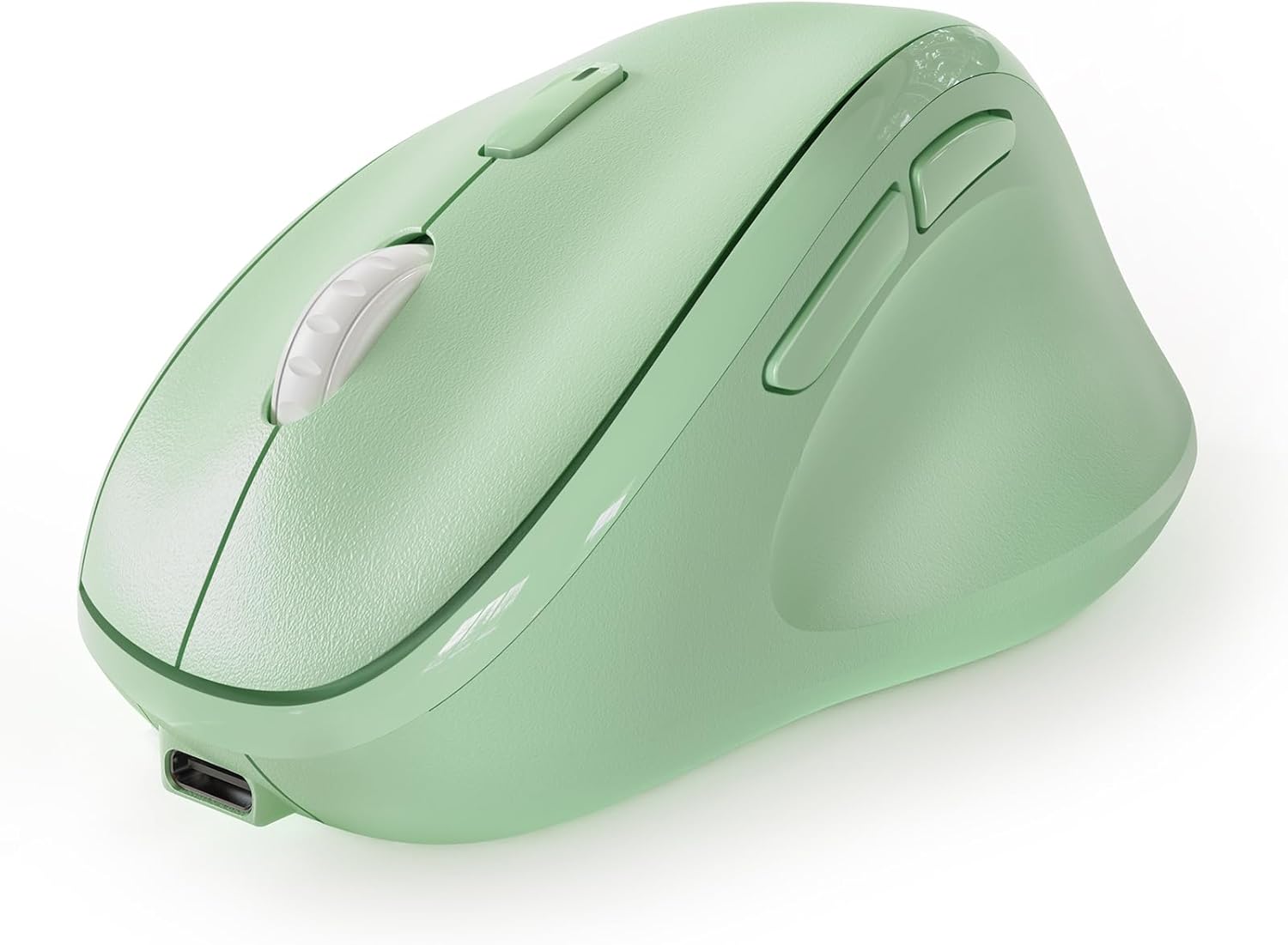
The Micropack Ergonomic Vertical Wireless Bluetooth Mouse is designed for users who spend long hours at a computer and want to reduce wrist strain. With its vertical handshake design, it promotes a more natural wrist position, making it ideal for professionals, students, and anyone prone to repetitive strain injuries.
Standout features include the ability to connect to three devices simultaneously via two Bluetooth channels and a 2.4G USB receiver. Switching between devices is effortless using a button on the bottom, and an LED indicator shows which device is active. This multi-device capability dramatically improves workflow for those juggling a laptop, tablet, and desktop.
The mouse delivers ultra-quiet clicks, creating a peaceful environment for both you and those around you. The adjustable DPI settings allow you to tailor cursor speed to your preference, whether you are editing photos or browsing the web. The rechargeable battery eliminates the need for constant battery changes, adding to its convenience.
Build quality is solid with a comfortable full-size shape that fits medium to large hands well. The thumb rest and well-placed forward/back buttons enhance usability. However, the mouse may feel bulky for users with smaller hands, and the micro USB charging port is a bit dated compared to USB-C.
Overall, the Micropack Ergonomic Vertical Mouse offers excellent value for the price. It combines essential ergonomic features with seamless multi-device connectivity and silent operation. If you are looking for a comfortable, versatile mouse to improve your daily computing experience, this is a great choice.
Pros
- Reduces wrist and arm strain with an ergonomic vertical design.
- Rechargeable battery saves money and reduces waste.
- Adjustable DPI settings suit different tasks and user preferences.
- Convenient forward/back buttons speed up web and document navigation.
- Compact and lightweight, ideal for travel or small desks.
Cons
- May require a short adjustment period for users accustomed to traditional horizontal mice.
- The 2.4G USB receiver must remain plugged into the device, which could be inconvenient for laptops with limited ports.
- Low battery level can affect tracking smoothness, so regular charging is recommended.
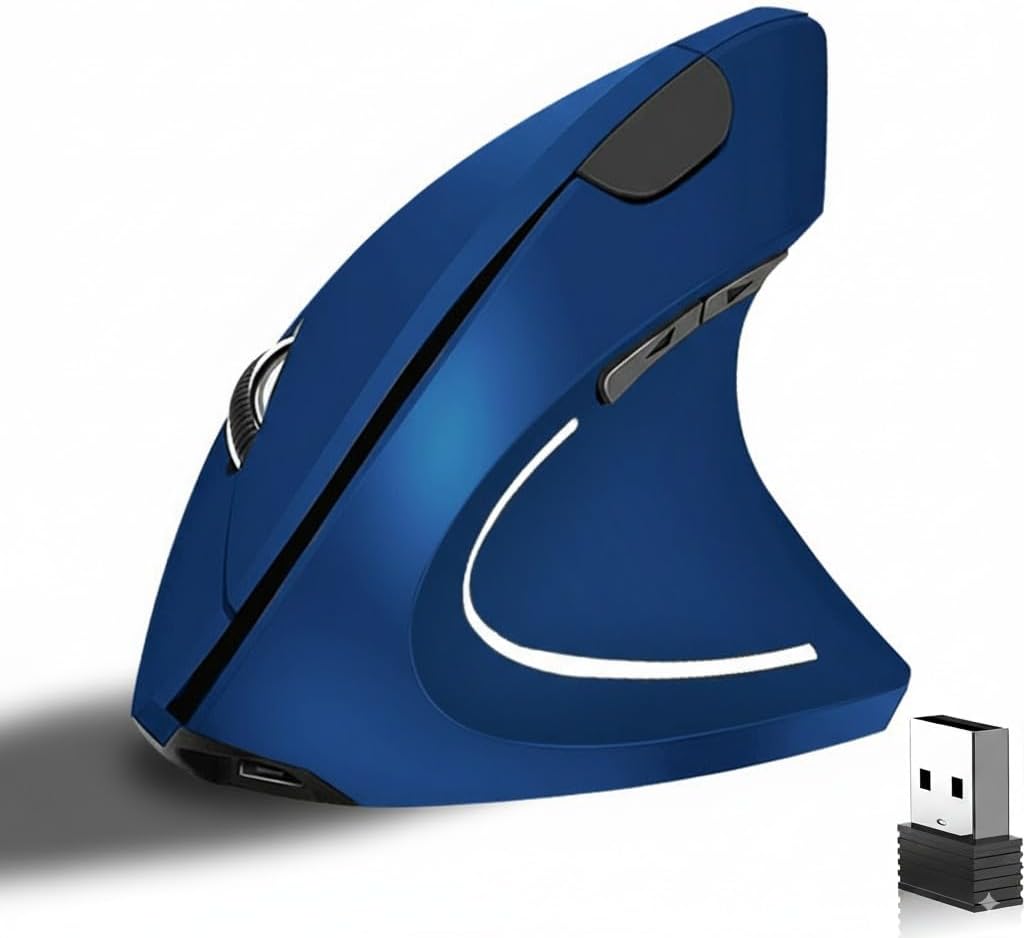
The tlkawzy Ergonomic Vertical Wireless Mouse is designed for users who spend long hours at a computer and want to minimize wrist and arm fatigue. Its vertical, handshake-inspired shape encourages a natural neutral posture, which can help reduce the risk of repetitive strain injuries. This mouse is ideal for office workers, students, and anyone who prioritizes comfort during daily computing tasks.
Standout features include a built-in rechargeable battery that eliminates the need for constant battery replacements, and smart power-saving mode that kicks in after 8 minutes of inactivity. The adjustable 800/1200/1600 DPI optical sensor provides smooth, accurate tracking on most surfaces, allowing you to tailor sensitivity to your workflow. Forward and back buttons add convenience for browsing and multitasking.
Build quality is solid for its price point, with a lightweight plastic shell and a comfortable textured grip. The blue color gives it a modern, stylish look that stands out from typical black peripherals. The 2.4G wireless connection is reliable and lag-free, provided the USB receiver is kept within range.
One potential drawback is the learning curve for users new to vertical mice; it may take a few days to get used to the different hand position. Additionally, the USB receiver must stay plugged into your computer, which could be an issue for devices with limited ports. Also, keep the battery charged to maintain optimal performance.
Overall, the tlkawzy Ergonomic Vertical Wireless Mouse offers excellent value for anyone seeking relief from wrist strain without breaking the bank. Its combination of ergonomic design, rechargeability, and adjustable DPI makes it a practical upgrade for comfort-focused users. If you're willing to adapt to a vertical grip, this mouse is a worthy investment.

Pros
- Long rated battery life per charge
- Long manufacturer warranty relative to other options here
- Wide compatibility across older and newer operating systems
Cons
- No Bluetooth option, USB receiver only
- Manufacturer notes a short adjustment period is typically needed
Lekvey's vertical mouse uses a handshake-style grip and a rechargeable battery rated for roughly 150 hours of continuous use per charge.
Lekvey markets this mouse specifically toward carpal tunnel and wrist comfort, though as with any ergonomic accessory, how much relief it provides varies by person and shouldn't replace medical advice for a diagnosed condition.
It uses a simple plug-and-play USB receiver with no pairing steps, and is backed by a long manufacturer warranty compared with other options in this comparison.
The main limitation is the lack of Bluetooth, so it's tied to whichever computer has the receiver plugged in.
It suits anyone who wants a rechargeable, handshake-grip mouse with strong battery life per charge.
Dimensions: 5 inches long by 3 inches wide.
Battery: Rechargeable, rated around 150 hours per charge.
DPI: Up to 1600, three adjustable levels.
Connectivity: 2.4G USB receiver.
Who should buy this mouse? Anyone who wants a rechargeable, handshake-grip mouse with a long battery life per charge.
Who might want to look elsewhere? Anyone who needs Bluetooth should look at the Logitech or ProtoArc models instead.
Setup tip: Allow a short adjustment period as the manufacturer suggests, and talk with a doctor about diagnosed wrist conditions rather than relying on the mouse alone.

Pros
- Ergonomic 52-degree angle reduces wrist strain effectively
- High 4800 DPI with 5 settings for versatile precision
- Silent clicks ideal for shared or quiet spaces
- Comfortable fit for small to medium hands
- Simple plug-and-play wireless setup with long range
Cons
- Side buttons are not silent and not supported on Mac OS
- May not fit larger hands comfortably due to size focus
- No rechargeable battery, requires AA batteries
The TECKNET Ergonomic Wireless Mouse is a vertical mouse designed to combat wrist and arm fatigue during prolonged computer use. With a 52-degree angle that mimics a handshake position, it's an excellent choice for office workers, gamers, or anyone with small to medium hands seeking relief from repetitive strain injuries.
Its standout feature is the 4800 DPI optical sensor with five adjustable levels, providing smooth and precise cursor control on most surfaces. The silent click buttons reduce noise by over 99%, making it perfect for libraries or open-plan offices, though the forward/back side buttons are not silent and only work on Windows. The wireless 2.4GHz connection offers a stable 32-foot range with plug-and-play simplicity.
The build is compact and rounded with no sharp corners, tailored for small to medium hands. This design minimizes fatigue, but larger hands may find it cramped. The mouse runs on a single AA battery, which is a slight inconvenience compared to rechargeable models, but it ensures long battery life.
One drawback is the lack of Mac support for the side buttons, and the non-rechargeable battery may require periodic replacements. However, the affordable price and ergonomic benefits outweigh these issues for most users.
Overall, the TECKNET Ergonomic Wireless Mouse delivers on its promise of comfort and precision at a great value. It's a solid investment for anyone looking to reduce wrist pain without breaking the bank.
Buying Guide: What to Look for in an Ergonomic Mouse for Small Hands
Size and Grip Shape
The most important factor is physical fit. A mouse that’s too large forces you to overextend your thumb or pinky, while a too-small one can cause cramping. Look for models explicitly designed for small or medium hands. The SABLUTE MAM3 and Luhaso vertical mouse both have compact shells that fill your palm naturally without stretching. Also pay attention to the contour: a sculpted thumb rest and a slight tilt (like the 57° angle on many vertical mice) keep your wrist in a neutral handshake position.
Vertical vs. Traditional vs. Trackball
Vertical mice (like the Lekvey and TECKNET) rotate your forearm to a handshake posture, reducing pressure on the carpal tunnel. They’re excellent for small hands if the width is scaled down. Trackball mice, such as the Logitech MX Ergo S, let you keep your hand stationary while moving the cursor with your thumb or fingers, which can be a relief if you have limited desk space. However, trackballs may require a learning curve. For most small-handed users, a low-profile vertical mouse with a short reach is the sweet spot.
Connectivity and Battery Life
Wireless freedom is a must, but choose between Bluetooth and 2.4GHz. Bluetooth lets you connect to multiple devices (like a laptop and tablet) without dongles, while 2.4GHz offers lower latency. Models like the seenda MOU-302 and Micropack support both, letting you switch between three devices with a button. Rechargeable batteries save you from buying disposables; look for a built-in battery with USB-C charging. The DELUX Seeker even has an OLED screen to show battery status.
DPI and Custom Buttons
Adjustable DPI (dots per inch) lets you control cursor speed. For small hands, a lower DPI (800–1200) often feels more comfortable because you don’t need large arm movements. Programmable buttons (like the forward/backward keys on the SABLUTE MAM3 or the thumb wheel on the DELUX Seeker) can speed up your workflow. Just make sure the buttons are easy to reach without stretching your fingers.
For more tips on setting up your workspace, read our guide on positioning your keyboard and mouse and explore best under-desk keyboard trays to complete your ergonomic setup.
Final Thoughts
After comparing all ten models, the best ergonomic mouse for small hands comes down to your preferred grip style. If you want a compact vertical mouse that instantly relieves wrist strain, the SABLUTE MAM3 is an excellent choice with its 57° angle and silent clicks. For those who need advanced customization and a built-in screen, the DELUX Seeker offers programmable buttons, RGB lighting, and a detachable wrist rest that adapts to your hand size. Either way, you’ll find lasting comfort and a natural fit.
Frequently Asked Questions
What is the best ergonomic mouse for small hands in 2026? The SABLUTE MAM3 and TECKNET vertical mouse are top contenders because they are specifically designed for small to medium hands, offering a comfortable grip and wrist relief. The Luhaso model is also a great budget-friendly option.
Are vertical mice better for small hands? Yes, because they keep your hand in a natural handshake position, reducing strain on the wrist and forearm. Many vertical mice, like the Lekvey and seenda, have a slim profile that fits smaller hands well. Just check the dimensions to ensure a snug fit.
How do I choose the right size ergonomic mouse? Measure your hand from the base of your palm to the tip of your middle finger. If it’s under 7 inches, look for mice labeled ‘small’ or ‘small to medium.’ Read reviews from users with similar hand sizes and consider the width of the mouse, as a too-wide model can cause discomfort.
Can an ergonomic mouse help with carpal tunnel syndrome? It can be a significant part of the solution. By keeping your wrist in a neutral position, vertical mice reduce pressure on the median nerve. For more advice, see our guide to the best ergonomic mice for carpal tunnel. Combine it with proper keyboard positioning and regular breaks for best results.




Write Your Review
No reviews yet. Be the first to share your experience!