

It starts as a dull ache during a late-night raid, then turns into a sharp twinge every time you flick your wrist for a quick 180. If hours of clicking and dragging have left your forearm tense, the culprit may be your mouse. Learning how to reduce wrist pain from typing can help, but swapping your peripheral is often the first fix. This guide reviews the best ergonomic gaming mouse for wrist pain, with options that encourage a natural handshake grip, reduce strain, and keep your accuracy sharp.
We evaluated ten models across leading brands, focusing on vertical angle, sensor precision, button layout, and comfort for prolonged sessions. Our picks include wired and wireless mice, budget-friendly designs, and RGB-loaded flagships. In 2026, there are more choices than ever, so we’ve done the legwork to help you choose the right one for your setup.
Vertical gaming mice trade off some precision in fast flick movements, so competitive players with wrist pain may need to accept a small performance tradeoff for comfort. This guide is informational and is not a substitute for medical advice; if your pain is severe, persistent, or worsening, consult a physician or physical therapist.
Disclosure: Ergonook is a participant in the Amazon Associates program. Links below are affiliate links, and we may earn a commission from qualifying purchases. This does not affect which products we recommend or how we rank them.

Pros
- Multi-device pairing across three connections
- Rechargeable rather than disposable batteries
- Quiet primary clicks
Cons
- Sized specifically for hands under 7.5 inches, so larger hands may not fit well
- Manufacturer notes a one to two week learning curve
The ProtoArc EM11 uses a 58 degree vertical shape and can stay paired to three devices at once, switching between Bluetooth and its included USB-A receiver.
It's built specifically for hands under 7.5 inches, and ProtoArc recommends measuring your hand before ordering to get a comfortable fit.
The battery is rechargeable over USB-C, and the primary buttons click quietly, though the scroll wheel and side buttons are not silent.
Like most vertical mice, the manufacturer notes it takes one to two weeks to feel fully natural.
It suits anyone with smaller to medium hands who wants to pair across multiple devices.
Dimensions: 5.43 inches long by 2.72 inches wide.
Weight: 250 grams.
DPI: Up to 2400, three adjustable levels.
Battery: Rechargeable, rated around a month per charge.
Connectivity: Bluetooth or 2.4G USB-A receiver, up to three devices.
Who should buy this mouse? Anyone with small to medium hands who wants to pair across multiple devices with Bluetooth.
Who might want to look elsewhere? Larger hands should consider the Logitech MX Vertical instead.
Setup tip: Measure your hand length against the 7.5 inch guideline before ordering to confirm a comfortable fit.
Pros
- Tailored for large hands with recommended hand size guide for optimal fit.
- Silent buttons minimize disturbance in shared spaces.
- Removable wrist rest adds significant comfort and reduces wrist friction.
- Customizable DPI and button mapping via driver software.
- Sturdy build and reliable wired connection for consistent performance.
Cons
- Takes a few days to adapt to the vertical design from a traditional mouse.
- Right-handed only; not suitable for left-handed users.
- Side buttons and driver software not compatible with Mac/iOS systems.
- PVC cable is somewhat stiff and may not be as flexible as braided cables.
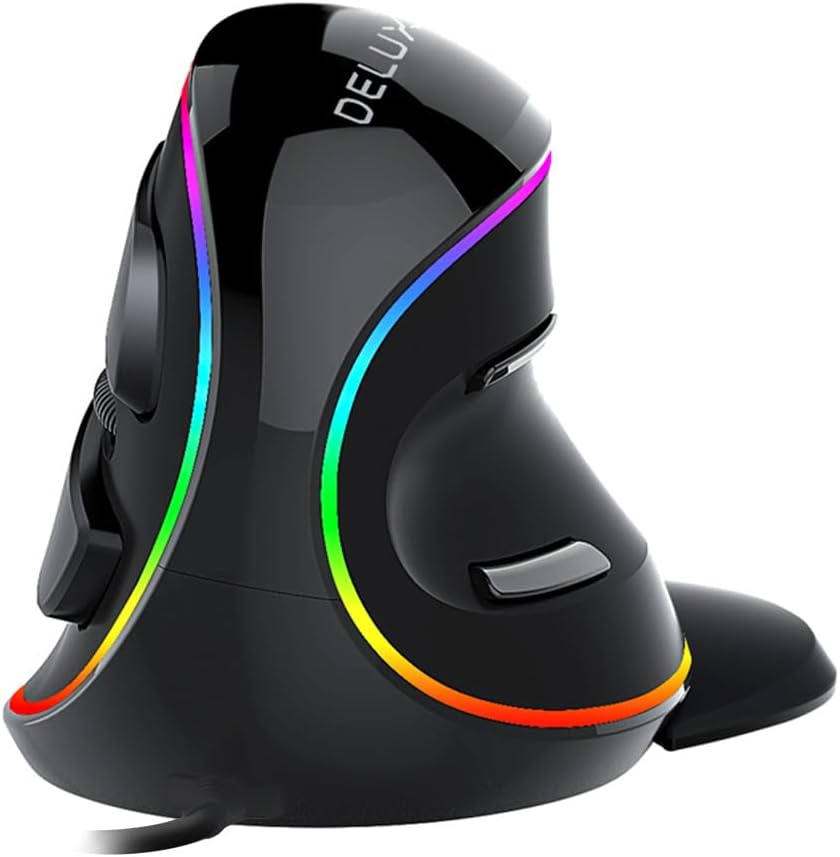
The DELUX M618Plus RGB Wired vertical mouse is an ergonomic solution designed specifically for users with large hands (recommended hand length 6.7-7.5 inches). Its unique volute bionic shape promotes a natural handshake posture, reducing wrist and arm discomfort during extended use. While it may take a few days to adapt to the vertical orientation, many users find the relief significant.
Standout features include a removable wrist rest that elevates the palm and prevents friction, silent click buttons that cut noise by over 90%, and 6 programmable buttons that can be customized via the driver software. The RGB backlighting adds a vibrant touch with multiple effects, and the dedicated on/off switch lets you conserve power when needed.
DPI adjustment is versatile with six preset levels (400-800-1200-1600-2400-4000) and up to 12800 DPI with the driver. This makes the mouse suitable for both precision work and casual gaming. The wired USB connection ensures consistent, lag-free performance, and the 1.6-meter cable provides ample reach.
A few drawbacks: the vertical design requires an adjustment period, and it is designed for right-handed users only. Mac users will not have access to side buttons or the driver software, though basic mouse functions work. Also, the PVC cable is a bit stiff but manageable.
Overall, the DELUX M618Plus RGB is a well-priced ergonomic mouse that delivers on comfort and functionality for large-handed users. Its silent operation, customizable buttons, and wrist rest make it an excellent choice for office workers and gamers seeking relief from strain.
Dimensions: 130.6 x 68.9 x 42.5 mm (5.1 x 2.7 x 1.7 inches)
Weight: 210 grams
Connectivity: USB wired with 1.6-meter PVC cable
DPI: 6 preset levels (400-800-1200-1600-2400-4000), up to 12800 with driver
Buttons: 6 programmable buttons (left, right, middle, forward, backward, DPI)
Compatibility: Windows XP, Vista, 7, 8, 10, 11; limited Mac support (side buttons and driver not available)
Design: Right-handed, vertical ergonomic with removable wrist rest and RGB backlighting

Pros
- Reduces wrist pain and fatigue with vertical ergonomic design
- Innovative 5D rocker adds extra control without extra buttons
- High DPI range suitable for various gaming styles
- On-board memory saves custom settings for portability
- Affordable price point for a feature-rich gaming mouse
Cons
- Vertical design may require adjustment period for traditional mouse users
- Software setup can be confusing for non-technical users
- Build quality feels slightly plasticky compared to premium models
The TRELC Wired Gaming Mouse is a specialized peripheral designed for gamers and professionals who prioritize wrist health without sacrificing performance. With its vertical ergonomic shape and 5-direction rocker, it targets users suffering from repetitive strain injuries or those who simply want a more natural grip during long gaming sessions.
Its standout feature is the integrated 5-direction rocker, which replaces five separate buttons with a single thumb-controlled stick. This allows for quick directional inputs in FPS, MOBA, and MMO games, giving players a competitive edge. The 10000 DPI PMW3325 sensor offers smooth tracking across five adjustable levels, ensuring precision whether you're sniping or sprinting.
The vertical design mimics a handshake posture, reducing pressure on the wrist and forearm. Users with carpal tunnel syndrome or tendinitis report noticeable relief after switching. The 11 programmable buttons can be customized via software, and on-board memory stores your macros even when moving between computers.
On the downside, the vertical orientation takes time to get used to, especially for fast-paced gaming where muscle memory matters. The software interface is functional but not as polished as premium brands. Build quality is decent for the price but feels slightly plasticky, though it holds up well under regular use.
Overall, the TRELC Wired Gaming Mouse is an excellent value for gamers seeking ergonomic relief and advanced control features. It is highly recommended for those with wrist pain or anyone wanting to prevent future strain, while still enjoying high-performance gaming capabilities.

Pros
- Highly ergonomic shape that reduces wrist strain and promotes natural hand positioning.
- Excellent battery life with rapid charging capability for minimal downtime.
- Versatile multi-device connectivity for efficient control across multiple systems.
- High-precision sensor works on various surfaces including glass.
- AI productivity shortcuts boost efficiency for text and email tasks.
Cons
- Vertical design may require an adjustment period for users accustomed to traditional mice.
- RGB lighting may be unnecessary for office environments and could affect battery life.
- Premium price point compared to standard ergonomic mice.
The Razer Pro Click V2 is a vertical wireless mouse engineered for comfort and productivity, aimed at users who spend long hours at a computer. Its unique handshake grip design minimizes wrist strain, making it suitable for professionals, gamers, and anyone experiencing discomfort from traditional mice.
Standout features include the AI Prompt Master, which lets you automate repetitive tasks like summarizing text or drafting emails with a single click. The mouse boasts up to 6 months of battery life, and a quick 5-minute charge provides three days of use, ensuring uninterrupted workflow. Multi-device connectivity supports up to five devices across wireless and Bluetooth modes, streamlining your setup.
The 18-zone RGB underglow adds a customizable aesthetic, while the Focus Pro 30K optical sensor delivers pinpoint accuracy even on glass surfaces. Build quality is solid with durable mechanical switches rated for 60 million clicks, promising longevity. However, the vertical shape may feel unconventional initially, and the RGB lighting might drain battery if used heavily.
Some drawbacks include a higher price tag and a learning curve for those new to vertical mice. Additionally, the AI features require Razer Synapse software, which may not appeal to minimalist users. Despite these, the Pro Click V2 excels in ergonomic design and productivity enhancements.
Overall, the Razer Pro Click V2 is an excellent investment for users seeking relief from wrist pain and wanting to boost efficiency. Its blend of comfort, connectivity, and smart features makes it a top choice for demanding workloads and gaming sessions alike.
Sensor: Focus Pro 30K Optical (99.8% resolution accuracy)
Switches: Mechanical, 60 million click lifecycle
Connectivity: HyperSpeed Wireless (2.4GHz), Bluetooth 5.0 (3 hosts), USB-C wired
Battery: Up to 6 months (standard test conditions), 5-minute charge for 3 working days
Lighting: 18-zone RGB with full underglow, Chroma Workshop compatible
Weight: Not specified in data but typical for vertical ergonomic mice (approx. 100-120g)

Pros
- Long rated battery life per charge
- Long manufacturer warranty relative to other options here
- Wide compatibility across older and newer operating systems
Cons
- No Bluetooth option, USB receiver only
- Manufacturer notes a short adjustment period is typically needed
Lekvey's vertical mouse uses a handshake-style grip and a rechargeable battery rated for roughly 150 hours of continuous use per charge.
Lekvey markets this mouse specifically toward carpal tunnel and wrist comfort, though as with any ergonomic accessory, how much relief it provides varies by person and shouldn't replace medical advice for a diagnosed condition.
It uses a simple plug-and-play USB receiver with no pairing steps, and is backed by a long manufacturer warranty compared with other options in this comparison.
The main limitation is the lack of Bluetooth, so it's tied to whichever computer has the receiver plugged in.
It suits anyone who wants a rechargeable, handshake-grip mouse with strong battery life per charge.
Dimensions: 5 inches long by 3 inches wide.
Battery: Rechargeable, rated around 150 hours per charge.
DPI: Up to 1600, three adjustable levels.
Connectivity: 2.4G USB receiver.
Who should buy this mouse? Anyone who wants a rechargeable, handshake-grip mouse with a long battery life per charge.
Who might want to look elsewhere? Anyone who needs Bluetooth should look at the Logitech or ProtoArc models instead.
Setup tip: Allow a short adjustment period as the manufacturer suggests, and talk with a doctor about diagnosed wrist conditions rather than relying on the mouse alone.

Pros
- One of the most widely reviewed mice in this comparison
- Straightforward 2.4G USB setup with no pairing steps
- Backed by an 18-month warranty
Cons
- No Bluetooth option, USB receiver only
- Requires disposable batteries rather than being rechargeable
Anker's vertical mouse uses a handshake-style grip aimed at a neutral wrist and arm position, connecting through a 2.4G USB receiver rather than Bluetooth.
It offers three adjustable DPI levels and next and previous buttons for browsing, and drops into a power-saving mode after periods of inactivity.
It's one of the most widely reviewed mice in this comparison and is backed by an 18-month warranty.
The main trade-offs are the lack of Bluetooth and the use of disposable rather than rechargeable batteries.
It suits anyone who wants a simple, well-reviewed, plug-and-play vertical mouse.
Dimensions: approximately 120 by 62.8 by 74.8 millimeters.
Weight: approximately 3.4 ounces.
Connectivity: 2.4G USB receiver.
DPI: Up to 1600, three adjustable levels.
Warranty: 18 months.
Who should buy this mouse? Anyone who wants a simple, well-reviewed, plug-and-play vertical mouse without Bluetooth.
Who might want to look elsewhere? Anyone who needs Bluetooth or a rechargeable battery should look at the Logitech or ProtoArc options instead.
Setup tip: Keep spare batteries on hand since this mouse isn't rechargeable.

Pros
- Compact vertical design suited to small and medium hands
- Long rated battery life
- Quiet clicks for shared workspaces
Cons
- Fixed for right-hand use only, with no left-handed version
- Smaller shape may feel cramped for larger hands
The Logitech Lift is a vertical mouse shaped around a 57 degree angle, intended to keep the forearm in a more natural rotation than a standard flat mouse.
Its grip is softly textured with a snug thumb rest, and it's sized specifically for small to medium right hands rather than a one-size-fits-all shape.
It connects over Bluetooth or the included USB receiver, with a battery rated to last up to two years, and the scroll wheel is designed to feel smooth and quiet.
The main limitation is fit: it's built for smaller hands and right-hand use only, so it won't suit everyone.
It's a strong option for anyone who wants a compact, all-day vertical mouse without a steep learning curve.
Connectivity: Bluetooth or the included USB receiver.
Buttons: Up to 6, with 4 customizable.
Battery life: Rated up to two years.
Hand fit: Right-handed, built for small to medium hands.
Sensor: Optical, up to 4000 DPI.
Who should buy this mouse? Anyone with a small to medium right hand who wants a compact vertical mouse with long battery life.
Who might want to look elsewhere? Left-handed users, or anyone with larger hands who may find the shape too compact.
What to compare before buying: Check hand size fit against the product's stated dimensions, since vertical mice vary more in shape than standard mice.
Setup tip: Give yourself a week or two to adjust to the vertical grip, since the wrist rotation feels different from a standard mouse at first.

Pros
- Ergonomic vertical design minimizes wrist strain
- Adjustable DPI up to 6400 for versatile use
- Silent clicks for quiet environments
- Plug and play with multiple operating systems
- Durable and smooth tracking
Cons
- Not suitable for small hands (best for medium to large)
- Side buttons not functional on macOS
- Wired connection may limit mobility for some users
The TECKNET Wired Mouse is an ergonomic vertical mouse designed to alleviate wrist and forearm discomfort during extended computer use. It is particularly suited for users with medium to large hands who spend long hours working, gaming, or browsing.
Its standout feature is the 6400 DPI optical sensor with four adjustable levels, allowing precise cursor control for tasks ranging from detailed photo editing to fast-paced gaming. The silent click technology ensures a noise-free experience, making it a great choice for libraries or shared workspaces.
The mouse adopts a natural handshake posture, promoting a neutral wrist position. The build feels solid and durable, with a 1.5-meter USB cable that provides ample reach. Setup is truly plug and play, requiring no software installation.
One limitation is that the mouse is not ideal for small hands, and the side buttons do not function on macOS. Additionally, being wired may restrict desk mobility for some users, though the cable is sufficiently long.
Overall, the TECKNET Wired Mouse offers excellent value for those seeking ergonomic relief without breaking the bank. With its reliable performance, silent operation, and lifetime support, it is a strong recommendation for anyone prioritizing comfort and precision.

Pros
- Ergonomic design effectively alleviates wrist pain and arm discomfort
- RGB lighting adds a customizable aesthetic touch to any setup
- 4 DPI settings provide flexibility for different tasks
- Plug-and-play functionality eliminates complicated setup
- Lightweight and portable for easy travel and storage
Cons
- Forward and Backward buttons are not compatible with Mac OS
- All buttons are non-programmable, limiting customization
- May require a few days to adjust from a traditional mouse shape
The Nulea Ergonomic Vertical Mouse is a wired peripheral designed to combat wrist pain and arm fatigue during extended computer use. Its 57-degree natural grip positions your forearm in a neutral alignment, making movements smoother and more flexible. This mouse is ideal for office workers, gamers, or anyone who experiences discomfort from standard horizontal mice.
Standout features include 11 RGB backlight modes that illuminate the mouse outline, adding a personalized touch to your workspace. The 4 adjustable DPI levels (800, 1200, 2400, 3200) let you switch between precise cursor control for detailed tasks and faster tracking for general browsing. Real-world performance is responsive and reliable, with buttons that click easily and a metal non-slip scroll wheel that feels durable.
The build quality is solid for its price point, with a lightweight design that enhances portability. The 5.9ft cable provides ample reach, and the plug-and-play USB 2.0 connection requires no drivers, ensuring immediate use. The RGB lighting is vibrant but subtle, and the overall construction feels sturdy enough for daily use.
One drawback is that the forward and backward navigation buttons do not work with Mac OS, which limits compatibility for Apple users. Additionally, all buttons are non-programmable, so you cannot remap them to custom functions. Some users may need a short adjustment period to get used to the vertical shape, but the ergonomic benefits usually outweigh this initial learning curve.
Overall, the Nulea Ergonomic Vertical Mouse delivers excellent value for those seeking relief from wrist strain without breaking the bank. Its combination of ergonomic design, customizable RGB lighting, and adjustable DPI make it a strong choice for productivity and comfort. If you can work within its limitations, this mouse is a worthwhile investment for a healthier computing experience.

Pros
- Handshake grip designed to reduce muscular strain versus a standard mouse
- Cursor speed switch adds quick control over sensitivity
- Fits a wider range of hand sizes than more compact vertical mice
Cons
- Larger, taller shape than the Lift, which may not suit smaller hands or bags
- Right-hand only design
The MX Vertical takes the handshake grip concept further than the compact Lift, with a taller 57 degree shape designed to reduce muscular activity compared with a standard mouse.
A cursor speed switch lets you jump between DPI settings instantly, and the textured surface is shaped to fit a broader range of hand sizes.
It's designed according to criteria set out by ergonomists, and charges over USB-C rather than requiring disposable batteries.
Its larger size is also its main trade-off: it takes up more desk space and isn't as easy to slip into a bag as the compact Lift.
It suits anyone with medium to large hands who wants a pronounced handshake-style grip.
Dimensions: 7.5 inches long by 6 inches wide.
Connectivity: USB, wireless.
Buttons: 4.
Sensor: Optical, up to 4000 DPI.
Battery life: Rated around 4 months per charge.
Who should buy this mouse? Anyone with medium to large hands who wants a pronounced handshake-style grip to reduce strain.
Who might want to look elsewhere? Smaller hands or anyone who wants a more compact, travel-friendly shape should consider the Lift instead.
Setup tip: Rest your whole palm on the mouse rather than gripping it like a standard mouse, since that's how the handshake shape is meant to be used.
Buying Guide: How to Choose an Ergonomic Gaming Mouse for Wrist Pain
Hand Size and Grip Style
Vertical ergonomic mice are not one-size-fits-all. The DELUX M618Plus RGB Wired is tailored for large hands, while the Logitech Lift is sized for small to medium palms. Measure from your wrist crease to your longest fingertip, then match it to the product dimensions. A mouse that’s too small forces your fingers into a curl, and a too-large model makes your thumb stretch. For more tailored picks, browse our list of the best vertical mouse for wrist pain options.
DPI and Sensor Performance
Gamers need precision, not just comfort. Look for adjustable DPI settings so you can switch between careful sniping and fast, sweeping movements. The TRELC wired gaming mouse jumps from 1500 to 10000 DPI, while the TECKNET wired mouse reaches 6400 DPI. A reliable optical sensor tracks accurately on varied surfaces, so you don’t have to lift the mouse repeatedly. If wrist pain has already set in, our guide to the best ergonomic mouse for carpal tunnel is worth reading.
Wireless vs. Wired
Wireless mice free up your desk and reduce cable drag, but battery life matters. The Lekvey rechargeable vertical mouse delivers up to 150 hours on a single charge, and the Razer Pro Click V2 can run for months. Wired options like the Nulea and DELUX models provide plug-and-play reliability with zero latency, which is a plus for competitive titles. Remember to position your keyboard and mouse ergonomically to get the full benefit from any mouse you choose.
Programmable Buttons and Customization
The more you can customize your mouse, the less often you need to reach for your keyboard. The Razer Pro Click V2 includes AI prompt shortcuts, and the TRELC model features a 5-direction rocker for quick movements. Software matters too: the DELUX mouse offers 6 programmable buttons, and the Logitech MX Vertical includes a dedicated DPI switch. These features reduce wrist extension and help you maintain a neutral posture during intense sessions.
Final Thoughts
If you want a premium, precision-focused companion for long gaming sessions, the Logitech MX Vertical is a proven choice with its comfortable 57-degree angle and excellent sensor. For gamers who crave extensive customization and a unique vertical form, the TRELC Wired Gaming Mouse stands out with its programmable rocker and high-DPI sensor. Either option can make a real difference for your wrist health in 2026.
Frequently Asked Questions
Will an ergonomic gaming mouse really help with wrist pain?
Yes, for many people. A vertical mouse keeps your wrist in a neutral handshake position, which reduces pressure on the median nerve and lowers muscle strain. That said, an ergonomic mouse works best when paired with proper desk posture and regular breaks. Using an under desk keyboard tray can also help you keep your wrists straight.
How long does it take to get used to a vertical mouse?
Most gamers adapt within a few days, but it can take up to two weeks if you’ve been using a standard mouse for years. Start with shorter sessions and let your forearm relax into the new grip. In 2026, many vertical mice are designed with a gentler angle to shorten the learning curve.
Are wired or wireless ergonomic mice better for gaming?
It depends on your priorities. Wired mice like the Nulea offer zero latency and no battery worries, while wireless models such as the Razer Pro Click V2 use advanced tech that most players won’t notice. For competitive esports, a wired connection is still a safe bet; for convenience, wireless wins.
Can I use these mice for office work too?
Absolutely. Most of these mice work with Windows, macOS, and Linux, and many have silent clicks that suit open offices. The Logitech MX Vertical and the ProtoArc EM11 NL are especially popular with professionals who spend long hours on spreadsheets. If you type a lot, pairing your mouse with an ergonomic keyboard for wrist pain can complete your setup.




Write Your Review
No reviews yet. Be the first to share your experience!