

You’re working late, the office is quiet, and every click of your mouse sounds like a drumroll. It distracts you, maybe even your colleagues. If you spend hours at a computer, wrist pain and noise can become constant annoyances. That’s where the best silent ergonomic mice come in. They offer a peaceful clicking experience and a design that supports your hand and wrist naturally. In this guide, we’ve reviewed ten top models from brands like Lekvey, Tecknet, and AOC to help you find a mouse that keeps you comfortable and your workspace serene. Whether you’re a designer, coder, or remote worker, there’s a perfect silent ergonomic mouse for you.
Quiet switches on these mice trade off some tactile crispness, so gamers who need instant, positive click feedback for competitive timing may find them a poor fit.
Disclosure: Ergonook is a participant in the Amazon Associates program. Links below are affiliate links, and we may earn a commission from qualifying purchases. This does not affect which products we recommend or how we rank them.

Pros
- Ergonomic vertical shape relieves carpal tunnel discomfort
- Ultra-quiet clicks for distraction-free work
- Long wireless range and stable connection
- Easy plug-and-play setup with USB receiver
- Affordable price point for ergonomic features
Cons
- Requires 1-2 week adaptation period
- Side buttons not compatible with Mac systems
- Batteries not included; right-hand design only
The TECKNET 2.4G Ergonomic Vertical Mouse is designed to combat wrist strain and carpal tunnel syndrome. Its vertical grip encourages a handshake-like position, reducing pressure on the median nerve. This mouse is best for office workers, gamers with long sessions, or anyone who spends hours at a computer.
Performance-wise, it offers 5 adjustable DPI levels from 800 to 4800, allowing smooth cursor control on any surface. The wireless 2.4G connection is reliable up to 49 feet, and plug-and-play setup means no software needed. Silent clicks reduce noise by over 90%, perfect for quiet environments.
The build quality features a textured right-hand grip with forward/back buttons. Battery life is efficient with auto-sleep after 8 minutes of inactivity; two AAA batteries power it (not included). An adaptation period of one to two weeks may be necessary for first-time vertical mouse users.
A few drawbacks: the side buttons do not function on Mac systems, and the mouse is only for right-handed users. Additionally, a USB-A port is required; some modern laptops may need an adapter. The price is very competitive for an ergonomic vertical mouse with these features.
Overall, the TECKNET ergonomic mouse delivers excellent value for those seeking wrist relief and quiet operation. Its precision and comfort make it a solid choice for everyday computing. If you can adapt to the vertical design, it will likely improve your work ergonomics significantly.

Pros
- Reduces wrist strain with an upright, handshake grip
- Customizable buttons and on-the-mouse speed controls
- Plug-and-play wireless with no driver needed for basic functions
- Durable build quality and precise optical tracking
- Medium size fits most adult right hands
Cons
- Higher price point than typical ergonomic mice
- Learning curve when transitioning from a flat mouse
- No Bluetooth option, USB receiver only
The Evoluent VMDMW is a medium-sized vertical mouse for right-handed users who spend long hours at a computer. It is designed for professionals, creatives, and gamers seeking relief from wrist strain without sacrificing productivity. As the original vertical mouse brand, it brings decades of ergonomic research into its shape.
The upright handshake posture is the standout feature, keeping your forearm in a neutral position and reducing pressure on the wrist. The six customizable buttons can be programmed through the free Evoluent Mouse Manager for different applications, and the four pointer speeds are adjustable on the fly via a dedicated button. The optical sensor tracks reliably on many surfaces, so you can work on a desk, mat, or laminate top.
The medium shell fits most adult right hands, and a lip under the pinky keeps your little finger from dragging on the desk. The wireless USB receiver is truly plug-and-play, with no pairing or account setup. Build quality is robust, with high-quality materials that feel solid during extended use.
There are a couple of drawbacks to consider. The price is higher than many standard mice, and the medium size may not suit hands that are noticeably small or large. Also, switching from a flat mouse requires a few days of adjustment, and the mouse connects only via USB receiver, not Bluetooth, which could be inconvenient for some users.
If you want to reduce wrist strain during long computer sessions, the Evoluent VMDMW is a smart investment. It combines ergonomic design, customization, and durable construction in one package. Whether you are editing photos, crunching spreadsheets, or gaming, this mouse is built for the hours you put in.

Pros
- Compact vertical design suited to small and medium hands
- Long rated battery life
- Quiet clicks for shared workspaces
Cons
- Fixed for right-hand use only, with no left-handed version
- Smaller shape may feel cramped for larger hands
The Logitech Lift is a vertical mouse shaped around a 57 degree angle, intended to keep the forearm in a more natural rotation than a standard flat mouse.
Its grip is softly textured with a snug thumb rest, and it's sized specifically for small to medium right hands rather than a one-size-fits-all shape.
It connects over Bluetooth or the included USB receiver, with a battery rated to last up to two years, and the scroll wheel is designed to feel smooth and quiet.
The main limitation is fit: it's built for smaller hands and right-hand use only, so it won't suit everyone.
It's a strong option for anyone who wants a compact, all-day vertical mouse without a steep learning curve.
Connectivity: Bluetooth or the included USB receiver.
Buttons: Up to 6, with 4 customizable.
Battery life: Rated up to two years.
Hand fit: Right-handed, built for small to medium hands.
Sensor: Optical, up to 4000 DPI.
Who should buy this mouse? Anyone with a small to medium right hand who wants a compact vertical mouse with long battery life.
Who might want to look elsewhere? Left-handed users, or anyone with larger hands who may find the shape too compact.
What to compare before buying: Check hand size fit against the product's stated dimensions, since vertical mice vary more in shape than standard mice.
Setup tip: Give yourself a week or two to adjust to the vertical grip, since the wrist rotation feels different from a standard mouse at first.

Pros
- Silent clicks for noise-sensitive environments
- Adjustable DPI settings for various tasks
- Ergonomic comfort for long sessions
- Reliable Bluetooth 5.0 connectivity
- Portable and lightweight design
Cons
- No USB receiver for devices without Bluetooth
- Silent clicks may feel slightly less tactile to some users
- Requires an AA battery (not included)
The Lenovo WL310 Bluetooth Silent Mouse is an affordable wireless input device designed for users who prioritize a quiet, comfortable computing experience. It's especially well-suited for office workers, students, and late-night users who need to click without disturbing those around them.
Its standout feature is the silent click technology, which dramatically reduces noise without sacrificing responsiveness. The three adjustable DPI levels let you switch between precise work and fast navigation seamlessly. Bluetooth 5.0 provides a stable connection with low latency, and the mouse works out of the box with Windows, Mac, and Chromebook laptops.
The ergonomic design fits naturally in the hand, reducing wrist stress during long sessions. The matte grey finish looks professional and resists fingerprints. At under four ounces, it's light enough to toss into any bag for travel, and the compact shape suits most palm sizes.
A few trade-offs exist: this mouse relies solely on Bluetooth, so you won't find a USB receiver for older computers. Some users might prefer a more tactile click, and the single AA battery power source means occasional replacements rather than built-in rechargeable battery.
Overall, the Lenovo WL310 delivers excellent value for its price. If you need a silent, ergonomic, and portable mouse for everyday productivity, it's a smart choice that balances comfort, performance, and cost effectively.

Pros
- Quiet clicks without sacrificing tactile feedback
- Works on many surfaces, including wood, fabric, and carpet
- Long battery life reduces maintenance
- Comfortable ergonomic shape for right-handed users
- Affordable price with solid build quality
Cons
- Not suitable for left-handed users
- Does not track on glass surfaces
- No Bluetooth option; requires a USB port
The HP 280 Silent Wireless Mouse is a practical choice for anyone seeking a quiet, reliable input device. Designed for right-handed users, it connects via a 2.4GHz USB nano receiver and works with Windows, Chrome OS, and Mac computers. With up to 18 months of battery life on a single AA battery, it reduces the hassle of frequent replacements.
Its standout feature is the QuietClick technology, which dampens the sound of left and right button presses by 90% without compromising the click feel. This makes it perfect for shared offices, libraries, or late-night work. The multi-surface Blue Optical sensor glides smoothly on wood, cloth, laminate, and more, so you can leave your mouse pad behind.
The ergonomic right-handed contour fits comfortably in the palm, and the three-button layout with an integrated scroll wheel provides intuitive navigation. The 1600 DPI optical sensor offers precise cursor control, suitable for both productivity tasks and casual gaming. The nano receiver stores inside the mouse for easy transport.
Potential drawbacks include the lack of left-handed support and the inability to track on glass surfaces. Some users may prefer Bluetooth connectivity for portability, but the USB receiver offers a stable, low-latency connection. The build feels sturdy for its price point.
Overall, the HP 280 Silent Wireless Mouse delivers excellent value. Its quiet operation, long battery life, and versatile surface tracking make it a strong recommendation for students, office workers, and home users who value peace and simplicity.
Connection: 2.4GHz USB-A wireless (nano receiver stored inside mouse)
Range: Up to 32.8 feet (10 meters)
Sensor: HP Blue Optical, 1600 DPI fixed (no adjustable)
Buttons: 3 (left, right, scroll wheel button)
Battery: 1 AA alkaline (included), up to 18 months life
Compatibility: Windows 10 and higher, Chrome OS, macOS
Dimensions: 4.4 x 2.4 x 1.3 inches
Weight: 2.6 ounces (with battery)
Warranty: 1-year limited
Consider this mouse if you need a quiet, no-fuss wireless option for your desktop or laptop. It is ideal for right-handed users who work in shared environments or want to avoid mouse pad clutter. For left-handed users, look for an ambidextrous model. If you require adjustable DPI or Bluetooth, this model may not suit you. Check that your device has a USB-A port; if not, a USB-C adapter will be needed. The multi-surface tracking works on most non-glass surfaces, so test it on your desk material. Overall, it offers strong performance at a budget-friendly price.

Pros
- Ergonomic vertical design minimizes wrist strain
- Adjustable DPI up to 6400 for versatile use
- Silent clicks for quiet environments
- Plug and play with multiple operating systems
- Durable and smooth tracking
Cons
- Not suitable for small hands (best for medium to large)
- Side buttons not functional on macOS
- Wired connection may limit mobility for some users
The TECKNET Wired Mouse is an ergonomic vertical mouse designed to alleviate wrist and forearm discomfort during extended computer use. It is particularly suited for users with medium to large hands who spend long hours working, gaming, or browsing.
Its standout feature is the 6400 DPI optical sensor with four adjustable levels, allowing precise cursor control for tasks ranging from detailed photo editing to fast-paced gaming. The silent click technology ensures a noise-free experience, making it a great choice for libraries or shared workspaces.
The mouse adopts a natural handshake posture, promoting a neutral wrist position. The build feels solid and durable, with a 1.5-meter USB cable that provides ample reach. Setup is truly plug and play, requiring no software installation.
One limitation is that the mouse is not ideal for small hands, and the side buttons do not function on macOS. Additionally, being wired may restrict desk mobility for some users, though the cable is sufficiently long.
Overall, the TECKNET Wired Mouse offers excellent value for those seeking ergonomic relief without breaking the bank. With its reliable performance, silent operation, and lifetime support, it is a strong recommendation for anyone prioritizing comfort and precision.

Pros
- Long rated battery life per charge
- Long manufacturer warranty relative to other options here
- Wide compatibility across older and newer operating systems
Cons
- No Bluetooth option, USB receiver only
- Manufacturer notes a short adjustment period is typically needed
Lekvey's vertical mouse uses a handshake-style grip and a rechargeable battery rated for roughly 150 hours of continuous use per charge.
Lekvey markets this mouse specifically toward carpal tunnel and wrist comfort, though as with any ergonomic accessory, how much relief it provides varies by person and shouldn't replace medical advice for a diagnosed condition.
It uses a simple plug-and-play USB receiver with no pairing steps, and is backed by a long manufacturer warranty compared with other options in this comparison.
The main limitation is the lack of Bluetooth, so it's tied to whichever computer has the receiver plugged in.
It suits anyone who wants a rechargeable, handshake-grip mouse with strong battery life per charge.
Dimensions: 5 inches long by 3 inches wide.
Battery: Rechargeable, rated around 150 hours per charge.
DPI: Up to 1600, three adjustable levels.
Connectivity: 2.4G USB receiver.
Who should buy this mouse? Anyone who wants a rechargeable, handshake-grip mouse with a long battery life per charge.
Who might want to look elsewhere? Anyone who needs Bluetooth should look at the Logitech or ProtoArc models instead.
Setup tip: Allow a short adjustment period as the manufacturer suggests, and talk with a doctor about diagnosed wrist conditions rather than relying on the mouse alone.
Pros
- Ergonomic design significantly reduces wrist strain for small to medium hands.
- Long battery life with convenient USB-C charging and pass-through use.
- Versatile connectivity options for multiple devices and low latency.
- Quiet clicks are ideal for shared workspaces.
- Customizable DPI and programmable buttons enhance productivity.
Cons
- Not recommended for users with large hands due to the smaller form factor.
- Only the left and right buttons are silent; other buttons make normal clicking sounds.
- RGB lighting significantly reduces battery life from 200 to 40 hours.
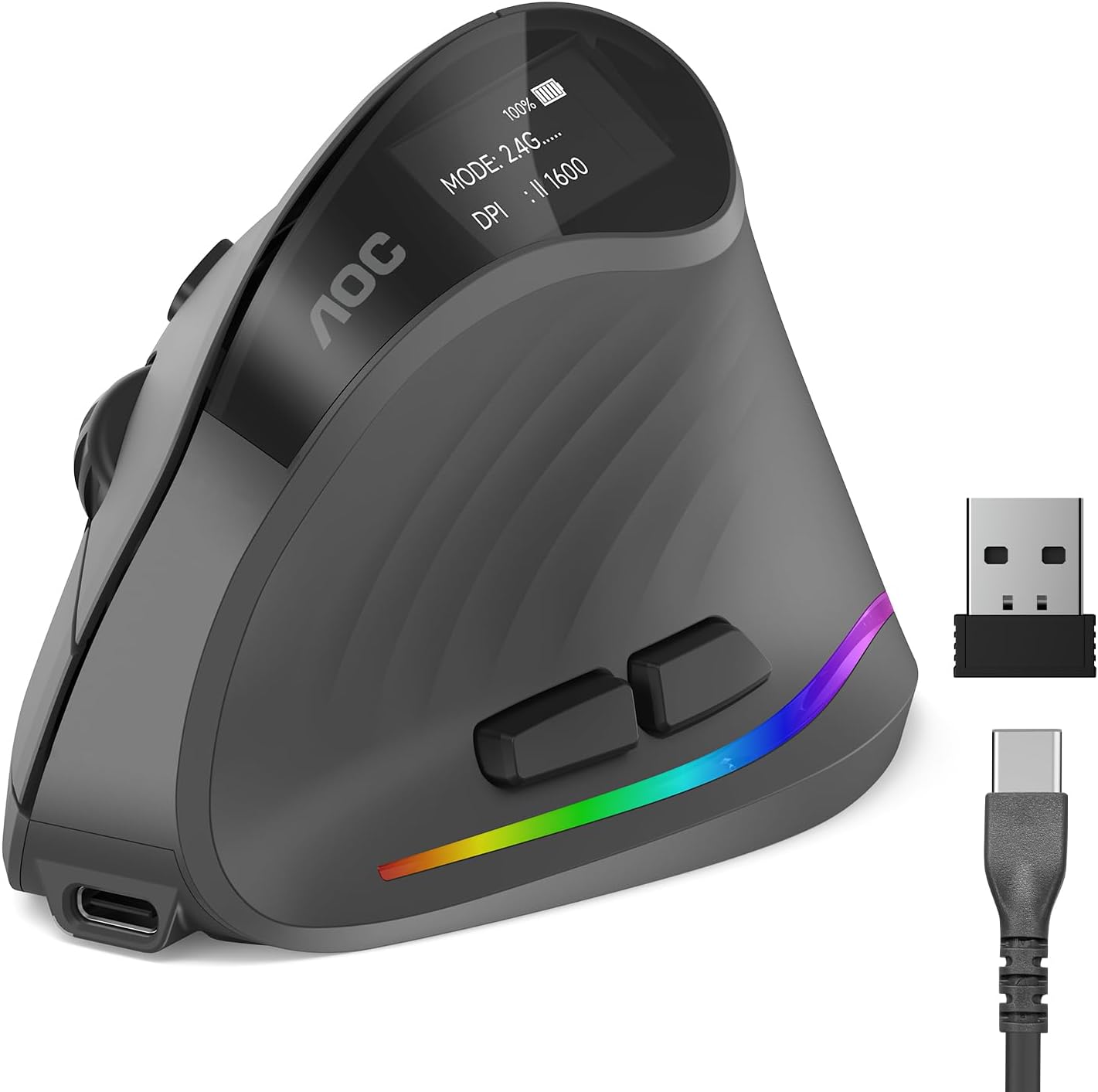
The AOC Ergonomic Vertical Mouse is designed for professionals who spend long hours at a computer and want to avoid wrist strain. Its 52-degree vertical angle places your hand in a natural handshake position, which reduces twisting and tension in the forearm. This mouse is optimized for small to medium hands, so it fits comfortably without forcing a stretch or cramp.
Performance is strong with adjustable DPI from 1000 to 4800, giving you precise control for tasks like photo editing, coding, or graphic design. The tracking is responsive and accurate, adapting to your movements without lag. The 800mAh rechargeable battery is a standout feature, offering up to 200 hours of use without RGB, and you can charge via USB-C while still working.
Build quality feels solid and professional, typical of AOC's reputation. The programmable buttons allow you to set shortcuts for common actions, boosting your efficiency. Triple-mode connectivity (Bluetooth 5.4, 2.4GHz, and wired) makes it easy to switch between devices, and the silent clicks keep noise under 35dB for quiet environments.
However, there are a few drawbacks. The mouse is only suitable for small to medium hands, so larger-handed users may find it uncomfortable. Also, only the left and right buttons are silent; the other buttons produce normal clicking sounds. RGB lighting is a nice touch but cuts battery life to 40 hours, so you may want to disable it for longer use.
Overall, the AOC Ergonomic Vertical Mouse delivers excellent comfort and performance for its target audience. If you have small to medium hands and need an ergonomic solution with versatile connectivity and long battery life, this mouse is a strong choice. It combines thoughtful design with reliable AOC quality, making it a smart investment for your workspace.

Pros
- Ergonomic 52-degree angle reduces wrist strain effectively
- High 4800 DPI with 5 settings for versatile precision
- Silent clicks ideal for shared or quiet spaces
- Comfortable fit for small to medium hands
- Simple plug-and-play wireless setup with long range
Cons
- Side buttons are not silent and not supported on Mac OS
- May not fit larger hands comfortably due to size focus
- No rechargeable battery, requires AA batteries
The TECKNET Ergonomic Wireless Mouse is a vertical mouse designed to combat wrist and arm fatigue during prolonged computer use. With a 52-degree angle that mimics a handshake position, it's an excellent choice for office workers, gamers, or anyone with small to medium hands seeking relief from repetitive strain injuries.
Its standout feature is the 4800 DPI optical sensor with five adjustable levels, providing smooth and precise cursor control on most surfaces. The silent click buttons reduce noise by over 99%, making it perfect for libraries or open-plan offices, though the forward/back side buttons are not silent and only work on Windows. The wireless 2.4GHz connection offers a stable 32-foot range with plug-and-play simplicity.
The build is compact and rounded with no sharp corners, tailored for small to medium hands. This design minimizes fatigue, but larger hands may find it cramped. The mouse runs on a single AA battery, which is a slight inconvenience compared to rechargeable models, but it ensures long battery life.
One drawback is the lack of Mac support for the side buttons, and the non-rechargeable battery may require periodic replacements. However, the affordable price and ergonomic benefits outweigh these issues for most users.
Overall, the TECKNET Ergonomic Wireless Mouse delivers on its promise of comfort and precision at a great value. It's a solid investment for anyone looking to reduce wrist pain without breaking the bank.

Pros
- Ergonomic 52 degree vertical design reduces wrist and forearm strain
- Tri-mode connectivity with Bluetooth 5.0, 3.0, and 2.4G offers flexible pairing
- Long-lasting 600mAh rechargeable battery with USB-C charging
- Silent click technology keeps noise to a minimum
- Adjustable 4800 DPI sensor works well on many surfaces
Cons
- Forward and back buttons are not functional on macOS
- Ergonomic shape fits small to medium hands, but may not suit larger hands
- Built-in battery is not user-replaceable
The TECKNET Ergonomic Vertical Mouse is a wireless mouse designed for users who spend long hours at a computer and want to reduce wrist strain. With a 52 degree vertical angle and a handshake grip, it fits small to medium hands comfortably, making it a solid choice for office workers, students, and casual gamers.
Its standout features include Bluetooth 5.0/3.0 and 2.4G connectivity, allowing you to switch between three devices instantly. The 600mAh rechargeable battery delivers up to two months of use on a 1.5 hour charge, and the quiet click technology reduces noise by 99 percent. Pair that with 4800 DPI precision and you get a responsive, versatile mouse for both productivity and play.
The design is robust and practical, with six programmable buttons including side-mounted forward and back controls. The 52 degree vertical shape feels natural and encourages a relaxed grip, though it is best suited for small to medium hands. Build quality is solid, rated for six million clicks, and the matte black finish resists fingerprints.
One drawback is that the forward and back buttons do not work on macOS, limiting navigation on Apple computers. Also, the ergonomic shape may not be comfortable for users with large hands, and the built-in battery cannot be swapped out easily. These are worth considering before purchase.
Overall, the TECKNET Ergonomic Vertical Mouse offers excellent value for anyone seeking comfort and functionality without breaking the bank. It combines a thoughtful ergonomic design with reliable wireless performance and useful productivity features. If you fit the hand size range and want to avoid wrist fatigue, this mouse is a smart investment.
Connectivity: Bluetooth 5.0, Bluetooth 3.0, 2.4G wireless via USB-A receiver
Battery: 600mAh rechargeable, up to 2 months per charge, USB-C charging
DPI: 6 adjustable levels from 800 to 4800 DPI
Buttons: 6 total including side forward/back buttons
Compatibility: Windows 11/10/8/7/XP, Mac OS X 10.4 and later, desktops, laptops, tablets
Design: 52 degree vertical angle, quiet clicks, anti-wear finish
Buying Guide
Silent Click Technology
Not all silent mice are created equal. Some offer near-silent clicks on all buttons, while others only quiet the main left and right buttons. For example, the AOC Ergonomic Mouse has silent left and right clicks under 35dB, but other buttons make normal sounds. The TECKNET models often reduce noise by over 90% or 99%, making them great for libraries or open-plan offices. Think about where you’ll use the mouse most. If absolute quiet is critical, look for models that specify silent clicks on all buttons.
Also, consider that silent switches sometimes feel slightly different. They are often softer and require less force, which can reduce finger fatigue during long sessions. Many users appreciate this, but it is worth trying if possible. Our reviews of the best vertical mouse for wrist pain can give you more context on comfort features.
Ergonomic Design and Hand Size
Most vertical mice have a 52 to 57 degree angle to promote a natural handshake position. This reduces wrist strain and forearm tension. However, fit varies by hand size. The AOC model is optimized for small to medium hands, while the Lekvey mouse is better for medium to large hands. The Logitech Lift is specifically crafted for small to medium hands and comes in both right and left-handed configurations. Always check size recommendations to ensure the mouse feels comfortable from day one.
A good ergonomic mouse should have a textured grip and thumb rest for added comfort. The Logitech Lift includes a softly textured grip and snug thumb rest, which helps during extended use. For more on proper setup, check our guide on how to position keyboard and mouse ergonomically.
Connectivity and Battery Life
Silent ergonomic mice come with various connectivity options. Bluetooth is convenient for multi-device switching, while 2.4GHz wireless offers a stable, low-latency connection. Some models, like the AOC mouse, offer triple-mode connectivity (Bluetooth, 2.4GHz, and wired), which is ideal for users who move between devices. Battery life is also crucial. Rechargeable models like the Tecknet and Lekvey options last for weeks on a single charge, while the HP 280 boasts up to 18 months on a single AAA battery. Choose based on your preference for recharging versus battery swapping.
If you use multiple computers, consider a mouse with easy device switching. The Tecknet Bluetooth mouse can toggle between three devices smoothly. For more tips on reducing strain, read how to reduce wrist pain from typing.
Final Thoughts
After reviewing ten of the best silent ergonomic mice, it is clear there is a model for every need and budget. For a premium, whisper-quiet experience with excellent build quality, the AOC Ergonomic Mouse stands out with its 52-degree vertical design and triple-mode connectivity. If you want an affordable yet highly rated vertical mouse with near-silent clicks, the TECKNET Ergonomic Mouse is a fantastic choice, offering great value and comfort for small to medium hands. Whichever you pick, you will enjoy a quieter, more comfortable computing experience.
Frequently Asked Questions
Are silent ergonomic mice as responsive as regular mice?
Yes. Silent mice use different switch mechanisms, but they are just as responsive. Many models offer adjustable DPI for precise tracking, and the clicks are confirmed by feel rather than sound.
Do silent clicks mean a longer lifespan?
Many silent switches are rated for millions of clicks, similar to standard mice. For instance, Tecknet models are built to withstand 6 million clicks, so durability is not a concern.
Can I use a silent ergonomic mouse for gaming?
Yes, many are suitable for casual gaming. Look for models with high DPI (up to 4800) and low latency connections like 2.4GHz or Bluetooth 5.0. However, some gamers prefer louder, more tactile switches for feedback.
How do I clean a silent ergonomic mouse?
Most mice can be wiped with a soft, damp cloth. Avoid using harsh chemicals. For crevices, use a compressed air duster. Check the manufacturer’s instructions, as some have removable parts for deeper cleaning. For more on maintaining your workspace, see best under desk keyboard tray options.




Write Your Review
No reviews yet. Be the first to share your experience!