

To reduce wrist pain from typing, keep your wrists straight and in line with your forearms, lower your keyboard to elbow height or below, and take a short break from typing roughly every hour. Mayo Clinic notes rest, ice, and ergonomic adjustments as first-line steps for typing-related wrist pain, and OSHA’s neutral-posture guidance addresses the setup side of the problem.
- Neutral wrist posture, straight and in line with the forearm, is OSHA’s central recommendation for preventing wrist strain from typing.
- Mayo Clinic lists rest, ice for 15 to 20 minutes every 4 to 6 hours after a flare-up, and NSAIDs as common first steps for tendon-related wrist pain.
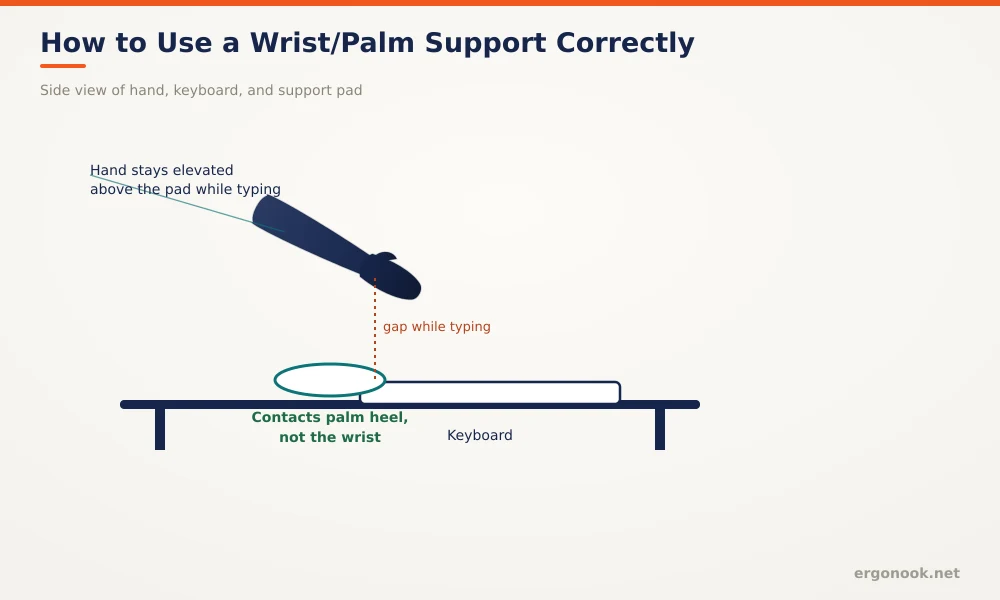
- A wrist or palm support should be at least 1.5 inches deep and contact the heel of your palm, not the wrist itself, per OSHA’s design guidance.
- Wrist pain that doesn’t improve with rest and setup changes, or that includes numbness or tingling, is a signal to see a doctor rather than push through it.
This article is for informational purposes only and is not medical advice. If you have persistent wrist pain, numbness, or tingling, talk to a doctor or physical therapist before continuing your usual typing routine.
In this article:
- Why wrist pain happens from typing
- Ways to reduce wrist pain from typing
- Setting up your workspace to prevent it
- Using a wrist rest correctly
- When to see a doctor
- Frequently asked questions
Why Wrist Pain Happens From Typing
Typing is a repetitive motion, and jobs involving a lot of it put people at higher risk for tendon irritation in the wrist. The mechanism is mechanical: repeated motion or sustained awkward angles cause microscopic tears in tendon fibers, and the body responds with inflammation, which shows up as swelling, pain, and tenderness (Cleveland Clinic, Wrist Tendonitis). Bending the wrist up, down, or to the side while typing, instead of keeping it straight, adds mechanical stress on top of the repetition itself. That combination, repetition plus a bent wrist, is what typically turns ordinary typing into a source of pain.
5 Ways to Reduce Wrist Pain From Typing
1. Keep Your Wrist Straight While You Type
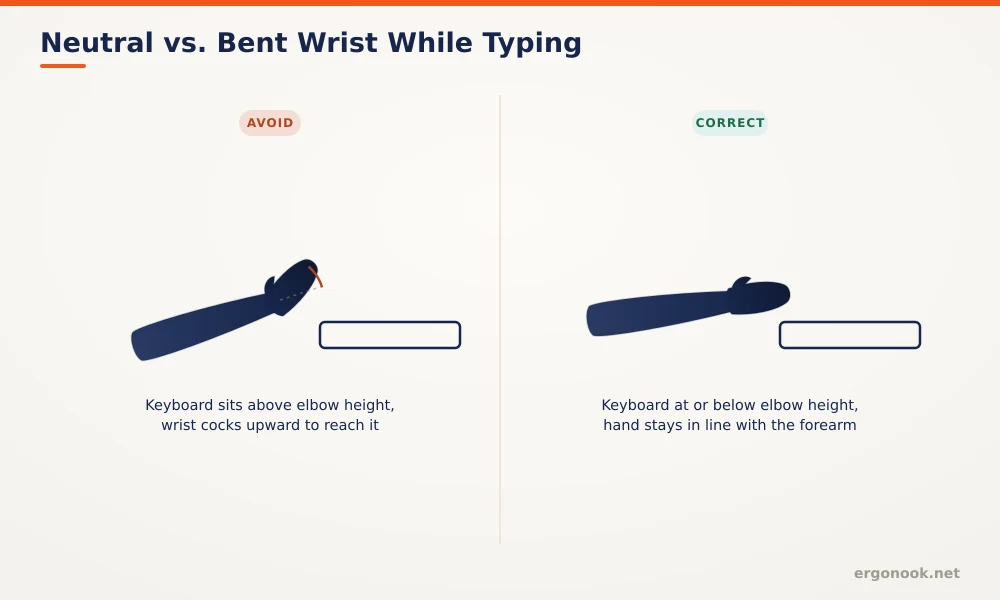
OSHA’s core guidance for preventing wrist strain is a neutral wrist, straight and in line with the forearm, not bent up, down, or to either side. This lets tendons slide through the wrist without extra friction. It’s the single change that does the most work here.
2. Rest and Ice After a Flare-Up
Mayo Clinic recommends resting the tendon and applying ice for 15 to 20 minutes every 4 to 6 hours after a sudden flare of tendon pain, which eases swelling. A splint or brace can also rest the tendon between typing sessions (Mayo Clinic, Wrist Pain: Diagnosis and Treatment).
3. Take Breaks From Typing Every Hour
OSHA’s Computer Workstations eTool recommends a five-minute break from computer tasks every hour. A short break gives tendons time to recover from sustained repetitive load instead of accumulating strain across an eight-hour day (OSHA, Computer Workstations eTool).
4. Lower Your Keyboard to Elbow Height
A keyboard set above elbow height forces your wrist upward to reach the keys. Our guide on positioning your keyboard and mouse ergonomically walks through getting this height right, including what a negative-tilt keyboard tray does for wrist angle.
5. Consider an Ergonomic Keyboard or Mouse
A split or tented keyboard reduces the ulnar deviation, the sideways bend toward the little finger, that a flat rectangular keyboard forces onto your wrists. A vertical mouse does something similar for the forearm, keeping it in a more neutral, handshake-style position instead of rotated flat. Neither is a cure on its own, but both remove one source of mechanical stress.
Setting Up Your Workspace to Prevent Wrist Pain
Setup matters more than any single stretch or gadget. If your desk is a fixed height that doesn’t match your elbow height, no keyboard adjustment fully compensates. Our split ergonomic keyboard picks and vertical mouse picks cover equipment built around this neutral-posture principle, but the equipment only works if the height underneath it is right first. Address desk and keyboard height before adding new hardware on top of a setup that’s still forcing your wrist into a bad angle.
Using a Wrist Rest Correctly
A wrist or palm support should be at least 1.5 inches deep with a soft, rounded surface, and it should contact the heel of your palm, not your wrist joint. OSHA is specific that resting your wrist itself on the pad while actively typing can restrict motion and increase awkward postures, since the pad becomes a pivot point instead of a resting surface. Hands should stay elevated above the rest while typing, and only drop down to rest on it during pauses (OSHA, Computer Workstations eTool, Wrist/Palm Supports).
| Symptom Pattern | Likely Contributing Factor | What Helps |
|---|---|---|
| Ache along the top or side of the wrist after long sessions | Tendon irritation from repetition and a bent wrist | Neutral posture, breaks, ice after flare-ups |
| Pain that worsens through the day, eases overnight | Cumulative load without enough recovery time | Hourly breaks, lower typing volume where possible |
| Numbness or tingling in thumb, index, or middle finger | Possible nerve involvement, not simple tendon strain | See a doctor rather than self-treat |
| Pain that improves with rest but returns with typing | Setup issue, likely keyboard or desk height | Re-check elbow angle and keyboard height |
When to See a Doctor
Rest, ice, and setup changes are reasonable first steps for mild, typing-related wrist soreness. Numbness, tingling, or pain that persists despite these changes, or that spreads into your fingers or interferes with sleep, goes beyond what self-care addresses. That pattern can point to nerve involvement, and a doctor or physical therapist can identify the specific cause and the right treatment rather than you guessing at it.
Frequently Asked Questions
How long does typing-related wrist pain usually take to improve?
Mild tendon irritation often eases within a couple of weeks with rest, setup changes, and reduced repetitive load. Pain that persists past that point is worth having evaluated.
Is wrist pain from typing the same as carpal tunnel syndrome?
Not always. Tendon irritation causes aching or soreness, while carpal tunnel syndrome specifically involves the median nerve and tends to cause numbness or tingling in the thumb, index, and middle fingers. See our guide on preventing carpal tunnel at work for that specific condition.
Should I wear a wrist brace while typing?
Braces are generally meant to rest the tendon between typing sessions, not to be worn while actively typing, since a rigid brace can restrict the neutral wrist motion you’re trying to maintain.
Should I use ice or heat for wrist pain?
Mayo Clinic notes ice works best right after a flare-up to reduce swelling, while heat tends to help more with ongoing, chronic tendon pain by boosting blood flow and relaxing muscles.
Reducing wrist pain from typing comes down to fixing the angle first, then the habits around it: a straight neutral wrist, a keyboard at the right height, regular breaks, and a wrist rest used between typing bursts rather than during them. If pain persists past a couple of weeks of these changes, that’s the point to get it checked rather than keep adjusting on your own.





Write Your Review
No reviews yet. Be the first to share your experience!