

A split keyboard is a keyboard divided into two separate halves, one for each hand, letting your wrists stay closer to a neutral, straight angle instead of bending inward to reach a single block of keys. A 1999 study found split keyboards reduced ulnar deviation from about 12 degrees to within 5 degrees of neutral compared with a standard layout.
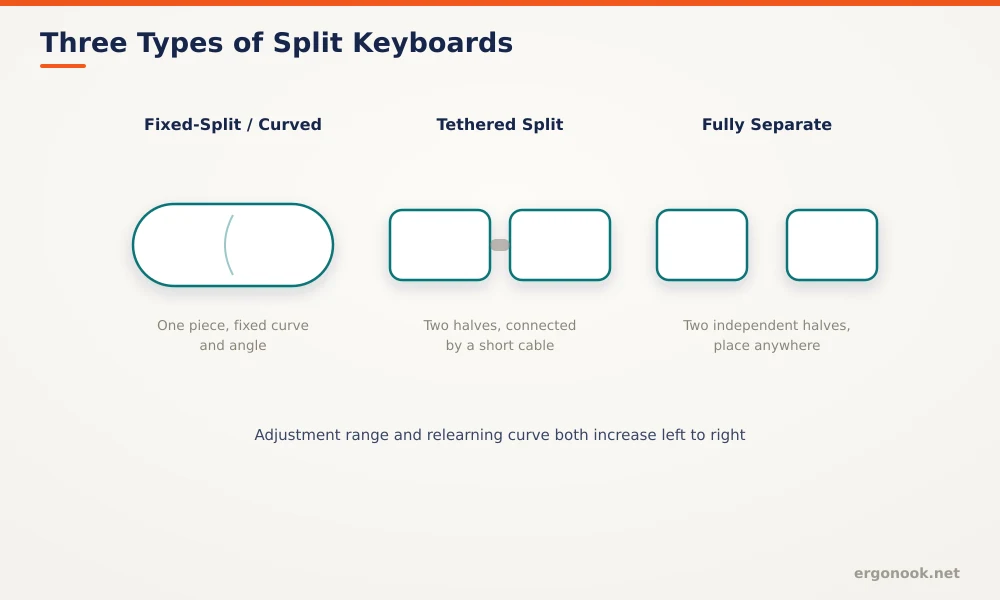
- Split keyboards range from fixed curved designs that look like one piece to fully separate halves you can place anywhere on the desk.
- A 1999 study in Human Factors found split keyboards reduced ulnar deviation from about 12 degrees to within 5 degrees of neutral.
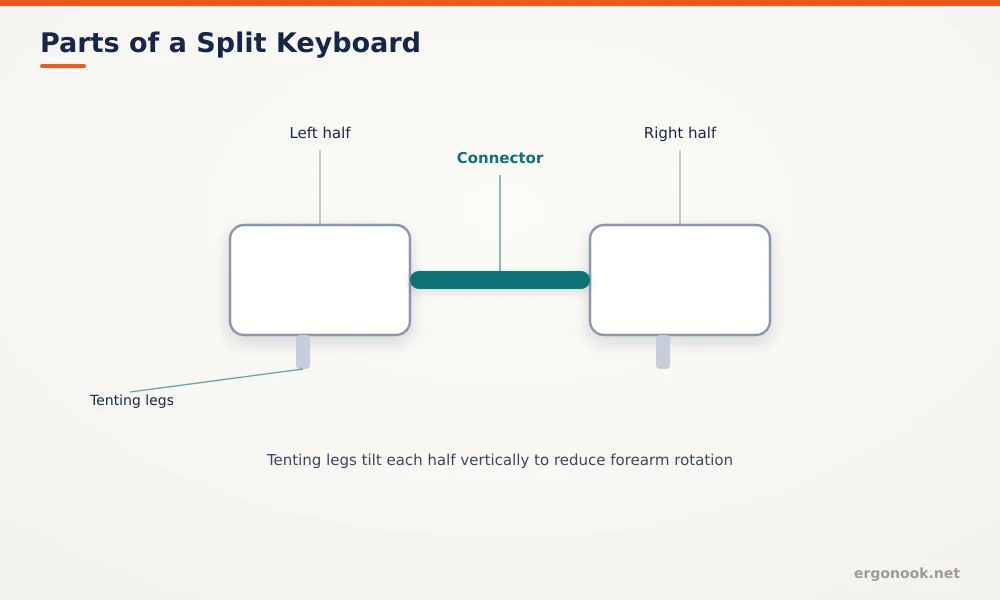
- Tenting, a vertical tilt added to each half, further reduces forearm rotation on top of the ulnar deviation benefit.
- The main cost is a real learning curve. Typing speed often dips for the first couple of weeks on a fully split layout.
What Is a Split Keyboard?
A split keyboard divides the standard key layout into two separate sections, roughly down the middle, so each hand operates its own half rather than both hands reaching across one continuous block. Some split keyboards look like a single curved unit; others are two physically separate pieces connected by a cable or wireless connection, positioned at whatever width matches your shoulders.
In this article:
- How a split keyboard works
- Types of split keyboards
- Do you actually need a split keyboard?
- Split keyboard vs regular keyboard
- How to choose the right one for you
- Frequently asked questions
How a Split Keyboard Works
On a standard keyboard, both hands reach toward the center to hit keys near the middle of the layout, which bends the wrists inward, called ulnar deviation. A split keyboard removes that reach by giving each hand its own dedicated half positioned at shoulder width, so the wrist stays straight rather than angled. A 1999 study of 90 office workers measured this directly and found split keyboards reduced mean ulnar deviation from about 12 degrees to within 5 degrees of neutral (Marklin, Simoneau & Monroe, Human Factors, 1999).
Types of Split Keyboards
| Type | Description | Best For |
|---|---|---|
| Fixed-split / curved | One piece, permanently curved or angled | Smallest adjustment from a standard keyboard, easiest transition |
| Tethered split | Two halves connected by a short cable | Moderate width adjustment while staying one connected unit |
| Fully separate | Two independent halves, wired or wireless | Full width and angle control, biggest relearning curve |
Do You Actually Need a Split Keyboard?
If you type for hours at a stretch and notice wrist discomfort by the afternoon, a split keyboard addresses a specific, measured cause: sustained ulnar deviation. If you type in short bursts throughout the day, the benefit is smaller, since the strain from a standard layout is cumulative rather than immediate. Cornell’s ergonomics program also notes that a correctly positioned regular keyboard, flat or slightly negative tilt at elbow height, can reach a similar neutral posture without switching hardware at all, so a split keyboard isn’t the only path to the same result. For a full breakdown of that trade-off, see our guide on ergonomic keyboard vs regular keyboard. If you’ve decided a split layout is the right call, our picks for the best split ergonomic keyboard are a good place to start.
Split Keyboard vs Regular Keyboard
The core difference isn’t features, it’s wrist geometry. A regular keyboard depends entirely on correct placement to stay neutral. A split keyboard builds the neutral angle into the hardware itself, which is more forgiving if your desk setup isn’t perfectly dialed in, but costs you a real adjustment period that a regular keyboard doesn’t require at all.
How to Choose the Right One for You
Start with a fixed-split or curved design if you’ve never used one before, since it asks the least of your muscle memory while still reducing ulnar deviation. Move to a tethered or fully separate design only if you specifically want shoulder-width hand placement or a tenting angle, since both add adjustment time on top of the split itself. Check the numpad and function row layout too. Many split keyboards drop or relocate them, which matters if you rely on numeric entry or specific shortcuts for work.
Frequently Asked Questions
Does a split keyboard slow down typing permanently?
Most people recover their original typing speed after a few weeks. A fully separate layout tends to take longer than a fixed curved one.
Are split keyboards good for gaming?
Split or heavily reshaped layouts can complicate common gaming key combinations. A mildly curved design is usually a smaller compromise for mixed use.
Do I need tenting, or is the split enough on its own?
The split alone addresses ulnar deviation. Tenting is a separate benefit for forearm rotation, worth adding later once you’re comfortable with the split itself.
Is an ortholinear layout the same as a split keyboard?
No. Ortholinear refers to keys arranged in a straight grid instead of staggered rows, a separate design choice that some split keyboards use and others don’t.
A split keyboard is a hardware fix for a wrist angle problem that a well-positioned regular keyboard can also solve, just with less margin for error. The measured benefit is real, backed by a reduction from roughly 12 to 5 degrees of ulnar deviation, but it comes with an adjustment period worth planning for.





Write Your Review
No reviews yet. Be the first to share your experience!