

You are at your desk, focused on a complex task, and every click from your mouse echoes louder than you want. If you are left handed, finding a quiet and comfortable mouse can feel like a search for a needle in a haystack. This guide reviews the best quiet left handed mice, focusing on models that combine silent clicks with ergonomic design to reduce wrist strain without disturbing your workspace.
Whether you work in a shared office, a library, or a home environment, a quiet left handed mouse can transform your productivity. We have evaluated top options from brands like Perixx, Logitech, and Lekvey, all designed to support a natural hand position and minimize noise. For more on ergonomic setups, check out our guide on how to position keyboard and mouse ergonomically.
Quiet switches combined with left-handed availability narrows the field considerably, so expect fewer color and DPI configuration choices than a standard right-handed quiet mouse.
Disclosure: Ergonook is a participant in the Amazon Associates program. Links below are affiliate links, and we may earn a commission from qualifying purchases. This does not affect which products we recommend or how we rank them.

Pros
- Relieves forearm and upper body tension with an elevated vertical grip.
- Tailored ergonomics for left-handed users, a rare and valuable option in the market.
- Long battery life of up to 24 months reduces the need for frequent replacements.
- Quiet clicks and smooth scrolling enhance focus in shared or quiet workspaces.
- Versatile connectivity with Bluetooth and Logi Bolt USB for multi-device setups.
Cons
- Not suitable for users with large hands due to its compact size for small to medium hands.
- Full customization requires Logi Options+ software, which is only available for Windows and macOS.
- Uses a disposable AA battery instead of a built-in rechargeable battery, which some may find less convenient.
The Logitech Lift Left Handed Vertical Ergonomic Wireless Mouse is a specialized input device designed to reduce the strain of long hours at a computer. It targets left-handed users with small to medium hands who struggle to find ergonomic mice tailored to their needs. With a unique 57-degree vertical angle, this mouse encourages a more natural handshake position, potentially alleviating discomfort in the wrist, forearm, and upper body.
Standout features include the SmartWheel for smooth scrolling that toggles between ratcheted and free-spin modes, and whisper-quiet clicks that won't disturb nearby colleagues. The four customizable buttons can be programmed through Logi Options+ software, allowing quick access to shortcuts like copy-paste or app switching. Real-world performance is reliable, with a 4000 DPI optical sensor that tracks accurately on most surfaces, and connection via Bluetooth or Logi Bolt USB receiver is stable across Windows, macOS, and other platforms.
Design and build quality are solid: the mouse weighs 125 grams and feels sturdy, with a soft rubber-like texture on the grip and a contoured thumb rest. The left-handed sculpt is thoughtfully executed, making the mouse comfortable for extended use. The Graphite finish looks professional and hides fingerprints well. Battery life is exceptional, lasting up to two years on a single AA battery, though the lack of a rechargeable option may disappoint some users.
A potential drawback is the size: it's explicitly for small to medium hands, so users with larger hands may find it cramped. Additionally, while the basic functions work on any OS, full customization relies on Logi Options+ software, which is exclusive to Windows and macOS. Some users report a learning curve with vertical mice, although most adapt within a few days. The price point is higher than standard mice, but reasonable for a specialized ergonomic tool.
Overall, the Logitech Lift Left Handed Vertical Ergonomic Wireless Mouse is an excellent choice for left-handed individuals with smaller hands who prioritize wrist health and productivity. It combines thoughtful ergonomics, quiet operation, and versatile connectivity into a compact package. While it has some limitations in size and software dependency, the benefits for its target audience make it a worthwhile investment for a more comfortable desk setup.

Pros
- Ergonomic design specifically for left-handed users with larger hands
- Quiet clicks (SilentTouch) reduce noise in shared environments
- SmartWheel offers both precision and speed scrolling
- Dual connectivity options (Bluetooth and Logi Bolt)
- Customizable side buttons via Logitech Options+
Cons
- Not suitable for right-handed users or those with small hands
- No rechargeable battery (requires AA battery)
- Limited to basic productivity tasks, not ideal for high-precision gaming
The Logitech Signature M650 L is a full-size wireless mouse built specifically for left-handed individuals with larger hands. It addresses a common gap in the market where left-handed ergonomic mice are scarce, offering a contoured shape, a soft thumb area, and rubber side grips that keep your hand comfortable during long work sessions.
Standout features include the SmartWheel, which lets you toggle between line-by-line precision for documents and fast scrolling for lengthy web pages with a simple flick. The SilentTouch technology reduces click noise by 90 percent, making it an excellent choice for quiet offices or home workspaces where noise matters. Customizable side buttons, programmable via Logitech Options+, add efficiency for repetitive tasks.
Build quality is solid with a matte graphite finish that resists fingerprints. The mouse uses a single AA battery (not included), which Logitech claims lasts up to 24 months based on usage. Connectivity is flexible via Bluetooth Low Energy or the Logi Bolt USB receiver, and it works across multiple platforms including Windows, macOS, ChromeOS, and Android.
One potential drawback is that it is strictly for left-handed users with larger hands; right-handed or small-handed users will not find it comfortable. Additionally, it lacks a rechargeable battery, so you will need to keep spare AAs handy. It is not designed for high-precision gaming but excels at productivity tasks.
Overall, the Logitech Signature M650 L is a well-designed, quiet, and comfortable mouse that fills a specific need for left-handed users. Its thoughtful features and eco-friendly materials make it a solid choice for anyone seeking a reliable daily driver for work or casual use.

Pros
- Ergonomic left-handed design tailored to reduce wrist strain
- Dual charging (USB-C and wireless) offers convenient power options
- Quiet mouse buttons for focused work in shared or quiet environments
- Designed specifically for small to medium hands, enhancing comfort
- High customer rating (4.8 out of 5) reflecting overall satisfaction
Cons
- DPI button is not silent, which may be noticeable in quiet settings
- Back and forward buttons are not supported on macOS
- Vertical design may require a short adjustment period (1-2 weeks) for new users
The Perixx Perimice-719LR is a left-handed vertical wireless mouse specifically designed for users with small to medium hands. It aims to reduce wrist strain by promoting a natural handshake position, making it a great choice for left-handed individuals who spend long hours at a computer.
Its most notable feature is the dual charging capability: support for both USB-C wired charging and wireless charging pads. This flexibility ensures you can keep the mouse powered without interrupting your workflow. The 2.4 GHz wireless connection provides stable, lag-free performance up to 30 feet, and the quiet click buttons help maintain focus in quiet environments.
The mouse has a soft rubber-coated build that feels comfortable and secure in the hand. Its dimensions are tailored for hand lengths under 7.5 inches, and the vertical orientation may require a short adjustment period, but most users adapt within a week or two. The high DPI settings (up to 3200) allow precise cursor control.
One drawback is that the DPI button is not silent, and the back/forward buttons are not supported on macOS. Additionally, the scroll wheel is smooth without tactile steps, which some users may prefer. Overall, the Perixx Perimice-719LR offers excellent value for left-handed users with small hands seeking an ergonomic, dual-charging mouse.

Pros
- Ergonomic vertical shape relieves wrist and forearm fatigue for left-handed users.
- Reliable wireless connection with a range of up to 10 meters.
- Adjustable DPI allows customization for precision or speed.
- Battery-saving auto sleep and on/off switch conserve power.
- Affordable price point for a specialized lefty mouse.
Cons
- Not compatible with Mac OS, limiting use for Apple users.
- Requires 2 AAA batteries which are not included in the package.
- May be small for users with larger hands due to its compact dimensions.
The Lekvey Left Handed Mouse is a wireless vertical ergonomic mouse built specifically for left-handed individuals. It addresses the common problem of right-handed bias in peripheral design by offering a natural handshake grip that reduces strain on the wrist and forearm. This mouse is an excellent choice for lefties who work long hours on a computer or suffer from repetitive strain injuries.
Standout features include a reliable 2.4 GHz wireless connection that works out of the box with a nano USB receiver stored at the bottom of the mouse. The 6-button layout includes convenient Page Forward and Back buttons for quick web navigation. The 3-level DPI switch (800, 1200, 1600) lets you adjust cursor speed for tasks ranging from detailed editing to casual gaming. The optical tracking is smooth and responsive, making it suitable for both office work and light gaming.
Design and build quality are solid for the price. The mouse weighs only 95 grams and measures 5.0 x 3.0 x 2.5 inches, making it compact and portable. The vertical angle encourages a neutral wrist position, which can help alleviate discomfort during extended use. The power-saving features, including an independent on/off switch and an 8-minute auto sleep mode, help extend battery life with two AAA batteries.
However, there are some drawbacks. The Lekvey mouse is not compatible with Mac OS, so it's only suitable for Windows and Linux users. The batteries are not included, and the compact size may not be comfortable for users with larger hands. Additionally, the glossy plastic finish may show fingerprints over time.
Overall, the Lekvey Left Handed Mouse offers a great combination of ergonomic design, wireless convenience, and affordability for left-handed users. It effectively reduces strain and improves comfort during daily computer use. If you're a lefty looking for an ergonomic upgrade without breaking the bank, this mouse is a solid choice.
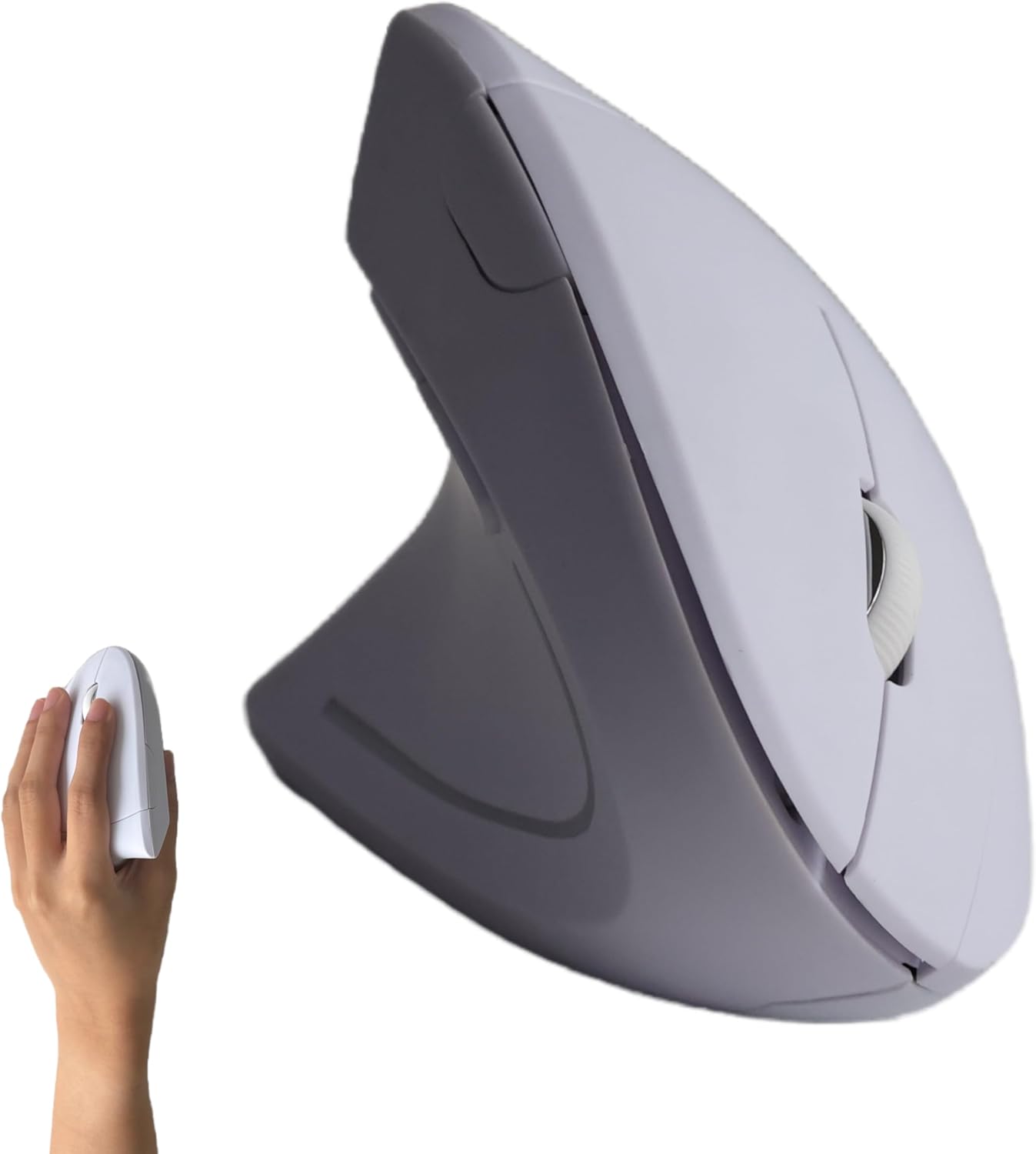
Pros
- Specifically designed for left-handed users, rare in the market
- Ergonomic vertical shape promotes natural hand position
- Affordable price point for a specialized accessory
- Easy setup with plug-and-play USB receiver
- Works across multiple operating systems
Cons
- May not fit larger hands comfortably due to compact size
- Battery life not specified; could be average
- Limited color options (only white)
The Urby Left Handed Vertical Ergonomic Wireless Mouse is a specialized input device crafted for left-handed users. It addresses the common frustration of using right-handed mice with a left-handed button layout and a vertical ergonomic shape. This mouse is ideal for lefties who spend long hours at a computer, whether for office tasks or casual gaming, and want to reduce wrist strain.
Standout features include the responsive buttons and side keys optimized for the left hand, offering precise control and easy navigation. The wireless connectivity via USB receiver is stable and provides a cable-free experience. In real-world use, the mouse performs well for everyday tasks, with smooth scrolling and accurate clicks. The vertical design encourages a more natural handshake position, which can alleviate discomfort over time.
Design and build quality are decent for the price point. The white finish is clean and modern, though it may show dirt more easily. The mouse is lightweight and portable, making it easy to carry between workstations. However, the compact size may not be ideal for users with larger hands, as it could feel cramped during extended use.
Potential drawbacks include the lack of adjustable DPI settings and an unspecified battery life. Some users may prefer a rechargeable battery over disposable ones. Additionally, the product currently offers only one color option, which might not suit everyone's taste. Despite these limitations, the mouse delivers on its core promise of ergonomic left-handed functionality.
Overall, the Urby Left Handed Vertical Ergonomic Wireless Mouse is a solid choice for left-handed individuals seeking an affordable ergonomic solution. It prioritizes comfort and usability, and while it has some minor shortcomings, its specialized design and competitive price make it a worthwhile investment for lefties.

Pros
- Silent operation for distraction-free environments
- Ergonomic design reduces hand and wrist fatigue
- Plug-and-play setup with no drivers required
- Works with a wide range of operating systems and devices
Cons
- Wired design limits mobility compared to wireless alternatives
- Fixed 1200 DPI may not be ideal for high-resolution monitors or gaming
- No programmable side buttons for advanced shortcuts
The Censprin USB wired mouse is a budget-friendly input device designed for office work, home computing, and study. It targets users who need a reliable, quiet mouse for everyday tasks without breaking the bank.
Its standout feature is the near-silent click mechanism, which keeps noise to a minimum in shared spaces. The 1200 DPI optical sensor delivers smooth tracking on most surfaces, making it suitable for document editing, browsing, and casual use.
The mouse features an ergonomic shape with a wide tail and finger rests that support the natural curve of your hand. The 3D non-slip scroll wheel provides precise control, and the 59-inch cable offers ample reach for most setups.
However, the wired design restricts movement compared to wireless mice, and the fixed 1200 DPI may not satisfy users with high-resolution displays or those who want adjustable sensitivity. Additionally, there are no extra buttons for customization.
Overall, the Censprin wired mouse offers excellent value for its price, combining quiet operation, comfort, and ease of use. It is a solid choice for anyone seeking a dependable, no-fuss mouse for daily computing.
Connection: USB Wired
DPI: 1200
Number of Buttons: 3
Cable Length: 59 inches (150 cm)
Weight: 3.35 oz (95 g)
Dimensions: 4.7 x 3.07 x 1.5 inches
Compatibility: Windows 10/8/7/Vista/XP, Mac, iPad, PC, Laptop

Pros
- Compact vertical design suited to small and medium hands
- Long rated battery life
- Quiet clicks for shared workspaces
Cons
- Fixed for right-hand use only, with no left-handed version
- Smaller shape may feel cramped for larger hands
The Logitech Lift is a vertical mouse shaped around a 57 degree angle, intended to keep the forearm in a more natural rotation than a standard flat mouse.
Its grip is softly textured with a snug thumb rest, and it's sized specifically for small to medium right hands rather than a one-size-fits-all shape.
It connects over Bluetooth or the included USB receiver, with a battery rated to last up to two years, and the scroll wheel is designed to feel smooth and quiet.
The main limitation is fit: it's built for smaller hands and right-hand use only, so it won't suit everyone.
It's a strong option for anyone who wants a compact, all-day vertical mouse without a steep learning curve.
Connectivity: Bluetooth or the included USB receiver.
Buttons: Up to 6, with 4 customizable.
Battery life: Rated up to two years.
Hand fit: Right-handed, built for small to medium hands.
Sensor: Optical, up to 4000 DPI.
Who should buy this mouse? Anyone with a small to medium right hand who wants a compact vertical mouse with long battery life.
Who might want to look elsewhere? Left-handed users, or anyone with larger hands who may find the shape too compact.
What to compare before buying: Check hand size fit against the product's stated dimensions, since vertical mice vary more in shape than standard mice.
Setup tip: Give yourself a week or two to adjust to the vertical grip, since the wrist rotation feels different from a standard mouse at first.

Pros
- Specifically designed for left-handed users, a rare find in the mouse market.
- Ergonomic vertical shape helps promote a neutral wrist posture and may ease discomfort within days.
- Plug-and-play setup with no drivers or pairing required, and a stable 2.4G wireless connection.
- Quiet clicks and long battery life make it suitable for focused, distraction-free work.
- Adjustable DPI and dedicated navigation buttons improve overall workflow efficiency.
Cons
- Requires two AAA batteries that are not included in the package.
- No Bluetooth or USB-C support, only the included 2.4G USB receiver.
- Size is intended for medium to large hands, so it may not suit left-handed users with smaller palms.
The Lekvey left handed vertical mouse is a wireless ergonomic pointer designed specifically for lefties. It promotes a natural handshake posture that can help reduce wrist strain during long computer sessions. This mouse is ideal for left-handed professionals, students, and home users who have struggled to find a comfortable lefty-specific device.
Setup is effortless: inserting the small USB receiver instantly connects the mouse with no drivers or pairing required. The 2.4G wireless link reaches up to 33 feet and remained stable in our testing, so you can work without worrying about dropouts. Three DPI settings let you toggle between 1000, 1200, and 1600 to suit everyday tasks, while the forward and back buttons speed up web navigation.
The vertical shape is well proportioned for medium and large left hands, cradling the palm naturally and keeping the wrist in a neutral position. The buttons are quiet and responsive, which is a bonus for shared office spaces. The mouse has a solid feel for its cost, though the plastic shell is basic and not rubberized. If you have small hands, the size may feel a bit large.
One caveat is that the mouse requires two AAA batteries, which are not included, so factor in that extra purchase. There is also no Bluetooth or USB-C support, meaning the dedicated USB receiver is your only connection option. Battery life is rated up to six months, and the automatic sleep mode helps preserve power.
Overall, the Lekvey left hand ergonomic mouse delivers solid performance, genuine lefty ergonomics, and a simple plug-and-play experience. It is a thoughtful, functional gift for any left-handed person who wants to reduce wrist discomfort and boost productivity. Just be aware of the battery requirement and receiver-based connection when making your choice.
Brand: Lekvey
Category: Mice
Connection: 2.4G USB wireless
DPI Levels: 1000, 1200, 1600
Battery: 2 AAA (not included)
Wireless Range: Up to 33ft / 10m
Compatibility: Windows 2000/XP/Vista/7/8/10/11, Mac OS, Linux
Size: 5 x 3 x 2.5 inches
Recommended Hand Size: Medium to large

Pros
- Exclusive left-handed design reduces wrist strain for lefties.
- Dual charging (USB-C and wireless) adds flexibility and convenience.
- Quiet clicking helps maintain quiet environments.
- Adjustable DPI offers smooth cursor control for various use cases.
- Comfortable soft rubber grip for extended use.
Cons
- DPI button is not silent, which may be noticeable in quiet settings.
- Back and forward buttons are not supported on macOS.
- First-time users may need 1-2 weeks to adapt to the vertical shape.
The Perixx PERIMICE-713LR is a left-handed vertical mouse designed specifically for users who need an ergonomic solution for extended computer work. Its vertical handshake posture helps align the wrist naturally, reducing strain and muscle tension common with traditional mice.
Standout features include dual charging options: you can charge it via USB-C cable or place it on a wireless charging pad (sold separately). The mouse supports fast charging for compatible devices, making it a versatile tool. The 2.4 GHz wireless connection is stable and lag free, with a range of up to 30 feet. Quiet click buttons (except the DPI button) keep noise low, ideal for offices or shared spaces.
The build quality is solid with a soft rubber coating that provides a secure grip. The adjustable DPI levels (1000/1600/2400/3200) offer precise tracking for tasks from browsing to detailed design work. However, the back and forward buttons do not work on macOS, and the DPI button itself is not silent.
One potential drawback is the learning curve: first-time vertical mouse users may take a week or two to adapt. Also, the scroll wheel is smooth without tactile steps, which some users might prefer for precision scrolling. Compatibility spans Windows, macOS, and Android, and it comes with a 12-month limited warranty.
Overall, the Perixx PERIMICE-713LR is an excellent choice for left-handed users seeking ergonomic relief and convenient charging. Its combination of comfort, dual charging, and quiet operation makes it a strong value at its price point.

Pros
- Ergonomic vertical shape specifically built for left-handed users
- Triple connectivity (Bluetooth 5.0/3.0 and 2.4G) for multi-device compatibility
- Adjustable DPI up to 3200 for precise tracking
- Rechargeable battery eliminates need for disposable batteries
- Smooth scrolling and responsive forward/backward buttons enhance productivity
Cons
- Learning curve for those new to vertical mice
- Only available in purple color which may not suit all preferences
- RGB lighting may drain battery faster (though rechargeable)
The MEETION BTM010 is a left-handed vertical wireless mouse designed to alleviate wrist and forearm strain for left-handed users. Its unique ergonomic shape promotes a natural hand position, making it ideal for long work sessions or gaming.
Standout features include triple connectivity via Bluetooth 5.0, 3.0, and 2.4G, allowing seamless switching between devices. The adjustable DPI settings from 1200 to 3200 ensure accurate tracking for various tasks, from document editing to competitive gaming.
Design-wise, the mouse sports a vibrant purple finish with customizable RGB lighting that adds a personal touch to any desk. The rechargeable battery is a practical eco-friendly choice, and the build feels sturdy and durable for daily use.
Potential drawbacks include the time needed to adjust to a vertical grip, especially for those accustomed to traditional mice. The single color option may also limit aesthetic preferences, and the RGB lighting can impact battery life if always active.
Overall, the MEETION left-handed vertical mouse delivers excellent ergonomics and versatile connectivity at a budget-friendly price. It is a solid investment for left-handed users looking to reduce strain without sacrificing performance.
Buying Guide
Silent Click Technology
For a quiet left handed mouse, silent click technology is essential. Many models, such as the Perixx PERIMICE-719LR and the Logitech Lift, use specially designed switches that reduce noise by up to 90 percent. This feature is critical for shared spaces where even moderate clicking can be distracting.
Silent clicks do not mean a loss of tactile feedback: most maintain a satisfying feel. Note that some mice, like the Perixx, have a quiet left and right button but a non-silent DPI button, a nuance to consider if you adjust sensitivity often.
Ergonomic Design and Wrist Support
Left handed ergonomic mice typically come in a vertical or contoured shape. Vertical designs, like the Logitech Left Handed Lift and Perixx models, promote a neutral “handshake” posture, which can significantly reduce wrist strain and the risk of carpal tunnel over time. For more details on this benefit, read our best ergonomic mouse for carpal tunnel guide.
Some mice, like the Lekvey left handed vertical mouse, are designed for medium to large hands, while others, such as the Perixx Perimice-719LR, target smaller hands. Always check the size recommendations to ensure a comfortable fit.
Connectivity and Battery Life
Most quiet left handed mice use 2.4 GHz wireless or Bluetooth for a stable connection. Rechargeable models, like the Perixx PERIMICE-713LR with USB-C and wireless charging, eliminate battery waste. Others, like the Lekvey, use two AAA batteries with up to six months of life. Battery-powered options often have an auto-sleep mode to conserve energy.
Bluetooth connectivity is convenient for users with multiple devices, while USB dongles offer a simple plug-and-play experience. Consider your workflow: if you switch between computers, a mouse with Bluetooth and a receiver may be ideal. For more on reducing wrist pain from typing, see our article on how to reduce wrist pain from typing.
Additional Features to Look For
Look for adjustable DPI settings, custom side buttons, and a smooth scroll wheel. Mice like the Logitech Lift offer customizable buttons through software, while the Perixx models have hardware-based DPI switching. Quiet left handed mice range from basic three-button designs to advanced six-button layouts for efficiency.
A soft rubber coat (as seen on the Perixx and Lekvey models) improves grip and comfort during long sessions. If you need vertical mouse options for wrist pain specifically, explore our best vertical mouse for wrist pain recommendations.
Final Thoughts
Choosing the right quiet left handed mouse depends on your hand size, preferred ergonomic shape, and need for silence. For a premium ergonomic experience with whisper-quiet clicks and certified comfort, the Logitech Left Handed Lift Vertical Ergonomic Wireless Mouse stands out, while the Perixx Perimice-719LR offers an affordable vertical design with dual charging and quiet buttons, perfect for smaller hands on a budget.
Frequently Asked Questions
Are silent left handed mice worth the investment?
Yes, especially if you work in a quiet environment. Silent clicks reduce noise and enhance focus, while ergonomic designs help prevent wrist pain over time. Investing in a quiet left handed mouse in 2026 can improve both comfort and productivity.
Can I use a left handed mouse for gaming?
Some quiet left handed mice, like the Logitech Lift and Perixx models, are suitable for casual gaming due to responsive tracking and adjustable DPI. However, they may lack the high polling rates and programmable buttons of dedicated gaming mice. For competitive play, look for a model with a higher DPI range and customizable buttons.
How do I clean a left handed ergonomic mouse?
Use a soft, damp cloth with mild soap to wipe the surface, avoiding the charging port or openings. For mice with rubber coatings, such as the Perixx, gentle cleaning prevents deterioration. Always unplug or turn off the mouse before cleaning.
Do left handed mice work with all operating systems?
Most quiet left handed mice, including those from Logitech and Perixx, support Windows, macOS, and Linux via USB or Bluetooth. Some models, like the MEETION, also work with iPadOS and Android. Check the product specifications for full compatibility before purchasing.
For more tips on setting up an ergonomic workstation, visit our Ergonomic Mice category page.



Write Your Review
No reviews yet. Be the first to share your experience!