

Your MMO character’s survival depends on split-second reactions and seamless spell rotations. But if your hand aches after a two-hour raid session, your performance suffers. You need a gaming mouse that merges marathon comfort with the programmable buttons essential for MMO macros. In 2026, the market offers more ergonomic designs than ever for MMO enthusiasts. We reviewed dozens of models, focusing on wrist-friendly shapes, button layouts, and reliable sensors, to bring you the most promising contenders.
This guide covers wired and wireless ergonomic MMO mice across various budgets. Whether you need a vertical design for wrist pain relief or a traditional shape with programmable side buttons, we have recommendations. For those exploring other ergonomic solutions, our guide to the best vertical mouse for wrist pain offers additional insights into maintaining comfort during long sessions.
A mouse loaded with side buttons takes time to learn blind, so if you swap mid-raid-tier without practicing macros beforehand, expect a rough adjustment period.
Disclosure: Ergonook is a participant in the Amazon Associates program. Links below are affiliate links, and we may earn a commission from qualifying purchases. This does not affect which products we recommend or how we rank them.

Pros
- Extensive customization with 16 programmable buttons and complex macro support.
- Long battery life, up to 70 hours in wireless mode with auto-sleep and power saving features.
- Accurate high-precision sensor with 16000 DPI and 1000 Hz polling rate.
- Ergonomic shape with sweat-resistant grinding coating for comfortable long sessions.
Cons
- The dense cluster of 12 thumb buttons may feel overwhelming for players with smaller hands or those new to MMO mice.
- The included software is required to unlock full customization, which might be a hurdle for users who prefer plug-and-play.
- The 70-hour battery life depends on keeping auto-sleep and power saving modes active.
The UtechSmart Venus Pro is a wireless MMO gaming mouse designed for players who need quick access to a large number of commands. With its 16000 DPI optical sensor and dedicated macro engine, it is especially valuable for MMORPG, MOBA, and other titles where every keystroke matters.
The 16 programmable buttons are the highlight. The 12 thumb buttons are arranged with different inclination angles so your thumb can find them without looking, while macro programming lets you combine complex actions into a single press. The wireless connection feels responsive thanks to the 2.4 GHz nano receiver and 1000 Hz polling rate, so you can move around your desk without losing input fidelity.
The ergonomic shape reduces wrist fatigue during long sessions, and the grinding coating on the shell increases grip while resisting sweat. The battery is equally impressive for a wireless mouse: a 1000 mAh cell delivers up to 70 hours of continuous use in wireless mode, with auto-sleep and low power consumption modes that help it last through marathon gaming weekends.
No product is perfect. The thumb button cluster is dense, and players with smaller hands may struggle to reach all 12 buttons comfortably. In addition, the setup software is necessary to remap keys or adjust DPI stages, which adds an extra step before you can take full control of the mouse. For most MMO players, the customization payoff is worth the learning curve.
The UtechSmart Venus Pro offers remarkable value for its price point. It brings wireless freedom, a high-accuracy sensor, and deep macro customization to the MMO segment without breaking the bank. If you want a reliable, comfortable, and fully featured wireless gaming mouse for MMO or MOBA play, the Venus Pro is a very strong contender.
Sensor: UtechSmart custom PixArt PMW3335 ultra-accurate optical sensor. DPI: 100 to 16000 with 5 switchable DPI stages. Polling rate: 1000 Hz. Buttons: 16 programmable buttons, including 12 thumb buttons with angled design. Connectivity: 2.4 GHz wireless with nano receiver and stable 1.5m wired mode. Battery: 1000mAh capacity, up to 70 hours wireless use, 2-hour full charge, auto-sleep and low power mode. Software supports button mapping, DPI adjustment, and battery monitoring.
Pros
- Extensive button customization for MMO and MOBA gameplay
- Adjustable side button slider accommodates different hand sizes and grips
- High-precision sensor with fine DPI tuning
- Robust build quality with long-lasting switches
- Comfortable ergonomic design for extended sessions
Cons
- Wired design may limit desk setup flexibility
- Side buttons can be tricky to reach for those with smaller hands
- iCUE software required for full customization, which some users find complex
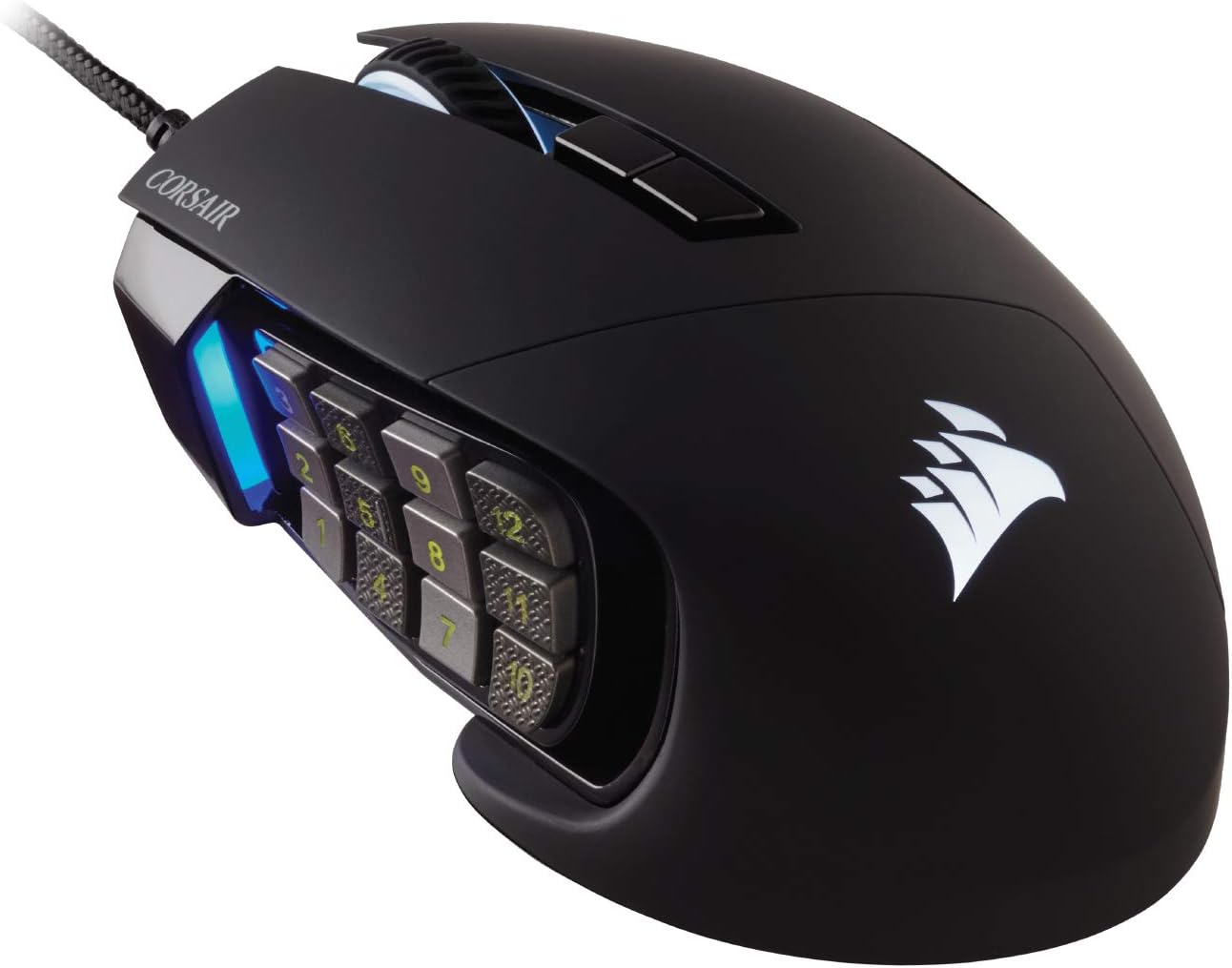
The Corsair Scimitar RGB Elite is a wired gaming mouse built specifically for MMO and MOBA players who need quick access to numerous commands. With 17 programmable buttons, including a 12-button side panel, this mouse lets you assign complex macros or individual keybinds for efficient gameplay.
Its standout feature is the patented Key Slider control system, which allows you to slide the side button cluster forward or backward to match your thumb's natural reach. The native 18,000 DPI optical sensor (PixArt PMW3391) offers 1 DPI resolution steps, ensuring accurate tracking for both fast and precise movements. In real-world use, the sensor performs reliably across various surfaces, and the Omron switches provide satisfying tactile feedback with a 50 million click lifespan.
The contoured shape fits comfortably in the palm, and the right-side finger rest helps reduce hand fatigue during long gaming sessions. The braided cable adds durability without being overly stiff, and the four-zone RGB lighting can be customized via Corsair's iCUE software to match your setup.
One potential drawback is the wired connection, which may not suit users who prefer a clutter-free desk. Additionally, the side buttons may be less accessible for those with smaller hands, even after adjusting the slider. The iCUE software, while powerful, has a learning curve for new users.
Overall, the Corsair Scimitar RGB Elite is a top choice for dedicated MMO and MOBA gamers who value button customization and ergonomic comfort. Its adjustable side panel and high-DPI sensor make it a versatile tool for mastering complex games.

Pros
- Three swappable side plates provide unmatched versatility for different game genres and productivity
- Excellent sensor performance with high DPI and Frame Sync for precise tracking in competitive games
- Long battery life ensures extended gaming sessions without frequent charging
- Durable optical switches offer fast, responsive clicks and longevity
- Multiple connectivity options give flexibility for any setup
Cons
- High price point may not suit budget-conscious buyers
- Heavier design compared to some ultralight gaming mice
- Full customization software features are limited to Windows; macOS supports only core functions
The Razer Naga V3 Pro is a modular wireless gaming mouse designed for players who need adaptability across genres. It targets MMO enthusiasts, competitive FPS gamers, and productivity users who want a single mouse that can handle multiple roles. With three swappable side plates, it offers 12, 6, or 2-button layouts to match your game or workflow.
Standout features include the HyperScroll Tilt Wheel Gen-2, which provides tactile, free-spin, and Smart-Reel scrolling for inventory management or document navigation. The Focus Pro 50K Optical Sensor Gen-3 delivers exceptional tracking accuracy with up to 50,000 DPI, making it suitable for precision aiming and creative work. The optical switches are lighter and rated for over 100 million clicks, ensuring consistent performance over years of use.
Build quality is solid with a comfortable ergonomic shape, though the mouse is on the heavier side due to its modular design. The magnetic side plates snap on securely and are easy to swap. Wireless connectivity is reliable with Razer HyperSpeed for low latency and Bluetooth for extended battery life, offering up to 280 hours on Bluetooth.
A potential drawback is the price, which is premium compared to many gaming mice. Additionally, the full customization suite via Razer Synapse is only available on Windows, limiting macOS users. Some may find the weight less ideal for fast-paced FPS games that favor lightweight mice.
Overall, the Razer Naga V3 Pro is an excellent choice for gamers who want versatility without compromising on performance. Its modular design, top-tier sensor, and long battery life make it a strong contender for MMO players and anyone who values customization. If you need a do-it-all wireless mouse and are willing to invest, this is a top pick.
Swappable Side Plates: 12-button, 6-button, 2-button layouts (magnetic)
Programmable Buttons: Up to 23 (including edge buttons and ring finger button)
Sensor: Razer Focus Pro 50K Optical Sensor Gen-3 (up to 50,000 DPI, 930 IPS, 90G acceleration)
Switches: Razer Optical Mouse Switches Gen-4 (100 million clicks, 12% lighter actuation)
Scroll Wheel: Razer HyperScroll Tilt Wheel Gen-2 (tactile 24/48 steps, free-spin, Smart-Reel)
Connectivity: Razer HyperSpeed Wireless, Bluetooth 5.0, USB-C wired
Battery Life: Up to 155 hours (HyperSpeed), up to 280 hours (Bluetooth)
Charging: USB-C, compatible with Razer HyperFlux V2 and Mouse Dock Pro (sold separately)
Software: Razer Synapse (Windows full, macOS core functions)

Pros
- Ergonomic 45° vertical design significantly reduces wrist and forearm strain.
- Ten programmable side buttons offer extensive macro capabilities for MMO and productivity.
- High-quality PAW3311 sensor with wide DPI range and reliable glass tracking.
- Long battery life (270 hours) and tri-mode connectivity for versatile use.
- Browser-based configuration with onboard memory eliminates the need for software installs on Windows.
Cons
- Configuration tool is Windows-only, limiting for Mac and Linux users.
- Vertical design may not suit all hand sizes or grip preferences.
- Initial learning curve for side button placement and ergonomic posture.
The SOLAKAKA E9 is a vertical ergonomic mouse specifically designed for MMO gamers and professionals who suffer from repetitive strain injuries or wrist fatigue. Its 45-degree handshake posture aims to reduce pressure on the wrist during extended use, making it a compelling choice for those who spend hours at the computer.
The standout feature is the 10 programmable side buttons placed at the thumb, providing a macro hub for complex commands. Combined with the PAW3311 sensor, which offers up to 24800 DPI and reliable glass tracking, the E9 delivers both comfort and precision. The tri-mode connectivity (2.4G, Bluetooth, USB-C) ensures it adapts to any setup, while the 1000mAh battery provides up to 270 hours of use.
The vertical design is unique and may require an adjustment period, but it effectively promotes a natural handshake position. The build feels solid with customizable RGB lighting on the side buttons and logo. The browser-based configuration tool is convenient for Windows users, allowing settings to be saved directly to the mouse's onboard memory.
However, the configuration tool is Windows-only, which is a limitation for Mac and Linux users. The 3.2-star rating from 74 reviews indicates some users have encountered issues, possibly with side button sensitivity or ergonomic fit. Additionally, the vertical grip may not suit everyone, and the price is higher than standard mice.
Overall, the SOLAKAKA E9 is a niche product that excels for its target audience: MMO players and users with wrist pain. If you need macro-heavy control and ergonomic relief, it offers good value. But if you prefer traditional mice or are on a non-Windows system, consider alternatives. The two-year warranty provides peace of mind.
Connection: Tri-Mode (2.4GHz, Bluetooth 5.0, USB-C)
Sensor: PAW3311 Optical
DPI Presets: 800/1200/1600/2400/3200/6400 (extendable to 24800)
Polling Rate: 1000Hz
Tracking Speed: 300 IPS
Acceleration: 35G
Battery: 1000mAh (up to 270 hours)
Buttons: 10 programmable side buttons + left/right/scroll/DPI switch
RGB: Customizable on side buttons and logo
Warranty: 2 years

Pros
- Excellent battery life, lasting weeks on a single AA battery
- 19 programmable buttons offer unmatched macro customization for MMO and MOBA games
- High-performance Focus Pro 30K sensor works on glass and other challenging surfaces
- Low-latency Razer HyperSpeed Wireless ensures responsive, input-lag-free gameplay
- Durable mechanical switches with a long lifespan
Cons
- Uses disposable AA batteries instead of a built-in rechargeable battery
- Dongle needs to be placed close to the mousepad with clear line of sight for a stable connection
- Button-heavy layout can feel overwhelming for users who aren't playing MMO or MOBA games
The Razer Naga V2 HyperSpeed is a wireless gaming mouse built specifically for MMO players who need quick access to numerous abilities, items, and macros. With an arsenal of 19 programmable buttons and a dual-mode scroll wheel, it is designed for titles like World of Warcraft, Final Fantasy XIV, and MOBAs where every keybind matters.
In real-world use, the mouse delivers excellent performance. The Razer HyperSpeed Wireless connection provides low-latency input that keeps up with fast rotations, while Bluetooth mode extends the battery life to up to 400 hours. The Focus Pro 30K optical sensor is also a standout, tracking accurately on surfaces like glass, so you can game without needing a dedicated mousepad.
The build quality is solid, with an ergonomic shape that supports comfortable long sessions. The mechanical switches Gen 2 are rated for 60 million clicks, giving you confidence in its durability. However, the wireless dongle must be positioned within about 30 cm of the mousepad and have a clear line of sight to avoid interference, which can be a minor hassle for desk setups.
The main drawbacks are the reliance on a AA battery and the complex button layout. While battery life is impressive, buying replacement batteries adds recurring cost, and the many buttons take time to get used to. Casual gamers may find the Naga V2 HyperSpeed to be more than they need, but for MMO enthusiasts, it is a powerful tool.
Overall, the Razer Naga V2 HyperSpeed is a fantastic option for dedicated MMO gamers who want wireless freedom, massive customization, and long endurance. It strikes an excellent balance between functionality and performance, making it a top pick in its category.

Pros
- Ergonomic design effectively reduces wrist and shoulder strain for extended use.
- Tri-mode connectivity offers flexibility for multiple devices and setups.
- 12 programmable buttons and macro support allow deep customization for any game or task.
- High DPI range and precise sensor deliver accurate tracking for competitive gaming.
- The 5-direction rocker provides intuitive, quick control in FPS, MOBA, and MMO games.
Cons
- The configuration software may require manual approval on some security programs to install.
- Designed only for right-handed users, limiting accessibility for left-handed gamers.
- Battery life is not specified in the product data, which may concern heavy users.
The ATTOE Wireless Vertical Gaming Mouse is a versatile peripheral that blends ergonomic comfort with gaming-grade performance. Designed specifically to combat carpal tunnel syndrome and muscle strain, it promotes a natural handshake position that reduces wrist, shoulder, and tendon fatigue. This makes it an excellent choice for both competitive gamers and professionals who spend long hours at the computer.
Standout features include a high-precision PMW3325 sensor with up to 24000 DPI, providing smooth and accurate tracking across five adjustable presets. The 12 programmable buttons, supported by macro editing software, allow you to tailor controls to your favorite games or workflows. Additionally, the thumb-operated 5-direction rocker replaces five traditional keys, giving you faster, more intuitive inputs in fast-paced titles like shooters and MOBAs.
Build quality is solid for its price point, with a contoured shape that accommodates small to large hands. The tri-mode connectivity (dual Bluetooth 5.0, 2.4GHz wireless, and USB-C wired) ensures stable, low-latency performance up to 33 feet. Side RGB strips with five dynamic effects add visual flair without compromising ergonomics, making the mouse suitable for both work and play.
One potential drawback is the software installation, which may require users to manually approve the driver on some security-conscious systems. Also, the mouse is right-handed only, so left-handed users will need to look elsewhere. Battery life details are not provided in the product data, which could be a concern for heavy users who prefer long wireless sessions.
Overall, the ATTOE vertical gaming mouse offers an impressive combination of ergonomic relief, high performance, and customization at a reasonable price. It is a strong contender for anyone seeking to reduce wrist pain while maintaining gaming or productivity efficiency. With its unique rocker and programmable buttons, it delivers genuine value for the target audience.
Pros
- Exceptional value with high-end specs at an affordable price
- Highly customizable with programmable buttons and weight tuning
- Comfortable ergonomic design suited for long gaming sessions
- Vibrant RGB lighting that can be personalized or turned off
- Responsive sensor with high DPI range for competitive play
Cons
- Software can be complex for beginners to configure fully
- 12 side buttons may feel overwhelming for non-MMO gamers
- Build quality, while good, is mostly plastic which may not suit everyone
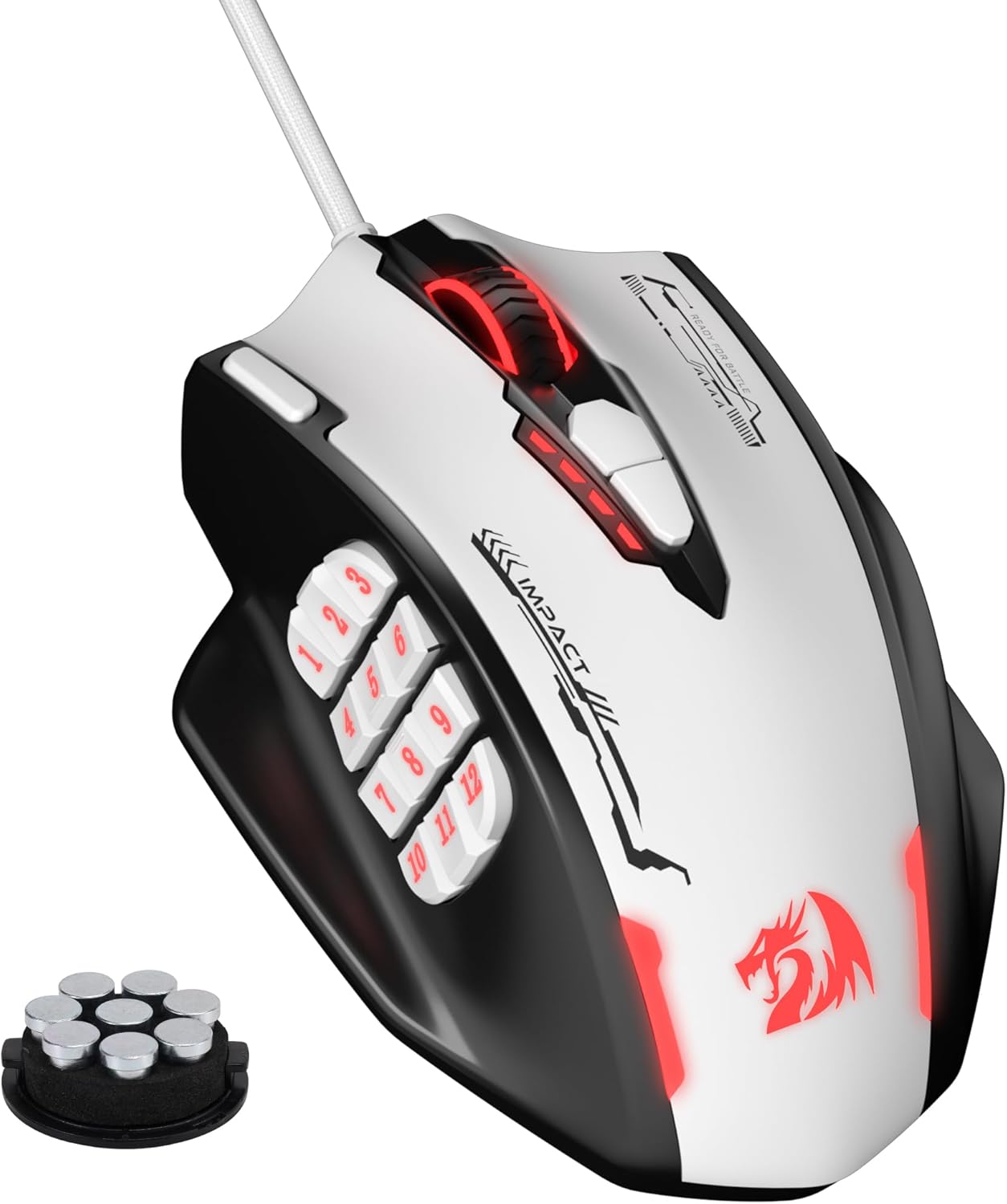
The Redragon M908 is a wired RGB gaming mouse designed specifically for MMO and MOBA enthusiasts who need quick access to multiple commands. With a 24000 DPI optical sensor and 18 programmable buttons, it promises precision and convenience for both gaming and daily tasks.
Standout features include a high-precision sensor with five adjustable DPI levels (400/800/1600/2400/3200) and a 1000 Hz polling rate for minimal latency. The 18 buttons, including 12 side buttons, can be remapped via software, and the 5 memory profiles with distinct RGB colors make switching between setups seamless. The included 8-piece weight tuning set (2.4g each) allows you to personalize the mouse weight to your liking.
Design-wise, the M908 sports an aggressive, ergonomic shape with durable TEFLON feet pads for smooth gliding. The 6ft braided-fiber cable and gold-plated USB connector add to its longevity. The RGB backlight offers 16.8 million colors and can be disabled if you prefer a stealthier look.
Potential drawbacks include a learning curve for the software, especially for first-time users, and the 12 side buttons may feel excessive for those who don't play MMOs. The build, while sturdy, uses plastic that might not appeal to everyone seeking a premium feel.
Overall, the Redragon M908 delivers outstanding performance and customization at a budget-friendly price. It is an excellent choice for MMO gamers looking for a reliable, feature-packed mouse without breaking the bank.

Pros
- Long battery life up to 67 hours with fast 15-minute charge for 12 hours of gameplay
- Hot-swappable switches let you personalize click feel and extend the mouse's lifespan
- Excellent 19,000 DPI sensor with on-the-fly sensitivity adjustment and 1000 Hz polling rate
- Lag-free wireless performance in both 2.4GHz and wired modes
- Included magnetic charging dock adds convenience and a clean desktop setup
Cons
- Heavy at 168g; may be too bulky for fast-paced FPS games or users preferring lightweight mice
- Right-handed design only, not suitable for left-handed users
- Some users note that the software for customization can be complex and has a learning curve
The ASUS ROG Spatha X is a wireless gaming mouse engineered for MMO and MOBA enthusiasts who demand precision and customizability. With 12 programmable buttons, including 6 side buttons, it lets you assign complex macros and commands for games like World of Warcraft. Its dual-mode 2.4GHz and USB-C connectivity ensures lag-free performance, while the 19,000 DPI optical sensor delivers pixel-perfect tracking.
Standout features include hot-swappable ROG micro switches with a 70-million-click lifespan, allowing you to adjust click force and prolong the mouse's life. The DPI On-The-Scroll function lets you adjust sensitivity without software, making it easy to switch between sniping and rapid movements. Battery life is impressive: up to 67 hours with RGB off, and a 15-minute charge gives 12 hours of play.
The mouse is built for comfort with a large, right-handed ergonomic shape, flexible ROG Paracord, and low-friction feet for smooth glides. The included magnetic charging dock doubles as a receiver, simplifying setup. Build quality is robust, though the 168g weight may feel hefty for users accustomed to lighter gaming mice.
Potential drawbacks include the right-hand-only design and a relatively heavy chassis, which may not suit FPS gamers or those with smaller hands. Additionally, the customization software can be initially complex. However, for MMO players who value button density and durability, these are minor trade-offs.
Overall, the ASUS ROG Spatha X is a premium wireless mouse for dedicated MMO and MOBA gamers who want a feature-rich, customizable tool. Its combination of programmable buttons, hot-swappable switches, long battery life, and magnetic dock makes it a compelling choice for extended gaming sessions.

Pros
- Exceptional sensor accuracy on a wide range of surfaces, including glass.
- Highly customizable with 11 programmable buttons and extensive RGB lighting.
- Long battery life for extended gaming sessions.
- Fast and reliable HyperSpeed wireless connectivity.
- Durable optical switches with no double-click issues.
Cons
- HyperPolling dongle and Mouse Dock Pro sold separately for 8KHz polling.
- May be too large for users with smaller hands.
- Premium price point may not suit all budgets.
The Razer Basilisk V3 Pro is the latest flagship wireless gaming mouse from Razer, designed for gamers who demand uncompromising performance and customization. It combines a proven ergonomic shape with cutting-edge technology like the Focus Pro 30K optical sensor, making it suitable for both competitive esports players and enthusiasts who want every advantage.
Standout features include the 13-zone Chroma RGB lighting that syncs with over 150 games, and the HyperScroll tilt wheel which lets you switch between free-spin and tactile modes. The Gen-3 optical mouse switches offer a satisfying click and are rated for 90 million actuations, ensuring reliability. In real-world use, the mouse tracks flawlessly on glass and other surfaces, and wireless performance feels as responsive as wired.
The build quality is excellent with a solid feel and textured grips, though the mouse is on the larger side. The ergonomic shape supports palm and claw grips well, but smaller hands may find it less comfortable. The included USB-C cable is flexible, and the mouse works wired, wirelessly via 2.4GHz, or Bluetooth.
One drawback is that to achieve the full 8KHz polling rate, you need to purchase the HyperPolling dongle or Mouse Dock Pro separately, which adds to the cost. Additionally, the software (Razer Synapse) can be resource-heavy for some users. However, the mouse's core performance is outstanding.
Overall, the Razer Basilisk V3 Pro is a top-tier wireless gaming mouse that excels in precision, customization, and battery life. If you're willing to invest in a premium peripheral and value cutting-edge features, this is an excellent choice. It earns a strong recommendation for serious gamers.

Pros
- Exceptional battery life for extended gaming sessions
- Comfortable ergonomic shape for large hands
- High-precision 26K DPI sensor with surface calibration
- Versatile tri-mode connectivity options
- Customizable RGB lighting and programmable buttons
Cons
- Designed only for right-handed users
- Shape may not suit claw or fingertip grip styles
- Some may find the mouse a bit large for smaller hands
The Corsair IRONCLAW Wireless SE Gaming Mouse is built for right-handed gamers with larger hands who prefer a palm grip. Its uniquely sculpted shape and textured grips provide secure, comfortable control during long gaming sessions. The mouse is ideal for MOBA, FPS, and MMO players who need precision and endurance.
At the heart of the IRONCLAW is the CORSAIR MARKSMAN sensor with 26,000 DPI, delivering pinpoint accuracy for competitive gaming. Surface calibration allows the mouse to adapt to any mousepad or desk, ensuring consistent tracking. In real-world use, the sensor performs flawlessly in fast-paced games, with no lag or jitter.
The mouse offers tri-mode connectivity: robust 2.4GHz wireless for lag-free gaming, convenient Bluetooth for office use, or a USB-C cable for charging and wired play. Battery life is a standout feature, offering up to 285 hours over 2.4GHz and up to 532 hours over Bluetooth, reducing the need for frequent charging. The switches are rated for 100 million clicks, promising durability.
Customization is handled through Corsair's iCUE software, which allows remapping of the 10 programmable buttons, adjusting DPI settings, and controlling the RGB lighting. The RGB lighting is visible on the scroll wheel, logo, and front grill, with three-stage indicators for DPI and profile changes. The build quality feels solid, with a matte black finish that resists fingerprints.
A potential drawback is that the mouse is designed exclusively for right-handed users, which limits its appeal. Additionally, the large size and palm grip focus may not suit those with smaller hands or who prefer claw or fingertip grips. Overall, the Corsair IRONCLAW Wireless SE is an excellent choice for right-handed gamers with larger hands who value comfort, battery life, and precision.
Sensor: CORSAIR MARKSMAN, up to 26,000 DPI
Connectivity: 2.4GHz wireless, Bluetooth, USB-C wired
Battery Life: Up to 285 hours (2.4GHz), up to 532 hours (Bluetooth)
Buttons: 10 programmable
Switch Lifespan: 100 million clicks
Lighting: Customizable RGB (scroll wheel, logo, front grill)
Weight: Approximately 130 grams
Dimensions: 5.1 x 3.2 x 1.7 inches
Buying Guide: What to Look for in an Ergonomic MMO Gaming Mouse
Button Count and Layout
MMO games demand a dozen or more hotkeys for skills, potions, and macros. Look for a mouse with at least 12 programmable buttons on the side, like the UtechSmart Venus Pro. The arrangement matters: buttons should be angled and spaced so your thumb finds them by feel, not sight. Some models offer swappable side plates, such as the Razer Naga V3 Pro, letting you switch between 2, 6, or 12 buttons for different game genres.
Ergonomic Shape and Grip
An MMO session can last hours, so the mouse must fit your hand comfortably without causing wrist strain. Traditional palm-grip mice work well for many, but vertical designs, like the ATTOE Gaming Mouse with 12 programmable buttons, promote a handshake position that reduces pressure on the carpal tunnel. Consider your grip style (palm, claw, or fingertip) and hand size when choosing. Our guide for the best ergonomic mouse for carpal tunnel covers more options if wrist pain is a concern.
Sensor Performance
MMO gaming doesn’t require the extreme DPI of competitive FPS, but you still need a responsive, accurate optical sensor. Models with PixArt sensors (like the PMW3335 in the Venus Pro) or the Razer Focus Pro 30K deliver precise tracking even at high speeds. A polling rate of 1000 Hz ensures minimal input lag during critical moments. Avoid mice with outdated laser sensors that can introduce jitter on cloth pads.
Final Thoughts
Choosing the best ergonomic gaming mouse for MMO means balancing comfort, programmable buttons, and sensor reliability. For a vertical design that minimizes wrist fatigue, the ATTOE Gaming Mouse with 12 Programmable Buttons stands out with its natural handshake posture and five-direction rocker. If you prefer a traditional ergonomic shape with abundant side buttons and wireless freedom, the UtechSmart Venus Pro Wireless MMO Gaming Mouse offers exceptional build quality and a proven track record. Either way, your wrist and your raid team will thank you.
Frequently Asked Questions
What makes a gaming mouse ergonomic for MMOs?
An ergonomic MMO mouse reduces hand and wrist strain during long play sessions through a contoured shape that supports a natural hand position. It also features a thumb rest and a button layout that minimizes finger stretching. This differs from standard mice by prioritizing long-term comfort alongside functionality.
How many programmable buttons do I need for MMO gaming?
Most MMO players benefit from 10 to 12 programmable side buttons to map skills, macros, and inventory actions without touching the keyboard. This allows faster reaction times and reduces the need to move your hand away from the mouse. For casual play, 6 buttons might suffice, but serious raiders should aim for 12.
Is a wireless MMO mouse reliable for competitive raiding?
Yes, modern wireless MMO mice use 2.4 GHz or Bluetooth 5.0 technology with latency comparable to wired connections. The Razer Naga V2 HyperSpeed and UtechSmart Venus Pro offer stable, lag-free performance. Just ensure your mouse has a strong battery life (70+ hours) so it lasts through extended sessions. If you’re concerned about desk setup, learning how to position keyboard and mouse ergonomically can further improve your experience.
Can I use an ergonomic MMO mouse for work and gaming?
Absolutely. Many ergonomic MMO mice double as productivity tools thanks to their programmable buttons. You can assign shortcuts for copy, paste, screen capture, or app switching. The ATTOE vertical design, for instance, helps reduce repetitive strain during both gaming and office work. For tips on minimizing wrist pain during typing, read our guide on how to reduce wrist pain from typing.




Write Your Review
No reviews yet. Be the first to share your experience!