

If you spend hours gaming, wrist pain can turn your favorite hobby into a source of discomfort. The right mouse makes all the difference. In this guide, we’ve evaluated the best ergonomic gaming mouse under $50 for 2026, focusing on models that combine comfort, performance, and affordability. Whether you’re a competitive gamer or a casual player, these picks will help you game longer without the ache.
We’ve assessed over a dozen mice based on ergonomic design, button customization, sensor accuracy, and build quality. For more on reducing wrist strain, check out our guide on the best vertical mouse for wrist pain.
At this price, gaming-specific ergonomic mice have fewer programmable buttons and simpler sensors, so competitive players who need onboard profile switching should budget for a higher tier.
Disclosure: Ergonook is a participant in the Amazon Associates program. Links below are affiliate links, and we may earn a commission from qualifying purchases. This does not affect which products we recommend or how we rank them.

Pros
- Ergonomic design effectively reduces wrist and shoulder strain for extended use.
- Tri-mode connectivity offers flexibility for multiple devices and setups.
- 12 programmable buttons and macro support allow deep customization for any game or task.
- High DPI range and precise sensor deliver accurate tracking for competitive gaming.
- The 5-direction rocker provides intuitive, quick control in FPS, MOBA, and MMO games.
Cons
- The configuration software may require manual approval on some security programs to install.
- Designed only for right-handed users, limiting accessibility for left-handed gamers.
- Battery life is not specified in the product data, which may concern heavy users.
The ATTOE Wireless Vertical Gaming Mouse is a versatile peripheral that blends ergonomic comfort with gaming-grade performance. Designed specifically to combat carpal tunnel syndrome and muscle strain, it promotes a natural handshake position that reduces wrist, shoulder, and tendon fatigue. This makes it an excellent choice for both competitive gamers and professionals who spend long hours at the computer.
Standout features include a high-precision PMW3325 sensor with up to 24000 DPI, providing smooth and accurate tracking across five adjustable presets. The 12 programmable buttons, supported by macro editing software, allow you to tailor controls to your favorite games or workflows. Additionally, the thumb-operated 5-direction rocker replaces five traditional keys, giving you faster, more intuitive inputs in fast-paced titles like shooters and MOBAs.
Build quality is solid for its price point, with a contoured shape that accommodates small to large hands. The tri-mode connectivity (dual Bluetooth 5.0, 2.4GHz wireless, and USB-C wired) ensures stable, low-latency performance up to 33 feet. Side RGB strips with five dynamic effects add visual flair without compromising ergonomics, making the mouse suitable for both work and play.
One potential drawback is the software installation, which may require users to manually approve the driver on some security-conscious systems. Also, the mouse is right-handed only, so left-handed users will need to look elsewhere. Battery life details are not provided in the product data, which could be a concern for heavy users who prefer long wireless sessions.
Overall, the ATTOE vertical gaming mouse offers an impressive combination of ergonomic relief, high performance, and customization at a reasonable price. It is a strong contender for anyone seeking to reduce wrist pain while maintaining gaming or productivity efficiency. With its unique rocker and programmable buttons, it delivers genuine value for the target audience.

Pros
- Ergonomic design effectively alleviates wrist pain and arm discomfort
- RGB lighting adds a customizable aesthetic touch to any setup
- 4 DPI settings provide flexibility for different tasks
- Plug-and-play functionality eliminates complicated setup
- Lightweight and portable for easy travel and storage
Cons
- Forward and Backward buttons are not compatible with Mac OS
- All buttons are non-programmable, limiting customization
- May require a few days to adjust from a traditional mouse shape
The Nulea Ergonomic Vertical Mouse is a wired peripheral designed to combat wrist pain and arm fatigue during extended computer use. Its 57-degree natural grip positions your forearm in a neutral alignment, making movements smoother and more flexible. This mouse is ideal for office workers, gamers, or anyone who experiences discomfort from standard horizontal mice.
Standout features include 11 RGB backlight modes that illuminate the mouse outline, adding a personalized touch to your workspace. The 4 adjustable DPI levels (800, 1200, 2400, 3200) let you switch between precise cursor control for detailed tasks and faster tracking for general browsing. Real-world performance is responsive and reliable, with buttons that click easily and a metal non-slip scroll wheel that feels durable.
The build quality is solid for its price point, with a lightweight design that enhances portability. The 5.9ft cable provides ample reach, and the plug-and-play USB 2.0 connection requires no drivers, ensuring immediate use. The RGB lighting is vibrant but subtle, and the overall construction feels sturdy enough for daily use.
One drawback is that the forward and backward navigation buttons do not work with Mac OS, which limits compatibility for Apple users. Additionally, all buttons are non-programmable, so you cannot remap them to custom functions. Some users may need a short adjustment period to get used to the vertical shape, but the ergonomic benefits usually outweigh this initial learning curve.
Overall, the Nulea Ergonomic Vertical Mouse delivers excellent value for those seeking relief from wrist strain without breaking the bank. Its combination of ergonomic design, customizable RGB lighting, and adjustable DPI make it a strong choice for productivity and comfort. If you can work within its limitations, this mouse is a worthwhile investment for a healthier computing experience.

Pros
- Highly customizable with 11 programmable buttons and macros.
- Excellent ergonomic design with a comfortable thumb rest.
- High-performance 26K DPI sensor for precise tracking.
- Durable optical switches rated for 70 million clicks.
- Vibrant 11-zone RGB lighting with game integration.
Cons
- Wired design may not suit those preferring wireless mice.
- Full customization requires Razer Synapse software.
- The free-spin scroll wheel mode can feel too loose for some users.
The Razer Basilisk V3 is a wired ergonomic gaming mouse designed for players who want extensive customization and top-tier performance. It targets both competitive and casual gamers who value comfort and precision. With its iconic thumb rest and optimized button placement, this mouse supports long gaming sessions without fatigue.
Standout features include the HyperScroll tilt wheel, which toggles between free-spin for rapid scrolling and tactile mode for precise weapon or skill selection. The 11 programmable buttons allow you to assign macros and secondary functions, giving you an edge in games like shooters and MOBAs. The Focus+ 26K DPI optical sensor delivers flawless tracking with zero smoothing, ensuring pixel-perfect accuracy.
Build quality is robust with Razer's Gen-2 optical switches, offering crisp actuation at 0.2ms and a lifespan of 70 million clicks. The 11-zone Chroma RGB lighting is vibrant and can sync with over 150 games for immersive effects. The braided cable is durable and flexible, reducing drag.
A potential drawback is the wired connection, which may be a dealbreaker for those seeking wireless freedom. Additionally, unlocking the full potential of the mouse requires installing Razer Synapse software, which some users find resource-heavy. The free-spin scroll wheel can also feel too loose for precise tasks.
Overall, the Razer Basilisk V3 is an excellent choice for gamers who want a highly customizable, ergonomic mouse with a proven track record. Its combination of performance, comfort, and RGB lighting makes it a standout in the wired gaming mouse market.
Pros
- Tailored for large hands with recommended hand size guide for optimal fit.
- Silent buttons minimize disturbance in shared spaces.
- Removable wrist rest adds significant comfort and reduces wrist friction.
- Customizable DPI and button mapping via driver software.
- Sturdy build and reliable wired connection for consistent performance.
Cons
- Takes a few days to adapt to the vertical design from a traditional mouse.
- Right-handed only; not suitable for left-handed users.
- Side buttons and driver software not compatible with Mac/iOS systems.
- PVC cable is somewhat stiff and may not be as flexible as braided cables.
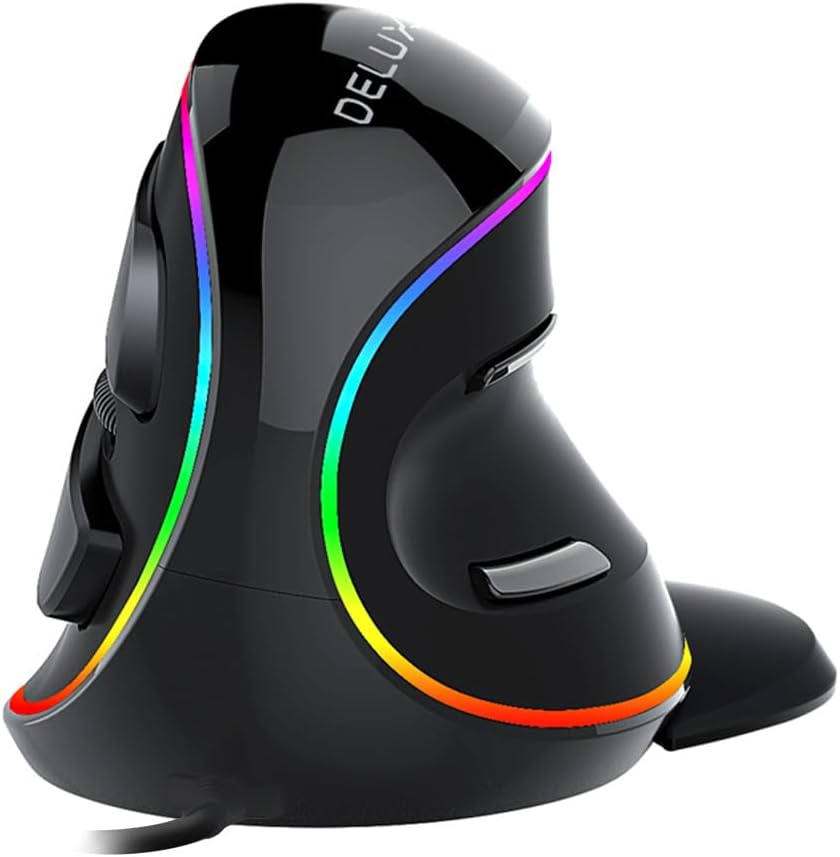
The DELUX M618Plus RGB Wired vertical mouse is an ergonomic solution designed specifically for users with large hands (recommended hand length 6.7-7.5 inches). Its unique volute bionic shape promotes a natural handshake posture, reducing wrist and arm discomfort during extended use. While it may take a few days to adapt to the vertical orientation, many users find the relief significant.
Standout features include a removable wrist rest that elevates the palm and prevents friction, silent click buttons that cut noise by over 90%, and 6 programmable buttons that can be customized via the driver software. The RGB backlighting adds a vibrant touch with multiple effects, and the dedicated on/off switch lets you conserve power when needed.
DPI adjustment is versatile with six preset levels (400-800-1200-1600-2400-4000) and up to 12800 DPI with the driver. This makes the mouse suitable for both precision work and casual gaming. The wired USB connection ensures consistent, lag-free performance, and the 1.6-meter cable provides ample reach.
A few drawbacks: the vertical design requires an adjustment period, and it is designed for right-handed users only. Mac users will not have access to side buttons or the driver software, though basic mouse functions work. Also, the PVC cable is a bit stiff but manageable.
Overall, the DELUX M618Plus RGB is a well-priced ergonomic mouse that delivers on comfort and functionality for large-handed users. Its silent operation, customizable buttons, and wrist rest make it an excellent choice for office workers and gamers seeking relief from strain.
Dimensions: 130.6 x 68.9 x 42.5 mm (5.1 x 2.7 x 1.7 inches)
Weight: 210 grams
Connectivity: USB wired with 1.6-meter PVC cable
DPI: 6 preset levels (400-800-1200-1600-2400-4000), up to 12800 with driver
Buttons: 6 programmable buttons (left, right, middle, forward, backward, DPI)
Compatibility: Windows XP, Vista, 7, 8, 10, 11; limited Mac support (side buttons and driver not available)
Design: Right-handed, vertical ergonomic with removable wrist rest and RGB backlighting

Pros
- Long rated battery life per charge
- Long manufacturer warranty relative to other options here
- Wide compatibility across older and newer operating systems
Cons
- No Bluetooth option, USB receiver only
- Manufacturer notes a short adjustment period is typically needed
Lekvey's vertical mouse uses a handshake-style grip and a rechargeable battery rated for roughly 150 hours of continuous use per charge.
Lekvey markets this mouse specifically toward carpal tunnel and wrist comfort, though as with any ergonomic accessory, how much relief it provides varies by person and shouldn't replace medical advice for a diagnosed condition.
It uses a simple plug-and-play USB receiver with no pairing steps, and is backed by a long manufacturer warranty compared with other options in this comparison.
The main limitation is the lack of Bluetooth, so it's tied to whichever computer has the receiver plugged in.
It suits anyone who wants a rechargeable, handshake-grip mouse with strong battery life per charge.
Dimensions: 5 inches long by 3 inches wide.
Battery: Rechargeable, rated around 150 hours per charge.
DPI: Up to 1600, three adjustable levels.
Connectivity: 2.4G USB receiver.
Who should buy this mouse? Anyone who wants a rechargeable, handshake-grip mouse with a long battery life per charge.
Who might want to look elsewhere? Anyone who needs Bluetooth should look at the Logitech or ProtoArc models instead.
Setup tip: Allow a short adjustment period as the manufacturer suggests, and talk with a doctor about diagnosed wrist conditions rather than relying on the mouse alone.

Pros
- Multi-device pairing across three connections
- Rechargeable rather than disposable batteries
- Quiet primary clicks
Cons
- Sized specifically for hands under 7.5 inches, so larger hands may not fit well
- Manufacturer notes a one to two week learning curve
The ProtoArc EM11 uses a 58 degree vertical shape and can stay paired to three devices at once, switching between Bluetooth and its included USB-A receiver.
It's built specifically for hands under 7.5 inches, and ProtoArc recommends measuring your hand before ordering to get a comfortable fit.
The battery is rechargeable over USB-C, and the primary buttons click quietly, though the scroll wheel and side buttons are not silent.
Like most vertical mice, the manufacturer notes it takes one to two weeks to feel fully natural.
It suits anyone with smaller to medium hands who wants to pair across multiple devices.
Dimensions: 5.43 inches long by 2.72 inches wide.
Weight: 250 grams.
DPI: Up to 2400, three adjustable levels.
Battery: Rechargeable, rated around a month per charge.
Connectivity: Bluetooth or 2.4G USB-A receiver, up to three devices.
Who should buy this mouse? Anyone with small to medium hands who wants to pair across multiple devices with Bluetooth.
Who might want to look elsewhere? Larger hands should consider the Logitech MX Vertical instead.
Setup tip: Measure your hand length against the 7.5 inch guideline before ordering to confirm a comfortable fit.

Pros
- Ergonomic shape effectively reduces wrist and forearm strain
- Long battery life with rechargeable design eliminates battery waste
- Multiple connectivity options work with Windows, Mac, and Linux
- Adjustable DPI suits various tasks from browsing to gaming
- Affordable price point for a feature-rich vertical mouse
Cons
- May not fit smaller hands comfortably despite dimension check
- Smooth surface can be less grippy for users who lift the mouse often
- Forward/backward buttons not compatible with Safari browser
The MEETION BTM010 is an ergonomic wireless vertical mouse designed to combat wrist and forearm strain during long computer sessions. Its unique vertical shape promotes a natural handshake position, making it an excellent choice for office workers, gamers, and anyone experiencing discomfort from traditional flat mice. However, users with smaller hands should verify the dimensions (4.3 x 3.1 x 2.8 inches) as it is best suited for medium to large hands.
Standout features include dual wireless connectivity via Bluetooth 5.0/3.0 and 2.4G, allowing seamless switching between devices. The adjustable DPI (1200-3200) ensures accurate tracking for tasks like design work or gaming. In real-world use, the mouse provides smooth scrolling and responsive clicks, though the forward/backward buttons do not work with Safari. The rechargeable battery lasts up to two months with RGB lighting off, a significant convenience over disposable batteries.
The build quality feels solid with a smooth, streamlined surface that glides well on a desk. The RGB lighting adds a customizable aesthetic with multiple colors and effects. However, the smooth finish may be less grippy for users who frequently lift the mouse, which could be a minor drawback for some. The mouse is lightweight at 0.24 lbs, making it portable for travel or office use.
Potential drawbacks include the lack of compatibility with Safari for the side buttons and the fact that the ergonomic shape may not suit very small hands. Additionally, while the Bluetooth connection is recommended for stability in complex wireless environments, some users might experience occasional interference with the 2.4G option in crowded spaces. These are honest trade-offs at this price point.
Overall, the MEETION BTM010 offers excellent value for an ergonomic vertical mouse with versatile connectivity and customizable lighting. It effectively addresses wrist strain, provides long battery life, and is compatible with multiple operating systems. For users with medium to large hands seeking an affordable, feature-rich solution, this mouse is a reliable choice. Its minor drawbacks are outweighed by its comfort and performance.

Pros
- Ergonomic vertical design reduces wrist strain and improves comfort during long use.
- Dual wireless connectivity (Bluetooth 5.0 and 2.4G) offers flexibility and easy device switching.
- High 24000 DPI and 12 programmable buttons provide precise control and customization.
- Built-in 5-way joystick adds a unique control option for games and software.
- Long battery life with RGB lighting enhances the gaming experience without frequent charging.
Cons
- Vertical grip may require an adjustment period for users accustomed to traditional mice.
- Joystick placement might not suit all hand sizes or gaming styles.
- Software for button programming and RGB customization is not detailed and may be basic.
The TKMARS Wireless Ergonomic Vertical Gaming Mouse is designed for gamers and professionals who prioritize comfort and precision. Its vertical shape reduces wrist strain and promotes a natural grip, making it ideal for long hours of use. With a unique 5-way joystick, dual wireless connectivity, and 12 programmable buttons, this mouse aims to deliver a competitive edge in both gaming and productivity tasks.
Standout features include the 5-way joystick for intuitive navigation and the adjustable DPI up to 24000 for pinpoint accuracy. The dual wireless modes (Bluetooth 5.0 and 2.4G) allow seamless connection to two devices, and the 800mAh rechargeable battery ensures long sessions without interruption. RGB lighting adds a customizable aesthetic, while the Teflon base provides smooth gliding on any surface.
The build quality is solid with non-slip materials and a comfortable vertical design. The 12 programmable buttons are well-placed, though the joystick may feel slightly different depending on hand size. The mouse is lightweight enough for fast movements but sturdy for daily use. The included USB-C cable offers a wired option for low-battery situations.
One potential drawback is the learning curve for users new to vertical mice; it may take a few days to adjust. Additionally, the joystick's sensitivity might not suit all game genres, and the programming software could be more advanced. However, these are minor trade-offs given the ergonomic benefits and feature set.
Overall, the TKMARS vertical gaming mouse offers excellent value for those seeking comfort and control. Its joystick, programmable buttons, and high DPI make it a versatile choice for gamers and office workers alike. If you prioritize wrist health and customization, this mouse is a strong contender in its price range.

Pros
- Ergonomic vertical design reduces wrist strain and promotes natural hand position.
- Silent clicks ideal for shared workspaces or late-night use.
- Versatile connectivity with dual wireless and multi-device support.
- Adjustable DPI for different tasks from precision work to gaming.
- Affordable price point for a feature-rich ergonomic mouse.
Cons
- May take time to adjust to vertical design if you are used to traditional mice.
- Not rechargeable; requires AA battery replacement.
- Limited to one AA battery, though battery life is good.
The UGREEN Ergonomic Wireless Mouse is designed for users who spend long hours at a computer and want to reduce wrist strain. Its vertical handshake posture promotes a natural alignment, making it especially suitable for those with larger hands or anyone prone to discomfort from traditional mice.
The mouse features silent click buttons that keep your workspace peaceful, along with a practical 5-button layout for efficient navigation. With four adjustable DPI levels, you can easily switch between precise editing and fast scrolling. The dual wireless connectivity via Bluetooth or 2.4G ensures a stable connection up to 10 meters, and you can pair with up to three devices.
The build quality is solid for its price point, with PTFE glide feet providing smooth and quiet tracking on most surfaces. The vertical design may require a short adjustment period, but once accustomed, it offers noticeable relief in wrist and forearm fatigue. Battery life is extended by a smart sleep mode, powered by a single AA battery.
One potential drawback is that the mouse is not rechargeable, so you will need to replace the AA battery periodically. Additionally, the vertical shape might not be comfortable for everyone, especially those with smaller hands or who prefer a traditional grip. The lack of customizable software may also limit advanced users.
Overall, the UGREEN Ergonomic Wireless Mouse is an excellent budget-friendly choice for improving ergonomics and productivity. It delivers on comfort, quiet operation, and versatile connectivity, making it a strong recommendation for office workers, students, and home users seeking relief from repetitive strain.

Pros
- Reduces wrist pain and fatigue with vertical ergonomic design
- Innovative 5D rocker adds extra control without extra buttons
- High DPI range suitable for various gaming styles
- On-board memory saves custom settings for portability
- Affordable price point for a feature-rich gaming mouse
Cons
- Vertical design may require adjustment period for traditional mouse users
- Software setup can be confusing for non-technical users
- Build quality feels slightly plasticky compared to premium models
The TRELC Wired Gaming Mouse is a specialized peripheral designed for gamers and professionals who prioritize wrist health without sacrificing performance. With its vertical ergonomic shape and 5-direction rocker, it targets users suffering from repetitive strain injuries or those who simply want a more natural grip during long gaming sessions.
Its standout feature is the integrated 5-direction rocker, which replaces five separate buttons with a single thumb-controlled stick. This allows for quick directional inputs in FPS, MOBA, and MMO games, giving players a competitive edge. The 10000 DPI PMW3325 sensor offers smooth tracking across five adjustable levels, ensuring precision whether you're sniping or sprinting.
The vertical design mimics a handshake posture, reducing pressure on the wrist and forearm. Users with carpal tunnel syndrome or tendinitis report noticeable relief after switching. The 11 programmable buttons can be customized via software, and on-board memory stores your macros even when moving between computers.
On the downside, the vertical orientation takes time to get used to, especially for fast-paced gaming where muscle memory matters. The software interface is functional but not as polished as premium brands. Build quality is decent for the price but feels slightly plasticky, though it holds up well under regular use.
Overall, the TRELC Wired Gaming Mouse is an excellent value for gamers seeking ergonomic relief and advanced control features. It is highly recommended for those with wrist pain or anyone wanting to prevent future strain, while still enjoying high-performance gaming capabilities.
Buying Guide
Ergonomic Design: Vertical vs. Traditional
Ergonomic gaming mice come in two main shapes: vertical and traditional. Vertical mice, like the Lekvey or ProtoArc, place your hand in a handshake position, reducing forearm rotation and wrist strain. Traditional ergonomic designs, such as the Razer Basilisk V3, offer sculpted grips and thumb rests for a natural feel. Choose based on your pain points. If you already have wrist issues, a vertical mouse may be ideal. For more on this, see our best ergonomic mouse for carpal tunnel guide.
Programmable Buttons and Customization
Gaming mice often feature programmable buttons for macros and shortcuts. The TRELC and ATTOE models offer up to 12 programmable buttons, including a 5-direction rocker for quick in-game actions. More buttons mean less reliance on keyboard shortcuts, which can reduce hand movement. Ensure the software is compatible with your operating system, especially for Mac users, as some brands limit customization.
DPI and Sensor Performance
DPI (dots per inch) determines cursor speed and precision. For gaming, a range from 800 to 24000 DPI covers most needs, from slow aiming to fast flicks. The Razer Basilisk V3 and TKMARS mice feature high-precision sensors for accurate tracking. Adjustable DPI settings let you switch between tasks, like editing documents or playing FPS games. Wired connections offer zero latency, while wireless options provide freedom but may have slight lag.
Build Quality and Battery Life
Durability matters for long gaming sessions. Look for mice with high-quality switches rated for millions of clicks, like the Razer’s optical switches. Rechargeable batteries are convenient; the MEETION mouse lasts up to two months per charge. Wired mice eliminate battery concerns but limit movement. Consider your setup: if you frequently travel or have a cluttered desk, wireless may be better. For proper desk ergonomics, read our guide on how to position keyboard and mouse ergonomically.
Final Thoughts
After reviewing the top options, we believe the best ergonomic gaming mouse under $50 depends on your needs. For gamers seeking a traditional shape with excellent customization, the Razer Basilisk V3 stands out with its 11 programmable buttons and precise sensor. If wrist pain is a concern, the Lekvey Vertical Wireless Mouse offers a comfortable handshake grip and long battery life at a budget-friendly price. Both models provide great value and will enhance your gaming comfort.
Frequently Asked Questions
What is the best ergonomic gaming mouse under $50 for 2026?
The Razer Basilisk V3 and Lekvey Vertical Mouse are top picks, offering comfort and performance. The Razer excels in customization, while the Lekvey prioritizes wrist health.
Are vertical mice good for gaming?
Yes, vertical mice reduce wrist strain and can improve comfort during long sessions. However, they may have a learning curve for precise movements. Models like the ATTOE and TKMARS include high DPI sensors suitable for gaming.
How important is DPI for an ergonomic gaming mouse?
DPI affects cursor speed and accuracy. For most gamers, a range of 800 to 16000 DPI is sufficient. Higher DPI allows faster movements without lifting the mouse, which can reduce wrist fatigue.
Can I use an ergonomic gaming mouse for work?
Absolutely. Many ergonomic gaming mice, like the DELUX M618Plus, feature silent clicks and programmable buttons for productivity. For more tips, see our article on how to reduce wrist pain from typing.




Write Your Review
No reviews yet. Be the first to share your experience!