

You spend hours at your desk, and every click or scroll sends a dull ache through your wrist. The wrong mouse can turn a productive day into a painful one. That is why finding the best ergonomic mouse matters so much. In this guide, we rate ten top options for 2026, from vertical designs to trackballs, so you can work comfortably and avoid repetitive strain. Whether you have small hands, need silent clicks, or want multi device support, there is a perfect match here. For more targeted advice, check our roundup of the best vertical mouse for wrist pain if vertical shapes appeal to you.
If your discomfort comes from your keyboard rather than your mouse, swapping only the mouse will not fully resolve wrist strain; consider your whole setup.
Disclosure: Ergonook is a participant in the Amazon Associates program. Links below are affiliate links, and we may earn a commission from qualifying purchases. This does not affect which products we recommend or how we rank them.

Pros
- Compact vertical design suited to small and medium hands
- Long rated battery life
- Quiet clicks for shared workspaces
Cons
- Fixed for right-hand use only, with no left-handed version
- Smaller shape may feel cramped for larger hands
The Logitech Lift is a vertical mouse shaped around a 57 degree angle, intended to keep the forearm in a more natural rotation than a standard flat mouse.
Its grip is softly textured with a snug thumb rest, and it's sized specifically for small to medium right hands rather than a one-size-fits-all shape.
It connects over Bluetooth or the included USB receiver, with a battery rated to last up to two years, and the scroll wheel is designed to feel smooth and quiet.
The main limitation is fit: it's built for smaller hands and right-hand use only, so it won't suit everyone.
It's a strong option for anyone who wants a compact, all-day vertical mouse without a steep learning curve.
Connectivity: Bluetooth or the included USB receiver.
Buttons: Up to 6, with 4 customizable.
Battery life: Rated up to two years.
Hand fit: Right-handed, built for small to medium hands.
Sensor: Optical, up to 4000 DPI.
Who should buy this mouse? Anyone with a small to medium right hand who wants a compact vertical mouse with long battery life.
Who might want to look elsewhere? Left-handed users, or anyone with larger hands who may find the shape too compact.
What to compare before buying: Check hand size fit against the product's stated dimensions, since vertical mice vary more in shape than standard mice.
Setup tip: Give yourself a week or two to adjust to the vertical grip, since the wrist rotation feels different from a standard mouse at first.

Pros
- Handshake grip designed to reduce muscular strain versus a standard mouse
- Cursor speed switch adds quick control over sensitivity
- Fits a wider range of hand sizes than more compact vertical mice
Cons
- Larger, taller shape than the Lift, which may not suit smaller hands or bags
- Right-hand only design
The MX Vertical takes the handshake grip concept further than the compact Lift, with a taller 57 degree shape designed to reduce muscular activity compared with a standard mouse.
A cursor speed switch lets you jump between DPI settings instantly, and the textured surface is shaped to fit a broader range of hand sizes.
It's designed according to criteria set out by ergonomists, and charges over USB-C rather than requiring disposable batteries.
Its larger size is also its main trade-off: it takes up more desk space and isn't as easy to slip into a bag as the compact Lift.
It suits anyone with medium to large hands who wants a pronounced handshake-style grip.
Dimensions: 7.5 inches long by 6 inches wide.
Connectivity: USB, wireless.
Buttons: 4.
Sensor: Optical, up to 4000 DPI.
Battery life: Rated around 4 months per charge.
Who should buy this mouse? Anyone with medium to large hands who wants a pronounced handshake-style grip to reduce strain.
Who might want to look elsewhere? Smaller hands or anyone who wants a more compact, travel-friendly shape should consider the Lift instead.
Setup tip: Rest your whole palm on the mouse rather than gripping it like a standard mouse, since that's how the handshake shape is meant to be used.
Pros
- Ergonomic shape reduces muscle strain and promotes better forearm posture
- Thumb trackball eliminates need to move arm, great for tight desks
- Long battery life up to 18 months on a single AA battery
- Quiet clicks reduce noise in shared environments
- Customizable buttons enhance productivity for repetitive tasks
Cons
- Thumb-operated trackball may require a short adjustment period for new users
- Designed primarily for right-handed users, left-handed option not available
- Uses AA battery instead of rechargeable USB-C, which may be less convenient for some
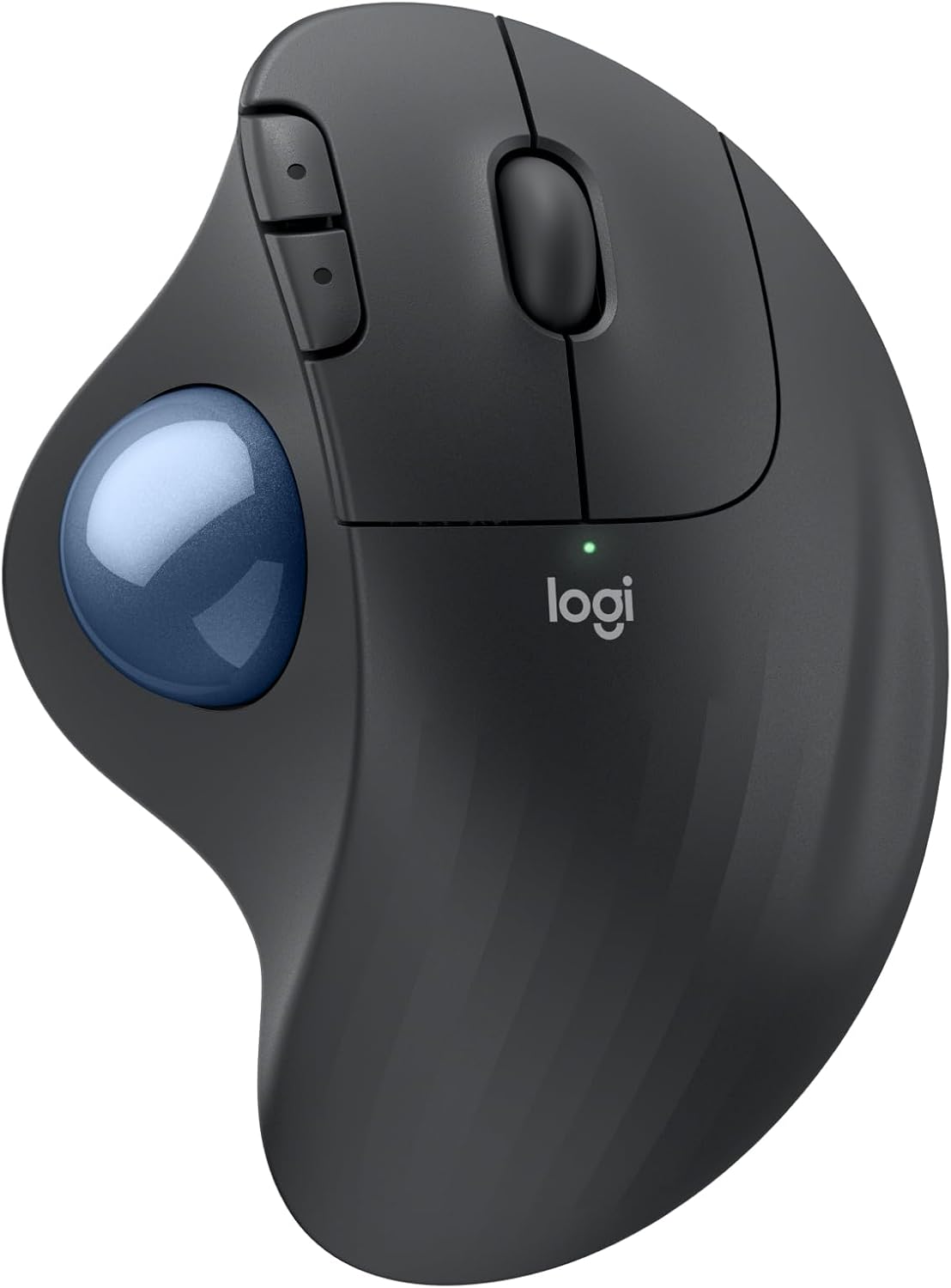
The Logitech ERGO M575S is a wireless trackball mouse designed to reduce arm movement and improve ergonomic comfort. It is ideal for professionals who spend long hours at a computer, especially those with limited desk space or existing wrist and forearm discomfort. The thumb-controlled trackball lets you move the cursor without moving your hand, making it a practical choice for cluttered or small workspaces.
Standout features include a sculpted shape that supports your hand and positions your forearm naturally, resulting in 25% less muscle strain compared to a standard mouse. The quiet clicks are a welcome improvement for shared offices or home environments where noise matters. Customizable buttons and Smart Actions through the Logi Options+ app allow you to streamline repetitive tasks, boosting productivity.
Build quality is solid, with a comfortable matte finish and a blue trackball that glides smoothly. The mouse connects via Bluetooth or the included Logi Bolt receiver, and battery life is impressive at up to 18 months. Logitech also incorporates recycled plastic in the construction, which is a nice sustainability touch.
Potential drawbacks include a learning curve for those new to trackballs, as thumb control requires precise thumb movements. The mouse is right-handed only, which limits its appeal for left-handed users. Additionally, it runs on a single AA battery rather than a rechargeable one, so you will need to keep spare batteries on hand.
Overall, the Logitech ERGO M575S delivers on its promise of comfort and space-saving design. If you are looking to reduce arm strain and declutter your desk, this trackball mouse is a reliable and well-built choice. It earns a strong recommendation for ergonomic-conscious buyers.

Pros
- Exceptional ergonomic design with a 57-degree angle reduces wrist fatigue.
- Enterprise-grade security with Logi Bolt encryption protects sensitive data.
- Long-lasting battery life of up to two years minimizes maintenance.
- Quiet clicks and smooth scrolling enhance focus and reduce noise.
Cons
- The vertical design may take some time to get used to for those accustomed to traditional mice.
- No rechargeable battery; uses disposable batteries, though they last up to two years.
- Higher price point compared to standard wireless mice, justified by ergonomic and security features.
The Logitech Lift for Business is a vertical ergonomic wireless mouse tailored for IT departments and professionals who spend long hours at their desks. It combines enterprise-grade security with a design focused on reducing wrist strain and boosting comfort.
Its standout feature is the 57-degree angle that keeps your hand in a natural handshake position, minimizing pressure on the wrist. The softly textured grip and snug thumb rest add coziness, while whisper-quiet clicks and a smooth SmartWheel let you work without distractions.
Security is a priority with Logi Bolt wireless technology, offering fully encrypted connections and a Secure Connections Only mode for sensitive environments. You can connect via Bluetooth Low Energy or the included Logi Bolt USB receiver, and the mouse lasts up to two years on a single battery.
The build quality is solid, with a soft-touch finish and ergonomic certification from leading experts. It is certified in over 100 countries and supports remote deployment through Logitech Options, making it easy for IT to manage at scale.
One potential drawback is the learning curve for users unfamiliar with vertical mice, and the use of disposable batteries instead of a rechargeable option. However, for those seeking lasting comfort, robust security, and reliable performance, the Logitech Lift for Business is an excellent investment.
Connectivity: Bluetooth Low Energy or Logi Bolt USB receiver
Angle: 57 degrees vertical
Battery Life: Up to 2 years (1 AA battery)
Compatibility: Windows, macOS, iPadOS, Chrome OS, Linux
Security: Logi Bolt with AES-128 encryption, Secure Connections Only mode
Buttons: Customizable (left, right, scroll wheel, thumb button, DPI switch)
Certification: Ergonomic certification by leading ergonomists, certified in 100+ countries
Pros
- Ergonomic design significantly reduces wrist strain for small to medium hands.
- Long battery life with convenient USB-C charging and pass-through use.
- Versatile connectivity options for multiple devices and low latency.
- Quiet clicks are ideal for shared workspaces.
- Customizable DPI and programmable buttons enhance productivity.
Cons
- Not recommended for users with large hands due to the smaller form factor.
- Only the left and right buttons are silent; other buttons make normal clicking sounds.
- RGB lighting significantly reduces battery life from 200 to 40 hours.
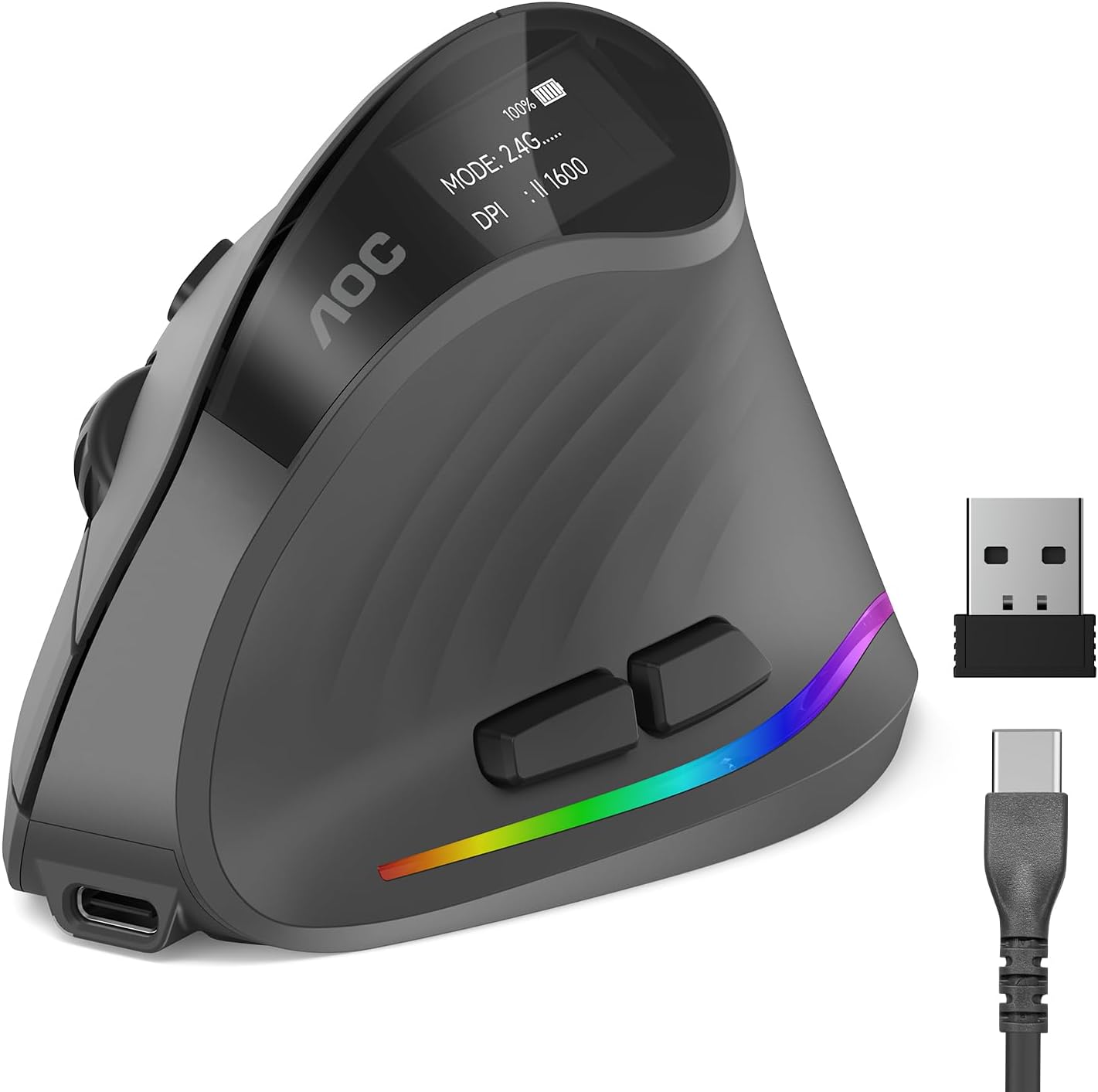
The AOC Ergonomic Vertical Mouse is designed for professionals who spend long hours at a computer and want to avoid wrist strain. Its 52-degree vertical angle places your hand in a natural handshake position, which reduces twisting and tension in the forearm. This mouse is optimized for small to medium hands, so it fits comfortably without forcing a stretch or cramp.
Performance is strong with adjustable DPI from 1000 to 4800, giving you precise control for tasks like photo editing, coding, or graphic design. The tracking is responsive and accurate, adapting to your movements without lag. The 800mAh rechargeable battery is a standout feature, offering up to 200 hours of use without RGB, and you can charge via USB-C while still working.
Build quality feels solid and professional, typical of AOC's reputation. The programmable buttons allow you to set shortcuts for common actions, boosting your efficiency. Triple-mode connectivity (Bluetooth 5.4, 2.4GHz, and wired) makes it easy to switch between devices, and the silent clicks keep noise under 35dB for quiet environments.
However, there are a few drawbacks. The mouse is only suitable for small to medium hands, so larger-handed users may find it uncomfortable. Also, only the left and right buttons are silent; the other buttons produce normal clicking sounds. RGB lighting is a nice touch but cuts battery life to 40 hours, so you may want to disable it for longer use.
Overall, the AOC Ergonomic Vertical Mouse delivers excellent comfort and performance for its target audience. If you have small to medium hands and need an ergonomic solution with versatile connectivity and long battery life, this mouse is a strong choice. It combines thoughtful design with reliable AOC quality, making it a smart investment for your workspace.

Pros
- One of the most widely reviewed mice in this comparison
- Straightforward 2.4G USB setup with no pairing steps
- Backed by an 18-month warranty
Cons
- No Bluetooth option, USB receiver only
- Requires disposable batteries rather than being rechargeable
Anker's vertical mouse uses a handshake-style grip aimed at a neutral wrist and arm position, connecting through a 2.4G USB receiver rather than Bluetooth.
It offers three adjustable DPI levels and next and previous buttons for browsing, and drops into a power-saving mode after periods of inactivity.
It's one of the most widely reviewed mice in this comparison and is backed by an 18-month warranty.
The main trade-offs are the lack of Bluetooth and the use of disposable rather than rechargeable batteries.
It suits anyone who wants a simple, well-reviewed, plug-and-play vertical mouse.
Dimensions: approximately 120 by 62.8 by 74.8 millimeters.
Weight: approximately 3.4 ounces.
Connectivity: 2.4G USB receiver.
DPI: Up to 1600, three adjustable levels.
Warranty: 18 months.
Who should buy this mouse? Anyone who wants a simple, well-reviewed, plug-and-play vertical mouse without Bluetooth.
Who might want to look elsewhere? Anyone who needs Bluetooth or a rechargeable battery should look at the Logitech or ProtoArc options instead.
Setup tip: Keep spare batteries on hand since this mouse isn't rechargeable.

Pros
- Multi-device pairing across three connections
- Rechargeable rather than disposable batteries
- Quiet primary clicks
Cons
- Sized specifically for hands under 7.5 inches, so larger hands may not fit well
- Manufacturer notes a one to two week learning curve
The ProtoArc EM11 uses a 58 degree vertical shape and can stay paired to three devices at once, switching between Bluetooth and its included USB-A receiver.
It's built specifically for hands under 7.5 inches, and ProtoArc recommends measuring your hand before ordering to get a comfortable fit.
The battery is rechargeable over USB-C, and the primary buttons click quietly, though the scroll wheel and side buttons are not silent.
Like most vertical mice, the manufacturer notes it takes one to two weeks to feel fully natural.
It suits anyone with smaller to medium hands who wants to pair across multiple devices.
Dimensions: 5.43 inches long by 2.72 inches wide.
Weight: 250 grams.
DPI: Up to 2400, three adjustable levels.
Battery: Rechargeable, rated around a month per charge.
Connectivity: Bluetooth or 2.4G USB-A receiver, up to three devices.
Who should buy this mouse? Anyone with small to medium hands who wants to pair across multiple devices with Bluetooth.
Who might want to look elsewhere? Larger hands should consider the Logitech MX Vertical instead.
Setup tip: Measure your hand length against the 7.5 inch guideline before ordering to confirm a comfortable fit.

Pros
- Comfortable vertical design alleviates wrist pain
- Reliable 3-device switching via Bluetooth and 2.4GHz
- High 4800 DPI with 6 adjustable levels for precision
- Silent clicks for noise-sensitive environments
- Long battery life with auto sleep and low battery warning
Cons
- Designed for right-handed users only, not ambidextrous
- Side buttons are not compatible with macOS
- Only left and right clicks are silent, other buttons click audibly
- Requires 2 AAA batteries (not included)
The TECKNET Ergonomic Mouse is a vertical wireless mouse designed to reduce wrist strain while offering versatile connectivity. It connects to up to three devices via Bluetooth 5.0/3.0 and a 2.4GHz USB receiver, making it ideal for multitaskers who switch between a laptop, tablet, and desktop.
Standout features include six adjustable DPI levels up to 4800, allowing smooth tracking on various surfaces. The silent left and right clicks are a boon for quiet offices or libraries, though other buttons remain audible. Battery life is extended by an auto sleep mode, and a low battery indicator prevents surprises.
The ergonomic vertical shape places your hand in a handshake position, reducing pressure on the wrist. Build quality feels solid for the price, and the 36-month warranty adds confidence. However, it is strictly right-handed and the side buttons do not work on macOS.
Potential drawbacks include the need for AAA batteries (not included) and the fact that only the primary buttons are silent. Some users may prefer a rechargeable model, but the battery life is good with branded cells.
Overall, the TECKNET Ergonomic Mouse delivers excellent value for those seeking wrist relief and multi-device convenience. Its high DPI and silent operation make it a strong choice for both productivity and casual use.

Pros
- Haptic feedback adds a new dimension of tactile precision and productivity
- MagSpeed wheel offers unmatched scrolling speed and accuracy
- Ergonomic shape reduces hand strain during extended use
- Quiet clicks minimize distraction in shared workspaces
- Long battery life with quick charging capability
Cons
- Charging cable not included in the box
- Advanced customization requires Logi Options+ software
- Premium price point may not suit casual users or gamers
The Logitech MX Master 4 is the latest evolution of the iconic MX series, designed for professionals who demand precision and efficiency. With haptic feedback, it transforms how you interact with your computer, making every shortcut and notification feel tangible. This mouse is ideal for creative professionals, data analysts, and anyone who spends hours navigating complex workflows.
Standout features include the Haptic Sense Panel, which provides customizable vibrations for specific actions, and the Actions Ring that places your most-used tools right at your cursor. The MagSpeed scroll wheel is Logitech's fastest, allowing you to fly through long documents or stop on a pixel with ease. The 8K DPI sensor tracks on any surface, even glass, ensuring reliable performance anywhere.
Design and build quality are top-notch. The ergonomic shape keeps your hand in a natural posture, reducing fatigue. The thumb scroll wheel and quiet clicks (90% less noise) make it a pleasure to use in quiet offices. Connectivity is robust with a USB-C dongle offering 2x more powerful signal, plus Bluetooth for versatility. Battery life reaches 70 days, and a one-minute charge gives three hours of use.
However, there are a few drawbacks. The mouse does not include a charging cable, which is an oversight at this price. Full customization requires installing Logi Options+, and the haptic feedback may feel subtle to some users. Additionally, it is not designed for gaming, so gamers should look elsewhere. The premium price also puts it out of reach for budget-conscious buyers.
Overall, the Logitech MX Master 4 is a superb tool for productivity enthusiasts who want to work smarter, not harder. Its haptic feedback, fast scrolling, and ergonomic comfort make it one of the best mice for professionals. If you can overlook the missing cable and software dependency, this mouse will elevate your daily workflow.

Pros
- Long rated battery life per charge
- Long manufacturer warranty relative to other options here
- Wide compatibility across older and newer operating systems
Cons
- No Bluetooth option, USB receiver only
- Manufacturer notes a short adjustment period is typically needed
Lekvey's vertical mouse uses a handshake-style grip and a rechargeable battery rated for roughly 150 hours of continuous use per charge.
Lekvey markets this mouse specifically toward carpal tunnel and wrist comfort, though as with any ergonomic accessory, how much relief it provides varies by person and shouldn't replace medical advice for a diagnosed condition.
It uses a simple plug-and-play USB receiver with no pairing steps, and is backed by a long manufacturer warranty compared with other options in this comparison.
The main limitation is the lack of Bluetooth, so it's tied to whichever computer has the receiver plugged in.
It suits anyone who wants a rechargeable, handshake-grip mouse with strong battery life per charge.
Dimensions: 5 inches long by 3 inches wide.
Battery: Rechargeable, rated around 150 hours per charge.
DPI: Up to 1600, three adjustable levels.
Connectivity: 2.4G USB receiver.
Who should buy this mouse? Anyone who wants a rechargeable, handshake-grip mouse with a long battery life per charge.
Who might want to look elsewhere? Anyone who needs Bluetooth should look at the Logitech or ProtoArc models instead.
Setup tip: Allow a short adjustment period as the manufacturer suggests, and talk with a doctor about diagnosed wrist conditions rather than relying on the mouse alone.
Buying Guide: How to Choose the Best Ergonomic Mouse
Grip Style and Hand Size
Your grip style directly affects comfort. Vertical mice force a handshake position that reduces forearm twisting, but they require an adjustment period. Trackballs let you keep your hand still while moving the cursor with your thumb. For small to medium hands, models like the Logitech Lift or ProtoArc EM11 NL fit naturally. Large hands may prefer the Lekvey or AOC vertical mice. Always measure your hand length before ordering.
Connectivity and Multi Device Support
Many ergonomic mice now offer dual Bluetooth and 2.4 GHz wireless, plus a USB wired option. If you switch between a laptop, desktop, and tablet, look for a mouse that can pair with three devices simultaneously. The TECKNET and AOC models excel at this. For business environments, the Logitech Lift for Business adds secure Logi Bolt encryption. If you are curious about proper desk posture, read our guide on how to position keyboard and mouse ergonomically.
Button Customization and DPI
Programmable buttons save time on repetitive tasks. The AOC ergonomic mouse lets you assign shortcuts and even adjust RGB lighting. DPI settings control cursor speed; higher DPI means less hand movement. Most vertical mice offer 800 to 4800 DPI levels. For detail work like photo editing, a high DPI sensor reduces arm fatigue. The Logitech MX Vertical includes a dedicated DPI switch for instant speed changes.
Quiet Operation and Battery Life
Silent clicks matter in shared offices or libraries. Models from AOC, ProtoArc, and TECKNET deliver quiet left and right buttons while other buttons remain audible. Rechargeable batteries are standard now; look for USB C charging and at least 150 hours of use per charge. The Lekvey lasts up to 150 hours, while the Logitech Lift runs for up to two years on a single AA battery. For more on wrist health, see our article on how to reduce wrist pain from typing.
Final Thoughts
After evaluating all ten models, we believe the best ergonomic mouse for most people is the AOC Ergonomic Mouse for its outstanding 52 degree vertical angle, silent clicks, and versatile triple mode connectivity. If you prefer a more affordable, compact option that still delivers excellent wrist support, the Lekvey Ergonomic Mouse is a reliable choice with a comfortable grip and long battery life. Both models are certified by ergonomists and backed by solid warranties, so you can click without worry.
Frequently Asked Questions
Do ergonomic mice really help with wrist pain?
Yes. Ergonomic mice place your hand in a more natural position, reducing pressure on the median nerve and forearm muscles. Many users report significant relief after a short adjustment period. For carpal tunnel concerns, see our best ergonomic mouse for carpal tunnel guide.
What is the difference between a vertical mouse and a trackball?
A vertical mouse keeps your hand upright like a handshake, moving the whole device. A trackball stays stationary and you move the ball with your thumb or fingers. Both reduce wrist movement, but trackballs require no arm motion at all. Many users pair a trackball with an ergonomic keyboard for a fully relaxed setup.
How long does it take to get used to a vertical mouse?
Most people adapt within 3 to 7 days. The first day may feel awkward, but your forearm muscles learn the new posture quickly. Start with short sessions and gradually increase usage. After a week, you will likely prefer the vertical shape over a traditional mouse.
Can I use an ergonomic mouse with a Mac?
Yes. Nearly all ergonomic mice listed here support macOS, though side buttons may not be programmable without third party software. Models like the Logitech Lift and AOC offer native macOS compatibility. For best results, pair it with a best ergonomic keyboard for wrist pain for a complete ergonomic workstation.




Write Your Review
No reviews yet. Be the first to share your experience!