

Programming work has a specific physical pattern that differs from general office tasks: hands stay on a keyboard and mouse for most of the day, eyes stay fixed on one or more monitors at a set distance, and posture rarely changes much during a focused debugging session or a long stretch of writing code. A chair suited to this pattern prioritizes precise armrest positioning for typing height, a headrest that supports the neck during extended screen time, and seat depth adjustment for a workstation you may sit at for years rather than months. For a broader look at setting up the rest of a coding workstation, see our guide on correct monitor height for ergonomics. See our full mesh office chair lineup for more options.
We compared six mesh chairs specifically on armrest adjustability, headrest design, and seat depth adjustment, the three factors most directly tied to comfort during keyboard-heavy, screen-focused work.

Pros
- Highest average rating among the high-back picks in this comparison
- 3-year warranty, longer than several competitors
- 4 recline positions and adjustable seat depth together
Cons
- 220 lb weight capacity, the lowest among the high-back picks in this comparison
- Smaller review count than more established competitors
- 2D armrests offer fewer directions than 4D or 5D systems elsewhere
ProtoArc built the EC200 specifically for people who sit for extended stretches, remote workers and programmers by its own marketing, backing that positioning with a 3-year warranty and 4 recline positions.
Adjustable seat depth is a genuinely uncommon inclusion at this price, paired with lumbar support and 2D armrests. It holds the highest average rating among the high-back chairs in this comparison.
The 220 lb weight rating is the lowest among the high-back picks compared here, worth checking carefully against your own weight before buying.
For anyone who specifically sits long hours and wants seat depth adjustment in a high-back chair, this is a strong, well-rated pick.
Chair Type: High-back ergonomic mesh office chair. Frame Material: Nylon. Seat Material: Foam. Back Style: Mesh back.
Armrests: 2D. Recline: 4 positions. Seat Depth: Adjustable. Lumbar Support: Included.
Brand: ProtoArc, EC200 model. Warranty: 3 years. Maximum weight recommendation: 220 pounds.
If you want the highest-rated high-back chair in this comparison, this pick currently leads on that specific measure.
Consider this chair if adjustable seat depth and a 3-year warranty matter to you together in a high-back design.
Check the 220 lb weight rating carefully against your own weight, since it trails the other high-back picks here.
This is best suited to remote workers or programmers sitting long hours who fall within its weight range.

Pros
- Wire-controlled sliding seat depth is simpler to adjust on the fly than a lever-based system
- 4D armrests adjust in more directions than fixed or flip-up arms, useful for matching keyboard height
- Thick padded lumbar support in addition to the mesh backrest
Cons
- Seat cushion is foam rather than an open mesh pan
- Lower average rating than the top picks in this comparison
- Plastic frame rather than metal or aluminum
COLAMY builds this chair around a wire-controlled sliding seat depth adjustment, a simpler mechanism to operate mid-task than a lever you have to reach underneath the seat for, paired with 4D armrests that adjust in more directions than a standard flip-up design.
Matching armrest height precisely to your keyboard and mouse position reduces shoulder and wrist strain during long coding sessions, and the 4D range here covers height, width, depth, and pivot rather than just up and down.
The seat itself uses a foam cushion rather than an open mesh pan, and the frame is plastic rather than metal, tradeoffs that come with the lower price point relative to some other picks in this comparison.
For anyone who wants precise seat depth and armrest adjustment for a keyboard-heavy workstation, this is a reasonable pick.
Chair Type: High back mesh office chair for long hours. Frame Material: Plastic. Seat Material: Foam. Back Style: High back mesh.
Armrests: 4D adjustable. Seat Depth: Wire-controlled sliding adjustment. Lumbar Support: Thick padded, adjustable. Recline: Lockable.
Brand: COLAMY. Maximum weight recommendation: 300 pounds.
If precise armrest positioning for keyboard and mouse height matters to you specifically, the 4D range here covers more adjustment directions than a basic flip-up design.
Consider this chair if a wire-controlled sliding seat depth appeals to you over a lever-based mechanism.
Weigh the foam seat and plastic frame against the mesh-seat, metal-frame options in this comparison if those matter more to you.
This is best suited to buyers who prioritize armrest and seat depth precision over premium frame materials.

Pros
- Enormous review base, among the largest of any chair in this comparison
- V-shaped back design distributes support differently than a standard flat mesh back
- 3D adjustment on both the lumbar support and armrests
Cons
- Single recline position only
- DIY-style assembly instructions, less detailed than some competitors
- V-shaped back design may not suit every body type equally well
This chair carries one of the largest review bases in this entire comparison, a strong signal of consistent performance across an unusually large number of buyers over time.
The V-shaped back is the most distinctive design choice here, aiming to distribute support differently than a standard flat mesh backrest. Both the lumbar support and armrests adjust in 3D, giving more precise positioning than fixed alternatives.
Assembly instructions are described as DIY-style, less hand-held than some competitors, and recline is limited to a single position.
For anyone curious about a genuinely different back design backed by an enormous amount of buyer feedback, this is one of the most-proven picks in this comparison.
Chair Type: Ergonomic mesh office chair with V-shaped back. Frame Material: Nylon. Seat Material: Foam.
Armrests: 3D adjustable. Lumbar Support: 3D adjustable. Recline: Single position. Assembly: DIY.
Back Style: V-shaped design, a departure from the flat mesh backs elsewhere in this comparison.
If review volume matters most to you, this chair's track record is among the strongest in this comparison.
Consider this chair if you want 3D adjustment on both the lumbar support and armrests rather than fixed or simpler flip-up designs.
Check photos of the V-shaped back carefully; it is a genuinely different silhouette than the standard flat mesh backs on most other picks here.
This is best suited to buyers drawn to a distinctive design backed by an unusually large amount of buyer feedback.
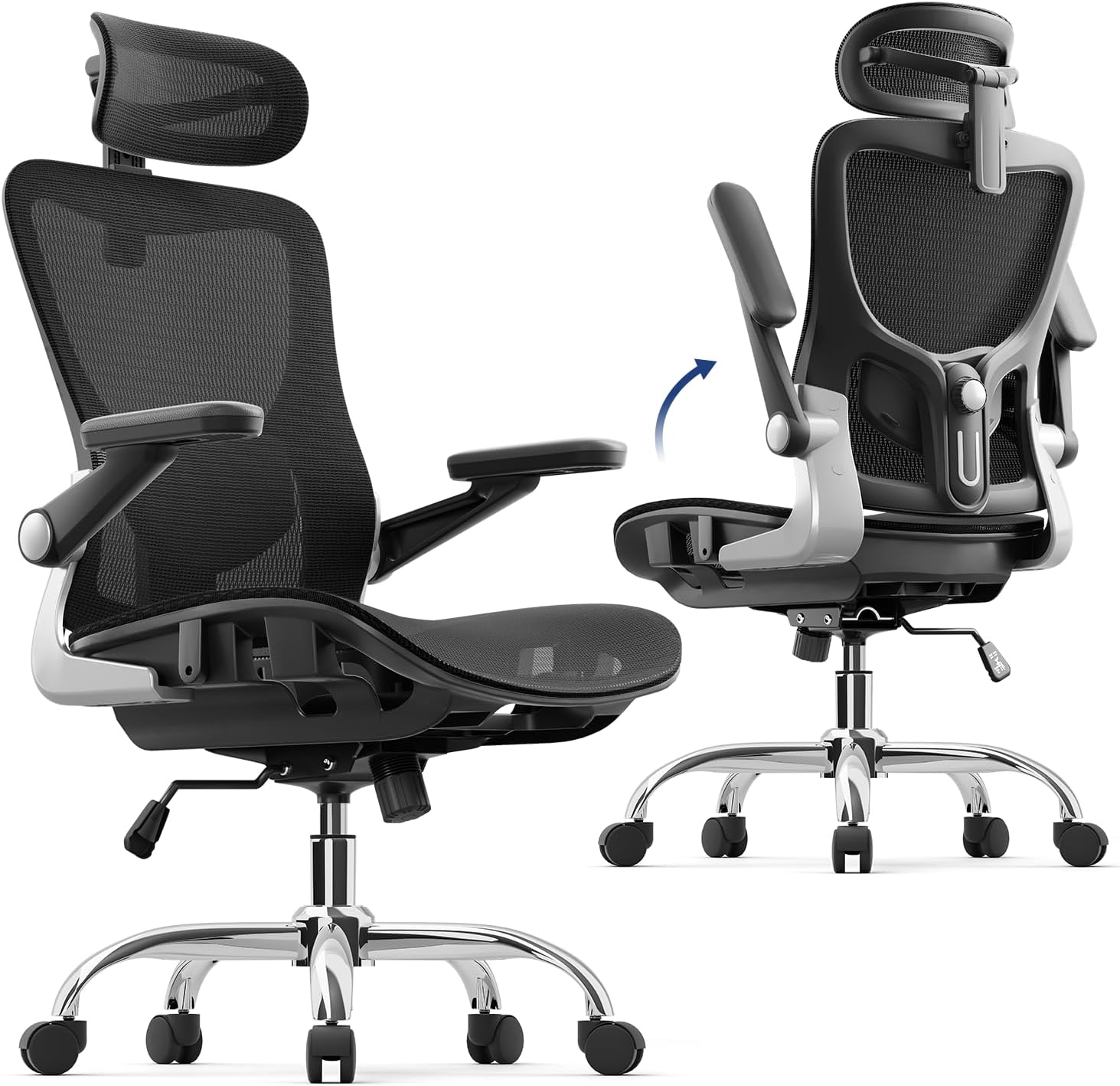
Pros
- Two-direction lumbar adjustment covers more body shapes than height-only adjustment
- 3D armrests offer more posture variety than fixed or flip-up-only arms
- Rocking function adds light movement without a full recline mechanism
Cons
- Rocking range is modest compared to the dedicated reclining chairs elsewhere in this category
- Mid-range price sits above the simplest lumbar-only picks on this list

Pros
- Backed by a recognizable national retailer, simplifying returns and support
- Solid rating for a straightforward, no-frills task chair
- Built specifically for everyday desk use rather than niche features
Cons
- Heavier than most other picks in this comparison
- Fewer standout features than the big and tall or heavy-duty options here
- Smaller review base than the highest-volume picks in this comparison
Staples' Dexley chair keeps things simple: adjustable lumbar support, a mesh build, and a swivel base, aimed squarely at everyday desk use rather than any single standout feature.
Being backed by a national retailer with physical locations is a real advantage for returns and support compared to smaller, direct-to-consumer brands in this comparison.
At 37 pounds, it is one of the heavier chairs in this roundup, and its review base is smaller than the highest-volume picks here, though its rating remains strong.
For anyone who wants a dependable, no-surprises task chair from a known retailer, this is a safe, straightforward pick.
Chair Type: Ergonomic mesh task chair. Lumbar Support: Adjustable. Base Movement: Swivel. Weight: 37 pounds, one of the heavier chairs in this comparison.
Brand: Staples, Dexley line. Designed for home offices, workstations, and everyday desk use.
If brand recognition and easy returns matter to you, this chair carries the backing of a national retailer that the smaller brands in this comparison cannot match.
Consider this chair if you want a dependable everyday chair rather than a chair built around one standout feature like extreme weight capacity or a headrest.
This is best suited to buyers who prioritize a trusted retailer name over the largest possible review count or a niche feature set.

Pros
- 2D headrest adjusts both height and angle, useful for supporting the neck while looking at a monitor
- 3D flip-up armrests fold out of the way entirely when not needed
- Adjustable lumbar support paired with a breathable mesh back
Cons
- Smaller review base than the more established picks in this comparison
- Seat cushion uses foam fill rather than an open mesh pan
- Recline limited to 2 positions rather than a continuous range
Marsail pairs a breathable mesh back with a 2D headrest that adjusts both height and angle, a combination that helps support the neck during long stretches of looking at a monitor without having to crane forward.
The 3D flip-up armrests fold completely out of the way when not needed, useful if you switch between typing and using a full desk surface for notes or a second device, and the adjustable lumbar support rounds out the core ergonomic points.
Recline is limited to 2 positions rather than a continuous range, and the seat cushion uses foam fill rather than an open mesh pan, with a smaller review base than the more established picks in this comparison.
For anyone who specifically wants a 2D adjustable headrest for monitor viewing angle, this is a reasonable pick.
Chair Type: Mesh office chair with headrest. Frame Material: Metal and plastic. Seat Material: Mesh with foam fill. Back Style: Breathable mesh back.
Armrests: 3D flip-up. Headrest: 2D adjustable. Lumbar Support: Adjustable. Recline: 2 positions.
Brand: Marsail. Maximum weight recommendation: 300 pounds.
If neck support while looking at a monitor for extended periods matters to you, the 2D headrest here adjusts in more directions than a fixed or single-axis headrest.
Consider this chair if flip-up armrests that fold completely away matter to you for desk flexibility.
Weigh the smaller review base and 2-position recline against the more established, wider-recline picks in this comparison if those matter more to you.
This is best suited to buyers who prioritize headrest adjustability for monitor viewing over recline range.
What Matters Most in a Chair for Programming Work
Armrests That Match Keyboard Height Precisely
Armrests set even slightly too high or too low force the shoulders to compensate over thousands of keystrokes a day, a pattern that adds up to real strain over months of daily typing. A 3D or 4D adjustable armrest, capable of moving in height, width, and depth rather than just up and down, lets you match the armrest to your specific keyboard and mouse position rather than adjusting your posture to fit a fixed armrest.
Flip-up or fold-away armrests are also worth considering if you frequently switch between a keyboard-and-mouse setup and using the desk surface for notes, a second device, or a tablet, since they let you clear the armrest entirely rather than working around it.
A Headrest That Supports Extended Screen Time
Staring at a fixed monitor position for hours tends to pull the neck slightly forward over time, a posture that a well-positioned headrest can offset by giving the head something to rest against periodically rather than holding itself up unsupported. A 2D headrest, adjustable in both height and angle, fits a wider range of monitor setups and sitting postures than a fixed or single-axis headrest.
This matters more for programming specifically than for tasks that involve moving around a room or looking at physical documents, since screen-based work tends to lock the head into one narrow range of motion for long stretches. Our guide on best monitor distance from eyes covers the screen positioning side of the same problem.
Seat Depth Adjustment for a Workstation You Use Daily
A fixed seat depth either fits your leg length or it does not, and a mismatch shows up as either the front edge pressing into the back of your knees or your lower back losing contact with the backrest. Seat depth adjustment, whether through a sliding seat pan or a wire-controlled mechanism, lets you dial in the fit specifically rather than settling for a compromise.
This is a feature worth prioritizing for a chair you expect to use for years at the same desk, since the fit only needs to be set once and then left alone, unlike armrest height, which you may adjust more often as your setup changes. Our guide on how to adjust an ergonomic office chair walks through setting seat depth correctly the first time.
Quiet Casters Matter More Than You Would Expect
Programming work frequently happens alongside video calls, pair programming sessions, or recorded screen shares, where a squeaky or rattling caster becomes a distraction in a way it would not during quieter office tasks. Smooth-rolling casters are a minor line item on most listings but worth checking in reviews specifically for complaints about noise, since this detail rarely shows up in product photos or specifications.
A chair that swivels and rolls smoothly also reduces the temptation to twist your torso awkwardly to reach a second monitor or a side desk, a small habit that adds up to real strain if repeated dozens of times a day.
Recline Range for Debugging Breaks and Reading
Not every part of programming work happens leaning forward toward a keyboard. Reading documentation, reviewing a pull request, or thinking through a problem before writing code often happens in a more reclined position, and a chair with a wider recline range supports that shift without needing to stand up or change chairs.
A tension-adjustable recline, where you can control how much resistance the backrest offers as you lean back, is more useful here than a chair limited to a couple of preset angles, since it lets you match the resistance to your own body weight and preferred reading posture. If your setup includes multiple monitors, our guide on setting up dual monitors ergonomically covers positioning them alongside your chair.
Final Thoughts
ProtoArc EC200 Ergonomic Office Chair holds the highest rating in this comparison and includes adjustable seat depth alongside strong lumbar support, a solid all-around choice for a daily coding setup. If a headrest built specifically for supporting the neck during long screen sessions is your main priority, Marsail Ergonomic Mesh Office Chair includes a 2D adjustable headrest that moves in both height and angle to match your monitor position.
Frequently Asked Questions
Do programmers really need a different chair than other office workers?
The core ergonomic needs overlap significantly with any desk job, but programming work tends to involve fewer posture changes and more sustained keyboard and screen time than roles that include meetings, walking between desks, or handling physical materials. That pattern makes armrest and headrest adjustability slightly more valuable than they might be for a more varied workday.
Is a mechanical keyboard tray more important than the chair?
Both matter, and neither fully compensates for the other. A well-positioned keyboard tray sets the correct height and distance for typing, while the chair supports your back and determines how well you can maintain that position for hours at a time. Treat them as complementary parts of the same setup rather than choosing one over the other.
How often should armrest height be readjusted?
Once set correctly for your desk and keyboard height, armrests generally do not need frequent readjustment unless you change desks, switch to a standing desk setup, or add a keyboard tray that changes your typing height. It is worth rechecking the fit any time your desk setup changes rather than assuming the original adjustment still applies.
Does chair material affect focus during long coding sessions?
Indirectly. Discomfort from poor support or overheating tends to become a distraction over a long session, pulling attention away from the task at hand, even if the material itself has no direct effect on concentration. A chair that stays comfortable for hours reduces one more source of interruption during focused work.
Does chair choice matter as much as desk setup for programmers specifically?
Both matter, but they solve different problems. A well-fitted chair addresses sitting posture and pressure over long sessions, while monitor height and distance address neck and eye strain. Programmers who spend hours in front of a screen typically need to get both right rather than treating either as a complete fix on its own.



Write Your Review
No reviews yet. Be the first to share your experience!