

Correct monitor height for ergonomics means the top of the screen at or just below eye level, with your line of sight landing 1 to 2 inches below the top edge. OSHA recommends at least 20 inches of viewing distance on top of that. Most people need a stand riser or monitor arm to hit this exactly, since desk height alone rarely gets you there.
- Cornell University’s ergonomics program recommends your line of sight land 1 to 2 inches below the top of the screen, not centered on the middle of the display.
- OSHA’s guidance calls for at least 20 inches of viewing distance, with the display centered directly in front of you, not off to one side.
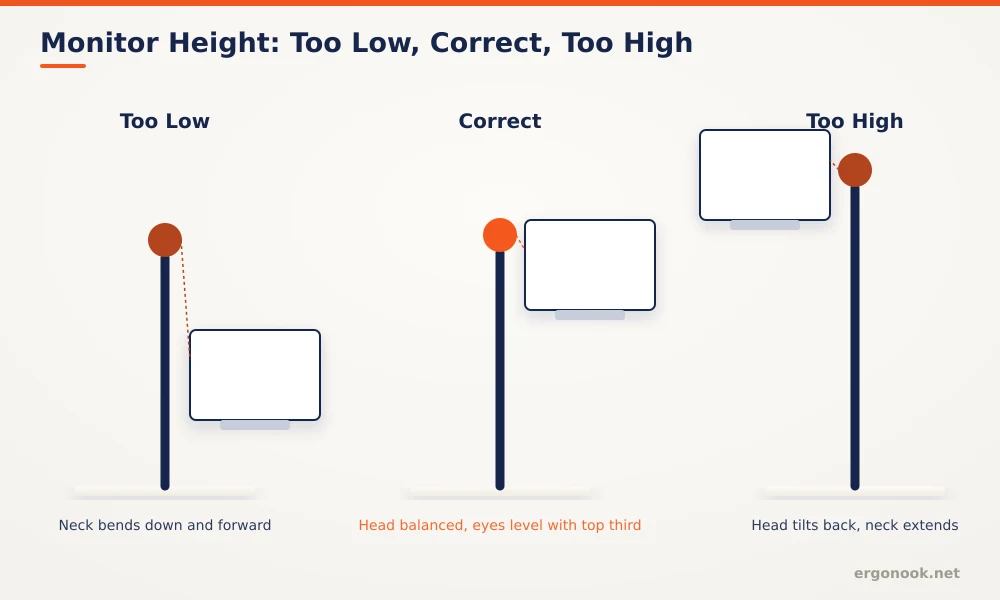
- A monitor that’s too low forces your neck to bend down and forward for hours; one that’s too high tilts your head back and strains the muscles on the back of your neck.
- If your eyes sit lower than the monitor’s lowest setting even after lowering it fully, a monitor arm gives more downward range than a fixed stand.
In this article:
- The quick answer: monitor height by your situation
- Why monitor height matters
- How to measure your own monitor height
- How to adjust your monitor to reach it
- Special cases
- Signs your monitor height is wrong
- Frequently asked questions
The Quick Answer: Monitor Height by Your Situation
| Your Situation | Recommended Adjustment |
|---|---|
| Standard vision, single monitor | Top of screen at eye level, line of sight 1 to 2 inches below the top edge |
| Bifocals or progressive lenses | Lower the monitor further so you view it through the reading portion of the lens, not the distance portion |
| Very tall or short frame | A monitor arm gives more height range than a fixed stand or riser |
| Laptop as main screen | Prop the laptop up to eye level with a stand and use an external keyboard and mouse |
| Standing desk, alternating positions | An arm that adjusts with the desk keeps the same eye-level target at both heights |
Why Monitor Height Matters
Your neck is built to hold your head level, not tilted up or down for hours at a stretch. When a monitor sits too low, you round your neck forward to look down at it, the same posture that strains your neck and upper back during long phone use. When it sits too high, you tilt your head back, which shortens and fatigues the muscles at the back of your neck over a full workday. Correct monitor height for ergonomics isn’t about a single magic number, it’s about keeping your head balanced over your shoulders so neither set of muscles has to work overtime just to hold your gaze on the screen.
How to Measure Your Own Monitor Height
Sit in your normal working posture, looking straight ahead without tilting your head up or down. Note where your eyes naturally land on the screen. Cornell’s ergonomics program recommends that spot fall 1 to 2 inches below the top edge of the monitor, not the vertical center (Cornell University Ergonomics Web). If your eyes land closer to the middle or bottom of the screen, the monitor is too low. If you have to tilt your head up to see the top of the screen at all, it’s too high.
Check distance at the same time. OSHA’s Computer Workstations eTool recommends a minimum of 20 inches from your eyes to the screen, centered directly in front of you rather than angled to one side (OSHA).
How to Adjust Your Monitor to Reach It
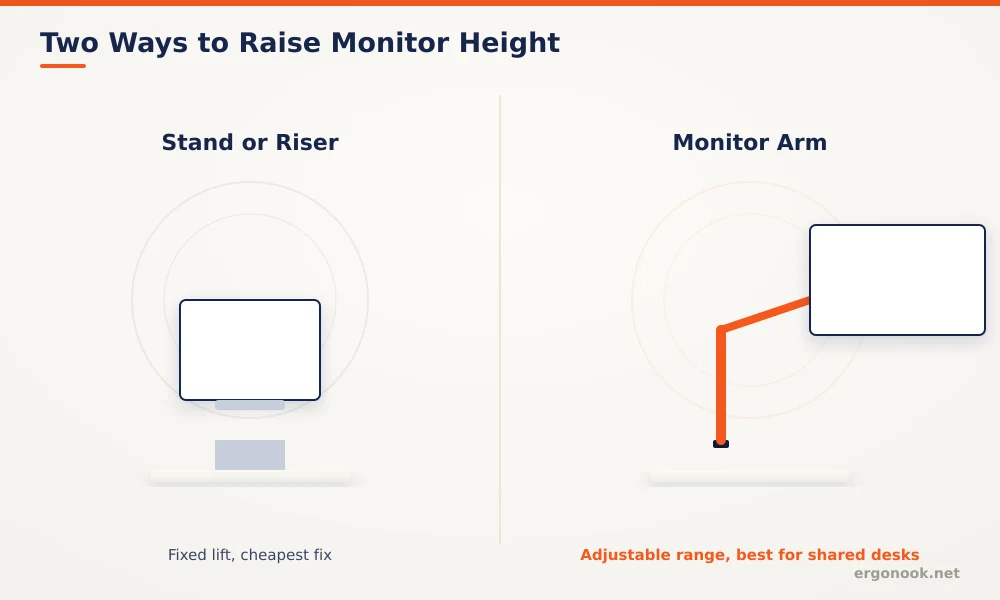
Two options raise a monitor that’s sitting too low: a fixed stand or riser, or a monitor arm. A stand is the cheaper fix and works fine if your ideal height never changes. An arm costs more but gives you a full adjustable range, useful if you share the desk, alternate between sitting and standing, or just aren’t sure yet what height actually feels right. If your monitor is already too high and can’t be lowered further, check whether it’s sitting on an unnecessary riser or box first, that’s a free fix before buying anything.
If you’re shopping for an arm, our monitor arms for ultrawide monitors roundup and dual monitor arm roundup cover models scored on height range and weight capacity, the two specs that matter most for actually hitting and holding the right eye level.
Special Cases
Bifocal and progressive lens wearers often need to set the monitor a bit lower than the standard eye-level rule, since looking straight ahead through the distance portion of the lens at a screen close-up can blur the text, and tilting the head back to use the reading portion undoes the ergonomic benefit entirely. Lowering the monitor slightly lets you view it through the correct part of the lens without the head tilt. Laptop users face the opposite problem: a laptop screen sitting on the desk is almost always too low, which is why an external keyboard and mouse paired with a laptop stand matters more for laptops than for desktop monitors.
Screen size changes how forgiving the height rule is, even though the underlying target stays the same. A 24-inch monitor is small enough that a few degrees of tilt barely matters, but a 32-inch or ultrawide display puts more of the screen outside your natural sightline if the height is off, since your eyes have to travel further to cover the whole surface. Larger screens are also more likely to need a slight backward tilt, angling the top of the panel a few degrees away from you, so the entire surface stays roughly the same distance from your eyes instead of the top edge being noticeably farther away than the bottom.
Signs Your Monitor Height Is Wrong
Neck stiffness that’s worse at the end of the workday than at the start is the most common signal. Headaches that start in the base of the skull, rather than the temples, often point to sustained neck extension from a monitor set too high. If you catch yourself leaning forward to read text, the monitor may be too far away or too low, both of which encourage the same forward head posture.
Frequently Asked Questions
Should the monitor be exactly at eye level?
Not exactly. Cornell’s guidance places your line of sight 1 to 2 inches below the top of the screen, so the very top edge sits slightly above where you’re actually looking.
Does monitor height change with two monitors?
The same eye-level target applies to your primary screen. A secondary monitor used less often can sit slightly lower or off to the side without the same strict requirement.
Do I need to readjust monitor height when I switch to standing?
Yes, if the monitor doesn’t move with the desk. An arm mounted to a standing desk keeps the same eye-level target at both heights without a separate adjustment.
Is a stack of books as good as a monitor riser?
Functionally yes, for a fixed height. It won’t tilt or swivel like a purpose-built riser, but it raises the screen the same way for free.
Correct monitor height for ergonomics comes down to one target: your line of sight landing just below the top of the screen, with your head balanced rather than tilted up or down. Get that right first, then worry about distance, tilt, and everything else.


Write Your Review
No reviews yet. Be the first to share your experience!