

You have a clean desk after a long session, but then the pens, sticky notes, and small gadgets start piling up again. A standard keyboard tray keeps your typing posture correct, but adding storage turns it into a command center. If you want a clutter-free surface without sacrificing ergonomic support, a keyboard tray with storage is the answer. In this guide, we walk through the key features that separate a good tray from a great one, helping you choose a model that fits your workflow and desk setup.
Before diving into specifics, it helps to understand how a tray with storage differs from a basic under desk model. For a broader look at under desk options, check out our Best Under Desk Keyboard Tray roundup. That article covers standard trays, while here we focus on those that integrate compartments for your daily tools.
Added storage drawers make the tray heavier and deeper, so desks with shallow under-surface clearance may not have room for the storage compartment even if the keyboard platform itself would fit.
Disclosure: Ergonook is a participant in the Amazon Associates program. Links below are affiliate links, and we may earn a commission from qualifying purchases. This does not affect which products we recommend or how we rank them.

Pros
- Full ergonomic adjustability (swivel, tilt, height) reduces wrist and shoulder strain
- Integrated storage drawer helps declutter the desk surface
- Smooth slide-out mechanism with protective pad for comfortable typing
- Easy to install on standard flat-edged desks
- Sturdy build and attractive vintage design
Cons
- Not compatible with desks that have beveled edges
- Requires a desk thickness of at least 0.61 inches for secure mounting
- May need extra legroom check for taller users or thicker desks
This vintage keyboard tray with storage drawer is a versatile ergonomic solution for home offices and gaming setups. Designed for desks over 28 inches long, it offers a 28x11 inch surface that accommodates full-sized keyboards and mice. The vintage aesthetic blends well with wood or classic decor, making it a functional upgrade for any workspace.
The standout feature is its full adjustability: 360 degrees of horizontal rotation, 30 degrees of vertical tilt, and up to 6.5 inches of height adjustment. This allows you to find the perfect typing angle, reducing strain on wrists and shoulders. The slide-out mechanism extends 9.8 inches from the desk edge, and the included soft pad ensures comfortable use during long sessions.
Build quality is solid, with a smooth glide and stable mounting. The storage drawer is a convenient addition for holding small items like pens, sticky notes, or cable clips. Installation is straightforward with the provided hardware, but note that the clamp requires a desk edge thickness of at least 0.61 inches and a flat underside; beveled edges are not compatible.
Potential drawbacks include the need to measure your desk height for legroom and the limitation on desk edge shape. Some users may find the tray slightly bulky under thicker desks. However, for those with suitable desks, the ergonomic benefits and added storage make it a worthwhile investment.
Overall, this keyboard tray delivers on its promise of adjustable comfort and desk organization. It is best suited for users who value ergonomic flexibility and a tidy workspace. With a user rating of 4 out of 5, it is a reliable choice for improving your typing posture and reducing clutter.
Pros
- Sturdy C-clamps provide a secure, damage-free attachment to desks up to 1.75 inches thick.
- Three height adjustments allow personalized ergonomic positioning for comfortable typing.
- Large 32.8-inch platform accommodates a full keyboard and mouse with room to spare.
- Easy to install with included hardware and instructions, no drilling required.
- Smooth slide-out action extends up to 8.5 inches for convenient access.
Cons
- Not compatible with desks that have beveled edges or thickness greater than 1.75 inches.
- Total length of 38 inches from clamp to clamp may be too long for smaller desks.
- Some users may find the C-clamps require careful adjustment to avoid slipping on smooth surfaces.
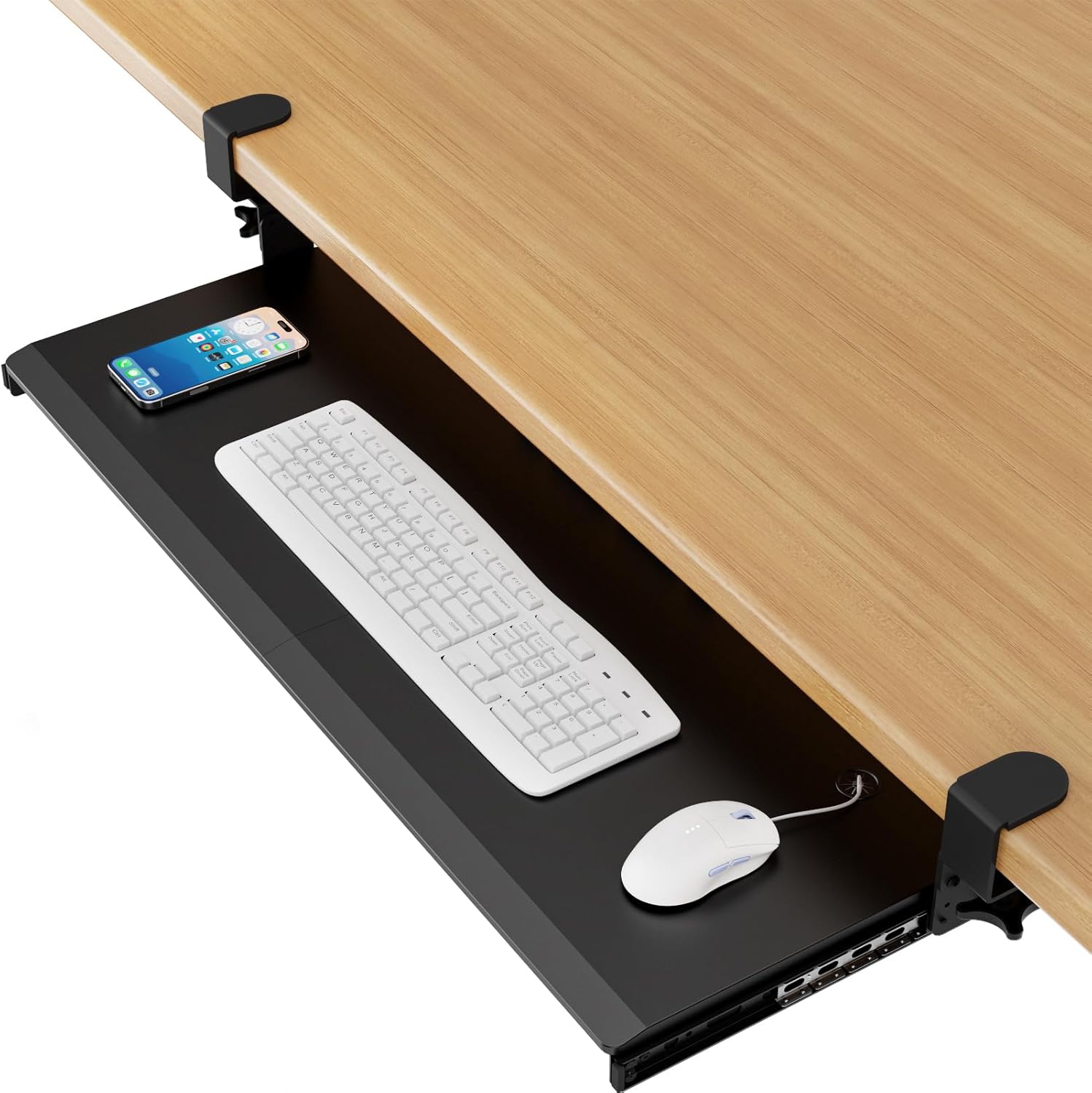
The AX WABER under-desk keyboard tray is a spacious, adjustable solution for anyone looking to reclaim desk space and improve typing ergonomics. With a 32.8-inch platform (38 inches including clamps) and a 12-inch depth, it holds a full-size keyboard, mouse, and small accessories easily. This tray is ideal for home office workers, gamers, or anyone spending long hours at a computer who wants to reduce wrist and shoulder fatigue.
Standout features include three height adjustable settings that let you tilt the tray to your preferred ergonomic angle, and a smooth slide-out mechanism that extends up to 8.5 inches from the desk edge. The sturdy C-clamp mount attaches securely without drilling or damaging your desk surface, supporting up to 11 lbs. Real-world performance is solid: the tray glides smoothly and stays in place during use, making typing and mousing comfortable even during long sessions.
Design and build quality are impressive for the price. The platform is made of a durable, easy-to-clean material, and the clamps feel robust. Installation is straightforward with all necessary hardware and clear instructions, though you need a desk with a flat edge no thicker than 1.75 inches. The tray also works well on 90-degree corner tables, adding flexibility to your setup.
Potential drawbacks include incompatibility with beveled desk edges and the 38-inch total clamp-to-clamp length, which may be too large for narrow desks. Some users may need to adjust the clamps carefully to ensure a tight grip on smooth surfaces. Additionally, the tray does not have built-in wrist rests, so you may want to add your own for extra comfort.
Overall, the AX WABER keyboard tray delivers excellent value for its price. It combines a large work surface, ergonomic adjustability, and easy installation into a reliable under-desk solution. If your desk meets the thickness and edge requirements, this tray is a smart investment for improving your workstation comfort and organization.
Pros
- Extra large surface for keyboard and mouse plus accessories
- Ergonomic tilt improves typing posture and reduces fatigue
- Sturdy clamp mounting holds securely without damage
- Smooth sliding action for easy access and storage
- Easy installation with included hardware and instructions
Cons
- Not compatible with desks that have beveled edges
- Requires at least 11.8 inches of clearance from desk edge to center stretcher
- Relatively heavy at 11.93 pounds, may require a sturdy desk
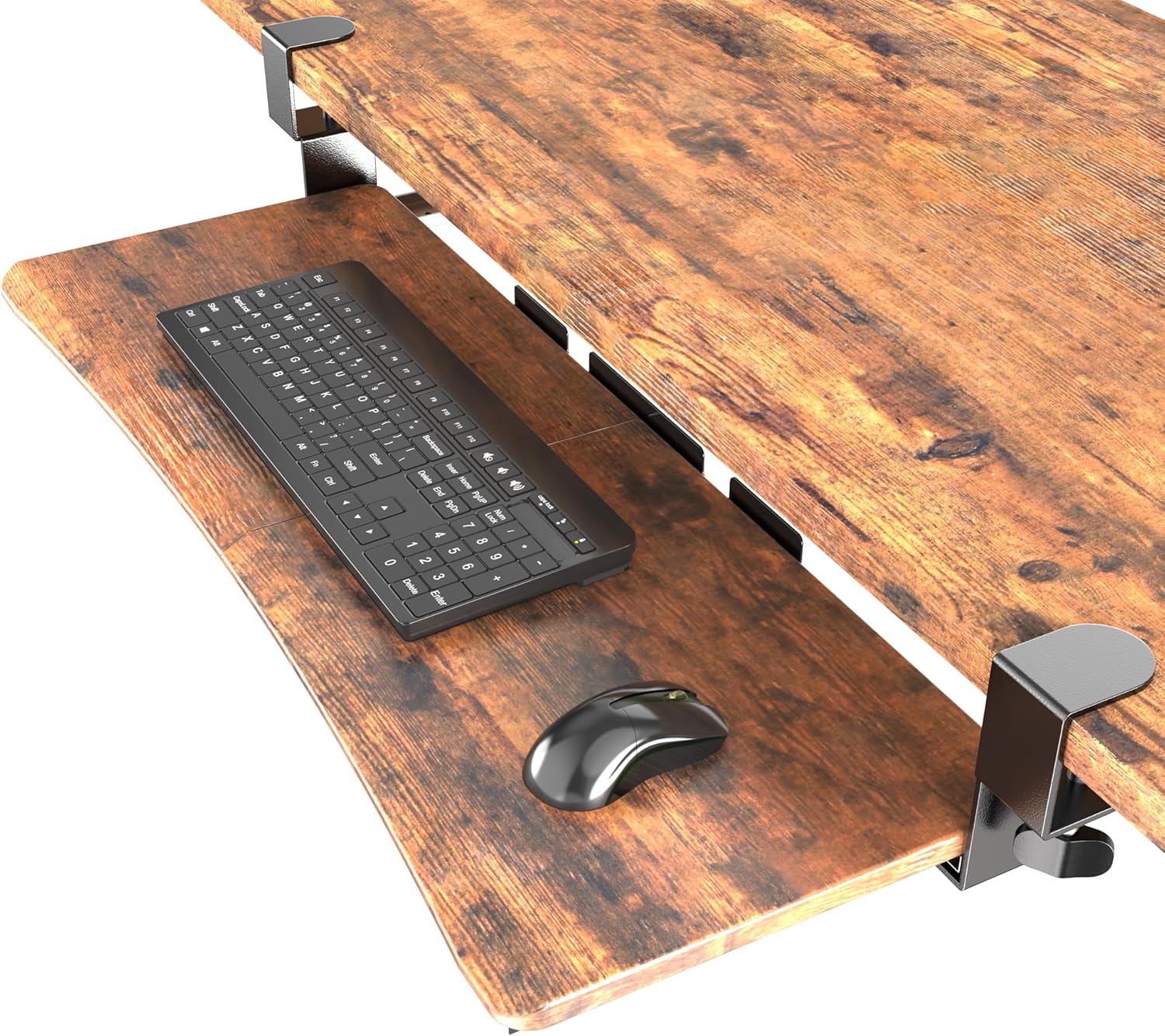
The UPGRAVITY Extra Large Keyboard Tray is a spacious under-desk solution designed for full-size keyboards and mice. It offers an oversized 31.5-inch surface that also accommodates a phone, notepad, or other small accessories, making it ideal for home offices and gaming setups.
Its standout feature is the smooth ball-bearing slide mechanism that allows the tray to glide in and out easily, providing ergonomic typing angles that reduce wrist and shoulder strain. The heavy-duty C-clamps attach securely to desks up to 2.17 inches thick without causing damage, thanks to non-slip EVA pads.
The tray's build quality is solid, with a powder-coated, rust-resistant frame and a rustic wood surface that looks great. Assembly is straightforward with the included two-piece design and all necessary hardware, though the tray is heavy at nearly 12 pounds, so ensure your desk can support it.
One drawback is that it is not compatible with desks featuring beveled edges, and you need at least 11.8 inches of clearance from the desk edge to the center stretcher. Additionally, some users may find the clamps require careful adjustment for perfect fit.
Overall, the UPGRAVITY Extra Large Keyboard Tray offers excellent value for those seeking to declutter their workspace and improve ergonomics. Despite a few installation constraints, its robust build and smooth performance make it a top choice for productivity and comfort.
Dimensions: 31.5 x 11.8 inches (tray surface); 35.8 inches total width including clamps
Slide Extension: Maximum 9.8 inches from desk edge; slides under 11.8 inches
Desk Thickness Compatibility: Up to 2.17 inches
Weight Capacity: 11 pounds
Product Weight: 11.93 pounds
Material: Wood tray, powder-coated steel frame, EVA pads
Color: Rustic Vintage Brown

Pros
- Full range of motion for ergonomic positioning.
- Saves desktop space by storing keyboard and mouse underneath.
- Includes storage drawer for small accessories.
- Height and tilt adjustments customizable.
- Easy to install if desk meets requirements.
Cons
- Requires specific desk dimensions and clearance; not universal fit.
- Some users may find installation tricky due to crossbar restrictions.
- Only 7 reviews so far, limited user feedback.
The LLDEPLL Under Desk Keyboard Tray with Storage Drawer is a versatile ergonomic accessory designed for home office and gaming setups. It mounts securely under your desk, providing a slide-out platform for both keyboard and mouse, plus a small drawer for storing pens, notes, or other desk essentials.
Standout features include 180-degree horizontal rotation and 30-degree vertical tilt, allowing you to find the perfect typing angle. The tray also adjusts up to 6.5 inches in height, helping to align your arms and wrists for reduced strain during long work or gaming sessions. The slide-out mechanism extends up to 9.8 inches from the desk edge, then tucks away completely when not in use, freeing up valuable desktop space.
Build quality appears solid with a soft protective pad for comfort. Installation is straightforward with included hardware, but careful measurement is crucial: the desk must be at least 0.6 inches thick, with no crossbar within 15.7 inches of the edge, and at least 28 inches of width clearance for rotation. These requirements may limit compatibility with some desks.
Potential drawbacks include the need for specific desk dimensions and the relatively low number of user reviews, which makes long-term reliability uncertain. Additionally, the storage drawer is small and may not fit larger items.
Overall, the LLDEPLL keyboard tray offers excellent ergonomic adjustability and space-saving benefits for those with compatible desks. If your setup meets the clearance requirements, it is a solid choice for improving comfort and organization.

Pros
- Spacious platform comfortably fits a full keyboard and mouse
- 360° rotation and tilt adjustment offer flexible ergonomic positioning
- Convenient built-in drawer, phone slot, and headphone hanger for organization
- Sturdy clamp design holds firmly without damaging the desk
- Smooth mouse pad surface enhances tracking accuracy
Cons
- Height is not adjustable, which may limit ergonomic matching for some users
- Requires a minimum desk width of 35 inches for full double-sided rotation
- C-clamp may not fit desks with rounded edges or very thin tops
The Klearlook Keyboard Tray is a well-designed under-desk solution for anyone seeking a more organized and ergonomic workspace. It fits a wide range of standard keyboards and mice on its 25 by 11 inch platform, and the built-in mouse pad provides a smooth, responsive surface. This tray is ideal for remote workers, gamers, or anyone who spends hours at a computer and wants to reduce desk clutter.
Standout features include the 360 degree rotation, which lets you swing the tray out of the way when not in use, and the adjustable tilt angle that helps you maintain a neutral wrist position. The integrated storage drawer, phone slot, and headphone hanger are thoughtful additions that keep essentials close at hand. In real-world use, the tray feels stable and the clamp holds securely to the desk edge.
Build quality is solid, with a sturdy steel frame and a durable plastic platform. The clamp fits desks up to 2.68 inches thick, and the assembly is straightforward with clear instructions. The tray does not wobble during typing or mouse use, which adds to the premium feel. However, the height is fixed, so you cannot raise or lower the tray relative to the desk surface.
One drawback is that the 360 degree rotation requires a minimum desk width of 35 inches for full range of motion, which may be restrictive for smaller desks. Also, the lack of height adjustment means you need to ensure your chair and desk height are already well matched. The C-clamp may not work well on desks with rounded edges or very thick tops.
Overall, the Klearlook Keyboard Tray offers excellent value for its price. It combines generous space, smart organization features, and ergonomic adjustability in a sturdy package. If you have a desk that meets the width requirements and you do not need height adjustment, this tray is a reliable choice for a cleaner, more comfortable workspace.

Pros
- Spacious 26.7x11.8 inch platform fits full-size keyboard and mouse
- Three built-in drawers for convenient storage
- Smooth and quiet sliding mechanism
- Easy to install with C-clamps that don't damage desk
- Ergonomic design promotes better posture
Cons
- C-clamp may not fit desks thicker than 1.69 inches
- Slide-out depth is limited to 7.72 inches, not full extension
- Plastic construction might not feel as premium as metal options
The XINLEI under-desk keyboard tray is a practical solution for anyone looking to reclaim desk space while improving ergonomics. It is designed for home office workers, gamers, or anyone who spends long hours at a computer and wants to reduce strain on wrists and shoulders.
Its standout feature is the large 26.7x11.8 inch platform that accommodates a full-size keyboard and mouse comfortably. The smooth and silent sliding mechanism allows easy access, and the back baffle ensures your keyboard stays in place. The three storage drawers are a bonus for keeping small items organized.
Build quality is solid with a metal sliding rail and sturdy C-clamps that attach without damaging the desk. The 11-pound weight capacity is sufficient for most setups. Installation is straightforward, though you need to measure your desk thickness and clearance carefully.
A potential drawback is the limited slide-out depth of 7.72 inches, which may not pull out fully for some users. Also, the tray itself is made of plastic, which might not feel as premium as all-metal alternatives. The maximum desk thickness of 1.69 inches restricts compatibility with thicker desks.
Overall, the XINLEI keyboard tray delivers excellent value for its price. It offers a large workspace, ergonomic benefits, and handy storage. If your desk meets the thickness requirement and you don't need full extension, this is a great choice for a tidier, more comfortable desk setup.
Dimensions: 26.77 x 11.81 inches (platform); 31 inches total length including clamps
Slide-Out Range: Up to 7.72 inches
Maximum Desk Thickness: 1.69 inches
Total Height: 3.86 inches
Weight Capacity: 11 lbs
Material: Metal sliding rail, plastic platform
Drawers: 1 large, 2 small

Pros
- Spacious 24.4x10 inch surface accommodates full-size keyboards and mice
- Multifunctional design includes wrist rest, storage drawer, phone holder, and headset hook
- Adjustable height and tilt support proper wrist alignment and reduce strain
- Smooth sliding mechanism for quiet, effortless access
- Easy to install with a stable, long-lasting build
Cons
- Requires a desk with a minimum width of 24.4 inches and under-desk clearance over 16 inches
- Not compatible with desks that have thick edge frames or crossbars that block mounting
- Some users may find the initial installation process a bit time-consuming
The Klearlook Upgraded Ergonomic Keyboard Tray is a comprehensive solution for anyone seeking a more organized and comfortable workspace. Designed for home offices, corporate desks, and gaming setups, this tray slides smoothly under your desk and provides a stable platform for your keyboard and mouse.
Its standout feature is the combination of ergonomic adjustability and multifunctional storage. You can adjust the tray's height and tilt to find your ideal typing angle, reducing shoulder and wrist fatigue during long sessions. The integrated wrist rest, leather mouse area, phone holder, headset hook, and storage drawer keep all your essentials within reach while the surface stays clutter-free.
The build quality is solid, with a sturdy metal frame that feels durable and reliable. The slide mechanism is smooth and quiet, making it easy to push the tray in and out as needed. Installation is straightforward, but careful measurement is required to ensure your desk meets the minimum width and clearance requirements.
A potential drawback is the specific desk compatibility: your desk must be at least 24.4 inches wide and have over 16 inches of under-desk clearance with no thick edge frames. This may limit its use on some desks. Additionally, assembly can take a bit more time if you need to adjust mounting hardware.
Overall, the Klearlook keyboard tray is an excellent investment for anyone spending hours at a computer. It offers a generous work area, thoughtful organization, and ergonomic benefits that can help prevent discomfort. With a solid 4.2-star rating from nearly 300 reviewers, it is a reliable choice for upgrading your desk setup.
Dimensions: 24.4 x 10 inches (tray surface)
Compatibility: Requires desk width of at least 24.4 inches and under-desk clearance of over 16 inches; no thick edge frames or crossbars obstructing the underside
Features: Smooth slide mechanism, adjustable height and tilt, integrated wrist rest, leather mouse area, phone holder, headset hook, storage drawer
Material: Sturdy metal frame with high-quality finishes
Use Cases: Home office, corporate workspace, gaming desk
Installation: Easy mounting with included hardware (measurement required beforehand)

Pros
- Integrated cup holder and hooks reduce desktop clutter and keep essentials handy.
- Wide height range accommodates both sitting and standing users of various heights.
- Lockable casters provide mobility and stability, easy to reposition.
- Water-resistant desktop is easy to clean and works well without a mouse pad.
- Sturdy construction supports up to 44 lbs, suitable for heavy keyboards and accessories.
Cons
- Mouse pad not included; some users may prefer a dedicated mouse surface.
- Particleboard surface may not be as durable as solid wood over long-term use.
- Cup holder is wire mesh, not insulated; may not fit larger cups or mugs.
The Snughome Mobile Keyboard Tray is a height-adjustable rolling platform designed to bring organization and ergonomic flexibility to any home office. It is ideal for users who want to convert a fixed desk into a sit-stand workstation without buying a new desk, or for those who need extra keyboard and mouse space.
Its standout features include a built-in wire cup holder and two storage hooks, which keep drinks, headphones, and cables off your main desk surface. The height adjusts smoothly from 27.5 to 44.4 inches, allowing you to switch between sitting and standing with ease. The smooth water-resistant desktop works well for mouse tracking even without a mouse pad.
The tray is built with a sturdy metal frame and particleboard surface, supported by reinforced crossbars for stability. Four lockable casters make it easy to move around or slide under a desk for storage. Assembly is straightforward with included tools and instructions.
One potential drawback is that a mouse pad is not included, and some users might prefer one for precision work. The particleboard surface, while durable, may not be as premium as solid wood. Also, the wire cup holder is not insulated and may not accommodate very large cups.
Overall, the Snughome Mobile Keyboard Tray offers excellent value for its price, combining practical storage features, height adjustability, and mobility. It is a solid choice for anyone looking to improve their desk ergonomics and keep their workspace tidy.

Pros
- Most adjustable arm range in this comparison
- Dual mounting options for above or under desk use
- Extra storage and organization features not found on the other trays here
Cons
- Smaller review history than the more established VIVO, BONTEC, and HUANUO trays
- More complex arm mechanism than a simple slide-out tray
The Klearlook tray stands apart with a full articulating arm, offering 360 degree horizontal rotation and 237 degrees of vertical adjustment, along with 180 degrees of tilt.
It can mount either above or under the desk, giving more setup flexibility than a fixed slide-out tray.
Beyond the keyboard and mouse platform, it includes a storage drawer, a phone slot, and a headphone hanger for extra organization.
It has a smaller review history than the more established trays in this comparison, being a newer, more feature-dense product.
It suits anyone who wants maximum positioning flexibility and extra storage in one accessory.
Dimensions: 24.4 inches by 10 inches, with the mounting arm at 22.83 by 14.57 by 18.5 inches.
Motion: 360 degree rotation, 237 degree vertical arm adjustment, 180 degree tilt.
Extras: Storage drawer, phone slot, headphone hanger, built-in mouse pad.
Weight: 8.25 pounds.
Who should buy this tray? Anyone who wants maximum positioning flexibility along with built-in storage.
Who might want to look elsewhere? Anyone who wants a simpler, more established slide-out tray should consider the VIVO or BONTEC options instead.
Setup tip: Decide between above-desk or under-desk mounting before installation, since switching later means reinstalling the mount.
Buying Guide: What to Look for in a Keyboard Tray with Storage
Choosing the right tray means balancing ergonomics, storage capacity, and build quality. Below are the four most important factors to evaluate before you buy.
Storage Design and Accessibility
Not all storage trays are created equal. Some offer a shallow drawer underneath the keyboard platform, while others include side compartments or a pull‑out shelf for a mouse. Think about what you need to store: pens, USB drives, phone, notepads. A tray with a dedicated slot for your smartphone or a magnetic strip for metal tools can keep things within reach without adding clutter. Make sure the storage area is easy to access while typing, so you don’t have to stretch or lean forward.
Ergonomic Adjustability
Storage should never compromise ergonomics. Look for a tray that offers height adjustment, tilt, and negative tilt options. Negative tilt (angling the keyboard slightly away from you) helps keep your wrists straight, reducing strain. A tray that locks firmly in your chosen position prevents wobble during typing. If you use a standing desk, confirm that the tray can be mounted securely and adjusted easily. For more on ergonomic positioning, read our guide on How to Position Keyboard and Mouse Ergonomically.
Build Quality and Materials
A tray with storage must support the weight of your keyboard plus the items you store inside. Steel or aluminum construction offers durability without excessive bulk. Check the weight capacity of the drawer or compartment, especially if you plan to store a heavy mouse or a tablet. The sliding mechanism should use ball‑bearing rails for smooth, quiet operation. Avoid plastic slides that may wear out quickly. A solid tray also reduces vibrations and keeps your typing stable.
Mounting Compatibility and Desk Fit
Most keyboard trays with storage attach under your desk with a clamp or screw‑mount system. Measure your desk thickness and the clearance needed for the tray to slide out without hitting your legs or chair. Some models require a minimum overhang, while others work with any flat surface. If you have a standing desk, verify that the tray’s mounting bracket does not interfere with the desk’s height‑adjustment mechanism. For more insights on standing desk setups, see our Best Keyboard Tray for Standing Desk article.
Final Thoughts
A keyboard tray with storage is a smart upgrade for anyone who wants a tidy, ergonomic workspace. By focusing on storage design, adjustability, build quality, and mounting compatibility, you can find a tray that keeps your essentials close while protecting your wrists. Whether you prioritize a deep drawer for office supplies or a slim compartment for just a few items, the criteria above will guide you to a model that fits your daily routine. Remember to double‑check your desk dimensions before ordering, and don’t hesitate to explore the other ergonomic resources on our site to complete your setup.
Frequently Asked Questions
Here are common questions people ask when shopping for keyboard trays with storage.
Can I use a keyboard tray with storage on a standing desk?
Yes, many trays are designed for standing desks. Look for a model with a clamp‑mount that attaches securely to the desk frame and does not block the height‑adjustment mechanism. Measure the clearance under your desk when the tray is fully extended to ensure it does not hit your legs.
How much weight can a keyboard tray with storage hold?
Weight capacity varies by model. Most sturdy trays support up to 10–15 pounds in the drawer area, which is enough for a keyboard, a mouse, and small accessories. Always check the manufacturer’s specifications to avoid overloading the sliding mechanism.
Does a keyboard tray with storage improve ergonomics?
It can, as long as the tray itself offers proper ergonomic adjustments. Negative tilt, height adjustment, and a stable platform are essential. The storage compartment should not force you to change your typing posture. For more on reducing wrist pain, read How to Reduce Wrist Pain From Typing.
Are there keyboard trays with storage that fit a 75% or compact keyboard?
Yes, many trays have adjustable width or a removable palm rest to accommodate smaller keyboards. Measure your keyboard’s width and depth, and compare it with the tray’s internal dimensions. Some trays also include a separate mouse platform, which can be useful if you prefer a compact layout.



Write Your Review
No reviews yet. Be the first to share your experience!