

You finally cleared your desk of clutter, but your keyboard and mouse still hog precious real estate. Every time you reach for them, your shoulders hunch and your wrists bend at an awkward angle. A black keyboard tray mounted under your desk solves both problems instantly: it frees up surface space and lets you type in a neutral, comfortable position. Whether you work from home, manage a busy office, or game for hours, the right tray makes a noticeable difference in your daily comfort.
In this guide, we have reviewed nine of the best black keyboard trays on the market for 2026. We looked at size, mounting style, adjustability, and build quality to help you choose the model that fits your desk and your workflow. If you are new to under-desk trays, you might also want to read our complete guide to under-desk keyboard trays for a broader overview.
A dark tray shows dust and fingerprints more visibly than a lighter finish, so anyone who prefers low-maintenance gear may want to weigh that against the aesthetic appeal.
Disclosure: Ergonook is a participant in the Amazon Associates program. Links below are affiliate links, and we may earn a commission from qualifying purchases. This does not affect which products we recommend or how we rank them.

Pros
- Largest tray surface in this comparison
- No-drill C-clamp installation
- Well-established review history
Cons
- Requires more under-desk clearance than the more compact trays here
- Not compatible with desks that have beveled edges or a crossbar in the way
The VIVO tray stands out for its size, at 34 inches wide before the clamps, giving enough room for a keyboard, mouse, and small accessories side by side.
It slides smoothly in and out from under the desk, and the C-clamp mount attaches securely without drilling into your desk surface.
It's rated to hold up to 11 pounds and requires a maximum desk thickness of 1.25 inches, so it's worth double-checking your desk specs before ordering.
Because of its length, it needs more under-desk clearance than the more compact trays in this comparison, and it isn't compatible with beveled desk edges or a crossbar in the way.
It suits anyone who wants maximum surface area for a full keyboard and mouse setup.
Dimensions: 39.4 inches long including clamps by 11 inches deep.
Material: Alloy steel frame.
Weight capacity: Up to 11 pounds.
Mounting: C-clamp, maximum desk thickness 1.25 inches.
Who should buy this tray? Anyone who wants maximum surface area for a keyboard, mouse, and accessories in one tray.
Who might want to look elsewhere? Anyone with a beveled desk edge, a crossbar underneath, or limited under-desk width should consider a more compact tray instead.
Setup tip: Measure the full 39.4 inch clamp-to-clamp length against your desk width before ordering, not just the 34 inch tray itself.

Pros
- Easy tool-free installation with C-clamps
- Smooth sliding mechanism for effortless use
- Sturdy steel clamps hold up to 11 lbs
- Ergonomic design reduces wrist strain
- Non-slip pads protect desk surface
Cons
- Not compatible with desks thicker than 1.57 inches
- Not suitable for corner or curved desks
- Depth may be insufficient for larger mouse pads or extended wrist rests
The suptek DSF1 under desk keyboard tray is a practical ergonomic accessory for anyone looking to declutter their workspace. It is designed for standard desks with thickness up to 1.57 inches and is ideal for home office users, gamers, or professionals who want a cleaner desk and better typing posture.
Its standout feature is the smooth slide system that allows you to effortlessly push the tray under the desk when not in use. The dual steel C-clamps grip securely without damaging the desk, and the tray can hold up to 11 pounds, easily accommodating a keyboard and mouse. Users report that the installation is quick and requires no drilling.
The tray measures 25.6 inches wide by 11.8 inches deep, providing ample space for most keyboards and mice. The black finish is professional and blends with most desk setups. Non-slip pads on the clamps protect the desk surface, and an edge stopper prevents the keyboard from sliding off when pushed back.
One limitation is that the clamps only fit desks up to 1.57 inches thick, so thicker desks or glass tops may not work. Additionally, the tray is not designed for corner or curved desks. Some users may find the depth a bit shallow for larger mouse mats.
Overall, the suptek DSF1 offers excellent value for its price. It combines ease of installation, sturdy construction, and ergonomic benefits. If your desk meets the thickness requirement, this tray is a solid choice to improve your workspace comfort and organization.
Pros
- No-drill mounting preserves desk warranty and finish
- Large platform fits standard keyboard and mouse comfortably
- Sturdy C-clamps with protective pads offer stable, scratch-free grip
- Frees up valuable desktop space and promotes ergonomic posture
- Smooth sliding mechanism makes it easy to pull out and push back
Cons
- Not compatible with curved, beveled, or rounded desk edges or desks with crossbars or support beams
- Requires significant clearance: at least 31.3 inches of width and 11.8 inches of depth under the desk
- Oversized or vertical ergonomic keyboards may not fit; verify dimensions and height clearance before ordering
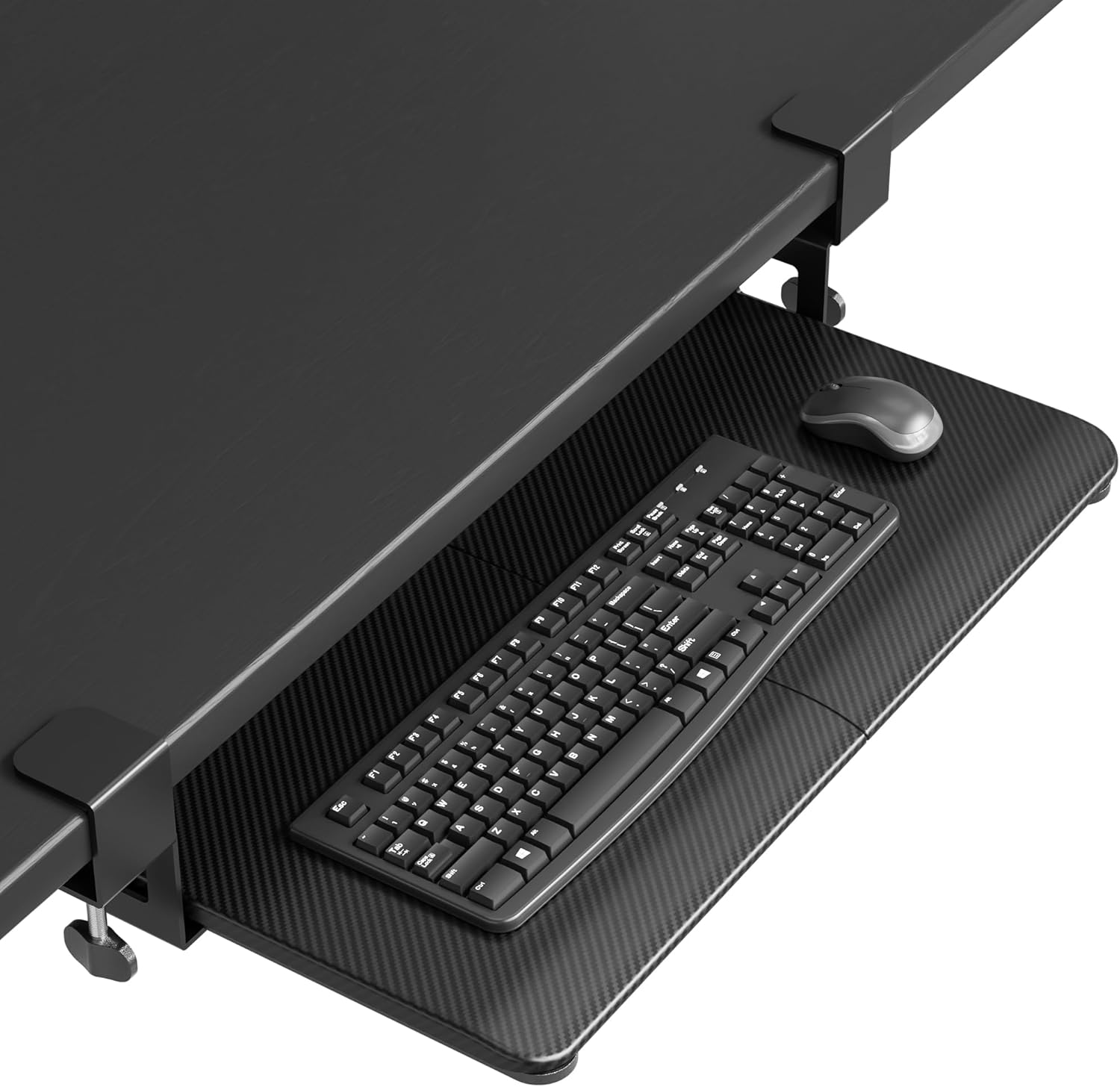
The BONTEC Under Desk Keyboard Tray is a practical pull-out platform that mounts under a flat desk with sturdy C-clamps. It is designed for office workers, remote professionals, and gamers who want to maximize desk space and improve ergonomics.
This tray slides out smoothly to reveal a roomy 25.6 x 11.8 inch platform for a standard keyboard and mouse, then tucks away when not in use. No-drill installation is a major plus, allowing you to attach the tray to desktops up to 1.97 inches thick and support up to 11 pounds. Protective pads keep the clamps from scratching your desk.
With a strong 4.4-star rating from thousands of users, buyers appreciate the sturdy build and space-saving design. The under-desk position promotes a natural wrist angle, which can reduce fatigue during long sessions. However, the tray requires at least 31.3 inches of width and 11.8 inches of depth under the desk, and it will not work with curved edges or crossbars, so careful measuring is essential.
The biggest limitation is compatibility. Desks with beveled, curved, or rounded undersides, or with support beams, cannot use the clamp system. Also, oversized or vertical ergonomic keyboards may not fit on the 25.6-inch platform, so you need to verify dimensions and clearance before ordering.
If your desk has a flat, unobstructed underside and you meet the clearance requirements, the BONTEC under desk keyboard tray is a smart, affordable way to reclaim desktop space and improve your ergonomic setup. It is well built, easy to install, and backed by strong user satisfaction.
Brand: BONTEC
Product: Under Desk Keyboard Tray
Platform Dimensions: 25.6 x 11.8 inches
Required Desk Clearance: 31.3 inches width, 11.8 inches depth
Maximum Desktop Thickness: 1.97 inches
Weight Capacity: 11 lb
Mounting Type: C-clamps, no drilling
Compatibility: Desks with flat, unobstructed undersides only

Pros
- Recovers valuable desktop real estate
- Ergonomic tilt reduces strain during long typing sessions
- Built-in storage drawer keeps small items organized and out of sight
- Sturdy C-clamps provide a secure, wobble-free mount
- Simple installation with no drilling required
Cons
- Not compatible with desks thicker than 1.25 inches or those with beveled edges
- Total clamp-to-clamp length of 32.5 inches may be too wide for narrow desks
- Pencil drawer may not fully close if tray is pushed all the way in with tall accessories
The VIVO Black Clamp-on Keyboard Tray with Pencil Drawer (MOUNT-KB05-4D) is a practical under-desk solution for anyone looking to maximize workspace and improve typing ergonomics. It combines a 27x11 inch keyboard platform with a hidden 17-inch pencil drawer, catering to home office workers, gamers, or anyone with a cluttered desk.
The standout feature is the integrated storage drawer, which slides out independently and holds up to 11 pounds of accessories like pens, sticky notes, or small gadgets. This keeps essentials within reach without sacrificing desk space. The tray itself glides smoothly and offers adjustable tilt angles, helping to reduce wrist and shoulder fatigue during extended use.
Build quality is solid, with a steel frame and sturdy C-clamps that grip the desk edge tightly. Installation is straightforward: all hardware is included, and the clamps adjust easily without tools. The tray sits 2 to 2.75 inches below the desk, depending on table thickness, and extends up to 8.5 inches for comfortable access.
One limitation is compatibility: the desk surface must be no thicker than 1.25 inches and must have a flat edge (beveled edges are not supported). Also, the total width from clamp to clamp is 32.5 inches, so ensure your desk has enough clearance. Some users may find the drawer adds bulk, but it rarely interferes with legroom.
Overall, the VIVO keyboard tray with pencil drawer delivers excellent value for its price. It effectively declutters your workspace while promoting better posture. If your desk meets the thickness and edge requirements, this is a highly recommended upgrade for a more organized and comfortable workstation.

Pros
- Full side-to-side rotation for flexible positioning
- Rubber padding adds wrist support
- Simple, included hardware for assembly
Cons
- Lowest average rating among the trays in this comparison
- Needs an additional spacer bracket, sold separately, for height-adjustable desks with a crossbar
This VIVO tray offers a 25 by 10 inch platform that slides forward and back, with 5 inches of height adjustment and full side-to-side rotation.
Supportive rubber padding is built into the design to help reduce wrist soreness during use.
It has the lowest average rating of the trays compared here, which appears tied in part to desk compatibility, since height-adjustable desks with a crossbar need an additional spacer bracket sold separately.
Standard fixed desks with 14.25 inches of clearance between the desktop edge and any crossbar should install without the extra part.
It suits anyone with a standard fixed desk who wants a straightforward, rotating tray, more than someone with a height-adjustable desk with a crossbar.
Dimensions: 25 inches wide by 10 inches deep.
Material: Rubber-padded tray.
Height adjustment: 5 inches.
Weight: 10 pounds.
Who should buy this tray? Anyone with a standard fixed desk who wants a straightforward, rotating tray with rubber wrist padding.
Who might want to look elsewhere? Anyone with a height-adjustable desk with a crossbar should check for the required spacer bracket first, or consider the Eureka Ergonomic tray, which is built for crossbar desks.
Setup tip: Confirm whether your desk needs the separately sold spacer bracket before ordering, since this is the most common fitment issue reported.

Pros
- Large adjustable surface area fits various keyboard and mouse setups
- Smooth gliding mechanism for easy access and storage
- Sturdy steel construction ensures long-term durability
- Easy to install with included hardware and instructions
- Non-retractable design provides stability during use
Cons
- Requires a desk thickness of at least 0.78 inches for secure mounting
- Screw mounting not compatible with glass or very thin desks
- Tray height of 2.36 inches may be too low for some users depending on chair and desk height
The JINGCHENGMEI Large Under Desk Slide-Out Keyboard Tray is a spacious and sturdy solution for anyone looking to free up desk space while maintaining comfortable typing ergonomics. Measuring 27 by 9.8 inches with an adjustable width from 23 to 27 inches, it fits a wide range of desks and accommodates full-size keyboards and mice.
Its standout feature is the smooth ball-bearing slide mechanism, which allows the tray to extend and retract effortlessly. The cold rolled steel construction supports up to 11 pounds, ensuring durability even with heavy mechanical keyboards. The non-retractable locking stops keep the tray securely in place while typing, preventing accidental sliding.
Installation is straightforward with the included screws and instructions, though it requires a desk thickness of at least 0.78 inches. The tray mounts firmly under the desk, keeping your workspace clutter-free. The low profile height of 2.36 inches may feel low for some users, so consider your chair height and desk setup.
Potential drawbacks include the screw mounting method, which is not suitable for glass or very thin desks. Additionally, the tray's depth of 9.8 inches may be limiting for those who prefer a deeper platform. However, for most standard desks, this tray offers excellent value and performance.
Overall, the JINGCHENGCHI keyboard tray is a well-built, easy-to-install accessory that enhances ergonomics and desk organization. Its large adjustable surface and smooth sliding make it a top choice for home offices and workspaces.

Pros
- Versatile 360° rotation for customized ergonomic positioning.
- Space-saving under-desk storage when not in use.
- Sturdy clamp holds securely without damaging desk.
- Easy to install with all hardware included.
- Accommodates wide range of keyboards up to 11 lbs.
Cons
- Not compatible with desks that have lipped or beveled edges.
- Requires at least 32 inches of clearance for full 360° rotation.
- Maximum desk thickness of 2 inches may limit some workstations.
The VIVO MOUNT-KB04CB is a clamp-on rotating keyboard tray designed to free up desk space while providing ergonomic typing angles. It is ideal for home office workers, gamers, or anyone with a cluttered desk who wants their keyboard and mouse stored neatly underneath when not in use.
The standout feature is the 360 degree rotation enabled by a single desk clamp. This allows you to pivot the tray to any angle for comfortable typing and then rotate it completely under the desk for discreet storage. The rotation is smooth and requires 32 inches of clearance for a full circle, making it suitable for L-shaped or corner desk setups.
Build quality is solid with a sturdy C-clamp that attaches securely to desks up to 2 inches thick without causing damage. The tray itself measures 22.8 by 9.8 inches, providing enough room for a standard keyboard and mouse. Installation is straightforward with included hardware and the clamp adjusts easily.
A notable drawback is that the clamp is not compatible with desks that have lipped or beveled edges. Also, the maximum desk thickness of 2 inches may exclude thicker workstations. Some users may find the tray size limiting for full-size keyboards with integrated numpads, though it fits most standard models.
Overall, the VIVO MOUNT-KB04CB offers excellent value for those seeking a flexible, space-saving keyboard tray. Its rotating design and easy installation make it a practical choice for improving desk ergonomics. With a strong 4-star rating from users, it delivers on its promise of convenience and adjustability.

Pros
- Spacious surface accommodates keyboard and mouse together
- Smooth and quiet glide operation
- Easy installation with two mounting options
- Sturdy build provides stable typing platform
- Ergonomic angle promotes comfort during long work sessions
Cons
- Requires sufficient desk overhang (total length 30 inches) for clamp installation
- Height clearance may be limited for thicker desks when using clamp method
- Clamps cannot fit desks thicker than 1.63 inches without using screw mount
The XINLEI Keyboard Tray is an under-desk slide-out platform designed to save workspace and improve ergonomics. It targets anyone with a cluttered desk who wants to keep their keyboard and mouse accessible yet out of the way. This tray is especially useful for home office workers, gamers, and professionals seeking a cleaner setup.
Its standout feature is the generous 25.6 x 11.8 inch surface, which easily holds a full-size keyboard and mouse together. The smooth metal sliding rail allows you to pull out up to 7.75 inches and push in silently, with a back baffle preventing accidental drops. Users report that the glide feels premium and stable during use.
Build quality is solid with a black finish that matches most desks. The C-clamps are padded to protect the desk edge, and they grip firmly up to 1.63 inches thick. For thicker desktops, the included screw mount option provides a secure alternative. The ergonomic angle is fixed but well-chosen to reduce wrist strain.
One drawback is the total length of 30 inches including clamps, which means you need enough desk overhang. Also, when using clamps, the height clearance under the desk is only 2.4 inches, so thicker keyboards may not fit if the desk is thick. However, the screw mount solves this for most users.
Overall, the XINLEI Keyboard Tray delivers excellent value for its price. It combines a large surface, smooth operation, and easy installation. If you need to reclaim desk space and improve typing comfort, this tray is a reliable choice that meets its promises.
Platform Dimensions: 25.6 x 11.8 inches (total length 30 inches including clamps)
Slide Range: Push in up to 12.24 inches, pull out up to 7.75 inches
Maximum Desk Thickness: 1.63 inches (clamp) or unlimited with screw mount
Height Clearance Under Desk: 2.4 inches (clamp mode), total height 4.45 inches
Mounting Options: C-clamp or screw mount
Color: Black
Material: Metal sliding rail, plastic platform

Pros
- Established brand with a strong review history
- Pre-installed mouse tray saves a separate purchase
- Fits a wide range of standard keyboard sizes
Cons
- Screw-mounted rather than clamp-mounted, requiring permanent installation into the desk underside
- Requires 23.5 inches of width and 14.5 inches of depth underneath the desk, more clearance than some compact trays
The Fellowes drawer mounts to the underside of your desk using screws, rather than a clamp, which makes for a more permanent but very stable installation.
It offers three height positions and a platform sized for keyboards up to 20 inches wide, with a mouse tray pre-installed on the right side.
It's built with an impact-resistant tray and has a well-established review history among office keyboard trays.
Because it's screw-mounted, installation is more involved than a clamp tray, and it needs 23.5 inches of width and 14.5 inches of depth of obstruction-free space underneath the desk.
It suits anyone who wants a stable, permanent keyboard drawer with a built-in mouse platform.
Dimensions: 22.37 inches wide by 11.63 inches deep.
Material: Plastic.
Height adjustment: 3 positions.
Mouse tray: 7.25 by 7.5 inches, pre-installed.
Who should buy this tray? Anyone who wants a stable, permanent keyboard drawer with a built-in mouse platform and doesn't mind screw installation.
Who might want to look elsewhere? Anyone who wants a no-drill option should choose one of the C-clamp trays in this comparison instead.
Setup tip: Confirm you have 23.5 inches of width and 14.5 inches of depth free of any crossbars before installing.
Buying Guide: What to Look for in a Black Keyboard Tray
Choosing the right black keyboard tray involves more than just picking a color. Consider these key factors to ensure a comfortable, durable, and space-saving addition to your desk.
Desk Compatibility and Mounting System
Not every tray works with every desk. Most models use C-clamps that grip the underside of your desktop, but they require a flat, unobstructed surface. Check your desk thickness: many trays support up to 1.25 inches, while others like the BONTEC model handle up to 1.97 inches. Also measure the width underneath your desk to ensure the tray slides out fully. Desks with curved, beveled, or lipped edges often cannot accept clamp-on trays. If your desk has a crossbar or support beam, consider a screw-mounted tray like the JINGCHENGMEI model or a rotating clamp design such as the VIVO MOUNT-KB04CB.
Tray Size and Mouse Space
The platform must hold both your keyboard and mouse comfortably. Standard trays measure around 25 to 27 inches wide and 10 to 11 inches deep. If you use a full-size keyboard with a separate numpad or an ergonomic split keyboard, look for extra-large options like the VIVO MOUNT-KB15EB (34 inches wide) or the XINLEI DSF4 (25.6 inches wide). Some trays include a dedicated mouse platform, such as the Fellowes Office Suites model, while others provide a single large surface so you can position your mouse anywhere. Think about your mouse style: vertical mice may need extra height clearance, so verify the tray’s depth and clearance before buying.
Adjustability and Ergonomics
A good keyboard tray lets you adjust height, tilt, and distance to maintain a neutral wrist and arm position. Some trays offer three height settings (like the Fellowes model) or a full 5-inch height adjustment with side-to-side rotation (like the VIVO MOUNT-KB03B). Others, such as the rotating VIVO MOUNT-KB04CB, pivot 360 degrees for flexible placement. Even a simple slide-out tray with a smooth glide reduces reaching strain. If you share your desk or switch between sitting and standing, adjustable features become even more important. For standing desk setups, you may need a spacer bracket to clear the frame crossbar; check our guide to keyboard trays for standing desks for compatible options.
Build Quality and Weight Capacity
Look for a tray made of cold-rolled steel or thick plastic that can support at least 11 pounds. Most models in this review hold that weight, but the quality of the slide mechanism matters too. Ball-bearing slides provide smooth, quiet operation, while basic plastic slides may feel rough over time. Check for edge stoppers that prevent your keyboard from slipping off when you push the tray back. Also examine the clamp design: padded C-clamps protect your desk from scratches and provide a secure grip. A well-built tray will last for years without sagging or loosening.
If wrist pain is a concern, pairing a good tray with an ergonomic keyboard can further improve your comfort. Explore our recommendations for the best ergonomic keyboards for wrist pain and best split ergonomic keyboards to build a complete ergonomic setup.
Final Thoughts
After reviewing nine black keyboard trays, the VIVO Black Extra Large Keyboard Tray (MOUNT-KB15EB) stands out for its generous 34-inch platform that easily accommodates a full-size keyboard and mouse, plus its sturdy C-clamp mount that fits most standard desks. For a more budget-friendly option that still delivers reliable performance, the Fellowes Office Suites Underdesk Keyboard Drawer offers three height adjustments and a dedicated mouse tray, making it a solid choice for smaller workspaces or users who need quick ergonomic tweaks. Whichever you choose, mounting your keyboard under the desk is a simple upgrade that can transform your posture and productivity.
Frequently Asked Questions
Will a black keyboard tray fit any desk?
Most clamp-on trays work with desks that have a flat, unobstructed underside and a thickness between roughly 0.5 and 1.5 inches. Desks with curved, beveled, or lipped edges may not accept C-clamps. Always measure your desk thickness and available clearance before purchasing. For desks with crossbars, screw-mounted trays or rotating clamp designs offer alternatives.
How do I install a keyboard tray without drilling?
Many black keyboard trays use C-clamps that tighten against the underside of your desk without any drilling. Simply slide the clamps into position, adjust them to your desk thickness, and tighten the knobs. Some models also include non-slip pads to protect the desk surface. If your desk has a crossbar, you may need a screw-mounted tray or an adapter bracket.
Can I use a keyboard tray with a standing desk?
Yes, but you may need a spacer bracket to clear the frame crossbar on height-adjustable desks. The VIVO MOUNT-KB03B, for example, requires an optional spacer (MOUNT-SPACER01) for standing desk frames. Check the product specifications and consider our guide to keyboard trays for standing desks for compatible models.
What size keyboard tray do I need?
Measure your keyboard and mouse combined width, then add a few inches for comfortable movement. Standard trays range from 23 to 27 inches wide. If you use a large keyboard with a numpad or an ergonomic split model, look for extra-wide trays like the VIVO MOUNT-KB15EB (34 inches). Also ensure the tray depth (usually 10 to 11 inches) accommodates your mouse.
For more tips on reducing wrist strain, read our article on how to reduce wrist pain from typing and learn how to position your keyboard and mouse ergonomically.


Write Your Review
No reviews yet. Be the first to share your experience!