

If your desk looks like a spaghetti junction of cables, you are not alone. A quality keyboard tray can be the unsung hero that hides those wires while improving your typing posture. In this guide, we focus specifically on the best keyboard trays for cable management: models that come with built-in routing channels, cable clips, or under-tray storage to keep everything tidy. Whether you work from home or in an office, these trays help you maintain a clean setup without sacrificing ergonomics. For a broader look at under-desk options, check out our best under desk keyboard tray roundup.
If your cable clutter is mainly behind your monitor or PC rather than at the keyboard, a keyboard tray’s routing channels will not solve that; a separate cable sleeve or management tray addresses that better.
Disclosure: Ergonook is a participant in the Amazon Associates program. Links below are affiliate links, and we may earn a commission from qualifying purchases. This does not affect which products we recommend or how we rank them.

Pros
- Tool-free installation saves time and money
- Sturdy metal clamps provide stable support for heavy keyboards
- Smooth rail action with ample space for large keyboards and gaming gear
- SmartFit height adjustment enhances ergonomics for various users
- Does not damage or mark desk surfaces
Cons
- Height adjustment limited to three preset positions, not fully customizable
- Clamp may not fit desks thinner than 0.5 inches (not specified)
- Cable management may require additional routing for thicker cables
The Kensington Clamp-On Keyboard Tray (model K55407WW) is a practical under-desk solution designed for users who need ergonomic support without permanent installation. It attaches to desks up to 1.5 inches thick using sturdy metal clamps, making it ideal for home offices, shared workspaces, and even government settings due to its TAA compliance.
Standout features include the tool-free clamp system that installs in minutes, a smooth sliding rail that accommodates everything from slim keyboards to large mechanical ones, and the SmartFit height adjustment with three preset levels. Real-world performance is solid: the tray glides easily and provides ample clearance for a mouse or trackball, reducing wrist strain during long work sessions.
Build quality is robust, with a black finish that blends into most office environments. The C-clamp design grips securely without leaving marks or scratches on the desk surface. Cable management is integrated but basic, helping keep cords organized but may not handle very thick bundles without extra effort.
Drawbacks include the limited height adjustment range (only three stops) which may not suit every user’s perfect ergonomic position. Additionally, the clamp might not fit desks thinner than about half an inch. Some users may prefer a continuous adjustment mechanism.
Overall, the Kensington Clamp-On Keyboard Tray delivers reliable, tool-free ergonomic support at a reasonable price. It is a strong choice for anyone wanting to free up desk space and improve posture without drilling holes or hiring a professional.

Pros
- Largest tray surface in this comparison
- No-drill C-clamp installation
- Well-established review history
Cons
- Requires more under-desk clearance than the more compact trays here
- Not compatible with desks that have beveled edges or a crossbar in the way
The VIVO tray stands out for its size, at 34 inches wide before the clamps, giving enough room for a keyboard, mouse, and small accessories side by side.
It slides smoothly in and out from under the desk, and the C-clamp mount attaches securely without drilling into your desk surface.
It's rated to hold up to 11 pounds and requires a maximum desk thickness of 1.25 inches, so it's worth double-checking your desk specs before ordering.
Because of its length, it needs more under-desk clearance than the more compact trays in this comparison, and it isn't compatible with beveled desk edges or a crossbar in the way.
It suits anyone who wants maximum surface area for a full keyboard and mouse setup.
Dimensions: 39.4 inches long including clamps by 11 inches deep.
Material: Alloy steel frame.
Weight capacity: Up to 11 pounds.
Mounting: C-clamp, maximum desk thickness 1.25 inches.
Who should buy this tray? Anyone who wants maximum surface area for a keyboard, mouse, and accessories in one tray.
Who might want to look elsewhere? Anyone with a beveled desk edge, a crossbar underneath, or limited under-desk width should consider a more compact tray instead.
Setup tip: Measure the full 39.4 inch clamp-to-clamp length against your desk width before ordering, not just the 34 inch tray itself.

Pros
- Adjustable height with four positions for customized ergonomic setup.
- Spacious surface fits large keyboards plus mouse and wrist rest.
- Integrated mousing area and included accessories save extra purchases.
- Smooth glide mechanism and cable management enhance desk organization.
- TAA compliant for professional and institutional buyers.
Cons
- Requires careful measurement of desk clearance; total mounting width spans 31 to 33 inches.
- No built-in palm rest for the keyboard itself (only a wrist rest for the mousing area).
- Some users may find the height adjustment range limited for very tall or short individuals.
The Kensington SmartFit Under Desk Keyboard Tray (K60004US) is an ergonomic solution for anyone looking to reclaim desk space while improving typing posture. Designed for both home offices and professional workstations, this extra-wide tray accommodates all keyboard sizes, including oversize and ergonomic models, and adds a dedicated mousing area with a wrist rest and mouse pad.
Its standout feature is the SmartFit System, which lets you mount the tray at one of four heights using color-coded settings. This quick adjustment helps align your keyboard with your natural elbow angle, reducing wrist and shoulder strain. The easy-glide drawer slides smoothly in and out, and the built-in cable management keeps wires tidy. Real-world performance is solid: the tray feels stable under normal typing and mousing, and the integrated wrist rest adds comfort during long sessions.
Build quality is typical of Kensington: a sturdy steel frame with a matte black finish that resists scratches. Installation is straightforward with included hardware, though you must measure your desk clearance beforehand because the mounting arms extend 31 to 33 inches wide. The inner tray measures 24.5 by 11.75 inches, giving ample room for a full-size keyboard plus a mouse. The included mouse pad is decent, but some users may prefer a larger one.
Potential drawbacks include the need for precise desk measurements and the lack of a keyboard-level palm rest (only the mousing wrist rest is provided). Also, the height adjustment, while convenient, may not suit extremely tall or short individuals if their desk height is fixed. Despite these minor limitations, the tray delivers on its promise of ergonomic flexibility and space-saving design.
Verdict: The Kensington SmartFit Under Desk Keyboard Tray is a reliable, well-built choice for anyone wanting a height-adjustable, extra-wide keyboard drawer. It is especially suited for users with large keyboards or those who need a dedicated mousing surface. Just measure your desk carefully before buying.

Pros
- Full swivel and tilt range in one tray
- Height adjustment suits both sitting and standing desks
- Well-established review history
Cons
- Requires specific clearance under the desk for the tray to slide and rotate
- Assembly and clamp installation required
The HUANUO tray combines a full 180 degree swivel with 6 degrees of upward tilt and 22 degrees of downward tilt, giving a wide range of typing angles to work with.
Its 6.3 inches of height adjustment is enough to reposition the tray as you move between sitting and standing at an adjustable desk.
A built-in wrist rest adds cushioned support, and the whole tray slides out of sight under the desk when not in use.
It does require specific under-desk clearance to swivel and slide fully, so it's worth checking the manufacturer's clearance guidance against your desk before buying.
It suits anyone who wants a versatile tray that adjusts through a full range of motion.
Dimensions: 25 inches wide by 9.84 inches deep.
Height adjustment: 6.3 inches.
Motion: 180 degree swivel, 6 degree up and 22 degree down tilt.
Weight: Approximately 11.5 pounds.
Who should buy this tray? Anyone who wants full swivel and tilt adjustment to suit both sitting and standing desk positions.
Who might want to look elsewhere? Anyone with limited under-desk width for the swivel motion should measure clearance carefully first or consider a fixed tray.
Setup tip: Loosen the adjustment knob fully before repositioning the tray, then retighten once it's parallel to the desk bottom.
Pros
- Soft-close feature reduces noise and wear
- High weight capacity of 40 lbs for robust keyboards
- Easy to install with included hardware
- Smooth sliding action with full extension for comfortable typing
- Durable steel build with anti-corrosion finish
Cons
- Limited to 1U height, may not fit oversized keyboards with wrist rests
- No integrated USB hub or KVM switch for added connectivity
- Some users may find the 17.75 inch depth insufficient for larger keyboards
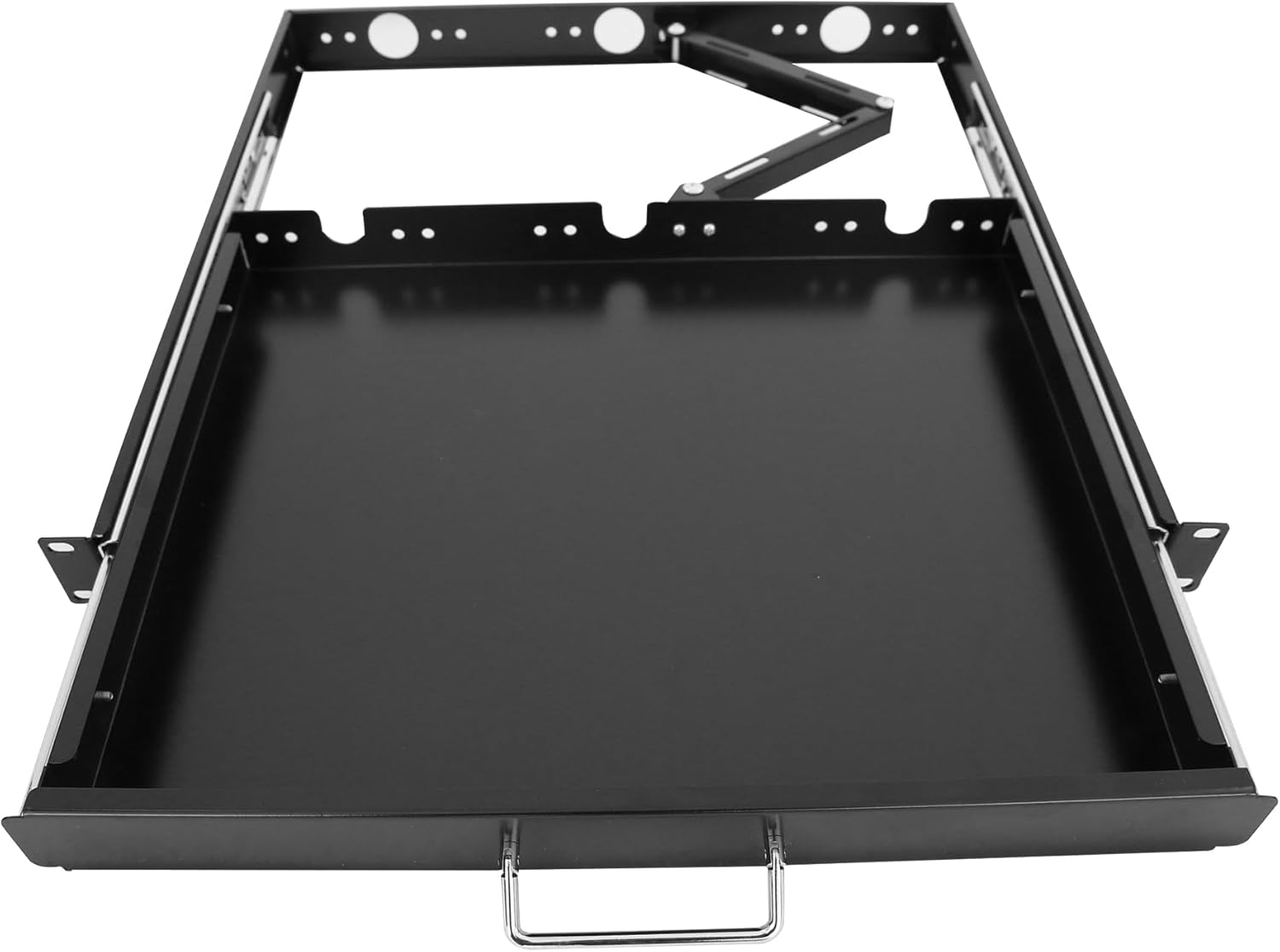
The GlobalRack 1U Keyboard Drawer is a practical and robust accessory designed for 19-inch server racks and cabinets. It is an ideal choice for IT administrators, data center technicians, and home lab enthusiasts who need to keep their keyboard accessible yet out of the way when not in use. This drawer fits seamlessly into standard rack environments, offering a space-efficient solution without compromising on functionality.
Standout features include a smooth soft-close damping mechanism that ensures the drawer closes quietly and gently, reducing noise in sensitive server environments. The drawer extends from 17.75 inches to a full 27 inches, providing ample room for comfortable typing. With a 40 lbs weight capacity, it can easily support even heavy mechanical keyboards without sagging or instability.
Build quality is excellent for the price point. The drawer is constructed from cold-rolled steel with a powder-coated finish that resists rust and corrosion, ensuring long-term durability. The foldable handle and integrated cable manager help keep cables organized and the rack neat. Installation is straightforward thanks to included M6 screws and cage nuts, and the drawer is compatible with both square and threaded holes.
Potential drawbacks include the 1U height limitation, which may not accommodate keyboards with integrated wrist rests or oversized designs. Additionally, the drawer lacks built-in USB hubs or KVM switch capabilities, so users may need separate solutions for connectivity. Some users might find the 17.75 inch depth slightly restrictive for larger keyboards, but most standard models fit well.
Overall, the GlobalRack 1U Keyboard Drawer offers excellent value for its price. It delivers reliable performance, solid construction, and thoughtful features like soft-close and cable management. If you need a dependable keyboard drawer for your server rack, this model is a smart choice that balances cost and quality effectively.

Pros
- Quick, tool-free setup with a secure clamp mount.
- Sturdy metal construction holds heavy cables and power strips.
- Rubber pads protect desk from scratches and marks.
- Cable holes allow easy organization and routing.
- Mesh design minimizes dust buildup and improves airflow.
Cons
- Only fits flat desk edges with thickness between 0.4 and 2 inches.
- Clamp may not be as secure on very thin or rounded edges.
- Mesh design may not fully hide very messy cable bundles.
The Litwaro Under Desk Cable Management Tray is a no-drill solution for anyone tired of tangled cords under their workspace. Designed for home offices, standing desks, and even kitchens, it clamps onto desk edges from 0.4 to 2 inches thick. Assembly takes just three minutes with the included side clips, making it a hassle-free upgrade for any desk.
This tray holds up to 15 pounds of cables, power strips, and USB hubs, keeping them off the floor and out of sight. The two holes on each side let you route cables neatly, while the mesh design prevents dust accumulation. Users praise its sturdy carbon steel build and easy installation, with thousands of positive reviews backing its performance.
Build quality is excellent for the price. The clamps have soft rubber pads that protect your desk from scratches, and the tray can be mounted inward or outward to suit your setup. The metal mesh feels solid and does not sag under moderate weight, though extremely heavy transformers might require additional support.
A potential drawback is that the clamp only works with flat desk edges within the specified thickness range. Very thick or contoured edges may not fit securely. Also, while the mesh hides most cables, extremely messy bundles may still peek through. However, for typical home office use, these limitations are minor.
Overall, the Litwaro cable management tray is a reliable, affordable way to organize cords without drilling. Its easy clamp mount, sturdy build, and protective features make it a top choice for anyone seeking a cleaner, safer desk area. Highly recommended for remote workers, gamers, and students.
Material: High-quality carbon steel with black mesh finish
Weight Capacity: Up to 15 lbs (6.8 kg)
Compatible Desk Thickness: 0.4 to 2 inches (10 to 50 mm)
Installation: No drill clamp mount with side clips
Cable Holes: Two on each side for cable pass-through
Dimensions: Approximately 17.7 x 5.5 x 3.5 inches (not officially stated, estimated from typical design)

Pros
- Full side-to-side rotation for flexible positioning
- Rubber padding adds wrist support
- Simple, included hardware for assembly
Cons
- Lowest average rating among the trays in this comparison
- Needs an additional spacer bracket, sold separately, for height-adjustable desks with a crossbar
This VIVO tray offers a 25 by 10 inch platform that slides forward and back, with 5 inches of height adjustment and full side-to-side rotation.
Supportive rubber padding is built into the design to help reduce wrist soreness during use.
It has the lowest average rating of the trays compared here, which appears tied in part to desk compatibility, since height-adjustable desks with a crossbar need an additional spacer bracket sold separately.
Standard fixed desks with 14.25 inches of clearance between the desktop edge and any crossbar should install without the extra part.
It suits anyone with a standard fixed desk who wants a straightforward, rotating tray, more than someone with a height-adjustable desk with a crossbar.
Dimensions: 25 inches wide by 10 inches deep.
Material: Rubber-padded tray.
Height adjustment: 5 inches.
Weight: 10 pounds.
Who should buy this tray? Anyone with a standard fixed desk who wants a straightforward, rotating tray with rubber wrist padding.
Who might want to look elsewhere? Anyone with a height-adjustable desk with a crossbar should check for the required spacer bracket first, or consider the Eureka Ergonomic tray, which is built for crossbar desks.
Setup tip: Confirm whether your desk needs the separately sold spacer bracket before ordering, since this is the most common fitment issue reported.

Pros
- Easy no-drill installation with clamp or screw brackets.
- Large capacity holds many cables and power strips.
- Flame-retardant material adds safety and dust protection.
- Versatile fit for desks of various thicknesses.
- Complete kit with ties and tubes for full organization.
Cons
- Fabric material may sag slightly under very heavy cable loads.
- Clamp mount may not be secure on desks with rounded or thick edges.
- Only available in black, limiting color options.
The Cotohim under desk cable management tray is a fabric-based organizer designed to hide and manage cables beneath your desk. It is ideal for home office workers, gamers, and anyone with a standing desk who wants a clutter-free workspace.
Its standout feature is the flame-retardant Oxford cloth that adds a layer of safety while protecting cables from dust. The large capacity easily holds power strips, adapters, and multiple cords. Installation is flexible with either clamp or screw mount brackets, and the kit includes cable ties and fiber tubes for complete organization.
The build quality is good for a fabric tray, with reinforced stitching and a sturdy frame. The tray measures 35.8 inches long by 5.6 inches wide, fitting desks with thickness from 0.4 to 2.4 inches. The black fabric blends well with most desk setups.
One potential drawback is that the fabric may not be as rigid as metal trays, so very heavy cables might cause slight sagging. Also, the clamp mount might not be secure on desks with rounded or thick edges. The product comes only in black, limiting color options.
Overall, the Cotohim cable management tray offers an excellent balance of safety, capacity, and ease of installation. It is a great choice for anyone looking to tidy up their desk cables without drilling or using adhesive solutions.

Pros
- Dual installation options: traceless C-clips or secure screws for versatile mounting.
- Large 32-inch capacity easily accommodates power strips and multiple cables.
- Ventilated design prevents overheating of cables and devices.
- Enlarged holes simplify routing and plugging in cords.
- Sturdy build stays put without wobbling or falling.
Cons
- C-clip installation may not suit all desk edge thicknesses.
- Screw installation is permanent and may damage desk if removed.
- No cable ties or extra organization accessories included.
The Univivi Under Desk Cable Management Tray is a 32-inch wide cord organizer designed for home and office users who want to eliminate messy wires and create a safer workspace. It mounts under your desk to keep power strips, cables, and chargers neatly out of sight and off the floor.
Its standout features include dual installation methods with traceless C-clips or secure screws, and enlarged cable holes that make routing multiple cords effortless. The hollow ventilated structure prevents overheating, ensuring your devices stay cool even with heavy use.
The tray is made from durable materials and features a sturdy construction that holds everything securely without wobbling. The 32-inch length provides ample room for a power strip and numerous cables, making it a practical solution for any desk setup.
One potential drawback is that the C-clips may not fit all desk edges perfectly, and screw installation requires permanent mounting. Additionally, the tray does not include cable ties or hooks for further organization, so you may need to purchase those separately.
Overall, the Univivi Under Desk Cable Management Tray offers excellent value for its price, with a high customer rating of 4.6 out of 5. It is a reliable, well-designed solution for anyone looking to declutter their workspace and improve safety.
Buying Guide: What to Look for in a Cable-Friendly Keyboard Tray
Not every keyboard tray handles cables well. Here are the key features to evaluate before you buy.
Cable Routing Channels and Clips
The most effective cable management trays include dedicated channels or grooves that guide wires from your keyboard and mouse toward the back or underside of the tray. Some models also come with removable cable clips that secure cords along the tray’s edge. This prevents cables from dangling or tangling with your chair arms. Look for trays that offer at least two routing paths (one for your keyboard cable and one for your mouse) to keep everything separate and easy to access.
Under-Desk Mounting and Clearance
A tray that mounts securely under your desk is ideal for hiding cables completely. Check that the mounting bracket provides enough clearance for your legs and that the tray can slide or tilt out of the way when not in use. Many of the best keyboard tray for standing desk options use a clamp or screw-in mechanism that keeps the tray stable even during height adjustments. If you plan to route cables through the bracket, ensure there is a gap or pass-through hole so wires aren’t pinched.
Material and Surface Finish
The tray surface matters for both ergonomics and cable management. A smooth, non-slip surface prevents your keyboard from sliding, while a matte finish reduces glare. Some trays include a removable wrist rest or a padded surface that also helps hide cables underneath. Avoid trays with sharp edges that could fray your cords over time. Bamboo, aluminum, and high-density plastic are common materials, so choose one that complements your desk and resists wear.
Ergonomic Adjustability
A tray that only manages cables but ignores your posture is not a complete solution. Look for tilt, swivel, and height adjustments so you can position the keyboard at a neutral angle. This is especially important if you also use a vertical mouse or split keyboard. For more on proper positioning, read our guide on how to position keyboard and mouse ergonomically. A well-adjusted tray reduces wrist strain while keeping cables organized.
Final Thoughts
Choosing the best keyboard tray for cable management comes down to matching your desk setup with the right routing features and ergonomic adjustments. While we didn’t evaluate specific models here, the criteria above will help you identify trays that combine clean cable handling with comfortable typing. For a deeper dive into ergonomic accessories, explore our keyboard trays category page and consider pairing your tray with an ergonomic keyboard for wrist pain to complete your workspace.
Frequently Asked Questions
Do keyboard trays really help with cable management?
Yes, many trays include channels, clips, or under-tray compartments that route cables out of sight. This reduces desk clutter and prevents cords from tangling with chair wheels or leg movements.
Can I use a keyboard tray with a wireless keyboard and mouse?
Absolutely. Wireless setups still benefit from cable management trays because you can store the receiver dongle and any charging cables neatly. Some trays have a small compartment for the receiver.
How do I install a cable management keyboard tray under my desk?
Most trays attach with clamps or screws. First, measure your desk thickness and ensure the bracket fits. Then route your cables through the tray’s channels before securing the keyboard. For step-by-step tips, see our article on how to reduce wrist pain from typing, which covers desk setup basics.
What is the best material for a keyboard tray with cable routing?
Bamboo and aluminum are popular for durability and aesthetics. Bamboo offers a warm look and is naturally anti-microbial, while aluminum is lightweight and easy to clean. Both materials can be machined with smooth cable channels.



Write Your Review
No reviews yet. Be the first to share your experience!