

After a long day of answering emails, writing reports, or coding, your wrists should not feel like they have been through a workout. If your keyboard sits flat on your desk, you are probably reaching forward, shrugging your shoulders, or bending your wrists upward just to type. A good keyboard tray solves these problems by bringing your keyboard and mouse to elbow height, and it can also free up valuable desk surface.
This guide covers the best budget-friendly keyboard tray options for anyone who wants a cleaner, more comfortable workspace without spending a small fortune. We focus on models with stable clamps, smooth height adjustment, and enough room for your everyday gear. If wrist discomfort is already part of your routine, check out our guide on how to reduce wrist pain from typing before you upgrade your setup.
Budget trays typically use simpler clamp mechanisms without smooth gas-spring height adjustment, so anyone who changes position throughout the day may find a pricier gas-spring model worth the extra cost.
Disclosure: Ergonook is a participant in the Amazon Associates program. Links below are affiliate links, and we may earn a commission from qualifying purchases. This does not affect which products we recommend or how we rank them.

Pros
- Strong, well-established review history
- No-drill C-clamp installation
- Comfortable sliding motion for typing angle adjustment
Cons
- Not compatible with beveled desk edges
- Requires a specific desk thickness range for the clamps to grip properly
This VIVO tray offers a 26.8 inch platform, 32.5 inches including the clamps, giving enough room for a keyboard and mouse together.
It slides out to a comfortable typing angle, extending up to 8.5 inches from the desk edge, and the C-clamp mount attaches without drilling into the desk.
It's rated to hold up to 11 pounds and requires a desk thickness of no more than 1.25 inches for the clamps to grip securely.
It isn't compatible with beveled desk edges, so it's worth checking your desk shape before ordering.
It suits anyone who wants a proven, mid-size sliding tray without a complex adjustment mechanism.
Dimensions: 32.5 inches long including clamps by 11 inches deep.
Material: Alloy steel.
Weight capacity: Up to 11 pounds.
Mounting: C-clamp, maximum desk thickness 1.25 inches.
Who should buy this tray? Anyone who wants a proven, mid-size sliding keyboard tray with simple no-drill installation.
Who might want to look elsewhere? Anyone who wants extra height and tilt adjustment should consider the HUANUO or Eureka Ergonomic trays instead.
Setup tip: Measure the full 32.5 inch clamp-to-clamp length against your desk before ordering, not just the tray itself.

Pros
- Frees up desk space by keeping keyboard and mouse underneath.
- Promotes ergonomic typing posture to reduce strain.
- Clamps are sturdy and non-damaging to most desk surfaces.
- Simple assembly and installation process.
- Large platform fits standard keyboards and mice comfortably.
Cons
- Requires desk thickness under 1.9 inches and a flat edge (not compatible with beveled edges).
- Total clamp-to-clamp length of 32.5 inches may be too long for smaller desks.
- Tray extension is limited to 5.7 inches, which may not suit users who prefer a further reach.
The AX WABER Keyboard Tray Under Desk is a practical solution for anyone looking to reclaim precious desktop real estate. Designed for home office workers, gamers, or anyone with a cluttered desk, this 27.3-inch slide-out platform holds your keyboard and mouse securely below the work surface.
Its standout feature is the adjustable C-clamp mounting system, which attaches firmly without damaging your desk. The tray slides in and out smoothly, allowing you to type at a comfortable ergonomic angle that reduces wrist and shoulder fatigue. With a maximum extension of 5.7 inches, it keeps essentials within easy reach while maximizing workspace.
The build quality is solid: the black platform feels durable and supports up to 11 pounds. Installation is straightforward with included hardware, and the clamps are easy to tighten. The tray is wide enough for a full-size keyboard and mouse, and the non-slip surface keeps items in place.
However, there are a few limitations. The clamps require a desk thickness of 1.9 inches or less, and the desk edge must be flat (not beveled). Also, the total clamp-to-clamp length of 32.5 inches means you need a desk that wide. The short extension might not suit users who prefer to push the tray further away.
Overall, this keyboard tray offers excellent value for its price. It is well-built, easy to install, and effectively frees up desk space while promoting better ergonomics. If your desk meets the size and edge requirements, it is a smart investment for a more organized and comfortable workstation.
Tray Dimensions: 27.3 x 11 inches (width x depth)
Total Length with Clamps: 32.5 inches
Maximum Desk Thickness: 1.9 inches
Tray Extension: Up to 5.7 inches
Weight Capacity: 11 lbs
Material: Sturdy steel and plastic construction
Mounting: Adjustable C-clamps, no drilling required
Compatibility: Not for beveled edges

Pros
- Spacious surface accommodates keyboard and mouse together
- Smooth and quiet glide operation
- Easy installation with two mounting options
- Sturdy build provides stable typing platform
- Ergonomic angle promotes comfort during long work sessions
Cons
- Requires sufficient desk overhang (total length 30 inches) for clamp installation
- Height clearance may be limited for thicker desks when using clamp method
- Clamps cannot fit desks thicker than 1.63 inches without using screw mount
The XINLEI Keyboard Tray is an under-desk slide-out platform designed to save workspace and improve ergonomics. It targets anyone with a cluttered desk who wants to keep their keyboard and mouse accessible yet out of the way. This tray is especially useful for home office workers, gamers, and professionals seeking a cleaner setup.
Its standout feature is the generous 25.6 x 11.8 inch surface, which easily holds a full-size keyboard and mouse together. The smooth metal sliding rail allows you to pull out up to 7.75 inches and push in silently, with a back baffle preventing accidental drops. Users report that the glide feels premium and stable during use.
Build quality is solid with a black finish that matches most desks. The C-clamps are padded to protect the desk edge, and they grip firmly up to 1.63 inches thick. For thicker desktops, the included screw mount option provides a secure alternative. The ergonomic angle is fixed but well-chosen to reduce wrist strain.
One drawback is the total length of 30 inches including clamps, which means you need enough desk overhang. Also, when using clamps, the height clearance under the desk is only 2.4 inches, so thicker keyboards may not fit if the desk is thick. However, the screw mount solves this for most users.
Overall, the XINLEI Keyboard Tray delivers excellent value for its price. It combines a large surface, smooth operation, and easy installation. If you need to reclaim desk space and improve typing comfort, this tray is a reliable choice that meets its promises.
Platform Dimensions: 25.6 x 11.8 inches (total length 30 inches including clamps)
Slide Range: Push in up to 12.24 inches, pull out up to 7.75 inches
Maximum Desk Thickness: 1.63 inches (clamp) or unlimited with screw mount
Height Clearance Under Desk: 2.4 inches (clamp mode), total height 4.45 inches
Mounting Options: C-clamp or screw mount
Color: Black
Material: Metal sliding rail, plastic platform

Pros
- Established brand with a strong review history
- Pre-installed mouse tray saves a separate purchase
- Fits a wide range of standard keyboard sizes
Cons
- Screw-mounted rather than clamp-mounted, requiring permanent installation into the desk underside
- Requires 23.5 inches of width and 14.5 inches of depth underneath the desk, more clearance than some compact trays
The Fellowes drawer mounts to the underside of your desk using screws, rather than a clamp, which makes for a more permanent but very stable installation.
It offers three height positions and a platform sized for keyboards up to 20 inches wide, with a mouse tray pre-installed on the right side.
It's built with an impact-resistant tray and has a well-established review history among office keyboard trays.
Because it's screw-mounted, installation is more involved than a clamp tray, and it needs 23.5 inches of width and 14.5 inches of depth of obstruction-free space underneath the desk.
It suits anyone who wants a stable, permanent keyboard drawer with a built-in mouse platform.
Dimensions: 22.37 inches wide by 11.63 inches deep.
Material: Plastic.
Height adjustment: 3 positions.
Mouse tray: 7.25 by 7.5 inches, pre-installed.
Who should buy this tray? Anyone who wants a stable, permanent keyboard drawer with a built-in mouse platform and doesn't mind screw installation.
Who might want to look elsewhere? Anyone who wants a no-drill option should choose one of the C-clamp trays in this comparison instead.
Setup tip: Confirm you have 23.5 inches of width and 14.5 inches of depth free of any crossbars before installing.
Pros
- Highly adjustable for personalized ergonomic comfort
- Integrated storage drawer adds valuable desk organization
- Smooth sliding mechanism with soft pad for wrist comfort
- Easy to install with clear instructions and included hardware
- Durable build suitable for daily use in gaming or office setups
Cons
- Not compatible with desks that have beveled edges
- Requires a desk thickness of at least 0.61 inches for secure mounting
- May not fit desks shorter than 28 inches in length
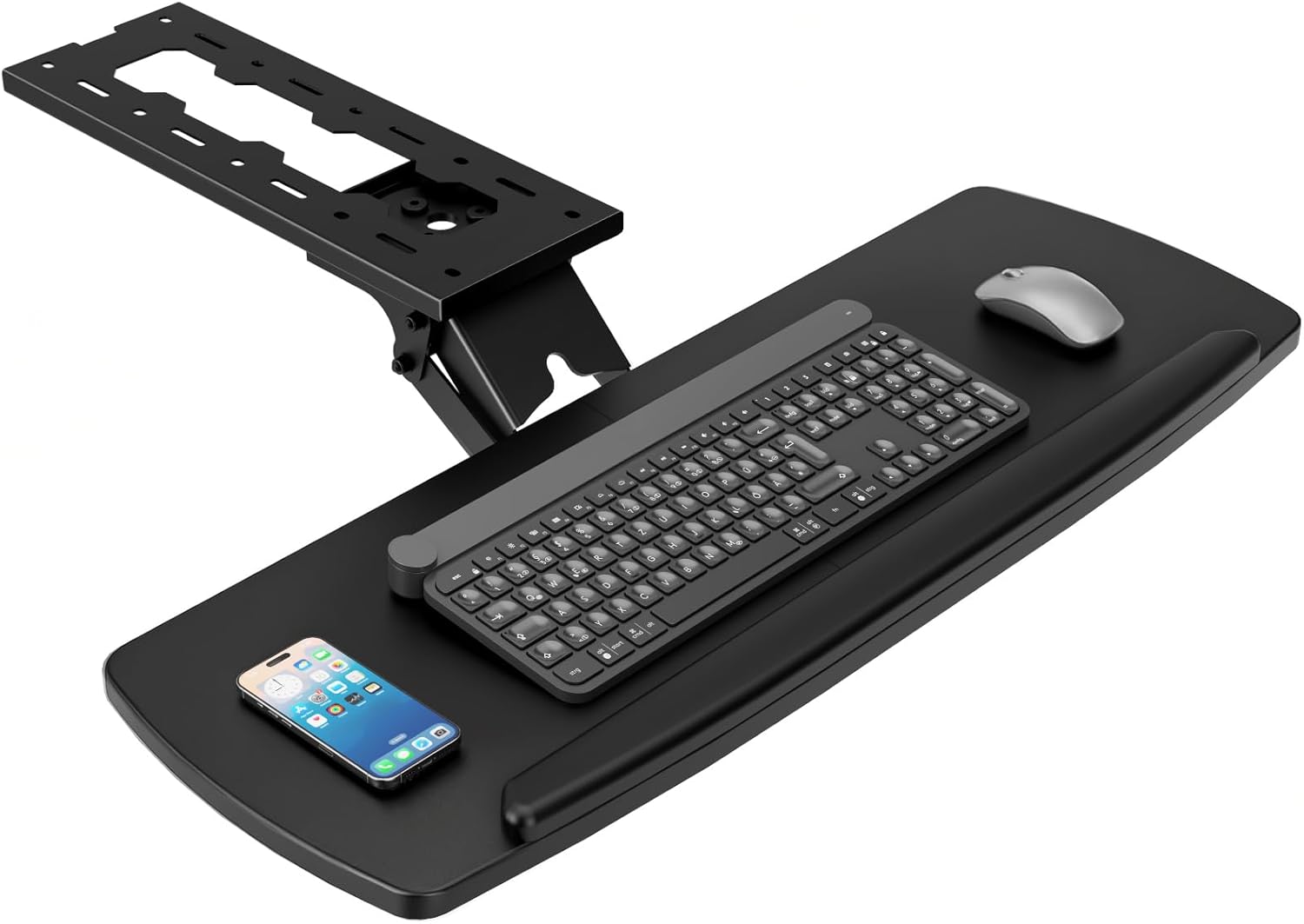
The AX WABER Keyboard Tray Under Desk with Storage Drawer is a versatile ergonomic solution designed for gamers and home office workers. It transforms any standard desk into a comfortable workstation by allowing you to position your keyboard and mouse at ideal angles for reduced strain.
Standout features include 180 degrees of horizontal rotation, 30 degrees of vertical tilt, and up to 6.5 inches of height adjustment. This range of motion lets you find the perfect typing posture, while the smooth slide-out extends 9.8 inches from the desk edge for easy access. The built-in storage drawer is a welcome addition for stashing pens, notepads, or small accessories.
Build quality is solid, with a sturdy metal mounting bracket and a soft protective pad on the tray surface. Installation is straightforward with all necessary hardware provided, though you must ensure your desk is at least 0.61 inches thick and lacks beveled edges. The 28x11 inch surface comfortably fits full-size keyboards and mice.
A potential drawback is compatibility: desks with beveled edges or those under 28 inches in length won't work. Additionally, the tray's height adjustment may require some fine-tuning to match your chair and desk height. These limitations are clearly stated in the product description, so measure before buying.
Overall, the AX WABER keyboard tray delivers excellent ergonomic flexibility and practical storage at a reasonable price. It is a strong choice for anyone looking to improve workspace comfort, provided their desk meets the mounting requirements.

Pros
- Generous platform size fits full-size keyboard and mouse comfortably.
- Height adjustable from 24.4 to 30.7 inches with 5 settings for personalized ergonomics.
- C-shaped design fits tightly under desks, saving floor space.
- Versatile mobility with lockable casters or stationary feet included.
- Sturdy steel frame holds up to 44 lb of equipment.
Cons
- Only 3 customer reviews available, making long-term reliability uncertain.
- Platform is fixed and non-tilting, which may not suit all ergonomic preferences.
- Included mouse pad may be thin or low quality, as typical at this price point.
The Snughome Mobile Keyboard Tray with Mouse Pad is a versatile under-desk solution designed for anyone seeking a more ergonomic typing setup. It targets home office workers, gamers, and students who want to free up desk space while keeping their keyboard and mouse at a comfortable height. With 5-level height adjustment from 24.4 to 30.7 inches, it adapts to various chair and desk combinations.
Its standout feature is the spacious 26.8 x 11.8 inch fixed platform that accommodates full-size keyboards and mice without wobble. The included matching mouse pad adds convenience, though its quality may be basic. The telescoping frame adjusts smoothly, and the lockable casters let you roll the tray aside when not in use, or you can replace wheels with adjustable feet for a stationary setup.
The C-shaped design slides neatly under most desks, maximizing floor space, and the lower crossbar serves as a footrest for improved posture. Build quality is reinforced steel supporting up to 44 lb, and assembly requires no drilling or clamps, making it user-friendly. However, the platform does not tilt, which could be a drawback for users needing negative tilt for wrist health.
Potential drawbacks include the limited number of customer reviews (only 3), which makes it hard to gauge long-term durability. Some users may find the mouse pad thin, and the fixed platform may not suit all ergonomic needs. The 3.3-star rating suggests mixed early impressions, though the features are compelling for the price.
Overall, the Snughome Mobile Keyboard Tray offers good value for those needing an adjustable, space-saving keyboard stand. It excels in flexibility and ease of setup, but potential buyers should consider the lack of tilt and limited track record. For ergonomic improvement and desk decluttering, it is a solid choice at a reasonable price point.

Pros
- Sturdy full metal construction with rust-resistant coating
- 26x13 inch tray fits full-size and mechanical keyboards plus mouse
- Tool-free double C-clamp installation, no drilling required
- Smooth slide rails for easy switching between sitting and standing
- Renter-friendly design that works on straight, L-shaped, and corner desks
Cons
- Mixed customer feedback suggests clamp fit can be inconsistent on some desk edges or thicknesses
- 15 lb weight capacity may be tight for setups with heavy accessories
- Low overall rating indicates possible quality control concerns with the sliding mechanism or finish
The Strifuture Keyboard Tray Under Desk is a full metal slide-out platform designed for people who want a cleaner, more ergonomic workspace without drilling into their furniture. It is a practical fit for home office users, renters, and anyone using a standing desk or a regular desk who needs to switch between sitting and standing positions during the day.
The tray measures 26x13 inches, which gives enough room for a full-size or mechanical keyboard, a mouse, and even a wrist rest or small accessories. Its ventilated surface helps prevent heat buildup, while the rust-resistant iron frame supports up to 15 pounds and holds up well against everyday spills and humidity. The double C-clamps attach to straight, L-shaped, or corner desks without requiring any drilling.
Build quality is a mixed story based on customer feedback. The full metal frame feels solid and the scratch-proof coating is a nice touch, but the low overall rating suggests some users have experienced issues with clamp fit, installation, or the smoothness of the sliding track. This means the tray may work perfectly on some desks, yet be less reliable on unusual edge profiles or thicker desktops.
The main drawbacks are the 15 pound weight limit and the potential for uneven performance from unit to unit. If you use a heavy mechanical keyboard plus a large mouse pad and accessories, you need to stay within the rated capacity. It is also worth measuring your desktop thickness before buying, since the C-clamps need a compatible edge to bite into securely.
Overall, the Strifuture Keyboard Tray Under Desk is a worthwhile option if your desk is compatible and you want a tool-free under-desk keyboard solution. The spacious tray, rust-resistant metal frame, and ergonomic slide-out design make it a strong choice for renters and mixed sitting-standing workstations. Just check your desk edge and keep expectations realistic given the mixed customer reviews.

Pros
- Large surface area fits keyboard and mouse comfortably.
- Wide range of height and tilt adjustments for personalized ergonomics.
- Smooth sliding action for easy access and storage.
- Built-in wrist rest enhances typing comfort.
- Easy to install on standard wooden desks.
Cons
- Not compatible with desks that have cross beams or metal frames.
- 11 lbs weight capacity may not support heavy mechanical keyboards or additional accessories.
- Assembly instructions could be clearer for some users.
The VEVOR Under-Desk Keyboard Tray is designed for those seeking an ergonomic workspace solution. It fits most standard desks and offers generous adjustability to promote natural typing posture.
Its standout feature is the 25x9.8 inch surface, which comfortably holds a keyboard and mouse. The height and tilt adjustments allow you to find the perfect angle, while the smooth slide-out mechanism keeps your desk clutter-free.
Build quality combines MDF board with a Q235 carbon steel frame, providing stability. The integrated wrist rest adds comfort during long typing sessions, though it may feel firm for some users.
One drawback is its limited compatibility with desks that have cross beams or metal frames. Additionally, the 11 lb load capacity may not support heavier mechanical keyboards or additional accessories.
Overall, this tray offers solid ergonomic features at a reasonable price point. It is a good choice for home and office workers looking to improve their desk setup without breaking the bank.
Item Model Number: PE-KB01
Keyboard Tray Size: 9.8 x 25 in / 250 x 635 mm
Main Material: MDF Board + Q235 Carbon Steel Frame
Height Adjustable: 0-8.7 in / 0-220 mm
Swivel: 180 degrees
Angle Adjustable: +6 degrees to -25 degrees
Sliding Length: 9.5 in / 241 mm
Load Bearing: MAX 11 lbs / 5 kg
Weight: 10.25 lbs / 4.65 kg

Pros
- Easy tool-free installation with C-clamps
- Smooth sliding mechanism for effortless use
- Sturdy steel clamps hold up to 11 lbs
- Ergonomic design reduces wrist strain
- Non-slip pads protect desk surface
Cons
- Not compatible with desks thicker than 1.57 inches
- Not suitable for corner or curved desks
- Depth may be insufficient for larger mouse pads or extended wrist rests
The suptek DSF1 under desk keyboard tray is a practical ergonomic accessory for anyone looking to declutter their workspace. It is designed for standard desks with thickness up to 1.57 inches and is ideal for home office users, gamers, or professionals who want a cleaner desk and better typing posture.
Its standout feature is the smooth slide system that allows you to effortlessly push the tray under the desk when not in use. The dual steel C-clamps grip securely without damaging the desk, and the tray can hold up to 11 pounds, easily accommodating a keyboard and mouse. Users report that the installation is quick and requires no drilling.
The tray measures 25.6 inches wide by 11.8 inches deep, providing ample space for most keyboards and mice. The black finish is professional and blends with most desk setups. Non-slip pads on the clamps protect the desk surface, and an edge stopper prevents the keyboard from sliding off when pushed back.
One limitation is that the clamps only fit desks up to 1.57 inches thick, so thicker desks or glass tops may not work. Additionally, the tray is not designed for corner or curved desks. Some users may find the depth a bit shallow for larger mouse mats.
Overall, the suptek DSF1 offers excellent value for its price. It combines ease of installation, sturdy construction, and ergonomic benefits. If your desk meets the thickness requirement, this tray is a solid choice to improve your workspace comfort and organization.
What to Look for in a Budget Keyboard Tray
When you shop for an affordable keyboard tray, features matter more than the price tag. We focused on mounting stability, motion smoothness, and everyday comfort, then distilled the list into the qualities that separate reliable trays from frustrating ones. The criteria below are the same ones we use when reviewing more premium under-desk setups. A small keyboard tray is a big upgrade for your posture, and the features that matter most are easy to compare once you know what to look for.
Clamp and Mounting System
The clamp is the foundation of any keyboard tray, and a weak clamp can ruin an otherwise solid buy. Look for a C-clamp with a protective pad, a tightening knob that is easy to reach, and enough opening range for your desk edge. The most dependable budget trays use metal hardware that stays rigid even when you rest your palms on the wrist rest.
Also consider the thickness of your desktop. If you have an I-beam edge or a rounded frame, not every clamp will fit comfortably. In that case, verify the clamp opening range before ordering and look for models with adjustable mounting brackets that can adapt to unusual desk shapes.
Proper installation matters just as much as the clamp design. Tighten the clamp slowly, check that the tray sits level, and adjust the wrist rest before you load it with gear. Most wobble complaints come from loose mounting hardware, not from the tray itself.
Ergonomic Adjustability
An ergonomic keyboard tray should let you dial in the exact height and tilt that keeps your forearms parallel to the floor. Negative tilt, which lowers the front edge of the keyboard slightly below the back edge, helps keep your wrists in a neutral, handshake position. This matters more than most people realize when you are forming healthy typing habits, and you can learn more about how to position your keyboard and mouse ergonomically in our dedicated guide.
Check how many adjustment points a tray offers. Height adjustment alone is not enough: you also want easy tilt control and a smooth sliding motion for when you need to push the tray under your desk. In 2026, even budget-friendly models often include multiple pivot points and locking mechanisms that keep settings intact throughout the day.
Think about how you move between tasks during the day. A tray that tucks away flat under the desk gives you back your workspace when you need to write on paper, review a document, or use a second monitor. Smooth glides make this transition effortless, so look for a tray with a convenient pull-out motion.
One often-overlooked detail is the release mechanism. Some trays lock into place at the front, while others let you push the whole platform back under the desk with a single motion. Decide which feel you prefer, because you will interact with that mechanism dozens of times a day.
Platform Size and Mouse Room
A keyboard tray that is too narrow will force you to squeeze your mouse onto a tiny corner, which pulls your shoulder into an awkward position. Measure your keyboard first, then add at least a few inches on the right or left side for the mouse. For compact setups, some trays pair a 20-inch keyboard platform with a smaller inset mouse surface, too.
If you already know that you want a spacious design, our roundup of the best under desk keyboard trays can help you compare full-platform models side by side. Remember that a deeper tray also changes how close you sit to your desk, so leave enough legroom when you measure your under-desk clearance.
If your keyboard has a built-in wrist rest, you only need a platform that is slightly larger than the keyboard itself. But if you use a separate padded wrist rest, give it enough room to sit right at the front edge without pushing your mouse out of reach.
Your mouse needs a stable surface next to your keyboard, but not every budget tray includes a built-in mouse pad. If your wrist still aches after switching to a tray, consider pairing it with a vertical mouse designed to keep your forearm in a more neutral rotation.
Build Quality and Stability
Cheap plastic gears, loose screws, and flimsy rails can make any budget tray feel like a future repair job. We prefer trays with aluminum or heavy-duty steel platforms, reinforced sliding mechanisms, and rubber or silicone pads that stop your keyboard from sliding around. A tray that wobbles while you type defeats the whole purpose of an ergonomic setup.
Stability also matters if you switch between sitting and standing during the day. A solid mount will hold its position when you lean on the wrist rest, and the height adjustment should stay put once you lock it. For standing desk owners, check our recommendations for the best keyboard tray for standing desks before you commit to a fixed-position model.
Glide quality is easy to overlook. The best budget trays use ball-bearing slides that stay smooth after months of use, while cheaper rails can stick or tilt unevenly. Give the slide mechanism a few full cycles when you first install the tray, and tighten all screws before your first full day of typing.
Weight capacity is another useful spec. Some budget trays support only compact keyboards, so double-check that the tray can handle your full-size model plus a wrist rest. When in doubt, choose a tray rated for a few extra pounds to leave room for future upgrades.
Finally, pay attention to the wrist rest. A soft foam pad feels comfortable for short sessions, while a wider gel pad offers more support for long stretches. The best budget trays let you remove or adjust the wrist rest if you prefer to use a standalone pad.
Final Thoughts
Choosing the right tray comes down to your desk, your keyboard size, and how much adjustability you actually need. A secure clamp, a smooth tilt mechanism, and a generously sized platform will serve you well for years, even on a tight budget. Pair your new tray with an ergonomic keyboard or a vertical mouse, and you will give your wrists the support they deserve without changing your whole workspace.
Frequently Asked Questions
Are keyboard trays worth it?
Yes, especially if you type for several hours a day. A keyboard tray lowers your hands to elbow height, reduces reaching, and keeps your wrists in a neutral position. Many people find that this single change eases shoulder fatigue and wrist pressure within a few weeks.
How do I know if a keyboard tray will fit my desk?
Measure the thickness of your desktop and the total clearance between the desk edge and anything below it, like drawers or shelves. Most budget trays accommodate desks from about half an inch to two inches thick, but always check the clamp opening range before ordering. If your desk has a metal frame or a thick rounded lip, look for a tray designed specifically for that surface.
Can you use a keyboard tray with a standing desk?
Yes, and many standing desk owners prefer a keyboard tray because it creates more usable space up top. You need a model with a secure clamp that will not loosen as the desk moves. For more guidance, our roundup of the best keyboard tray for standing desks covers the most stable options for 2026.
What is the ideal height for a keyboard tray?
The ideal height puts your keyboard just below elbow level so your forearms slope slightly downward and your elbows rest at roughly a 90-degree angle. Your wrists should stay flat, not bent up or down. Start with that reference point and adjust in small steps until typing feels effortless. If your chair has armrests, set them at the same height as the tray so your arms can rest naturally.


Write Your Review
No reviews yet. Be the first to share your experience!