

You spend hours hunched over a laptop, and your neck and shoulders are screaming for relief. The fix is simple: an adjustable laptop stand that lifts your screen to eye level. But finding one that fits a tight budget can feel like a scavenger hunt. That is where we come in. We have combed through dozens of models under the $60 mark, evaluating stability, adjustability, and build quality. Whether you work from home, commute to a co-working space, or just want a healthier setup, this guide will help you pick the perfect stand without breaking the bank.
For a deeper look at ergonomic setups, check out our guide on how to set up a laptop for ergonomics to pair your new stand with proper posture.

Pros
- 360-degree rotation enhances collaboration and screen sharing
- Sturdy metal base eliminates wobble and sliding
- Ergonomic height reduces neck and shoulder pain
- Universal fit for most laptops 10-15.6 inches
- Durable fiber metal construction outlasts typical aluminum stands
Cons
- Stand is not adjustable in height or tilt angle
- May add bulk to a minimalist desk setup
- Some users might prefer a more compact design for portability
The tounee Laptop Stand is a versatile and ergonomic accessory designed for anyone who spends long hours at a desk. It is perfect for professionals, students, and remote workers who want to improve their posture and reduce discomfort while using a laptop. With its 360-degree rotating base, it also suits team environments where screen sharing is frequent.
Standout features include the full rotation capability, which allows you to easily turn your screen toward colleagues or clients without moving the laptop itself. The ergonomic elevation brings the display to eye level, helping you maintain a natural head position and alleviating strain on your neck and shoulders. During real-world use, the stand feels solid and stable, even during intense typing sessions, thanks to the heavy-duty metal base and non-slip silicone pads.
Build quality is impressive for the price point. The one-piece fiber metal frame is noticeably more rigid than many aluminum alternatives, and the base is wide and weighty enough to prevent any accidental tipping. The black finish is clean and professional, blending well with most office or home setups. The stand is also compatible with virtually all laptops between 10 and 15.6 inches, making it a flexible choice for households with multiple devices.
One potential drawback is that the stand does not offer height or tilt adjustments, so you cannot fine-tune the angle beyond the fixed elevation. Additionally, its robust build makes it less portable than ultra-slim or foldable stands. However, for a stationary desk setup, these trade-offs are minor given the stability and rotation benefits.
Overall, the tounee Laptop Stand delivers excellent value for its price. It combines a unique rotating base with solid ergonomics and durable construction. If you need to share your screen frequently or simply want a more comfortable typing position, this stand is a smart investment that will enhance your daily workflow.

Pros
- Quick and easy sit-stand transition with a telescoping handle, ideal for dynamic work environments.
- Sturdy metal frame with dual pivot joints offers excellent stability and supports up to 22 pounds.
- Compact and foldable design saves desk space and makes storage or travel hassle-free.
- Wide height range (2.1 to 21 inches) accommodates both sitting and standing desks, plus various user heights.
- Universal compatibility with laptops 10 to 17 inches, suitable for most mainstream devices.
Cons
- The pull-out design may require a slight adjustment period to find the sweet spot for balance.
- While sturdy, the stand may wobble slightly on uneven surfaces at maximum height.
- No built-in ventilation or cable management features, though the open design allows airflow.
The tounee LS07 laptop stand is a versatile and affordable solution for anyone looking to improve their workspace ergonomics. Designed for laptops from 10 to 17 inches, this telescopic riser lets you easily switch between sitting and standing positions, helping to reduce the health risks of prolonged sitting.
Its standout feature is the quick height adjustment via a telescoping handle, offering a range from 2.1 to 21 inches. This allows you to position your screen at eye level whether you are seated or standing, which can significantly alleviate neck and back strain. The metal construction feels robust, and the dual pivot joints keep the stand stable with minimal wobble, even when fully extended and supporting up to 22 pounds.
The design is both space-saving and practical: the stand folds flat for easy storage or transport, making it ideal for small desks or remote workers. Setup is straightforward, and the pull-out mechanism works smoothly. However, users with very uneven desks may notice slight instability at the highest settings, and there are no integrated cable management or cooling features.
Overall, the tounee LS07 offers excellent value for its price. It combines essential ergonomic benefits with a sturdy build and a compact footprint. While it lacks some premium extras, it delivers on its core promise of promoting healthier work habits.
Verdict: If you are looking for an affordable, height-adjustable laptop stand that prioritizes stability and ease of use, the tounee LS07 is a solid choice. It is well-suited for home offices, shared workspaces, and anyone who wants to reduce discomfort from long hours at a desk.

Pros
- Outstanding stability thanks to the dual-rod design, which outperforms single-hinge competitors
- Effective passive cooling via the open geometric panel keeps performance-hungry laptops running at full speed
- Genuinely portable and lightweight, folding flat for effortless transport in any bag
- Broad compatibility covers nearly every laptop brand and size from 10 to 17 inches
- Excellent build quality and ergonomic benefit delivered at a very accessible price
Cons
- Height is not continuously adjustable, so users who prefer a specific custom elevation may find the preset angles limiting
- The stand does not include a built-in wrist rest or keyboard tray, meaning a separate keyboard is recommended for extended typing comfort
The Nulaxy Ergonomic Adjustable Laptop Stand is a foldable, dual-rod desk riser designed for anyone who spends long hours in front of a laptop. Whether you are a remote professional, a student, or a gamer, this stand addresses one of the most common complaints of laptop use: poor posture caused by looking down at a low screen. It is especially well suited to hybrid workers who move between home, the office, and coffee shops.
The standout feature here is the dual-support rod mechanism. Unlike cheaper single-hinge stands that can wobble or tip under a heavy device, the Nulaxy distributes weight evenly across two rods, delivering a genuinely wobble-free surface for typing and trackpad use. It supports devices up to 22 lbs, which covers even the largest gaming laptops with ease. The geometric heat-vent panel on the upper surface is another highlight, allowing continuous airflow underneath the laptop to reduce heat buildup during demanding tasks.
Build quality is solid for the price category. The frame feels sturdy and the anti-slip silicone pads do a reliable job of keeping the laptop in place while also protecting its underside from scratches. The folding mechanism is smooth and the stand collapses completely flat, making it genuinely thin enough to slide into a laptop sleeve or the back pocket of a backpack. Setup takes only a few seconds, which is a real convenience for users on the move.
There are a couple of things to keep in mind before purchasing. The stand offers a fixed set of angle positions rather than infinite height adjustment, so users who want a very precise custom elevation may find the options slightly limited. Additionally, elevating the laptop screen means the built-in keyboard sits at an awkward angle, so pairing this stand with a separate Bluetooth keyboard is strongly recommended for comfortable extended use.
Overall, the Nulaxy Laptop Stand delivers impressive ergonomic and thermal benefits at a price that is hard to beat. Its combination of dual-rod stability, effective heat ventilation, and genuine portability makes it one of the most practical desk accessories available in its category. For anyone looking to improve their workstation setup without a large investment, this stand is a straightforward recommendation.
This stand is an excellent match for remote workers and hybrid professionals who split their time between home and the office. Its flat-folding design means it can be packed and unpacked daily without any hassle, fitting neatly into most laptop bags and backpacks alongside other gear.
Students who use their laptops for extended study sessions will also benefit significantly. Elevating the screen to eye level reduces the forward head tilt that causes neck and upper back fatigue over time, making long library or dorm-room sessions noticeably more comfortable. The affordable price point makes it accessible for those on a tight budget.
Power users and gamers running resource-intensive applications will appreciate the heat-vent panel, which actively improves airflow to help the laptop maintain peak performance. If your laptop tends to run hot during video editing, gaming, or large data tasks, this stand offers a simple passive cooling upgrade with no additional power required.
Setting up the Nulaxy stand requires no tools and no assembly. Simply unfold the two support rods, adjust to your preferred angle from the available preset positions, and place your laptop on the silicone-padded surface. The entire process takes under ten seconds, which is ideal for users who set up and pack down their workspace regularly.
Compatibility is broad and covers laptops ranging from 10 to 17 inches in screen size. Confirmed compatible brands include Apple MacBook Pro and MacBook Air, Dell XPS, HP, Lenovo ThinkPad and IdeaPad, ASUS, Acer, Microsoft Surface, and most Chromebook models. The silicone pads accommodate a range of chassis widths without any adjustment needed.
One practical tip: because the stand raises the laptop keyboard to a steep angle, pairing it with an external Bluetooth keyboard and mouse transforms it into a near-desktop ergonomic setup. This combination, which can be assembled for a modest total investment, is a popular choice among users who want a comfortable and productive portable workstation.

Pros
- Highly rated by a large number of verified buyers, reflecting consistent real-world satisfaction
- Lightweight and foldable design makes it genuinely portable for commuters and travelers
- Ventilated platform actively helps manage laptop heat rather than trapping it
- Broad device compatibility covers nearly all popular laptop and tablet sizes
- Affordable price point makes ergonomic desk setup accessible without a big investment
Cons
- Width is not adjustable, so very large or unusually proportioned devices may not sit as securely as on a wider stand
- Metal construction, while sturdy, may feel less premium than heavier aluminum stands at a higher price tier
- Height adjustment range may not satisfy users who need an especially tall viewing angle for extended monitor-level use
The Gogoonike Adjustable Laptop Stand is a compact, metal-build riser designed for anyone who spends long hours working at a desk. It targets home office workers, students, and business travelers who want an ergonomic upgrade without spending a lot of money. At its core, it solves the very common problem of hunching over a flat laptop screen by elevating your display to a healthier eye level.
The standout feature is its adjustable height and angle system, which lets you customize your viewing position to reduce neck fatigue, back pain, and eye strain. The ventilated top platform is a genuine bonus, as the open-hole design allows air to circulate freely beneath your laptop during use. This helps prevent thermal throttling and keeps your device running at its best, something a solid flat surface simply cannot offer.
Build quality is solid for the price. The metal frame supports up to 17.6 lbs, which comfortably covers even heavier pro laptops. Rubber mats and anti-skid silicone pads protect your device from scratches and prevent any unwanted sliding during use. The smooth edges are a thoughtful touch that makes daily handling safe and comfortable.
There are a couple of minor limitations worth noting. The stand does not offer width adjustment, which means very wide or oddly shaped devices may not sit as snugly as they would on a more customizable model. Users looking for a very tall elevation, closer to an external monitor height, may also find the maximum angle slightly limiting compared to premium alternatives.
Overall, the Gogoonike Laptop Stand delivers excellent value for its category. It is well-built, genuinely portable, and covers all the ergonomic basics that most users need. For anyone seeking an affordable, foldable stand that works reliably at home, in the office, or on the road, this is a very strong choice.
The Gogoonike stand is designed to accommodate laptops and tablets ranging from 10 to 15.6 inches in screen size. This covers the vast majority of consumer and business laptops currently on the market, making it a versatile choice for households with multiple devices.
Confirmed compatible brands include Apple MacBook Air and MacBook Pro, Dell XPS, HP laptops, ASUS, Lenovo ThinkPad, Acer, Google Pixelbook, Chromebooks, and Microsoft Surface devices. If your laptop falls within the 10 to 15.6 inch range, it will almost certainly work with this stand.
Note that the stand does not feature width adjustment, so users with larger 17-inch laptops or gaming notebooks should verify their device dimensions before purchasing. For standard everyday laptops and tablets, compatibility is essentially universal.
This stand is an ideal choice for remote workers and home office users who want to improve their posture without investing in a full ergonomic workstation setup. The height adjustment and ventilation features address two of the most common complaints about working with a laptop directly on a desk.
Frequent travelers and commuters will appreciate the foldable, lightweight design that fits easily into a backpack or laptop bag. It adds minimal weight to your carry-on gear while providing a meaningful ergonomic and cooling benefit wherever you set up to work.
Students and casual users looking for a budget-friendly way to make long study sessions more comfortable will also find great value here. It is simple to set up, requires no tools, and works straight out of the box with virtually any laptop or tablet they own.

Pros
- Highly stable large aluminum base eliminates the wobble common in cheaper plastic stands
- Tool-free angle and height adjustment makes ergonomic setup quick and intuitive
- Genuinely portable and foldable design that fits inside most laptop bags without adding bulk
- Broad device compatibility means one stand works across mixed laptop environments
- Excellent heat dissipation design helps protect laptop longevity during long work sessions
Cons
- Does not include a separate keyboard and mouse, which are necessary for a fully ergonomic setup once the laptop is raised
- Aluminum finish, while premium looking, may show fingerprints and smudges over time
- Single fixed platform design means it does not support dual-laptop or tablet configurations simultaneously
The Lamicall Adjustable Laptop Stand is a premium aluminum desk riser built for anyone who spends long hours working on a laptop. Whether you are a remote worker, student, or office professional, it addresses one of the most common complaints in modern computing: poor posture caused by staring down at a low screen. It supports laptops from 10 to 17.3 inches, making it a genuinely universal solution.
The standout feature here is the combination of adjustability and stability. The stand allows users to customize both height and viewing angle, bringing the screen to true eye level and significantly reducing neck, shoulder, and spinal strain. The upgraded large aluminum base is noticeably heavier than competitors, which translates to a rock-solid platform that does not shift even during vigorous typing sessions.
Build quality is where Lamicall clearly differentiates itself. The full aluminum alloy construction feels premium and durable, while the anti-skid silicone pads protect both the desk surface and the laptop itself from scratches. The multiple ventilation holes cut into the platform are a practical touch, allowing heat generated by the laptop to dissipate freely rather than being trapped underneath.
There are a few considerations worth noting. Once the laptop is elevated, you will need an external keyboard and mouse to type comfortably, which adds to the overall cost of the ergonomic setup. The polished aluminum surface, while attractive, is prone to fingerprint smudges. These are minor trade-offs rather than dealbreakers for most users.
Overall, the Lamicall Adjustable Laptop Stand delivers exceptional value for its price point. Its combination of solid construction, wide compatibility, genuine ergonomic benefit, and portable design makes it one of the most well-rounded laptop stands available. It is a smart investment for anyone serious about improving their workspace comfort and productivity.
The Lamicall stand is engineered to accommodate laptops ranging from 10 inches up to 17.3 inches in screen size. This covers the vast majority of consumer and professional laptops on the market today. Confirmed compatible brands include Apple MacBook Air and MacBook Pro, Dell XPS, HP, ASUS, Acer, Lenovo, Microsoft Surface Laptop, Google Pixelbook, Alienware, and Chromebook models.
The stand uses a platform-style cradle rather than a clamping mechanism, meaning compatibility is determined by the laptop's footprint rather than its thickness or port placement. This makes it equally suitable for ultra-thin models like the MacBook Air and thicker gaming laptops within the size range.
For organizations considering bulk purchases, the universal compatibility is a key advantage. IT departments can deploy a single standardized stand model across a mixed fleet of Windows, macOS, and ChromeOS devices without needing to source multiple stand types. No assembly or configuration is required, making rollout fast and straightforward.
Using a laptop directly on a desk forces the user to tilt their head downward, placing significant strain on the cervical spine and surrounding muscles. Over time, this posture contributes to chronic neck pain, shoulder tension, and even lower back discomfort. A laptop stand like this one corrects the problem by raising the screen to eye level, encouraging a neutral spine position.
The Lamicall stand's adjustable height and angle give users the flexibility to find the exact position that suits their body and desk height. Ergonomic guidelines generally recommend that the top of the monitor should be at or slightly below eye level, and this stand makes that alignment achievable for most users regardless of chair or desk height.
For the best ergonomic outcome, pair this stand with an external Bluetooth keyboard and mouse. This allows the arms to remain at a comfortable 90-degree angle while the screen sits at the correct height, completing a fully ergonomic workstation setup that can meaningfully reduce fatigue during long work sessions.
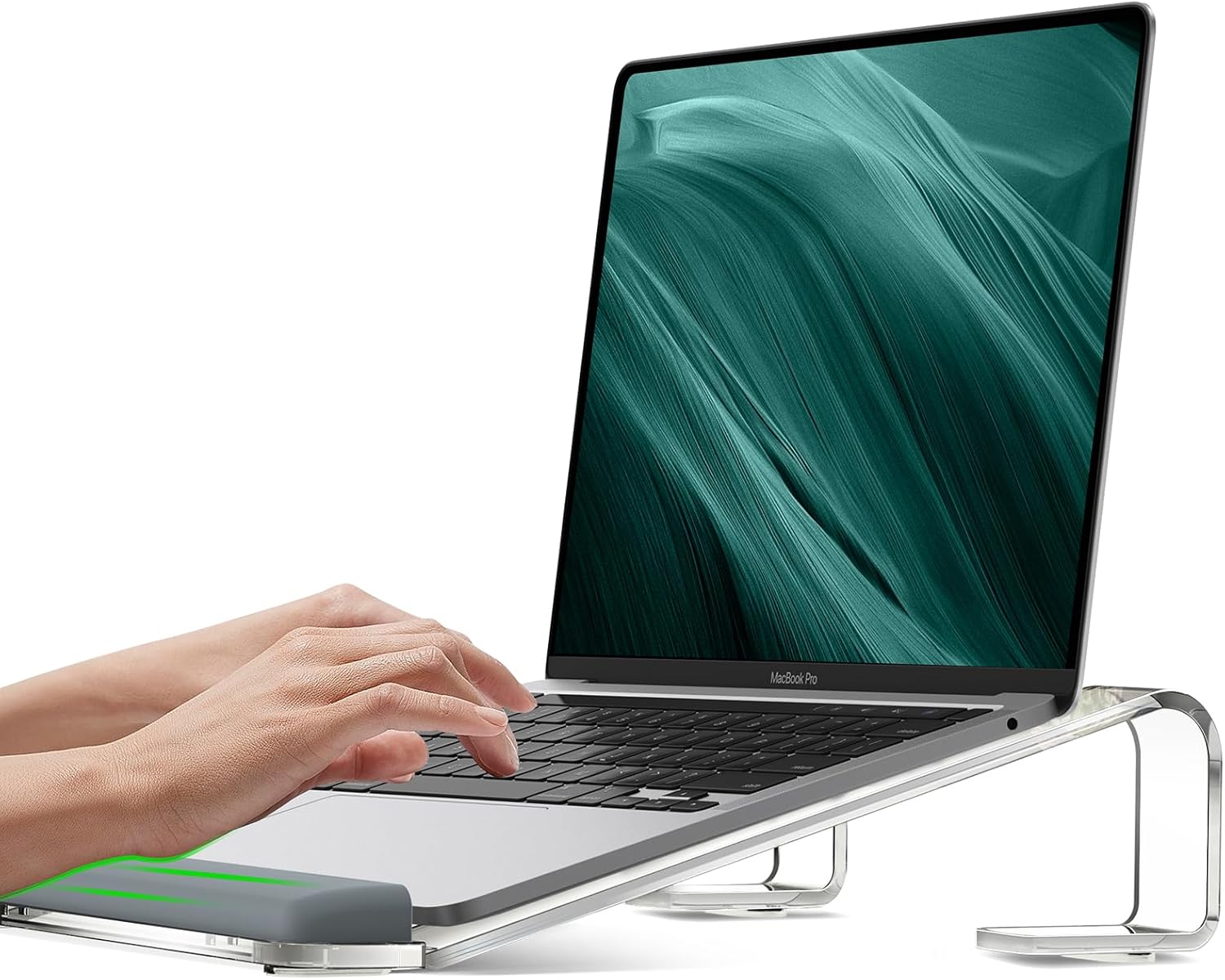
Pros
- Integrated wrist rest helps prevent fatigue and discomfort
- Raises screen to eye level for better ergonomics
- Sturdy acrylic build with no wobble during use
- Easy to assemble without any tools
- Wide compatibility with most laptops up to 17 inches
Cons
- Clear acrylic may show fingerprints and dust more readily than opaque materials
- Some users may prefer an adjustable height option for more flexibility
- The wrist rest is fixed and may not suit all hand sizes or typing positions
The JCZT Clear Acrylic Laptop Stand is designed for professionals and students who spend long hours at a desk and want to improve their ergonomic setup. It combines a laptop riser with a built-in wrist rest to address common issues like neck pain and wrist fatigue.
A standout feature is the raised rubber wrist rest, which provides a comfortable typing angle and reduces strain during extended use. The stand elevates your laptop screen by 2.7 inches, bringing it to eye level and encouraging better posture. Users report noticeable relief in their neck and shoulders after switching to this stand.
Made from high-grade acrylic, the stand is both sturdy and visually appealing. It uses a three-point support system that keeps your laptop stable even during vigorous typing. The clear design blends into any workspace, though it does require occasional cleaning to keep fingerprints at bay.
One potential drawback is the fixed height and wrist rest position. While it works well for many, those with specific ergonomic needs may wish for adjustability. Assembly is tool-free and takes just seconds, making it very user-friendly.
Overall, the JCZT Clear Acrylic Laptop Stand delivers excellent value for its price. It is a reliable choice for anyone seeking a simple yet effective way to boost comfort and productivity at their desk.

Pros
- Tool-free adjustable height and angle for customized ergonomics.
- 360° rotatable base for flexible viewing and sharing.
- Stable and scratch-free due to metal build and rubber pads.
- Excellent airflow thanks to open design, reducing overheating.
- Broad compatibility with 10 to 14 inch laptops from major brands.
Cons
- Only fits laptops up to 14 inches; larger models won't work.
- Rubber pads may accumulate dust and require periodic cleaning.
- No built-in cable management or carrying case included.
The BESIGN LS12 Laptop Stand is a well-engineered accessory designed for anyone who spends hours working on a laptop between 10 and 14 inches. It targets users seeking relief from neck and shoulder pain by providing adjustable ergonomics without requiring tools. Whether you use a MacBook Air, Dell XPS, or Lenovo ThinkPad, this stand aims to improve your posture and comfort.
Its standout feature is the 360° rotating base, which allows you to share your screen effortlessly with colleagues or adjust the viewing angle without moving the stand itself. The tool-free height adjustment is intuitive—just push or pull to find the right level. These features combine to reduce neck fatigue and make long work sessions more bearable.
The build quality is solid, using premium metal that feels sturdy and supports up to 8.8 pounds. Rubber pads on the holder grip the laptop tightly, preventing slips and scratches. The open design promotes airflow, keeping your device cool even during demanding tasks, and also provides under-stand storage for a keyboard or mouse for a cleaner desk.
Potential drawbacks include the size limitation—laptops larger than 14 inches won't fit. While the rubber pads are protective, they can attract dust over time. Additionally, there is no cable management or carrying case, which might disappoint those who travel frequently. However, these are minor issues given the stand's affordable price point.
Overall, the BESIGN LS12 delivers excellent value with its ergonomic adjustability, rotation, and stability. It is a practical upgrade for anyone using a smaller laptop and looking to improve their workstation setup. For the price, it is hard to beat the combination of features and build quality.

Pros
- 360-degree rotation for collaboration and easy cable management
- Tool-free height adjustment for personalized ergonomics
- Robust metal build eliminates wobble and feels premium
- Excellent ventilation keeps laptop cool during extended use
- Folds flat for portability, ideal for mobile workers
Cons
- Base rotation may feel stiff initially; requires a bit of force to turn
- Height adjustment range is modest; not suited for standing desk setups
- Only offered in black; limited color choice for aesthetic preferences
The BESIGN LSX7 Laptop Stand is a versatile and ergonomic solution for anyone who spends hours working on a laptop. Designed for 10 to 15.6-inch devices, it elevates your screen to a comfortable eye level, reducing neck strain and promoting better posture. Whether you are a remote worker, student, or office professional, this stand adapts to your space and workflow.
One standout feature is the 360-degree rotating base, which lets you easily share your screen with colleagues or adjust your viewing angle without moving the stand. The height and tilt adjustments are tool-free, simply push or pull the mechanism to find your perfect ergonomic setup. Many users report a noticeable reduction in neck fatigue after switching to this stand.
Build quality is impressive for the price. The stand is constructed from premium metal, supporting up to 13 pounds with no wobble. Rubberized pads on the holder keep your laptop secure and scratch-free. The open design promotes airflow, preventing overheating during intensive tasks, and leaves room underneath to store a keyboard, mouse, or documents.
While the rotation can require a bit more effort than expected initially, it loosens up over time. The height range is best for seated desks; it may not be tall enough for standing setups. The all-black finish is sleek but may not suit everyone's taste. That said, these minor drawbacks do not overshadow the stand’s overall value.
In conclusion, the BESIGN LSX7 delivers a solid blend of ergonomics, stability, and flexibility at an affordable price. It is a wise investment for improving your work posture and decluttering your desk. Highly recommended for laptop users seeking an adjustable, rotating stand that lasts.
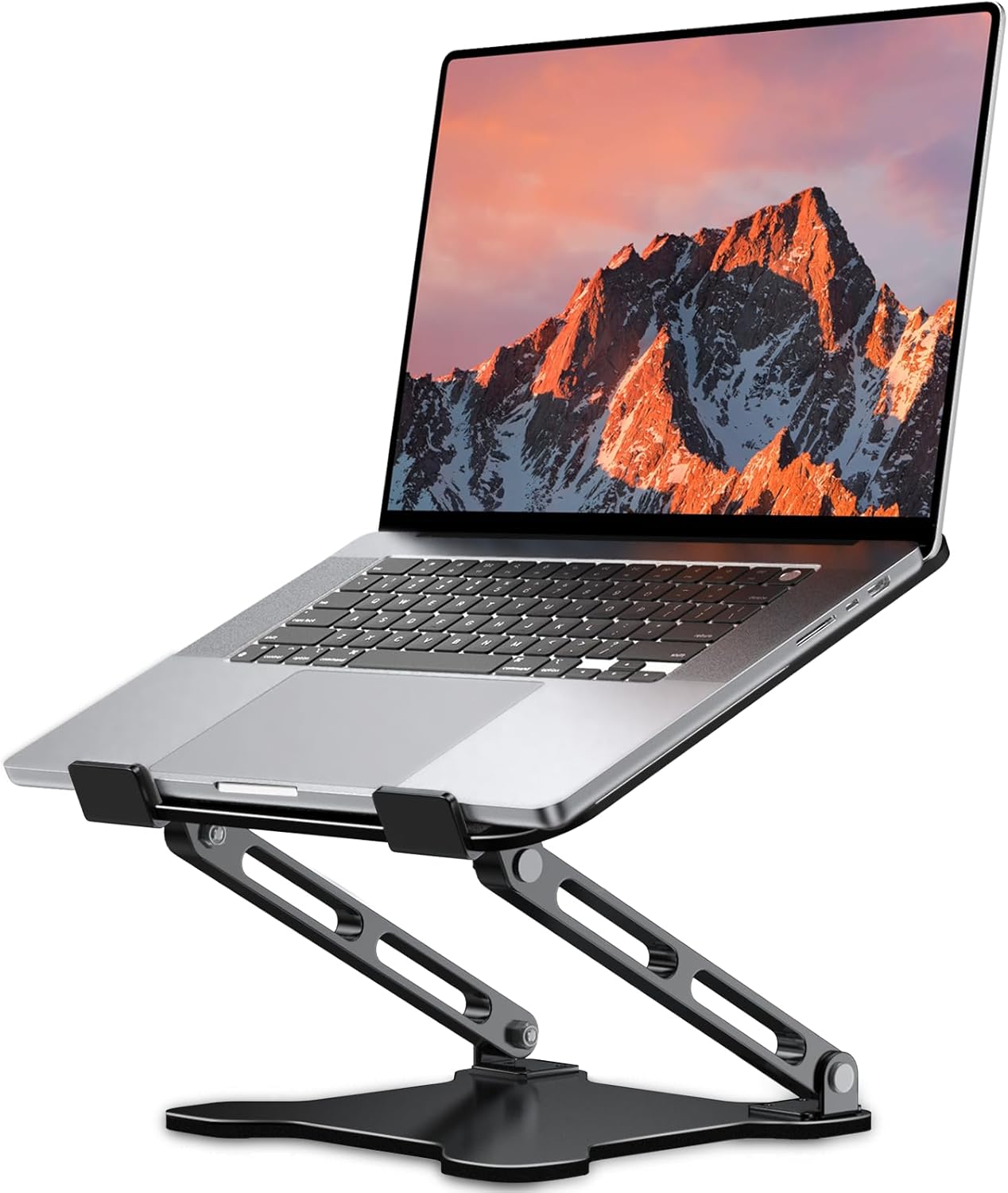
Pros
- Adjustable ergonomic design improves posture and reduces fatigue
- Strong metal build with excellent weight capacity and stability
- Effective heat dissipation prevents overheating during long use
- Foldable and lightweight for easy portability
- Affordable price point with high user ratings
Cons
- Only supports laptops up to 15.6 inches, not suitable for larger devices
- Some users may prefer a fixed height stand for more stability
- Non-slip pads may wear over time with frequent folding
The LOXP Adjustable Laptop Stand is a versatile and ergonomic accessory designed for anyone who uses a laptop for extended periods. It is ideal for remote workers, students, and travelers who need to improve their posture and reduce neck, back, and eye strain. This stand supports laptops from 10 to 15.6 inches, making it compatible with most popular models including MacBook, Dell XPS, HP, Lenovo, and more.
One of the standout features of this stand is its adjustable height and angle, which allows you to find the perfect viewing position. The sturdy metal construction can hold up to 15.4 pounds without wobbling, providing a stable platform for your laptop. Additionally, the open design promotes exceptional airflow, helping to dissipate heat and keep your device cool even during intensive tasks. This can extend the lifespan of your laptop and maintain its performance.
The design includes non-slip pads and silicone grips on both the top and bottom, ensuring your laptop stays securely in place and is protected from scratches. The foldable mechanism makes it easy to pack into a backpack, and the smooth edges prevent any accidental cuts. While the stand is highly portable, its metal build feels durable and reliable for daily use.
Potential drawbacks include the size limitation of 15.6 inches, so it won't accommodate larger gaming laptops. Some users might also prefer a fixed-height stand for added stability, though the adjustable design offers flexibility. The non-slip pads could wear over time with frequent folding, but this is typical for portable stands.
Overall, the LOXP Adjustable Laptop Stand delivers excellent value for its price. It combines ergonomic benefits, solid build quality, and effective heat dissipation in a portable form factor. Whether you are working from home, in the office, or on the go, this stand can significantly enhance your comfort and productivity. Highly recommended for those seeking an affordable and reliable laptop riser.
Buying Guide: What to Look For in an Adjustable Laptop Stand
Height and Angle Adjustability
The whole point of a laptop stand is to bring the screen to your natural line of sight. Look for models that offer multiple tilt angles and a height range that works with your chair and desk. Some stands have preset notches, while others use a friction hinge for infinite adjustment. If you switch between sitting and standing, consider a telescoping model like the tounee LS07, which can extend up to 21 inches.
Stability and Build Quality
A wobbly stand is worse than no stand at all. Check the weight capacity and read user feedback about shaking when typing. Metal stands with a wide base tend to be most stable. Models like the Lamicall and BESIGN use heavy-duty aluminum or steel to keep your laptop rock solid even during fast typing.
Portability and Footprint
If you travel or shift workstations, a foldable stand is essential. Many of the best budget options collapse flat and slip into a backpack. Also consider how much desk space the stand takes up. Open designs let you store a keyboard underneath, which is a nice bonus for small desks.
For more on optimizing your desk space, read our article on correct monitor height for ergonomics to complement your stand choice.
Final Thoughts
After evaluating the contenders, the Nulaxy Ergonomic Adjustable Laptop Stand stands out as the best all-around budget pick with stellar stability and cooling, while the tounee Telescopic Laptop Stand is perfect if you need extra height for standing desk use. Both offer exceptional value for their price and will transform your work comfort without emptying your wallet.
Frequently Asked Questions
Are adjustable laptop stands worth the money? Yes. Elevating your screen to eye level reduces neck and back strain, which can prevent long-term discomfort. Even a basic model under $60 provides ergonomic benefits that far outweigh the cost.
What size laptop do these stands fit? Most of the stands we reviewed accommodate laptops from 10 to 17 inches. Check the product specifications for the exact range, but the majority will fit MacBooks, Dell XPS, HP, Lenovo, and other common models.
Do laptop stands help with overheating? Many adjustable stands have an open design or ventilation holes that allow airflow under your laptop, which can reduce heat buildup compared to placing it directly on a desk. This is especially helpful during intensive tasks like gaming or video editing.
Can I use a laptop stand with an external monitor? Absolutely. In fact, pairing a laptop stand with a monitor arm creates a dual-screen ergonomic setup. For tips on arranging monitors, see our guide on how to set up dual monitors ergonomically.


Write Your Review
No reviews yet. Be the first to share your experience!