

If you use your MacBook Pro with an external monitor, keyboard, and mouse, you know the struggle of a cluttered desk. A vertical laptop stand lifts your MacBook off the surface, stores it upright, and frees up valuable workspace. In this guide, we evaluated the best vertical laptop stands for MacBook Pro in 2026, covering options for every budget and setup. For more on optimizing your desk, check out our guide on how to set up a laptop for ergonomics.

Pros
- Sturdy aluminum build with no wobble.
- Adjustable width fits many laptop sizes.
- Silicone padding protects against scratches and slips.
- Saves significant desk space.
- Portable and lightweight for on-the-go use.
Cons
- Requires the laptop to be stored vertically, so you cannot use the laptop screen while it's in the stand (must be closed).
- Width adjustment requires a screwdriver or coin (not tool-free).
- The stand is designed for storage only, not for active use with the laptop open.
The UGREEN Vertical Laptop Stand Holder is a practical solution for desk clutter, designed for professionals and gamers who want to maximize workspace. It holds laptops vertically, making it ideal for those using an external monitor or keyboard, or simply needing a tidy setup.
Its standout feature is the adjustable width slot that fits laptops from 0.47 to 1 inch thick, accommodating models like MacBook Air, Pro, and even gaming laptops up to 17.3 inches. The premium aluminum alloy base ensures incredible stability with no wobble, even when holding heavier devices.
The build quality is excellent: non-slip silicone pads inside the slot protect your laptop from scratches, while silicone on the base prevents sliding. The compact size (5.9 x 3.2 x 2 inches) makes it portable, though you'll need a screwdriver to adjust the width, which is a minor inconvenience.
One drawback is that the laptop must be closed when placed in the stand, so you cannot use it with the lid open. Additionally, while the stand is very sturdy, it's designed for storage and clamshell mode, not for holding an open laptop during active use.
Overall, this stand delivers on its promise of space-saving and stability. At its price point, it's a reliable choice for anyone looking to organize their desk without compromising on durability. If you use an external monitor and want to tuck your laptop away, this is an excellent buy.

Pros
- Sturdy and stable even with larger laptops
- Premium aluminum build feels solid and looks great
- Adjustable width accommodates a wide range of laptop sizes
- Non-slip silicone mats protect device finish
- Very easy to install and use
Cons
- Only holds one laptop at a time
- May not fit laptops thicker than 2.71 inches
- No cable management built-in
The OMOTON Vertical Laptop Stand is a simple yet effective solution for anyone looking to reclaim desk space. By holding your laptop upright, it transforms clutter into a clean, organized setup. This stand is particularly suited for MacBook users and those who dock their laptop to an external monitor, keeping the lid closed and out of the way.
The standout feature is its adjustable width, which ranges from 0.55 to 2.71 inches. This means it can securely hold thin ultrabooks like a MacBook Air or thicker gaming laptops. In real-world use, the stand feels very stable; the wide aluminum base prevents wobbling, and the silicone pads keep your laptop firmly in place without scratching.
Build quality is excellent. The stand is made from anodized aluminum that has been sandblasted, brushed, and CNC-machined. This gives it a premium, matte finish that resists scratches and fingerprints. It looks just as good on a modern desk as it does in a home office, blending seamlessly with other tech accessories.
One potential drawback is that it only holds one laptop at a time, and there is no integrated cable management. Also, laptops thicker than 2.71 inches won't fit. However, for the vast majority of users, these are minor issues given the stand's affordable price and solid performance.
Overall, the OMOTON Vertical Laptop Stand is a well-built, space-saving accessory that delivers on its promise. If you want to tidy your desk and keep your laptop safe and accessible, this stand is a reliable choice. Its combination of adjustability, premium materials, and stability makes it a top pick in its category.

Pros
- Space-saving vertical design holds two laptops in a small footprint.
- Adjustable width fits most popular laptop brands and thicknesses.
- Protective silicone padding prevents scratches and keeps laptops secure.
- Sturdy, premium aluminum build feels durable and looks elegant.
- Easy setup with no tools required; simply slide laptops into the slots.
Cons
- May not fit very thick gaming laptops or ultrabooks with cases exceeding the 1.65-inch max.
- Vertically oriented stands can be less convenient for quick plug/unplug of peripherals.
- The silver color may show minor scuffs over time, though aluminum is generally resistant.
The OMOTON Dual Vertical Desk Laptop Stand Holder is designed for users who need to manage two laptops at once without sacrificing desk space. Whether you own a MacBook Air, MacBook Pro, Samsung Galaxy Book, or Microsoft Surface, this stand's adjustable slots accommodate devices ranging from 14mm to 42mm thick, making it versatile for different setups.
One standout feature is the protective silicone mat that covers the laptop slots and base. It prevents scratches and keeps your devices from sliding, even when you insert or remove them. The wide, aluminum base adds stability, so you can confidently use two laptops without worrying about tipping over.
Build quality is excellent. The stand is crafted from anodized aluminum with a sandblasted, brushed, and CNC-machined finish that closely matches the texture of a MacBook. This makes it not only functional but also aesthetically pleasing on a modern desk. The scratch-resistant surface holds up well to daily use.
A potential drawback is that the vertical orientation might be less convenient if you frequently plug in cables or need to open the laptop lid. Also, laptops with very thick chassis (over 1.65 inches) or bulky cases may not fit. However, for most standard laptops and ultrabooks, the stand works perfectly.
Overall, the OMOTON Dual Vertical Stand is a well-built, space-saving solution for anyone with two laptops. Its adjustability, protective padding, and premium materials justify the modest price point. Highly recommended for multitaskers and minimalists alike.
Pros
- Solid aluminum build feels premium and durable
- Adjustable slot accommodates a wide range of devices
- Space-saving vertical orientation declutters your desk
- Enhanced airflow helps keep laptops cooler during use
- Anti-scratch silicone pads protect device surfaces
Cons
- Maximum device thickness of 1.1 inches may not fit thicker gaming laptops
- Vertical stand requires a stable, flat surface to prevent tipping
- Two-button adjustment system might take a moment to get used to
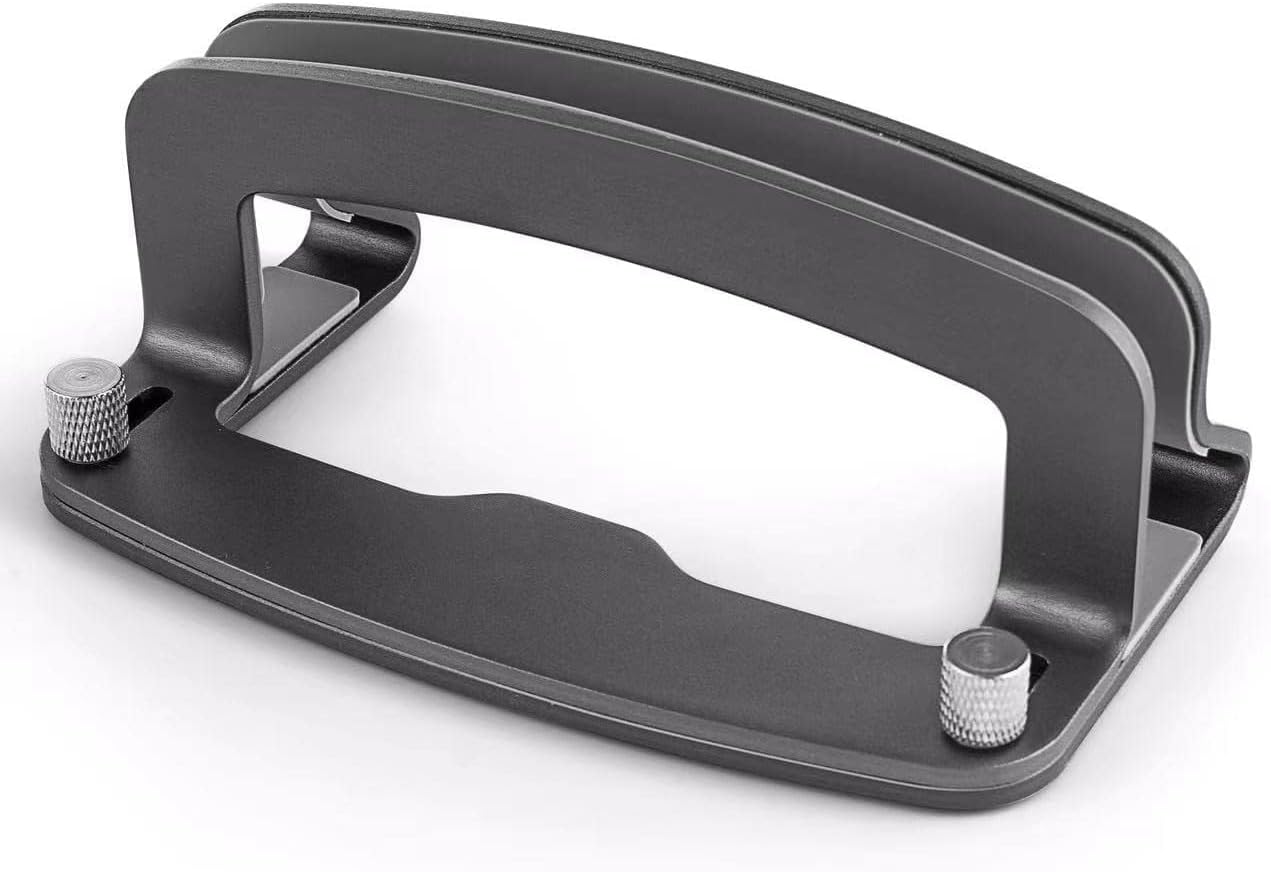
The LOTEYIKE Aluminum Vertical Laptop Stand is a practical and stylish accessory for anyone seeking to optimize their desk space. Designed for MacBook Pro, Air, and most laptops or tablets with a thickness between 0.47 and 1.1 inches, this stand turns your device into a sleek vertical display. It is ideal for remote workers, students, or minimalists who want to keep their workspace tidy and improve airflow around their computer.
Standout features include the adjustable cradle with two buttons for effortless width changes. The stand holds devices securely without wobbling, thanks to its heavy aluminum base and rubber pads. Users report that it works perfectly with MacBooks, iPads, and even some Windows ultrabooks. The open design promotes passive cooling, which can help extend the life of your laptop by reducing heat buildup during prolonged use.
Build quality is impressive for the price point. The stand is crafted from durable aluminum alloy with a smooth grey finish that resists fingerprints. Silicone pads line every contact point, ensuring your device won't get scratched. The rubber base grips the desk firmly, making the stand stable even when you dock or remove your laptop. The overall construction feels solid and well-thought-out.
One potential drawback is the thickness limitation: laptops thicker than 1.1 inches (like some gaming models) may not fit. Also, because the stand is vertical, it requires a stable surface and may not be ideal for tight spaces where you need to reach the ports on the side. However, for most standard laptops and tablets, these are minor considerations.
Our verdict: The LOTEYIKE Vertical Laptop Stand delivers excellent value with its adjustable design, sturdy build, and space-saving benefits. If you have a compatible device and want to declutter your desk while improving cooling, this stand is a smart investment. It earns a strong recommendation for MacBook and tablet users alike.

Pros
- Saves desk space by storing laptop vertically in clamshell mode
- Secure grip from silicone pads prevents slipping and protects from scratches
- Versatile compatibility with a wide range of MacBook Pro and Air models via included inserts
- Sturdy construction with scratch-resistant finish maintains a clean look
- Simple, minimalist design enhances any desk setup
Cons
- Not designed for use with MacBooks that have thick cases or skins
- Opening width tapers, so you must confirm fit for specific MacBook models before purchase
- May not accommodate the 2024 14-inch MacBook Pro with M4 Pro chip (check compatibility)
The HumanCentric Vertical Laptop Stand is a sleek and functional accessory for MacBook users who want to tidy their workspace. It is designed to hold your MacBook Pro or Air in a vertical position while you use it in clamshell mode with an external monitor, keyboard, and mouse. This stand is perfect for anyone from creative professionals to remote workers who need a cleaner desk.
One standout feature is the set of three adjustable inserts that allow the stand to fit a wide range of MacBook models from 2016 to 2024. This means you can keep the same stand even when you upgrade your laptop. The stand securely grips your device with silicone pads and stays put on your desk with silicone feet, so you never worry about accidents or scratches.
Build quality is excellent with a scratch-resistant space gray finish that matches the MacBook aesthetic. The stand feels sturdy and stable, and its minimalist look adds a professional touch to any desk. The design also helps protect your laptop from spills and clutter, making it a practical choice for busy workstations.
A few limitations to consider: the stand is not compatible with MacBooks that have thick cases or skins, so you may need to remove them. Also, the opening tapers to secure the laptop, so you should check the fit before buying, especially for the latest 2024 models like the 14-inch M4 Pro MacBook Pro which is not supported.
Overall, the HumanCentric Vertical Laptop Stand delivers on its promise of a tidy, space-saving setup. With its adjustable inserts and robust build, it offers great value for MacBook users who want a reliable vertical docking solution. We highly recommend it for anyone looking to streamline their desk while keeping their laptop safe.

Pros
- Tool-free, instant grip adjustment makes switching laptops effortless
- Stable and secure hold with no wobble even with heavier devices
- Compact footprint reclaims desk space for external monitors and peripherals
- Durable aluminum build with scratch-resistant coating
- No setup hassle, just set your laptop in the stand
Cons
- Only supports laptops up to 1 inch thick, excluding some larger gaming models
- Vertical orientation may require lifting the laptop out for frequent cable plugging
- Price point is slightly higher than basic vertical stands
The HumanCentric Vertical Laptop Stand is a practical accessory designed for users who connect their laptop to an external monitor, keyboard, and mouse. It is ideal for anyone wanting to minimize clutter while keeping their device protected and easily accessible.
The standout feature is its tool-free, instant grip mechanism that adjusts automatically when you place your laptop into the stand. This works well for most laptops up to 1 inch thick, even with cases or skins. In real-world use, the grip is secure and the silicone pads prevent scratching or slipping.
The design is minimalist with an anodized aluminum finish in matte black. It looks premium and blends into any desk setup. The silicone feet keep the stand firmly in place, and the vertical orientation saves significant desk space compared to laying the laptop flat.
A potential drawback is the thickness limit, which may not accommodate thicker gaming laptops. Additionally, if you frequently plug and unplug cables, you will need to lift the laptop out each time. However, for most MacBook and ultrabook users this is not a significant issue.
Overall, the HumanCentric Vertical Laptop Stand delivers on its promise of a clean, space-saving desk. Its build quality and hassle-free operation make it a solid choice for anyone looking to optimize their workspace.

Pros
- Gravity auto-lock makes docking and retrieval quick and intuitive.
- Space-saving vertical design frees up desk space for other items.
- Excellent heat dissipation due to unobstructed air vents.
- Sturdy aluminum build with silicone pads ensures device safety.
- Versatile compatibility with laptops, tablets, and phones.
Cons
- May not accommodate very thick or bulky laptops due to adjustable width limits.
- Requires a stable, flat surface to prevent tipping when bumped.
- The gravity lock may feel loose for some users until the laptop is fully seated.
The SODI Vertical Laptop Stand is a space-saving solution for anyone tired of a cluttered desk. Designed with a gravity auto-lock mechanism, it lets you slide your laptop in and out with one hand, making it ideal for users who frequently switch between a laptop and an external monitor setup. This stand is particularly well-suited for MacBook Pro and Air owners, but it also works with tablets and phones, thanks to its adjustable width.
The standout feature is the auto-lock system: no screws or manual adjustments. Simply place your laptop vertically, and the weight triggers the locking arms to hold it securely. In real-world use, this makes docking effortless, and retrieval is just as smooth. The vertical orientation also improves heat dissipation by keeping air vents unobstructed, which helps prevent overheating during long work sessions.
Build quality is impressive for the price. The stand is made from premium aluminum alloy with a sandblasted finish that feels solid and matches Apple's aesthetic. Silicone pads on the base and arms protect your devices from scratches and slipping. The Eiffel-inspired design adds a touch of elegance while keeping the footprint minimal, so you can fit a coffee cup or notebook beside it.
One drawback is that the width adjustment range may not accommodate very thick laptops, such as some gaming models. Additionally, because it relies on gravity, the stand needs to be on a stable surface to avoid tipping if bumped. The lock can feel a bit loose until the laptop is fully seated, but it becomes secure once properly positioned.
Overall, the SODI Vertical Laptop Stand delivers on its promise of saving desk space and simplifying your workflow. It is a well-built, attractive accessory that works best for MacBook users or anyone with a slim laptop. For the price, it offers excellent value and is a smart addition to any organized workspace.

Pros
- Sturdy 6061 aluminum construction with premium finish.
- Adjustable slot width accommodates a wide variety of laptops and tablets.
- Tool-free adjustment is highly convenient for switching devices.
- Non-slip silicone pads protect device from scratches and sliding.
- Sleek, modern design that complements MacBooks and other devices.
Cons
- May not fit laptops thicker than 42mm, such as some gaming laptops.
- Silicone pads can attract dust over time, requiring occasional cleaning.
- No built-in cable management features.
The Psitek Aluminum Vertical Laptop Stand Dock Holder is a simple yet effective solution for organizing your desk. Designed for MacBooks and other laptops, it holds your device vertically, freeing up valuable workspace. This stand is perfect for home offices, dorm rooms, or any cluttered desk where every inch counts.
The standout feature is the adjustable slot width from 12mm to 42mm, which fits a wide range of laptops, tablets, and even smartphones. The non-slip silicone pads keep your device securely in place without scratching. The tool-free quick-release screws make switching between devices effortless, a convenience that sets it apart from fixed stands.
Built from premium 6061 aluminum with a sandblasted and anodized finish, the stand matches the look and feel of a MacBook. It is lightweight at 280g but feels sturdy and durable. The open design promotes airflow, helping to dissipate heat and prevent overheating during extended use.
One potential drawback is that the slot width may not accommodate laptops thicker than 42mm, such as some gaming laptops. Additionally, the silicone pads may attract dust over time, though they are easy to clean. There is no built-in cable management, which some users might desire.
Overall, the Psitek Aluminum Vertical Laptop Stand Dock Holder offers excellent value for its affordable price. It combines durability, adjustability, and a sleek design to keep your workspace organized and your laptop cool. Highly recommended for anyone seeking a clutter-free desk and improved laptop ventilation.

Pros
- Saves significant desk space with a compact vertical footprint.
- Sturdy aluminum build with silicone slot securely cradles your MacBook.
- Cable Catch keeps connections tidy and prevents cable drops.
- Compatible with a range of MacBook sizes thanks to interchangeable inserts.
- Easy to slide in and out, making it convenient for travel or switching between setups.
Cons
- Designed exclusively for MacBooks, so it will not work with other laptops or tablets.
- Requires an external monitor, keyboard, and mouse to be useful in clamshell mode, which are sold separately.
- The grey color may not match all setups, and the stand does not include a charging cable or dock.
The Twelve South BookArc is a popular vertical stand designed specifically for MacBook users who want to reclaim valuable desk space. It is perfect for anyone using their laptop as a desktop replacement with an external monitor, keyboard, and mouse.
Its closed-clamshell mode lets you keep your MacBook closed while connected to a display, turning it into a powerful desktop setup. The integrated Cable Catch keeps your cords organized and prevents them from falling when disconnected, adding everyday convenience.
The stand features a sleek aluminum construction with a soft silicone slot that protects your MacBook from scratches. Its low-profile design blends with modern decor while improving airflow around the device, helping it stay cool during heavy use.
One limitation is that it is exclusively for MacBooks, so it won't accommodate other laptops. You will also need to supply your own external display, keyboard, and mouse, which can add to the total cost of your setup.
Overall, the Twelve South BookArc is a well-built, space-saving solution for MacBook owners who want a cleaner, more ergonomic workstation. Its thoughtful design and cable management make it a worthy investment for anyone serious about their desk setup.

Pros
- Effortless one-handed docking with gravity auto-lock
- Saves significant desk space compared to laptop stands
- Improves airflow and cooling for high-performance laptops
- Solid build quality with premium aluminum and anti-slip padding
- Compatible with a wide range of laptop sizes and brands
Cons
- Only works with laptops in closed (clamshell) mode, requiring an external monitor and keyboard
- Maximum thickness of 1.5 inches may not fit some thicker gaming laptops with additional cooling vents
- No built-in cable management for charging cables
The Elestoria Aluminum Vertical Laptop Stand is a space-saving solution designed for users who want to keep their desk tidy while improving laptop cooling. It is ideal for professionals, students, and gamers who use their laptop with an external monitor, keyboard, and mouse, allowing them to store the laptop vertically and out of the way.
The standout feature is the gravity auto-lock mechanism. Simply place your laptop into the slot, and the weight of the device automatically engages the locking arms. Lifting the laptop releases it instantly. This makes docking and undocking incredibly fast and hassle-free, with no manual screws or clamps to adjust.
The stand is made from high-quality aluminum with a weighted base and anti-slip silicone pads. This provides excellent stability, even when the desk is bumped. The vertical orientation also improves passive thermal convection, helping to prevent heat buildup and thermal throttling during intensive tasks.
One potential drawback is that the stand is designed for use with a closed laptop. You cannot use the laptop screen while it is docked, so you need an external monitor. Additionally, the maximum laptop thickness is 1.5 inches, which may exclude some thick gaming laptops. There is also no cable management for charging cables.
Overall, the Elestoria vertical stand delivers on its promise of saving space and improving cooling. Its gravity auto-lock is a clever and convenient feature that makes it easy to use daily. For anyone with a compatible laptop who wants a cleaner desk and better thermal performance, this stand is an excellent choice.

Pros
- Sturdy aluminum base keeps laptop stable with no wobble
- Adjustable width fits a wide range of laptops up to 17.3 inches
- Silicone pads protect against slips and scratches
- Compact, space-saving design frees up desk real estate
- Easy to adjust and simple to set up
Cons
- Vertical design means the laptop lid must stay closed, so it is not for using the built-in screen while docked
- Width adjustment is manual with a screw, so swapping between very different laptop thicknesses takes a few extra seconds
- No integrated cable management or extra storage features
The TECKNET Vertical Laptop Stand is a practical desk organizer for anyone who uses a laptop with an external monitor, keyboard, or mouse. By holding your computer upright, it frees up valuable desk space and keeps your workstation looking clean and professional. It works with a wide range of laptops, including MacBook Pro and Air models, Dell, HP, and other notebooks up to 17.3 inches.
The standout feature is the adjustable width. You can turn the screw to change the slot from 0.59 to 1.3 inches, so it can hug a slim ultrabook or a thicker 17.3-inch laptop securely. The aluminum body feels solid and provides a stable base with no wobble. It also acts as a heat sink, helping to draw heat away from the laptop when it is closed and running in clamshell mode.
Build quality is thoughtful. Every contact point is covered with soft silicone pads, which means the stand will not scratch your laptop or slide around on your desk. The compact footprint of 5.9 by 4.3 by 2.1 inches makes it easy to fit into a backpack or carry between home and office. The minimalist aluminum finish looks at home in any modern setup.
There are a couple of limitations to keep in mind. Because the laptop sits vertically, you cannot use its built-in screen while it is docked, so this stand is best for closed-lid use with an external display. Also, the screw-based width adjustment is simple but not instant, so frequent swaps between very different laptop sizes may take a little patience. There is no cable management built in, but that is easy to solve with a simple clip.
Overall, the TECKNET Vertical Laptop Stand delivers solid value for its price. It combines a compact, stable design with adjustable compatibility and scratch protection, making it a great choice for professionals, students, and remote workers who want a tidy desk. With a 36-month warranty, it is a low-risk upgrade for any workspace.
Material: Premium aluminum with silicone padding
Compatibility: Fits laptops up to 17.3 inches, including MacBook Pro/Air, Dell, HP, and other notebooks
Adjustable Width: 0.59 to 1.3 inches
Dimensions: 5.9 x 4.3 x 2.1 inches
Warranty: 36-month warranty with registration
Buying Guide: What to Look for in a Vertical Laptop Stand
Build Quality and Stability
A vertical stand must securely cradle your MacBook Pro without wobbling. Look for models made from anodized aluminum alloy with a wide base. Silicone pads on the cradle and base prevent scratches and keep the stand planted. Brands like OMOTON and HumanCentric use CNC-machined aluminum that matches the MacBook’s finish.
Compatibility and Adjustability
Not all MacBook Pro models have the same thickness, especially if you use a skin or case. Choose a stand with an adjustable slot width or interchangeable inserts. The HumanCentric stand, for example, includes inserts for different MacBook generations. If you frequently switch devices, a tool-free adjustable design like the UGREEN or Psitek models saves time. For more on desk ergonomics, see our best adjustable laptop stand guide.
Heat Dissipation and Airflow
When your MacBook Pro is closed in clamshell mode, it still generates heat. A vertical stand promotes passive cooling by keeping the vents unobstructed. Models with open sides or a cutout design, like the Elestoria Gravity Auto-Lock stand, improve airflow. This helps prevent thermal throttling during intensive tasks.
Design and Space Saving
A vertical stand should complement your workspace without dominating it. Slim profiles like the Twelve South BookArc take up minimal footprint. Some stands, like the SODI, even double as a tablet or phone holder. If you work from a standing desk, check our best laptop stand for standing desk recommendations for compatible options.
Final Thoughts
For a premium, tool-free experience, the Elestoria Aluminum Vertical Laptop Stand with Gravity Auto-Lock is a top choice. If you prefer a trusted brand with a sleek design, the Twelve South BookArc remains a classic. Both are excellent additions to any MacBook Pro workstation, offering stability, airflow, and a cleaner desk.
Frequently Asked Questions
Will a vertical laptop stand fit my MacBook Pro?
Most vertical stands accommodate MacBook Pro models from 2016 onward, including the 14-inch and 16-inch M1, M2, M3, and M4 versions. Always check the slot width range and any included inserts. The HumanCentric stand, for instance, provides specific inserts for different generations.
Does a vertical stand help with overheating?
Yes. By holding your MacBook upright, a vertical stand allows heat to escape through the keyboard area and bottom vents more freely than when lying flat. This passive cooling can reduce temperatures during clamshell mode use. For best results, pair it with proper monitor height; see our guide on correct monitor height.
Can I use a vertical stand with a laptop case?
It depends on the stand’s adjustability. Some stands, like the HumanCentric adjustable model, are designed to grip laptops up to 1 inch thick, which accommodates most slim cases. Others require a bare laptop for a secure fit. Measure your laptop’s thickness with the case on before purchasing.
Is it safe to store my MacBook vertically?
Absolutely. High-quality vertical stands use non-slip silicone padding and a stable base to prevent tipping. The weight of the laptop itself helps secure it in place. Just ensure the stand is placed on a flat, stable surface. For more on desk organization, see our comparison of monitor arm vs monitor stand.


Write Your Review
No reviews yet. Be the first to share your experience!