

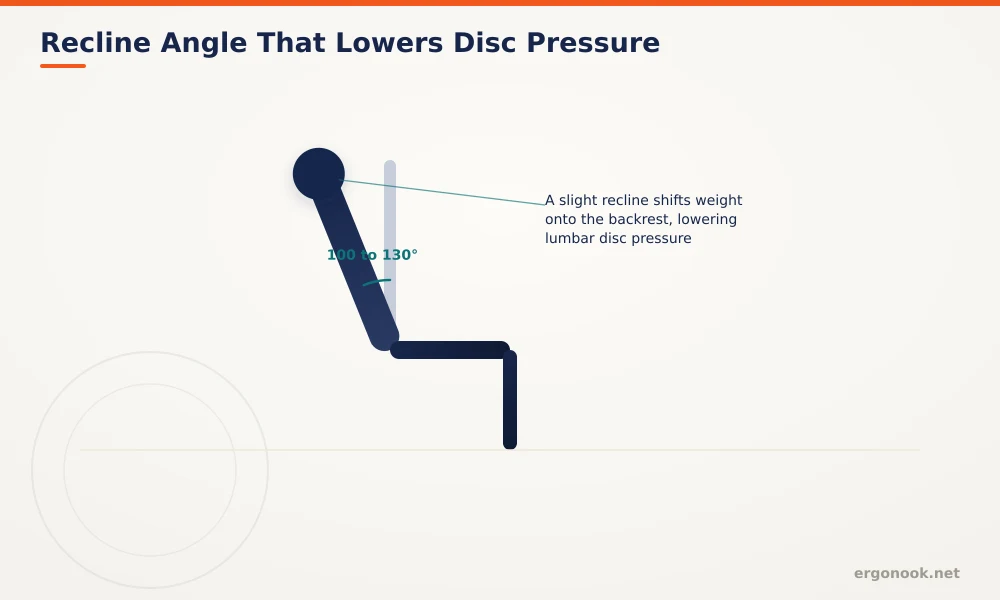
To make an office chair more comfortable, adjust seat height and lumbar support first, then add a lumbar cushion, seat cushion, or footrest to fix whatever the chair’s built-in adjustments can’t. Cornell’s ergonomics research also points to a slight recline, 100 to 130 degrees, as a free change that lowers lumbar disc pressure compared to sitting bolt upright.
- Cornell research shows disc pressure and back muscle activity are both lowest at a 100 to 130 degree recline, not at an upright 90 degrees.
- Adjusting what your chair already has, seat height, depth, lumbar, and armrests, costs nothing and often fixes more than buying an accessory.
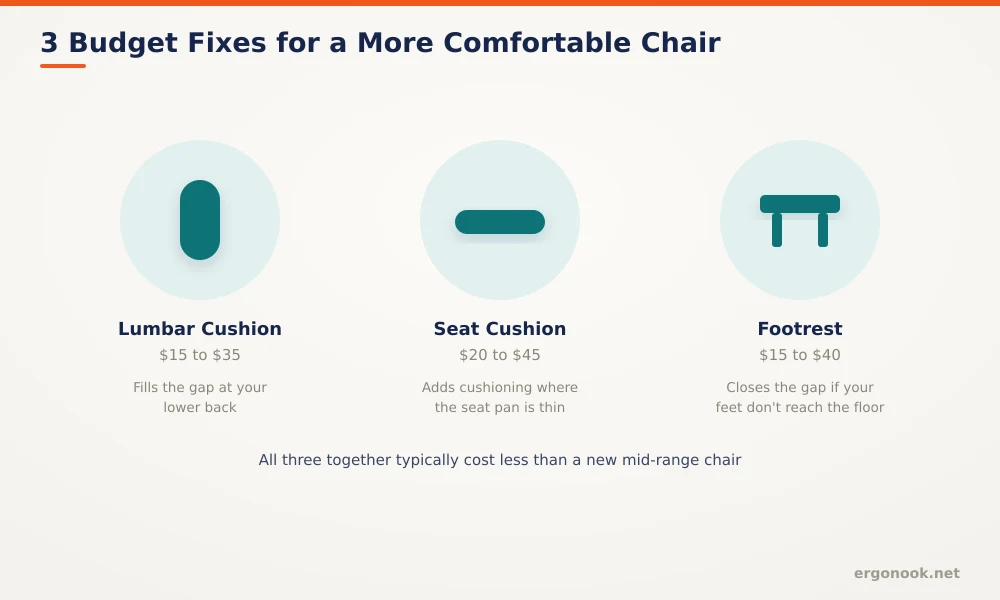
- A lumbar cushion, seat cushion, and footrest together typically cost less than a new mid-range chair, and each solves a different gap.
- If a chair squeaks, sinks, or has no adjustment range at all, that’s a mechanical problem no cushion fixes.
In this article:
- 7 ways to make your chair more comfortable
- Budget fixes at a glance
- When to fix vs replace
- Frequently asked questions
7 Ways to Make Your Chair More Comfortable
1. Adjust Seat Height First
Every other adjustment depends on this one. Set it so your feet rest flat on the floor and your knees sit near hip height, then move on. Our guide to adjusting an ergonomic office chair walks through the full sequence if your chair supports more than height.
2. Fix Your Lumbar Support
If your chair has a lumbar adjustment, slide it until it actually meets the inward curve of your lower back, not above or below it. If it doesn’t, or the built-in curve doesn’t fit your body, a separate lumbar support cushion closes that gap. See our guide on what lumbar support actually does for more on getting the position right.
3. Recline Slightly Instead of Sitting Upright
Cornell’s ergonomics research found that a reclined posture of 100 to 130 degrees produces significantly lower lumbar disc pressure and back muscle activity than the traditional upright 90-degree posture, since more of your body’s weight transfers onto the backrest instead of your spine (Cornell CUErgo, Computer Workstation Ergonomics Guidelines). If your chair has recline tension, loosen it slightly and let yourself lean back a few degrees rather than holding a rigid, bolt-upright posture all day.
4. Add a Footrest If Your Feet Don’t Reach the Floor
OSHA specifically recommends a footrest when seat height can’t be lowered enough without pushing your desk setup out of position. See our footrest benefits guide for who this fits, and our under-desk footrest picks for specific models.
5. Add Padding Where the Seat Pan Feels Thin
Budget chairs often use thin, dense foam that flattens within a year or two. A seat cushion adds back the padding without replacing the whole chair. Cushions with a shaped cutout matter more if pain concentrates at your tailbone specifically, covered in our seat cushion for tailbone pain guide.
6. Set Armrests So Shoulders Stay Relaxed
Armrests set too high push your shoulders up toward your ears. Set too low, they do nothing and you rest your weight on the desk edge instead. Adjust them so your elbows sit near 90 degrees with your shoulders relaxed, touching the armrests lightly rather than pressing into them.
7. Get Up on a Schedule, Not Just When You Remember
No chair, cushion, or recline angle fully offsets hours of continuous sitting. OSHA’s Computer Workstations eTool recommends a five-minute break from computer tasks every hour, which gives your whole setup, chair included, a periodic reset rather than one static position held for a full workday (OSHA, Computer Workstations eTool).
Budget Fixes at a Glance
When to Fix vs Replace
| Situation | Fix or Replace |
|---|---|
| Adjustable but currently set wrong | Fix: readjust height, depth, lumbar, and armrests |
| Correctly adjusted, still uncomfortable | Fix: add a lumbar cushion, seat cushion, or footrest to close the specific gap |
| No lumbar, depth, or armrest adjustment at all | Cushions help, but a chair with more adjustment range fits better long-term |
| Squeaking, sinking, or visible foam breakdown | Replace, mechanical wear isn’t fixable with an accessory |
Frequently Asked Questions
What’s the cheapest way to make a chair more comfortable?
Readjusting what the chair already has, seat height, depth, lumbar, and armrests, costs nothing and often fixes more than any accessory you could buy.
Is reclining while working actually bad posture?
No. Cornell’s research found a slight recline, 100 to 130 degrees, produces lower disc pressure than sitting perfectly upright at 90 degrees, as long as your back stays supported by the backrest.
Should I buy cushions or just get a new chair?
If the chair’s mechanics work and only comfort is the issue, cushions are the cheaper first step. If the chair has no adjustment range or is mechanically worn out, a new chair addresses more than cushions can.
Can I use a lumbar cushion and a seat cushion at the same time?
Yes, they address different areas and commonly get used together, especially on budget chairs with minimal built-in padding or lumbar shaping.
Most chairs get more comfortable through a handful of free adjustments and a couple of inexpensive accessories, not a full replacement. Start with height, lumbar, and recline, since they cost nothing, then add a cushion or footrest for whatever gap remains.



Write Your Review
No reviews yet. Be the first to share your experience!