

Neck pain from desk work often traces back to a fixed head position held for hours, whether that means craning forward toward a monitor or resting the neck at an angle a chair’s backrest was never designed to support. The chairs worth considering here share a specific trait: a headrest that adjusts in more than one direction, rather than a decorative pad fixed at a single height. For more on how screen position itself contributes to neck strain, see our guide on correct monitor height for ergonomics. See our full mesh office chair lineup for more options.
We compared six mesh chairs specifically on headrest adjustability, upper back support, and recline range, the factors most directly tied to reducing neck strain during long sitting sessions.
This article is for informational purposes only and is not medical advice. Neck pain can stem from many causes, including muscle strain, disc issues, or nerve compression, and a chair alone cannot resolve an underlying medical condition. If you have persistent or worsening neck pain, consult a physician or physical therapist rather than relying on a chair purchase alone.

Pros
- Adaptive lumbar tracks your recline instead of staying fixed, useful for anyone who shifts positions often
- Weight capacity matches the highest-rated chairs in this roundup
- Warranty coverage beats the budget and mid-range picks here
Cons
- Average rating trails the rest of the chairs in this roundup, though it remains solidly positive
- Split-back design looks different from the solid-back chairs on this list, worth checking photos against your preference
- Assembly involves attaching several parts with the included tool
SIHOO's pitch for the B100 centers on lumbar support that moves with you instead of staying locked at a fixed height, useful for anyone who alternates between leaning forward to type and sitting back for a call. The split-back mesh design is a visual departure from the solid mesh backs on the rest of this list, though it serves the same airflow purpose.
The armrests flip up, the headrest is wide and adjustable, and the frame supports multiple recline positions. Warranty coverage runs several years, ahead of the budget option in this roundup.
Its average rating trails the rest of the chairs compared here, though it remains solidly positive overall. Assembly requires attaching a few more parts than the simplest chairs on this list.
For anyone whose main priority is lumbar support that adapts through the day rather than a fixed pad, this is the most purpose-built option here.
Chair Type: Split-back mesh ergonomic office chair. Frame Material: Polypropylene frame. Seat Material: Polypropylene seat base with mesh, polyester, and nylon upholstery.
Headrest: Wide, adjustable headrest. Armrests: Flip-up design. Lumbar Support: Adaptive lumbar support that adjusts with posture. Recline: 3-position tilt, 5 height positions. Base Movement: Swivel on a star base.
Color: Grey. Brand: SIHOO. Model: B100. Warranty: 3-year parts replacement coverage. Suitable for hard floor and carpet surfaces.
If lower back support is your single biggest priority in a new chair, this is the most purpose-built option in this roundup, with lumbar support designed to move as you shift positions rather than staying fixed at one height.
Consider this chair if you spend long stretches alternating between leaning forward to focus and sitting back for calls or breaks. The adaptive lumbar mechanism is designed specifically for that kind of movement throughout the day.
The split-back mesh design is a visual departure from the solid-back chairs elsewhere on this list, so it is worth checking product photos to make sure the look fits your space before buying.
This is best suited to buyers whose main complaint with previous chairs has been inconsistent or fixed lower back support. If a more traditional solid-back look matters more to you, other picks on this list may be a better fit.
Pros
- Highest average rating of any chair across our mesh office chair roundups so far
- Adjustable back support goes beyond a simple fixed lumbar pad
- Large and rapidly growing review base backs up that rating
Cons
- Heavier than most other picks at a similar price
- Newer brand relative to established names like Lorell or Staples
- Solid-back design rather than full mesh throughout
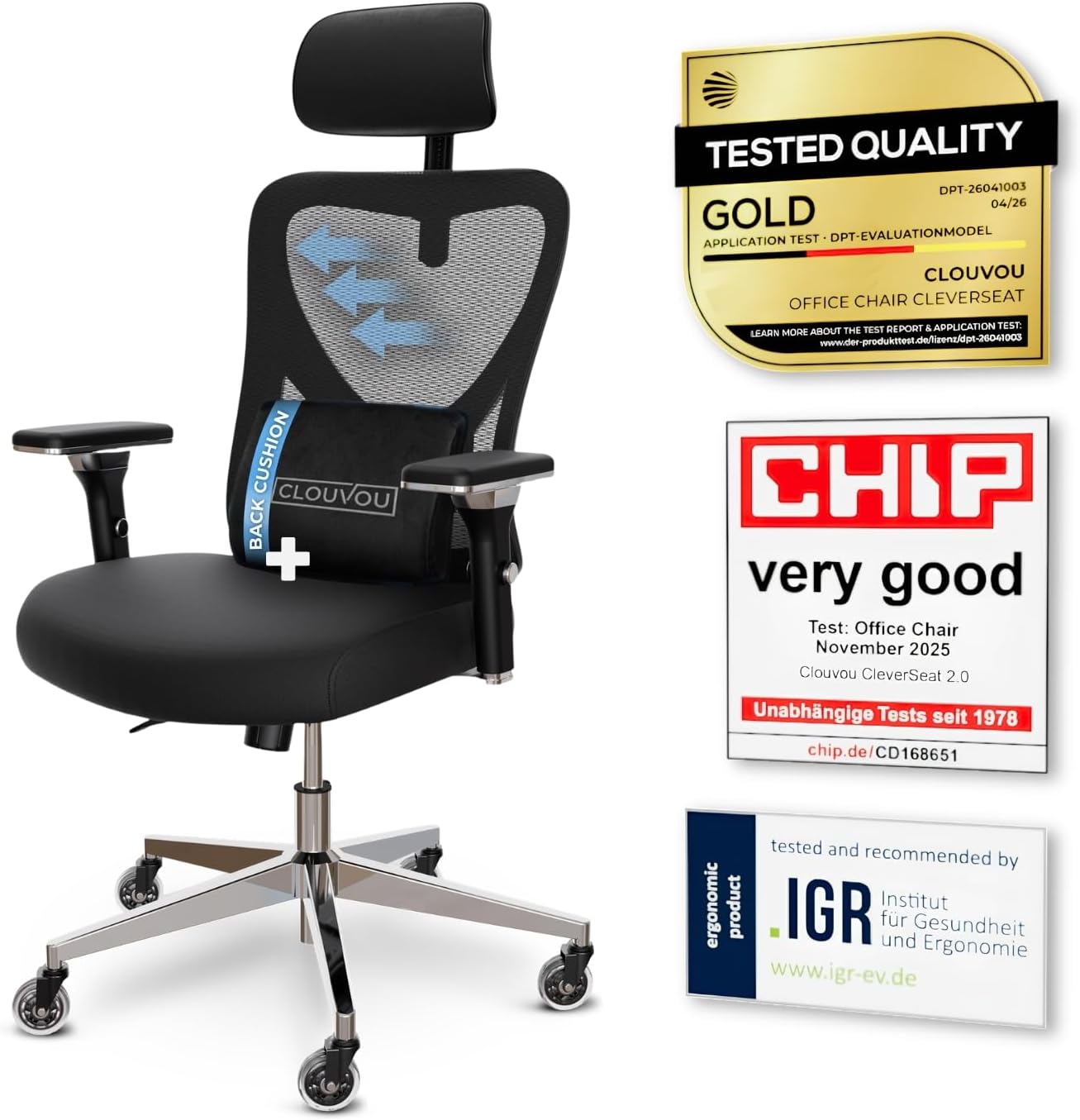
CleverSeat's chair carries the highest average rating of any chair we have covered across our mesh office chair comparisons, backed by a review base that has grown substantially in a short time, a strong signal of consistent buyer satisfaction.
The back support adjusts rather than relying on a single fixed lumbar bump, and the 2D headrest adds coverage that many chairs at this price skip entirely. It is rated for 330 pounds, matching the higher-capacity picks in our comparisons.
The backrest uses a solid-back design rather than full mesh throughout, trading some breathability for structure, and at 40 pounds it is heavier than several competitors.
For anyone prioritizing rating and adjustable back support above all else, this is currently the strongest performer we have found in this category.
Chair Type: Ergonomic mesh office chair with adjustable back. Frame Material: Reinforced polymer. Seat Material: Mesh. Back Style: Adjustable, solid back.
Armrests: Adjustable. Headrest: 2D. Base Movement: Swivel on rolling casters.
Weight: 40 pounds. Maximum weight recommendation: 330 pounds, per manufacturer listing.
If overall rating is your deciding factor above any single spec, this chair currently leads every comparison we have run in this category.
Consider this chair if adjustable back support and a 2D headrest matter more to you than a full mesh build throughout.
Weigh the newer brand history against more established names if a long-standing company track record matters to you specifically.
This is best suited to buyers who prioritize current buyer satisfaction over brand tenure.

Pros
- 5-year warranty, longer than most chairs in this comparison
- Footrest and deep recline together support position changes throughout the day
- Precisely specified lumbar and headrest adjustment ranges rather than vague marketing language
Cons
- Lower average rating than the higher-volume picks in this comparison
- Linked armrests move together rather than independently
- Smaller review base than SIHOO or CleverSeat
CYKOV specifies this chair's adjustment ranges precisely: a 4-way headrest moving 4.72 inches and 60 degrees, a 2-way lumbar pad adjusting 2 inches and 1.18 inches, and a recline range from 90 to 135 degrees, backed by a 5-year warranty.
The built-in footrest pairs with that recline range to support genuine position changes throughout the day, useful for anyone who benefits from alternating between sitting upright and reclining periodically.
The armrests are linked, moving together rather than independently, and the average rating trails the higher-volume picks in this comparison.
For anyone who values precisely specified adjustment ranges and a long warranty over the largest possible review count, this is a reasonable pick.
Chair Type: Reclining ergonomic mesh office chair with footrest. Frame Material: Nylon. Seat Material: Foam. Back Style: Mesh back.
Armrests: Linked. Headrest: 4-way adjustable. Lumbar Support: 2-way adjustable. Recline: 90 to 135 degrees, 2 positions.
Brand: CYKOV. Warranty: 5 years. Maximum weight recommendation: 350 pounds.
If alternating between upright sitting and a genuine recline throughout the day matters to you, this chair's footrest and 135-degree range support that directly.
Consider this chair if a 5-year warranty and precisely specified adjustment ranges matter more to you than raw review volume.
Weigh the linked armrests against the independently adjustable systems on other picks if that flexibility matters to you.
This is best suited to buyers who value warranty length and precise specifications over brand recognition.

Pros
- Mesh backrest stays cooler than faux leather over multi-hour sessions
- Adjustable headrest is uncommon at this price point in the 350 lb capacity tier
- Flip-up armrests let the chair tuck fully under a desk when not in use
- Straightforward 15 minute assembly reduces setup friction for a heavier chair
Cons
- Lumbar support is fixed rather than depth-adjustable
- Seat depth runs shorter than some competitors, which may not suit taller frames
The Freepub Ergonomic Office Chair pairs a breathable mesh backrest with a sturdy frame rated to hold up to 350 pounds. The mesh construction is the chair's main differentiator in this price range, keeping air moving across the back during long sitting sessions rather than trapping heat the way faux leather does.
An adjustable 3D headrest and flip-up armrests round out the ergonomic feature set, and the backrest reclines up to 125 degrees with a corresponding 90 degree armrest adjustment for switching between focused work and a more relaxed recline.
The seat itself uses anti-collapse high-density foam, aimed at resisting the flattening that cheaper cushions show after a year of daily use. A 360 degree swivel base and quiet casters handle everyday movement around a desk.
This chair fits buyers who prioritize breathability and headrest support over the more traditional leather executive look, at a price closer to the budget end of this roundup.
Weight Rating: 350 lbs. Backrest: breathable mesh. Seat: high-density anti-collapse foam.
Recline: up to 125 degrees. Headrest: adjustable 3D. Armrests: flip-up, 90 degree adjustable.
Product Dimensions: approximately 21.2 inches deep by 24 inches wide by 45.3 inches high. Color: black.
Consider this chair if you want mesh breathability and an adjustable headrest without paying premium executive-chair pricing. The flip-up armrests are also useful in smaller rooms where the chair needs to slide fully under the desk.
Taller users or anyone who wants adjustable lumbar depth rather than fixed support may find the La-Z-Boy or GTPLAYER picks in this roundup a closer fit.

Pros
- Headrest and lumbar support are both adjustable rather than fixed in one position
- Wide seat design suits a broader range of body types than a narrower chair
- High resilience foam seat holds its shape longer than basic sponge fill
Cons
- Single recline position rather than a continuous tilt range
- Smaller review base than the more established picks in this comparison
- No 3D or 4D armrest adjustment
TRALT builds this chair around headrest support paired with adjustable lumbar support, a combination aimed at supporting both the neck and lower back during extended desk sessions rather than focusing on one area alone.
The wide seat design accommodates a broader range of body types than a narrower chair, and the high resilience foam seat holds its shape better over time than basic sponge cushioning.
Recline is limited to a single position, and the armrests are standard rather than 3D or 4D adjustable, with a smaller review base than the more established picks in this comparison.
For anyone who wants headrest and lumbar support paired together in a wider seat, this is a reasonable pick.
Chair Type: Ergonomic desk chair with headrest support. Frame Material: Nylon. Seat Material: High resilience foam. Back Style: Mesh back.
Headrest: Adjustable. Lumbar Support: Adjustable. Seat: Wide design. Recline: 1 position.
Brand: TRALT. Maximum weight recommendation: 350 pounds.
If both headrest and lumbar support adjustability matter to you together, this chair covers both rather than prioritizing just one.
Consider this chair if a wider seat than average matters to your body type.
Weigh the single recline position and smaller review base against the more established picks in this comparison if those matter more to you.
This is best suited to buyers who want combined neck and lower back support in one chair.

Pros
- Highly customizable lumbar support adapts to individual back shapes for personalized comfort
- Breathable mesh material prevents heat buildup during long sitting sessions
- 3D armrests offer flexible positioning to reduce upper body tension
- Adjustable recline with multiple lock positions adds versatility for work and relaxation
- Strong customer satisfaction rating reflects consistent real-world comfort and durability
Cons
- Seat width of 19.8 inches may feel snug for users with a broader build
- Assembly requires careful attention as some parts are packaged together and can be easy to miss
- Sliding armrest panels may feel loose for users who prefer fixed, stationary arm support
The MOLENTS Ergonomic Office Chair is a full-mesh executive chair built for professionals who spend extended hours at a desk. Whether you work from a home office, a corporate setting, or a creative studio, this chair is designed to support your posture and keep you comfortable throughout the day.
The standout feature is the 4D dynamic adaptive lumbar support, which adjusts both vertically and horizontally to cradle your lower back precisely where you need it. Paired with 3D adjustable armrests, the chair allows you to fine-tune your arm and shoulder positioning, which can meaningfully reduce tension during long work sessions.
Build quality feels solid, with a premium breathable mesh that stretches to conform to your body without trapping heat. The backrest reclines smoothly between 90 and 120 degrees, offering three lockable positions that make it easy to shift from focused work to a relaxed posture during breaks. The overall dimensions are well-suited to average-height users, though taller or broader individuals may want to verify the seat measurements before purchasing.
A few minor drawbacks are worth noting. The assembly process requires careful attention, as certain components are packaged together and can be overlooked. The sliding armrest panels, while adjustable, may feel less stable than fixed panels for some users. Additionally, the seat width may feel limiting for those with a larger frame.
Overall, the MOLENTS Ergonomic Mesh Chair delivers excellent value for its price point, combining thoughtful ergonomic engineering with a clean, professional aesthetic. It earns its strong customer rating and is a smart investment for anyone looking to upgrade their workspace comfort without overspending.
The MOLENTS office chair is designed to fit a wide range of workspaces with a practical and well-considered set of dimensions. The overall chair height adjusts between 38.6 and 42.4 inches, making it suitable for standard and slightly taller desks.
The seat height from the floor ranges from 19.5 to 23.3 inches, providing flexibility for users of varying heights. The seat depth measures 18.9 inches and the seat width is 19.8 inches, offering a firm and supportive sitting surface. The overall chair width is 27.6 inches, keeping the footprint compact enough for most office environments.
The chair is available in both black full mesh and gray full mesh colorways, allowing it to complement a variety of office aesthetics. Custom gas lift options are available directly from the manufacturer for users who require a shorter or taller cylinder than the standard configuration.
If you are considering the MOLENTS Ergonomic Office Chair, it is best suited for users who sit for four or more hours per day and want a chair that actively supports healthy posture. The adjustable lumbar system makes it particularly valuable for people who experience lower back discomfort during long work sessions.
This chair works well as a primary office chair for remote workers, as a task chair in a corporate environment, or even as a stylish addition to a bedroom workspace. Its multi-position recline also makes it a reasonable option for those who like to read or take short breaks without leaving their desk.
Buyers with a broader frame should take note of the 19.8-inch seat width and compare it against their own measurements before purchasing. Those who prefer a completely fixed armrest may also want to contact MOLENTS directly, as the brand offers a fixed-panel option on request. Overall, this chair represents a strong choice in the mid-range ergonomic category for comfort-focused buyers.
What to Look for in a Chair When You Deal With Neck Pain
A Headrest That Adjusts in More Than One Direction
A fixed headrest only helps if it happens to land at the right height and angle for your neck and monitor setup, which varies significantly between people and desk arrangements. A 2D or 3D adjustable headrest, moving in height and angle rather than just height alone, fits a much wider range of sitting postures and monitor heights.
Look specifically for language describing multi-directional headrest adjustment on the listing rather than assuming any chair with a visible headrest offers real adjustability. Several chairs in this comparison specify the exact type of headrest movement available, worth checking directly before buying.
Upper Back and Shoulder Support, Not Just Lumbar
Most ergonomic marketing focuses on lower back lumbar support, but neck pain often relates more to upper back and shoulder posture than lower back curve. A high-back chair design that supports the shoulder blades, not just the lower spine, helps keep the neck in a more neutral position by reducing the tendency to slump forward.
Check the backrest height specifically, since a mid-back chair that stops below the shoulder blades leaves the upper back and neck without support, even if the lumbar area is well designed. Our guide on what to look for in an ergonomic office chair covers backrest height alongside other adjustment points worth checking.
Recline Range to Periodically Rest the Neck
Reclining periodically, even briefly, shifts the head’s weight from being held up entirely by neck muscles to being partially supported by the chair itself. A wider recline range, especially when paired with a headrest that stays supportive at an angle rather than only when sitting fully upright, gives more opportunities to rest the neck throughout the day.
This does not require reclining for extended periods. Even short breaks in a reclined position every hour or so can reduce the cumulative strain of holding the head upright continuously. Our guide on desk stretches for office workers covers movement-based approaches that work alongside chair adjustments.
Match the Headrest to Your Actual Monitor Setup
A headrest is only useful if it lines up with where your head naturally sits when looking at your monitor, which depends on your monitor height, viewing distance, and desk setup. Before assuming a chair’s headrest will help, check whether your monitor is already positioned correctly, since a headrest cannot fully compensate for a screen set too high or too low.
If you have not checked your monitor height and distance recently, it is worth doing before or alongside a chair purchase, since fixing screen position sometimes resolves neck strain that a new chair alone would not.
Armrest Height Affects the Neck More Than Most People Expect
Armrests set too low leave the shoulders unsupported, causing them to drop and pull down on the muscles that connect to the neck over the course of a workday. Armrests set too high push the shoulders up toward the ears, creating a different but equally real source of tension in the same muscle group.
Getting armrest height right, so your shoulders can rest in a natural, relaxed position while your forearms are supported, indirectly reduces neck tension even though the armrests themselves never touch the neck. This is easy to overlook when shopping specifically for neck pain relief, since the connection is less obvious than a headrest. Getting the headrest angle right matters as much as choosing the chair; see our guide on how to adjust an ergonomic office chair for the full setup process.
Final Thoughts
Freepub Mesh Office Chair is the clearest specialist pick in this comparison, built around a 3D adjustable headrest that moves in more directions than a standard design, useful for matching neck support precisely to your monitor setup. If overall rating and a highest-rated track record matter more to you than a specialized headrest, CleverSeat Ergonomic Office Chair holds one of the highest average ratings of any chair we have compared, with an adjustable headrest backing that rating up.
Frequently Asked Questions
Can an office chair actually fix neck pain?
A chair with a well-positioned, adjustable headrest can meaningfully reduce the strain caused by holding the head in a fixed forward position for hours, but it does not address underlying medical causes like a pinched nerve or degenerative disc issue. See the disclaimer near the top of this article, and consult a physician or physical therapist for persistent or worsening pain rather than relying on a chair purchase alone.
Should the headrest touch my neck constantly while working?
Not necessarily. Many people only rest against the headrest periodically, such as while reading or briefly reclining, rather than maintaining constant contact while actively typing. The goal is having support available when you want it, not forcing your posture to match the headrest at all times.
Is a high-back chair always better for neck pain than a mid-back chair?
Generally yes, for neck-specific concerns, since a high-back design extends support up to the shoulders and includes a headrest option, while most mid-back chairs stop below that point. That said, a mid-back chair can still work well for overall comfort if neck support is not a primary concern.
How does monitor position relate to a chair’s headrest?
A headrest supports the neck when the head is in a natural, upright position, but if your monitor is set too low or too far away, you may lean or crane forward regardless of the chair’s features. Correcting monitor height and distance first tends to make a chair’s headrest more effective rather than less necessary.
Can a chair alone fix neck pain from looking down at a phone or laptop?
Not on its own. A supportive headrest helps during reclined breaks, but neck pain from looking down at a screen is primarily a monitor height and posture issue rather than something a chair alone resolves. See the disclaimer near the top of this article, and consult a physician or physical therapist if pain persists.



Write Your Review
No reviews yet. Be the first to share your experience!