

If you live with arthritis, every keystroke can feel like a small battle. The stiffness, swelling, and pain in your hands, wrists, and fingers make typing a chore instead of a breeze. That is why choosing the right keyboard matters. A wireless ergonomic keyboard designed for arthritis can reduce strain, support natural hand alignment, and let you work or create without discomfort. In this guide, we have reviewed nine top models that combine split layouts, cushioned palm rests, and adjustable features to help you type with less pain. We also share practical buying advice so you can find the best fit for your needs. For more tips on easing discomfort, check out our guide on how to reduce wrist pain from typing.
Whether you have osteoarthritis, rheumatoid arthritis, or just chronic joint pain, the right keyboard can make a real difference. Let us look at the products that have earned top marks from users and ergonomists alike.
These keyboards reduce strain but do not reverse joint damage from arthritis, and heavier tactile switches can aggravate sensitive finger joints for some users. This guide is informational and is not a substitute for medical advice; if your pain is severe, persistent, or worsening, consult a physician or physical therapist.
Disclosure: Ergonook is a participant in the Amazon Associates program. Links below are affiliate links, and we may earn a commission from qualifying purchases. This does not affect which products we recommend or how we rank them.

Pros
- Certified by an independent ergonomics organization
- Full-size layout keeps a familiar typing experience
- Quiet keys suited to shared workspaces
Cons
- Fixed split angle rather than fully separable key modules like the Kinesis models here
- Larger footprint than a standard compact keyboard
The Ergo K860 uses a curved, split keyframe that slopes outward, aiming to keep your wrists and forearms in a more natural position without fully separating the two halves.
Its memory foam wrist rest and three tilt angles let you fine-tune the typing posture whether you're sitting or standing, and it's certified by United States Ergonomics.
It connects over Bluetooth or the included USB receiver, and keeps a full-size layout with quiet keys, so the transition from a standard keyboard is relatively gentle.
Compared with the fully split Kinesis models in this comparison, its fixed curve is less adjustable but easier to adapt to.
It suits anyone who wants proven ergonomic credentials in a familiar, full-size keyboard shape.
Dimensions: 17.95 inches long by 9.17 inches wide by 1.89 inches high.
Connectivity: Bluetooth or included USB receiver.
Tilt options: 0, negative 4, or negative 7 degrees.
Layout: Full-size, 105 keys.
Weight: 2.6 pounds.
Who should buy this keyboard? Anyone who wants a certified ergonomic keyboard that still feels close to a standard full-size layout.
Who might want to look elsewhere? Anyone who wants fully separable key modules for maximum shoulder-width typing should look at the Kinesis Freestyle2 or Advantage360 instead.
Setup tip: Start at the flat 0 degree tilt and only add negative tilt once you're comfortable with the split shape.

Pros
- Rechargeable battery with a long rated life per charge
- Simple plug-and-play setup, no Bluetooth pairing required
- One of the more affordable split keyboards in this comparison
Cons
- Fixed split angle rather than fully separable modules
- USB receiver only, no Bluetooth option
The Arteck split keyboard uses a fixed split layout with a soft cushioned wrist and palm rest, aimed at a more natural hand position than a flat keyboard.
It connects through a nano USB receiver stored in the keyboard itself, and its rechargeable battery is rated for about six months per charge based on typical daily use.
It's backed by a 24 month warranty, and is one of the more affordable split keyboards in this comparison.
It doesn't offer Bluetooth or fully separable key modules, so it's a more modest step up from a standard keyboard than the Kinesis models here.
It suits anyone who wants an affordable, low-effort introduction to a split keyboard layout.
Dimensions: 16.5 inches long by 9.6 inches wide by 1.02 inches high.
Connectivity: 2.4G USB wireless receiver.
Battery: Rechargeable, rated around six months per charge.
Warranty: 24 months.
Who should buy this keyboard? Anyone who wants an affordable, simple introduction to a split ergonomic layout.
Who might want to look elsewhere? Anyone who wants Bluetooth or fully separable key modules should consider the Logitech K860 or Kinesis models instead.
Setup tip: The nano receiver stores inside the keyboard when not in use, so check there first if you misplace it.

Pros
- Certified by an independent ergonomics organization
- Compact size closer to a standard keyboard footprint
- Long rated battery life
Cons
- Not fully split, so the wrist angle change is more subtle than the Kinesis or Perixx keyboards
- Membrane switches rather than mechanical
Wave Keys uses a gently wavy, contoured shape rather than a fully split layout, aiming to guide your hands into a more natural position without a steep learning curve.
Its built-in memory foam palm rest adds cushioned support, and it's certified by United States Ergonomics for posture and strain reduction.
It connects over Bluetooth or the included Logi Bolt receiver, with Easy-Switch letting you jump between paired devices, and a battery rated to last up to three years.
Because it isn't fully split, the wrist angle change is more subtle than the Kinesis or Perixx keyboards in this comparison.
It suits anyone who wants ergonomic support with minimal adjustment from a standard keyboard.
Dimensions: 14.8 inches long by 8.62 inches wide by 1.18 inches high.
Connectivity: Bluetooth or included Logi Bolt receiver.
Switch type: Membrane.
Battery life: Rated up to three years.
Weight: 2.1 pounds.
Who should buy this keyboard? Anyone who wants certified ergonomic support with a gentle learning curve from a standard keyboard.
Who might want to look elsewhere? Anyone who wants a fully split or mechanical layout should consider the Perixx or Kinesis keyboards instead.
Setup tip: Pair it with a compatible Logitech mouse through the same Easy-Switch profile for a consistent multi-device setup.
Pros
- Ergonomic split design reduces wrist and hand strain
- Long 206-hour rechargeable battery life
- Comfortable oversized leatherette wrist rest
- Dual-mode connectivity for versatile device pairing
- Adjustable tilt angles for personalized ergonomics
Cons
- Split layout may require a learning curve for new users
- No backlighting for use in low-light environments
- Wrist rest is not removable, which may limit desk space
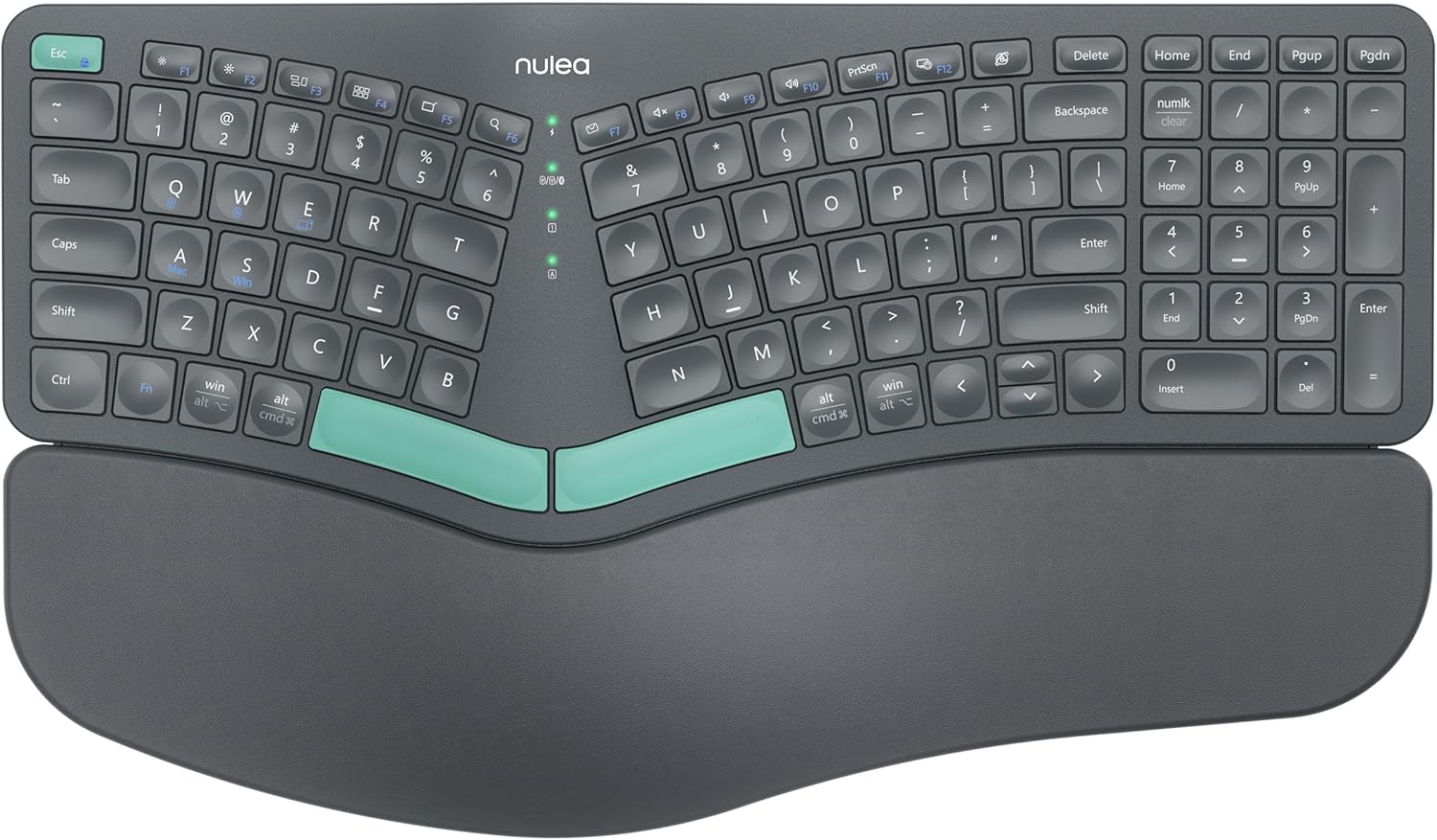
The Nulea Ergonomic Split Keyboard is designed for users who spend long hours typing and want to reduce strain. It is ideal for office workers, programmers, and anyone experiencing wrist discomfort from traditional keyboards.
Its standout feature is the split design, which promotes a natural hand position, while the cushioned leatherette wrist rest offers ample support. Dual-mode wireless connectivity allows easy switching between devices, and the rechargeable battery lasts up to 206 hours, ensuring uninterrupted productivity.
The keyboard includes adjustable tilt legs for three different angles, letting users find their optimal typing angle. The build feels sturdy and premium, though the split design may take some time to get used to for those accustomed to standard layouts.
Potential drawbacks include the lack of backlighting, which could be a downside for typing in low-light conditions. Additionally, the split layout may have a learning curve, but most users adapt within a week.
Overall, the Nulea Ergonomic Split Keyboard offers excellent value for ergonomic-conscious users. Its combination of comfort, wireless freedom, and long battery life makes it a solid choice for improving typing posture and reducing fatigue.
Brand: Nulea
Model: Ergonomic Split Keyboard
Connectivity: Bluetooth 5.0 and 2.4G wireless
Battery Life: Up to 206 hours
Wrist Rest: Oversized, leatherette, cushioned
Adjustable Tilt: 3 angles
Rechargeable: Yes, via USB-C
Compatibility: Windows, macOS, Android, iOS

Pros
- Ergonomic split layout encourages better wrist and forearm alignment.
- Soft cushioned palm rest adds meaningful comfort for long typing sessions.
- Triple device support with easy one-click switching and two included wireless receivers.
- Long battery life and a convenient USB-C charging cable keep downtime minimal.
- Great value for a multi-device ergonomic keyboard in this price range.
Cons
- Fixed split angle means you cannot adjust the distance between key groups to fit your exact body shape.
- Six-month battery life is based on two hours of daily use, so heavy users may need more frequent recharging.
- The keyboard is split as one unit, not a fully separated design, which may not satisfy users wanting maximum adjustability.
The Arteck Ergonomic Keyboard is designed for Windows users who spend long hours typing and want to reduce wrist and forearm strain. Its split layout and cushioned palm rest aim to promote a more natural posture, making it a practical upgrade from a standard flat keyboard.
It connects to up to three devices using a USB-A receiver, a USB-C receiver, or Bluetooth, and you can switch between them with a single click. The keyboard also includes a USB-C charging cable, and both receivers are stored at the back so they are easy to keep track of.
The build quality feels solid and the cushioned wrist rest is soft and supportive. The split angle helps keep wrists and forearms aligned, and the layout is familiar to anyone who has used a typical Windows keyboard.
One limitation is that the split angle is not adjustable, so the keyboard may not match every user's shoulder width perfectly. Also, the six-month battery life is based on two hours of daily use, which means heavier users may need to charge it more often.
Overall, the Arteck Ergonomic Keyboard is a strong option for anyone looking to improve typing comfort while managing multiple devices. It delivers good ergonomics, flexible connectivity, and a comfortable typing experience at a reasonable price.
Connectivity: 2.4G USB-A receiver, 2.4G USB-C receiver, and Bluetooth
Device switching: Up to 3 devices with one-click switching
Battery: Rechargeable lithium battery, up to 6 months on a single charge (based on 2 hours of daily use)
Design: Split ergonomic layout with built-in cushioned wrist rest
Compatibility: Windows PC, laptop, tablet
Included in box: Keyboard, USB-A receiver, USB-C receiver, USB-C charging cable, welcome guide, 24-month warranty
Pros
- Rechargeable battery with a long rated life per charge
- Backlighting adds visibility for low-light typing
- Dual-mode wireless connection option
Cons
- Smaller, newer brand with less of an established track record than Logitech or Perixx
- Membrane keyboard rather than mechanical
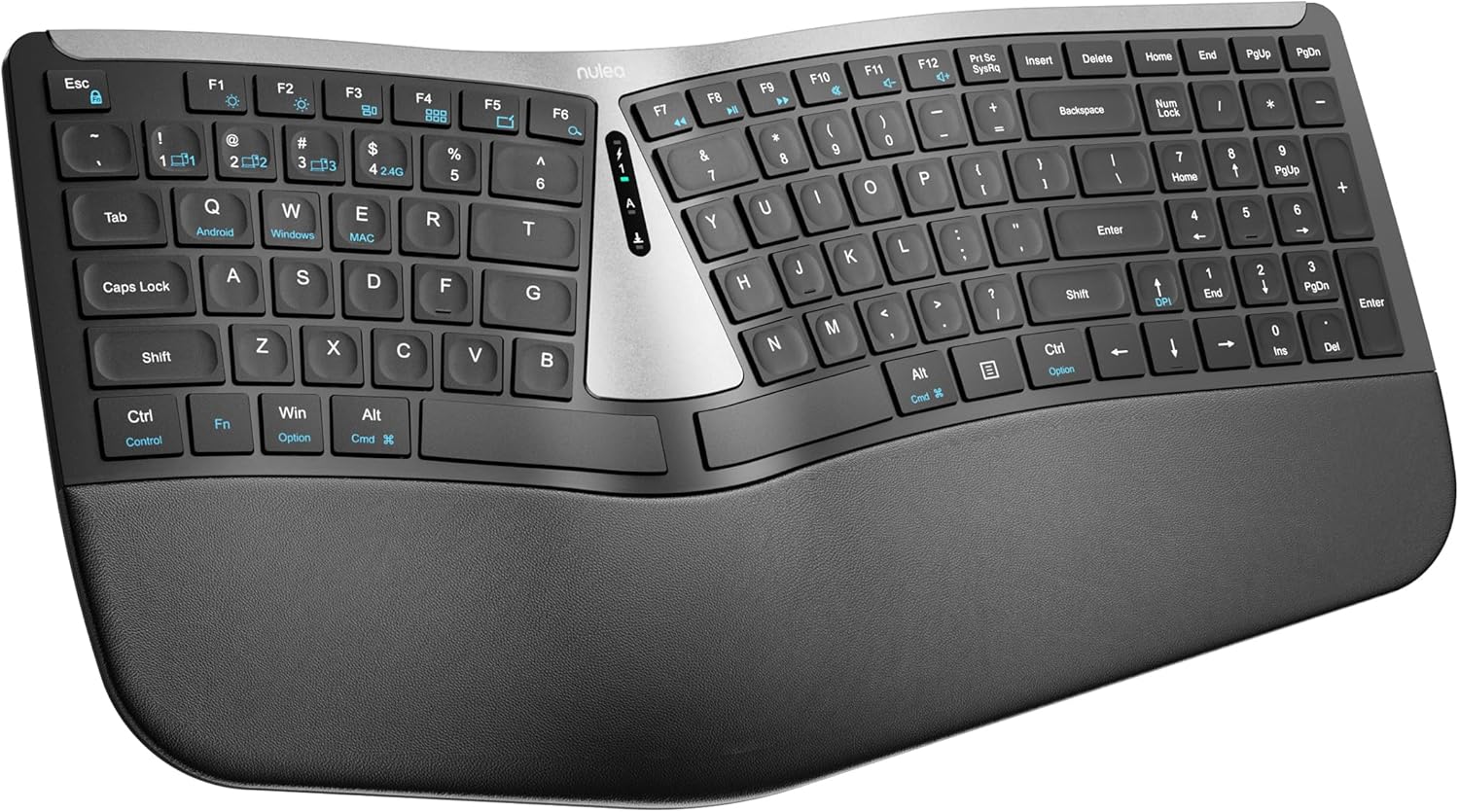
Nulea's keyboard uses a split layout with a soft palm rest and backlighting, connecting through either Bluetooth or a 2.4G receiver.
Nulea markets this keyboard specifically toward carpal tunnel comfort, though as with any ergonomic accessory, how much relief it provides varies by person and it isn't a substitute for medical advice.
Its rechargeable battery is rated for around 200 hours per charge, and the scissor-switch keys are built for a stable, responsive feel.
As a smaller, newer brand, it has less of an established track record than the Logitech or Perixx keyboards in this comparison.
It suits budget-conscious shoppers who want a wireless split keyboard with backlighting.
Connectivity: Bluetooth and 2.4G, dual-mode.
Battery: Rechargeable, rated around 200 hours per charge.
Switch type: Scissor-switch.
Keys: 104.
Who should buy this keyboard? Budget-conscious shoppers who want a wireless split keyboard with backlighting.
Who might want to look elsewhere? Anyone who wants an established, long-track-record brand should consider the Logitech or Perixx keyboards instead.
Setup tip: If you have diagnosed carpal tunnel syndrome, talk with a doctor about your setup rather than relying on any keyboard alone.

Pros
- Keyboard and mouse designed to work together as a matched set
- Simplifies buying both accessories at once
- Certified ergonomic design
Cons
- Smaller review history than the standalone Wave Keys keyboard
- Costs more upfront than buying just the keyboard alone
This combo bundles the Wave Keys keyboard with the Lift vertical mouse, both designed and approved according to criteria set out by ergonomists.
The keyboard brings the same wavy shape and memory foam palm rest as the standalone version, while the Lift mouse adds a 57 degree vertical grip built for small to medium hands.
Both connect through Bluetooth or a shared Logi Bolt receiver, and the pairing is meant to give a consistent ergonomic setup across your whole workstation.
It has a smaller review history than the standalone keyboard, since it's a newer bundled offering.
It suits anyone outfitting both a keyboard and mouse at once who wants a matched, certified pair.
Who should buy this combo? Anyone who needs both a new keyboard and mouse and wants a matched, certified ergonomic pair.
Who might want to look elsewhere? Anyone who already has a mouse they like should buy the standalone Wave Keys keyboard instead.
Setup tip: Pair both devices to the same Logi Bolt receiver to save a USB port if your computer has limited ports.

Pros
- Ergonomic split design significantly reduces wrist and shoulder strain during extended typing.
- Comfortable memory foam wrist rest evenly distributes pressure and prevents wrist sinking.
- Versatile dual connectivity with easy switching between up to 4 devices boosts productivity.
- Long battery life and fast USB-C charging allow uninterrupted use for weeks.
- Adjustable tilt angles accommodate different desk setups and user preferences.
Cons
- No backlighting, which may be a drawback for typing in low-light environments.
- Split layout requires a short adjustment period for users accustomed to traditional keyboards.
- The built-in wrist rest is not removable, limiting cleaning and customization options.
The TECKNET Wireless Ergonomic Keyboard is designed for users who spend long hours typing and want to minimize discomfort. With its split curved layout and built-in memory foam wrist rest, it targets office workers, programmers, and writers who prioritize ergonomics and multi-device flexibility.
Standout features include a split key arrangement that follows your fingers' natural arc, reducing lateral stretching and mistyping. The dual-density wrist rest offers stable support and gentle pressure relief, while the Bluetooth 5.0 and 2.4GHz connectivity let you seamlessly switch between a computer, tablet, and smartphone. The 500mAh battery delivers up to 200 hours of use, so you can rely on it for weeks without recharging.
Build quality is solid with a stain-resistant fabric surface that withstands daily wear. The four adjustable tilt feet allow you to find the perfect angle whether seated or standing. The keyboard feels sturdy and responsive, though it lacks a backlight, which may be a limitation in dimly lit rooms.
One potential drawback is the learning curve: the split layout takes some getting used to, and the wrist rest is non-removable, limiting cleaning options. However, the ergonomic benefits quickly outweigh these minor inconveniences for most users.
Overall, the TECKNET Wireless Ergonomic Keyboard delivers excellent value for its price. It combines thoughtful ergonomics, reliable wireless performance, and long battery life, making it a smart choice for anyone seeking a healthier typing experience.

Pros
- Excellent ergonomic design reduces wrist and hand strain during extended typing.
- Customizable tilt with removable elevator for personalized comfort.
- Strong data security with AES 128-bit encryption for every keystroke.
- Convenient dedicated Windows key and back button for efficient navigation.
- Flexible number pad placement allows you to optimize your desktop layout.
Cons
- Split layout may require an adjustment period for users accustomed to traditional keyboards.
- Integrated palm rest cannot be detached for cleaning or replacement.
- No backlighting, which can be a drawback in low-light environments.
The Incase Sculpt Ergonomic Keyboard, designed by Microsoft, is a wireless split-layout keyboard aimed at professionals and heavy typists seeking to reduce wrist strain and improve posture. Its domed geometry and cushioned palm rest promote a natural typing position, making it ideal for long work sessions or anyone with repetitive strain concerns.
Key features include a removable elevator for adjusting tilt, AES 128-bit encryption for secure data entry, and a dedicated Windows key for quick navigation. The standalone numeric keypad adds flexibility, allowing you to place it where it suits your workflow. Users report a noticeable reduction in wrist fatigue after extended use.
The keyboard has a sleek black finish with a split layout that encourages a shoulder-width hand position. The palm rest is plush and supportive, though it is integrated and not removable. The keys have a comfortable scissor-switch feel, and wireless connectivity is reliable with a secure encrypted link.
The split layout may require a brief adjustment period for those used to standard keyboards, and the lack of backlighting can be a drawback in dim environments. Additionally, the integrated palm rest may not suit users who prefer a detachable option for cleaning.
Overall, the Incase Sculpt Ergonomic Keyboard offers excellent ergonomic support and security features for productivity-focused users. While it has a few limitations, its comfort and thoughtful design make it a strong choice for anyone looking to upgrade their typing experience.
What to Look for in a Wireless Ergonomic Keyboard for Arthritis
Not every ergonomic keyboard suits arthritic hands. You need specific features that reduce joint stress and promote a neutral posture. Here are the key criteria we used when evaluating these models.
Split Design and Keyframe Curvature
A split layout lets you position each hand at shoulder width, which keeps your wrists straight and your forearms parallel. This alignment reduces twisting in the tendons and joints. The Logitech Ergo K860 and the Arteck models both use a curved, split keyframe that mimics the natural arc of your fingers. For a deeper look at how split designs compare, read our article on best split ergonomic keyboards.
Look for a keyboard where the left and right halves angle outward slightly. This prevents your wrists from bending inward, a common cause of median nerve compression.
Cushioned Wrist Rest and Palm Support
Arthritis often makes the base of your palm tender. A firm but soft wrist rest can relieve pressure and keep your hands in a neutral position. Memory foam models, like those on the Logitech Wave Keys and the TECKNET keyboard, conform to your palms without sinking. Avoid hard plastic rests that can aggravate joints.
The Incase Sculpt and Nulea keyboards include generous padded rests that extend across the full width. This gives you a stable place to anchor your wrists while you type, reducing fatigue during long sessions.
Connectivity and Multi-Device Compatibility
Wireless freedom is essential for arthritis sufferers, because tangled cords can force awkward reaching. Bluetooth and 2.4G receivers let you switch between a computer, tablet, or phone with a single click. The Arteck and TECKNET keyboards support up to three devices, so you can move from your desktop to a laptop without re-pairing. For guidance on setting up your workspace, see how to position keyboard and mouse ergonomically.
Make sure the keyboard offers a USB receiver option if your computer has limited Bluetooth support. Some models, like the Logitech Wave Keys, include both Bluetooth and a Logi Bolt receiver for stable connections.
Adjustability and Tilt Options
Your ideal typing angle depends on your chair height, desk surface, and arm length. Keyboards with adjustable feet let you tilt the frame negative or positive to find a neutral wrist position. The Logitech Ergo K860 offers three tilt settings, while the TECKNET has four stages from 0 to 6.2 degrees. These small adjustments can prevent your wrists from bending up or down, which aggravates arthritis. Compare ergonomic versus standard designs in our post on ergonomic keyboard vs regular keyboard.
Final Thoughts
After reviewing nine wireless ergonomic keyboards, two models stand out for arthritis sufferers. The Logitech Ergo K860 offers a premium split design with a pillowed wrist rest that reduces wrist bending by 25 percent, making it ideal for people who type for hours and need maximum support. For a more budget-friendly option that still delivers excellent ergonomics, the Arteck Ergonomic Keyboard combines a cushioned palm rest, split layout, and multi-device connectivity at a fraction of the cost. Both are certified by ergonomists and have earned strong user ratings, so you can choose with confidence.
Frequently Asked Questions
Can an ergonomic keyboard really help with arthritis pain?
Yes. Ergonomic keyboards with split designs and cushioned wrist rests promote a neutral hand and wrist position, which reduces pressure on inflamed joints. Many users report less pain and fatigue after switching to a model like the Logitech Wave Keys or TECKNET keyboard. For more relief strategies, see our guide on best ergonomic keyboard for wrist pain.
What is the best split keyboard for arthritis in 2026?
The Logitech Ergo K860 remains a top choice for 2026 because of its curved split keyframe, memory foam wrist rest, and adjustable tilt. For a more affordable split option, the Arteck models offer similar ergonomic benefits at a lower price point.
Are wireless ergonomic keyboards better for arthritis than wired ones?
Wireless keyboards give you freedom to position your keyboard exactly where it feels comfortable, without cord tension pulling it out of place. Many models also support multi-device switching, so you can avoid repetitive reaching. Both wired and wireless can be ergonomic, but wireless often allows more flexible desk setups.
How do I choose the right keyboard for arthritic hands?
Focus on split layouts, soft palm rests, low-force keys, and adjustable tilt. Look for models that let you type with your wrists straight and your forearms parallel to the floor. Reading user reviews from people with arthritis can also help you decide.


Write Your Review
No reviews yet. Be the first to share your experience!