

If your wrists ache after answering emails or your desk is too crowded for a full-size keyboard, a compact ergonomic model could be the fix. The best smallest ergonomic keyboard options fold, split, and shrink your setup without skimping on support.
In this guide, we compared the most promising mini and portable ergonomic keyboards of 2026 based on layout, wrist support, connectivity, and build quality. If you’re dealing with discomfort, you may also want to read our tips on how to reduce wrist pain from typing before you buy.
A tiny or foldable keyboard sacrifices key spacing, which can be uncomfortable for anyone with average or larger hands, and the compact frame does not tent as effectively as a full split design.
Disclosure: Ergonook is a participant in the Amazon Associates program. Links below are affiliate links, and we may earn a commission from qualifying purchases. This does not affect which products we recommend or how we rank them.

Pros
- Compact and lightweight design makes it easy to carry everywhere.
- Ergonomic split keystrokes reduce wrist fatigue compared to standard keyboards.
- Seamless switching between three devices without re-pairing.
- Quiet operation perfect for libraries and open offices.
- Smart power management with auto-sleep extends battery life.
Cons
- Split layout may require an adjustment period for new users.
- No backlit keys, limiting usability in low-light conditions.
- Smaller key spacing than full-sized keyboards could feel cramped for large hands.
The MEETION Foldable Ergonomic Bluetooth Keyboard is a portable typing solution designed for students, digital nomads, and busy professionals. Its unique V-shaped 166° split layout folds in half, making it easy to slip into a bag, while the ergonomic angle helps reduce wrist tension during long work sessions.
Standout features include Bluetooth multi-device connectivity that pairs with up to three gadgets simultaneously. Switching between a phone, tablet, or laptop is effortless with a single tap. The low-profile scissor-switch keys offer a quiet and tactile typing experience, cutting noise by over 90 percent, which is a boon for quiet spaces like libraries or coworking hubs.
Build quality is solid: a magnetic clasp prevents accidental opening, and the wipe-clean PU leather cover protects the keyboard from spills and dust. The integrated metal kickstand provides stable typing on laps, train trays, or uneven surfaces. Battery performance is reliable, with up to 60 hours of standby and an auto-sleep feature that wakes with any keypress.
There are minor drawbacks. The split design requires a brief learning curve, and there is no backlight for typing in the dark. Additionally, the compact size may feel slightly cramped for users with larger hands. These trade-offs are typical for a portable keyboard.
Overall, the MEETION foldable keyboard delivers exceptional portability and ergonomic comfort at an affordable price. It is a great choice for anyone who needs a versatile, travel-friendly input device without sacrificing typing comfort.

Pros
- Compact size maximizes desk space without sacrificing ergonomic benefits.
- Split curved keyframe encourages natural hand positioning, reducing wrist strain.
- Seamless multi-device switching (up to 3) with both Bluetooth and 2.4G.
- Long battery life with USB-C charging and auto sleep.
- Adjustable tilt legs for personalized typing angle.
Cons
- No number pad may be a drawback for users who frequently input numbers.
- Hard palm rest is not cushioned, which some users might find less comfortable than soft rests.
- Split layout requires an adjustment period, as noted in the product description.
The ProtoArc EK04 is a compact wireless ergonomic keyboard designed for users who want to reduce typing strain without sacrificing desk space. Its split curved keyframe and tenkeyless layout make it ideal for professionals, remote workers, and anyone with limited workspace who prioritizes comfort.
The standout feature is the curved split keyframe that promotes a natural hand and shoulder alignment, which can help reduce repetitive strain. The hard leather palm rest offers stable support, though it is not cushioned. Multi-device switching via Bluetooth or 2.4G works seamlessly, and the USB-C rechargeable battery provides long standby time.
Build quality is solid with a space gray finish that looks professional. The adjustable tilt legs allow for four different angles, accommodating various desk setups. The keyboard is lightweight and compact, making it easy to move or pack.
The lack of a number pad may be a dealbreaker for users who frequently input numbers. Additionally, the hard palm rest might not suit everyone; those accustomed to soft cushioning may find it firm. The split layout requires an adjustment period, but the ergonomic benefits are worth the effort.
Overall, the ProtoArc EK04 is a well-designed ergonomic keyboard that delivers on comfort and space efficiency. It is a solid choice for those willing to adapt to a split layout and who do not need a number pad. Its competitive price point and reliable wireless connectivity make it a strong contender in the compact ergonomic category.
Pros
- Ergonomic curved layout promotes a natural hand position for comfort.
- Works with up to three devices via Bluetooth, plus a 2.4G receiver for lag-free connection.
- Long battery life with USB-C charging and auto-sleep saves power.
- Portable foldable design fits in most bags and is great for on-the-go use.
Cons
- Compact size means smaller keys, which may feel cramped for users with large hands.
- Auto-sleep activates after only 10 minutes, which can interrupt workflow if you pause briefly.
- Keys are not backlit, making typing in low light challenging.
The MoKo Ergonomic Foldable Keyboard is designed for users who spend long hours typing and want relief from wrist and shoulder discomfort. Its curved layout breaks away from traditional rectangular keyboards, allowing your hands to rest in a more natural position. This makes it a strong choice for students, remote workers, and travelers who need a portable yet comfortable typing solution.
Standout features include dual connectivity via Bluetooth and a 2.4G USB receiver, giving you reliable wireless performance up to 15 meters. You can pair up to three Bluetooth devices and switch between them effortlessly, ideal for juggling a tablet, phone, and laptop. The built-in rechargeable battery provides 25-30 hours of use, and the auto-sleep function helps extend battery life when you step away.
Build quality is solid for a foldable keyboard. The scissor-switch keys offer quiet, responsive feedback, and the non-slip PU leather base keeps it steady on any surface. A locking clasp on the back prevents the keyboard from folding up when used on your lap. The compact folded size easily slips into a backpack or tablet sleeve, making it highly portable.
However, the compact form factor means the keys are smaller than standard keyboards, which may take time to adjust to, especially for users with larger hands. The auto-sleep timer is set to 10 minutes, which might be too short for some workflows. Additionally, there is no backlighting, so typing in dim environments can be difficult.
Overall, the MoKo Ergonomic Foldable Keyboard delivers a thoughtful blend of comfort, portability, and multi-device support at an attractive price point. It is a practical upgrade for anyone looking to reduce typing strain while staying productive on the move.

Pros
- Ergonomic V-shape split keyset minimizes hand and wrist strain.
- Ultra-compact and foldable, easily slips into a backpack or briefcase.
- Connects to three devices simultaneously with easy switching.
- Long battery life with Type-C rechargeable, great for travel.
- Stylish leather exterior looks premium and matches modern devices.
Cons
- Requires an adjustment period to get used to the split key layout.
- No backlighting for typing in low-light conditions.
- The compact foldable form may feel less stable on an uneven surface.
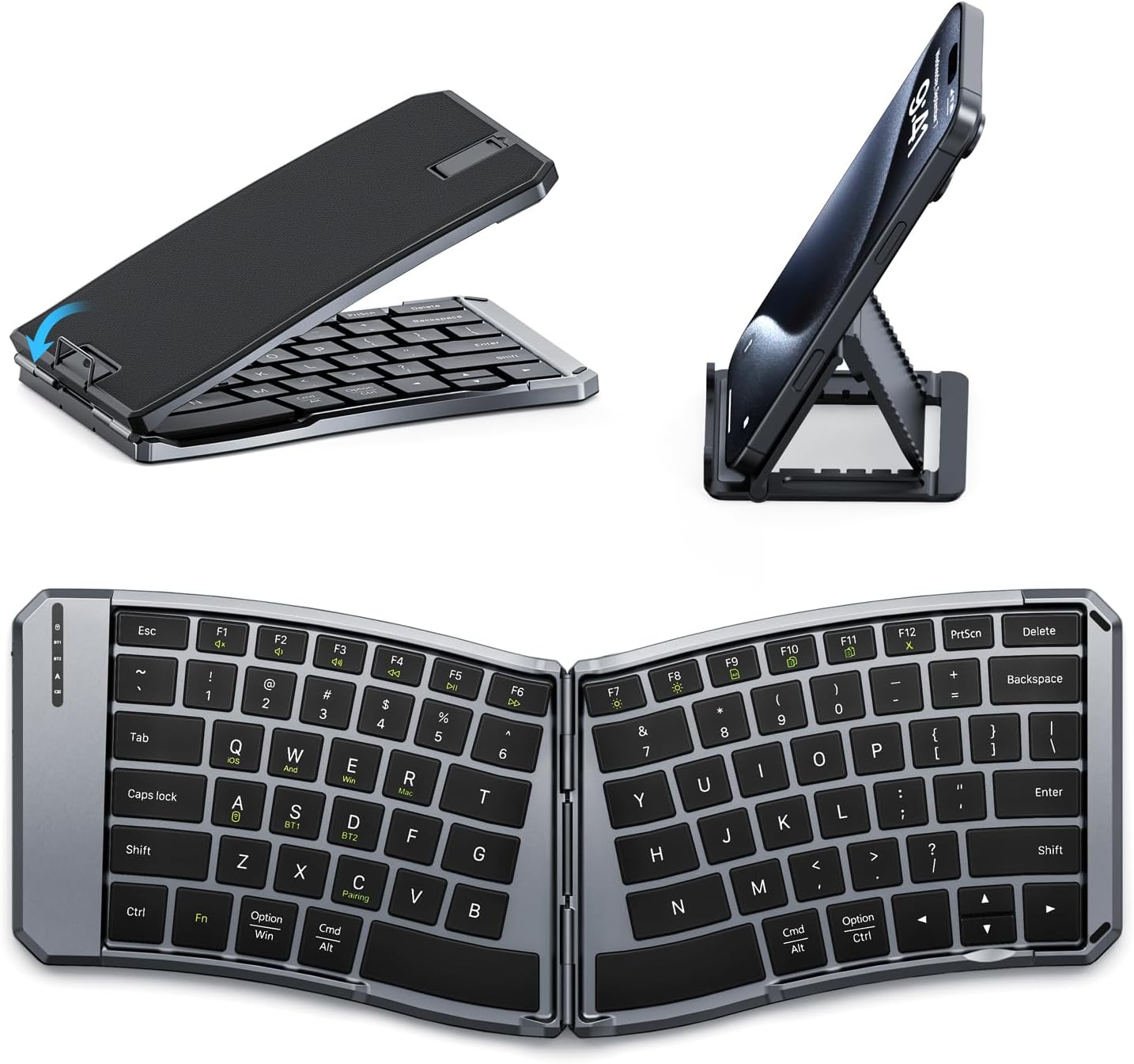
The ProtoArc XK03 is an ergonomic foldable Bluetooth keyboard designed for professionals and travelers who need a portable typing solution without sacrificing comfort. It pairs well with iPads, iPhones, tablets, and laptops, making it a versatile accessory for multi-device users.
The standout feature is the unique V-shaped split keyset angled at 166 degrees, which encourages a more natural hand position to reduce wrist strain. In practice, the keys have decent travel and feedback for a foldable keyboard, though users should expect a brief learning curve. Switching between devices is seamless via a dedicated button, boosting productivity.
The keyboard folds 360 degrees into a compact package that easily slips into a bag. Strong magnets keep it securely closed, and the leather-like finish adds a touch of elegance. The Type-C charging port is a modern convenience, and the battery lasts for hours of extensive use.
Some users may find the split layout takes a few days to get used to, especially if they are accustomed to standard keyboards. The lack of backlighting can be a hindrance in dim environments, and the folding design might feel less rigid than a full-sized keyboard. However, these trade-offs are typical for ultra-portable ergonomic options.
Overall, the ProtoArc XK03 is a solid choice for anyone seeking a travel-friendly ergonomic keyboard that supports multiple devices. Its thoughtful design and reliable performance make it a worthwhile investment for reducing strain while typing on the go.
Connectivity: Bluetooth
Device Compatibility: iOS, Android, Windows, Mac OS
Multi-Device: Up to 3 devices
Keyboard Layout: Split keyset, V-shape 166°
Foldable: 360° foldable with magnetic closure
Battery: Built-in lithium, 250 hours standby, Type-C charging
Material: Leather-like finish

Pros
- Rechargeable battery with a long rated life per charge
- Simple plug-and-play setup, no Bluetooth pairing required
- One of the more affordable split keyboards in this comparison
Cons
- Fixed split angle rather than fully separable modules
- USB receiver only, no Bluetooth option
The Arteck split keyboard uses a fixed split layout with a soft cushioned wrist and palm rest, aimed at a more natural hand position than a flat keyboard.
It connects through a nano USB receiver stored in the keyboard itself, and its rechargeable battery is rated for about six months per charge based on typical daily use.
It's backed by a 24 month warranty, and is one of the more affordable split keyboards in this comparison.
It doesn't offer Bluetooth or fully separable key modules, so it's a more modest step up from a standard keyboard than the Kinesis models here.
It suits anyone who wants an affordable, low-effort introduction to a split keyboard layout.
Dimensions: 16.5 inches long by 9.6 inches wide by 1.02 inches high.
Connectivity: 2.4G USB wireless receiver.
Battery: Rechargeable, rated around six months per charge.
Warranty: 24 months.
Who should buy this keyboard? Anyone who wants an affordable, simple introduction to a split ergonomic layout.
Who might want to look elsewhere? Anyone who wants Bluetooth or fully separable key modules should consider the Logitech K860 or Kinesis models instead.
Setup tip: The nano receiver stores inside the keyboard when not in use, so check there first if you misplace it.

Pros
- Promotes neutral wrist position with split-key layout and vertical mouse design.
- Affordable all-in-one ergonomic solution for budget-conscious users.
- Compact and portable, perfect for small desks or travel.
- Silent mouse clicks and low-profile keys suitable for quiet environments.
- Easy plug-and-play setup with no software installation required.
Cons
- No numeric keypad may inconvenience users who frequently input numbers.
- Membrane keys lack the tactile feedback of mechanical switches.
- Requires AA batteries for both keyboard and mouse; no rechargeable option included.
The Perixx PERIDUO-606 is a wireless ergonomic keyboard and mouse set designed for users seeking comfort and space efficiency. It combines a split-key keyboard with a vertical mouse to reduce wrist strain, making it ideal for office workers, remote employees, and anyone with limited desk space.
Standout features include the split-key design that encourages a natural hand position, while the vertical mouse promotes a neutral grip. The adjustable palm rest allows you to tilt the keyboard for a better typing angle. Wireless connectivity up to 33 feet keeps your desk clutter-free.
Performance-wise, the membrane keys are quiet and low-profile, suitable for shared workspaces. The vertical mouse offers three DPI settings for cursor control. Build quality is functional but not premium; the plastic construction feels lightweight and portable.
Drawbacks include the lack of a number pad, which may be a downside for data entry tasks. Some users may find the keys too small or the mouse too compact for larger hands. The device requires batteries, which can be a recurring cost.
Overall, the Perixx PERIDUO-606 is a budget-friendly ergonomic combo that delivers on comfort and convenience. It is a good choice for those who prioritize wrist health and desk organization, though it may not satisfy heavy typists or gamers.

Pros
- Excellent ergonomic design reduces wrist and hand strain during extended typing.
- Customizable tilt with removable elevator for personalized comfort.
- Strong data security with AES 128-bit encryption for every keystroke.
- Convenient dedicated Windows key and back button for efficient navigation.
- Flexible number pad placement allows you to optimize your desktop layout.
Cons
- Split layout may require an adjustment period for users accustomed to traditional keyboards.
- Integrated palm rest cannot be detached for cleaning or replacement.
- No backlighting, which can be a drawback in low-light environments.
The Incase Sculpt Ergonomic Keyboard, designed by Microsoft, is a wireless split-layout keyboard aimed at professionals and heavy typists seeking to reduce wrist strain and improve posture. Its domed geometry and cushioned palm rest promote a natural typing position, making it ideal for long work sessions or anyone with repetitive strain concerns.
Key features include a removable elevator for adjusting tilt, AES 128-bit encryption for secure data entry, and a dedicated Windows key for quick navigation. The standalone numeric keypad adds flexibility, allowing you to place it where it suits your workflow. Users report a noticeable reduction in wrist fatigue after extended use.
The keyboard has a sleek black finish with a split layout that encourages a shoulder-width hand position. The palm rest is plush and supportive, though it is integrated and not removable. The keys have a comfortable scissor-switch feel, and wireless connectivity is reliable with a secure encrypted link.
The split layout may require a brief adjustment period for those used to standard keyboards, and the lack of backlighting can be a drawback in dim environments. Additionally, the integrated palm rest may not suit users who prefer a detachable option for cleaning.
Overall, the Incase Sculpt Ergonomic Keyboard offers excellent ergonomic support and security features for productivity-focused users. While it has a few limitations, its comfort and thoughtful design make it a strong choice for anyone looking to upgrade their typing experience.

Pros
- Quiet keys and mouse clicks for a peaceful working environment
- Compact and portable, ideal for small desks or travel
- Strong wireless range up to 30 feet
- Easy plug-and-play setup with a single USB receiver
- Versatile DPI options to match different tasks and screen sizes
Cons
- No backlit keys, which may be a drawback for low-light use
- Compact size may not suit users with larger hands
- Lacks Bluetooth connectivity, requires a USB port
The Macally Small Wireless Keyboard and Mouse Combo is a compact, quiet productivity duo designed for PC users who want to save desk space without sacrificing functionality. It is ideal for office workers, students, or home users who need a reliable, no-fuss input solution for daily tasks like typing emails, browsing the web, or working on documents.
Standout features include the 78-key scissor-switch keyboard that provides a comfortable, responsive typing experience with minimal noise. The mouse is equally quiet with its silent click buttons and offers three DPI levels (800/1200/1600) for adaptable cursor speed. The 2.4G wireless connection is stable and reaches up to 30 feet, ensuring you can work from a comfortable distance.
Design-wise, the keyboard is slim and lightweight, with a clean layout that includes 12 shortcut keys for quick access to media, volume, and other functions. The mouse has a sleek, low-profile shape that fits well in medium to small hands. The single USB dongle receiver makes setup effortless, and the combo is powered by standard batteries (not included).
Potential drawbacks include the lack of backlighting, which may be a nuisance in dim environments, and the compact size that might feel cramped for users with larger hands. Additionally, the combo relies on a USB-A receiver, which could be less convenient for modern laptops with only USB-C ports.
Overall, the Macally Small Wireless Keyboard and Mouse Combo delivers excellent value for its price. It is a thoughtfully designed, quiet, and space-saving set that excels in productivity tasks. If you prioritize a tidy workspace and a distraction-free typing and clicking experience, this combo is a solid choice.

Pros
- Backlighting adds visibility in low-light settings
- Simple wired setup with no batteries or pairing required
- Affordable relative to the mechanical options in this comparison
Cons
- Wired only, no wireless option
- Fixed split angle rather than fully separable modules
This is the wired version of Arteck's split ergonomic keyboard, adding seven backlight colors and adjustable brightness on top of the same cushioned wrist and palm rest.
It connects over a 6 foot USB cable, so there's no battery to charge or receiver to keep track of.
It's backed by a 24 month warranty and is one of the more affordable options in this comparison.
Like the wireless Arteck model, it uses a fixed split angle rather than fully separable modules.
It suits anyone who wants a simple, wired split keyboard with backlighting for low-light typing.
Connectivity: Wired USB, 6 foot cable.
Lighting: 7 backlight colors, adjustable brightness.
Switch type: Scissor-switch.
Warranty: 24 months.
Who should buy this keyboard? Anyone who wants a simple, affordable, wired split keyboard with backlighting.
Who might want to look elsewhere? Anyone who wants a wireless connection should consider the Arteck wireless model or the Logitech K860 instead.
Setup tip: Route the cable so it doesn't pull on the keyboard while typing, since the split halves are connected as one wired unit.
How to Choose the Best Smallest Ergonomic Keyboard
Not every ergonomic keyboard needs to take over your desk. The smallest models offer genuine relief for your wrists and shoulders while freeing up valuable space. Below are the four things we focused on during our selection process.
1. Decide Between Foldable, Split, or Compact Layout
Foldable models like the MoKo Ergonomic Foldable Keyboard and the MEETION Foldable Ergonomic Bluetooth Keyboard collapse into a slim package that fits in a backpack. Split designs like the Arteck Split Ergonomic Keyboard separate the key clusters to let your shoulders relax naturally.
Compact boards such as the ProtoArc EK04 skip the number pad entirely, letting you keep your mouse closer to your body. Each style has its own trade-offs. Our ergonomic keyboard vs regular keyboard guide can help you understand the difference.
We also looked at combo bundles like the Macally Small Wireless Keyboard and Mouse Combo, which pairs a 78-key mini keyboard with a compact mouse for a tidy workstation. The Perixx PERIDUO-606 takes a different route by bundling a vertical mouse with a mini keyboard.
If you’re not sure which layout suits you, try to estimate how often you type on the go versus at a desk. Foldable keyboards are ideal for occasional use, while a curved split keyboard gives you more surface area for all-day comfort.
2. Check Connectivity and Device Switching
Many compact ergonomic keyboards now support both Bluetooth and 2.4G wireless connections. The MEETION foldable keyboard lets you pair up to three devices and switch with a tap, while the ProtoArc XK03 offers the same flexibility for iOS, Android, Windows, and macOS.
If you work across multiple devices, look for one-touch switching and reliable wireless range. Desktop-only users can save money with a wired model like the Arteck USB Wired Backlit Keyboard, which never needs charging.
Battery life also varies. The ProtoArc XK03 offers around 250 hours of standby time, while the MEETION provides up to 60 hours on a single charge. The Arteck wireless keyboard is rated for several months of typical use.
Think about whether you need to pair a laptop and phone or just one desktop computer. The ProtoArc EK04 supports Bluetooth plus a 2.4G USB receiver, and the Macally combo keeps things simple with a 2.4G connection.
3. Evaluate Wrist Support and Tilt Adjustment
A cushioned palm rest can make a huge difference during long sessions. The Arteck split keyboards include a soft wrist rest, while the Incase Sculpt Ergonomic Keyboard features an integrated cushioned palm rest and a removable elevator mechanism for reverse tilt.
Adjustable tilt legs, like the four on the ProtoArc EK04, help keep your hands in a neutral position whether you’re sitting or standing. For more setup advice, see our guide on how to position keyboard and mouse ergonomically.
The Perixx PERIDUO-606 goes a step further with an adjustable palm rest stand that can be positioned to match your arm length. If you suffer from wrist pain, you might also want to review our roundup of the best ergonomic keyboard for wrist pain.
Some keyboards include dedicated shortcut keys for volume, play, and emojis, which is handy when you’re working from a compact layout. The MEETION and ProtoArc XK03 both include these productivity-focused shortcuts.
4. Match Portability With Your Daily Routine
Frequent travelers should prioritize ultra-slim foldable keyboards with magnetic clasps and durable PU leather covers. The MEETION and ProtoArc XK03 are small enough for airplane tray tables and coffee shop counters.
If your keyboard mostly stays on a desk, a slightly larger compact split model with a palm rest may be the better investment. Compare these styles in our roundup of the best split ergonomic keyboard picks.
Build quality matters just as much as size. We preferred keyboards with solid hinges, non-slip bases, and quiet scissor-switch keys. A secure magnetic clasp, like the one on the MEETION, prevents accidental folding in your bag.
Finally, consider the finish and materials. A leather-like exterior looks professional in meetings, while matte plastics are easier to wipe down. The MEETION uses a durable PU leather wrap and a built-in kickstand for stable typing on uneven surfaces.
Final Thoughts
There is no single perfect keyboard for everyone, but two models stand out for different needs. For travel and multi-device work, the ProtoArc XK03 Ergonomic Foldable Keyboard combines a split layout with true portability. For a desktop setup focused on wrist comfort, the Incase Sculpt Ergonomic Keyboard delivers a sculpted, cushioned typing experience. Whichever you choose, give yourself a short adaptation period and your wrists will thank you.
Frequently Asked Questions
What is the smallest ergonomic keyboard I can buy?
Foldable models like the MoKo Ergonomic Foldable Keyboard and the MEETION Foldable Ergonomic Bluetooth Keyboard shrink down to roughly the size of a tablet or small notebook. These are the most portable smallest ergonomic keyboards available in 2026. The ProtoArc XK03 is another strong choice if you need a split layout.
Are compact ergonomic keyboards good for small hands?
Yes. Many mini keyboards use a staggered or split layout that reduces reaching, which benefits smaller hands. Models with adjustable tilt legs, like the ProtoArc EK04, let you fine-tune the angle for a comfortable fit. You can also choose a compact option with a palm rest for extra support.
Can I use a foldable ergonomic keyboard with my tablet or phone?
Absolutely. Foldable Bluetooth keyboards such as the ProtoArc XK03 connect with iPad, iPhone, Android devices, laptops, and desktop computers. You can switch between up to three paired devices with a single button press. The MEETION keyboard offers the same multi-device flexibility.
Do I need a wrist rest on a compact ergonomic keyboard?
Not always, but it helps if you type for extended periods. Several compact options include built-in cushioned or hard palm rests. If you prefer a separate solution, check out our list of the best under desk keyboard tray options to create a healthier setup.



Write Your Review
No reviews yet. Be the first to share your experience!