

If the clatter of mechanical keys or the stiffness of a standard keyboard leaves you distracted and fatigued, you are not alone. Many professionals, writers, and gamers now seek a quieter, more comfortable typing experience. This guide focuses on the best ergonomic keyboards with silent switches, covering everything from compact wave-shaped boards to premium split designs. Whether you work in a shared office or a home setup, these models help you type longer with less noise and less strain.
We have reviewed nine top-rated keyboards from trusted brands like Keychron, Logitech, Kinesis, and CHERRY. Each product has been evaluated for its ergonomic design, switch quietness, build quality, and overall value. If you are new to ergonomic keyboards, you may want to first read our guide on ergonomic keyboard vs regular keyboard to understand the key differences.
Silent switches trade some tactile feedback for quiet operation, so typists who prefer a crisp, clicky feel may find these keyboards feel mushy by comparison.
Disclosure: Ergonook is a participant in the Amazon Associates program. Links below are affiliate links, and we may earn a commission from qualifying purchases. This does not affect which products we recommend or how we rank them.

Pros
- Ergonomic wavy shape reduces wrist and forearm strain.
- Memory foam palm rest offers exceptional comfort for long typing sessions.
- Up to three years of battery life minimizes maintenance.
- Easy-Switch technology allows seamless use across multiple devices.
- Compact design saves desk space and improves mouse positioning.
Cons
- No backlighting for typing in low-light conditions.
- Membrane keys may feel less tactile compared to mechanical keyboards.
- Full customization requires installing the Logi Options+ app.
The Logitech Wave Keys Ergonomic Wireless Keyboard is designed for users who spend long hours typing and want to reduce strain. Its wavy shape and integrated palm rest make it a great choice for office workers, remote professionals, and anyone seeking a more comfortable typing experience.
The keyboard's compact layout brings your mouse closer, improving shoulder posture. The memory foam palm rest provides plush support, and the wavy key frame encourages a natural hand position. In daily use, the keys are quiet and responsive, and the Easy-Switch feature lets you toggle between devices seamlessly.
Built with a focus on sustainability, the Wave Keys uses up to 61% post-consumer recycled plastic. The sand color option is neutral and fits most desk aesthetics. The keyboard feels sturdy and the included Logi Bolt receiver offers a secure wireless connection. Battery life is rated at up to three years, so you rarely need to think about power.
Some users may miss a backlight for typing in dim environments. The membrane keys lack the tactile feedback of mechanical switches, which could disappoint enthusiasts. Additionally, full customization requires the Logi Options+ app, which may not appeal to those who prefer plug-and-play simplicity.
Overall, the Logitech Wave Keys delivers excellent ergonomic support and convenience at a reasonable price. It is a solid investment for anyone looking to improve typing comfort without sacrificing connectivity or desk space. Recommended for daily office use and multi-device workflows.

Pros
- Most adjustable split design in this comparison, separating up to 10 inches
- Quiet mechanical switches
- Long 3 year manufacturer warranty
Cons
- As a newer listing, it doesn't yet have an established review history
- Steeper price and learning curve than the more traditional layouts in this comparison
The Advantage360 Professional takes split ergonomics further than the other keyboards here, with contoured, concave key wells that can separate up to 10 inches apart and three adjustable tenting heights.
It uses quiet mechanical switches rated for high durability, and is fully programmable through an open source configuration tool.
It connects over Bluetooth with wireless linking between the two halves, and is backed by a 3 year warranty.
As a newer listing, it doesn't have the review history of more established keyboards in this comparison yet.
It suits anyone who wants the most adjustable, fully split layout and is comfortable with a longer learning curve.
Separation: Up to 10 inches between key wells.
Tenting: Three adjustable heights.
Switches: Quiet mechanical, rated for high durability.
Connectivity: Bluetooth.
Warranty: 3 years.
Who should buy this keyboard? Anyone who wants the most adjustable, fully split layout available and is willing to invest time in the learning curve.
Who might want to look elsewhere? Anyone who wants an established review history or an easier transition should consider the Logitech K860 instead.
Setup tip: Start with a modest tenting angle and separation distance, then increase gradually as your hands adjust.
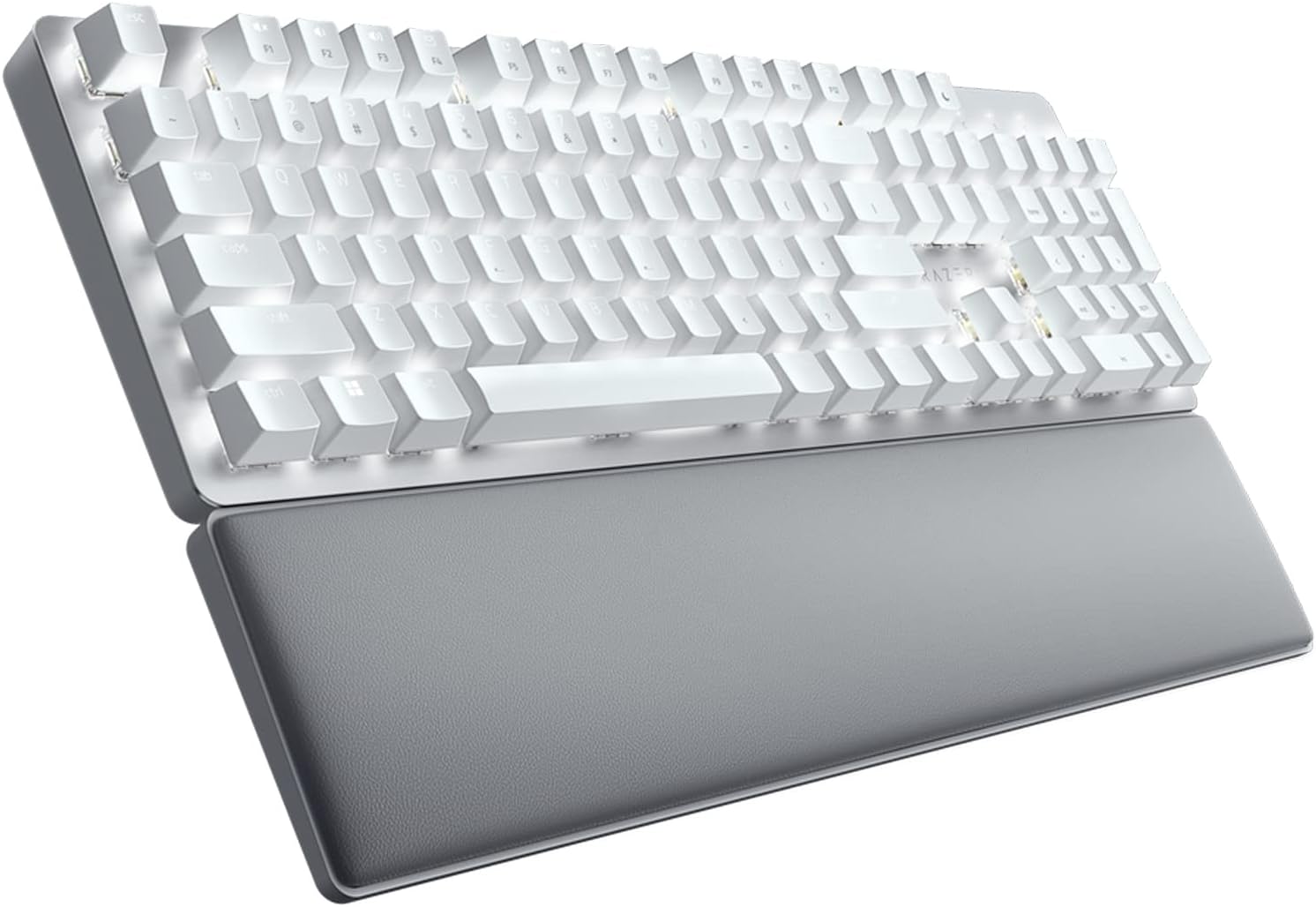
Pros
- Exceptionally quiet linear switches with foam dampening minimize noise.
- Ergonomic wrist rest provides superior comfort for extended use.
- Supports up to 4 devices with easy switching, boosting productivity.
- Customizable keys and macros for personalized shortcuts.
- Reliable wireless connection with HyperSpeed technology.
Cons
- ABS keycaps with soft-touch coating may show wear over time compared to PBT.
- No backlighting, which may be a drawback for low-light environments.
- Premium price point might be high for some buyers.
The Razer Pro Type Ultra is a wireless mechanical keyboard designed for professionals who value quiet, comfortable typing. It builds on the original Pro Type with community-driven improvements, making it a top choice for office workers, remote employees, and anyone who needs a distraction-free keyboard across multiple devices.
Its silent linear switches and sound-dampening foam drastically reduce noise without sacrificing the tactile feedback mechanical keyboard users love. The HyperSpeed wireless technology ensures a stable, low-latency connection, and the ability to pair with up to four devices makes switching between desktop, laptop, tablet, or TV seamless. Programmable keys and macros further enhance productivity.
The ergonomic design includes a cushioned, detachable wrist rest that aligns perfectly with the keyboard to reduce wrist strain. Keycaps feature a soft-touch, fingerprint-resistant coating for a luxurious feel, though they are made of ABS plastic which may be less durable than PBT. The overall build feels solid, with a refined aesthetic suitable for any workspace.
The lack of backlighting could be a limitation for those who work in dim environments. Additionally, the soft-touch coating on ABS keycaps may wear down over time, potentially affecting the typing experience. The price is on the higher side, but the feature set justifies the cost for serious users.
Overall, the Razer Pro Type Ultra excels in delivering a quiet, comfortable, and versatile typing experience. It is an excellent investment for professionals who prioritize productivity and ergonomics. While not perfect, its strengths outweigh the minor drawbacks, making it a strong contender in the premium wireless mechanical keyboard market.

Pros
- Ultra-responsive Hall Effect switches with customizable actuation points for personalized feel
- Quiet and smooth typing experience with pre-lubed silent switches, ideal for shared spaces
- Versatile tri-mode connectivity offers low-latency wireless and stable wired options
- Durable PBT keycaps and elegant rosewood accents enhance both longevity and desk aesthetics
- Easy customization via web-based Launcher without needing additional software installation
Cons
- Non-shine-through keycaps may be difficult to see in low-light conditions without backlighting
- Requires clearing browser cache before using the Launcher configurator, which may be a minor inconvenience
- Full-size layout may take up significant desk space, not ideal for compact setups
The Keychron K10 HE is a full-size wireless keyboard that combines classic mechanical feel with advanced Hall Effect magnetic switch technology. It targets professionals and gamers who demand ultra-responsive performance and quiet operation, thanks to the pre-lubed Silent Banana switches.
Standout features include tri-mode connectivity (Bluetooth 5.2, 2.4 GHz, USB-C), allowing seamless switching between up to three devices. The Keychron Launcher web configurator offers deep customization of actuation points, macros, and rapid trigger settings, making it a versatile tool for both typing and gaming.
Design-wise, the K10 HE features durable non-shine-through PBT keycaps and natural rosewood sidings that add a refined, organic touch. It is compatible with macOS and Windows out of the box, with extra keycaps included, and can be remapped for Linux.
Potential drawbacks include the non-shine-through keycaps which may be harder to see in dim lighting, and the need to clear browser cache before using the Launcher. Additionally, the full-size layout might not suit users with limited desk space.
Overall, the Keychron K10 HE delivers a premium typing and gaming experience with its silent magnetic switches and extensive customization. It is a solid choice for anyone seeking a quiet, high-performance full-size keyboard with versatile connectivity.

Pros
- Dramatically quieter than standard keyboards and mice, ideal for shared spaces.
- Long battery life reduces the need for frequent battery changes.
- Spill-resistant design offers extra protection against accidents.
- Solid, reliable wireless connection with a generous range.
Cons
- No backlighting on the keyboard for low-light use.
- Mouse is basic and may not suit users needing extra buttons or advanced features.
- USB receiver storage is inside the mouse battery compartment, which may be less convenient for some.
The Logitech MK295 is a full-size wireless keyboard and mouse combo designed for users who want a quieter typing and clicking experience. It is particularly suited for home offices, shared workspaces, or anyone sensitive to the noise of traditional peripherals. The combo maintains a familiar, satisfying feel while drastically reducing sound output.
Standout features include SilentTouch technology, which cuts noise by over 90% compared to the Logitech MK270, without compromising key feel or mouse click response. Real-world performance is smooth and reliable, thanks to the 2.4 GHz wireless connection that offers a 10-meter range and virtually no lag. The keyboard includes a full number pad and eight shortcuts for quick access to media, email, and volume controls.
Design and build quality are solid: the keyboard is spill-resistant and features durable keys with adjustable tilt legs for ergonomic comfort. The mouse is contoured and portable, with precise tracking on most surfaces. Both devices include on/off switches and exceptional battery life – 36 months for the keyboard and 18 months for the mouse – reducing maintenance hassles.
Some drawbacks include the lack of backlighting, which may be an issue in dim environments, and the mouse's basic design with no extra programmable buttons. Additionally, the USB receiver is stored inside the mouse battery compartment, which can be slightly inconvenient when switching between devices.
Overall, the Logitech MK295 delivers on its promise of near-silent operation without sacrificing performance or comfort. It is an excellent choice for anyone seeking a quiet, reliable, and long-lasting wireless keyboard and mouse combo for everyday productivity.

Pros
- Rechargeable battery with a long rated life per charge
- Simple plug-and-play setup, no Bluetooth pairing required
- One of the more affordable split keyboards in this comparison
Cons
- Fixed split angle rather than fully separable modules
- USB receiver only, no Bluetooth option
The Arteck split keyboard uses a fixed split layout with a soft cushioned wrist and palm rest, aimed at a more natural hand position than a flat keyboard.
It connects through a nano USB receiver stored in the keyboard itself, and its rechargeable battery is rated for about six months per charge based on typical daily use.
It's backed by a 24 month warranty, and is one of the more affordable split keyboards in this comparison.
It doesn't offer Bluetooth or fully separable key modules, so it's a more modest step up from a standard keyboard than the Kinesis models here.
It suits anyone who wants an affordable, low-effort introduction to a split keyboard layout.
Dimensions: 16.5 inches long by 9.6 inches wide by 1.02 inches high.
Connectivity: 2.4G USB wireless receiver.
Battery: Rechargeable, rated around six months per charge.
Warranty: 24 months.
Who should buy this keyboard? Anyone who wants an affordable, simple introduction to a split ergonomic layout.
Who might want to look elsewhere? Anyone who wants Bluetooth or fully separable key modules should consider the Logitech K860 or Kinesis models instead.
Setup tip: The nano receiver stores inside the keyboard when not in use, so check there first if you misplace it.
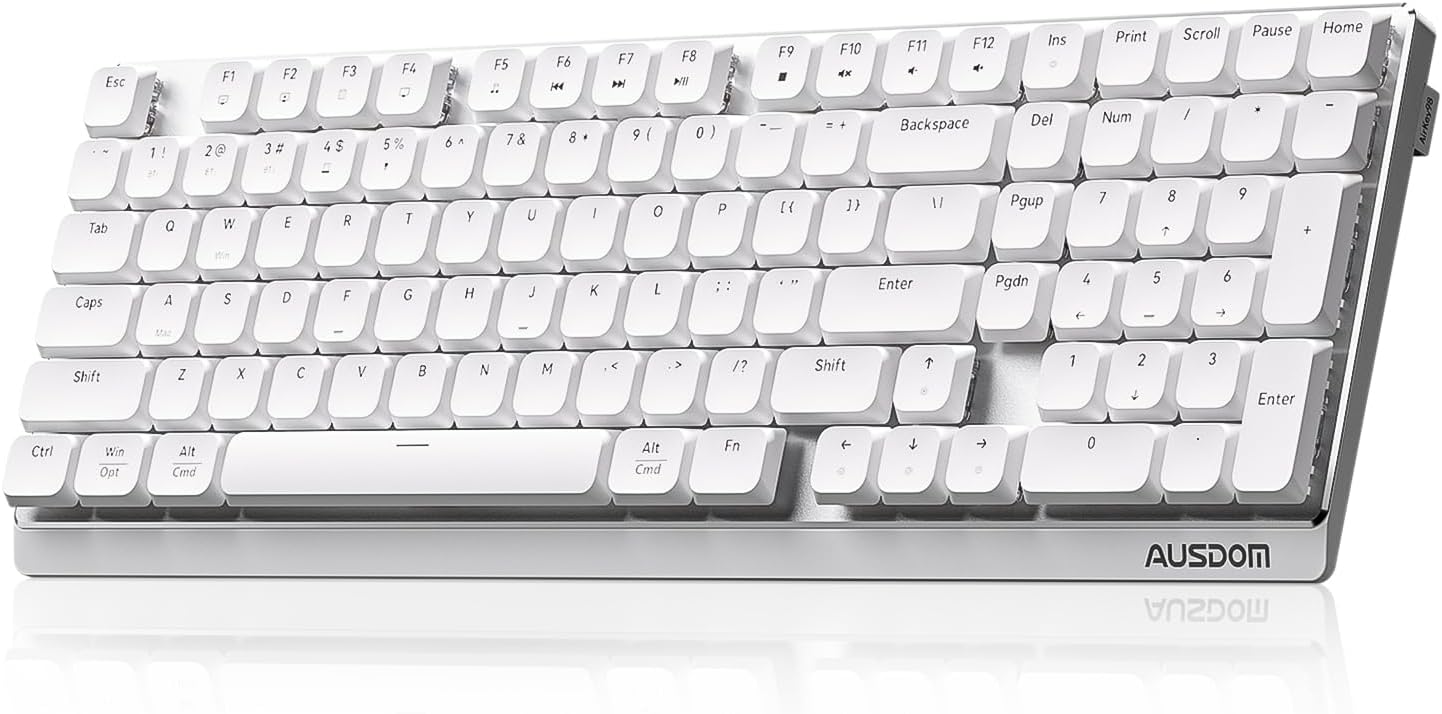
Pros
- Exceptionally quiet operation, suitable for shared workspaces.
- Hot-swappable switches for easy customization and longevity.
- Tri-mode connectivity with support for up to 5 devices enhances productivity.
- Long battery life and ergonomic design promote comfortable extended use.
Cons
- Backlight is white only, lacking RGB options for those who prefer colorful lighting.
- Low-profile switches may not provide the same tactile feedback as full-height mechanical switches, which some typists may miss.
The AUSDOM Wireless Mechanical Silent Office Keyboard is designed for professionals who need a quiet, efficient typing experience in shared or open workspaces. Its low-profile linear switches and soundproof silicone construction deliver near-silent keystrokes without sacrificing the satisfying mechanical feel.
Real-world performance is impressive, with pre-lubed switches providing smooth, crisp feedback that reduces fatigue during long typing sessions. The hot-swappable design lets you change switches on the fly, while tri-mode connectivity (Bluetooth, 2.4GHz, USB-C) allows seamless switching between up to five devices, boosting multitasking efficiency.
The keyboard features a compact layout with a full number pad, and its two-stage adjustable kickstand (4° or 8°) promotes a natural wrist angle. The white backlight offers 20 customizable effects, enhancing visibility in dim environments. Battery life reaches up to 100 hours without lighting, ensuring reliable daily use.
One limitation is the white-only backlight; users seeking RGB customization may be disappointed. Additionally, the low-profile switches have a shorter travel distance, which might not appeal to those who prefer traditional mechanical key feel. However, for office typing, this design actually reduces noise and improves ergonomics.
Overall, the AUSDOM Wireless Mechanical Silent Office Keyboard is a solid choice for anyone needing a quiet, versatile, and customizable keyboard. Its combination of silent operation, multi-device support, and long battery life makes it an excellent companion for productivity-focused users.
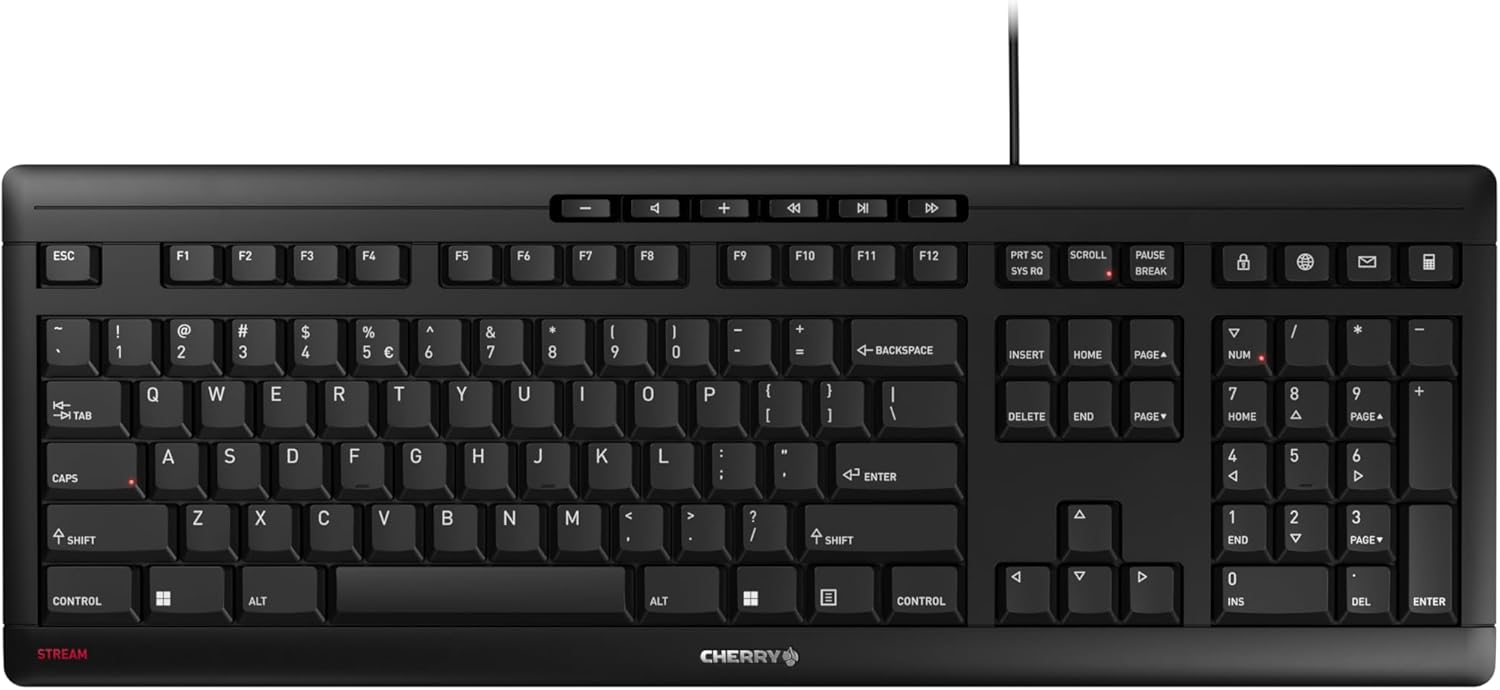
Pros
- Very quiet typing experience, ideal for shared workspaces
- Excellent build quality with metal plate and rubber feet for stability
- Abrasion-resistant key legends stay readable for a long time
- Ten handy multimedia and office shortcut keys
- Slim profile with a full numeric keypad
Cons
- No backlighting, which may be a drawback for low-light environments
- Wired only, limiting placement flexibility for some users
- Scissor-switch feel may be too shallow for those preferring mechanical keyboards
The CHERRY Stream Keyboard is a wired, slim keyboard designed for professionals and home office users who demand a quiet, precise, and durable typing experience. It features CHERRY's SX scissor-switch technology, which provides a tactile feel with a short travel distance, making it ideal for fast and accurate typing. This keyboard is particularly suited for those who spend long hours typing and value a stable, non-slip desk setup.
Standout features include the whisper-quiet operation, which is a significant upgrade from the previous model, and the ten multimedia and office shortcut keys that streamline common tasks. In real-world use, the keyboard delivers consistent, responsive keystrokes with minimal noise, allowing for distraction-free work. The inclusion of a numeric keypad further enhances productivity for data entry and spreadsheet work.
Build quality is impressive for a keyboard in this price range. An integrated metal plate and eight rubber feet provide excellent torsional stiffness and prevent sliding, even during vigorous typing. The key caps feature abrasion-resistant lettering that remains legible after extended use, and the three status LEDs are conveniently integrated into the Caps Lock, Num, and Scroll keys for easy monitoring.
Potential drawbacks include the lack of backlighting, which may be a concern for those who work in dimly lit environments. Additionally, the keyboard is wired only, which limits placement flexibility compared to wireless models. Some users accustomed to mechanical keyboards may find the scissor-switch feel too shallow, though it remains comfortable for most typists.
Overall, the CHERRY Stream Keyboard offers excellent value for anyone seeking a reliable, quiet, and well-built wired keyboard for office or home use. Its combination of durability, precise typing feel, and practical shortcut keys makes it a solid choice for frequent typists who prioritize comfort and longevity over flashy features.

Pros
- Exceptional battery life of up to 277 days without backlight.
- 15 customizable RGB lighting effects for personalization.
- Ergonomic wave design with leather wrist rest reduces strain.
- Whisper-quiet keys suitable for shared spaces.
- Plug-and-play 2.4GHz connection with 33ft range.
Cons
- Only 2.4GHz wireless, no Bluetooth option for multiple devices.
- Backlight reduces battery life to 10 days, requiring more frequent charging.
- Membrane keys may not satisfy mechanical keyboard enthusiasts.
The COLIKES Wireless Ergonomic Keyboard is a feature-rich peripheral designed for professionals and home users seeking comfort and style. Its wave-shaped layout and leather wrist rest cater to those who type for long hours, while the silent membrane keys make it ideal for quiet environments like offices or libraries.
With a massive 2500mAh battery, this keyboard offers up to 277 days of use without backlight, or 10 days with the 15 RGB lighting effects enabled. The customizable lighting includes breathing, wave, and static modes, letting you match your mood or setup. The 2.4GHz wireless connection ensures lag-free typing up to 33 feet away.
The ergonomic wave design promotes a natural hand position, and the included leather wrist rest adds plush support. Adjustable legs allow you to tilt the keyboard for better typing angle. The spill-resistant construction and durable membrane switches promise longevity, even with daily use.
However, the keyboard relies solely on a 2.4GHz USB receiver, lacking Bluetooth for easy multi-device switching. The backlight significantly drains the battery, so heavy RGB users will need to recharge every week or so. Also, the membrane keys lack the tactile feedback that mechanical enthusiasts prefer.
Overall, the COLIKES Wireless Ergonomic Keyboard delivers excellent battery life, customizable aesthetics, and ergonomic comfort at a reasonable price point. It is a solid choice for anyone who prioritizes typing comfort and long wireless operation over mechanical switches or Bluetooth connectivity.
Connection: 2.4GHz wireless with USB receiver
Battery: 2500mAh rechargeable, up to 277 days (backlight off) or 10 days (backlight on)
Charging: USB-C, full charge in 5 hours
Lighting: 15 RGB effects with 5 backlight modes and 3 brightness levels
Keys: Membrane, silent, spill-resistant
Wrist Rest: Leather, detachable
Compatibility: Windows, Mac, Chrome OS, Linux
Range: Up to 33 feet (10 meters)
Buying Guide
Switch Type and Noise Level
The core of any silent keyboard is its switch. Mechanical switches with built-in dampeners or linear stems (like Kailh Box Pink Silent or Keychron Ultra-Fast Lime Silent Red) reduce the audible click while maintaining a smooth keystroke. Membrane and scissor-switch keyboards, such as the CHERRY Stream, offer near-silent operation with a softer feel. For the quietest experience, look for models that specifically advertise “silent” or “whisper-quiet” switches.
If you are unsure whether a mechanical or membrane keyboard suits you, read our comparison of ergonomic keyboard vs regular keyboard for more insights.
Ergonomic Design and Adjustability
A truly ergonomic keyboard positions your wrists, forearms, and shoulders in a neutral alignment. Split designs (like the Kinesis Advantage360 or Arteck Split) allow you to adjust the angle and separation between the two halves. Wave-shaped keyboards, such as the Logitech Wave Keys, feature a gentle curve that mirrors natural hand positioning. Look for adjustable tenting, palm rests, and foldable legs to fine-tune comfort for your body.
For more on split designs, check our dedicated guide on the best split ergonomic keyboard.
Connectivity and Compatibility
Modern ergonomic keyboards offer wireless freedom through Bluetooth, 2.4 GHz, or both. Models like the Keychron K10 HE and AUSDOM Wireless support tri-mode connectivity (Bluetooth, 2.4 GHz, USB-C), allowing you to switch between multiple devices seamlessly. Ensure the keyboard works with your operating system (most support Windows, macOS, Linux, and Chrome OS). A reliable connection is crucial for uninterrupted workflow, especially in a busy office.
Build Quality and Extra Features
Durability matters for daily use. Look for keyboards with PBT keycaps (which resist shine), metal plates for stability, and spill-resistant designs. Backlighting can be a bonus for low-light environments, but ensure it does not drain battery life quickly. Some models offer programmable keys, macros, and dedicated media shortcuts to boost productivity. A comfortable wrist rest made of memory foam or leather can also reduce pressure during long typing sessions.
If wrist pain is a concern, read our article on how to reduce wrist pain from typing for additional tips.
Final Thoughts
After comparing all nine models, the Keychron K10 HE stands out as a versatile full-size option with ultra-silent magnetic switches and extensive customization, making it ideal for both typing and gaming. For those who prioritize advanced ergonomics and a contoured split design, the Kinesis Advantage360 Professional offers unparalleled adjustability and quiet mechanical switches, though at a higher investment. Both deliver a significantly quieter, more comfortable typing experience that can transform your daily workflow.
Frequently Asked Questions
Are silent mechanical keyboards quieter than membrane keyboards?
Generally, silent mechanical keyboards are quieter than traditional mechanical ones but may still produce a soft thud. High-quality membrane keyboards, like the Logitech MK295, can be just as quiet and often cost less. The choice depends on your preference for tactile feedback versus absolute silence.
Do ergonomic keyboards with silent switches help with wrist pain?
Yes, when combined with proper posture and a split or wave design, silent switches reduce the need for forceful keystrokes, which can alleviate strain on tendons and muscles. However, they are not a substitute for breaks and ergonomic practices. For more tips, see our guide on best ergonomic keyboard for wrist pain.
Can I use a silent ergonomic keyboard for gaming?
Absolutely. Many models, such as the Keychron K10 HE and Razer Pro Type Ultra, feature low-latency wireless or wired modes and programmable keys that work well for gaming. Their quiet switches allow you to play without disturbing others nearby.
How do I clean a silent ergonomic keyboard?
Use a soft, slightly damp cloth to wipe the keycaps and surface. For deeper cleaning, remove keycaps if they are compatible (check the manual). Avoid spraying liquid directly on the keyboard. Many models have spill-resistant designs, but it is best to disconnect the keyboard before cleaning.
For proper desk setup, consider reading about best under desk keyboard tray options.



Write Your Review
No reviews yet. Be the first to share your experience!