

If you live with arthritis, every keystroke can feel like a reminder of your joint pain. The wrong keyboard forces your hands into unnatural angles, aggravating inflammation in your fingers, wrists, and forearms. That is why choosing an ergonomic keyboard designed specifically for arthritis relief can transform your daily computing experience. In this guide, we review the top models that minimize strain, support natural alignment, and help you type comfortably for longer periods. Whether you need a split layout, a cushioned palm rest, or a vertical mouse companion, our picks have you covered.
For more background on reducing typing discomfort, see our guide on how to reduce wrist pain from typing.
No keyboard eliminates joint pain caused by arthritis; the split design and lighter keys reduce strain but do not replace treatment your doctor recommends. This guide is informational and is not a substitute for medical advice; if your pain is severe, persistent, or worsening, consult a physician or physical therapist.
Disclosure: Ergonook is a participant in the Amazon Associates program. Links below are affiliate links, and we may earn a commission from qualifying purchases. This does not affect which products we recommend or how we rank them.

Pros
- Certified by an independent ergonomics organization
- Full-size layout keeps a familiar typing experience
- Quiet keys suited to shared workspaces
Cons
- Fixed split angle rather than fully separable key modules like the Kinesis models here
- Larger footprint than a standard compact keyboard
The Ergo K860 uses a curved, split keyframe that slopes outward, aiming to keep your wrists and forearms in a more natural position without fully separating the two halves.
Its memory foam wrist rest and three tilt angles let you fine-tune the typing posture whether you're sitting or standing, and it's certified by United States Ergonomics.
It connects over Bluetooth or the included USB receiver, and keeps a full-size layout with quiet keys, so the transition from a standard keyboard is relatively gentle.
Compared with the fully split Kinesis models in this comparison, its fixed curve is less adjustable but easier to adapt to.
It suits anyone who wants proven ergonomic credentials in a familiar, full-size keyboard shape.
Dimensions: 17.95 inches long by 9.17 inches wide by 1.89 inches high.
Connectivity: Bluetooth or included USB receiver.
Tilt options: 0, negative 4, or negative 7 degrees.
Layout: Full-size, 105 keys.
Weight: 2.6 pounds.
Who should buy this keyboard? Anyone who wants a certified ergonomic keyboard that still feels close to a standard full-size layout.
Who might want to look elsewhere? Anyone who wants fully separable key modules for maximum shoulder-width typing should look at the Kinesis Freestyle2 or Advantage360 instead.
Setup tip: Start at the flat 0 degree tilt and only add negative tilt once you're comfortable with the split shape.

Pros
- Widely reviewed with a strong track record
- Distinct tactile feedback for typists who prefer a firmer keystroke
- Straightforward wired setup
Cons
- Manufacturer notes a one to two week adjustment period is typical
- Wired only, no wireless option
The PERIBOARD-512 uses a one-piece split layout with curved, stepped key rows, aiming to reduce wrist bending during long typing sessions.
Its extended key travel gives a tactile, audible response similar to a mechanical keyboard, and the curved keycaps are shaped to fit fingertip contours.
It's rated for up to 20 million keystrokes and has one of the most widely reviewed track records in this comparison.
Perixx notes most users adapt within one to two weeks, which is worth expecting going in.
It suits anyone who wants a proven, wired split keyboard with distinct tactile feedback.
Dimensions: 19.09 inches long by 9.29 inches wide by 1.73 inches high.
Connectivity: Wired USB.
Switch type: Tactile membrane, rated for up to 20 million keystrokes.
Weight: 2.3 pounds.
Who should buy this keyboard? Anyone who wants a proven, wired split keyboard with distinct tactile feedback.
Who might want to look elsewhere? Anyone who wants a wireless connection should consider the Logitech Wave Keys or Nulea keyboard instead.
Setup tip: Give yourself the one to two week adjustment period Perixx notes rather than judging comfort in the first few days.

Pros
- Certified by an independent ergonomics organization
- Compact size closer to a standard keyboard footprint
- Long rated battery life
Cons
- Not fully split, so the wrist angle change is more subtle than the Kinesis or Perixx keyboards
- Membrane switches rather than mechanical
Wave Keys uses a gently wavy, contoured shape rather than a fully split layout, aiming to guide your hands into a more natural position without a steep learning curve.
Its built-in memory foam palm rest adds cushioned support, and it's certified by United States Ergonomics for posture and strain reduction.
It connects over Bluetooth or the included Logi Bolt receiver, with Easy-Switch letting you jump between paired devices, and a battery rated to last up to three years.
Because it isn't fully split, the wrist angle change is more subtle than the Kinesis or Perixx keyboards in this comparison.
It suits anyone who wants ergonomic support with minimal adjustment from a standard keyboard.
Dimensions: 14.8 inches long by 8.62 inches wide by 1.18 inches high.
Connectivity: Bluetooth or included Logi Bolt receiver.
Switch type: Membrane.
Battery life: Rated up to three years.
Weight: 2.1 pounds.
Who should buy this keyboard? Anyone who wants certified ergonomic support with a gentle learning curve from a standard keyboard.
Who might want to look elsewhere? Anyone who wants a fully split or mechanical layout should consider the Perixx or Kinesis keyboards instead.
Setup tip: Pair it with a compatible Logitech mouse through the same Easy-Switch profile for a consistent multi-device setup.

Pros
- Rechargeable battery with a long rated life per charge
- Simple plug-and-play setup, no Bluetooth pairing required
- One of the more affordable split keyboards in this comparison
Cons
- Fixed split angle rather than fully separable modules
- USB receiver only, no Bluetooth option
The Arteck split keyboard uses a fixed split layout with a soft cushioned wrist and palm rest, aimed at a more natural hand position than a flat keyboard.
It connects through a nano USB receiver stored in the keyboard itself, and its rechargeable battery is rated for about six months per charge based on typical daily use.
It's backed by a 24 month warranty, and is one of the more affordable split keyboards in this comparison.
It doesn't offer Bluetooth or fully separable key modules, so it's a more modest step up from a standard keyboard than the Kinesis models here.
It suits anyone who wants an affordable, low-effort introduction to a split keyboard layout.
Dimensions: 16.5 inches long by 9.6 inches wide by 1.02 inches high.
Connectivity: 2.4G USB wireless receiver.
Battery: Rechargeable, rated around six months per charge.
Warranty: 24 months.
Who should buy this keyboard? Anyone who wants an affordable, simple introduction to a split ergonomic layout.
Who might want to look elsewhere? Anyone who wants Bluetooth or fully separable key modules should consider the Logitech K860 or Kinesis models instead.
Setup tip: The nano receiver stores inside the keyboard when not in use, so check there first if you misplace it.

Pros
- Excellent ergonomic design reduces wrist and hand strain during extended typing.
- Customizable tilt with removable elevator for personalized comfort.
- Strong data security with AES 128-bit encryption for every keystroke.
- Convenient dedicated Windows key and back button for efficient navigation.
- Flexible number pad placement allows you to optimize your desktop layout.
Cons
- Split layout may require an adjustment period for users accustomed to traditional keyboards.
- Integrated palm rest cannot be detached for cleaning or replacement.
- No backlighting, which can be a drawback in low-light environments.
The Incase Sculpt Ergonomic Keyboard, designed by Microsoft, is a wireless split-layout keyboard aimed at professionals and heavy typists seeking to reduce wrist strain and improve posture. Its domed geometry and cushioned palm rest promote a natural typing position, making it ideal for long work sessions or anyone with repetitive strain concerns.
Key features include a removable elevator for adjusting tilt, AES 128-bit encryption for secure data entry, and a dedicated Windows key for quick navigation. The standalone numeric keypad adds flexibility, allowing you to place it where it suits your workflow. Users report a noticeable reduction in wrist fatigue after extended use.
The keyboard has a sleek black finish with a split layout that encourages a shoulder-width hand position. The palm rest is plush and supportive, though it is integrated and not removable. The keys have a comfortable scissor-switch feel, and wireless connectivity is reliable with a secure encrypted link.
The split layout may require a brief adjustment period for those used to standard keyboards, and the lack of backlighting can be a drawback in dim environments. Additionally, the integrated palm rest may not suit users who prefer a detachable option for cleaning.
Overall, the Incase Sculpt Ergonomic Keyboard offers excellent ergonomic support and security features for productivity-focused users. While it has a few limitations, its comfort and thoughtful design make it a strong choice for anyone looking to upgrade their typing experience.
Pros
- Comfortable ergonomic design reduces wrist strain during long typing sessions
- Quiet keys are ideal for open offices or quiet environments
- Spill-proof and easy to clean, adding durability and longevity
- Affordable price point for an ergonomic keyboard with wrist support
- Simple plug-and-play setup with no software required
Cons
- Wired connection may limit desk setup flexibility compared to wireless models
- Some users may find the wrist rest too firm or prefer a detachable option
- No backlighting for typing in low-light conditions
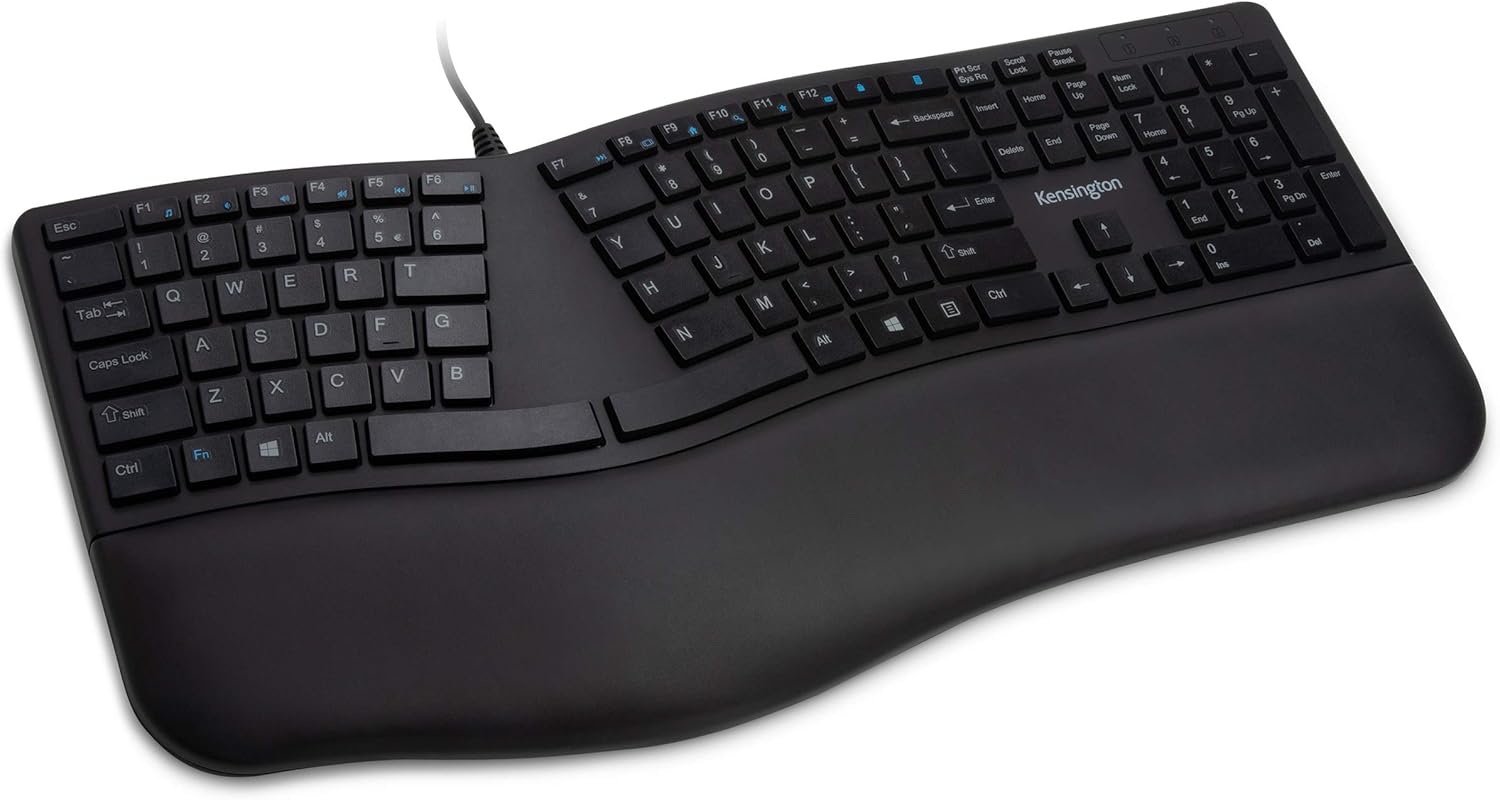
The Kensington Pro Fit Ergonomic Wired Keyboard (K75400US) is a thoughtfully designed input device aimed at users who spend hours typing each day. Whether you are a data entry professional, a writer, or a home office worker, this keyboard prioritizes comfort with its ergonomic split layout and adjustable reverse tilt. It positions your hands in a more natural alignment, potentially reducing the risk of repetitive strain injuries.
Standout features include the built-in cushioned wrist rest, which provides continuous support and helps maintain neutral hand alignment. The keys are quiet, making this keyboard suitable for shared workspaces where noise can be a distraction. Additionally, the spill-proof design meets rigorous MIL-STD-810H standards, meaning it can withstand accidental spills and regular cleaning with common disinfectants without damage.
In real-world use, the keyboard performs reliably with its plug-and-play USB connection, requiring no software installation. The F-keys and lock indicators (Caps Lock, Numbers Lock, Scroll Lock) add convenience for everyday tasks. The split layout may take a short adjustment period for those accustomed to traditional keyboards, but most users find the ergonomic benefits worthwhile after a few days.
One potential drawback is the wired connection, which may limit desk arrangement flexibility compared to wireless alternatives. Also, the wrist rest is integrated and non-detachable, which might not suit everyone's preference. The lack of backlighting could be an issue for those who type in dim environments.
Overall, the Kensington Pro Fit Ergonomic Wired Keyboard offers excellent value for its price. It combines proven ergonomic features, durable spill-proof construction, and quiet operation, making it a strong choice for anyone seeking comfort and reliability in a wired keyboard. Ideal for budget-conscious users who do not require wireless or backlit features.

Pros
- Keyboard and mouse designed to work together as a matched set
- Simplifies buying both accessories at once
- Certified ergonomic design
Cons
- Smaller review history than the standalone Wave Keys keyboard
- Costs more upfront than buying just the keyboard alone
This combo bundles the Wave Keys keyboard with the Lift vertical mouse, both designed and approved according to criteria set out by ergonomists.
The keyboard brings the same wavy shape and memory foam palm rest as the standalone version, while the Lift mouse adds a 57 degree vertical grip built for small to medium hands.
Both connect through Bluetooth or a shared Logi Bolt receiver, and the pairing is meant to give a consistent ergonomic setup across your whole workstation.
It has a smaller review history than the standalone keyboard, since it's a newer bundled offering.
It suits anyone outfitting both a keyboard and mouse at once who wants a matched, certified pair.
Who should buy this combo? Anyone who needs both a new keyboard and mouse and wants a matched, certified ergonomic pair.
Who might want to look elsewhere? Anyone who already has a mouse they like should buy the standalone Wave Keys keyboard instead.
Setup tip: Pair both devices to the same Logi Bolt receiver to save a USB port if your computer has limited ports.

Pros
- Backlighting adds visibility in low-light settings
- Simple wired setup with no batteries or pairing required
- Affordable relative to the mechanical options in this comparison
Cons
- Wired only, no wireless option
- Fixed split angle rather than fully separable modules
This is the wired version of Arteck's split ergonomic keyboard, adding seven backlight colors and adjustable brightness on top of the same cushioned wrist and palm rest.
It connects over a 6 foot USB cable, so there's no battery to charge or receiver to keep track of.
It's backed by a 24 month warranty and is one of the more affordable options in this comparison.
Like the wireless Arteck model, it uses a fixed split angle rather than fully separable modules.
It suits anyone who wants a simple, wired split keyboard with backlighting for low-light typing.
Connectivity: Wired USB, 6 foot cable.
Lighting: 7 backlight colors, adjustable brightness.
Switch type: Scissor-switch.
Warranty: 24 months.
Who should buy this keyboard? Anyone who wants a simple, affordable, wired split keyboard with backlighting.
Who might want to look elsewhere? Anyone who wants a wireless connection should consider the Arteck wireless model or the Logitech K860 instead.
Setup tip: Route the cable so it doesn't pull on the keyboard while typing, since the split halves are connected as one wired unit.
Pros
- Ergonomic split design reduces wrist and hand strain
- Long 206-hour rechargeable battery life
- Comfortable oversized leatherette wrist rest
- Dual-mode connectivity for versatile device pairing
- Adjustable tilt angles for personalized ergonomics
Cons
- Split layout may require a learning curve for new users
- No backlighting for use in low-light environments
- Wrist rest is not removable, which may limit desk space
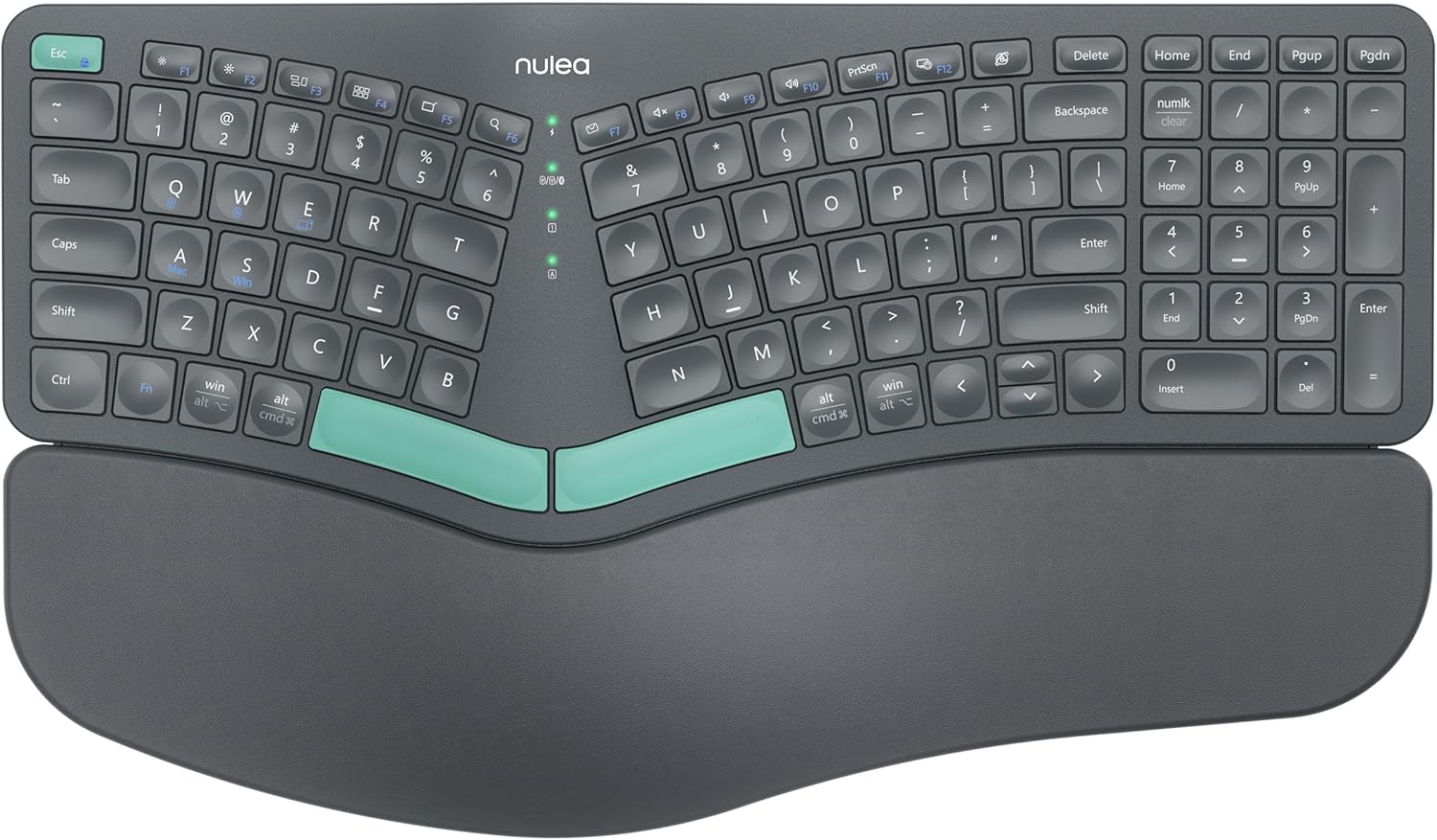
The Nulea Ergonomic Split Keyboard is designed for users who spend long hours typing and want to reduce strain. It is ideal for office workers, programmers, and anyone experiencing wrist discomfort from traditional keyboards.
Its standout feature is the split design, which promotes a natural hand position, while the cushioned leatherette wrist rest offers ample support. Dual-mode wireless connectivity allows easy switching between devices, and the rechargeable battery lasts up to 206 hours, ensuring uninterrupted productivity.
The keyboard includes adjustable tilt legs for three different angles, letting users find their optimal typing angle. The build feels sturdy and premium, though the split design may take some time to get used to for those accustomed to standard layouts.
Potential drawbacks include the lack of backlighting, which could be a downside for typing in low-light conditions. Additionally, the split layout may have a learning curve, but most users adapt within a week.
Overall, the Nulea Ergonomic Split Keyboard offers excellent value for ergonomic-conscious users. Its combination of comfort, wireless freedom, and long battery life makes it a solid choice for improving typing posture and reducing fatigue.
Brand: Nulea
Model: Ergonomic Split Keyboard
Connectivity: Bluetooth 5.0 and 2.4G wireless
Battery Life: Up to 206 hours
Wrist Rest: Oversized, leatherette, cushioned
Adjustable Tilt: 3 angles
Rechargeable: Yes, via USB-C
Compatibility: Windows, macOS, Android, iOS
Buying Guide: What to Look for in an Ergonomic Keyboard for Arthritis
Not every ergonomic keyboard works equally well for arthritic hands. Here are the key features to consider before making your choice.
Split vs. Non-Split Design
A split keyboard separates the keys into left and right zones, allowing your shoulders and wrists to remain in a more natural, relaxed position. For arthritis sufferers, this reduces the twisting and bending that can worsen joint pain. Many top picks, like the Logitech Ergo K860 and the Perixx PERIBOARD-512B, use a split layout to keep your forearms aligned.
If you are new to ergonomic keyboards, we recommend reading our comparison of ergonomic keyboard vs regular keyboard to understand the benefits.
Wrist Rest Comfort and Support
A cushioned palm rest provides essential support for arthritic wrists. Look for memory foam or gel padding that cradles your wrist without creating pressure points. Models like the Logitech Wave Keys feature a memory foam palm rest that reduces strain by up to 54%. A well-designed wrist rest can make the difference between a productive day and an achy one.
Key Travel and Actuation Force
Keys that require too much force to press can aggravate arthritis in your fingers. Opt for keyboards with longer key travel (around 4 mm) and tactile feedback that lets you know the key registered without bottoming out. Many mechanical-style keyboards, such as the Perixx PERIBOARD-512B, offer this kind of responsive yet gentle keystroke.
Connectivity and Adjustability
Wireless options free you from cable clutter and let you position the keyboard exactly where it feels best. Look for Bluetooth and USB receiver support, as well as adjustable tilt legs. Some keyboards, like the Kensington Pro Fit, offer reverse tilt to keep your wrists in a neutral position. Adjustability is key to finding your perfect typing angle.
For more on setting up your workspace, check out our guide on how to position keyboard and mouse ergonomically.
Final Thoughts
Choosing the right ergonomic keyboard for arthritis comes down to understanding your unique pain points and typing habits. For those who need maximum wrist support and a natural typing posture, the Logitech Ergo K860 stands out with its curved split keyframe and pillowed memory foam wrist rest. If you prefer a more budget-friendly option that still delivers excellent ergonomics, the Perixx PERIBOARD-512B offers a split layout and tactile keys that reduce strain without breaking the bank. Whichever you choose, investing in an arthritis-friendly keyboard can bring lasting relief to your hands and wrists.
Frequently Asked Questions
Can an ergonomic keyboard help with arthritis pain?
Yes, an ergonomic keyboard can significantly reduce arthritis pain by promoting a neutral hand and wrist position. Features like split layouts, cushioned palm rests, and adjustable tilt minimize the stress on inflamed joints. Many users report less discomfort after switching to an ergonomic design.
What type of keyboard is best for arthritis?
Split ergonomic keyboards with a curved or domed shape are generally best for arthritis because they align your forearms and wrists naturally. A keyboard with a soft wrist rest and low actuation force keys also helps reduce finger and wrist strain. Models like the Logitech Wave Keys and the Arteck split keyboards are popular choices.
Are split keyboards better for arthritis?
Split keyboards are often better for arthritis because they allow you to position each hand at shoulder width, reducing the inward twisting that can aggravate wrist pain. They also let you adjust the angle of each half independently. However, they do require a short adjustment period of a week or two.
Should I use a vertical mouse with an ergonomic keyboard for arthritis?
Pairing a vertical mouse with an ergonomic keyboard can provide complete relief for arthritis sufferers. A vertical mouse keeps your forearm in a handshake position, reducing pressure on the wrist. For recommendations, see our guide on best vertical mouse for wrist pain.


Write Your Review
No reviews yet. Be the first to share your experience!