

Does your laptop feel like a space heater after a few hours of work or gaming? Overheating not only slows down performance but can shorten your device’s lifespan. That’s where a quality laptop stand for cooling comes in. It elevates your machine for better airflow, adds ergonomic benefits, and often includes active fans to keep temperatures in check. In this guide, we’ve reviewed 11 top-rated models to find the best laptop stand for cooling in 2026. Whether you’re a remote worker, gamer, or student, you’ll find the perfect match for your needs. For more setup tips, check out our guide on how to set up a laptop for ergonomics.

Pros
- Multiple fan configurations for tailored cooling
- Very quiet operation even with all five fans running
- Ergonomic stand with six tilt options for comfort
- Includes a dual USB hub for extra connectivity
- Sturdy design with anti-slip stoppers for laptop security
Cons
- USB cable is USB-A to USB-A; Type-C laptops may need an adapter
- Blue LEDs may be distracting in dark environments
- Some users report fans can be less effective on certain thick laptops
The Kootek Laptop Cooling Pad is a practical solution for anyone using a laptop for extended periods. Designed to fit 12 to 17 inch laptops, it combines five quiet fans with an ergonomic stand to keep your device cool and comfortable. This makes it a great choice for gamers, remote workers, and students who need reliable performance without noise.
Its standout feature is the flexible fan control. Two switches let you run one, four, or all five fans, so you can match cooling power to your workload. The fans are whisper quiet, even at full speed, which is a big plus for quiet environments. The dual USB hub adds convenience by giving you extra ports for peripherals, though it uses a USB-A connection, so some newer laptops may need an adapter.
The build quality is solid with a sleek design that includes blue LED fans for a subtle glow. The six adjustable height settings allow you to find a comfortable viewing angle, reducing strain during long sessions. The two front stoppers keep your laptop secure, preventing slips even on uneven surfaces.
One potential drawback is the USB cable type. It is USB-A to USB-A, so if your laptop only has USB-C ports, you will need a separate adapter. Additionally, the blue LEDs might be distracting in very dark rooms, though they can be turned off with the switches. For very thick laptops, the fans may not be as effective, but for most standard models, cooling is adequate.
Overall, the Kootek Laptop Cooling Pad offers excellent value with its quiet fans, ergonomic design, and extra connectivity. It is a reliable choice for keeping your laptop cool and comfortable during heavy use. For its price and features, it is a solid investment for anyone looking to improve their laptop experience.

Pros
- Effective cooling with 3-speed fan control keeps laptops from overheating during demanding tasks
- Sturdy aluminum alloy frame with anti-slip pads holds devices securely at various angles
- RGB lighting enhances visual appeal, especially for gamers and DJs
- Foldable and lightweight design makes it easy to carry to cafes, studios, or business trips
- Ergonomic height adjustment promotes healthier posture and reduces fatigue
Cons
- RGB lighting is not customizable beyond pre-set modes (no app control)
- Fan noise may be noticeable at highest speed setting
- Stand height range may be limited for users needing extreme elevation for standing desks
The YICOSUN Adjustable Laptop Cooling Stand is a versatile accessory designed for anyone who regularly uses a laptop for gaming, DJing, or office work. With its dual quiet fans and RGB lighting, it targets users seeking both performance and aesthetics in a portable form factor. Compatible with laptops from 10 to 16 inches, including popular models from MacBook, Lenovo, ASUS, and Dell, this stand aims to keep devices cool while promoting ergonomic comfort.
In terms of cooling performance, the two fans offer three adjustable speeds to balance airflow and noise. During heavy gaming or rendering sessions, the highest setting effectively lowers temperatures, while the quiet mode works well for office tasks. The RGB lighting adds a subtle glow that syncs well with gaming peripherals, though it lacks customizable patterns. The stand's height can be adjusted to several angles, helping to align the screen with your eye level and reduce strain on the neck and shoulders.
Build quality is a strong point: the aluminum alloy construction feels premium yet remains lightweight. The surface has anti-slip silicone pads that keep your laptop secure even when tilted. When not in use, the stand folds flat, making it easy to slip into a backpack or laptop case. This portability is a major advantage for mobile professionals, students, or DJs who move between setups frequently.
However, some users may find the fan noise noticeable at the highest speed, and the RGB lighting is limited to preset effects rather than full customization. Additionally, the maximum height may not satisfy those who prefer a near-vertical angle for standing desk use. These are minor trade-offs considering the price and overall functionality.
Overall, the YICOSUN laptop cooling stand delivers reliable cooling and ergonomic benefits in a sleek, travel-friendly package. It earns a strong recommendation for gamers, creative professionals, and remote workers who want to protect their laptop investment and improve comfort without sacrificing desk space or style.

Pros
- Outstanding stability thanks to the dual-rod design, which outperforms single-hinge competitors
- Effective passive cooling via the open geometric panel keeps performance-hungry laptops running at full speed
- Genuinely portable and lightweight, folding flat for effortless transport in any bag
- Broad compatibility covers nearly every laptop brand and size from 10 to 17 inches
- Excellent build quality and ergonomic benefit delivered at a very accessible price
Cons
- Height is not continuously adjustable, so users who prefer a specific custom elevation may find the preset angles limiting
- The stand does not include a built-in wrist rest or keyboard tray, meaning a separate keyboard is recommended for extended typing comfort
The Nulaxy Ergonomic Adjustable Laptop Stand is a foldable, dual-rod desk riser designed for anyone who spends long hours in front of a laptop. Whether you are a remote professional, a student, or a gamer, this stand addresses one of the most common complaints of laptop use: poor posture caused by looking down at a low screen. It is especially well suited to hybrid workers who move between home, the office, and coffee shops.
The standout feature here is the dual-support rod mechanism. Unlike cheaper single-hinge stands that can wobble or tip under a heavy device, the Nulaxy distributes weight evenly across two rods, delivering a genuinely wobble-free surface for typing and trackpad use. It supports devices up to 22 lbs, which covers even the largest gaming laptops with ease. The geometric heat-vent panel on the upper surface is another highlight, allowing continuous airflow underneath the laptop to reduce heat buildup during demanding tasks.
Build quality is solid for the price category. The frame feels sturdy and the anti-slip silicone pads do a reliable job of keeping the laptop in place while also protecting its underside from scratches. The folding mechanism is smooth and the stand collapses completely flat, making it genuinely thin enough to slide into a laptop sleeve or the back pocket of a backpack. Setup takes only a few seconds, which is a real convenience for users on the move.
There are a couple of things to keep in mind before purchasing. The stand offers a fixed set of angle positions rather than infinite height adjustment, so users who want a very precise custom elevation may find the options slightly limited. Additionally, elevating the laptop screen means the built-in keyboard sits at an awkward angle, so pairing this stand with a separate Bluetooth keyboard is strongly recommended for comfortable extended use.
Overall, the Nulaxy Laptop Stand delivers impressive ergonomic and thermal benefits at a price that is hard to beat. Its combination of dual-rod stability, effective heat ventilation, and genuine portability makes it one of the most practical desk accessories available in its category. For anyone looking to improve their workstation setup without a large investment, this stand is a straightforward recommendation.
This stand is an excellent match for remote workers and hybrid professionals who split their time between home and the office. Its flat-folding design means it can be packed and unpacked daily without any hassle, fitting neatly into most laptop bags and backpacks alongside other gear.
Students who use their laptops for extended study sessions will also benefit significantly. Elevating the screen to eye level reduces the forward head tilt that causes neck and upper back fatigue over time, making long library or dorm-room sessions noticeably more comfortable. The affordable price point makes it accessible for those on a tight budget.
Power users and gamers running resource-intensive applications will appreciate the heat-vent panel, which actively improves airflow to help the laptop maintain peak performance. If your laptop tends to run hot during video editing, gaming, or large data tasks, this stand offers a simple passive cooling upgrade with no additional power required.
Setting up the Nulaxy stand requires no tools and no assembly. Simply unfold the two support rods, adjust to your preferred angle from the available preset positions, and place your laptop on the silicone-padded surface. The entire process takes under ten seconds, which is ideal for users who set up and pack down their workspace regularly.
Compatibility is broad and covers laptops ranging from 10 to 17 inches in screen size. Confirmed compatible brands include Apple MacBook Pro and MacBook Air, Dell XPS, HP, Lenovo ThinkPad and IdeaPad, ASUS, Acer, Microsoft Surface, and most Chromebook models. The silicone pads accommodate a range of chassis widths without any adjustment needed.
One practical tip: because the stand raises the laptop keyboard to a steep angle, pairing it with an external Bluetooth keyboard and mouse transforms it into a near-desktop ergonomic setup. This combination, which can be assembled for a modest total investment, is a popular choice among users who want a comfortable and productive portable workstation.

Pros
- Active cooling fan improves airflow and reduces laptop heat.
- Foldable and portable design for easy transport and storage.
- Universal fit works with a wide range of laptop sizes and brands.
- Adjustable load capacity accommodates heavier gaming laptops.
- Includes phone mount and extra USB ports for convenience.
Cons
- Fan may generate slight noise during operation.
- Plastic construction may feel less premium than metal stands.
- Limited color options available.
The ZMYPPYA Laptop Stand for Desk is a versatile cooling solution designed for MacBook Air, MacBook Pro, gaming laptops, and other computers from 14 to 18 inches. It is ideal for remote workers, students, and gamers who spend long hours at their desk and need to prevent overheating.
Its standout feature is the active cooling fan integrated into an open-frame design, which actively draws heat away from your laptop to maintain performance during intensive tasks. Real-world use shows it effectively lowers temperatures, making it a great choice for demanding applications like video editing or gaming.
The stand folds to just 1.3 inches thick for easy portability, and its lightweight build with a non-slip base ensures stability on any surface. The adjustable load capacity, up to 5kg using the included screw tool, allows it to securely hold heavier laptops without wobbling.
One potential drawback is that the fan can produce some noise, which may be noticeable in quiet environments. Additionally, the plastic construction, while durable, might not match the premium feel of aluminum stands. However, the included phone mount and USB ports add extra functionality that many competitors lack.
Overall, the ZMYPPYA Laptop Stand delivers excellent value with its active cooling, portability, and wide compatibility. It is a solid choice for anyone seeking an affordable, effective laptop riser that keeps their device cool and organized.
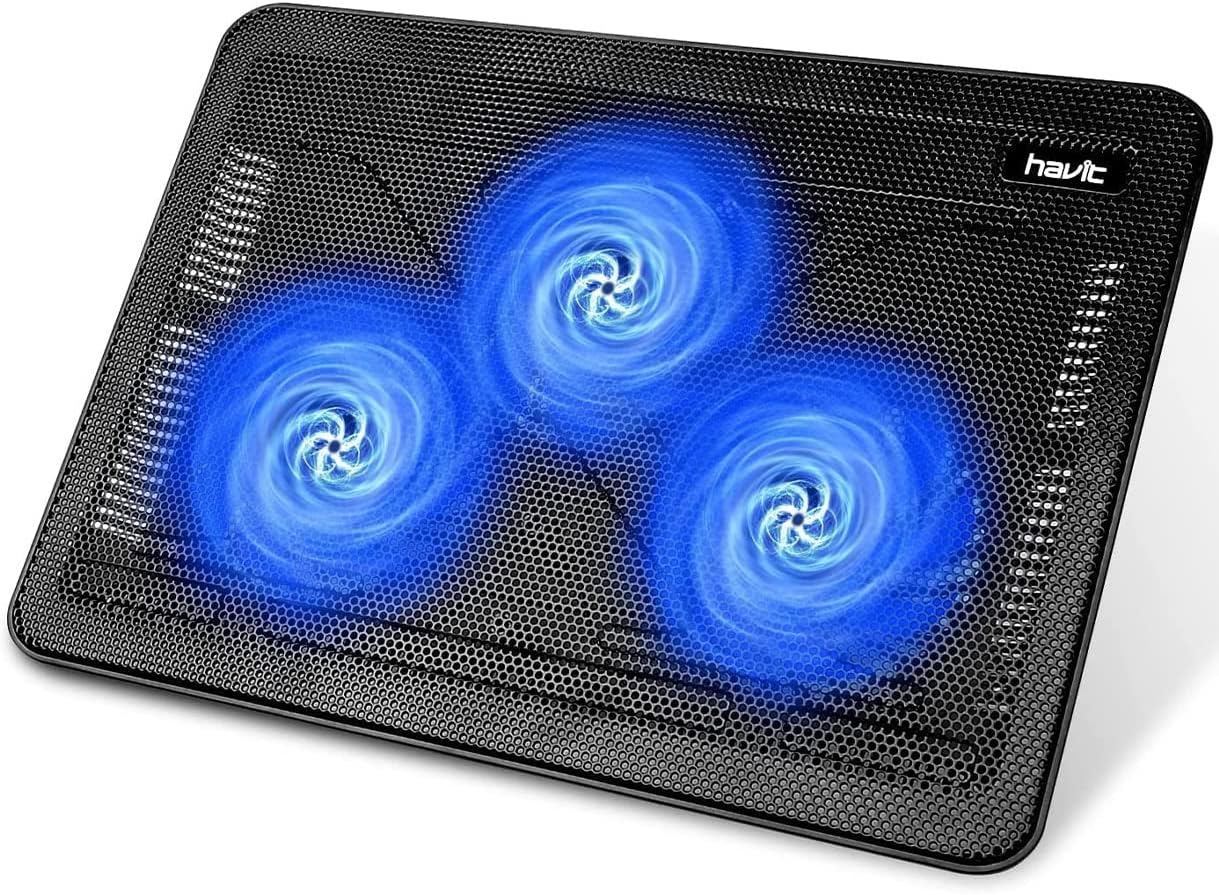
Pros
- Extremely portable and lightweight for easy travel
- Ergonomic height adjustment improves typing posture
- Ultra-quiet fans maintain a peaceful work environment
- Stable metal mesh surface supports heavy laptops
- Extra USB port adds convenience for connecting peripherals
Cons
- USB to USB cable requires a Type-C adapter for newer laptops with only USB-C ports
- Fan speed is not adjustable, limiting cooling customization
- No additional fan controls or LED indicators for power status
The havit HV-F2056 laptop cooling pad is designed for users who need a portable, effective cooling solution for laptops between 15.6 and 17 inches. It combines a slim profile with ergonomic features, making it suitable for both home and travel use. With a 4.5 out of 5 star rating, it promises reliable performance.
Standout features include three ultra-quiet fans that keep noise to a minimum while maintaining good airflow. The two adjustable height settings allow you to tilt the laptop to a comfortable typing angle, reducing strain on your wrists and neck. The metal mesh surface provides a stable, non-slip platform that also helps dissipate heat.
Build quality is solid for its lightweight construction. The cooling pad is easy to carry in a laptop bag thanks to its slim design. The extra USB port is a thoughtful addition, letting you connect a mouse or other device without losing a port on your laptop. However, the included USB to USB cable means you may need a Type-C adapter for newer laptops.
A potential drawback is the lack of fan speed control, which means you cannot adjust airflow based on your cooling needs. Additionally, there are no indicators for power or fan activity. Despite these minor cons, the pad performs well for everyday use and is a great value for its price range.
Overall, the havit HV-F2056 is an excellent choice for students, professionals, and travelers who want a lightweight, quiet cooling pad that doubles as an ergonomic stand. Its portability and stability make it a dependable accessory for keeping your laptop cool and comfortable.
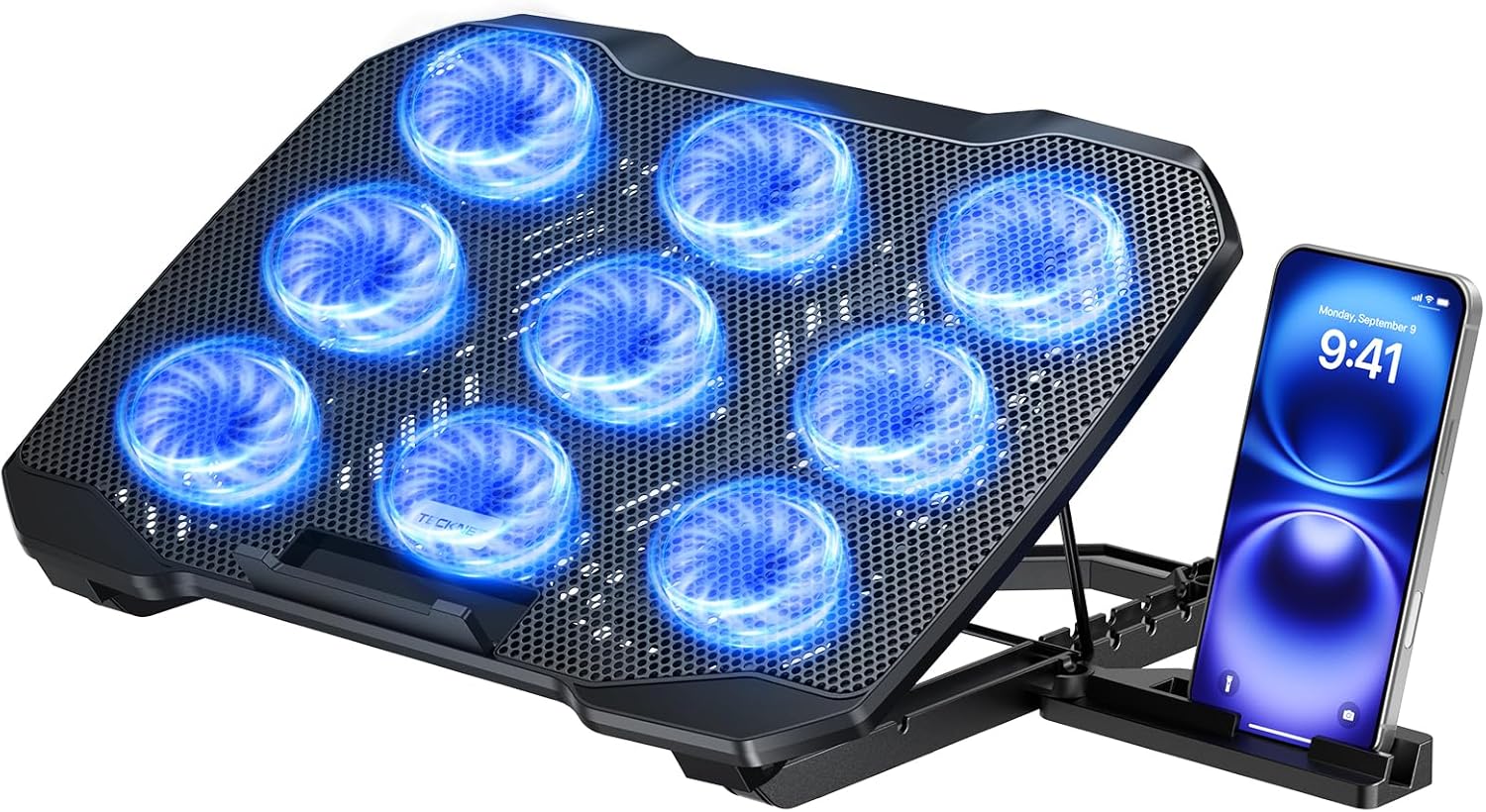
Pros
- Exceptional 360° cooling performance with 9 fans and stepless speed control
- Ergonomic 5-level height adjustment reduces neck and eye strain
- Dual USB ports allow connection of peripherals without occupying laptop ports
- Whisper-quiet operation ideal for noise-sensitive environments
- Built-in phone stand adds convenience for multitasking
Cons
- Larger footprint may not be suitable for small desks or travel
- Fan noise can become noticeable at maximum speed
- Phone stand may not accommodate larger smartphones with cases
The TECKNET Laptop Cooling Pad is designed for laptop users who demand powerful cooling and ergonomic comfort. With 9 fans delivering 360° airflow, it's ideal for gamers, video editors, and anyone who runs resource-intensive applications. The adjustable height and built-in phone stand make it a versatile companion for long work or gaming sessions.
Its standout feature is the 360° cooling system with stepless speed control up to 2600 RPM, effectively dissipating heat to prevent throttling and lag. The LED brightness syncs with fan speed, giving visual feedback on cooling status. The 5-level height adjustment allows users to find the perfect viewing angle, reducing neck strain.
Build quality is solid with an alloy mesh surface that aids heat dissipation. The anti-slip baffle secures laptops firmly, and the dual USB ports ensure you don't lose connectivity. The whisper-quiet technology keeps noise under 40 dB, making it suitable for quiet environments.
Potential drawbacks include its size, which may not be ideal for cramped desks or frequent travel. At maximum speed, fan noise can become slightly audible, though still relatively quiet. The phone stand might not accommodate very large phones with thick cases.
Overall, the TECKNET Laptop Cooling Pad offers excellent value with robust cooling, ergonomic adjustability, and thoughtful extras like a phone stand and dual USB ports. It's a strong choice for anyone looking to improve laptop performance and comfort during extended use.

Pros
- Exceptional cooling performance, dropping temperature by 44°C in 90 seconds
- Integrated USB hub adds convenience for connecting peripherals
- Removable dust filter protects laptop from debris buildup
- Adjustable stand with multiple angles improves ergonomics
- Quiet operation at ≤70dB even during high-speed cooling
Cons
- USB 2.0 ports are slower than USB 3.0, not ideal for high-speed data transfer
- Not suitable for charging devices, only for peripherals
- Noise level up to 70dB may be noticeable in quiet environments
- Large size may not fit smaller laptops under 15.6 inches
The llano V12 Gaming Laptop Cooling Pad is a robust solution for keeping your laptop cool during intense gaming sessions, video editing, or 4K rendering. Designed for laptops from 15.6 to 19 inches, it combines a powerful 5.5-inch turbo fan with a sealed foam design to achieve a remarkable 44°C temperature reduction in just 90 seconds. This makes it a top choice for gamers and power users who push their hardware to the limit.
Standout features include a built-in 3-port USB 2.0 hub, which turns the cooling pad into a convenient workstation for connecting peripherals like a mouse, keyboard, and external drive. The integrated dust filter captures hair and debris, preventing them from clogging your laptop's vents and extending its lifespan. The customizable RGB lighting with 10 modes and a touch-mute button adds a gaming aesthetic, while the memory function saves your preferred settings.
Build quality is solid with a reinforced chassis that supports heavy laptops. The three adjustable tilt angles (3°, 12°, and 15°) allow you to find the perfect ergonomic position, reducing neck and shoulder fatigue during long sessions. The 36W power adapter ensures consistent airflow, and the included memory foam seal further enhances cooling efficiency by directing air exactly where it is needed.
However, there are a few drawbacks. The USB ports are USB 2.0, which means slower data transfer speeds compared to USB 3.0, and they cannot be used for charging devices. The fan noise can reach up to 70dB, which is noticeable but typical for high-performance coolers. Additionally, the pad is fairly large and may not be ideal for smaller laptops under 15.6 inches.
Overall, the llano V12 offers excellent cooling performance and practical features for serious gamers and professionals. Its combination of rapid temperature reduction, dust protection, and ergonomic design makes it a worthwhile investment for anyone looking to keep their laptop cool and comfortable under heavy workloads.

Pros
- Ergonomic design relieves neck, shoulder, and wrist strain.
- Sturdy aluminum construction with anti-slip features.
- Promotes airflow to keep laptops cool during heavy use.
- Fits a wide range of laptop sizes and brands.
- High customer rating reflects reliability and satisfaction.
Cons
- The fixed height and angle are not adjustable, which may not suit every user's preference.
- May not provide enough support for very large or heavy 17-inch laptops despite the listed compatibility.
The Soqool Laptop Stand is an aluminum desk accessory designed to improve your posture while working on a laptop. It is ideal for remote workers, students, and professionals who spend hours typing and want to reduce neck, shoulder, and wrist discomfort.
The stand raises your laptop by 2.6 inches to bring the screen closer to eye level, promoting a neutral spine position. The open aluminum design improves airflow around the device, helping to prevent overheating during demanding tasks. Users report a stable typing experience thanks to the anti-slip rubber pads and secure locking hooks.
Built with a triangle support structure, the stand offers a sturdy and wobble-free base. The aluminum alloy body feels durable yet lightweight, and the smooth edges protect both your laptop and your hands. The compact footprint fits neatly on any desk without cluttering your workspace.
The main limitation is the fixed height and angle, so you cannot adjust it to your exact preferred viewing position. While the stand claims compatibility with up to 17.3 inch laptops, very large or heavy devices may feel less stable. For most standard laptops, however, it performs reliably.
Overall, the Soqool Laptop Stand delivers excellent value at an affordable price point. It combines ergonomic benefits, solid construction, and effective cooling in a simple, no-fuss design. If you are looking for a budget-friendly way to improve your laptop setup, this stand is a worthwhile investment.

Pros
- Powerful 140mm fan provides excellent cooling with low noise
- Built-in USB 3.0 hub adds four extra ports for accessories
- Adjustable height and angle improve ergonomics and reduce strain
- Sturdy aluminum construction with non-slip rubber pads ensures stability
- Compatible with most laptops from 10 to 17.3 inches
Cons
- The fan runs continuously when connected to USB power; there is no on/off switch for the fan
- The USB hub draws power from your laptop, which may affect battery life when used unplugged
- The aluminum stand is relatively heavy, making it less portable for travel
The SOUNDANCE Laptop Cooling Pad is a combination cooling stand and USB hub designed for laptops from 10 to 17.3 inches. It is ideal for anyone who works long hours on a laptop and wants to prevent overheating while improving ergonomics. Whether you are a student, remote worker, or gamer, this stand helps maintain performance and comfort.
The standout feature is the large 140mm fan that moves significant air volume while remaining quiet in operation. The built-in four-port USB 3.0 hub is a convenient addition for connecting peripherals without cluttering your desk. In real-world use, the fan effectively reduces laptop temperatures, allowing for sustained high-performance tasks like gaming or video editing without throttling.
The stand is constructed from aluminum with a brushed finish, giving it a premium look that fits any workspace. The unique shaft design provides excellent stability even with larger laptops, and the rubber mats prevent slipping. The smooth edges and silicone pads protect your laptop from scratches. The height adjustment offers multiple angles to suit your preference.
One potential drawback is that the fan runs whenever the USB power is connected, with no separate switch to turn it off. The USB hub also draws power from your laptop, which can reduce battery life when on the go. Additionally, the aluminum build adds weight, making it less portable than plastic stands. However, these trade-offs are reasonable for the build quality and cooling performance.
Overall, the SOUNDANCE Laptop Cooling Pad is a well-rounded accessory that delivers effective cooling, extra USB ports, and ergonomic benefits. It is a solid investment for anyone who wants to improve their laptop experience at a desk. Despite minor drawbacks, its performance and build quality justify the price.

Pros
- Excellent cooling performance with three adjustable fan speeds to suit different workloads.
- Adjustable ergonomics improve posture and reduce neck and eye strain during long sessions.
- Durable anodized aluminum construction supports heavy laptops without wobbling.
- Wide compatibility with many laptop brands up to 15 inches.
- Affordable price point offers great value for the features provided.
Cons
- Fan can be noisy on the highest speed setting, especially in quiet environments.
- Angled design encourages use of an external keyboard and mouse for comfortable typing.
- Only fits laptops up to 15 inches, not suitable for larger gaming notebooks.
The SHUWEI Laptop Cooling Stand is a well-designed accessory for anyone who spends long hours on a laptop. It combines effective cooling with ergonomic adjustability to enhance comfort and productivity. This stand is particularly suited for remote workers, students, and gamers who need to keep their device cool and their posture healthy.
At the heart of this stand is a large fan with three speed settings, delivering airflow from 40 to 85 CFM. In testing, the strong mode effectively prevented thermal throttling during demanding tasks. The adjustable height up to 11.8 inches and angle from 0 to 120 degrees allow you to find the perfect viewing position, reducing neck and eye strain.
Build quality is solid with an anodized aluminum frame that supports up to 22 pounds. The base is stable and prevents tipping even during heavy typing. However, the angled design means you will likely want to use an external keyboard and mouse for optimal ergonomics. The stand is foldable, making it easy to transport between home and office.
One potential drawback is fan noise on the highest setting, which may be noticeable in quiet environments. Also, the stand is limited to laptops up to 15 inches, so larger gaming machines may not fit. Despite these minor issues, the SHUWEI stand offers excellent value for its price.
Overall, the SHUWEI Laptop Cooling Stand delivers on its promises of cooling and ergonomic support. It is a smart investment for anyone looking to improve their workspace setup without breaking the bank. We recommend it for users with 10 to 15 inch laptops who prioritize both cooling and comfort.

Pros
- Powerful cooling with four fans that quickly reduce temperatures.
- Quiet operation, suitable for work or gaming environments.
- Universal size compatibility (11-19 inch laptops) with stable design.
- Includes a free eBook on extending computer life.
- 5-year warranty and trusted by over 500,000 users.
Cons
- Laptops 17 inches and larger will overhang the pad, which may not suit all users.
- Blue color may not match all setups.
- Some users may prefer adjustable fan speed controls.
The KLIM Wind Laptop Cooling Pad is a top-rated accessory designed to combat laptop overheating, a common issue that can slow performance and shorten your device's life. With over half a million units sold, this new version targets gamers, video editors, and anyone using resource-heavy applications or older laptops that run hot.
Its standout feature is four quiet fans spinning at 1200 RPM, which together can cool your laptop in under a minute. This rapid cooling action helps maintain peak performance during intense tasks like gaming or photo editing, and can even revive older laptops struggling with heat-related slowdowns. The pad also includes two USB ports, allowing you to connect peripherals while keeping your laptop powered.
Design-wise, the KLIM Wind is built to last with a durable yet lightweight construction and a 5-year warranty. It fits laptops from 11 to 19 inches, though larger models (17.3 inches and up) will extend over the edges. The rear legs and front pegs keep both the pad and your laptop stable, preventing slips. The blue color adds a subtle style, but it may not suit all setups.
A minor drawback is that very large laptops overhang, which might feel less secure for some users. Additionally, the fans operate at a fixed speed, so you cannot adjust them based on your cooling needs. However, these are small trade-offs given the pad's effective performance and affordable price point.
Overall, the KLIM Wind is a reliable investment for anyone looking to extend their laptop's life and boost performance. Its powerful cooling, universal fit, and solid build make it a top choice among cooling pads. If you struggle with overheating or want to protect your device, this pad delivers exceptional value.
Buying Guide: What to Look for in a Laptop Cooling Stand
Cooling Performance and Fan Configuration
The primary reason you’re buying a cooling stand is to keep your laptop from overheating. Look for models with multiple fans or a large single fan that moves significant airflow. Some stands use a sealed foam pad to direct air exactly where it’s needed, like the llano V12, which claims a 44°C drop in 90 seconds. Others, like the KLIM Wind, use four 1200 RPM fans for rapid cooling. If you’re a gamer or content creator, prioritize stands with adjustable fan speeds or high CFM ratings.
Build Quality and Stability
A wobbling stand is frustrating and dangerous for your expensive laptop. Look for robust construction, such as the dual-rod mechanism on the Nulaxy stand or the reinforced chassis of the llano V12. Aluminum alloy stands (like the Soqool) offer a premium feel and excellent heat dissipation, while plastic stands are lighter and more portable. Check the weight capacity: most stands support up to 22 lbs, sufficient for any laptop. If you use a standing desk, consider our best laptop stand for standing desk picks for extra stability.
Ergonomics and Adjustability
Elevating your laptop screen to eye level reduces neck strain and improves posture. The best laptop stands for cooling offer multiple height and angle adjustments. The TECKNET pad, for example, has five height settings and tilts up to 34°. The SHUWEI stand allows full angle adjustment from 0 to 120 degrees. If you switch between sitting and standing, choose a model that’s easy to adjust without tools. For more on proper ergonomics, read our guide on correct monitor height for ergonomics.
Portability and Extra Features
If you travel or work from multiple locations, a foldable, lightweight stand is essential. The Nulaxy stand collapses flat, while the havit pad is slim and portable. Extra USB ports are a bonus: many cooling pads include a USB hub or pass-through port so you don’t lose connectivity. Some models, like the Soundance, even add four USB 3.0 hubs. RGB lighting (found on the llano V12) is a nice touch for gamers but not necessary for most users. See our best laptop stand for bed recommendations if you work from your couch.
Final Thoughts
After reviewing dozens of models, the best laptop stand for cooling depends on your specific needs. For heavy-duty gamers and professionals who demand maximum cooling, the llano V12 Gaming Laptop Cooling Pad delivers exceptional temperature reduction with its turbo fan and sealed foam. If you want a budget-friendly, portable option that works for most laptops, the Nulaxy Ergonomic Adjustable Laptop Stand offers great stability and passive cooling at a low price. Both are excellent choices that will keep your device running smoothly and your posture comfortable throughout the day.
Frequently Asked Questions
Do laptop cooling pads really work?
Yes, active cooling pads with fans can lower laptop temperatures by 10–20°F under load, especially if your laptop’s internal fans are struggling. Passive stands that elevate the laptop also improve airflow and reduce heat buildup. For thermal throttling issues, a powered cooling pad is usually the most effective solution.
What is the best laptop stand for cooling in 2026?
The best choice depends on your laptop size and usage. For 15-inch gaming laptops, the KLIM Wind or llano V12 are top performers. For everyday office work, the Nulaxy or Soqool stands provide excellent ergonomics and passive cooling. Check our comparison table above for side-by-side specs.
Can I use a laptop cooling pad with a MacBook?
Absolutely. Most cooling pads are compatible with MacBooks, MacBook Pros, and MacBook Airs from 10 to 17 inches. The Nulaxy, Soqool, and KLIM Wind all work well with Apple laptops. Just ensure the stand’s width accommodates your model.
How many fans do I need in a laptop cooling pad?
One large fan (140mm or more) can be as effective as multiple smaller fans, but multiple fans often provide better coverage for laptops with bottom vents in different positions. For gaming laptops, 4–5 fans are ideal. For office use, a single large fan is usually sufficient. For more on monitor setup, see our monitor arm vs monitor stand comparison.


Write Your Review
No reviews yet. Be the first to share your experience!