

You spend hours at your desk, and your wrists are starting to complain. The solution isn’t a new keyboard or mouse alone: it’s the foundation beneath them. An under desk keyboard tray can transform your typing posture, letting you slide your keyboard and mouse into a natural, comfortable position. In this guide, we review nine top-rated models designed for ergonomic typing, from spacious trays for full setups to compact options for tight spaces. Whether you have a standing desk or a traditional workstation, we’ll help you choose the tray that fits your needs and your desk.
If you’re new to ergonomic accessories, start with our guide on positioning your keyboard and mouse to understand the basics. Then dive into our picks below.
These trays add several inches of depth below your desktop, so anyone with limited knee room or a desk with a center drawer already occupying that space should measure first.
Disclosure: Ergonook is a participant in the Amazon Associates program. Links below are affiliate links, and we may earn a commission from qualifying purchases. This does not affect which products we recommend or how we rank them.

Pros
- Full swivel and tilt range in one tray
- Height adjustment suits both sitting and standing desks
- Well-established review history
Cons
- Requires specific clearance under the desk for the tray to slide and rotate
- Assembly and clamp installation required
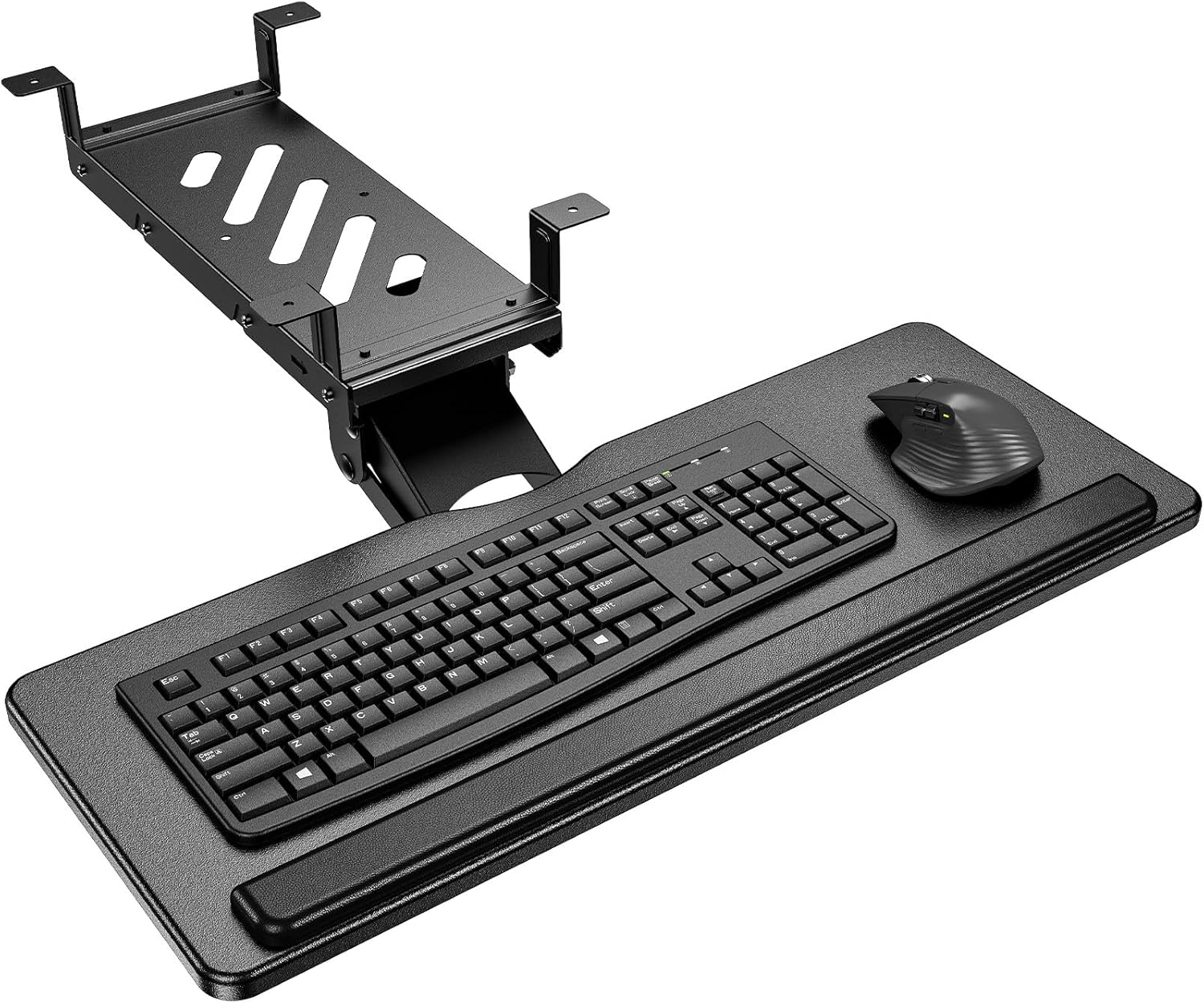
The HUANUO tray combines a full 180 degree swivel with 6 degrees of upward tilt and 22 degrees of downward tilt, giving a wide range of typing angles to work with.
Its 6.3 inches of height adjustment is enough to reposition the tray as you move between sitting and standing at an adjustable desk.
A built-in wrist rest adds cushioned support, and the whole tray slides out of sight under the desk when not in use.
It does require specific under-desk clearance to swivel and slide fully, so it's worth checking the manufacturer's clearance guidance against your desk before buying.
It suits anyone who wants a versatile tray that adjusts through a full range of motion.
Dimensions: 25 inches wide by 9.84 inches deep.
Height adjustment: 6.3 inches.
Motion: 180 degree swivel, 6 degree up and 22 degree down tilt.
Weight: Approximately 11.5 pounds.
Who should buy this tray? Anyone who wants full swivel and tilt adjustment to suit both sitting and standing desk positions.
Who might want to look elsewhere? Anyone with limited under-desk width for the swivel motion should measure clearance carefully first or consider a fixed tray.
Setup tip: Loosen the adjustment knob fully before repositioning the tray, then retighten once it's parallel to the desk bottom.
Pros
- One of the few trays in this comparison built specifically for cross-beam standing desks
- Same height and tilt adjustment range as HUANUO's standard tray
- Smooth sliding mechanism
Cons
- Smaller review history than the more established trays in this comparison
- Requires checking cross-beam height and desk thickness carefully before buying
Many standing desks have a support beam running underneath, which blocks standard clamp-mounted trays. This HUANUO tray solves that with brackets designed specifically for cross-beam installation, fitting beams up to 2 inches in height, alongside standard flat-bottom mounting.
It offers the same 6.3 inches of height adjustment and 180 degree swivel with 6 degree up and 22 degree down tilt as HUANUO's standard tray.
The metal roller track is rated for a high number of sliding cycles, aimed at long-term durability with frequent use.
It has a smaller review history than some of the more established trays in this comparison, since it's a more specialized product.
It suits anyone with a standing desk that has a cross beam blocking a standard tray installation.
Who should buy this tray? Anyone whose standing desk has a cross beam underneath that blocks a standard clamp-mounted tray.
Who might want to look elsewhere? If your desk has a flat, unobstructed underside, the standard HUANUO, VIVO, or BONTEC trays offer a more established track record.
Setup tip: Measure your cross beam's height and your desktop's depth and thickness carefully against HUANUO's compatibility guidelines before ordering.
Pros
- Frees up desktop space by keeping keyboard and mouse tucked underneath
- Highly adjustable with 6.3 inches of height range and full side to side rotation
- Plush foam padding adds comfort for extended use
- Universal tray size accommodates most standard keyboards and mice
- Works with straight and corner desks for versatile placement
Cons
- Requires a desktop at least 0.7 inches thick and capable of supporting 12 pounds underneath
- May not fit desks with crossbars, drawers, or other underside obstructions
- Assembly and under desk mounting may take extra time and careful measuring
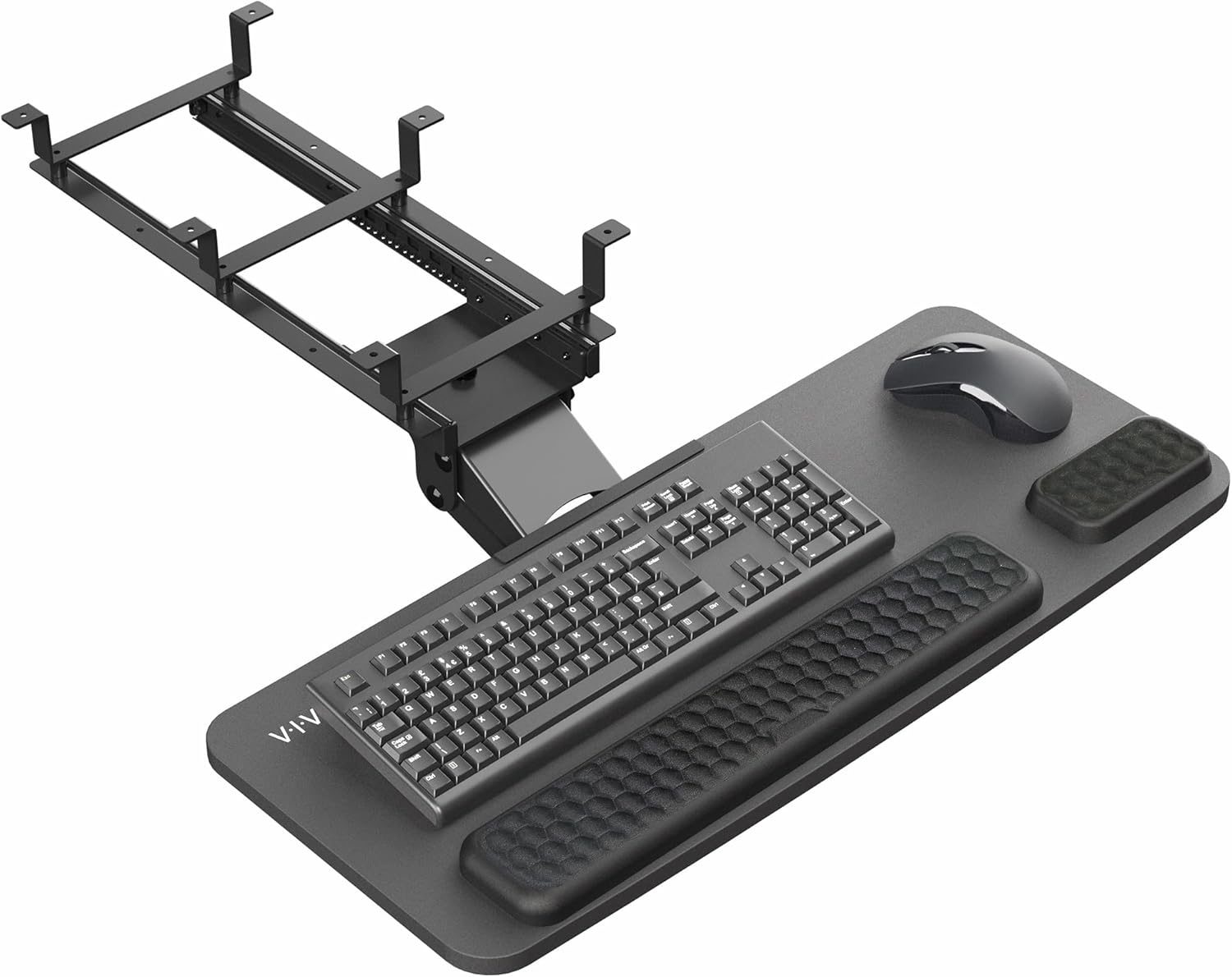
The VIVO Premium Black Under Desk Keyboard Tray (MOUNT-KB27P-B) is a well designed ergonomic accessory for anyone who wants to reclaim valuable desktop space. It installs beneath a standard desk and keeps your keyboard and mouse within easy reach while helping you maintain a more natural typing posture.
The standout quality is adjustability. With 6.3 inches of height adjustment and full side to side rotation, you can find a comfortable position whether you are tall, short, or sitting at a shared workspace. The cushioned foam pad adds plush support for wrists and palms during long sessions.
The tray's 26.8 by 11.2 inch surface fits most standard keyboards and mice, and the all black finish blends well with office furniture. It is compatible with straight and corner desks, provided the desktop is at least 0.7 inches thick and free of obstructions underneath.
Assembly is straightforward thanks to included hardware and instructions. The complete tray weighs 12 pounds, so you should confirm that your desk can support this under mounted weight before installation. Once in place, the tray feels solid and slides smoothly.
If you want a comfortable, space saving keyboard solution, this VIVO tray delivers strong value. Minor considerations include underside clearance and desk compatibility, but for most standard desks it offers an effective way to improve ergonomics and organization.
Brand: VIVO
Model: MOUNT-KB27P-B
Color: Premium Black
Tray Surface: 26.8 x 11.2 inches
Height Adjustment: 6.3 inches
Rotation: Full side to side
Compatibility: Straight and corner desks
Minimum Recommended Desktop Thickness: 0.7 inches
Total Tray Weight: 12 pounds

Pros
- Full side-to-side rotation for flexible positioning
- Rubber padding adds wrist support
- Simple, included hardware for assembly
Cons
- Lowest average rating among the trays in this comparison
- Needs an additional spacer bracket, sold separately, for height-adjustable desks with a crossbar
This VIVO tray offers a 25 by 10 inch platform that slides forward and back, with 5 inches of height adjustment and full side-to-side rotation.
Supportive rubber padding is built into the design to help reduce wrist soreness during use.
It has the lowest average rating of the trays compared here, which appears tied in part to desk compatibility, since height-adjustable desks with a crossbar need an additional spacer bracket sold separately.
Standard fixed desks with 14.25 inches of clearance between the desktop edge and any crossbar should install without the extra part.
It suits anyone with a standard fixed desk who wants a straightforward, rotating tray, more than someone with a height-adjustable desk with a crossbar.
Dimensions: 25 inches wide by 10 inches deep.
Material: Rubber-padded tray.
Height adjustment: 5 inches.
Weight: 10 pounds.
Who should buy this tray? Anyone with a standard fixed desk who wants a straightforward, rotating tray with rubber wrist padding.
Who might want to look elsewhere? Anyone with a height-adjustable desk with a crossbar should check for the required spacer bracket first, or consider the Eureka Ergonomic tray, which is built for crossbar desks.
Setup tip: Confirm whether your desk needs the separately sold spacer bracket before ordering, since this is the most common fitment issue reported.

Pros
- Spacious 24.4x10 inch surface accommodates full-size keyboards and mice
- Multifunctional design includes wrist rest, storage drawer, phone holder, and headset hook
- Adjustable height and tilt support proper wrist alignment and reduce strain
- Smooth sliding mechanism for quiet, effortless access
- Easy to install with a stable, long-lasting build
Cons
- Requires a desk with a minimum width of 24.4 inches and under-desk clearance over 16 inches
- Not compatible with desks that have thick edge frames or crossbars that block mounting
- Some users may find the initial installation process a bit time-consuming
The Klearlook Upgraded Ergonomic Keyboard Tray is a comprehensive solution for anyone seeking a more organized and comfortable workspace. Designed for home offices, corporate desks, and gaming setups, this tray slides smoothly under your desk and provides a stable platform for your keyboard and mouse.
Its standout feature is the combination of ergonomic adjustability and multifunctional storage. You can adjust the tray's height and tilt to find your ideal typing angle, reducing shoulder and wrist fatigue during long sessions. The integrated wrist rest, leather mouse area, phone holder, headset hook, and storage drawer keep all your essentials within reach while the surface stays clutter-free.
The build quality is solid, with a sturdy metal frame that feels durable and reliable. The slide mechanism is smooth and quiet, making it easy to push the tray in and out as needed. Installation is straightforward, but careful measurement is required to ensure your desk meets the minimum width and clearance requirements.
A potential drawback is the specific desk compatibility: your desk must be at least 24.4 inches wide and have over 16 inches of under-desk clearance with no thick edge frames. This may limit its use on some desks. Additionally, assembly can take a bit more time if you need to adjust mounting hardware.
Overall, the Klearlook keyboard tray is an excellent investment for anyone spending hours at a computer. It offers a generous work area, thoughtful organization, and ergonomic benefits that can help prevent discomfort. With a solid 4.2-star rating from nearly 300 reviewers, it is a reliable choice for upgrading your desk setup.
Dimensions: 24.4 x 10 inches (tray surface)
Compatibility: Requires desk width of at least 24.4 inches and under-desk clearance of over 16 inches; no thick edge frames or crossbars obstructing the underside
Features: Smooth slide mechanism, adjustable height and tilt, integrated wrist rest, leather mouse area, phone holder, headset hook, storage drawer
Material: Sturdy metal frame with high-quality finishes
Use Cases: Home office, corporate workspace, gaming desk
Installation: Easy mounting with included hardware (measurement required beforehand)

Pros
- Frees up desk space by keeping keyboard and mouse underneath.
- Promotes ergonomic typing posture to reduce strain.
- Clamps are sturdy and non-damaging to most desk surfaces.
- Simple assembly and installation process.
- Large platform fits standard keyboards and mice comfortably.
Cons
- Requires desk thickness under 1.9 inches and a flat edge (not compatible with beveled edges).
- Total clamp-to-clamp length of 32.5 inches may be too long for smaller desks.
- Tray extension is limited to 5.7 inches, which may not suit users who prefer a further reach.
The AX WABER Keyboard Tray Under Desk is a practical solution for anyone looking to reclaim precious desktop real estate. Designed for home office workers, gamers, or anyone with a cluttered desk, this 27.3-inch slide-out platform holds your keyboard and mouse securely below the work surface.
Its standout feature is the adjustable C-clamp mounting system, which attaches firmly without damaging your desk. The tray slides in and out smoothly, allowing you to type at a comfortable ergonomic angle that reduces wrist and shoulder fatigue. With a maximum extension of 5.7 inches, it keeps essentials within easy reach while maximizing workspace.
The build quality is solid: the black platform feels durable and supports up to 11 pounds. Installation is straightforward with included hardware, and the clamps are easy to tighten. The tray is wide enough for a full-size keyboard and mouse, and the non-slip surface keeps items in place.
However, there are a few limitations. The clamps require a desk thickness of 1.9 inches or less, and the desk edge must be flat (not beveled). Also, the total clamp-to-clamp length of 32.5 inches means you need a desk that wide. The short extension might not suit users who prefer to push the tray further away.
Overall, this keyboard tray offers excellent value for its price. It is well-built, easy to install, and effectively frees up desk space while promoting better ergonomics. If your desk meets the size and edge requirements, it is a smart investment for a more organized and comfortable workstation.
Tray Dimensions: 27.3 x 11 inches (width x depth)
Total Length with Clamps: 32.5 inches
Maximum Desk Thickness: 1.9 inches
Tray Extension: Up to 5.7 inches
Weight Capacity: 11 lbs
Material: Sturdy steel and plastic construction
Mounting: Adjustable C-clamps, no drilling required
Compatibility: Not for beveled edges

Pros
- Highly adjustable with 360° swivel, tilt, and height settings.
- Includes a practical storage drawer for small items.
- Easy to install with clear instructions and included hardware.
- Soft pad enhances typing comfort.
- Slides out smoothly for easy access.
Cons
- Not compatible with desks that have beveled edges.
- Requires desk thickness of at least 0.61 inches; may not fit very thin desktops.
- Some users may find the tray size limited for full-sized keyboards with number pads.
The AX WABER Under Desk Keyboard Tray with Storage Drawer is a versatile ergonomic accessory designed for gamers and home office professionals. It combines a height-adjustable slide-out tray with a built-in drawer, making it a practical space-saving solution for cluttered desks.
Its standout feature is the full range of motion: the tray rotates 180 degrees horizontally, tilts 30 degrees vertically, and adjusts up to 6.5 inches in height. This allows users to find the perfect typing angle to reduce wrist and shoulder strain during long work or gaming sessions. The smooth slide-out extends 9.8 inches, and the included soft pad adds comfort.
Build quality is solid with a sturdy black metal construction that feels durable. Installation is straightforward with all necessary hardware provided, though it requires a desk thickness of at least 0.61 inches and a desk length over 25 inches. The storage drawer is a welcome addition for holding small items like pens or USB drives.
One drawback is that the tray is not compatible with desks that have beveled edges. Additionally, users with extra-wide keyboards or those needing more mouse space may find the tray a bit snug. The height adjustment mechanism works well but may require occasional re-tightening.
Overall, the AX WABER keyboard tray offers excellent ergonomic flexibility and smart storage at a reasonable price. It's a great choice for anyone looking to improve their desk setup and typing comfort without sacrificing desk space.

Pros
- Largest tray surface in this comparison
- No-drill C-clamp installation
- Well-established review history
Cons
- Requires more under-desk clearance than the more compact trays here
- Not compatible with desks that have beveled edges or a crossbar in the way
The VIVO tray stands out for its size, at 34 inches wide before the clamps, giving enough room for a keyboard, mouse, and small accessories side by side.
It slides smoothly in and out from under the desk, and the C-clamp mount attaches securely without drilling into your desk surface.
It's rated to hold up to 11 pounds and requires a maximum desk thickness of 1.25 inches, so it's worth double-checking your desk specs before ordering.
Because of its length, it needs more under-desk clearance than the more compact trays in this comparison, and it isn't compatible with beveled desk edges or a crossbar in the way.
It suits anyone who wants maximum surface area for a full keyboard and mouse setup.
Dimensions: 39.4 inches long including clamps by 11 inches deep.
Material: Alloy steel frame.
Weight capacity: Up to 11 pounds.
Mounting: C-clamp, maximum desk thickness 1.25 inches.
Who should buy this tray? Anyone who wants maximum surface area for a keyboard, mouse, and accessories in one tray.
Who might want to look elsewhere? Anyone with a beveled desk edge, a crossbar underneath, or limited under-desk width should consider a more compact tray instead.
Setup tip: Measure the full 39.4 inch clamp-to-clamp length against your desk width before ordering, not just the 34 inch tray itself.

Pros
- Height and width adjustable for personalized ergonomic position
- Includes both keyboard and mouse wrist rests for all-day comfort
- Sturdy clamps provide a secure, wobble-free hold
- Easy to install with clear instructions and all hardware included
- Frees up valuable desk space for a cleaner, more productive workspace
Cons
- Not compatible with desks that have beveled edges
- Maximum desk thickness of 3.4 inches may limit some setups
- Tray may be too large for smaller desks or workspaces
The VIVO Mount-KBST1 is a clamp-on under-desk keyboard tray designed to improve ergonomics and maximize workspace. It is ideal for office workers, gamers, or anyone spending long hours at a computer who wants to reduce strain on their wrists and shoulders. This tray accommodates keyboards up to 23 to 30 inches wide and includes matching wrist rests for both keyboard and mouse.
Its standout features include height and width adjustability, allowing you to set the tray at one of five height positions and adjust the distance from the desk edge. This flexibility helps you find the perfect typing angle. The tray slides out smoothly and supports up to 11 pounds, enough for a full-size keyboard and mouse plus accessories. Real-world performance is solid, with users praising the improved posture and extra desk space.
Build quality is robust, with a steel frame and sturdy C-clamps that attach without damaging the desk. The included wrist rests and mouse pad offer comfortable support. Installation is straightforward with all necessary hardware provided, though you'll need a screwdriver. The tray's dimensions (22.5 x 30 inches) make it suitable for most standard desks, but it is not for desks with beveled edges.
One drawback is that the maximum desk thickness is 3.4 inches, which might not accommodate very thick or custom desks. Additionally, the large tray may feel cumbersome on smaller desks. However, these limitations are clearly stated and manageable for typical setups.
Overall, the VIVO Mount-KBST1 is an excellent value for its price. It combines ergonomic adjustability with a sturdy build and helpful accessories. If you need to reclaim desk space and improve your typing posture, this tray is a smart investment.
Product Dimensions: 22.5 x 30 inches (tray), 28.5 to 36 inches including clamps
Depth: 11 inches
Weight Capacity: 11 lbs
Slide Out Extension: Up to 8.5 inches from desk edge
Height Adjustment: 2.4 inches total with 5 set points
Width Adjustment (from desk): 8.8 to 10 inches (depends on depth setting)
Maximum Desk Thickness: 3.4 inches
Mounting Type: C-clamps (no drilling required)
Included Accessories: Keyboard wrist pad, mouse pad, mouse wrist rest
Buying Guide: What to Look for in an Ergonomic Keyboard Tray
Tray Size and Surface Area
Your keyboard and mouse need room to move. A tray that’s too narrow forces you to crowd your mouse or leave it on the desk. Look for a width of at least 25 inches to accommodate a full-size keyboard plus a mouse. The VIVO MOUNT-KB15EB offers an extra-long 34 inches, while the HUANUO models provide a solid 25 inches. Depth matters too: around 10 to 11 inches gives enough space for your wrists and a wrist rest.
Height and Tilt Adjustability
Ergonomic typing requires your elbows at a 90-degree angle and wrists straight. A tray with height adjustment lets you dial in the perfect level, especially if you switch between sitting and standing. The HUANUO Under Desk Keyboard Tray (B082NKBM62) offers 6.3 inches of height adjustment and 180-degree swivel. Tilt is equally important: look for at least 15 degrees of negative tilt to keep your wrists flat.
Mounting System and Desk Compatibility
Most trays use C-clamps that attach to the desk edge. Check your desk thickness: most clamps work up to 1.25 inches, but some like the VIVO MOUNT-KBST1 handle up to 3.4 inches. If you have a standing desk with cross beams, the HUANUO B0FLDQZKD5 includes special brackets for that situation. Always measure your desk’s underside clearance: you need at least 14 inches of depth for the tray to slide fully out.
For more on desk compatibility, read our guide to keyboard trays for standing desks.
Build Quality and Smooth Sliding
A wobbly tray defeats the purpose of ergonomics. Look for sturdy steel construction and ball-bearing slides. The HUANUO B0FLDQZKD5 boasts a metal roller track system validated for 20,000 cycles. The Klearlook tray (B0BZHLC9LY) adds a storage drawer and headset hook, but make sure the slide mechanism is smooth and quiet. Read reviews that mention long-term durability.
Final Thoughts
After evaluating nine models, our top recommendation for most users is the HUANUO Under Desk Keyboard Tray for its generous adjustment range and included wrist rest. If you need extra width for a full keyboard and mouse setup, the VIVO Black Extra Large 34 x 11 in Under Desk Keyboard Tray offers a spacious platform with sturdy C-clamps. Both provide the ergonomic angles and smooth sliding that reduce strain during long typing sessions. Whichever you choose, your wrists will thank you.
Frequently Asked Questions
How do I install an under desk keyboard tray?
Most trays use C-clamps that attach to the underside of your desk. Measure your desk thickness and clearance first. Follow the included instructions: typically you attach the track, then slide the tray onto it. The HUANUO B0FLDQZKD5 has a clever hang-and-lock design that simplifies installation.
Can I use a keyboard tray with a standing desk?
Yes, but you need a tray that accommodates the cross beams found on many electric standing desks. The HUANUO B0FLDQZKD5 includes brackets specifically for cross beams up to 2 inches high. Also ensure the tray has enough height adjustment to match your standing position.
What size keyboard tray do I need?
Measure your keyboard width and add at least 4 inches for mouse space. A 25-inch wide tray fits most keyboards and mice comfortably. If you have a full-size keyboard with a number pad, consider a 30-inch or wider tray like the VIVO MOUNT-KB15EB. Depth should be at least 10 inches to accommodate a wrist rest.
Does a keyboard tray help with wrist pain?
Absolutely. By allowing you to position your keyboard at elbow height and with negative tilt, a tray reduces wrist extension and pressure on the median nerve. Combined with proper typing technique, it can significantly alleviate discomfort. For more tips, see our article on how to reduce wrist pain from typing.


Write Your Review
No reviews yet. Be the first to share your experience!