

If your desktop feels cramped every time you pull out a full-size keyboard and mouse, an extra large keyboard tray might be the solution you need. These oversized platforms mount under your desk, freeing up valuable surface space while keeping your typing and mousing at a comfortable, ergonomic height. Whether you work from home, game for hours, or manage a busy office, the right tray can reduce wrist strain and improve posture. In this guide, we review nine top-rated models with widths of 30 inches or more, comparing their build quality, mounting systems, and ease of installation. For more ergonomic workspace ideas, check out our best under desk keyboard tray picks.
If your desk is already tight on knee clearance, an extra-large tray takes up more vertical space underneath than a standard tray, so measure clearance before choosing the biggest option available.
Disclosure: Ergonook is a participant in the Amazon Associates program. Links below are affiliate links, and we may earn a commission from qualifying purchases. This does not affect which products we recommend or how we rank them.

Pros
- Largest tray surface in this comparison
- No-drill C-clamp installation
- Well-established review history
Cons
- Requires more under-desk clearance than the more compact trays here
- Not compatible with desks that have beveled edges or a crossbar in the way
The VIVO tray stands out for its size, at 34 inches wide before the clamps, giving enough room for a keyboard, mouse, and small accessories side by side.
It slides smoothly in and out from under the desk, and the C-clamp mount attaches securely without drilling into your desk surface.
It's rated to hold up to 11 pounds and requires a maximum desk thickness of 1.25 inches, so it's worth double-checking your desk specs before ordering.
Because of its length, it needs more under-desk clearance than the more compact trays in this comparison, and it isn't compatible with beveled desk edges or a crossbar in the way.
It suits anyone who wants maximum surface area for a full keyboard and mouse setup.
Dimensions: 39.4 inches long including clamps by 11 inches deep.
Material: Alloy steel frame.
Weight capacity: Up to 11 pounds.
Mounting: C-clamp, maximum desk thickness 1.25 inches.
Who should buy this tray? Anyone who wants maximum surface area for a keyboard, mouse, and accessories in one tray.
Who might want to look elsewhere? Anyone with a beveled desk edge, a crossbar underneath, or limited under-desk width should consider a more compact tray instead.
Setup tip: Measure the full 39.4 inch clamp-to-clamp length against your desk width before ordering, not just the 34 inch tray itself.

Pros
- Extra-large surface fits all peripherals, reducing clutter
- C-clamp mount is secure and desk-friendly with padded protection
- Smooth sliding action with quiet, stable operation
Cons
- Not compatible with desks that have beveled edges or uneven undersides
- Requires at least 11.8 inches of clearance from desk edge to center support
- Maximum desk thickness of 2.17 inches may limit some thicker workstations
The UPGRAVITY Extra Large Keyboard Tray is designed for users who need a spacious, ergonomic typing solution under their desk. With a 31.5-inch wide surface (35.8 inches including clamps), it easily accommodates a full-size keyboard and mouse, plus a phone or other accessories. This tray is perfect for home offices, gaming stations, and small workspaces where desktop real estate is limited.
Its standout feature is the sturdy C-clamp mounting system. These clamps attach securely to desks up to 2.17 inches thick without damaging the surface, thanks to non-slip EVA pads. The ball-bearing slide allows the tray to extend up to 9.8 inches from the desk edge, enabling comfortable typing angles that reduce wrist and shoulder strain. Users report smooth, quiet operation that stays in place when fully retracted.
Build quality is impressive for the price point. The powder-coated steel frame resists rust and handles up to 11 pounds of equipment. Installation is straightforward with all hardware included, though you must ensure at least 11.8 inches of clearance from the desk edge to the center support. The tray itself weighs about 12 pounds, contributing to its solid feel during use.
One limitation is that the tray requires a flat desk underside; beveled or uneven edges are not compatible. Also, the maximum desk thickness may exclude thicker custom desktops. However, for standard office or gaming desks, these are minor concerns. The extra-large size might feel oversized for users with compact setups, but it offers generous space for multitasking.
Overall, the UPGRAVITY Extra Large Keyboard Tray delivers excellent value for its price. It combines a roomy work surface, robust mounting, and ergonomic design. If you need to free up desk space while improving your typing posture, this is a solid choice that earns high marks from reviewers.

Pros
- Large platform fits both keyboard and mouse comfortably
- Smooth sliding action with secure locking when closed
- Easy to install without drilling or modifying your desk
- Sturdy clamps hold tray firmly in place, no wobbling
- Edge stopper prevents keyboard from sliding off
Cons
- Not compatible with desks thicker than 1.57 inches
- Cannot be used on corner or curved desks
- Clamp design may not work with all desk edge shapes
The suptek DSF1LB Large Keyboard Tray is a practical solution for anyone looking to reclaim desk space and improve typing ergonomics. Designed for standard rectangular desks with thickness up to 1.57 inches, this tray holds your keyboard and mouse underneath the work surface, instantly clearing clutter. It is ideal for home office workers, gamers, or anyone who spends long hours at a computer and wants a more comfortable, organized setup.
Standout features include its generous 34 x 11.8 inch platform that easily fits a full-sized keyboard and mouse with room to spare. The updated slide system operates smoothly, allowing you to push the tray under the desk when not in use and pull it out effortlessly when needed. The ergonomic angle helps keep your wrists in a neutral position, reducing strain and fatigue. In real-world use, the tray glides without sticking and stays securely in place once closed.
Build quality is solid for the price point. The dual steel C-clamps grip the desk tightly and hold up to 11 pounds without slipping. Non-slip pads protect the desk surface from scratches, and a built-in edge stopper prevents your keyboard from falling off when you push the tray back. Installation is straightforward with the included hardware and instructions, requiring no drilling or permanent modifications to your desk.
However, there are a few limitations to consider. The tray is not compatible with desks thicker than 1.57 inches, and it cannot be installed on corner or curved desks due to the clamp design. Some users with very thick or irregular desk edges may find the clamps difficult to secure. Additionally, while the tray is sturdy, very heavy accessories beyond the 11-pound capacity should not be placed on it.
Overall, the suptek DSF1LB offers excellent value for its price. It delivers on its promise of freeing up desk space while promoting better ergonomics. If your desk fits the compatibility requirements and you want a reliable, easy-to-install under-desk tray, this is a strong choice that balances size, durability, and functionality.

Pros
- Extra-wide surface fits large keyboards and mouse comfortably.
- Height adjustable to four positions for personalized ergonomic comfort.
- Smooth and quiet ball bearing slides enhance user experience.
- Sturdy wooden build with a stylish finish complements any workspace.
- Easy to install with included hardware and clear instructions.
Cons
- May not fit desks thinner than 0.67 inches without modification.
- Some users may require regular lubrication of slides for optimal smoothness.
- Height adjustment requires tools and may not be tool-free.
The FRMSAET 30 inch Keyboard Drawer Tray is a spacious, height-adjustable platform designed to declutter your desk and improve ergonomics. It is ideal for professionals, gamers, or anyone spending long hours at a computer who needs a comfortable typing setup without sacrificing desktop space.
Its standout feature is the extra-wide surface, which easily accommodates a full-size keyboard and mouse. The heavy-duty 14-inch ball bearing slides ensure smooth, quiet extension and retraction, making daily use effortless. The four height adjustment settings allow you to find the perfect position to reduce wrist strain and fatigue.
Constructed from quality wood with a black finish, the tray is both sturdy and visually appealing, blending well with most office decor. The slides are made of steel for durability, and the overall build feels solid and reliable. Installation is straightforward with pre-drilled holes and all necessary hardware included.
One potential drawback is that the tray requires a desk thickness over 0.67 inches for proper mounting, which may not suit all desks. Additionally, the slides might need occasional lubrication to maintain smooth operation. However, these are minor considerations given the product's overall performance and value.
Overall, the FRMSAET Keyboard Drawer Tray is a well-designed, practical solution for anyone seeking to enhance their workstation ergonomics and organization. Its combination of wide surface, adjustability, and smooth slides makes it a worthwhile investment for comfort and productivity.

Pros
- Most adjustable arm range in this comparison
- Dual mounting options for above or under desk use
- Extra storage and organization features not found on the other trays here
Cons
- Smaller review history than the more established VIVO, BONTEC, and HUANUO trays
- More complex arm mechanism than a simple slide-out tray
The Klearlook tray stands apart with a full articulating arm, offering 360 degree horizontal rotation and 237 degrees of vertical adjustment, along with 180 degrees of tilt.
It can mount either above or under the desk, giving more setup flexibility than a fixed slide-out tray.
Beyond the keyboard and mouse platform, it includes a storage drawer, a phone slot, and a headphone hanger for extra organization.
It has a smaller review history than the more established trays in this comparison, being a newer, more feature-dense product.
It suits anyone who wants maximum positioning flexibility and extra storage in one accessory.
Dimensions: 24.4 inches by 10 inches, with the mounting arm at 22.83 by 14.57 by 18.5 inches.
Motion: 360 degree rotation, 237 degree vertical arm adjustment, 180 degree tilt.
Extras: Storage drawer, phone slot, headphone hanger, built-in mouse pad.
Weight: 8.25 pounds.
Who should buy this tray? Anyone who wants maximum positioning flexibility along with built-in storage.
Who might want to look elsewhere? Anyone who wants a simpler, more established slide-out tray should consider the VIVO or BONTEC options instead.
Setup tip: Decide between above-desk or under-desk mounting before installation, since switching later means reinstalling the mount.

Pros
- Large 34 x 11 inch tray accommodates full-size keyboards and mice comfortably.
- Swing design provides 8.6 inches of forward/backward movement and 165 degree rotation for personalized positioning.
- 12-step height adjustment (2.2 to 6.5 inches) fits various desk thicknesses and user heights.
- Supports up to 11 lbs, enough for most keyboard and mouse setups.
- Tool-free adjustment makes it easy to switch between sitting and standing positions.
Cons
- Requires at least 0.75 inch desk thickness and 4 inches of clearance underneath, which may not fit all desks.
- The tray itself weighs 9 lbs, so ensure your desk can handle the additional weight.
- No built-in wrist rest; users may need to purchase separately for full ergonomic support.
The VIVO Black Under Desk Keyboard Tray (MOUNT-KB34S) is a spacious 34x11 inch platform designed to mount beneath your desk, freeing up valuable workspace. It is ideal for home office workers, gamers, or anyone looking to improve their ergonomic setup without sacrificing desk real estate.
Its standout feature is the patented swing design, which allows the tray to move forward and backward by 8.6 inches with a total 165 degree range of motion. This enables you to find the perfect typing angle without tools, and both height and extension adjust simultaneously for seamless positioning.
The tray is built to hold up to 11 lbs and features a 12-step locking height adjustment system that accommodates desk thicknesses from 0.75 inches up to 6.5 inches. Assembly is straightforward with included hardware, though you will need at least 4 inches of clearance under your desk for the mounting bracket.
Potential drawbacks include the weight of the tray itself (9 lbs) and the requirement for a minimum desk thickness of 0.75 inches. Some users may also prefer a built-in wrist rest, which this model lacks, but it otherwise offers solid ergonomic benefits.
Overall, the VIVO keyboard tray delivers excellent value with its large surface, versatile adjustment, and sturdy construction. It is a reliable choice for anyone wanting to improve their workstation ergonomics and reclaim desk space.

Pros
- Spacious tray fits large keyboards and mouse comfortably
- Plush foam padding enhances typing comfort
- Full rotation and height adjustment for ergonomic positioning
- Easy to install with included hardware
Cons
- Requires a desk thickness of at least 0.7 inches for mounting
- May not fit very thick or irregularly shaped desks without modification
- Some users may prefer a smaller tray for compact workspaces
The VIVO Premium Black Under Desk Keyboard Tray (MOUNT-KB34P-B) is a well-designed ergonomic accessory aimed at office workers, gamers, and anyone spending long hours at a computer. It mounts beneath a standard desk to reclaim valuable desktop space while providing a comfortable typing and mouse platform.
Its standout feature is the generous 33.9 x 11.2 inch surface, which easily accommodates full-size keyboards and mice. The plush foam padding offers excellent wrist support, reducing fatigue during extended use. The tray rotates side-to-side and adjusts vertically up to 6.3 inches, allowing users to find their ideal typing angle with ease.
Build quality is solid, with a sturdy metal construction that supports up to 13.8 pounds. Assembly is straightforward thanks to the included hardware and clear instructions. The tray fits both straight and corner desks, though it requires a minimum desktop thickness of 0.7 inches.
One potential drawback is the mounting requirement: desks thinner than 0.7 inches may not be compatible, and very thick or irregular surfaces might need extra hardware. Additionally, some users with compact workspaces might find the large tray overkill.
Overall, the VIVO Premium Keyboard Tray delivers on its promise of ergonomic comfort and space efficiency. It is a worthwhile investment for anyone seeking to improve their desk setup, especially those with larger keyboards or who value adjustable, padded support.
Pros
- Large surface fits full-size keyboard and mouse comfortably
- Easy tool-free installation with no drilling required
- Stable and wobble-free thanks to heavy-duty steel clamps
- Ergonomic height reduces strain on wrists, arms, and shoulders
- TAA-compliant for government and business use
Cons
- Only fits desks up to 1.5 inches thick, limiting compatibility with thicker desks
- Clamp design may not work well on desks with curved or uneven edges
- No built-in cable management for keyboard or mouse wires
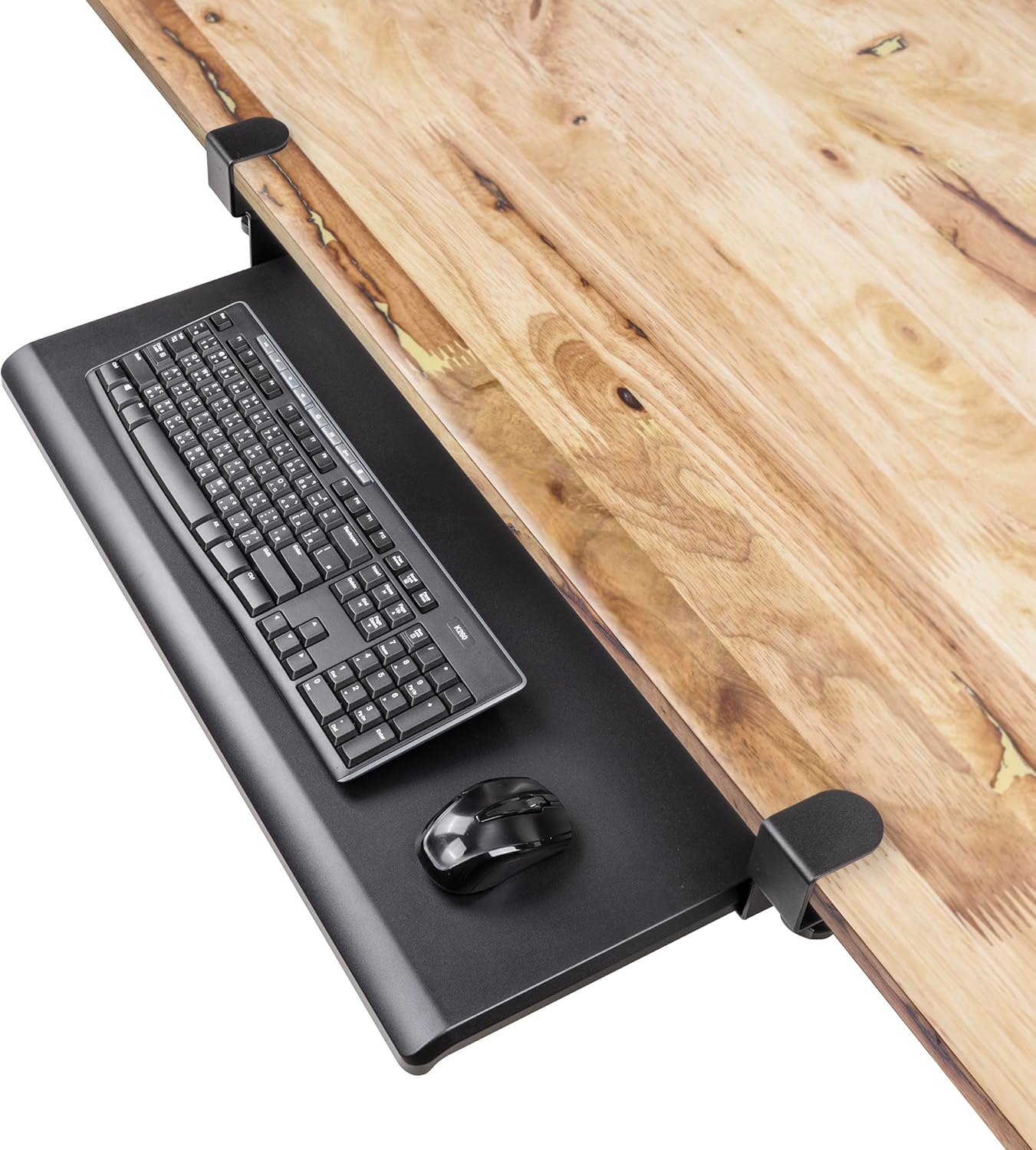
The EHO Under Desk Keyboard Tray is a large, clamp-on platform designed to free up valuable desk space while promoting ergonomic typing. It is perfect for anyone with a cluttered desk, from home office workers to gamers and professionals who need a clean, organized setup.
Standout features include a spacious 27.5x12.2 inch surface that comfortably holds a full-size keyboard and mouse side by side. The tool-free clamp-on installation uses heavy-duty steel C-clamps with anti-slip padding, ensuring the tray stays stable and wobble-free even during intense typing sessions. The retractable slide-out mechanism glides smoothly, allowing you to tuck the tray under the desk when not in use.
Build quality is robust, with durable materials designed to withstand daily use without sagging or loosening. The tray is TAA-compliant, meeting strict U.S. Federal Government purchasing standards, which adds credibility for business and government buyers. The ergonomic height adjustment helps reduce strain on wrists, arms, and shoulders, making long work hours more comfortable.
However, there are a few drawbacks. The tray only fits desks up to 1.5 inches thick, so thicker or unusually shaped desktops may not work. The clamp design might struggle with curved or uneven edges. Additionally, there is no integrated cable management, so you may need to manage wires separately.
Overall, the EHO Under Desk Keyboard Tray offers excellent value for anyone seeking a spacious, easy-to-install, and stable keyboard platform. Its ergonomic benefits and clean design make it a smart addition to any workspace, provided your desk meets the thickness requirements.

Pros
- Spacious platform for keyboard and mouse
- Sturdy C-clamp mount holds firmly without desk damage
- Easy to slide in and out for comfortable typing angles
- Simple installation with clear instructions
- Affordable price for the size and quality
Cons
- Not compatible with desks with beveled edges
- Maximum desk thickness 1.75 inches limits some thicker desks
- Tray extends only 5.4 inches from desk edge, may not suit those who need more pull-out
The AX WABER under desk keyboard tray is a practical solution for anyone looking to reclaim valuable desktop space. Designed for home offices, cubicles, or gaming setups, this slide-out platform accommodates full-size keyboards and mice while promoting a healthier typing posture.
Its 32.8-inch wide surface provides ample room for both keyboard and mouse, and the smooth sliding mechanism allows you to tuck it away when not in use. The sturdy C-clamps attach securely to desks up to 1.75 inches thick, and the tray extends up to 5.4 inches for comfortable wrist alignment.
The tray is built with a durable frame and a vintage-style finish that blends well with various desk aesthetics. Installation is straightforward thanks to included hardware and adjustable clamps, and the tray can hold up to 11 pounds of equipment.
One limitation is that the tray requires a desk with straight edges; beveled or curved edges will not work with the C-clamps. Also, the maximum desk thickness is 1.75 inches, so thicker desktops may need alternative mounting solutions. The 5.4-inch extension may feel shallow for some users.
Overall, the AX WABER keyboard tray delivers excellent value with its spacious design, easy installation, and ergonomic benefits. It is a smart choice for anyone wanting to keep their desk clutter-free while maintaining comfort during long typing sessions.
Buying Guide: What to Look for in an Extra Large Keyboard Tray
Size and Surface Area
The whole point of an extra large keyboard tray is having enough room for a full-size keyboard and a mouse side by side, plus maybe a phone or wrist rest. Look for widths of 30 inches or more, and depths of at least 11 inches. Models like the VIVO Black Extra Large (34 x 11 inches) and the AX WABER (32.8 x 12 inches) give you generous real estate. Always measure your desk space and check the total clamp-to-clamp length to ensure it fits.
Mounting System and Desk Compatibility
Most extra large trays use C-clamps that attach to the underside of your desk. These are sturdy and require no drilling, but they only work on flat desk edges. Check your desk thickness: many trays support up to 1.5–2 inches, but some (like the UPGRAVITY) accept up to 2.17 inches. If you have a standing desk, look for a tray that can accommodate the moving mechanism; our best keyboard tray for standing desk guide has more details.
Ergonomics and Adjustability
An adjustable tray lets you set the height and angle to keep your wrists straight and shoulders relaxed. Some models, like the VIVO MOUNT-KB34S, offer a swing arm for forward/backward movement, while the Klearlook Adjustable tray provides 360° rotation and tilt. If you share a desk or switch between sitting and standing, adjustability is key. For more tips on positioning, see our guide on how to position keyboard and mouse ergonomically.
Also consider the slide mechanism. Ball bearing slides offer smooth, quiet operation, and some trays have a stopper to prevent the keyboard from sliding off. The FRMSAET tray uses heavy-duty 14-inch ball bearing slides for a near-silent glide. If you often stow your keyboard away, a smooth slide is a must.
Build Quality and Weight Capacity
Most extra large trays hold up to 11 pounds, which is enough for a typical keyboard and mouse. But the tray itself can be heavy, especially with steel frames. The VIVO Premium model weighs nearly 14 pounds, so ensure your desk can support that weight. Look for powder-coated steel, anti-slip pads, and rubber stoppers that prevent scratches and wobble. The EHOPrime tray, for example, uses heavy-duty steel C-clamps with anti-slip padding for a secure fit.
If you suffer from wrist pain, an ergonomic setup can make a big difference. Read our article on how to reduce wrist pain from typing for additional strategies.
Final Thoughts
Choosing the right extra large keyboard tray ultimately comes down to your desk setup and personal comfort preferences. For a spacious, sturdy option that fits most standard desks, the VIVO Black Extra Large 34 x 11 in Under Desk Keyboard Tray offers a reliable C-clamp mount and smooth slide at a great value. If you need maximum adjustability for both above and under desk use, the Klearlook Upgraded Adjustable Keyboard Tray provides 360° rotation, tilt, and a built-in wrist rest, making it a versatile choice for dynamic workspaces. Whichever you pick, you will enjoy a cleaner desk and more comfortable typing experience.
Frequently Asked Questions
Can I install an extra large keyboard tray on a thick desk?
It depends on the model. Most C-clamp trays support desks up to 1.5 inches thick, but some like the UPGRAVITY accept up to 2.17 inches. Always check the maximum desk thickness before buying. If your desk is thicker, look for a tray with a larger clamp opening.
Do extra large keyboard trays work with standing desks?
Yes, many are compatible with standing desks as long as the desk edge is flat and the thickness is within range. The clamp mount attaches to the underside, and the tray moves with the desk. For standing desks with crossbars, you may need a tray that mounts to the desktop itself. Check our best keyboard tray for standing desk guide for specific recommendations.
How do I measure my desk for an extra large keyboard tray?
Measure the width of your desk where you plan to install the tray. Note the total clamp-to-clamp length of the tray (often 2–4 inches wider than the tray surface). Also measure the thickness of your desk edge. Ensure there is enough clearance underneath for the tray and slides, especially if you have a keyboard drawer or other under-desk accessories.
Will an extra large keyboard tray hold a gaming keyboard and mouse?
Absolutely. Most extra large trays are 30 inches wide or more, easily accommodating a full-size mechanical keyboard and a large mouse pad. The weight capacity of 11 pounds is sufficient for even heavy gaming peripherals. The smooth slide system lets you push the tray under the desk when not in use, keeping your gaming area tidy.


Write Your Review
No reviews yet. Be the first to share your experience!