

You spend hours at your desk, and your wrists are starting to complain. A nagging ache, a tingling sensation, or just plain discomfort can derail your focus and productivity. The solution often starts with your keyboard tray. Choosing the best keyboard tray for your setup can transform your posture, reduce strain, and make long work sessions far more comfortable. This guide walks you through what to look for and how to pick the right tray for your needs, whether you have a traditional desk or a standing desk. If you are new to ergonomic setups, you might also want to read our guide on how to position keyboard and mouse ergonomically.
If you already use a standing desk with fully independent height control for the whole surface, a separate keyboard tray adds less benefit than it does on a fixed-height desk.
Disclosure: Ergonook is a participant in the Amazon Associates program. Links below are affiliate links, and we may earn a commission from qualifying purchases. This does not affect which products we recommend or how we rank them.

Pros
- Largest tray surface in this comparison
- No-drill C-clamp installation
- Well-established review history
Cons
- Requires more under-desk clearance than the more compact trays here
- Not compatible with desks that have beveled edges or a crossbar in the way
The VIVO tray stands out for its size, at 34 inches wide before the clamps, giving enough room for a keyboard, mouse, and small accessories side by side.
It slides smoothly in and out from under the desk, and the C-clamp mount attaches securely without drilling into your desk surface.
It's rated to hold up to 11 pounds and requires a maximum desk thickness of 1.25 inches, so it's worth double-checking your desk specs before ordering.
Because of its length, it needs more under-desk clearance than the more compact trays in this comparison, and it isn't compatible with beveled desk edges or a crossbar in the way.
It suits anyone who wants maximum surface area for a full keyboard and mouse setup.
Dimensions: 39.4 inches long including clamps by 11 inches deep.
Material: Alloy steel frame.
Weight capacity: Up to 11 pounds.
Mounting: C-clamp, maximum desk thickness 1.25 inches.
Who should buy this tray? Anyone who wants maximum surface area for a keyboard, mouse, and accessories in one tray.
Who might want to look elsewhere? Anyone with a beveled desk edge, a crossbar underneath, or limited under-desk width should consider a more compact tray instead.
Setup tip: Measure the full 39.4 inch clamp-to-clamp length against your desk width before ordering, not just the 34 inch tray itself.

Pros
- Full swivel and tilt range in one tray
- Height adjustment suits both sitting and standing desks
- Well-established review history
Cons
- Requires specific clearance under the desk for the tray to slide and rotate
- Assembly and clamp installation required
The HUANUO tray combines a full 180 degree swivel with 6 degrees of upward tilt and 22 degrees of downward tilt, giving a wide range of typing angles to work with.
Its 6.3 inches of height adjustment is enough to reposition the tray as you move between sitting and standing at an adjustable desk.
A built-in wrist rest adds cushioned support, and the whole tray slides out of sight under the desk when not in use.
It does require specific under-desk clearance to swivel and slide fully, so it's worth checking the manufacturer's clearance guidance against your desk before buying.
It suits anyone who wants a versatile tray that adjusts through a full range of motion.
Dimensions: 25 inches wide by 9.84 inches deep.
Height adjustment: 6.3 inches.
Motion: 180 degree swivel, 6 degree up and 22 degree down tilt.
Weight: Approximately 11.5 pounds.
Who should buy this tray? Anyone who wants full swivel and tilt adjustment to suit both sitting and standing desk positions.
Who might want to look elsewhere? Anyone with limited under-desk width for the swivel motion should measure clearance carefully first or consider a fixed tray.
Setup tip: Loosen the adjustment knob fully before repositioning the tray, then retighten once it's parallel to the desk bottom.

Pros
- Established brand with a strong review history
- Pre-installed mouse tray saves a separate purchase
- Fits a wide range of standard keyboard sizes
Cons
- Screw-mounted rather than clamp-mounted, requiring permanent installation into the desk underside
- Requires 23.5 inches of width and 14.5 inches of depth underneath the desk, more clearance than some compact trays
The Fellowes drawer mounts to the underside of your desk using screws, rather than a clamp, which makes for a more permanent but very stable installation.
It offers three height positions and a platform sized for keyboards up to 20 inches wide, with a mouse tray pre-installed on the right side.
It's built with an impact-resistant tray and has a well-established review history among office keyboard trays.
Because it's screw-mounted, installation is more involved than a clamp tray, and it needs 23.5 inches of width and 14.5 inches of depth of obstruction-free space underneath the desk.
It suits anyone who wants a stable, permanent keyboard drawer with a built-in mouse platform.
Dimensions: 22.37 inches wide by 11.63 inches deep.
Material: Plastic.
Height adjustment: 3 positions.
Mouse tray: 7.25 by 7.5 inches, pre-installed.
Who should buy this tray? Anyone who wants a stable, permanent keyboard drawer with a built-in mouse platform and doesn't mind screw installation.
Who might want to look elsewhere? Anyone who wants a no-drill option should choose one of the C-clamp trays in this comparison instead.
Setup tip: Confirm you have 23.5 inches of width and 14.5 inches of depth free of any crossbars before installing.
Pros
- One of the few trays in this comparison built specifically for cross-beam standing desks
- Same height and tilt adjustment range as HUANUO's standard tray
- Smooth sliding mechanism
Cons
- Smaller review history than the more established trays in this comparison
- Requires checking cross-beam height and desk thickness carefully before buying
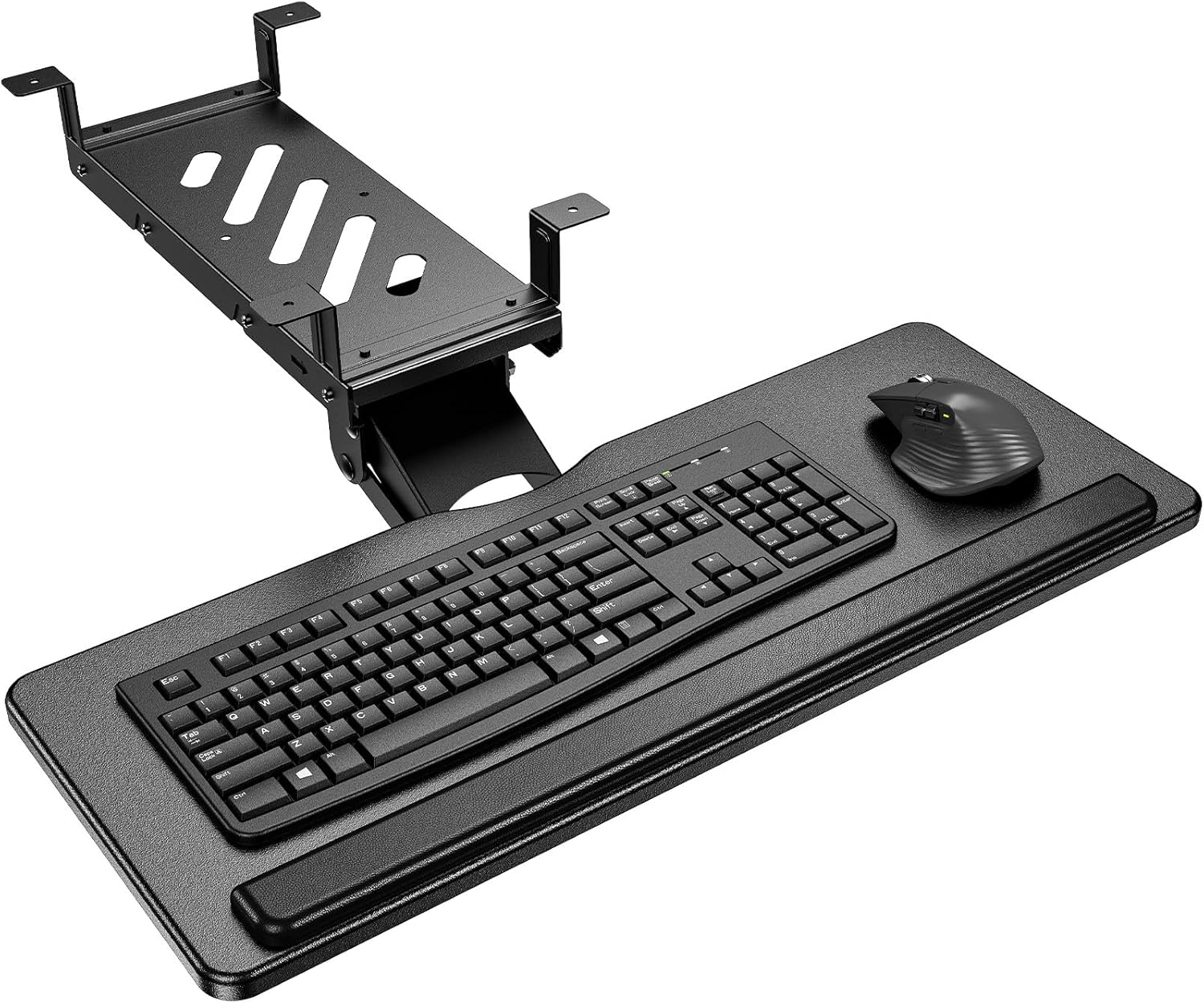
Many standing desks have a support beam running underneath, which blocks standard clamp-mounted trays. This HUANUO tray solves that with brackets designed specifically for cross-beam installation, fitting beams up to 2 inches in height, alongside standard flat-bottom mounting.
It offers the same 6.3 inches of height adjustment and 180 degree swivel with 6 degree up and 22 degree down tilt as HUANUO's standard tray.
The metal roller track is rated for a high number of sliding cycles, aimed at long-term durability with frequent use.
It has a smaller review history than some of the more established trays in this comparison, since it's a more specialized product.
It suits anyone with a standing desk that has a cross beam blocking a standard tray installation.
Who should buy this tray? Anyone whose standing desk has a cross beam underneath that blocks a standard clamp-mounted tray.
Who might want to look elsewhere? If your desk has a flat, unobstructed underside, the standard HUANUO, VIVO, or BONTEC trays offer a more established track record.
Setup tip: Measure your cross beam's height and your desktop's depth and thickness carefully against HUANUO's compatibility guidelines before ordering.

Pros
- Full side-to-side rotation for flexible positioning
- Rubber padding adds wrist support
- Simple, included hardware for assembly
Cons
- Lowest average rating among the trays in this comparison
- Needs an additional spacer bracket, sold separately, for height-adjustable desks with a crossbar
This VIVO tray offers a 25 by 10 inch platform that slides forward and back, with 5 inches of height adjustment and full side-to-side rotation.
Supportive rubber padding is built into the design to help reduce wrist soreness during use.
It has the lowest average rating of the trays compared here, which appears tied in part to desk compatibility, since height-adjustable desks with a crossbar need an additional spacer bracket sold separately.
Standard fixed desks with 14.25 inches of clearance between the desktop edge and any crossbar should install without the extra part.
It suits anyone with a standard fixed desk who wants a straightforward, rotating tray, more than someone with a height-adjustable desk with a crossbar.
Dimensions: 25 inches wide by 10 inches deep.
Material: Rubber-padded tray.
Height adjustment: 5 inches.
Weight: 10 pounds.
Who should buy this tray? Anyone with a standard fixed desk who wants a straightforward, rotating tray with rubber wrist padding.
Who might want to look elsewhere? Anyone with a height-adjustable desk with a crossbar should check for the required spacer bracket first, or consider the Eureka Ergonomic tray, which is built for crossbar desks.
Setup tip: Confirm whether your desk needs the separately sold spacer bracket before ordering, since this is the most common fitment issue reported.

Pros
- Designed specifically for corner and L-shaped desks with independently rotating clamps
- Slides in and out for ergonomic positioning
- Frees up desktop workspace for other essentials
- Easy clamp installation without permanent damage
- Supports up to 11 lbs of keyboard and accessories
Cons
- Not compatible with desktops thicker than 1.25 inches or with beveled edges
- The clamping mechanism extends about 32.5 inches wide, so you need enough underside clearance on your corner desk
- Load capacity of 11 lbs means it is not intended for heavy equipment
The VIVO Black Clamp-on Keyboard Tray (MOUNT-KB10C) is a space-saving under-desk platform designed for corner or L-shaped desks. It holds a full-size keyboard, mouse, and small accessories below the work surface, which is ideal for anyone who needs more usable desk space.
The standout feature is its pair of independently rotating C-clamps, which swivel 90 degrees to attach securely to corner desk frames. This gives it a level of placement flexibility that standard straight-mounted keyboard trays often lack.
In everyday use, the tray slides smoothly in and out so you can find a comfortable typing position. Raising your keyboard off the desktop can reduce strain on your wrists and shoulders, making this a straightforward ergonomic upgrade for home offices and cubicles.
Build quality feels solid for the price. The tray supports up to 11 pounds, and the black finish should blend with most desk setups. Installation is fairly simple with included hardware, but before buying you need to confirm your desktop is no thicker than 1.25 inches and does not have beveled edges, because those setups will not work.
Overall, the VIVO MOUNT-KB10C is a smart choice for corner desk users who want to free up space without sacrificing access to their keyboard. As long as your desk meets the compatibility requirements, this clamp-on tray delivers convenient, adjustable ergonomics at a reasonable price.
Brand: VIVO
Model: MOUNT-KB10C
Tray Dimensions: 26.8 x 11 inches
Overall Width Including Clamps: 32.5 inches
Mounting Type: Clamp-on with swiveling C-clamps
Maximum Desk Thickness: 1.25 inches
Maximum Load Capacity: 11 lbs
Color: Black

Pros
- Spacious surface accommodates keyboard and mouse together
- Smooth and quiet glide operation
- Easy installation with two mounting options
- Sturdy build provides stable typing platform
- Ergonomic angle promotes comfort during long work sessions
Cons
- Requires sufficient desk overhang (total length 30 inches) for clamp installation
- Height clearance may be limited for thicker desks when using clamp method
- Clamps cannot fit desks thicker than 1.63 inches without using screw mount
The XINLEI Keyboard Tray is an under-desk slide-out platform designed to save workspace and improve ergonomics. It targets anyone with a cluttered desk who wants to keep their keyboard and mouse accessible yet out of the way. This tray is especially useful for home office workers, gamers, and professionals seeking a cleaner setup.
Its standout feature is the generous 25.6 x 11.8 inch surface, which easily holds a full-size keyboard and mouse together. The smooth metal sliding rail allows you to pull out up to 7.75 inches and push in silently, with a back baffle preventing accidental drops. Users report that the glide feels premium and stable during use.
Build quality is solid with a black finish that matches most desks. The C-clamps are padded to protect the desk edge, and they grip firmly up to 1.63 inches thick. For thicker desktops, the included screw mount option provides a secure alternative. The ergonomic angle is fixed but well-chosen to reduce wrist strain.
One drawback is the total length of 30 inches including clamps, which means you need enough desk overhang. Also, when using clamps, the height clearance under the desk is only 2.4 inches, so thicker keyboards may not fit if the desk is thick. However, the screw mount solves this for most users.
Overall, the XINLEI Keyboard Tray delivers excellent value for its price. It combines a large surface, smooth operation, and easy installation. If you need to reclaim desk space and improve typing comfort, this tray is a reliable choice that meets its promises.
Platform Dimensions: 25.6 x 11.8 inches (total length 30 inches including clamps)
Slide Range: Push in up to 12.24 inches, pull out up to 7.75 inches
Maximum Desk Thickness: 1.63 inches (clamp) or unlimited with screw mount
Height Clearance Under Desk: 2.4 inches (clamp mode), total height 4.45 inches
Mounting Options: C-clamp or screw mount
Color: Black
Material: Metal sliding rail, plastic platform

Pros
- Most adjustable arm range in this comparison
- Dual mounting options for above or under desk use
- Extra storage and organization features not found on the other trays here
Cons
- Smaller review history than the more established VIVO, BONTEC, and HUANUO trays
- More complex arm mechanism than a simple slide-out tray
The Klearlook tray stands apart with a full articulating arm, offering 360 degree horizontal rotation and 237 degrees of vertical adjustment, along with 180 degrees of tilt.
It can mount either above or under the desk, giving more setup flexibility than a fixed slide-out tray.
Beyond the keyboard and mouse platform, it includes a storage drawer, a phone slot, and a headphone hanger for extra organization.
It has a smaller review history than the more established trays in this comparison, being a newer, more feature-dense product.
It suits anyone who wants maximum positioning flexibility and extra storage in one accessory.
Dimensions: 24.4 inches by 10 inches, with the mounting arm at 22.83 by 14.57 by 18.5 inches.
Motion: 360 degree rotation, 237 degree vertical arm adjustment, 180 degree tilt.
Extras: Storage drawer, phone slot, headphone hanger, built-in mouse pad.
Weight: 8.25 pounds.
Who should buy this tray? Anyone who wants maximum positioning flexibility along with built-in storage.
Who might want to look elsewhere? Anyone who wants a simpler, more established slide-out tray should consider the VIVO or BONTEC options instead.
Setup tip: Decide between above-desk or under-desk mounting before installation, since switching later means reinstalling the mount.

Pros
- Highly adjustable with 360° swivel, tilt, and height settings.
- Includes a practical storage drawer for small items.
- Easy to install with clear instructions and included hardware.
- Soft pad enhances typing comfort.
- Slides out smoothly for easy access.
Cons
- Not compatible with desks that have beveled edges.
- Requires desk thickness of at least 0.61 inches; may not fit very thin desktops.
- Some users may find the tray size limited for full-sized keyboards with number pads.
The AX WABER Under Desk Keyboard Tray with Storage Drawer is a versatile ergonomic accessory designed for gamers and home office professionals. It combines a height-adjustable slide-out tray with a built-in drawer, making it a practical space-saving solution for cluttered desks.
Its standout feature is the full range of motion: the tray rotates 180 degrees horizontally, tilts 30 degrees vertically, and adjusts up to 6.5 inches in height. This allows users to find the perfect typing angle to reduce wrist and shoulder strain during long work or gaming sessions. The smooth slide-out extends 9.8 inches, and the included soft pad adds comfort.
Build quality is solid with a sturdy black metal construction that feels durable. Installation is straightforward with all necessary hardware provided, though it requires a desk thickness of at least 0.61 inches and a desk length over 25 inches. The storage drawer is a welcome addition for holding small items like pens or USB drives.
One drawback is that the tray is not compatible with desks that have beveled edges. Additionally, users with extra-wide keyboards or those needing more mouse space may find the tray a bit snug. The height adjustment mechanism works well but may require occasional re-tightening.
Overall, the AX WABER keyboard tray offers excellent ergonomic flexibility and smart storage at a reasonable price. It's a great choice for anyone looking to improve their desk setup and typing comfort without sacrificing desk space.
Buying Guide: What to Look for in the Best Keyboard Tray
Adjustability and Range of Motion
A keyboard tray that stays fixed in one position defeats its purpose. The best keyboard tray offers height adjustment, tilt, and often swivel or rotation. Look for a tray that lets you position the keyboard at or slightly below elbow height, with a negative tilt to keep your wrists straight. This range of motion allows you to switch between sitting and standing without losing ergonomic alignment. For standing desk users, our roundup of the best keyboard tray for standing desk highlights models with extra vertical travel.
Build Quality and Stability
No one wants a wobbly tray that shakes with every keystroke. The best keyboard tray uses sturdy materials like steel or aluminum, with a solid mounting mechanism. Check the weight capacity and ensure the tray can support your keyboard and mouse without sagging. A stable platform also reduces noise and enhances your typing experience. If you are also considering a new keyboard, our list of the best ergonomic keyboard for wrist pain pairs well with a quality tray.
Size and Mouse Space
Your keyboard tray should accommodate not just your keyboard but also your mouse. Many trays come with an attached or separate mouse platform. Consider the width and depth of the tray relative to your desk and your reach. A tray that is too small forces you to place the mouse on the desk surface, breaking the ergonomic chain. For more on this, read our article on how to reduce wrist pain from typing.
Mounting Options and Compatibility
Keyboard trays attach to desks via clamp, bolt-through, or grommet mounts. Your desk thickness and underside clearance determine which option works. Clamp mounts are easiest to install, while bolt-through mounts offer the most stability. Always measure your desk before buying. If you are exploring different tray styles, the best under desk keyboard tray guide covers popular mounting systems.
Final Thoughts
Investing in the best keyboard tray is one of the smartest upgrades you can make for your daily comfort. Whether you need a tray for a traditional desk or a standing setup, focus on adjustability, stability, and size to match your workflow. Pair your new tray with proper typing habits and a supportive chair to create a truly ergonomic workspace. For more ergonomic product guides, visit our Keyboards and Mice section.
Frequently Asked Questions
What is the ideal height for a keyboard tray?
The ideal height places your keyboard at or slightly below elbow level when sitting. Your forearms should be parallel to the floor, and your wrists should remain straight, not bent up or down. Most adjustable trays accommodate this range easily.
Can a keyboard tray help with wrist pain?
Yes, a properly positioned keyboard tray can significantly reduce wrist strain by allowing you to maintain neutral wrist posture. Combined with an ergonomic keyboard and mouse, it is a key part of preventing carpal tunnel and other repetitive strain injuries. For more tips, check our guide on how to reduce wrist pain from typing.
Are keyboard trays compatible with standing desks?
Many keyboard trays are designed for standing desks, but you need to ensure the tray has enough vertical adjustment range to match the desk’s height change. Some trays are specifically marketed for standing desks, offering extended travel and easy transition between sitting and standing.
How do I install a keyboard tray under my desk?
Installation varies by mounting type. Clamp mounts require no drilling and attach to the desk edge. Bolt-through mounts need holes drilled into the desk surface. Grommet mounts use an existing cable hole. Always follow the manufacturer’s instructions and use the provided hardware for safety.


Write Your Review
No reviews yet. Be the first to share your experience!