

You have a monitor arm and a laptop, but your desk is still cluttered. You want a clean, ergonomic setup that lets you adjust your laptop screen height with ease. That is where a laptop stand for a monitor arm comes in. In this guide, we review 11 top-rated laptop trays and mounts that attach to your existing VESA monitor arm. Whether you need a simple tray or a full dual-arm system, these picks from VIVO, HUANUO, HumanCentric, and more will help you achieve a streamlined workspace. If you are looking for a dedicated desk solution, check out our best adjustable laptop stand for desk guide.

Pros
- Wide compatibility with monitors and laptops.
- Exceptional adjustability for ergonomic viewing.
- Sturdy build with reliable warranty and support.
- Clean cable management system.
- Two mounting options fit various desks.
Cons
- Maximum weight capacity of 22 lbs may not support larger or heavier monitors.
- Some users report minor wobble at full extension.
- VESA plate can be tricky for very thick monitors.
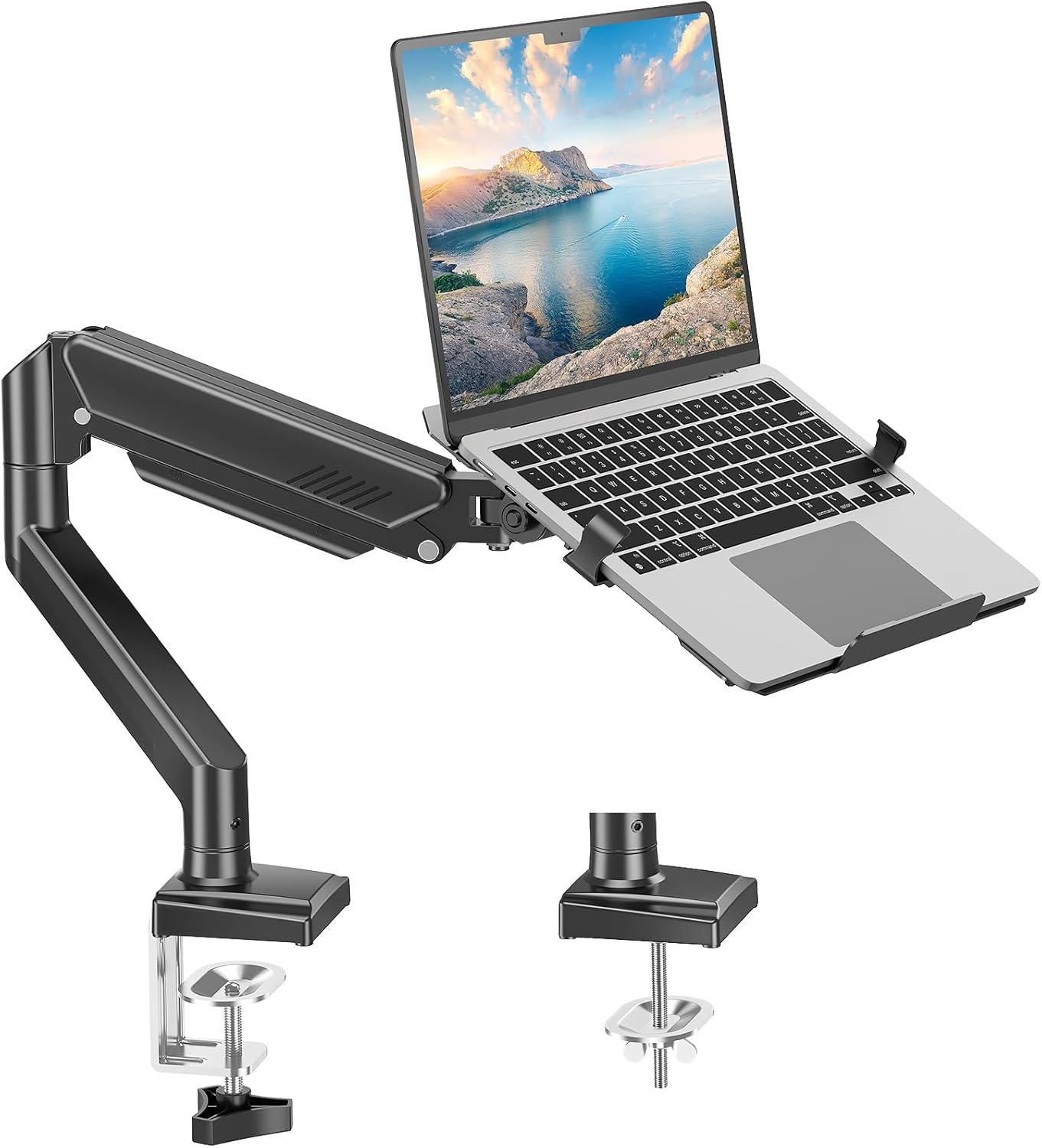
The VIVO STAND-V002C is a single arm monitor and laptop desk mount designed for home offices and gamers. It fits screens 13 to 32 inches and laptops up to 17 inches, making it ideal for dual-device setups or those who need ergonomic flexibility.
The mount offers full articulation with tilt, swivel, rotation, and height adjustment along the center pole. Users appreciate the smooth movement and ability to switch between portrait and landscape. The integrated cable management keeps wires hidden and organized.
Built from sturdy steel, the mount feels solid once installed. The C-clamp and grommet options provide secure attachment to desks up to 4 inches thick. The detachable VESA plates simplify setup. VIVO backs it with a 3-year warranty and responsive support.
The 22 lb weight limit may not suit extra-large monitors. At full extension, some users note a slight wobble. The VESA plate may not fit all monitor back profiles perfectly.
The VIVO STAND-V002C delivers excellent value at its price point, combining robust adjustability, dual-device support, and reliable build quality. It is a top recommendation for anyone seeking an affordable and versatile mount.

Pros
- Accommodates a wide range of laptop and monitor sizes with heavy-duty weight capacity.
- Full motion flexibility for optimal ergonomic positioning.
- Simple installation with included hardware and clear instructions.
- Ventilated laptop tray helps keep your device cool.
- Great value for a dual-purpose mount at a reasonable price point.
Cons
- The laptop tray is limited to 17-inch notebooks, which may not fit larger gaming laptops.
- Cable management is not included, requiring separate routing for a tidy desk.
- Some users report the gas spring tension may need adjustment for heavier monitors.
The WALI 2-in-1 laptop and monitor desk mount is a practical solution for anyone looking to declutter their desk while improving posture. Compatible with laptops up to 17 inches and monitors up to 34 inches, it supports two screens with a single sturdy arm, making it ideal for remote workers, gamers, or multitaskers who need an adjustable setup.
Standout features include full motion adjustability: tilt from -45 to +70 degrees, swivel 180 degrees, and rotate 360 degrees. The arm extends up to 19.3 inches and offers height adjustment of 17.3 inches, allowing you to position your screens exactly where you need them. The detachable laptop tray has ventilation holes to keep your device cool, a thoughtful touch for extended use.
Build quality is solid for the price point. The mount uses a heavy-duty mechanical arm that holds up to 22 lbs on the laptop side and 26.4 lbs on the monitor side. Installation is straightforward with both clamp and grommet options, and the included hardware fits most desk thicknesses. The black finish blends well with most office setups.
One potential drawback is the lack of built-in cable management, which may leave wires exposed. Also, the laptop tray is specifically sized for 17-inch notebooks, so larger gaming laptops may not fit securely. Some users have noted that the gas spring tension might require adjustment for optimal balance with heavier monitors.
Overall, the WALI laptop desk mount offers excellent value for its versatility and ergonomic benefits. It is a reliable choice for those seeking to improve their workspace without breaking the bank. With a 4.4-star rating from thousands of buyers, it is a well-regarded option in the monitor arm category.

Pros
- Universal VESA compatibility fits most monitor mounts.
- Adjustable clamps accommodate a wide range of laptop sizes.
- Rubber pads and cable tie provide secure, scratch-free hold.
- Ventilation design prevents overheating.
- Affordable price compared to full laptop arm solutions.
Cons
- Monitor arm or stand must be purchased separately.
- Weight limit of 10lbs may not support larger gaming or workstation laptops.
- Clamps may not fit extremely thick laptops (check thickness before buying).
The suptek Adjustable Laptop VESA Mount Tray (TP007) is a practical accessory for anyone looking to integrate their laptop into a multi-monitor setup. Designed to attach directly to existing monitor arms or stands with standard VESA patterns, this tray saves desk space and improves ergonomics. It is ideal for professionals, gamers, or students who want a clean dual-screen configuration without buying a new monitor arm.
Key features include adjustable clamps that accommodate laptops from 13 to 18 inches, a cable tie for added security, and rubber pads to prevent scratches. The tray also incorporates ventilation holes to keep your laptop cool during prolonged use, addressing a common concern with laptop docking. Users have praised its sturdy build and easy installation.
Constructed from durable materials, the tray weighs little yet supports up to 10 pounds. The black finish blends well with most equipment. The included mounting hardware makes attachment straightforward, though you need a compatible monitor arm. Rubber pads and the cable tie ensure your laptop stays firmly in place without damage.
One limitation is that the tray itself does not include a monitor arm, so you need to already own or purchase one separately. Additionally, the 10-pound weight capacity may not suit larger gaming or workstation laptops. The clamps are adjustable but might not accommodate very thick laptops; checking dimensions before purchase is wise.
Overall, the suptek TP007 offers an affordable and effective way to mount your laptop alongside a monitor. Its universal VESA compatibility, secure hold, and ventilation make it a solid choice for creating a tidy dual-screen workspace. For the price, it delivers excellent value, especially for users with lighter laptops and existing monitor arms.

Pros
- Exceptional compatibility with both monitors and laptops across popular sizes and weight limits
- Full motion range allows complete ergonomic customization for any user
- Simple height adjustment and tool-free mounting make setup quick and intuitive
- Ventilated laptop tray prevents heat buildup, protecting your device during long work sessions
- Solid build quality and versatile clamp/grommet options suit most desks and provide stability
Cons
- Monitor weight limit of 19.8 lbs may not support larger or ultra-wide monitors at the heavier end of the spectrum
- Laptop tray is designed for standard laptops; thicker gaming laptops with large hinges may fit less securely
- With only 9 reviews at launch, long-term durability feedback is limited
The VIVO Universal Adjustable Monitor and Laptop Desk Mount (STAND-V002O-L) is a practical solution for anyone looking to combine a monitor and laptop into a single, ergonomically efficient setup. This dual mechanical arm mount accommodates most 17 to 32 inch monitors weighing up to 19.8 lbs and 10 to 15.6 inch laptops up to 9.9 lbs, making it a versatile choice for home offices, small businesses, or any workspace where screen real estate is at a premium.
Standout features include full motion articulation: the arms offer +90 to -90 degree tilt, 180 degree swivel, and 360 degree rotation, allowing effortless switching between portrait and landscape orientations. The smooth 9.7 inch height adjustment lets you position displays from 6.25 to 16 inches above the desk, significantly reducing neck and eye strain during long workdays. The laptop tray is a highlight, with adjustable clamps and rubber tabs that secure your device firmly, plus integrated ventilation slots to prevent overheating.
Build quality is solid, with heavy-duty steel arms and a gas spring mechanism that supports smooth repositioning without sagging. The mount includes both a C-clamp (fits desktops 0.4 to 3.1 inches thick) and a grommet option (0.4 to 1.9 inches), so it adapts to most desk types. Installation is tool-free for the clamp and all necessary hardware is included, which simplifies setup.
One potential drawback is the monitor weight limit: users with larger or ultra-wide monitors nearing 20 lbs may find it less stable. Additionally, the laptop tray’s design works best with standard thin laptops; thicker or gaming laptops with large cooling vents may not seat as securely. With only a handful of user reviews available so far, long-term durability data is sparse, but early ratings are high.
Overall, the VIVO STAND-V002O-L offers excellent value for a dual arm mount that accommodates both a monitor and a laptop. Its extensive adjustment range, secure laptop tray, and flexible mounting options make it a strong choice for anyone seeking an organized, ergonomic workstation without breaking the bank.
Pros
- Versatile 2-in-1 design works with both laptops and monitors
- Full range of motion for customizable ergonomic comfort
- Sturdy aluminum build supports heavy devices securely
- Easy installation with clamp or grommet options
- Effective cable management keeps workspace tidy
Cons
- Not compatible with strongly curved monitors (1000R, 1500R, 1800R)
- Laptop tray cannot be rotated vertically, limiting some orientation options
- Arm reach may be limited for larger or ultrawide setups
The MOUNT PRO Laptop Arm Mount is a smart 2-in-1 desk accessory that adapts to your workflow. Designed for home office professionals, gamers, and students, it securely holds laptops up to 17 inches or monitors from 13 to 32 inches with VESA compatibility. The standout feature is its removable tray: attach it for a laptop stand or remove it for a standard monitor arm, all in one compact package.
Full-motion adjustment sets this mount apart. With tilt, swivel, and rotation ranges, you can easily position your screen to reduce neck and eye strain. The arm lifts your display up to 17.3 inches, promoting a healthy posture during long work or gaming sessions. Cable management keeps wires organized, and the ventilated tray with anti-slip pads ensures your laptop stays cool and secure.
Build quality is impressive for the price. The aluminum construction feels solid and supports up to 22 pounds. Installation is straightforward with a clamp or grommet base, and the included tools make assembly quick. The mount feels stable even with heavier monitors, though users with strongly curved screens should check compatibility.
One drawback is the laptop tray cannot be rotated vertically for safety, which limits some portrait-mode uses. Additionally, the arm’s reach might be tight for very wide setups. Some users may prefer a gas-spring arm for effortless height adjustment, but the manual adjustment here is reliable and low-maintenance.
Overall, the MOUNT PRO Laptop Arm Mount offers exceptional flexibility and value. It effectively transforms any desk into an ergonomic workstation while keeping clutter under control. If you need a dual-purpose mount that grows with your setup, this is a smart investment.

Pros
- Frees up valuable desk space by lifting both monitor and laptop off the desktop.
- Easy to adjust arm with three joints for precise positioning in any orientation.
- Compatible with a wide range of monitors and laptops, including larger screens.
- Sturdy build supports up to 17.6 lbs on the monitor arm and large laptops on the tray.
- Simple assembly with clear instructions and included mounting hardware.
Cons
- The laptop tray may not fit very thick gaming laptops with large cooling pads.
- Cable management clips are plastic and may be fragile if overtightened.
- Some users report the arm can sag slightly under maximum weight over time.
The UPGRAVITY Monitor and Laptop Mount is a versatile dual arm stand designed for users who want to reclaim desk space while improving ergonomics. It supports monitors from 13 to 27 inches and laptops up to 17 inches, making it ideal for home offices, small desks, or dual screen workflows.
Standout features include full motion articulation with 90 degree tilt, 180 degree swivel, and 360 degree rotation. The three joint arm allows you to position your monitor and laptop exactly where you need them, reducing neck and eye strain. The detachable VESA plates simplify installation, and the vented laptop tray keeps your notebook cool during extended use.
Build quality is solid for the price, with a heavy duty steel construction and a sleek black finish. The included C-clamp and grommet mount offer flexible installation on most desks. Cable management clips help keep wires organized, though they are plastic and should be handled with care.
One potential drawback is that the laptop tray has a fixed size, which may not accommodate very thick or oversized gaming laptops. Also, under maximum weight, some users have noticed slight arm sag over time, but this is uncommon with typical loads.
Overall, the UPGRAVITY Mount delivers excellent value with its wide compatibility, easy adjustability, and three year warranty. It is a smart choice for anyone looking to create a more comfortable and organized workspace without breaking the bank.

Pros
- Adjustable clamps accommodate a wide range of laptop sizes securely
- Sturdy steel construction ensures stability and durability over time
- Ventilation holes and rubber pads protect your laptop from overheating and scratches
- Compatible with standard VESA mounts, making integration simple
- Ergonomic design helps reduce neck and back strain for better comfort
Cons
- Mount arm or stand is not included, must be purchased separately
- May not fit laptops larger than 15.6 inches or unusually thick models
- Heavy gaming laptops might require extra tightening to prevent shifting
The HumanCentric Laptop VESA Mount Tray is a practical accessory for anyone who wants to elevate their laptop to an ergonomic height while reclaiming desk space. It attaches directly to monitor arms, stands, or wall mounts using standard 75x75mm or 100x100mm VESA patterns, making it a versatile addition to home offices, studios, and multi-screen gaming setups.
Its standout feature is the heavy-duty adjustable clamps that grip laptops from 10 to 15.6 inches securely. The clamps range from 9.5 to 16.5 inches wide, so even when you push the laptop from the side, it stays firmly in place. The tray also includes rubber pads to prevent scratches and ventilation holes to keep your laptop cool during demanding tasks, a thoughtful touch for performance users.
Build quality is robust, with a steel frame that feels sturdy and reliable. Professionals trust this tray for long-term use, and the easy installation process means you can set it up in minutes. The design is minimalist, blending well with most monitor arms and not adding unnecessary bulk to your workspace.
One potential drawback is that the mount arm itself is sold separately, so you need to factor that into your purchase. Also, while the tray fits most laptops, unusually thick or oversized models may not fit securely. Some users report that heavy gaming laptops require extra attention to ensure the clamps are tight enough to prevent movement.
Overall, the HumanCentric Laptop VESA Mount Tray is a smart investment for improving ergonomics and desk organization. It delivers on its promise of stable, secure mounting and is well suited for remote workers, students, and creators who value a clean, comfortable setup. With a high rating from over a thousand reviewers, it is a reliable choice for your workstation.

Pros
- Heavy-duty steel build for long-lasting durability.
- Ventilation design helps keep laptops cool under load.
- Anti-slip lip provides extra security against accidental drops.
- Universal VESA 100x100mm compatibility works with most monitor arms.
- Simple tool-free assembly with included hardware.
Cons
- May not fit laptops larger than 12.6" wide due to tray dimensions.
- Some users report the mounting bracket feels slightly tight on certain VESA arms.
- Limited to VESA 100x100mm pattern; not compatible with other hole spacings.
The HUANUO laptop tray is designed for anyone who wants to integrate a laptop into a VESA-based monitor arm setup. It is perfect for remote workers, gamers, or office professionals seeking a more ergonomic and clutter-free desk. By attaching to a standard VESA 100x100mm mount, this tray transforms your laptop into a floating workstation that can be easily adjusted for height and angle.
Standout features include a solid all-steel construction that supports up to 22 pounds, making it suitable for most laptops and even some larger notebooks. The vented platform significantly improves airflow underneath the laptop, reducing heat buildup during extended use. Real-world performance is reliable, with the tray maintaining a secure hold even when the arm is moved frequently.
Design and build quality are impressive for the price. The black matte finish looks professional and resists scratches. The protruding bottom lip is a thoughtful addition that prevents the laptop from sliding forward, giving you peace of mind. Installation is straightforward with the included M4 screws, and the tray fits most VESA arms without any wobble.
One potential drawback is the tray's size, which may not accommodate very large laptops (over 12.6 inches wide). Additionally, the mounting bracket can feel a bit snug on some arms, though this ensures a tight fit. The tray is also limited to VESA 100x100mm patterns, so it won't work with other hole spacings.
Overall, the HUANUO laptop tray offers excellent value for the price. It is a practical, well-built solution for creating an ergonomic laptop setup. If you have a compatible VESA arm and want to free up desk space while keeping your laptop cool, this tray is a solid choice.

Pros
- Affordable solution for ergonomic laptop setup
- Safety lip provides added security for devices
- Ventilation holes promote better cooling
- Compatible with standard VESA mounts
- Lightweight yet sturdy construction
Cons
- Requires a separate VESA arm or mount for use (not included)
- May not fit laptops with non-standard thickness or protruding designs
- No built-in cable management or adjustment features
The VIVO Stand-LAP2 laptop tray is a practical accessory designed for users who want to integrate a laptop into a VESA mount setup. It holds devices up to 17 inches, making it ideal for both home offices and professional workspaces. This tray is a straightforward solution for improving ergonomics by raising the laptop to eye level.
Standout features include the front safety lip, which prevents the laptop from sliding forward, and the ventilation holes that allow heat to escape during long work sessions. Users report that the tray feels sturdy and holds laptops securely, even when tilted. The VESA compatibility (100mm x 100mm) ensures it can attach to a wide range of monitor arms and stands.
Design-wise, the tray is made of black steel with a durable finish that matches most office aesthetics. It is lightweight yet rigid, and installation is simple with the included screws and brackets. The raised edges and ventilation pattern are thoughtful additions that enhance usability without adding bulk.
A potential drawback is that the tray is sold without a VESA arm, so buyers must source one separately. Additionally, laptops with very thick or irregular bases might not fit perfectly. Some users may also miss features like cable management clips or adjustable depth.
Overall, the VIVO Stand-LAP2 offers excellent value for anyone seeking an affordable way to mount a laptop on a VESA arm. It delivers on its promises of safety, cooling, and ergonomic improvement. For under $25, it is a reliable choice for transforming a standard monitor arm into a laptop workstation.

Pros
- Supports both monitor and laptop in one compact unit
- Vented tray helps prevent laptop overheating
- Smooth height adjustment for ergonomic comfort
- Effective cable management keeps desk tidy
- Sturdy construction with reliable weight capacity (9 kg per arm)
Cons
- Limited arm articulation: only height adjustment, no full tilt or swivel for monitor
- Laptop tray is fixed in angle, not adjustable for tilt
- Installation requires a desk edge or grommet hole, may not suit all desk types
PUTORSEN's Laptop Arm Mount is a versatile dual-device solution designed for professionals and home users who want to reclaim desk space while keeping their monitor and laptop at eye level. It supports monitors from 17 to 35 inches and laptops from 12 to 18 inches, making it a great fit for most standard setups.
Standout features include the vented laptop tray that promotes airflow to prevent overheating, plus a 43.9 cm pole for smooth height adjustment. The integrated cable management clips keep wires organized, contributing to a clutter-free workspace. In real-world use, the mount feels stable and secure, with the clamp or grommet base holding firm even on thicker desks.
Build quality is solid: the steel construction and removable VESA plate feel durable, and installation is straightforward thanks to the included mounting kit. The arms can be individually removed if you need to reconfigure your layout. However, the monitor arm offers only vertical height adjustment, not full articulation it lacks tilt and swivel range found on more expensive models.
One drawback is the fixed laptop tray it does not tilt, which may limit viewing angles for some users. Additionally, the mount requires a desk edge or grommet hole for installation, so it may not work on glass or unconventional desks. The 9 kg weight capacity per arm is adequate for most screens, but heavy ultrawide monitors might be close to the limit.
Verdict: The PUTORSEN Laptop Arm Mount delivers excellent value for those seeking a clean, ergonomic dual-device setup without breaking the bank. Its strengths in stability, heat management, and cable organization outweigh the limited articulation, making it a solid choice for home offices and workstations.

Pros
- Compatible with a wide range of laptops and VESA mounts
- Sturdy iron construction ensures long-term reliability
- Ergonomic design helps reduce posture-related discomfort
- Hollow back design effectively prevents laptop overheating
- Non-slip pads and bottom lip keep device secure during adjustments
Cons
- Requires a VESA mount with 100x100mm pattern; not compatible with other hole patterns without an adapter
- May not accommodate very thick or oversized laptops due to tray dimensions
- Adds weight to monitor arm; ensure your arm's weight capacity is sufficient
The Ergounion VESA Laptop Tray is a practical accessory for anyone using a monitor arm with a 100x100mm VESA pattern. It allows you to mount a laptop directly above your monitor, creating a streamlined dual-screen setup. This tray is ideal for professionals and remote workers who want an ergonomic sit-stand workstation.
The tray supports laptops from 6 to 17.3 inches and up to 28.6 pounds, covering most mainstream notebooks. Its ergonomic design helps reduce strain on your neck, shoulders, and wrists by positioning the laptop at eye level. The hollow U-shaped back promotes airflow, keeping your laptop cool during demanding tasks.
Constructed from strong iron, the tray feels solid and durable. The L-shaped blocker and non-slip rubber pads keep your laptop firmly in place, even when you adjust your arm or desk height. Installation is straightforward if your mount has the correct VESA pattern.
One potential limitation is the specific 100x100mm VESA requirement; mounts with other patterns will need an adapter. Also, very thick or oversized laptops may not fit comfortably. Ensure your monitor arm can handle the added weight, typically around 2-3 pounds for the tray alone plus the laptop.
Overall, the Ergounion VESA Laptop Tray offers excellent value for a clean, ergonomic workspace. It is well-built, secure, and thoughtfully designed for heat dissipation. For the price, it is a smart investment for improving your desk setup.
Buying Guide: What to Look For in a Laptop Stand for Monitor Arm
Compatibility with Your Monitor Arm and Laptop
Not all laptop trays fit every monitor arm. Most trays use a standard VESA 75x75mm or 100x100mm pattern. Confirm that your monitor arm supports these hole patterns. Also, check the tray dimensions to ensure your laptop width and depth fit securely. Many trays, like the HUANUO Laptop Tray, have adjustable clamps to accommodate various laptop sizes.
Weight Capacity and Build Quality
A sturdy tray must hold your laptop without sagging. Look for steel or aluminum construction with a capacity of at least 10 lbs. For larger laptops, models like the WALI Laptop Desk Mount support up to 22 lbs. A solid build prevents wobbling and keeps your device secure during adjustments.
Ventilation and Cooling
Laptops generate heat, especially during extended use. A tray with ventilation holes or slots allows airflow to prevent overheating. The VIVO Laptop Tray and HumanCentric tray both feature perforated designs that promote cooling. If you run demanding applications, prioritize trays with ample openings.
Ease of Installation and Adjustability
You want a tray that attaches quickly to your monitor arm. Most models include mounting hardware and a VESA plate. Some trays, like the suptek Adjustable Tray, come with cable ties to secure the laptop. Also, consider whether the tray allows you to tilt or rotate your laptop for optimal viewing angles. For standing desk users, our best laptop stand for standing desk guide offers additional insights.
Final Thoughts
Choosing the right laptop stand for your monitor arm transforms your workspace into an ergonomic haven. For a budget-friendly tray that works with most VESA arms, the HUANUO Laptop Tray offers solid steel construction and effective cooling. If you need a complete dual-arm setup for both monitor and laptop, the VIVO Universal Adjustable Monitor and Laptop Desk Mount provides full motion and height adjustment. Both options will help you reduce neck strain and reclaim desk space.
Frequently Asked Questions
Can I use any laptop tray with my monitor arm?
Most laptop trays are designed for VESA 75x75mm or 100x100mm patterns. Check your monitor arm’s compatibility before purchasing. If your arm supports these standards, trays like the HumanCentric Laptop VESA Mount Tray will fit.
How do I install a laptop tray on a monitor arm?
Installation is straightforward. Attach the VESA plate to the tray, then screw the plate onto your monitor arm. Most kits include all necessary hardware. For detailed steps, refer to our how to set up a laptop for ergonomics guide.
Will a laptop tray work with a curved monitor?
Yes, but some trays may not fit highly curved screens. The MOUNT PRO Laptop Arm Mount explicitly states it is not compatible with 1000R/1500R/1800R curved screens. Always verify with the manufacturer if you have a curved display.
What is the ideal height for a laptop on a monitor arm?
The top of your laptop screen should be at or slightly below eye level. This reduces neck strain. For guidance on monitor positioning, see our article on best monitor distance from eyes. Adjust the arm height accordingly.



Write Your Review
No reviews yet. Be the first to share your experience!