

If you run a dual-monitor setup with your MacBook, you know the struggle: a cramped desk, a laptop that eats into your workspace, and a neck that aches from staring down at a screen. You need a stand that elevates your MacBook, frees up real estate, and complements your monitors. Whether you prefer a vertical dock, a full arm mount, or a combined docking station, the right choice transforms your workflow. In this guide, we review the best laptop stands for a MacBook dual monitor setup in 2026, covering options from simple risers to integrated hubs. For more ergonomic insights, check out our best adjustable laptop stand for desk guide.

Pros
- Sturdy construction supports up to 22 lbs per arm, ideal for large monitors
- Laptop tray with lip prevents sliding, adding security for your notebook
- Multiple adjustment options allow for personalized ergonomic positioning
- Includes all mounting hardware and US-based customer support for peace of mind
Cons
- Laptop tray only tilts 15 degrees, which may limit some viewing preferences
- Requires a sturdy desk edge for clamp or grommet installation, not suitable for glass desks
The WALI Dual Monitor and Laptop Stand (M002XLLP) is a well-designed ergonomic mount that combines support for two monitors and a laptop in one compact unit. It is perfect for professionals and gamers who want to declutter their desk and improve posture while working or gaming.
Standout features include height-adjustable arms with 90 degrees tilt and swivel, 360 degree rotation, and an extra tall 31.5 inch pole. The laptop tray includes vented holes for cooling and a lip to secure the device. In real-world use, the mount feels solid and keeps screens stable, even when adjusting positions.
The build quality is impressive for its price point. Steel construction and a smooth finish give it a premium feel. Installation is straightforward with either a C-clamp or grommet base, and all necessary hardware is included. The mount supports monitors up to 27 inches and laptops up to 17 inches, with a 22 lb capacity per arm.
One drawback is the laptop tray’s limited tilt range of 15 degrees, which may not suit users who prefer a steeper angle. Also, the mount requires a strong desk edge for clamping, so glass or thin desks are not recommended. Cable management channels are basic but functional.
Overall, the WALI Dual Monitor and Laptop Stand delivers excellent value for those needing a flexible, space-saving workstation. It earns a strong recommendation for its blend of adjustability, stability, and laptop cooling features.

Pros
- Delivers dual 4K@60Hz video output for sharp visuals on two monitors.
- Adjustable stand improves posture and comfort during long work sessions.
- Fast 85W charging supports demanding workflows without draining your battery.
- Compact and travel-friendly design with included storage bag.
- Multiple ports including USB-A, USB-C, and SD/TF slots for seamless connectivity.
Cons
- Requires laptop USB-C port with DisplayPort Alt-mode for dual monitor support.
- The stand may not accommodate laptops larger than 16 inches securely.
- Limited to 85W power delivery, which may not fully charge some high-wattage laptops.
The Umaniy M91 is a 9-in-1 USB-C hub combined with an adjustable laptop stand, designed for professionals who need a portable and ergonomic workspace. It is particularly well-suited for MacBook Pro and Air users, but works with any USB-C laptop that supports DisplayPort Alt-mode.
Standout features include dual HDMI ports that output 4K at 60Hz, allowing you to connect two external monitors for a powerful multi-display setup. The USB-C PD 3.0 port delivers up to 85W of power, so your laptop charges quickly even while you use other ports, and the USB-A and USB-C data ports transfer files at 5Gbps. The built-in SD and TF card slots are a boon for photographers and videographers.
The design is thoughtful: a 6-level adjustable height mechanism lets you customize your laptop's position to reduce strain on your neck, back, and eyes. The triangular base with non-slip silicone pads keeps the laptop stable and promotes airflow to prevent overheating. At 0.9 lbs and folding to a compact size, it is easy to pack in the included storage bag for travel.
Potential drawbacks include the requirement that your laptop's USB-C port must support DisplayPort Alt-mode to use the HDMI outputs. Also, the stand may not be ideal for laptops larger than 16 inches, and the 85W power delivery might not be enough for some high-performance laptops that require 100W or more. However, for most users, these limitations are minor.
Overall, the Umaniy M91 offers excellent value for anyone seeking a portable docking station and stand. It combines functionality, ergonomics, and portability into one affordable package, earning a solid recommendation for remote workers, students, and creatives on the go.

Pros
- Maximizes desk space by combining two monitors and a laptop in one compact mount.
- Excellent range of motion for comfortable viewing in any orientation (portrait or landscape).
- Robust build quality with a heavy-duty clamp that feels secure and stable.
- Ventilated laptop tray keeps devices cool and protected.
- Easy to install and adjust, with clear instructions and included hardware.
Cons
- C-clamp may not fit desks thicker than 3.2 inches, limiting compatibility with some custom desks.
- Laptop tray weight capacity is 9.9 lbs, which may not support larger gaming laptops.
- Some users report slight wobble when fully extended, especially with heavier monitors.
If you are a power user juggling multiple tasks and crave a clutter-free desk, the VIVO Dual Monitor + Laptop Mount (STAND-V013L) is a game-changer. Designed for monitors from 13 to 27 inches and laptops up to 15.6 inches, this triple-screen solution lets you arrange two displays and a laptop in a single, space-saving setup. It is ideal for stock traders, video editors, programmers, or anyone who needs real-time data across multiple screens.
The standout feature is the full range of articulation. Each monitor arm offers +90 to -45 degrees tilt, 180 degrees swivel, and 360 degrees rotation, so you can easily switch between portrait and landscape. The center pole provides height adjustment, while the unique stacking arm design allows each monitor plate to be fine-tuned by 1.1 inches, ensuring perfect horizontal alignment. The ventilated laptop tray adjusts width and includes rubber tabs to keep your device secure, plus airflow holes to prevent overheating during extended use.
Build quality is solid for the price. The heavy-duty C-clamp (or optional grommet mount) attaches to desks up to 3.2 inches thick and includes protective padding to prevent scratches. The arms are made of steel with a sleek black finish, and installation is straightforward with the included cable management clips. At 4.4 out of 5 stars from 209 reviews, most users praise its stability and ease of adjustment, though a few note slight wobble when arms are fully extended with heavier monitors.
One honest drawback: the laptop tray supports only up to 9.9 lbs, so larger gaming or workstation laptops may not fit. Also, the C-clamp requires a desk edge that is not too thick, so check compatibility before buying. However, for standard monitors and lighter laptops, this mount delivers excellent value and ergonomics.
Overall, the VIVO STAND-V013L is a smart investment for anyone wanting to triple their screen real estate without sacrificing desk space. Its combination of versatility, adjustability, and sturdy construction makes it a top choice in the under-$100 mount category. If you need a reliable, space-saving triple-screen setup, this mount is hard to beat.

Pros
- Large compatibility range: fits most 17 to 32 inch VESA monitors and laptops up to 15 inches.
- Exceptionally tall pole allows for generous height adjustments to suit most desk setups.
- Sturdy metal tray with ventilation holes protects laptops and aids heat dissipation.
- Convenient tool-free VESA plate removal speeds up installation and adjustments.
- Clean cable management keeps cords organized and out of the way.
Cons
- The laptop tray is not independently adjustable, so its tilt and height are linked to the main pole setting.
- With a 19.8 lb capacity per arm, heavier 32-inch monitors may require a sturdier desk and careful positioning.
- The extra tall pole and wide dual arms can take up significant desk space, especially on small or lightweight surfaces.
The IMtKotW dual monitor stand is designed for multitaskers who need multiple screens without sacrificing desk space. It combines two VESA-compatible monitor arms with a dedicated laptop tray, making it an all-in-one solution for 17- to 32-inch monitors and laptops up to 15 inches. This product suits professionals, programmers, and content creators who want a streamlined triple-display workflow.
In real-world use, the setup supports three screens working simultaneously, which is ideal for stock trading, video editing, or productivity dashboards. The monitor arms offer a full 360-degree rotation, 45-degree tilt, and 90-degree swivel, allowing users to adjust each screen independently. The tall 31.6-inch pole adds generous height flexibility, letting you position your displays at a comfortable eye level.
Build quality is emphasized by the solid steel construction of both the arms and the laptop tray. The tray measures 11.81 x 10.43 inches and includes ventilation holes to help keep your laptop cool. Hidden cable management clips run along the arms, keeping cords neatly tucked away and reducing visual clutter.
One drawback is that the laptop tray itself lacks independent ergonomic adjustments, as its height is tied to the main pole. Also, with a per-arm weight limit of 19.8 pounds, very large 32-inch monitors need to be positioned carefully to avoid strain. Users with thin or non-standard desktops should double-check the clamp compatibility before ordering.
Overall, the IMtKotW dual monitor and laptop mount delivers valuable workspace flexibility at a reasonable price point. Its sturdy frame, easy mounting system, and thoughtful cable management make it a dependable upgrade for anyone wanting a more organized, ergonomic triple-screen setup. For those within the weight and size limits, this mount is a practical investment.

Pros
- Space-saving vertical design holds two laptops in a small footprint.
- Adjustable width fits most popular laptop brands and thicknesses.
- Protective silicone padding prevents scratches and keeps laptops secure.
- Sturdy, premium aluminum build feels durable and looks elegant.
- Easy setup with no tools required; simply slide laptops into the slots.
Cons
- May not fit very thick gaming laptops or ultrabooks with cases exceeding the 1.65-inch max.
- Vertically oriented stands can be less convenient for quick plug/unplug of peripherals.
- The silver color may show minor scuffs over time, though aluminum is generally resistant.
The OMOTON Dual Vertical Desk Laptop Stand Holder is designed for users who need to manage two laptops at once without sacrificing desk space. Whether you own a MacBook Air, MacBook Pro, Samsung Galaxy Book, or Microsoft Surface, this stand's adjustable slots accommodate devices ranging from 14mm to 42mm thick, making it versatile for different setups.
One standout feature is the protective silicone mat that covers the laptop slots and base. It prevents scratches and keeps your devices from sliding, even when you insert or remove them. The wide, aluminum base adds stability, so you can confidently use two laptops without worrying about tipping over.
Build quality is excellent. The stand is crafted from anodized aluminum with a sandblasted, brushed, and CNC-machined finish that closely matches the texture of a MacBook. This makes it not only functional but also aesthetically pleasing on a modern desk. The scratch-resistant surface holds up well to daily use.
A potential drawback is that the vertical orientation might be less convenient if you frequently plug in cables or need to open the laptop lid. Also, laptops with very thick chassis (over 1.65 inches) or bulky cases may not fit. However, for most standard laptops and ultrabooks, the stand works perfectly.
Overall, the OMOTON Dual Vertical Stand is a well-built, space-saving solution for anyone with two laptops. Its adjustability, protective padding, and premium materials justify the modest price point. Highly recommended for multitaskers and minimalists alike.
Pros
- True dual 4K@60Hz output for demanding creative workflows.
- Fast 100W PD charging keeps your MacBook at full power.
- Compact vertical stand design saves desk space and organizes cables.
- Wide port selection covers virtually all peripherals (USB, Ethernet, SD card, audio).
- Specifically designed for MacBooks, ensuring reliable compatibility across many models.
Cons
- M1/M2/M3 MacBooks only support single external display, limiting dual-screen use (check your model before purchase).
- HDMI2 and VGA ports mirror each other, so you cannot extend three separate displays simultaneously.
- Not compatible with Windows laptops or other USB-C devices, as it is MacBook-exclusive.
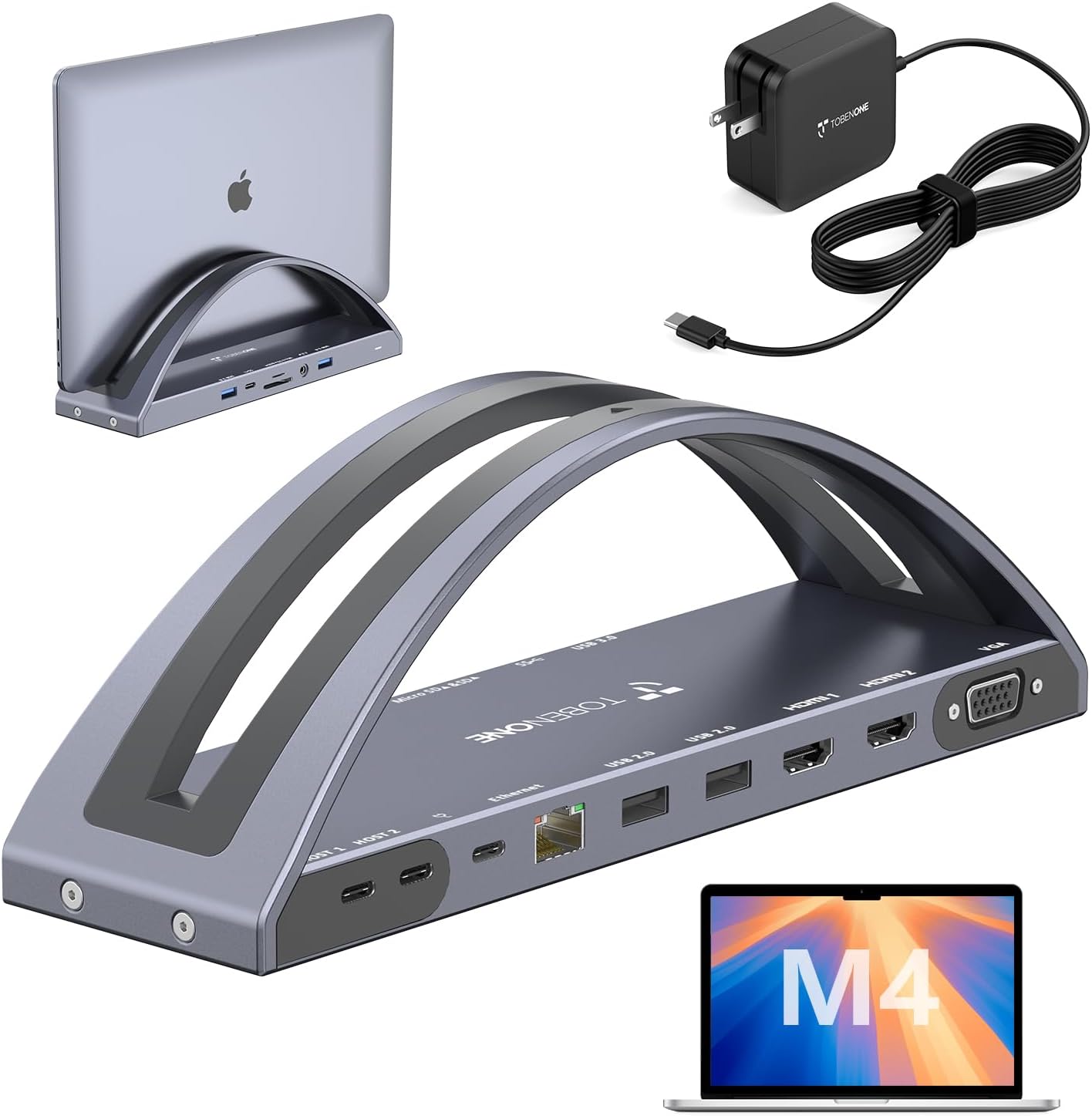
The TobenONE MacBook Pro/Air Docking Station Stand is a purpose-built solution for Mac users who want to expand their laptop's connectivity while keeping their desk neat. It combines a vertical stand with a full-featured USB-C dock, supporting dual 4K@60Hz displays, 100W power delivery, and a wide array of ports. This dock is tailored for creative professionals, remote workers, and anyone who relies on multiple monitors and peripherals with their MacBook.
Standout features include the dual HDMI outputs that deliver crisp 4K at 60Hz, ideal for video editors and graphic designers who need smooth motion and sharp detail. The 100W PD3.0 charging port provides up to 87W to your MacBook, ensuring you can work through long sessions without hunting for a power outlet. Additionally, the dock includes a VGA port for legacy projectors, though it mirrors the second HDMI output, which is a practical compromise for presentations.
Design-wise, the integrated vertical stand is a clever space-saver. It lifts your MacBook off the desk, improving airflow and reducing clutter. The dock's port layout is well-organized, with two USB-C host cables that connect to your MacBook, leaving the side ports easily accessible. The included 100W charger means you don't need to buy extra accessories. Build quality feels solid, and the stand provides a stable base for your laptop.
One drawback: MacBooks with M1, M2, or M3 chips only support a single external display, so dual-monitor setups will not work on those models. Also, the mirroring limitation between HDMI2 and VGA means you cannot use both ports for independent displays. These limitations are clearly stated, but they may disappoint some users who expect full multi-monitor flexibility.
Overall, the TobenONE Docking Station Stand is an excellent choice for MacBook users with Intel or M4/M5 chips seeking a tidy, high-performance workspace. Its combination of dual 4K output, fast charging, and comprehensive port selection makes it a strong contender in the docking station market. For those with compatible MacBooks, it delivers on its promises and earns a solid recommendation.
Ports: 2x HDMI (4K@60Hz), 1x VGA, 2x USB-C (1x 100W PD input, 1x 5Gbps data), 2x USB 3.0 (5Gbps), 2x USB 2.0, SD/Micro SD card reader (simultaneous read/write), Gigabit Ethernet (10/100/1000), 3.5mm audio jack, 2x USB-C host cables for MacBook connection.
Charging: 100W PD3.0 input, delivers up to 87W to MacBook (100W charger included).
Display Support: Dual 4K@60Hz via HDMI1+HDMI2; HDMI2 mirrors VGA; single display on M1/M2/M3 MacBooks.
Compatibility: MacBook Pro 2016-2024 (Intel, M1-M5), MacBook Air 2018-2025 (Intel, M1-M5). Not compatible with other laptops.
Design: Vertical stand with integrated dock, compact form factor for desk organization.

Pros
- Dual 4K@60Hz HDMI delivers sharp, smooth external displays for professional work
- Vertical stand saves desk space and keeps your MacBook organized
- Fast 10Gbps USB-C and USB-A ports for rapid file transfers
- 100W PD charging keeps your MacBook powered during intensive tasks
- Gigabit Ethernet provides reliable wired network connectivity
Cons
- Not compatible with MacBook base M1, M2, or M3 chips (only Pro/Max and newer models)
- Does not support Windows laptops or older MacBook models (e.g., MacBook Neo)
- PD adapter not included, you must use your own MacBook charger
- Clamshell mode requires a manual terminal command, which may be a minor inconvenience
The PULWTOP MacBook Docking Station is a versatile 2-in-1 solution that combines a vertical stand with a full-featured dock. Designed for MacBook Pro and Air users from 2016 to 2026, it supports Intel models and the latest M1 Pro/Max, M2 Pro/Max, M3 Pro/Max, and M4/M5 chips (both base and Pro/Max). This dock is not compatible with base M1, M2, or M3 MacBooks or Windows laptops, so check your model before buying.
On the performance front, the dual HDMI ports output stunning 4K at 60Hz, making this dock a fantastic choice for video editors, designers, and anyone needing extended or mirrored displays. The 10Gbps USB-C and USB-A ports allow lightning-fast data transfers, while the 100W Power Delivery ensures your MacBook charges at full speed even under heavy workloads like Final Cut Pro or dual-monitor setups. Built-in Gigabit Ethernet provides a stable wired connection, eliminating Wi-Fi drops during important video calls.
The vertical stand design is sturdy and accommodates your MacBook, tablet, or smartphone, helping to keep your desk tidy. The dock includes a 3.5mm audio jack, SD/TF card slots, and a dedicated USB-A 2.0 port for lag-free mouse and keyboard use. For clamshell mode, you need to run a simple terminal command, which is a minor extra step but works reliably once set up.
One drawback is the limited compatibility: it only works with specific MacBook models and not with Windows devices. Additionally, the PD adapter is not included, so you must supply your own. The USB-A 2.0 port is slower than the other ports, but it is fine for peripherals. Overall, this dock offers excellent value for MacBook users who need a clean workstation with dual 4K monitors and fast charging.
Verdict: If you own a compatible MacBook and want to boost your productivity with dual 4K displays and a tidy desk, the PULWTOP Docking Station is a strong choice. Its combination of performance, design, and essential ports makes it a worthy addition to any home office or creative setup.

Pros
- Seamless dual 4K@60Hz display expansion for enhanced productivity
- 150W power adapter keeps MacBook fully charged during long workdays
- High-speed 2.5G Ethernet ensures stable internet for video calls and large file transfers
- Fast SD 4.0 card reader ideal for photographers and videographers
- Wide compatibility with MacBook Pro models up to M5 series
Cons
- Not compatible with Windows, Chrome OS, or non-MacBook Apple devices (e.g., Mac Studio, iMac)
- MacBook M1/M2/M3/Neo only support single monitor extension
- Built-in stand slot (0.8 inches) may not fit MacBooks with thick protective cases
The TobenONE 17-in-2 MacBook Pro Docking Station is a versatile hub designed to streamline your workflow. It is specifically built for MacBook Pro users with Intel or Apple Silicon (M1 through M5) chips, making it a perfect companion for professionals who rely on multiple peripherals.
Standout features include dual 4K@60Hz HDMI outputs, which allow you to easily extend your workspace for tasks like spreadsheet editing, video color grading, or presentations. The included 150W power adapter ensures your MacBook stays charged, while two 30W PD ports quickly juice up your iPhone, iPad, or AirPods. The 2.5G Ethernet port provides a stable, high-speed internet connection, and the SD 4.0 card reader supports rapid file transfers for photographers and editors.
Design-wise, the dock doubles as a stand with a slim 0.8-inch slot to hold your MacBook vertically. This keeps your desk clutter-free, but note that the slot may not accommodate MacBooks with thick protective cases. The hub is built with a sleek, professional look and offers a solid feel.
One drawback is its exclusive MacBook compatibility. It does not work with Windows, Chrome OS, or other Apple devices like Mac Studio, Mac mini, or iMac. Additionally, MacBook M1/M2/M3/Neo models only support single monitor extension, so dual 4K is limited to Pro/Max versions. These limitations are clearly stated and should be considered before purchase.
Overall, the TobenONE docking station is an excellent investment for MacBook Pro users who want to expand connectivity, reduce cable mess, and boost productivity. It delivers on its promises with reliable performance and a generous port selection at a competitive price point.
Ports: 2x HDMI 4K@60Hz, 7x USB-C/A (up to 10Gbps), 2x PD 30W, 1x 2.5G Ethernet, SD/TF 4.0, 1x 150W DC input
Power Delivery: 150W adapter included; 100W to MacBook Pro, 30W each to front USB-C ports
Compatibility: MacBook Pro with Intel, M1 Pro/Max, M2 Pro/Max, M3 Pro/Max, M4, M4 Pro/Max, M5, M5 Pro/Max. Not compatible with Windows, Chrome OS, Mac Studio, Mac mini, Mac Pro, iMac, or Studio Display.
Data Transfer: USB-C/A up to 10Gbps; SD 4.0 up to 312MB/s read/write
Stand Slot: 0.8 inches (approx.) for bare MacBook; may not fit with thick case

Pros
- Versatile compatibility with most monitors and laptops
- Full ergonomic adjustments for comfortable viewing
- Easy to install with two mounting options
- Sturdy build holds screens securely
- Great value for a three-in-one setup
Cons
- Requires a separate reinforcement plate for glass desks (not included)
- Maximum arm extension of 20.7 inches may limit very wide setups
- Laptop tray may not fit larger gaming laptops over 17 inches
The MOUNTUP Dual Monitor and Laptop Mount is a versatile 3-in-1 desk stand designed for professionals and gamers who need to manage multiple screens. It accommodates two monitors up to 27 inches and a laptop from 10 to 17 inches, making it ideal for multitaskers seeking a cleaner, more ergonomic workspace.
Standout features include full motion adjustments: tilt 90 degrees up or down, swivel 90 degrees left or right, and rotate 360 degrees for portrait or landscape views. The arms extend up to 20.7 inches and raise 18.5 inches from the desk, allowing you to find the perfect viewing angle quickly. Real-world performance is smooth and stable, with each arm holding up to 17.6 pounds securely.
The mount is built with a robust steel construction and a sleek design that blends into any office or home setup. Installation is straightforward with a C-clamp or grommet mount, and all hardware is clearly labeled. Cable management channels help keep wires tidy, though the included clips could be more robust for thicker cables.
One potential drawback is that the laptop tray may not fit larger gaming laptops over 17 inches, and the maximum arm extension might be limiting for ultra-wide setups. Additionally, if you have a glass desk, you will need an optional reinforcement plate (sold separately) for safety. However, for most standard desks, the mount is rock solid.
Overall, the MOUNTUP 3-in-1 mount delivers excellent value for anyone looking to declutter their desk while improving posture and productivity. With a 4.4-star rating and a 3-year warranty, it is a reliable choice for dual-monitor and laptop users.

Pros
- Combines stand and dock to save desk space
- True dual 4K@60Hz output for sharp visuals
- Fast USB-C and USB-A data transfer speeds
- Stable Gigabit Ethernet for reliable internet
- Supports clamshell mode for a tidy workspace
Cons
- Not compatible with M1/M2/M3 MacBook base chips for dual display
- Power adapter for 100W PD not included
- Requires terminal command for clamshell mode, which may be intimidating for some users
The PULWTOP MacBook Docking Station is a versatile 2-in-1 solution that serves as both a sturdy stand and a multi-port hub. Designed for MacBook Pro and Air models from 2016 to 2026, including the latest M4 and M5 chips, it offers a dedicated experience for Apple users who need to expand their connectivity without cluttering their desk.
Its standout feature is dual 4K@60Hz output via two HDMI ports, allowing you to connect two external monitors for a seamless multitasking setup. Whether you are editing video, analyzing data, or simply enjoying a movie, the crisp 4K resolution ensures every detail is sharp. The integrated stand also improves ergonomics and airflow, which is a thoughtful touch for long work sessions.
Connectivity is comprehensive with two USB-C 10Gbps ports, one USB-A 10Gbps port, an additional USB-A 2.0 port, SD/TF card slots, a 3.5mm audio jack, and Gigabit Ethernet. The 100W Power Delivery pass-through keeps your MacBook charged, though you will need to provide your own power adapter. Data transfer is fast and reliable, making it easy to move large files or connect peripherals.
One potential drawback is compatibility: this dock does not support dual displays on M1/M2/M3 MacBook base chips, and it is not designed for Windows or Chrome devices. Additionally, enabling clamshell mode requires a terminal command, which may be a minor hurdle for less technical users. The build quality feels solid, and the compact design fits well with a modern workspace.
Overall, the PULWTOP MacBook Docking Station is a solid choice for MacBook Pro/Air users with M4/M5 or higher chips who need a space-saving stand and a powerful hub. Its dual 4K output, fast data ports, and Ethernet make it a practical tool for professionals and creatives alike. Just ensure your MacBook model is supported before purchasing.

Pros
- Exceptional compatibility with both monitors and laptops across popular sizes and weight limits
- Full motion range allows complete ergonomic customization for any user
- Simple height adjustment and tool-free mounting make setup quick and intuitive
- Ventilated laptop tray prevents heat buildup, protecting your device during long work sessions
- Solid build quality and versatile clamp/grommet options suit most desks and provide stability
Cons
- Monitor weight limit of 19.8 lbs may not support larger or ultra-wide monitors at the heavier end of the spectrum
- Laptop tray is designed for standard laptops; thicker gaming laptops with large hinges may fit less securely
- With only 9 reviews at launch, long-term durability feedback is limited
The VIVO Universal Adjustable Monitor and Laptop Desk Mount (STAND-V002O-L) is a practical solution for anyone looking to combine a monitor and laptop into a single, ergonomically efficient setup. This dual mechanical arm mount accommodates most 17 to 32 inch monitors weighing up to 19.8 lbs and 10 to 15.6 inch laptops up to 9.9 lbs, making it a versatile choice for home offices, small businesses, or any workspace where screen real estate is at a premium.
Standout features include full motion articulation: the arms offer +90 to -90 degree tilt, 180 degree swivel, and 360 degree rotation, allowing effortless switching between portrait and landscape orientations. The smooth 9.7 inch height adjustment lets you position displays from 6.25 to 16 inches above the desk, significantly reducing neck and eye strain during long workdays. The laptop tray is a highlight, with adjustable clamps and rubber tabs that secure your device firmly, plus integrated ventilation slots to prevent overheating.
Build quality is solid, with heavy-duty steel arms and a gas spring mechanism that supports smooth repositioning without sagging. The mount includes both a C-clamp (fits desktops 0.4 to 3.1 inches thick) and a grommet option (0.4 to 1.9 inches), so it adapts to most desk types. Installation is tool-free for the clamp and all necessary hardware is included, which simplifies setup.
One potential drawback is the monitor weight limit: users with larger or ultra-wide monitors nearing 20 lbs may find it less stable. Additionally, the laptop tray’s design works best with standard thin laptops; thicker or gaming laptops with large cooling vents may not seat as securely. With only a handful of user reviews available so far, long-term durability data is sparse, but early ratings are high.
Overall, the VIVO STAND-V002O-L offers excellent value for a dual arm mount that accommodates both a monitor and a laptop. Its extensive adjustment range, secure laptop tray, and flexible mounting options make it a strong choice for anyone seeking an organized, ergonomic workstation without breaking the bank.
Buying Guide: What to Look for in a MacBook Dual Monitor Stand
Compatibility With Your MacBook and Monitors
Not every stand fits every MacBook. Check the width adjustment range and weight capacity. For vertical docks, ensure the slot accommodates your MacBook’s thickness, especially if you use a case. For arm mounts, verify the VESA pattern (75x75mm or 100x100mm) matches your monitors. Some stands, like the TobenONE docking station, are designed specifically for MacBook Pro and Air models, while others are universal. Always confirm compatibility before buying.
Adjustability and Ergonomics
Your stand should allow you to position your MacBook at eye level, reducing neck strain. Look for tilt, swivel, and rotation features. Height adjustment is crucial, especially if you use a standing desk. A stand with full motion arms lets you create a seamless alignment between your laptop screen and external monitors. For more ergonomic tips, read our guide on how to set up a MacBook for ergonomics.
Build Quality and Stability
A wobbly stand is a disaster for a dual-monitor setup. Look for anodized aluminum, steel construction, and a wide base. Non-slip pads on the surface and bottom prevent scratches and keep your devices secure. The OMOTON Dual Vertical stand, for example, uses CNC-machined aluminum that matches the MacBook’s finish. For heavy monitor arms, a heavy-duty C-clamp or grommet mount ensures stability.
Additional Features: Docking Station, Cable Management, Ventilation
Many modern stands double as docking stations, adding ports for dual monitors, charging, and data transfer. If you want a clean desk, choose a stand with integrated cable management. Ventilated laptop trays prevent overheating during extended use. The VIVO and MOUNTUP models include metal trays with cutouts for airflow. For a deep dive into mounting options, see our comparison of monitor arm vs monitor stand.
Final Thoughts
After reviewing the top options, two stands stand out for different needs. For a budget-friendly, space-saving vertical dock, the OMOTON Dual Vertical Desk Laptop Stand Holder is a solid choice, holding two laptops securely with a sleek aluminum design. If you want full ergonomic control and a triple-screen setup, the VIVO Dual Monitor + Laptop Mount offers articulating arms and a ventilated laptop tray, perfect for a MacBook dual monitor workstation. Whichever you choose, elevating your MacBook improves posture and productivity.
Frequently Asked Questions
Can I use a laptop stand with a MacBook in clamshell mode?
Yes, many stands support clamshell mode, but you may need to run a terminal command to disable sleep when the lid is closed. Some docking stations, like the TobenONE and PULWTOP models, include instructions for clamshell mode. Ensure your MacBook model supports dual external displays in this mode.
What is the best height for a laptop stand with dual monitors?
The top of your laptop screen should be at or slightly below eye level. For a dual-monitor setup, align the laptop screen height with the monitors. Adjustable arm mounts make this easy. For more guidance, visit our article on correct monitor height for ergonomics.
Will a laptop stand fit my MacBook if I have a protective case?
It depends on the stand. Vertical docks often have a fixed slot width, so a thick case may prevent the laptop from sliding in. Check the product specifications for the maximum thickness. Some stands, like the TobenONE docking station, note that the slot is designed for a bare MacBook, so you may need to remove the case.
Do I need a VESA mount for my laptop on a dual monitor stand?
Most laptop trays on monitor arms use a clamp or tray that holds the laptop without VESA compatibility. Only the monitor arms require VESA plates. If you want to mount the laptop directly, look for a tray that supports your laptop size. The VIVO and MOUNTUP models include adjustable trays that work with most laptops.



Write Your Review
No reviews yet. Be the first to share your experience!