

After hours of typing, a dull ache can creep up your wrists and forearms. If you have experienced repetitive strain injury, you know that a standard keyboard often makes the problem worse. That is why we put together this guide to the best ergonomic mechanical keyboards for RSI in 2026, with an eye toward split designs, switch feel, palm support, and real-world comfort.
We evaluated dozens of models to find options that genuinely reduce strain and hold up to daily use. We also considered extras like wireless connectivity, adjustable tilt, and programmable keys. For a broader look at supportive designs, see our guide to the best ergonomic keyboard for wrist pain.
These keyboards ease hand strain during typing, but RSI triggered by non-keyboard activity, like a physically demanding hobby, will not improve from a keyboard swap alone. This guide is informational and is not a substitute for medical advice; if your pain is severe, persistent, or worsening, consult a physician or physical therapist.
Disclosure: Ergonook is a participant in the Amazon Associates program. Links below are affiliate links, and we may earn a commission from qualifying purchases. This does not affect which products we recommend or how we rank them.

Pros
- Split-key ergonomic design reduces wrist strain and promotes natural hand positioning.
- Low-profile blue clicky switches provide satisfying tactile and audible feedback for typing.
- Curved key rows and ergonomic keycaps enhance fingertip comfort during long sessions.
- Full N-key rollover ensures accurate keystroke registration, ideal for fast typists.
- Programmable keys offer customization without software installation, compatible with multiple OS.
Cons
- Clicky switch noise may be disruptive in quiet office or shared environments.
- Requires a short adjustment period (1-2 weeks) to adapt to the split layout.
- Wired connection only, no wireless or Bluetooth option available.
The Perixx PERIBOARD-535BL is a wired ergonomic mechanical keyboard designed for users who spend long hours typing. It targets coders, writers, and productivity-focused professionals seeking comfort and audible feedback. Its split-key layout and low-profile blue clicky switches set it apart from standard keyboards.
The standout feature is the one-piece split design that separates keys into left and right zones. This reduces wrist bending and promotes a natural hand position. The low-profile blue switches deliver a loud click and tactile bump, providing satisfying confirmation for every keystroke.
Build quality is solid with a compact footprint and curved key rows. The ergonomic keycaps have flatter tops and back edges, enhancing fingertip comfort. The keyboard is full-size with a number pad, and the wired connection ensures lag-free performance.
A potential drawback is the noise level; the clicky switches are loud and may not suit shared workspaces. Additionally, the split layout requires a brief adjustment period, typically one to two weeks. There is no wireless option, which may be a limitation for some users.
Overall, the Perixx PERIBOARD-535BL offers excellent ergonomic benefits and responsive mechanical switches at a reasonable price. It is a strong choice for anyone who values comfort and tactile feedback during extended typing sessions.

Pros
- Ergonomic split design reduces strain on wrists and shoulders.
- Customizable RGB lighting and macro keys offer personalization.
- Tactile Kailh brown switches provide good feedback without being too loud.
- Sturdy build quality with a comfortable built-in wrist rest.
- Integrated USB pass-through adds convenience for connecting peripherals.
Cons
- Higher price point compared to standard mechanical keyboards.
- May require an adjustment period for users new to split layouts.
- Software for RGB customization could be more intuitive for some users.
The Cloud Nine C989M is an ergonomic split mechanical keyboard designed to reduce wrist and shoulder pain during long typing sessions. It is ideal for professionals who spend hours at a computer, as well as gamers who want comfort without sacrificing performance. The keyboard features Kailh tactile brown switches, which provide a satisfying tactile bump with a low actuation force, making it suitable for both typing and gaming.
Standout features include the split design that can be separated up to eight inches, allowing for a natural arm and wrist alignment. The built-in tenting with a seven-degree angle and cushioned palm support further enhance comfort. The RGB backlighting is per-key customizable via a companion app, offering a wide range of colors and effects to suit any setup.
Build quality is solid, with a durable plastic frame and a full-size layout that includes a number pad and ten programmable macro keys. The USB pass-through is a convenient addition for connecting a mouse or other device. The wrist rests are integrated and provide good support, though they are not detachable.
One potential drawback is the price, which is higher than many standard mechanical keyboards. Additionally, users new to split keyboards may need some time to adapt to the layout. The customization software, while functional, could be more user-friendly for those looking to quickly adjust settings.
Overall, the Cloud Nine C989M is a well-built ergonomic keyboard that delivers on its promise of reducing strain. It is a worthwhile investment for anyone who experiences discomfort from traditional keyboards or wants to prevent future issues. With its combination of comfort, customization, and performance, it earns a strong recommendation for both work and play.

Pros
- Excellent tactile feedback with loud, clear clicky sound perfect for typists who prefer audible confirmation
- Ergonomic design with adjustable tilt wrist rest reduces pain and strain during extended use
- Programmable macro keys enhance productivity for repetitive tasks
- Affordable price point for a mechanical ergonomic keyboard
- Compatible with both Windows and Mac OS X, plus Linux
Cons
- Blue switches are loud, which may be disruptive in shared spaces or quiet offices
- No backlighting, making it harder to use in low-light conditions
- Compact layout may take time to adjust for users accustomed to full-size keyboards
The Perixx PERIBOARD-335BL is a wired ergonomic mechanical keyboard designed to improve typing posture and comfort. It targets heavy typists, programmers, and anyone spending long hours at a desk who wants the tactile feedback of mechanical switches without the high cost.
Its standout feature is the split-key design and curved frame, which promote a natural wrist and arm alignment. Paired with an adjustable tilt wrist rest offering 0, 4, and 7 degree angles, it effectively reduces pronation and muscle strain. The blue clicky switches provide crisp tactile and audible feedback, making each keystroke satisfying and precise for heavy-duty typing or coding.
Build quality feels solid for the price, with a compact tenkeyless form factor that saves desk space. The programmable keys via included software allow customization of macros and key remapping, enhancing workflow efficiency. Connectivity is via a 5.9 ft USB cable, and it works seamlessly with Windows, Mac, and Linux.
Potential drawbacks include the loud clicky sound, which may disturb coworkers in open offices, and the lack of backlighting for dim environments. The compact layout also takes some getting used to for those accustomed to a numeric keypad. However, these are trade-offs for the ergonomic benefits and affordability.
Overall, the Perixx PERIBOARD-335BL delivers exceptional value for its price. It combines genuine ergonomic design with responsive mechanical switches and programmability, making it a strong choice for anyone seeking relief from typing strain without sacrificing performance.

Pros
- Satisfying tactile quiet mechanical switches for responsive, low-noise typing
- Low-profile design improves ergonomics and reduces fatigue during extended use
- Smart illumination adapts to lighting conditions and saves battery life
- Multi-device pairing up to three devices with easy switching
- Long battery life with USB-C fast charging
Cons
- Not compatible with Logitech Unifying receivers; requires Logi Bolt or Bluetooth
- Full customization requires Logi Options+ software, which is only available for Windows and macOS
- FileVault on macOS can prevent Bluetooth password entry at startup; workaround involves using the Logi Bolt receiver
The Logitech MX Mechanical Wireless Illuminated Keyboard is a premium full-size keyboard designed for professionals and power users who want the tactile feedback of mechanical switches without the noise. It features Logitech's Tactile Quiet switches, which offer a distinct bump for precise typing while keeping volume low. This keyboard is ideal for office environments, shared workspaces, or anyone who values both performance and discretion.
In real-world use, the low-profile mechanical keys provide a comfortable typing experience with a shorter travel distance that reduces finger strain. The smart illumination is a standout feature: backlighting activates automatically when your hands approach and adjusts to ambient light, so you always see the keys without wasting battery. The ability to pair with up to three devices via Bluetooth or the included Logi Bolt receiver makes switching between a laptop, desktop, and tablet effortless.
Design and build quality are excellent. The keyboard has a sleek graphite finish with a sturdy construction that feels solid on a desk. It uses certified post-consumer recycled plastic, reflecting Logitech's sustainability efforts. The USB-C charging port is conveniently located, and the battery life is impressive: up to 15 days with backlighting on, or 10 months without. The low-profile keycaps also contribute to a cleaner, more professional look.
However, there are a few drawbacks. The keyboard does not support Logitech's older Unifying receivers, so you must use the included Logi Bolt or Bluetooth. Full customization through Logi Options+ is only available on Windows and macOS, limiting some features on other operating systems. Additionally, macOS users with FileVault enabled may need to use the Logi Bolt receiver to enter passwords at startup, as Bluetooth may not work.
Overall, the Logitech MX Mechanical Wireless Illuminated Keyboard is a top-tier choice for anyone seeking a quiet mechanical typing experience with ergonomic benefits and multi-device flexibility. Its smart illumination and long battery life add convenience, while the minor compatibility issues are manageable. If you value productivity and comfort, this keyboard is a worthy investment.

Pros
- Rechargeable battery with a long rated life per charge
- Simple plug-and-play setup, no Bluetooth pairing required
- One of the more affordable split keyboards in this comparison
Cons
- Fixed split angle rather than fully separable modules
- USB receiver only, no Bluetooth option
The Arteck split keyboard uses a fixed split layout with a soft cushioned wrist and palm rest, aimed at a more natural hand position than a flat keyboard.
It connects through a nano USB receiver stored in the keyboard itself, and its rechargeable battery is rated for about six months per charge based on typical daily use.
It's backed by a 24 month warranty, and is one of the more affordable split keyboards in this comparison.
It doesn't offer Bluetooth or fully separable key modules, so it's a more modest step up from a standard keyboard than the Kinesis models here.
It suits anyone who wants an affordable, low-effort introduction to a split keyboard layout.
Dimensions: 16.5 inches long by 9.6 inches wide by 1.02 inches high.
Connectivity: 2.4G USB wireless receiver.
Battery: Rechargeable, rated around six months per charge.
Warranty: 24 months.
Who should buy this keyboard? Anyone who wants an affordable, simple introduction to a split ergonomic layout.
Who might want to look elsewhere? Anyone who wants Bluetooth or fully separable key modules should consider the Logitech K860 or Kinesis models instead.
Setup tip: The nano receiver stores inside the keyboard when not in use, so check there first if you misplace it.

Pros
- Comfortable ergonomic design reduces hand and wrist fatigue
- Stable long-range wireless connection
- Quiet mouse operation ideal for shared spaces
- Easy setup with no software required
- Good value for a full-size combo with wrist rest
Cons
- No backlighting for low-light use
- Mouse may be too small for larger hands
- Build quality feels somewhat plastic and lightweight
The RECCAZR Wireless Keyboard and Mouse Combo brings ergonomic comfort to your desktop with its unique wave-shaped key layout and built-in wrist rest. Designed for office workers, heavy typists, and anyone spending long hours at a computer, this full-size set aims to reduce strain while boosting productivity.
The standout feature is the wave keys design, which allows fingers to access all keys naturally. The included wrist rest and foldable stand further enhance posture. The 2.4GHz wireless connection is stable up to 33 feet, and the single nano receiver works for both devices. The mouse offers quiet clicks with 90% less noise and three DPI levels for adjustable sensitivity.
Build quality is decent for the price, with a spill-resistant keyboard that can handle minor accidents. The mouse has forward/back buttons for easy browsing. Setup is truly plug-and-play with no software needed, and compatibility covers Windows and Mac systems.
On the downside, the keyboard lacks backlighting, which may be an issue in dimly lit rooms. Some users may find the mouse slightly small for larger hands. The plastic construction feels a bit lightweight but is acceptable at this price point.
Overall, the RECCAZR Wireless Keyboard and Mouse Combo delivers excellent ergonomics and quiet operation at an affordable price. It is a solid choice for anyone seeking a comfortable typing experience without breaking the bank.
Pros
- Ergonomic split design reduces wrist and hand strain
- Long 206-hour rechargeable battery life
- Comfortable oversized leatherette wrist rest
- Dual-mode connectivity for versatile device pairing
- Adjustable tilt angles for personalized ergonomics
Cons
- Split layout may require a learning curve for new users
- No backlighting for use in low-light environments
- Wrist rest is not removable, which may limit desk space
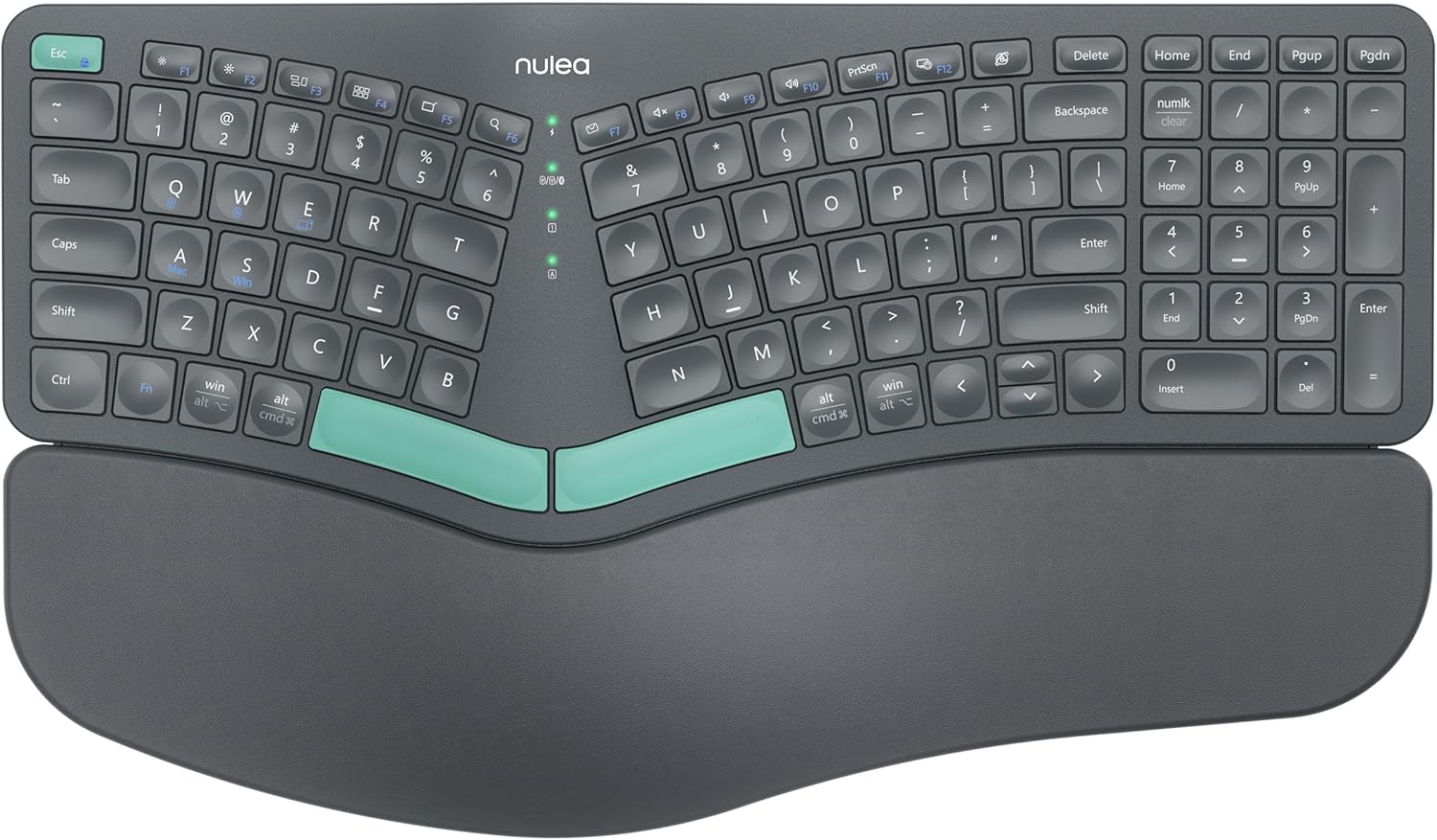
The Nulea Ergonomic Split Keyboard is designed for users who spend long hours typing and want to reduce strain. It is ideal for office workers, programmers, and anyone experiencing wrist discomfort from traditional keyboards.
Its standout feature is the split design, which promotes a natural hand position, while the cushioned leatherette wrist rest offers ample support. Dual-mode wireless connectivity allows easy switching between devices, and the rechargeable battery lasts up to 206 hours, ensuring uninterrupted productivity.
The keyboard includes adjustable tilt legs for three different angles, letting users find their optimal typing angle. The build feels sturdy and premium, though the split design may take some time to get used to for those accustomed to standard layouts.
Potential drawbacks include the lack of backlighting, which could be a downside for typing in low-light conditions. Additionally, the split layout may have a learning curve, but most users adapt within a week.
Overall, the Nulea Ergonomic Split Keyboard offers excellent value for ergonomic-conscious users. Its combination of comfort, wireless freedom, and long battery life makes it a solid choice for improving typing posture and reducing fatigue.
Brand: Nulea
Model: Ergonomic Split Keyboard
Connectivity: Bluetooth 5.0 and 2.4G wireless
Battery Life: Up to 206 hours
Wrist Rest: Oversized, leatherette, cushioned
Adjustable Tilt: 3 angles
Rechargeable: Yes, via USB-C
Compatibility: Windows, macOS, Android, iOS

Pros
- Ergonomic curved keyboard reduces wrist and finger fatigue.
- Silent keys and mouse make it ideal for shared workspaces.
- Adjustable tilt legs improve comfort for standing desks or different desk heights.
- Wide compatibility with Windows, Mac, Chrome OS, and Linux.
- Affordable price with included 1-year worry-free warranty.
Cons
- Not designed for gaming; lacks tactile feedback and high polling rate.
- Compact mouse may feel small for users with larger hands.
- No backlighting on keyboard, making it harder to use in low-light conditions.
The RECCAZR Wireless Keyboard and Mouse Combo is a thoughtfully designed peripheral set aimed at office workers, home users, and anyone who spends long hours at a computer. Its standout feature is the ergonomic curved keyboard layout, which encourages a more natural hand position and reduces strain on your wrists and fingers. Combined with the silent key mechanism, this combo is particularly well-suited for open-plan offices or quiet home environments where noise is a concern.
In real-world use, the wireless connection proved stable up to the advertised 10 meters, with no noticeable lag or dropouts during typing and mousing tasks. The plug-and-play setup is genuinely hassle-free: just insert the single nano receiver into a USB port and both devices work immediately. The keyboard's 9 shortcut keys are a welcome productivity boost, providing quick access to frequently used functions like volume, email, and calculator.
The ergonomic design extends to the mouse, which has a symmetrical shape that suits both left- and right-handed users. Its three adjustable DPI levels allow you to choose the cursor speed that feels best, though advanced users may desire more granular control. The adjustable tilt legs on the keyboard are a clever addition, letting you find a comfortable typing angle whether you're sitting or standing, which is especially beneficial for those using standing desks.
On the downside, the keyboard lacks backlighting, so typing in dimly lit rooms can be challenging. The mouse is on the compact side, which might not be ideal for users with larger hands, though it remains comfortable for general office tasks. Additionally, the silent membrane keys, while quiet, provide a softer feel that may not satisfy typists who prefer more tactile feedback.
Overall, the RECCAZR wireless combo delivers excellent value for its price, combining ergonomic innovation, silent operation, and reliable wireless performance. It is a solid choice for professionals, students, and home users who prioritize comfort and quiet efficiency during everyday computing. If you need a no-fuss, comfortable set for work or study, this combo is well worth considering.
Wireless Range: Up to 10 meters (33 feet)
Connection: Single nano USB receiver (shared by keyboard and mouse)
Keyboard Type: Silent membrane keys with ergonomic curved layout
Mouse DPI: 3 adjustable levels (800/1200/1600)
Adjustable Legs: Front and back double adjustable tilt legs
Shortcut Keys: 9 independent one-touch keys
System Compatibility: Windows 2000/XP/2003/2007/Vista/7/8/10/11, Mac OS, Chrome OS, Linux
Warranty: 1-year worry-free warranty

Pros
- Reduces wrist and shoulder pain for long typing sessions
- Built-in tenting eliminates need for separate accessories
- Kailh Brown switches offer a balanced tactile experience
- Customizable RGB backlighting and programmable controls
- Adjustable tilt adapts to sitting or standing desks
Cons
- Tenkeyless layout may not suit users who rely on a number pad
- Higher price point compared to standard mechanical keyboards
- Learning curve for split keyboard layout for new users
The Cloud Nine ErgoTKL is an ergonomic tenkeyless mechanical keyboard designed for professionals who spend hours typing. Its split design allows each half to be separated up to 6.5 inches, helping to align your shoulders and reduce wrist and shoulder pain. This keyboard is ideal for coders, writers, and anyone who experiences discomfort from traditional straight keyboards.
Standout features include a built-in 7-degree tented palm support that keeps your hands at a natural inward angle, eliminating the need for a separate tenting kit. The Kailh Brown switches provide a tactile bump with a satisfying feel, suitable for both typing and gaming. The aluminum Smart Wheel adds convenience, letting you control volume, switch applications, or scroll pages with a custom function.
Build quality is solid with an aluminum frame and adjustable forward tilt options (0/-4/-7 degrees) that work seamlessly with standing desks. The RGB backlighting is fully customizable, and the programmable hotkeys enhance productivity. The USB pass-through port is a handy addition for connecting peripherals.
Potential drawbacks include the tenkeyless layout, which may not suit users who frequently use a number pad. The price is higher than standard mechanical keyboards, and the split design may require an adjustment period for new users. However, the ergonomic benefits outweigh these concerns for those with chronic pain.
Overall, the Cloud Nine ErgoTKL is a well-built, ergonomic keyboard that delivers on its promise of pain-free typing. It is a worthwhile investment for anyone seeking long-term comfort and efficiency in their daily workflow.
How to Choose an Ergonomic Mechanical Keyboard for RSI
Not every ergonomic mechanical keyboard is the same. The best choice for RSI often comes down to how well a keyboard supports your posture, how much force it takes to press a key, and whether it fits into your existing workstation. These are the four criteria we focused on while evaluating each model.
We looked for models with proven split designs, responsive yet low-force switches, and comfort features that support natural wrist alignment. The result is a mix of full-size, tenkeyless, and compact options for different desk setups. Under each category below, we highlight what matters most and which products deliver on that front.
Split Layout and Tenting
A split keyboard lets each hand rest at shoulder width, which keeps your wrists, elbows, and shoulders in a straighter line. Tenting adds a vertical slope that reduces forearm pronation and eases pressure on the median nerve. Both the Cloud Nine C989M and the Cloud Nine ErgoTKL separate up to several inches and include built-in tenting, so your arms remain aligned even during marathon typing sessions. The Perixx PERIBOARD-535BL uses a one-piece split layout that separates keys into two zones without demanding extra desk space.
The Cloud Nine ErgoTKL takes this a step further with an integrated aluminum smart wheel that lets you adjust volume and switch apps without reaching for a mouse. If you want a dedicated number pad, the full-size Cloud Nine C989M keeps all of your data entry keys while still letting each half move independently.
If you want to explore more separated designs, our roundup of the best split ergonomic keyboard covers even more options with different feature sets.
Switch Type and Activation Force
Mechanical switches deliver clear tactile feedback, but not every switch is kind to sensitive hands. Low-actuation tactile switches, such as Kailh Brown or the low-profile blue switches used in the Perixx PERIBOARD-535BL and PERIBOARD-335BL, require less force and give you a satisfying bump without harsh bottoming out. If you prefer a quieter setup, the Logitech MX Mechanical offers tactile quiet switches that still feel precise.
Key feel also matters for RSI because a switch that is too stiff encourages forceful keystrokes, while one that is too light can lead to accidental presses. The Perixx low-profile blue switches deliver a crisp click with a short travel distance, making them a favorite among writers who want audible confirmation without bottoming out.
Before choosing a switch, consider how it affects your fingers over long sessions. You can also read our comparison of ergonomic keyboards versus regular keyboards to understand the broader benefits.
Wrist Support and Palm Rest
A cushioned palm rest helps keep your wrists in a neutral, resting position while you type. Many models, including the Arteck Split Ergonomic Keyboard and the Nulea split keyboard, include generously padded rests with soft, skin-friendly surfaces. However, a palm rest is not a substitute for correct posture, so pair it with a well-adjusted chair and desk height.
The Nulea keyboard goes even further with an oversized, leatherette wrist rest that feels plush from the first keystroke. The Arteck model adds foldable legs that change the tilt of the whole board, which can make a real difference if you alternate between sitting and standing.
If you already feel discomfort in your hands or wrists, our guide on how to reduce wrist pain from typing offers practical stretches and habits to combine with your new keyboard.
Connectivity and Adjustability
Look for features that match the way you work. Wireless models like the Nulea and the RECCAZR combo make it easy to switch between devices, while wired options such as the Perixx PERIBOARD-535BL provide dependable plug-and-play performance with no pairing hassle. Adjustable tilt legs, found on the Cloud Nine ErgoTKL and the Perixx PERIBOARD-335BL, let you change the angle of your wrists with a simple lever.
Keep in mind that some wireless keyboards use a USB receiver, while others pair through Bluetooth. The Nulea supports both, so you can switch between a laptop and desktop in seconds. The RECCAZR combo shares one tiny receiver between the keyboard and mouse, freeing up USB ports on your computer.
Pairing an ergonomic keyboard with a vertical mouse can further reduce strain. Our roundup of the best vertical mouse for wrist pain lists models that work well alongside these keyboards.
Final Thoughts
When you are dealing with RSI, the right keyboard can make a meaningful difference in how you feel at the end of the day. For a full-featured split design with tenting and programmable macros, the Cloud Nine C989M is our top pick for people who type for hours on end. If you prefer a sleeker, more compact option with quiet tactile switches, the Logitech MX Mechanical blends comfort with everyday versatility. Both are excellent starting points on your path to pain-free typing. Pair either one with a supportive wrist rest and regular micro-breaks, and you will give your hands the care they deserve.
Frequently Asked Questions
What is the best ergonomic mechanical keyboard for RSI in 2026?
The best option depends on your typing style, but the Cloud Nine C989M stands out because of its split body, tented palm support, and tactile Kailh Brown switches. The Logitech MX Mechanical is another strong choice if you want quiet, low-profile mechanical keys in a familiar full-size layout. Both are designed to reduce wrist strain during long stretches at the computer. If you use both devices, you can assign custom macros or lighting profiles through their companion software.
Are split keyboards better for RSI?
Split keyboards allow your arms and wrists to maintain a more natural alignment, which can reduce pressure on the median nerve and surrounding tendons. Many ergonomists and physical therapists recommend them for repetitive strain injuries. It may take a few days for your muscle memory to adjust to the new layout, but most people adapt within a week or two. During that adjustment period, take frequent breaks and keep your shoulders relaxed.
What switches are best for RSI?
In general, a tactile switch with a light activation force is easier on the fingers than a heavy linear or clicky switch. Kailh Brown switches and low-profile blue switches from Perixx provide a gentle bump, while the Logitech MX Mechanical tactile quiet switches add a softer cushion. If you have the chance, a switch sampler can help you choose the most comfortable feel for your hands. Pay attention to actuation force too, because a lighter switch can reduce fatigue over a full workday.
Can an ergonomic keyboard alone fix wrist pain?
An ergonomic keyboard can help, but it is only one part of a complete approach. Take regular breaks, stretch your fingers and wrists, and make sure your desk and chair are at the correct height. For more setup advice, read our guide on how to position keyboard and mouse ergonomically. A vertical mouse and an adjustable desk can also lower strain on your whole upper body.



Write Your Review
No reviews yet. Be the first to share your experience!