

Wrist pain from typing usually builds gradually, from hands held at an unnatural angle for hours at a time. An ergonomic keyboard can ease some of that strain by changing your hand position or adding cushioned support, though it isn’t a substitute for medical care if your pain persists.
We compared six ergonomic keyboards ranging from subtle, contoured designs to fully split, wired layouts. Browse our full ergonomic keyboards category for more options.

Pros
- Certified by an independent ergonomics organization
- Compact size closer to a standard keyboard footprint
- Long rated battery life
Cons
- Not fully split, so the wrist angle change is more subtle than the Kinesis or Perixx keyboards
- Membrane switches rather than mechanical
Wave Keys uses a gently wavy, contoured shape rather than a fully split layout, aiming to guide your hands into a more natural position without a steep learning curve.
Its built-in memory foam palm rest adds cushioned support, and it's certified by United States Ergonomics for posture and strain reduction.
It connects over Bluetooth or the included Logi Bolt receiver, with Easy-Switch letting you jump between paired devices, and a battery rated to last up to three years.
Because it isn't fully split, the wrist angle change is more subtle than the Kinesis or Perixx keyboards in this comparison.
It suits anyone who wants ergonomic support with minimal adjustment from a standard keyboard.
Dimensions: 14.8 inches long by 8.62 inches wide by 1.18 inches high.
Connectivity: Bluetooth or included Logi Bolt receiver.
Switch type: Membrane.
Battery life: Rated up to three years.
Weight: 2.1 pounds.
Who should buy this keyboard? Anyone who wants certified ergonomic support with a gentle learning curve from a standard keyboard.
Who might want to look elsewhere? Anyone who wants a fully split or mechanical layout should consider the Perixx or Kinesis keyboards instead.
Setup tip: Pair it with a compatible Logitech mouse through the same Easy-Switch profile for a consistent multi-device setup.

Pros
- Rechargeable battery with a long rated life per charge
- Simple plug-and-play setup, no Bluetooth pairing required
- One of the more affordable split keyboards in this comparison
Cons
- Fixed split angle rather than fully separable modules
- USB receiver only, no Bluetooth option
The Arteck split keyboard uses a fixed split layout with a soft cushioned wrist and palm rest, aimed at a more natural hand position than a flat keyboard.
It connects through a nano USB receiver stored in the keyboard itself, and its rechargeable battery is rated for about six months per charge based on typical daily use.
It's backed by a 24 month warranty, and is one of the more affordable split keyboards in this comparison.
It doesn't offer Bluetooth or fully separable key modules, so it's a more modest step up from a standard keyboard than the Kinesis models here.
It suits anyone who wants an affordable, low-effort introduction to a split keyboard layout.
Dimensions: 16.5 inches long by 9.6 inches wide by 1.02 inches high.
Connectivity: 2.4G USB wireless receiver.
Battery: Rechargeable, rated around six months per charge.
Warranty: 24 months.
Who should buy this keyboard? Anyone who wants an affordable, simple introduction to a split ergonomic layout.
Who might want to look elsewhere? Anyone who wants Bluetooth or fully separable key modules should consider the Logitech K860 or Kinesis models instead.
Setup tip: The nano receiver stores inside the keyboard when not in use, so check there first if you misplace it.

Pros
- Certified by an independent ergonomics organization
- Full-size layout keeps a familiar typing experience
- Quiet keys suited to shared workspaces
Cons
- Fixed split angle rather than fully separable key modules like the Kinesis models here
- Larger footprint than a standard compact keyboard
The Ergo K860 uses a curved, split keyframe that slopes outward, aiming to keep your wrists and forearms in a more natural position without fully separating the two halves.
Its memory foam wrist rest and three tilt angles let you fine-tune the typing posture whether you're sitting or standing, and it's certified by United States Ergonomics.
It connects over Bluetooth or the included USB receiver, and keeps a full-size layout with quiet keys, so the transition from a standard keyboard is relatively gentle.
Compared with the fully split Kinesis models in this comparison, its fixed curve is less adjustable but easier to adapt to.
It suits anyone who wants proven ergonomic credentials in a familiar, full-size keyboard shape.
Dimensions: 17.95 inches long by 9.17 inches wide by 1.89 inches high.
Connectivity: Bluetooth or included USB receiver.
Tilt options: 0, negative 4, or negative 7 degrees.
Layout: Full-size, 105 keys.
Weight: 2.6 pounds.
Who should buy this keyboard? Anyone who wants a certified ergonomic keyboard that still feels close to a standard full-size layout.
Who might want to look elsewhere? Anyone who wants fully separable key modules for maximum shoulder-width typing should look at the Kinesis Freestyle2 or Advantage360 instead.
Setup tip: Start at the flat 0 degree tilt and only add negative tilt once you're comfortable with the split shape.

Pros
- Widely reviewed with a strong track record
- Distinct tactile feedback for typists who prefer a firmer keystroke
- Straightforward wired setup
Cons
- Manufacturer notes a one to two week adjustment period is typical
- Wired only, no wireless option
The PERIBOARD-512 uses a one-piece split layout with curved, stepped key rows, aiming to reduce wrist bending during long typing sessions.
Its extended key travel gives a tactile, audible response similar to a mechanical keyboard, and the curved keycaps are shaped to fit fingertip contours.
It's rated for up to 20 million keystrokes and has one of the most widely reviewed track records in this comparison.
Perixx notes most users adapt within one to two weeks, which is worth expecting going in.
It suits anyone who wants a proven, wired split keyboard with distinct tactile feedback.
Dimensions: 19.09 inches long by 9.29 inches wide by 1.73 inches high.
Connectivity: Wired USB.
Switch type: Tactile membrane, rated for up to 20 million keystrokes.
Weight: 2.3 pounds.
Who should buy this keyboard? Anyone who wants a proven, wired split keyboard with distinct tactile feedback.
Who might want to look elsewhere? Anyone who wants a wireless connection should consider the Logitech Wave Keys or Nulea keyboard instead.
Setup tip: Give yourself the one to two week adjustment period Perixx notes rather than judging comfort in the first few days.

Pros
- Keyboard and mouse designed to work together as a matched set
- Simplifies buying both accessories at once
- Certified ergonomic design
Cons
- Smaller review history than the standalone Wave Keys keyboard
- Costs more upfront than buying just the keyboard alone
This combo bundles the Wave Keys keyboard with the Lift vertical mouse, both designed and approved according to criteria set out by ergonomists.
The keyboard brings the same wavy shape and memory foam palm rest as the standalone version, while the Lift mouse adds a 57 degree vertical grip built for small to medium hands.
Both connect through Bluetooth or a shared Logi Bolt receiver, and the pairing is meant to give a consistent ergonomic setup across your whole workstation.
It has a smaller review history than the standalone keyboard, since it's a newer bundled offering.
It suits anyone outfitting both a keyboard and mouse at once who wants a matched, certified pair.
Who should buy this combo? Anyone who needs both a new keyboard and mouse and wants a matched, certified ergonomic pair.
Who might want to look elsewhere? Anyone who already has a mouse they like should buy the standalone Wave Keys keyboard instead.
Setup tip: Pair both devices to the same Logi Bolt receiver to save a USB port if your computer has limited ports.
Pros
- Rechargeable battery with a long rated life per charge
- Backlighting adds visibility for low-light typing
- Dual-mode wireless connection option
Cons
- Smaller, newer brand with less of an established track record than Logitech or Perixx
- Membrane keyboard rather than mechanical
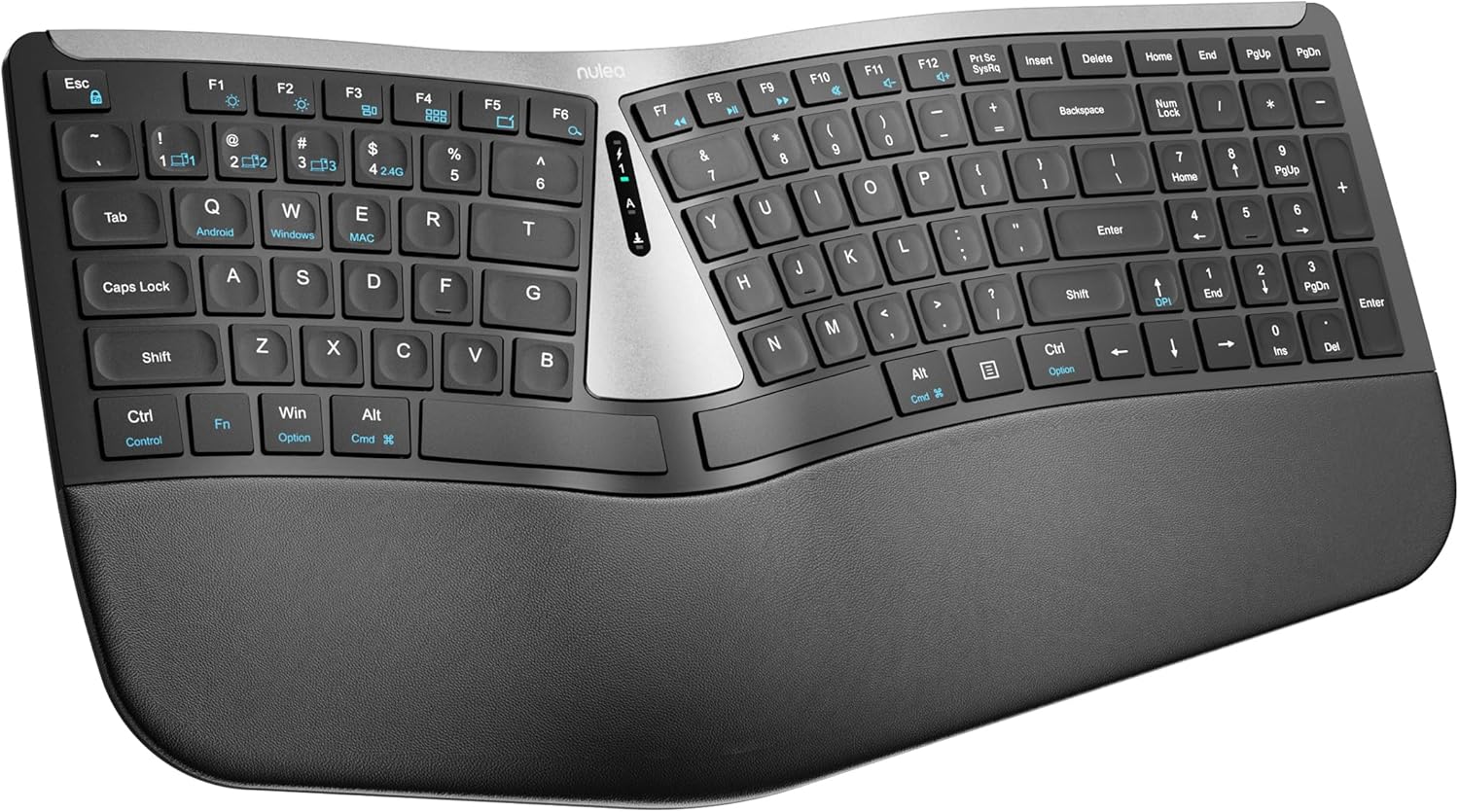
Nulea's keyboard uses a split layout with a soft palm rest and backlighting, connecting through either Bluetooth or a 2.4G receiver.
Nulea markets this keyboard specifically toward carpal tunnel comfort, though as with any ergonomic accessory, how much relief it provides varies by person and it isn't a substitute for medical advice.
Its rechargeable battery is rated for around 200 hours per charge, and the scissor-switch keys are built for a stable, responsive feel.
As a smaller, newer brand, it has less of an established track record than the Logitech or Perixx keyboards in this comparison.
It suits budget-conscious shoppers who want a wireless split keyboard with backlighting.
Connectivity: Bluetooth and 2.4G, dual-mode.
Battery: Rechargeable, rated around 200 hours per charge.
Switch type: Scissor-switch.
Keys: 104.
Who should buy this keyboard? Budget-conscious shoppers who want a wireless split keyboard with backlighting.
Who might want to look elsewhere? Anyone who wants an established, long-track-record brand should consider the Logitech or Perixx keyboards instead.
Setup tip: If you have diagnosed carpal tunnel syndrome, talk with a doctor about your setup rather than relying on any keyboard alone.
What to Look for When Wrist Pain Is Your Main Concern
Palm and Wrist Support
Cushioned support matters as much as the split shape itself. The Logitech Wave Keys and its combo bundle both include a memory foam palm rest, while the Arteck and Nulea keyboards use a softer cushioned rest built into the frame.
The Perixx keyboard takes a different approach, relying on curved, contoured keycaps rather than a dedicated palm rest.
How Gradual an Adjustment You Want
If you want the gentlest transition, the Wave Keys and its combo bundle use a subtle wavy shape rather than a full split. The Arteck, Perixx, and Nulea keyboards all use a more pronounced split layout that takes more adjustment but changes your hand position more significantly.
Wired vs. Wireless
The Wave Keys, its combo bundle, and the wireless Arteck all connect over Bluetooth or a USB receiver, while the Perixx keyboard is wired only. The Nulea keyboard supports both Bluetooth and 2.4G, giving you flexibility to switch between devices.
Final Thoughts
For most people who want an easy transition, the Logitech Wave Keys pairs certified ergonomic design with a gentle learning curve, while the Perixx PERIBOARD-512 is worth considering if you want a more pronounced split with tactile feedback.
Frequently Asked Questions
Can an ergonomic keyboard fix wrist pain from typing?
An ergonomic keyboard can reduce some of the strain from typing in an unnatural position, but it isn’t a guaranteed fix. If your pain is persistent or worsening, talk with a doctor rather than relying on a keyboard alone.
Should I choose a subtle or fully split ergonomic keyboard?
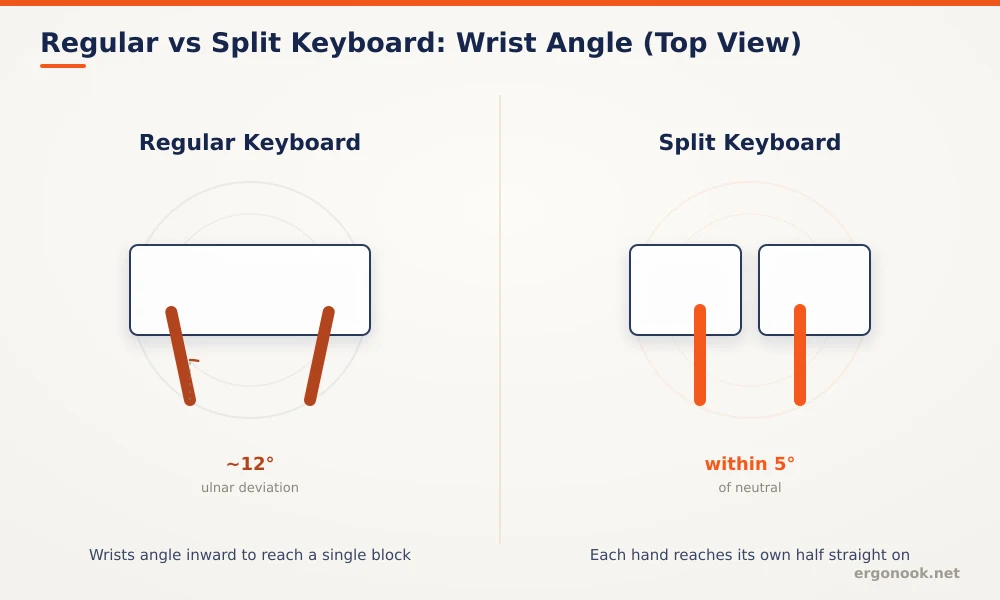
A subtle, contoured design like the Wave Keys is easier to adjust to if you’re new to ergonomic keyboards. A fully split layout changes your hand position more significantly, which some people find offers more relief once they’ve adapted.
Does a palm rest actually help with wrist pain?
A cushioned palm rest supports your wrists during pauses in typing, which can reduce pressure compared with resting your wrists directly on a hard desk edge. It works best alongside good posture rather than as a standalone fix.
How long before an ergonomic keyboard feels comfortable in 2026?
Most people need one to two weeks to adjust, especially with a fully split layout. Give it a fair trial before deciding whether the shape works for you.


Write Your Review
No reviews yet. Be the first to share your experience!