

Most people adjust to a shallow-angle split keyboard within a few days to a week. Keyboards with a columnar or heavily reshaped layout take longer, often two to four weeks before typing speed feels fully normal again. Daily, consistent use matters more than which specific keyboard you pick.
- A study of 24 experienced touch typists testing seven different split keyboard configurations found typing speed did not differ significantly between them, suggesting a standard split layout adds little relearning curve for most typists.
- Cornell’s ergonomics program notes that specialist or heavily alternative keyboards can carry a real learning curve, and some studies show a genuine short-term drop in performance that varies by design.
- A properly set up split keyboard reduced wrist ulnar deviation from 12 degrees to within 5 degrees of neutral compared with a standard keyboard, the core benefit driving the switch in the first place.
- Typing accuracy usually lags behind speed during adjustment. Expect more typos in the first few days even after your words-per-minute feels close to normal.
- Consistent daily use adjusts faster than occasional use, the same muscle memory principle behind learning any new input device.

In this article:
- The quick answer by keyboard type
- Why adjustment takes time
- How to speed up the adjustment
- Special cases
- Signs you’re not adjusting normally
- Frequently asked questions
The Quick Answer: Adjustment Time by Keyboard Type
| Keyboard Type | Layout Change From Standard | Typical Adjustment Time |
|---|---|---|
| Shallow split (fixed angle, standard key layout) | Minimal | A few days |
| Tented split (adjustable angle and slope) | Moderate | 3 to 7 days |
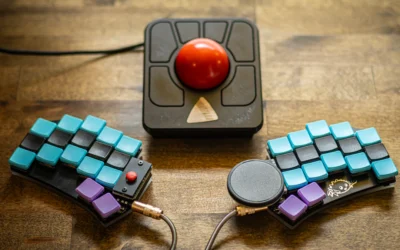
| Columnar or ortholinear layout | Significant | 2 to 4 weeks |
| Chorded or steno-style keyboards | Complete relearn | Weeks to months |
These ranges assume regular daily typing. Someone typing for two hours a day adjusts slower than someone typing for eight, simply because there are fewer repetitions building the new muscle memory. That is not an argument for typing more than you otherwise would, just a reason not to compare your own adjustment timeline against someone else’s without accounting for how many hours a day each of you actually spends on the keyboard. Weekend gaps matter too. Two days away from the new keyboard can noticeably slow progress compared with typing on it every day, even briefly, through the first week or two.
Why Adjustment Takes Time
Touch typing relies on muscle memory built over years of hitting the same keys in the same relative positions. A standard keyboard’s straight rows and shared angle between hands is what most people’s fingers learned on, whether that learning happened consciously or not.
A split keyboard changes the geometry between your hands but usually keeps the key layout itself the same, which is why the relearning curve tends to be short. A columnar or ortholinear board goes further, moving each key into a straight vertical column instead of the staggered rows typewriters have used for over a century. That’s a bigger break from existing muscle memory, and it takes longer to rebuild. A tented split sits somewhere in between: the key layout usually stays standard, but the added angle between your hands is itself a new coordination pattern your fingers haven’t practiced before, which is why it lands in the middle of the adjustment range rather than at either extreme.
Cornell’s ergonomics program is direct about this tradeoff: alternative keyboard designs can carry a real learning curve, and short-term studies of some designs show a genuine drop in typing performance during the adjustment window, even when the long-term posture benefits are real (Cornell CUErgo, Computer Keyboard Design). The tradeoff isn’t the same for every alternative keyboard, which is exactly why the table above separates a mild split from a full columnar layout.
The payoff research backs up is postural, not just comfort. In one study of split and vertically inclined keyboards, wrist ulnar deviation dropped from 12 degrees on a standard keyboard to within 5 degrees of neutral once the split design was set up correctly (PubMed, Wrist and Forearm Posture From Typing on Split and Vertically Inclined Computer Keyboards). That’s the mechanical reason people push through a few uncomfortable days in the first place. Reduced ulnar deviation on its own doesn’t guarantee less pain for everyone, since wrist posture is only one factor among several, but it’s the specific, measurable change a split keyboard is designed to produce.

How to Speed Up the Adjustment
- Type every day, even briefly. Short daily sessions build muscle memory faster than one long session a week.
- Prioritize accuracy over speed for the first few days. Chasing your old words-per-minute number too early just reinforces the wrong finger positions.
- Put the old keyboard out of reach. Switching back and forth between two layouts slows adjustment on both.
- Use a typing tutor or practice site for 10 to 15 minutes a day. Structured drills adapt faster than ad hoc typing during regular work.
- Avoid looking at your hands. Watching your fingers reinforces visual habits instead of the muscle memory you’re trying to rebuild.
If you’re still deciding whether a split layout is worth the adjustment period at all, our comparison of split keyboards versus standard ergonomic keyboards covers who benefits most. Once you’ve decided, see our picks for the best split ergonomic keyboards or our broader ergonomic keyboard picks if a milder layout change fits your situation better.
Special Cases
Professional touch typists with high baseline speed. The higher your starting words-per-minute, the more noticeable the temporary drop feels, even if the actual adjustment period isn’t longer in absolute terms. A typist going from 90 to 60 words per minute for a week experiences that gap more acutely than someone going from 40 to 30.
Hunt-and-peck typists. Counterintuitively, people who don’t touch type often adjust faster to a split or columnar layout, since they have less entrenched muscle memory working against the new key positions.
Older adults or anyone learning a new physical skill more slowly. Motor learning generally takes longer with age. This doesn’t mean the adjustment won’t happen, just that the ranges in the table above may run toward the longer end.
Anyone who needs full speed immediately for work. Consider making the switch during a lighter workload period, like a slower week or a planned break, rather than in the middle of a deadline-heavy stretch. Keeping the old keyboard within reach for the first day or two, rather than putting it away entirely, is a reasonable compromise if a deadline genuinely can’t wait, even though it will stretch the overall adjustment period.
Signs You’re Not Adjusting Normally
- Pain or discomfort is increasing rather than decreasing after the first week or two, instead of gradually easing as your hands adapt.
- There’s been no improvement in speed or accuracy at all after three to four weeks of consistent daily use.
- You’re developing new discomfort in a different location, like the shoulder or forearm, that wasn’t present before the switch.
- You find yourself reverting to bad habits, like resting wrists on a hard edge, to compensate for ongoing discomfort.
A temporary dip in speed and some initial awkwardness is a normal, expected part of switching layouts, the same way learning a new phone keyboard layout or a new car’s pedal spacing takes a few days before it stops feeling foreign. Pain that worsens over time, rather than easing, isn’t part of a normal adjustment curve and is worth addressing directly, either by rechecking your setup or talking to a doctor or physical therapist if it persists.
Frequently Asked Questions
How much should my typing speed drop when switching keyboards?
A drop of 20 to 40 percent in the first few days is common and not a sign of a bad fit. Most people recover most of that within a week on a mild split design, longer on a columnar layout. Tracking your words per minute daily on the same short passage gives a clearer picture of real progress than judging speed by feel alone, which tends to feel slower than it actually is during the frustrating first few days.
Do typing test websites actually help with adjustment?
Yes, short structured practice sessions build muscle memory faster than scattered typing during regular work, since the repetition is more consistent and focused.
Can I switch between my old keyboard and a new ergonomic one during adjustment?
It’s possible, but expect the adjustment to take longer on both. Sticking with one layout consistently, even for just the workday, speeds up the process.
What if I never fully adjust to a split or columnar keyboard?
Some people find certain layouts, especially heavily reshaped ones, genuinely don’t fit how they type. If speed and comfort haven’t improved after a month of consistent daily use, a milder split design may be a better fit than a full columnar layout.
Do younger people adjust to new keyboards faster?
Generally yes, motor learning tends to happen faster earlier in life, though consistent daily practice narrows that gap at any age.
Expect a short, temporary dip in speed and accuracy when switching to an ergonomic keyboard, longer for a columnar layout than a mild split. Type daily, prioritize accuracy first, and give it two to four weeks before judging whether the keyboard is a good fit. Pain that gets worse instead of better is the one sign worth stopping for. Everything else, the slower typing, the extra typos, the odd feeling of reaching for a key that isn’t quite where it used to be, is a normal part of building a new habit, not a sign the keyboard is wrong for you.
Related reading: Does an Ergonomic Keyboard Slow Down Your Typing Speed?




Write Your Review
No reviews yet. Be the first to share your experience!