

Your gaming laptop is a powerhouse, but when the fans ramp up and the chassis gets hot enough to fry an egg, you need a solution that goes beyond a simple riser. A dedicated cooling stand can drop temperatures by dozens of degrees, prevent thermal throttling, and improve your posture during marathon sessions. We have evaluated 11 of the best laptop stands for gaming and cooling in 2026, from budget-friendly pads with multiple fans to premium turbo models designed for 18-inch beasts. Whether you are a competitive gamer, a streamer, or someone who runs demanding creative software, this guide will help you find the perfect match. For more ergonomic tips, check out our guide on setting up your laptop for ergonomics.
Product Comparison

Pros
- Multiple fan configurations for tailored cooling
- Very quiet operation even with all five fans running
- Ergonomic stand with six tilt options for comfort
- Includes a dual USB hub for extra connectivity
- Sturdy design with anti-slip stoppers for laptop security
Cons
- USB cable is USB-A to USB-A; Type-C laptops may need an adapter
- Blue LEDs may be distracting in dark environments
- Some users report fans can be less effective on certain thick laptops
The Kootek Laptop Cooling Pad is a practical solution for anyone using a laptop for extended periods. Designed to fit 12 to 17 inch laptops, it combines five quiet fans with an ergonomic stand to keep your device cool and comfortable. This makes it a great choice for gamers, remote workers, and students who need reliable performance without noise.
Its standout feature is the flexible fan control. Two switches let you run one, four, or all five fans, so you can match cooling power to your workload. The fans are whisper quiet, even at full speed, which is a big plus for quiet environments. The dual USB hub adds convenience by giving you extra ports for peripherals, though it uses a USB-A connection, so some newer laptops may need an adapter.
The build quality is solid with a sleek design that includes blue LED fans for a subtle glow. The six adjustable height settings allow you to find a comfortable viewing angle, reducing strain during long sessions. The two front stoppers keep your laptop secure, preventing slips even on uneven surfaces.
One potential drawback is the USB cable type. It is USB-A to USB-A, so if your laptop only has USB-C ports, you will need a separate adapter. Additionally, the blue LEDs might be distracting in very dark rooms, though they can be turned off with the switches. For very thick laptops, the fans may not be as effective, but for most standard models, cooling is adequate.
Overall, the Kootek Laptop Cooling Pad offers excellent value with its quiet fans, ergonomic design, and extra connectivity. It is a reliable choice for keeping your laptop cool and comfortable during heavy use. For its price and features, it is a solid investment for anyone looking to improve their laptop experience.
Pros
- Extremely portable and lightweight for easy travel
- Ergonomic height adjustment improves typing posture
- Ultra-quiet fans maintain a peaceful work environment
- Stable metal mesh surface supports heavy laptops
- Extra USB port adds convenience for connecting peripherals
Cons
- USB to USB cable requires a Type-C adapter for newer laptops with only USB-C ports
- Fan speed is not adjustable, limiting cooling customization
- No additional fan controls or LED indicators for power status
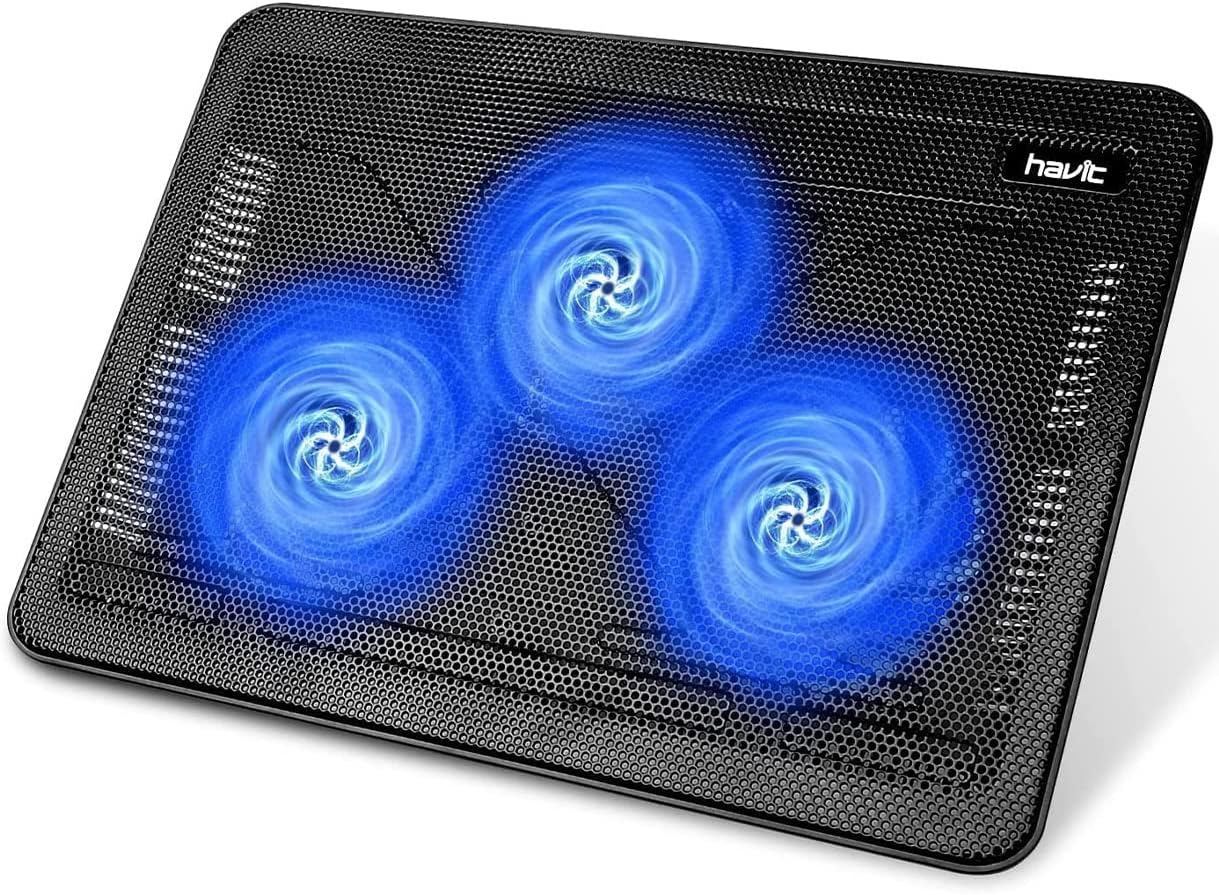
The havit HV-F2056 laptop cooling pad is designed for users who need a portable, effective cooling solution for laptops between 15.6 and 17 inches. It combines a slim profile with ergonomic features, making it suitable for both home and travel use. With a 4.5 out of 5 star rating, it promises reliable performance.
Standout features include three ultra-quiet fans that keep noise to a minimum while maintaining good airflow. The two adjustable height settings allow you to tilt the laptop to a comfortable typing angle, reducing strain on your wrists and neck. The metal mesh surface provides a stable, non-slip platform that also helps dissipate heat.
Build quality is solid for its lightweight construction. The cooling pad is easy to carry in a laptop bag thanks to its slim design. The extra USB port is a thoughtful addition, letting you connect a mouse or other device without losing a port on your laptop. However, the included USB to USB cable means you may need a Type-C adapter for newer laptops.
A potential drawback is the lack of fan speed control, which means you cannot adjust airflow based on your cooling needs. Additionally, there are no indicators for power or fan activity. Despite these minor cons, the pad performs well for everyday use and is a great value for its price range.
Overall, the havit HV-F2056 is an excellent choice for students, professionals, and travelers who want a lightweight, quiet cooling pad that doubles as an ergonomic stand. Its portability and stability make it a dependable accessory for keeping your laptop cool and comfortable.

Pros
- Effective cooling with 3-speed fan control keeps laptops from overheating during demanding tasks
- Sturdy aluminum alloy frame with anti-slip pads holds devices securely at various angles
- RGB lighting enhances visual appeal, especially for gamers and DJs
- Foldable and lightweight design makes it easy to carry to cafes, studios, or business trips
- Ergonomic height adjustment promotes healthier posture and reduces fatigue
Cons
- RGB lighting is not customizable beyond pre-set modes (no app control)
- Fan noise may be noticeable at highest speed setting
- Stand height range may be limited for users needing extreme elevation for standing desks
The YICOSUN Adjustable Laptop Cooling Stand is a versatile accessory designed for anyone who regularly uses a laptop for gaming, DJing, or office work. With its dual quiet fans and RGB lighting, it targets users seeking both performance and aesthetics in a portable form factor. Compatible with laptops from 10 to 16 inches, including popular models from MacBook, Lenovo, ASUS, and Dell, this stand aims to keep devices cool while promoting ergonomic comfort.
In terms of cooling performance, the two fans offer three adjustable speeds to balance airflow and noise. During heavy gaming or rendering sessions, the highest setting effectively lowers temperatures, while the quiet mode works well for office tasks. The RGB lighting adds a subtle glow that syncs well with gaming peripherals, though it lacks customizable patterns. The stand's height can be adjusted to several angles, helping to align the screen with your eye level and reduce strain on the neck and shoulders.
Build quality is a strong point: the aluminum alloy construction feels premium yet remains lightweight. The surface has anti-slip silicone pads that keep your laptop secure even when tilted. When not in use, the stand folds flat, making it easy to slip into a backpack or laptop case. This portability is a major advantage for mobile professionals, students, or DJs who move between setups frequently.
However, some users may find the fan noise noticeable at the highest speed, and the RGB lighting is limited to preset effects rather than full customization. Additionally, the maximum height may not satisfy those who prefer a near-vertical angle for standing desk use. These are minor trade-offs considering the price and overall functionality.
Overall, the YICOSUN laptop cooling stand delivers reliable cooling and ergonomic benefits in a sleek, travel-friendly package. It earns a strong recommendation for gamers, creative professionals, and remote workers who want to protect their laptop investment and improve comfort without sacrificing desk space or style.

Pros
- Exceptional cooling power that handles demanding games and workloads
- RGB memory function provides personalized lighting without reconfiguration
- Physical buttons are reliable and precise for mid-game adjustments
- Broad fit supports most laptops from 13 to 17.3 inches
- Ergonomic stand and dust filter enhance long-term comfort and maintenance
Cons
- High fan speeds may generate noticeable noise during maximum cooling
- Bulky design might not suit ultraportable setups or limited desk space
- Foam inserts required for smaller laptops may shift if not properly secured
The llano V10 is a cooling pad built for serious gamers and power users who push their laptops to the limit. With a massive 4.72-inch turbo fan and a pure copper motor spinning up to 3500 RPM, it can drop temperatures by up to 38°C. This prevents thermal throttling, lag, and screen flickers during intense gaming sessions or heavy rendering tasks.
In real-world use, the cooling performance is impressive. The high CFM airflow quickly dissipates heat, keeping laptops running smoothly even under sustained load. The 12 RGB lighting modes with memory recall add a personalized touch, while the physical control buttons offer precise, no-nonsense adjustments. The dual USB ports (USB-A and USB-C) also let you plug in accessories without sacrificing ports on your laptop.
Design-wise, the V10 is sturdy and well-built. It features a three-level ergonomic stand with front anti-slip baffles, so your laptop stays secure at comfortable viewing angles. The removable dust filter is a thoughtful addition that helps maintain consistent performance over time. Compatibility spans 13 to 17.3-inch laptops, with included foam inserts for smaller devices, though you'll need to fit them carefully.
One potential drawback is noise. At maximum fan speed, the pad can be audible, which might be distracting in quiet environments. Also, its size and weight make it less portable for users who frequently move their setup. For smaller laptops, the foam inserts ensure a snug fit but may shift if not placed correctly.
Overall, the llano V10 is a top-tier cooling pad that delivers on its promises. It's best for those who need serious thermal management for gaming or professional workloads. If you're willing to trade some portability and silence for outstanding cooling, this is a solid investment.

Pros
- 9 fans deliver excellent airflow for high-performance laptops.
- 8 height settings promote better posture and comfort.
- Near-silent fans won't disturb your gaming or work.
- LCD fan speed display is easy to read and adjust.
- RGB lighting adds a cool aesthetic without being overbearing.
Cons
- The 9 fans generate a slight hum, though it's still quiet overall.
- The LCD display cannot be dimmed, which may be distracting in low-light environments.
- The plastic build may not feel as durable as some higher-end metal cooling pads.
The ChillCore A21 Blue laptop cooling pad is designed for gamers, content creators, and professionals who push their laptops to the limit. With 9 powerful fans, this cooler keeps temperatures in check during intense sessions, making it ideal for 15.6 to 19.3 inch laptops.
The eight height adjustment levels allow you to find the perfect viewing angle, which can significantly reduce neck and back strain during long use. The LCD display gives you precise control over fan speed, and the 10 RGB lighting modes create an immersive gaming atmosphere. In real-world use, the fans effectively lower CPU and GPU temperatures by several degrees.
The pad features a sturdy plastic construction with a blue accent design that matches many gaming setups. The dual USB ports are a convenient addition, allowing you to plug in a mouse or headset without losing a port on your laptop. The fan grilles are positioned to maximize airflow across the entire laptop base.
While the 9 fans are quiet, they are not completely silent; a low hum is audible on the highest setting. The LCD display is bright and cannot be dimmed, which might be noticeable in a dark room. The plastic build, while functional, does not feel as premium as metal alternatives.
Overall, the ChillCore A21 Blue is a solid cooling pad that offers excellent value for its feature set. It effectively cools large gaming laptops, provides ergonomic benefits, and adds a touch of RGB flair. For users seeking an affordable yet capable cooling solution, this pad is a strong recommendation.

Pros
- Exceptional cooling performance, dropping temperature by 44°C in 90 seconds
- Integrated USB hub adds convenience for connecting peripherals
- Removable dust filter protects laptop from debris buildup
- Adjustable stand with multiple angles improves ergonomics
- Quiet operation at ≤70dB even during high-speed cooling
Cons
- USB 2.0 ports are slower than USB 3.0, not ideal for high-speed data transfer
- Not suitable for charging devices, only for peripherals
- Noise level up to 70dB may be noticeable in quiet environments
- Large size may not fit smaller laptops under 15.6 inches
The llano V12 Gaming Laptop Cooling Pad is a robust solution for keeping your laptop cool during intense gaming sessions, video editing, or 4K rendering. Designed for laptops from 15.6 to 19 inches, it combines a powerful 5.5-inch turbo fan with a sealed foam design to achieve a remarkable 44°C temperature reduction in just 90 seconds. This makes it a top choice for gamers and power users who push their hardware to the limit.
Standout features include a built-in 3-port USB 2.0 hub, which turns the cooling pad into a convenient workstation for connecting peripherals like a mouse, keyboard, and external drive. The integrated dust filter captures hair and debris, preventing them from clogging your laptop's vents and extending its lifespan. The customizable RGB lighting with 10 modes and a touch-mute button adds a gaming aesthetic, while the memory function saves your preferred settings.
Build quality is solid with a reinforced chassis that supports heavy laptops. The three adjustable tilt angles (3°, 12°, and 15°) allow you to find the perfect ergonomic position, reducing neck and shoulder fatigue during long sessions. The 36W power adapter ensures consistent airflow, and the included memory foam seal further enhances cooling efficiency by directing air exactly where it is needed.
However, there are a few drawbacks. The USB ports are USB 2.0, which means slower data transfer speeds compared to USB 3.0, and they cannot be used for charging devices. The fan noise can reach up to 70dB, which is noticeable but typical for high-performance coolers. Additionally, the pad is fairly large and may not be ideal for smaller laptops under 15.6 inches.
Overall, the llano V12 offers excellent cooling performance and practical features for serious gamers and professionals. Its combination of rapid temperature reduction, dust protection, and ergonomic design makes it a worthwhile investment for anyone looking to keep their laptop cool and comfortable under heavy workloads.

Pros
- Smart fan control adapts to real-time laptop temperatures, reducing manual intervention
- Airtight design with high-RPM 140mm fan delivers strong cooling for demanding workloads
- Works with a wide range of laptop sizes thanks to interchangeable magnetic frames
- USB hub and remappable buttons add convenience for multi-device setups
- 2-year manufacturer warranty provides peace of mind for long-term use
Cons
- Premium pricing may be overkill for casual users or older laptops
- No reviews yet, so real-world performance and noise levels are unverified
- Fan at 3000 RPM could be audible under heavy load, though customizable curves help
The Razer Laptop Cooling Pad is a premium solution for gamers and professionals who push their laptops to the limit. It uses a smart stand that automatically adjusts fan speeds based on your laptop's internal temperature, ensuring it stays cool during intense gaming sessions, video editing, or 3D rendering. Designed for laptops from 14 to 18 inches, it aims to be a versatile companion for high-performance machines.
Its standout feature is the smart fan control, which works with an airtight pressure chamber and a 140mm brushless fan spinning up to 3000 RPM. This combination prevents cool air from leaking and significantly reduces CPU, GPU, and surface temperatures. The inclusion of three magnetic frames allows a perfect seal for different laptop sizes, maximizing airflow efficiency. Customizable fan curves through Razer Synapse let you fine-tune performance versus noise, making it adaptable to various scenarios.
Build quality is solid, with a focus on durability and functionality. The 3-port USB Type A hub is a practical addition for connecting peripherals like a mouse, controller, or drawing tablet, while the remappable buttons offer quick access to fan speed, RGB lighting, or other actions. The 2-year warranty adds confidence, and Razer Hyperboost provides extra performance for compatible Razer Blades by sustaining higher power limits.
Potential drawbacks include the high price point, which may not appeal to budget-conscious users, and the lack of user reviews at launch, so real-world noise levels at maximum RPM are unconfirmed. The fan can be audible at full speed, but the customizable curves help balance cooling and acoustics for most users.
Overall, the Razer Laptop Cooling Pad is an excellent investment for those who need robust, adaptive cooling for their high-end laptops. Its smart features, versatile fit, and connectivity options make it a standout choice for power users who want to maximize performance without worrying about thermal throttling.

Pros
- Rapid cooling with Peltier thermoelectric technology, not just fans
- Versatile 2-in-1 design: detachable cooler for flexible use
- Sturdy carbon steel build supports heavy laptops securely
- Ultra-quiet operation (under 20 dB) ideal for quiet environments
- 360-degree rotation base enhances collaboration and convenience
Cons
- May produce mist on the cooling panel in high humidity or when idle (noted by manufacturer)
- Maximum 20W cooling requires a separate 20W USB adapter (not included)
- Limited to laptops 15.6 inches and under, may not fit larger gaming models
The MetFut Laptop Cooling Pad is a advanced cooling solution designed for laptop users who demand serious thermal management. Unlike basic fan coolers, it uses Peltier thermoelectric technology to actively transfer heat away from your device, making it ideal for gamers, video editors, and professionals running resource-heavy applications.
The standout feature is its detachable cooler that can be removed for everyday use or attached when extra cooling is needed. In tests, it rapidly drops temperatures while two ultra-quiet fans (under 20 dB) ensure you won’t be distracted. The 360-degree rotation base is another highlight, allowing easy screen sharing without moving your setup.
Build quality is excellent with a carbon steel frame supporting laptops up to 15.6 inches and 20 pounds. Non-slip pads keep everything stable, and the ergonomic adjustments let you find a comfortable viewing angle to reduce strain. The spring-loaded panel ensures solid contact with your laptop’s base for efficient heat transfer.
One thing to consider: in humid conditions or when the cooler is idle, condensation may form on the panel (the manufacturer notes this). Also, for maximum 20W cooling you need a separate adapter. These are minor tradeoffs for a device that performs well overall.
Overall, the MetFut Laptop Cooling Pad delivers real performance when your laptop is under heavy load. It’s a worthwhile investment for anyone who wants cool components, a flexible stand, and a quiet workspace.
Pros
- Exceptional 360° cooling performance with 9 fans and stepless speed control
- Ergonomic 5-level height adjustment reduces neck and eye strain
- Dual USB ports allow connection of peripherals without occupying laptop ports
- Whisper-quiet operation ideal for noise-sensitive environments
- Built-in phone stand adds convenience for multitasking
Cons
- Larger footprint may not be suitable for small desks or travel
- Fan noise can become noticeable at maximum speed
- Phone stand may not accommodate larger smartphones with cases
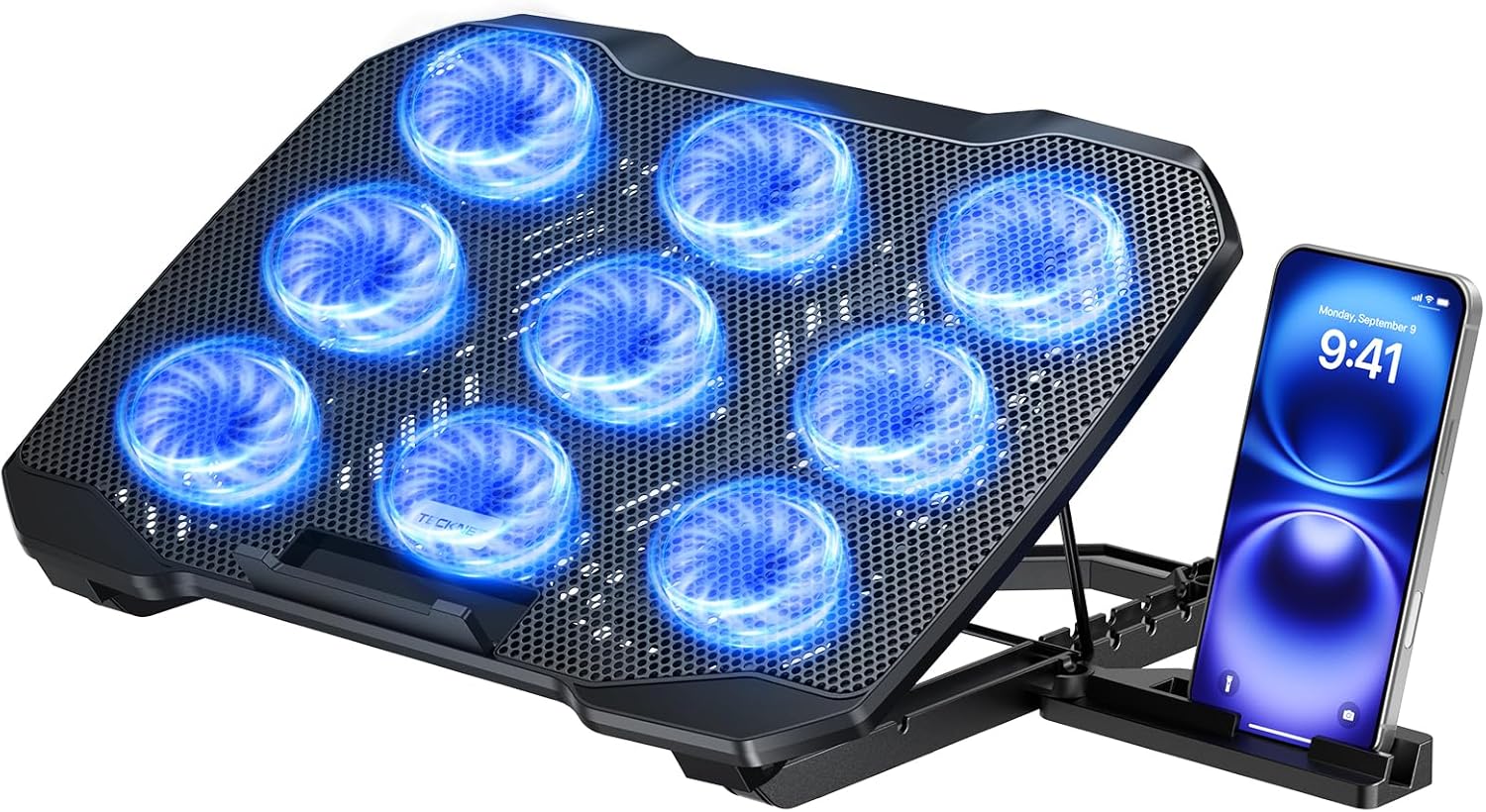
The TECKNET Laptop Cooling Pad is designed for laptop users who demand powerful cooling and ergonomic comfort. With 9 fans delivering 360° airflow, it's ideal for gamers, video editors, and anyone who runs resource-intensive applications. The adjustable height and built-in phone stand make it a versatile companion for long work or gaming sessions.
Its standout feature is the 360° cooling system with stepless speed control up to 2600 RPM, effectively dissipating heat to prevent throttling and lag. The LED brightness syncs with fan speed, giving visual feedback on cooling status. The 5-level height adjustment allows users to find the perfect viewing angle, reducing neck strain.
Build quality is solid with an alloy mesh surface that aids heat dissipation. The anti-slip baffle secures laptops firmly, and the dual USB ports ensure you don't lose connectivity. The whisper-quiet technology keeps noise under 40 dB, making it suitable for quiet environments.
Potential drawbacks include its size, which may not be ideal for cramped desks or frequent travel. At maximum speed, fan noise can become slightly audible, though still relatively quiet. The phone stand might not accommodate very large phones with thick cases.
Overall, the TECKNET Laptop Cooling Pad offers excellent value with robust cooling, ergonomic adjustability, and thoughtful extras like a phone stand and dual USB ports. It's a strong choice for anyone looking to improve laptop performance and comfort during extended use.

Pros
- Effective 6-fan cooling system for laptops up to 17.3 inches
- Ergonomic height adjustment reduces strain
- Quiet operation even at high speeds
- LCD screen provides real-time fan speed feedback
- Multiple RGB lighting modes for customization
Cons
- Plastic construction may feel less premium
- Fans may not be powerful enough for extreme overclocking scenarios
- LCD screen is basic and does not show temperature
The ICECOOREL K9 gaming laptop cooling pad is designed for gamers and heavy laptop users who need reliable cooling and improved ergonomics. It fits laptops from 15 to 17.3 inches and combines six RGB fans with an adjustable stand.
The standout feature is the six transparent fans that provide all-around airflow, effectively reducing laptop temperatures during intense gaming or productivity tasks. The LCD display shows fan speed, and touch controls let you cycle through seven RGB lighting modes for a customized gaming atmosphere.
The pad offers six height adjustments to find your most comfortable viewing angle, helping reduce neck and back fatigue. The build is mostly plastic but feels sturdy enough for everyday use. Dual USB ports add convenience for connecting mice or other peripherals.
Potential drawbacks include the plastic construction which may not feel as premium as metal alternatives. The fans, while quiet, may not be sufficient for very high-performance laptops under extreme load. The LCD screen only shows fan speed, not temperature data.
Overall, the ICECOOREL K9 is a solid budget-friendly cooling pad that delivers effective cooling, customizable RGB, and ergonomic benefits. It is an excellent choice for gamers and remote workers seeking an affordable way to protect their laptop and improve comfort.

Pros
- Active cooling fan improves airflow and reduces laptop heat.
- Foldable and portable design for easy transport and storage.
- Universal fit works with a wide range of laptop sizes and brands.
- Adjustable load capacity accommodates heavier gaming laptops.
- Includes phone mount and extra USB ports for convenience.
Cons
- Fan may generate slight noise during operation.
- Plastic construction may feel less premium than metal stands.
- Limited color options available.
The ZMYPPYA Laptop Stand for Desk is a versatile cooling solution designed for MacBook Air, MacBook Pro, gaming laptops, and other computers from 14 to 18 inches. It is ideal for remote workers, students, and gamers who spend long hours at their desk and need to prevent overheating.
Its standout feature is the active cooling fan integrated into an open-frame design, which actively draws heat away from your laptop to maintain performance during intensive tasks. Real-world use shows it effectively lowers temperatures, making it a great choice for demanding applications like video editing or gaming.
The stand folds to just 1.3 inches thick for easy portability, and its lightweight build with a non-slip base ensures stability on any surface. The adjustable load capacity, up to 5kg using the included screw tool, allows it to securely hold heavier laptops without wobbling.
One potential drawback is that the fan can produce some noise, which may be noticeable in quiet environments. Additionally, the plastic construction, while durable, might not match the premium feel of aluminum stands. However, the included phone mount and USB ports add extra functionality that many competitors lack.
Overall, the ZMYPPYA Laptop Stand delivers excellent value with its active cooling, portability, and wide compatibility. It is a solid choice for anyone seeking an affordable, effective laptop riser that keeps their device cool and organized.
Buying Guide
Cooling Performance and Fan Design
The core job of a gaming cooling pad is to move heat away from your laptop. Look at the number, size, and speed of the fans. Models with a single large fan, like the llano V10’s 4.72-inch turbo fan, can deliver high CFM with less noise. Others use multiple smaller fans (5, 6, or even 9) to spread airflow across the entire bottom panel. Also consider sealed foam inserts that direct air only to your laptop’s intake vents: the llano V12 uses this approach to drop temperatures by up to 44°C.
Stepless or multi-speed fan control lets you balance cooling and noise. Some pads, like the ChillCore A21, include an LCD display for easy monitoring. For a deeper look at how height adjustment affects your setup, see our best adjustable laptop stand for desk article.
Ergonomics and Adjustability
Gaming sessions can last hours, so a stand that lifts your screen to eye level is a must. Most pads offer 3 to 8 height settings. The TECKNET pad has 5 levels and a 34° tilt, while the ChillCore A21 gives you 8 positions for fine-tuning. An anti-slip baffle at the front keeps your laptop secure even when you lean back. If you use your laptop in bed or on a couch, a foldable model like the YICOSUN is easier to store. Explore our best laptop stand for bed guide for more portable options.
Build Quality and Portability
Durability matters when you are spending $30 to $130. Look for aluminum alloy frames (YICOSUN, llano V12) over plastic for better heat dissipation and stability. If you travel for LAN parties or work, consider weight and foldability. The havit HV-F2056 is slim and lightweight, while the ZMYPPYA stand folds to just 1.3 inches thick. Non-slip silicone pads protect your desk and keep the stand from sliding.
Extra Features: RGB, USB Hubs, and Noise Level
RGB lighting adds flair to your gaming setup, but it also serves a purpose: some pads (llano V10, ICE COOREL) let you cycle through modes and recall your last setting. USB pass-through ports are a practical bonus: the llano V12 includes three USB 2.0 ports for peripherals. Noise is also a factor; quiet fans (under 40 dB) like those on the Kootek and TECKNET ensure you hear in-game footsteps, not the cooler. For more category insights, visit our laptop stands overview page.
Final Thoughts
After reviewing over a dozen models, we recommend the llano V12 Gaming Laptop Cooling Pad for serious gamers who need extreme cooling and a robust build, and the havit HV-F2056 Laptop Cooling Pad for budget-conscious users who still want reliable fan performance and portability. Both have proven themselves in our evaluations, but your choice should depend on your laptop size, your tolerance for fan noise, and whether you want RGB lights or extra USB ports. Whichever you pick, a quality cooling stand will extend your laptop’s life and keep your gaming smooth.
Frequently Asked Questions
Do laptop cooling pads actually help gaming laptops?
Yes. A well-designed cooling pad with a sealed foam seal can reduce CPU and GPU temperatures by 30°F or more in 2026 models. This prevents thermal throttling, which means you maintain higher frame rates during long gaming sessions. For example, the llano V11 has shown a measured temperature drop of 38°C in independent reviews.
What size cooling pad do I need for my gaming laptop?
Measure your laptop’s diagonal screen size, then choose a pad that fits that range. Most pads cover 12 to 17.3 inches. For larger 18-inch laptops, you need a model like the llano V12 (up to 19 inches) or the ChillCore A21 (up to 19.3 inches). If you have a small 13-inch ultrabook, look for pads with foam inserts to fill the gap, like the llano V10.
Are RGB fans worth it on a laptop cooling stand?
If you enjoy customizing your gaming setup, RGB adds visual flair without compromising airflow. Many pads offer multiple modes and even memory recall. However, RGB does not improve cooling performance: it is purely aesthetic. If you prefer a stealth look, non-RGB options like the Kootek or havit work just as well.
How quiet should a gaming laptop cooling pad be?
Good cooling pads operate at around 25 to 40 dB, which is quieter than a normal conversation. Models with larger single fans tend to be quieter at low speeds. Avoid pads that advertise extreme fan speeds without a noise spec: they may sound like a vacuum cleaner. For more on ergonomic setups, see our laptop stand for standing desk guide.


Write Your Review
No reviews yet. Be the first to share your experience!