

If you spend hours typing each day, you know how quickly wrist fatigue can set in. A white ergonomic keyboard not only brightens your desk but also promotes a natural hand position, helping you avoid discomfort. In this guide, we evaluate nine of the best white ergonomic keyboards available in 2026, from wave-shaped designs to split layouts and wireless combos. Whether you are a remote worker, a student, or a creative professional, you will find a model that suits your needs. For more on preventing wrist pain, check out our guide to ergonomic keyboards for wrist pain.
A white keyboard shows dirt, dust, and finger oils more visibly than a dark one, so anyone who prefers low-maintenance gear may want to stick with a black or gray finish instead.
Disclosure: Ergonook is a participant in the Amazon Associates program. Links below are affiliate links, and we may earn a commission from qualifying purchases. This does not affect which products we recommend or how we rank them.

Pros
- Excellent ergonomic design for small to medium hands, reducing strain and improving posture.
- Cushioned palm rest adds significant comfort during extended typing sessions.
- Vertical mouse with 57-degree angle naturally aligns the forearm, relieving wrist pressure.
- Quiet operation with adaptive scroll wheel enhances focus in shared workspaces.
- Made with recycled plastics, supporting sustainability without compromising quality.
Cons
- Keyboard lacks a number pad, which may be a drawback for data entry users.
- Requires Logi Options+ software for full customization, which may not be available on all systems.
- The white color may show dirt and wear over time more easily than darker options.
The Logitech Wave Keys and Lift Vertical Mouse wireless combo is designed for users seeking ergonomic comfort during long workdays. Aimed at those with small to medium hands, this set promises to reduce strain and promote natural posture. The keyboard's wavy keyframe and the mouse's 57-degree vertical angle work together to create a desk experience that prioritizes health without sacrificing productivity.
In real-world use, the Wave Keys keyboard delivers a satisfying tactile feel with plunger key switches, while the cushioned memory foam palm rest provides hours of support. The Lift vertical mouse encourages a more natural forearm position, and the softly textured grip feels secure. The SmartWheel adjusts scrolling speed seamlessly, and whisper-quiet clicks keep the environment peaceful. The Logi Options+ app allows you to customize buttons and shortcuts to fit your workflow.
Build quality is solid, with both devices featuring certified post-consumer recycled plastic. The white finish is clean and modern, though it may require occasional cleaning to stay pristine. The combo is Bluetooth and Logitech Bolt compatible, offering flexible connectivity. Battery life is typical for such devices, and the included USB receiver ensures an easy setup.
One drawback is the lack of a dedicated number pad on the keyboard, which may inconvenience users who frequently input numbers. Additionally, the white color might show marks more easily. The software customization is robust but requires the Logi Options+ app, which is available for most operating systems. Some users might prefer a more traditional keyboard layout, but the ergonomic benefits outweigh the learning curve for most.
Overall, this combo excels in providing ergonomic support for small to medium hands. The Wave Keys and Lift mouse are a matched pair that reduce discomfort and enhance daily productivity. If you prioritize health and comfort in your workspace and appreciate sustainable materials, this combo is a worthy investment. It balances functionality, design, and eco-consciousness effectively.

Pros
- Wave-shaped layout promotes natural hand position and reduces wrist strain.
- Cushioned wrist rest adds comfort for long workdays.
- Compact design with full-size keys and numeric pad saves space.
- Wide compatibility with Windows and Mac via dual USB connectors.
- Adjustable tilt options for personalized ergonomics.
Cons
- Wired connection may limit desk setup flexibility compared to wireless models.
- Membrane keys may not satisfy mechanical keyboard enthusiasts seeking tactile feedback.
- No backlighting, which could be a drawback for low-light environments.
The SANWA Wired Ergonomic Keyboard is designed for users who spend long hours typing and want to reduce hand and wrist strain. Its curved wave shape and cushioned wrist rest make it ideal for office workers, writers, and anyone seeking a more natural typing posture without sacrificing a traditional keyboard feel.
Standout features include a compact full-size 100-key layout with a numeric keypad, saving desk space while maintaining full functionality. The 12 shortcut keys plus a dedicated Copilot button enhance productivity, allowing quick access to brightness, volume, screenshots, and AI assistance. Dual USB-A and USB-C connectors ensure plug-and-play compatibility with both Windows and Mac systems.
The keyboard features a soft PU wrist rest with foam padding for all-day comfort. Five adjustable support feet let you customize the typing angle to suit your desk and posture. Membrane keys use a crater-style structure for smooth rebound and reduced wobble, providing accurate typing with a standard 19mm key pitch and 50g actuation force.
Drawbacks include the wired connection, which may be less convenient than wireless options for some users. The membrane switches lack the tactile feedback preferred by mechanical keyboard enthusiasts. Additionally, there is no backlighting, which could be a limitation in dimly lit environments.
Overall, the SANWA Wired Ergonomic Keyboard offers excellent value for those prioritizing comfort and productivity. Its ergonomic design, cushioned wrist rest, and useful shortcuts make it a solid choice for daily office use. While it has some limitations, its affordable price and thoughtful features earn a recommendation for ergonomic seekers.
Layout: Compact Full-Size 100 Keys
Key Pitch: 19mm
Actuation Force: 50g
Connection: Wired USB-A and USB-C
Compatibility: Windows and Mac
Special Features: Cushioned Wrist Rest, 12 Shortcut Keys, Copilot Button, Adjustable Tilt (5 levels)

Pros
- Ergonomic 3D curved split design effectively reduces wrist strain and promotes natural typing posture.
- Unique 2-in-1 USB-A and USB-C cable offers versatile connectivity for both old and new devices.
- Integrated palm rest provides continuous support and helps prevent fatigue during extended use.
- Precision scooped keys enhance typing accuracy and comfort.
- Full compatibility with Windows and macOS, with dedicated media hotkeys.
Cons
- Wired only, which may be less convenient for users who prefer a clutter-free wireless setup.
- Split layout may require an adjustment period for those used to traditional keyboards.
- No backlighting, making it less suitable for low-light environments.
The Nulea Ergonomic Split Keyboard is a wired natural typing keyboard designed to alleviate wrist pain and promote a healthier typing posture. It targets office professionals, students, and home users who spend long hours at a computer and may suffer from Carpal Tunnel or repetitive strain injury (RSI).
Its standout feature is the 3D curved split layout that mirrors the natural angle of your hands and forearms, effectively minimizing wrist pressure and muscle strain. The integrated wide palm rest with soft leather and anti-slip texture further supports neutral wrist alignment, making extended typing sessions more comfortable.
In real-world use, the precision scooped keycaps provide tactile and fluid feedback that enhances accuracy and typing confidence. The 2-in-1 USB-C and USB-A cable is a thoughtful addition, allowing seamless connection to both older PCs and modern laptops or tablets without needing an adapter.
One potential drawback is the wired design, which may not appeal to those seeking a wireless setup. Additionally, the split layout requires a short adaptation period. The keyboard lacks backlighting, which could be a limitation in dimly lit environments.
Overall, the Nulea Ergonomic Split Keyboard offers excellent ergonomic value at a reasonable price point. Its combination of split design, integrated palm rest, and versatile connectivity makes it a solid choice for anyone prioritizing wrist health and typing comfort during daily use.

Pros
- Exceptional ergonomic design certified by ergonomists for all-day comfort
- Cushioned palm rest provides noticeable wrist support during long typing sessions
- Quiet keys are ideal for shared workspaces or late-night use
- Easy Bluetooth pairing and seamless switching between Apple devices
- Long battery life of up to 3 years means low maintenance
Cons
- No backlighting, which may be a drawback for low-light typing
- Not compatible with Windows devices out of the box, limiting versatility
- Compact layout may take adjustment for users accustomed to full-size keyboards
The Logitech Wave Keys for Mac is an ergonomic wireless keyboard designed to transform your typing experience. It targets Mac users who spend hours at the keyboard and want to reduce wrist fatigue without sacrificing productivity. The unique wave shape and cushioned memory foam palm rest help maintain a natural hand position, making it a solid choice for professionals, writers, and anyone prone to discomfort.
Standout features include the quiet, tactile keys that feel satisfying yet discreet, and the Easy-Switch Bluetooth technology that lets you toggle between your Mac, iPad, and iPhone with a single tap. The keyboard is optimized for macOS with dedicated keys for Mission Control, Spotlight, and other shortcuts, and it works seamlessly with iPadOS and iOS. Real-world performance is smooth, with no noticeable lag, and the 3-year battery life means you can forget about charging.
Build quality is solid, with a durable plastic construction that includes 46% recycled materials. The off-white color gives it a clean, modern look that blends well with Apple setups. The palm rest is generously padded and stays comfortable over long sessions. However, the compact layout takes some getting used to, especially if you rely on a numeric keypad or dedicated navigation keys.
One honest drawback is the lack of backlighting, which can be an issue in dimly lit environments. Additionally, while the keyboard is optimized for Mac, Windows users may find limited compatibility. The keyboard is not rechargeable, relying on included AA batteries, but the long battery life mitigates this concern. Overall, the Wave Keys excels at its primary goal: providing ergonomic comfort for Mac users.
Verdict: The Logitech Wave Keys for Mac is a worthy investment for anyone seeking a comfortable, well-designed ergonomic keyboard for their Apple ecosystem. It delivers on its promise of reduced wrist pressure and quiet typing, with the added bonus of eco-friendly materials. For Mac users who prioritize comfort and sustainability, this keyboard is a strong recommendation.

Pros
- Exceptional ergonomic design reduces wrist and shoulder pain
- Effortless multi-device switching boosts productivity
- Customizable backlight enhances visibility and desk aesthetics
- Strong battery life with fast USB-C charging
- Adjustable tilt and included wrist rest for personalized comfort
Cons
- Backlight automatically turns off when battery drops below 10%, limiting low-light use
- Split layout may require an adjustment period for new users
- Wrist rest could be wider for larger hands
The Nulea RT05 Wireless Ergonomic Keyboard is purpose-built for users who spend long hours typing and want to reduce discomfort. With its split, splayed, and curved design, it encourages a more natural arm and wrist position, making it a smart choice for professionals, writers, and gamers prone to repetitive strain injuries.
Standout features include seamless multi-device connectivity via Bluetooth or 2.4G USB, allowing you to toggle between up to three devices with one tap. The 7-color backlight with three brightness levels adds a touch of personalization and helps visibility in dim settings, though the backlight shuts off below 10% battery to preserve functionality.
Build quality is solid with a sturdy frame and a comfortable wrist rest. The adjustable tilt legs provide three angles to further optimize your typing posture. Battery life is generous thanks to the 2000mAh cell, and USB-C charging makes topping up quick and convenient.
One drawback is that the split design may take some getting used to for those accustomed to standard keyboards. Additionally, the automatic backlight shutdown at low battery can be inconvenient if you rely on it frequently. The wrist rest, while helpful, might not be wide enough for all users.
Overall, the Nulea RT05 delivers excellent ergonomic benefits and versatile connectivity at a reasonable price. It is a strong contender for anyone looking to improve typing comfort and reduce strain in a multi-device workspace.

Pros
- Comfortable sculpted wave design with thick padded palm rest for neutral wrist posture.
- Quiet, low-force linear mechanical switches reduce strain and noise in shared spaces.
- Easy Bluetooth pairing with two devices and instant switching, no dongle needed.
- Extensive programmability via browser-based tool, suitable for power users.
- Backlit legends reduce eye strain in low light (USB required for lighting).
Cons
- Backlighting only works when connected via USB, not in Bluetooth mode.
- Programming requires a Chrome or Edge browser, which may limit some users.
- Mac-specific layout may not be ideal for non-Mac users without additional configuration.
The Kinesis mWave Quiet Ergonomic Keyboard for Mac is a refined version of the company's classic sculpted design, tailored specifically for Apple users. It targets typists who want ergonomic comfort without sacrificing the tactile feedback of mechanical switches, all while keeping noise to a minimum. This keyboard is ideal for professionals, writers, and programmers who spend long hours at a Mac and need a healthy, productive typing experience.
Standout features include the whisper-quiet low-profile mechanical switches, which offer a linear, low-force feel that reduces finger strain. The wave layout and thick padded palm support keep wrists in a neutral position, and there is virtually no learning curve. Dual connectivity via USB or Bluetooth allows pairing with two devices and easy switching, making it convenient for multi-device workflows. The programmability via Kinesis Clique is robust, letting you remap keys, create macros, and set up multiple layers.
Build quality is solid, with a clean white finish that blends perfectly with Mac aesthetics. The magnetic feet for negative tilt add adjustability, and the integrated keypad via Fn key is a space-saving touch. Backlighting is a welcome addition, but note that it only activates when the keyboard is plugged in via USB. The unit is wireless in Bluetooth mode but requires batteries (included).
One drawback: the backlight does not work wirelessly, which might disappoint those who need illumination in dark rooms without a cable. Also, the programming tool is limited to Chrome or Edge browsers, which could be inconvenient for users of other browsers. The Mac-specific layout means some keys are different from standard Windows keyboards, but that is exactly what Mac users want.
Overall, the Kinesis mWave Quiet Ergonomic Keyboard for Mac delivers on its promise of comfort, quietness, and Mac-native convenience. It is a strong choice for anyone seeking an ergonomic upgrade with modern connectivity and customization options. The combination of zero learning curve and pro-level programmability makes it a versatile tool for demanding users.

Pros
- Luxurious, easy-to-clean faux leather palm rest enhances typing comfort.
- Exceptional battery life with 4000mAh capacity and auto-sleep.
- Durable build with 10 million keystroke lifespan.
- Versatile backlighting and RGB mouse customization.
- Ergonomic wave keys and adjustable stands reduce wrist strain.
Cons
- White finish may show dirt or stains over time.
- Mouse is on the smaller side, which may not suit larger hands.
- No dedicated software for advanced key remapping.
The SABLUTE White Wireless Keyboard and Mouse Combo is a full-size ergonomic set designed for professionals, home office workers, and anyone who spends long hours at a computer. It combines a backlit keyboard with a cushioned faux lambskin leather palm rest and a silent RGB mouse, all powered by a single 2.4GHz USB receiver.
Standout features include a 4000mAh battery that delivers weeks of use on one charge, and a keyboard rated for 10 million keystrokes, double the standard. The wave-shaped keys and adjustable front/back stands encourage a natural wrist position, reducing fatigue during 8-hour work sessions. The backlighting offers 7 colors, and the mouse provides 6 fixed colors or 5 cycle modes with 3 DPI levels.
The build quality impresses with a matte finish and durable synthetic leather palm rest that resists sweat and is easy to wipe clean. The mouse is compact but responsive, and the keyboard has 9 shortcut keys for productivity. The 33ft wireless range works reliably across most devices.
Potential drawbacks include the white color which may require occasional cleaning, and the mouse size may feel small for users with larger hands. There is no dedicated software for remapping keys, but the plug-and-play setup is simple.
Overall, the SABLUTE combo offers excellent value with its comfort-focused design, long battery life, and durable build. It is a smart choice for anyone seeking a stylish, ergonomic wireless set for daily work or study.

Pros
- Superior ergonomic design reduces hand and wrist fatigue during long work sessions.
- Long battery life: up to 36 months for keyboard and 24 months for mouse.
- Multi-device support with easy switching between up to three devices.
- Sustainable build with at least 49% post-consumer recycled plastic.
- Quiet operation with low-noise clicks and smooth scrolling.
Cons
- Mouse is right-handed only, not suitable for left-handed users.
- No included USB dongle for users who prefer non-Bluetooth connections.
- Off White color may show dirt more easily than darker options.
The Logitech Signature Comfort Plus MK880 is a wireless keyboard and mouse combo designed for professionals and home office workers who spend long hours at their desks. It combines enhanced ergonomics with smart connectivity, making it a versatile choice for multi-device users.
Standout features include the curved dual-foam palmrest on the keyboard and the sculpted mouse with a built-in palm cushion, both delivering exceptional all-day comfort. The SmartWheel scrolling and quiet clicks ensure precise, noise-free navigation, while the dedicated AI key and meeting controls streamline your workflow.
Build quality is solid, with a sustainable design using at least 49% post-consumer recycled plastic. The off-white finish adds a clean, modern aesthetic to any workspace. Battery life is impressive, with up to 36 months for the keyboard and 24 months for the mouse, reducing interruptions.
One drawback is the mouse is right-handed only, which may exclude left-handed users. Also, it relies on Bluetooth connectivity without a USB dongle, which could be a concern for those with older devices. The light color may require more frequent cleaning.
Overall, the Logitech Signature Comfort Plus MK880 is an excellent investment for anyone seeking a comfortable, customizable, and sustainable input solution. It delivers on its promise of enhanced comfort and productivity, making it a top pick for daily work.
Pros
- Excellent ergonomic design reduces wrist and forearm strain for comfortable all-day use
- Cushioned memory foam wrist rest provides superior support
- Seamless multi-device switching via Bluetooth or USB
- Rechargeable with long battery life and auto sleep mode
- High-precision mouse with programmable side buttons
Cons
- Large footprint (20.75 x 11 inches) requires ample desk space
- Split keyframe may require a brief adjustment period for new users
- No backlighting for low-light environments
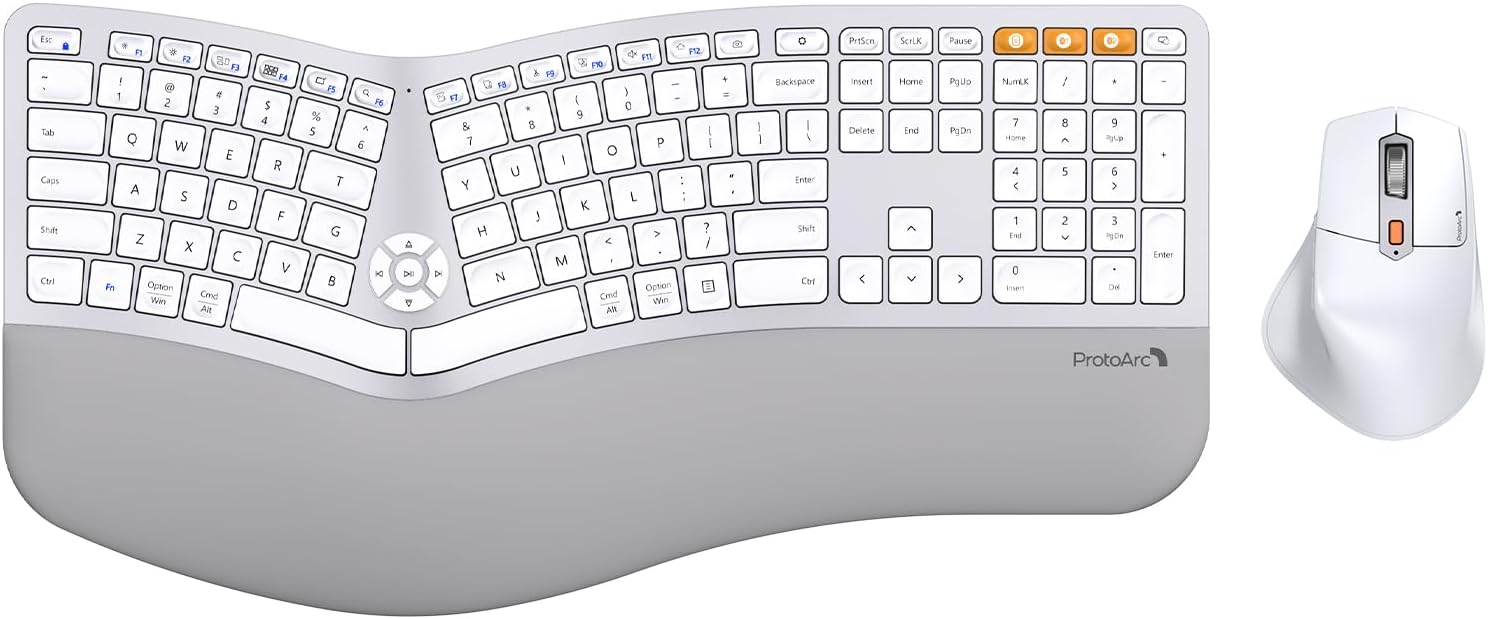
The ProtoArc EKM01 Plus is a wireless ergonomic keyboard and mouse combo designed for users who spend long hours typing and need relief from wrist strain. This full-size set includes a curved split keyboard and a sculpted mouse, both rechargeable and capable of connecting to up to three devices via Bluetooth or USB receiver.
Standout features include the cushioned memory foam wrist rest that supports your wrists in a natural position, reducing bending compared to standard keyboards. The scooped keys offer quick, comfortable keystrokes, while the adjustable tilt legs let you customize the angle for seated or standing use. The ergonomic mouse complements the keyboard with a palm rest and 2000 DPI precision, plus forward/backward buttons for efficient browsing.
In real-world use, the combo delivers on comfort and productivity. The split keyframe encourages a relaxed wrist angle, and the soft wrist rest makes a noticeable difference during extended typing sessions. Switching between devices is effortless with a dedicated button, and the rechargeable batteries hold up well, with auto sleep conserving power when idle.
One drawback is the large size of the keyboard, which measures over 20 inches wide and may not fit on smaller desks. Additionally, the split layout may take a few days to get used to if you are accustomed to a traditional keyboard. There is no backlight, so typing in dim light can be challenging.
Overall, the ProtoArc EKM01 Plus is an excellent choice for professionals and heavy typists seeking ergonomic support and multi-device flexibility. Despite its size, the comfort and build quality make it a worthwhile investment for a healthier workspace.
Full Size Ergonomic Keyboard with Curved Split Keyframe
Memory Foam Wrist Rest
Connectivity: Bluetooth 5.0 and USB Receiver
Supports up to 3 Devices Simultaneously
Compatible with Windows 7/8/10, Mac OS X 10.12, Android 4.3+
Mouse DPI: 2000
Battery: 500mAh Lithium (Both Keyboard and Mouse)
Charging: Type-C Cable
Auto Sleep after 30 Minutes
Dimensions: 20.75 x 11 inches (Keyboard)
Buying Guide for White Ergonomic Keyboards
Wave vs. Split Design: Which Is Right for You?
The two most common ergonomic layouts are wave (curved) and split. Wave keyboards, like the SANWA and Logitech Wave Keys, gently curve the keyframe to align your hands naturally without a steep learning curve. Split keyboards, such as the Nulea RT05, separate the left and right halves, allowing you to angle each side independently for a more customized posture. If you are new to ergonomics, a wave design often feels more familiar. For deeper insights, read our comparison of ergonomic vs. regular keyboards.
Connectivity: Wired, Wireless, or Both?
Your workflow determines the best connection type. Wired keyboards offer zero latency and never need charging, ideal for stationary setups. Wireless options like the ProtoArc EKM01 Plus and Logitech Wave Keys for Mac provide Bluetooth and USB receiver flexibility, letting you switch between devices seamlessly. Many models now include USB-C charging for convenience. Consider how often you move between devices when choosing.
Wrist Rest Quality: Comfort That Lasts
A padded wrist rest can make or break long typing sessions. The SABLUTE combo features a faux lambskin leather palm rest that resists sweat, while the KINESIS mWave includes a thick padded support. Look for memory foam or dual-foam layers that maintain shape over time. A well-designed wrist rest keeps your wrists in a neutral position and reduces pressure on the carpal tunnel. Learn how to position your keyboard and mouse ergonomically for best results.
Key Feel and Noise Level
Membrane keys are quiet and affordable, while mechanical switches offer tactile feedback and durability. The KINESIS mWave uses low-profile silent mechanical switches for a satisfying yet quiet typing experience. If you share an office or work in a quiet environment, prioritize quiet switches. Backlit keys, like those on the Nulea RT05, add visibility in low light but may affect battery life on wireless models.
Final Thoughts
After reviewing the top contenders, we recommend the Logitech Wave Keys for its proven ergonomic certification, cushioned palm rest, and long battery life, making it a solid choice for Mac users. For those who prefer a split layout with customizable backlighting and multi-device switching, the Nulea RT05 offers exceptional value and comfort. Both models exemplify the best white ergonomic keyboards of 2026, combining style with science-backed design to keep you typing comfortably all day.
Frequently Asked Questions
Are white ergonomic keyboards easy to keep clean? Yes, most white keyboards have a smooth, matte finish that resists fingerprints and dust. Regular wiping with a microfiber cloth keeps them looking fresh. Some models like the SABLUTE use sweat-proof materials that simplify maintenance.
Can I use a white ergonomic keyboard with a Mac? Absolutely. Many models, such as the Logitech Wave Keys for Mac and the KINESIS mWave, include dedicated macOS modifiers and hotkeys. Others like the SANWA and Nulea support both Windows and Mac via a simple switch.
What is the difference between a wave and a split keyboard? A wave keyboard curves the keyframe in a gentle arc to align your hands naturally, while a split keyboard separates the two halves to let you angle each side independently. Split designs offer more adjustability but may require a brief adjustment period.
How long do wireless ergonomic keyboards last on a charge? Battery life varies by model. The Nulea RT05 provides up to several weeks with backlight off, while the Logitech Wave Keys boasts up to three years on disposable batteries. Rechargeable models like the ProtoArc EKM01 Plus include auto-sleep to extend usage between charges.



Write Your Review
No reviews yet. Be the first to share your experience!