

Programming work is unusually stationary compared to most desk jobs. Long, focused blocks of typing and reading tend to keep a developer in nearly the same seated position for hours at a stretch, with far less standing, walking, or switching tasks than roles built around meetings or physical movement. That pattern raises the stakes on chair fit specifically for larger programmers: a poor match between weight capacity, lumbar support, and armrest position does not get diluted by a day of interruptions the way it might in a more active role. This list narrows our big and tall office chair research to models built for that kind of sustained, low-movement sitting.
We pulled six chairs currently sold on Amazon, including three genuine HON commercial-brand models and a mesh chair with a 215-degree rotating armrest built for precise desk and keyboard alignment. Weight ratings run from 350 to 500 pounds, and every pick here documents either adjustable lumbar support, adjustable arms, or both, the two features that matter most for a coding-heavy workday. For the wider lineup this list draws from, see our full big and tall office chair guide, and if your setup involves several monitors, our multi-monitor arm picks pair well with the armrest-focused chairs below.
Disclosure: Ergonook is a participant in the Amazon Associates program. Links below are affiliate links, and we may earn a commission from qualifying purchases. This does not affect which chairs we recommend or how we rank them.

Pros
- HON is an established commercial office furniture brand, a different tier of manufacturing than most Amazon-only big and tall sellers
- Fabric upholstery breathes better than PU leather during long coding sessions
- Height-adjustable arms help align wrist position with a keyboard and mouse
Cons
- 350 lb capacity is on the lower end of this roundup
- Arms adjust in height only, not the multi-directional range of 3D or 4D designs

Pros
- Mesh construction keeps airflow consistent through long, low-movement coding sessions better than fabric or leather
- 450 lb rating gives real headroom above the 350 lb entry point in this roundup
- Built by an established commercial brand rather than a newer direct-to-Amazon seller
Cons
- Higher price than most non-HON alternatives in this list
- Mesh backrest offers less plush cushioning than a padded leather high-back design
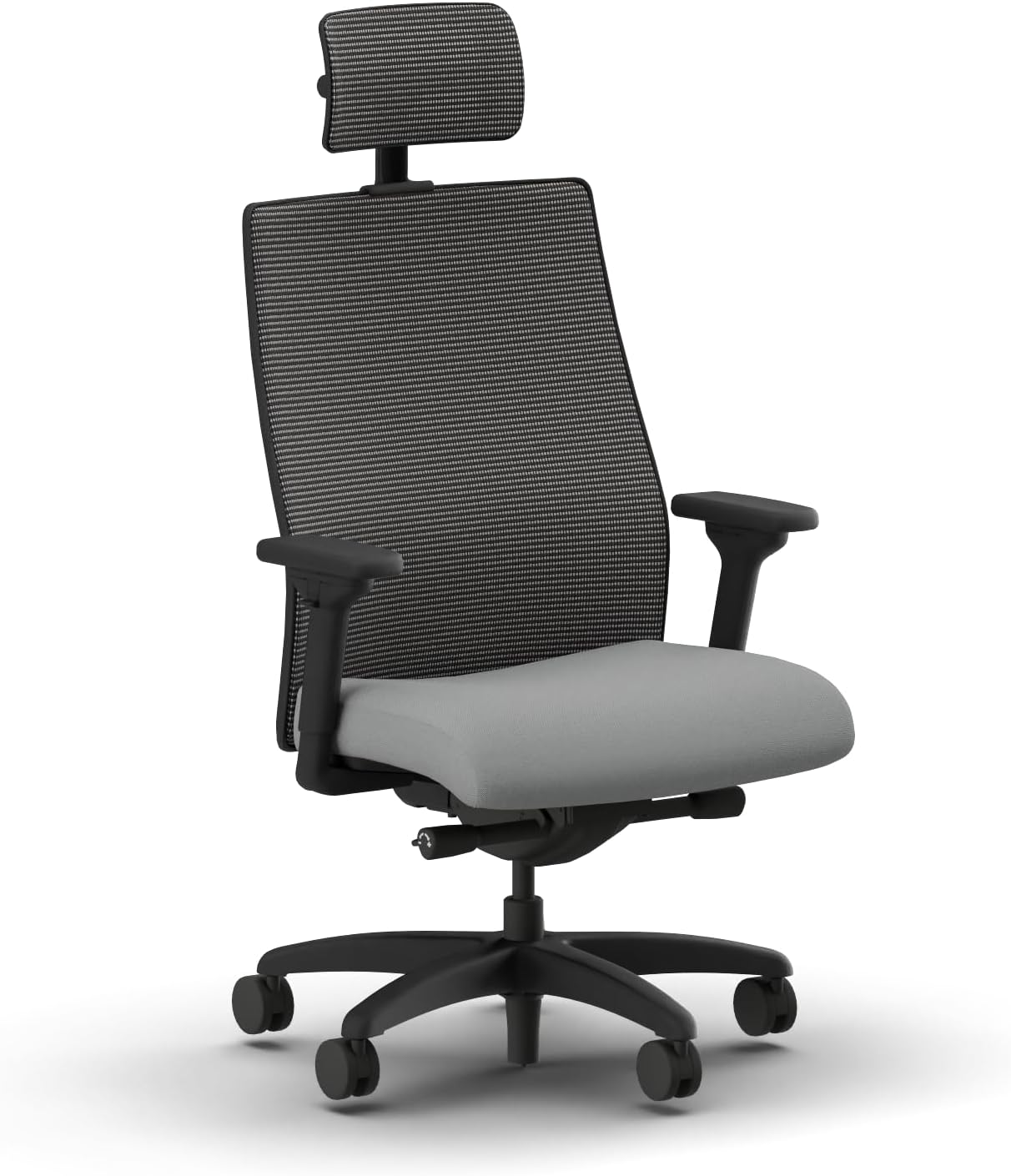
Pros
- Top-tier HON model in this roundup, reflecting the brand's flagship ergonomic line rather than an entry-level configuration
- 450 lb capacity matches the HON Wave while adding refinements aimed at dependable long-term performance
- Built specifically for spacious seating during extended workdays, matching a programmer's typical schedule
Cons
- Highest price of any chair in this roundup
- Ash color option may not match every home office aesthetic

Pros
- 3D armrest rotates 215 degrees and adjusts up, down, forward, and back, more adjustment range than most fixed or single-direction arms
- Adjustable headrest adds neck support during recline breaks between coding sessions
- Double-back lumbar design targets fatigue reduction specifically, matching the stated use case
Cons
- 350 lb capacity is on the lower end of this roundup's range
- Mesh seat may feel firmer than a foam-padded alternative for very long sessions

Pros
- 23.62 inch seat width is the widest in this roundup, directly addressing hip pressure for larger frames
- Armrests are deliberately spaced wider (22.05 inches apart) to avoid squeezing at the hips, a detail specific to this chair
- SGS-certified Class 4 gas lift is a higher-rated cylinder class than the Class 3 lifts on some other chairs here
Cons
- Highest price in this roundup
- Large overall footprint needs more floor space than the compact task chairs on this list

Pros
- Lowest price of any chair in this roundup, a reasonable entry point for a first big and tall chair purchase
- Molded foam cushion adds comfort without the cost of mesh-and-frame or commercial-brand construction
- Quick assembly reduces setup friction for a straightforward desk upgrade
Cons
- Lacks the armrest adjustability and headrest features found on the GABRYLLY and higher-end picks above
- 400 lb rating and simpler frame construction sit below the HON and true big and tall options for genuinely large frames
What Matters for a Sedentary, Keyboard-Heavy Workday
Armrest Adjustability for Keyboard and Mouse Position
Fixed armrests force wrist and shoulder position to adapt to the chair rather than the other way around, which compounds over hours of typing. A 3D or 4D armrest that adjusts height, depth, and width lets you match arm position to your specific keyboard and desk height instead, reducing the shoulder shrug that comes from an armrest sitting too high or too far forward. This matters more for programming than for roles with more varied movement, since the same arm position holds for hours rather than shifting naturally throughout the day.
Lumbar Support That Holds Up Over Long Sessions
A chair that feels fine for the first hour can still fail over a full workday if the lumbar support does not maintain contact once you have shifted position or leaned into a problem. Adjustable lumbar support, rather than a fixed curve built into the backrest, lets you reposition support as posture naturally drifts during long focus sessions. Chairs from established commercial brands tend to hold up to this more reliably than newer sellers, which is part of why HON models appear prominently in this list.
Mesh Versus Fabric for All-Day Airflow
Since programming involves less movement than more active desk roles, heat buildup against the backrest becomes noticeable sooner. Mesh backrests address this directly, and fabric is a reasonable second choice; PU leather is the least breathable option and worth avoiding for anyone doing back-to-back multi-hour sessions. If you are also considering a keyboard upgrade to pair with a better chair, our split ergonomic keyboard picks address the same sustained-typing strain from the input side rather than the seating side.
Weight Capacity Margin for Daily, Long-Term Use
A chair used for eight-plus hours a day, five days a week, wears differently than one used occasionally, so build in more margin above your own weight than you might for lighter use. The gas cylinder and base bear sustained load for longer stretches in a programming role than in jobs with more standing and walking breaks, and that sustained load is what determines how long the mechanism holds up before it starts to sink or wobble. A useful rule of thumb is to leave at least 50 to 100 pounds of headroom between your own weight and the chair’s rated maximum, rather than shopping right at the printed limit. That margin protects the gas cylinder and base from the accelerated wear that comes from sustained near-maximum load, which shows up months later as a slow sink or a wobble that was not present when the chair was new.
Recline and Micro-Breaks Between Debugging Sessions
A chair that only supports one fixed, upright position removes a useful tool for a programmer’s workday: the ability to lean back briefly while thinking through a problem rather than staring at a stalled terminal in the same posture that caused the fatigue in the first place. A tilt-back range of 90 to 120 degrees, like the GABRYLLY model in this list offers, gives enough recline for a short mental reset without requiring you to get up, while still returning easily to an upright typing position. This is a smaller feature than lumbar support or armrest adjustability, but it adds up over a full day of alternating between focused typing and the kind of staring-into-space thinking that debugging tends to involve.
None of this replaces getting up and moving periodically, which matters for circulation and focus regardless of how good the chair is. Pairing a well-fitted big and tall chair with scheduled short breaks, even just standing to refill water or stretch between compiles, does more for long-term comfort than any single chair feature. If eye strain from extended screen time is a bigger concern than seating in your setup, our guide on monitor distance and eye strain covers that side of a programmer’s desk setup.
Final Thoughts
For programmers who want commercial-grade reliability and are willing to pay for it, the HON Wave Big and Tall Ergonomic Chair pairs a 450-pound rating with breathable mesh construction from an established office furniture brand, a solid middle ground between the entry-level HON Sadie and the flagship Ignition 2.0. For a lower-cost option with genuinely strong armrest adjustability, the GABRYLLY Mesh Chair with 3D Armrest offers 215 degrees of arm rotation and an adjustable headrest at roughly a third of the HON Ignition 2.0’s price. Either is a reasonable starting point before comparing the remaining picks, which trade some of that adjustability for a lower price or larger overall dimensions.
FAQ
Is mesh or fabric better for a programmer’s chair?
Mesh generally wins for airflow during long, low-movement sessions, which fits the sedentary nature of coding work well. Fabric is a reasonable second choice if a particular chair’s other features, such as the HON Sadie’s build quality, outweigh the airflow difference for you.
Do I really need 3D or 4D armrests for programming?
Not strictly, but they help more here than in many other desk jobs, since a programmer’s arm position stays fixed for hours at a time rather than shifting naturally throughout the day. If your desk and keyboard height already line up well with a fixed or simple height-adjustable arm, the extra adjustment range is a nice-to-have rather than a requirement.
Are HON chairs worth the higher price over Amazon-only brands?
HON is an established commercial office furniture manufacturer, and that generally shows in build consistency and long-term durability compared to newer, direct-to-Amazon sellers. Whether the price premium is worth it depends on how many hours a day the chair sees and how long you expect to keep it before replacing it.
Should I combine this with a standing desk?
Alternating between sitting and standing reduces the total hours spent in any single position, which is generally beneficial regardless of chair quality. Our standing desk picks cover options that work well for a multi-monitor programming setup if you want to add that alongside one of these chairs.



Write Your Review
No reviews yet. Be the first to share your experience!