

You sit down for a long session, and within an hour your neck is stiff, your screen is at the wrong angle, and your desk looks like a cable jungle. A quality monitor arm solves all three problems at once. Whether you are running a single ultrawide panel or a dual-screen battlestation, the right mount gives you precise control over your viewing angle and clears the clutter from your workspace.
This guide covers seven of the strongest options available right now for gamers at every level. From budget-friendly single-arm mounts to heavy-duty ultrawide solutions with RGB flair, you will find a clear breakdown of what each one offers and who it suits best. If you are building or refining your monitor setup, this is the right place to start.

Pros
- Exceptional build quality with automotive-grade internals that stay firm at any angle
- Very easy and fast to install with no special tools or expertise required
- Wide compatibility with most monitors and desk types thanks to dual mounting options
- Full 360-degree adjustability allows for portrait mode, shared viewing, and precise ergonomic positioning
- Outstanding value for the price with a trusted brand backed by millions of users
Cons
- Maximum height extension of 15.75 inches may feel limiting for users who prefer a very elevated screen position
- Best suited for wood tabletops, so desks with metal frames or unusual undersides may not be compatible
- Single-arm only, so users with dual-monitor setups will need to purchase an additional unit
The HUANUO FlowLift Single Monitor Mount is a versatile and affordable monitor arm designed for anyone looking to reclaim desk space and improve their viewing ergonomics. It fits screens ranging from 13 to 32 inches and is compatible with the widely used 75x75mm and 100x100mm VESA mounting patterns, making it suitable for the vast majority of LCD monitors on the market today.
Where this arm truly stands out is in its range of motion and ease of adjustment. With a tilt range of -50 to +85 degrees, 90-degree swivel, and full 360-degree rotation, users can dial in the perfect viewing angle without any tools. The arm holds its position firmly once set, and the tension can be tuned to match the weight of your specific monitor, keeping everything locked in place throughout the workday.
HUANUO has invested heavily in build quality for this price point. The arm uses automotive-grade internal components and has been subjected to over 20,000 motion tests, which the brand claims translates to more than five years of continuous use. The 1-piece design simplifies installation dramatically, with most users reporting a setup time of around three minutes using only the included hardware.
There are a few things to keep in mind before purchasing. The maximum height lift of 15.75 inches is adequate for most users but may feel restrictive for those who prefer a very high monitor position. The arm also performs best on solid wood tabletops, and desks with metal frames or obstructions underneath may complicate installation. Users wanting a dual-monitor solution will need to purchase a second unit or opt for HUANUO's dedicated dual-arm model.
Overall, the HUANUO FlowLift Single Monitor Mount delivers impressive performance and durability at a very competitive price. It is a smart, practical upgrade for home offices, gaming setups, and corporate workstations alike. With a strong rating backed by a large number of verified buyers, it is one of the most reliable options in its category.
Monitor Size Compatibility: 13 to 32 inches
Weight Capacity: 4.4 to 19.8 lbs
VESA Compatibility: 75x75mm and 100x100mm
Maximum Height from Desktop: 15.75 inches (39.6 cm)
Maximum Extension: 17.32 inches
Tilt Range: -50 to +85 degrees
Swivel: Plus or minus 90 degrees
Rotation: 360 degrees
Mounting Options: C-clamp or grommet base
Desk Thickness Compatibility: 0.59 to 3.54 inches
Build Standard: Automotive-grade internal components
Motion Test Cycles: 20,000 (rated for 5+ years of use)
Installation Time: Approximately 3 minutes
Hardware Included: Yes, all mounting hardware included
Before purchasing a monitor arm, confirm that your monitor has a VESA mounting pattern on the back. This is typically a grid of four screw holes in either a 75x75mm or 100x100mm arrangement. The HUANUO FlowLift supports both, covering the majority of monitors sold today. If your monitor has a non-removable stand or no VESA holes, a monitor arm will not be compatible.
Next, check your desk. This arm works best on solid wood surfaces with a clean underside. Measure your desk thickness to ensure it falls between 0.59 and 3.54 inches. If your desk has a grommet hole, you can use that mounting option instead of the C-clamp for a cleaner, more stable installation.
Consider your monitor's weight carefully. The FlowLift handles monitors up to 19.8 lbs, which covers most standard displays. However, if you are using a large ultrawide or a particularly heavy professional monitor, you may want to consider HUANUO's Heavy Duty Monitor Arm, which supports up to 44 lbs and accommodates screens up to 49 inches.
If you run a dual-monitor setup, this single arm will only cover one screen. HUANUO offers a dual mount version at a slightly higher price that handles two monitors simultaneously, which may be a more cost-effective and space-efficient solution for multi-display users.
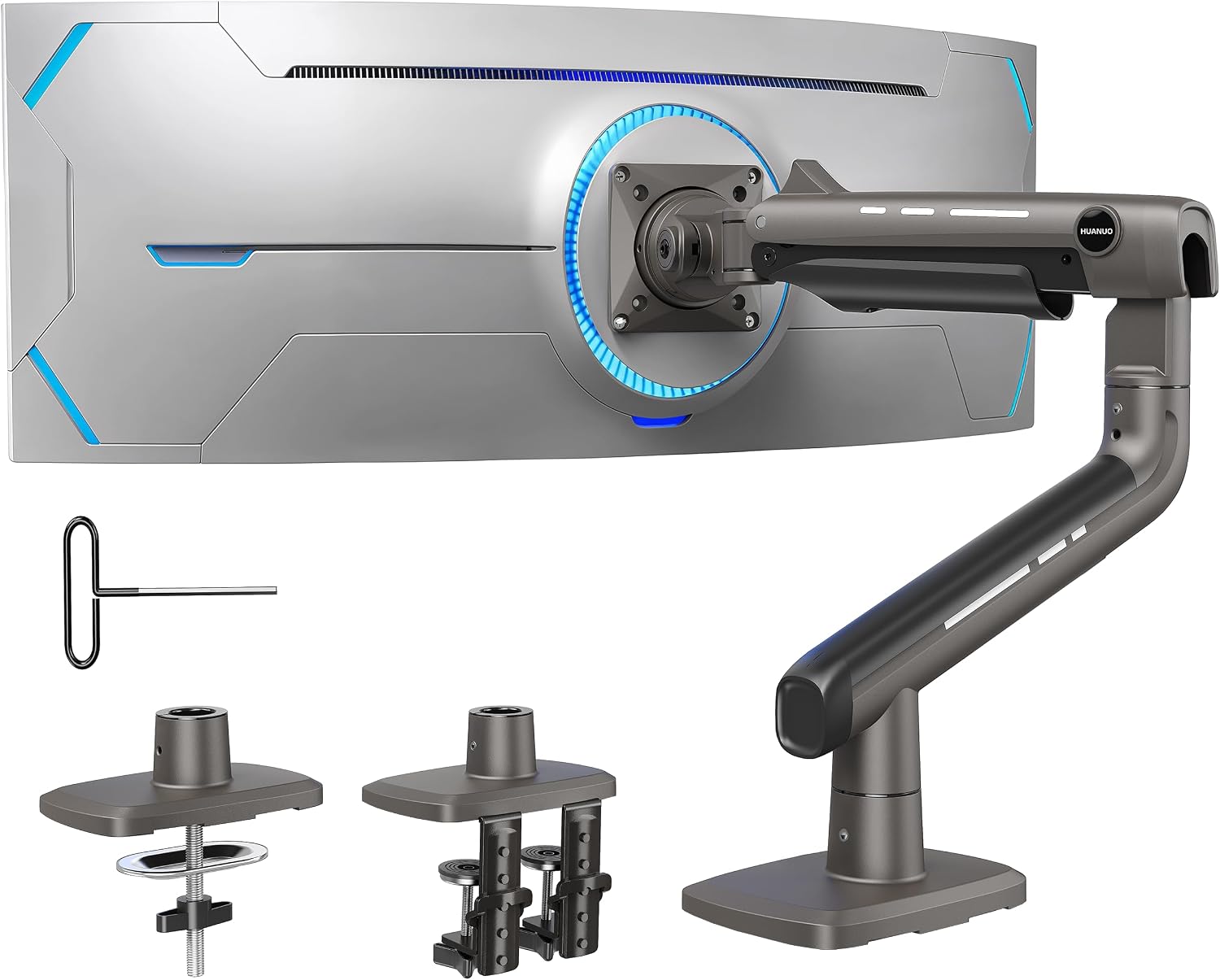
Pros
- Exceptional weight capacity of 44 lbs handles the heaviest ultrawide monitors with ease
- Highly flexible range of motion covers virtually every ergonomic need for work or gaming
- Reinforced aluminum build with 20% thicker arms and 30% wider base adds confidence in long-term stability
- Tool-free one-hand tension adjustment makes fine-tuning straightforward and frustration-free
- Strong customer satisfaction rating reflects reliable real-world performance across a large number of buyers
Cons
- 360-degree rotation is only compatible with screens up to 35 inches, so owners of larger ultrawides will have limited rotation options
- Only compatible with wooden desks within a specific thickness range, which may exclude users with glass, plastic, or non-standard desk setups
The HUANUO TitanLift is a premium single monitor arm engineered specifically for large and ultrawide displays. It accommodates screens from 17 to 49 inches and supports weights up to 44 lbs, making it one of the more capable arms in its price range. It is ideal for content creators, gamers, and professionals who use oversized monitors and demand both stability and flexibility.
The arm's range of motion is genuinely impressive. Users can tilt from +50 to -50 degrees, swivel 180 degrees, and extend the arm up to 22.5 inches, while height adjustment reaches up to 19.6 inches above the desk surface. This level of adjustability makes it easy to dial in an ergonomic position that reduces neck and eye fatigue during extended sessions. The one-hand tension adjustment using an included Allen key is a thoughtful touch that simplifies setup compared to many competing arms.
Build quality is a clear highlight of the TitanLift. The arm is constructed from high-strength aluminum alloy with arms that are 20% thicker and a base that is 30% wider than standard designs. The proprietary MechaSpring Technology has been tested through 50,000 motion cycles and a 3x load stress test, giving buyers strong confidence in its longevity. The dual C-clamp system grips desks securely and accommodates thicknesses from 0.8 to 3.5 inches without any permanent installation required.
There are a few limitations worth noting. The 360-degree rotation feature is restricted to monitors 35 inches and under, so owners of the largest ultrawides will not have full portrait mode capability. Additionally, the arm is only rated for wooden desks within the specified thickness range, which means users with glass or plastic desktops will need to look elsewhere. Desks with cross beams or panels on the underside are also incompatible.
Overall, the HUANUO TitanLift is a well-built, feature-rich monitor arm that punches above its weight class. Its combination of high load capacity, broad adjustability, durable construction, and straightforward installation makes it a compelling option for anyone upgrading to a large or ultrawide display. As long as your desk and monitor meet the compatibility requirements, this arm is a strong and reliable choice.
Compatible Screen Sizes: 17 to 49 inches (ultrawide supported). Weight Capacity: 6.6 to 44 lbs. VESA Compatibility: 75x75mm and 100x100mm.
Tilt Range: +50 to -50 degrees. Swivel: 180 degrees left or right. Rotation: 360 degrees (screens up to 35 inches only). Arm Extension: Up to 22.5 inches. Height Adjustment: Up to 19.6 inches from desk surface to VESA mount center.
Desk Compatibility: Wooden desks only, thickness range 0.8 to 3.5 inches, no cross beams or panels on underside. Mounting Type: Dual C-clamp. Material: High-strength aluminum alloy. Spring Technology: MechaSpring, tested to 50,000+ cycles and 3x load rating.
Before purchasing the HUANUO TitanLift, confirm that your monitor meets all three compatibility criteria: screen size between 17 and 49 inches, weight between 6.6 and 44 lbs, and VESA mounting holes in a 75x75mm or 100x100mm pattern. Monitors without standard VESA holes, including some Samsung ultrawide models, may require an adapter plate.
Your desk must also meet specific requirements. Only solid wooden desks are recommended, and the thickness must fall between 0.8 and 3.5 inches. Check the underside of your desk before ordering, as any cross beams or support panels near the clamping area will prevent proper installation. Glass and plastic desktops are not supported.
If you plan to use a monitor larger than 35 inches, be aware that the full 360-degree rotation feature will not be available. For users who primarily need tilt, swivel, and height adjustment rather than portrait mode, this limitation is unlikely to be a concern. For those with a 35-inch or smaller screen who want full rotation flexibility, the TitanLift offers everything needed in a single, well-built package.

Pros
- Exceptional weight capacity of 44 lbs accommodates ultrawide and large-format monitors with ease
- Gas spring arm delivers smooth, tool-free height and angle adjustments for all-day ergonomic comfort
- RGB lighting with 20+ modes adds a premium aesthetic touch that most monitor arms lack
- Quick-release VESA plate makes swapping monitors fast and hassle-free
- Flexible clamp and grommet mounting options suit a variety of desk configurations
Cons
- The RGB feature adds complexity and may not appeal to users seeking a minimalist or office-focused setup
- At this price point, users with lighter or smaller monitors may find the heavy-duty build more than they need
- No reviews are currently available to validate long-term durability and real-world performance claims
The MSI MPG MT201R V2 is a premium single monitor arm designed for gamers, content creators, and power users who demand both performance and style from their desk setup. With support for screens ranging from 17 to 49 inches and a weight capacity of up to 44 lbs, it is one of the most capable single-arm mounts in its class, comfortably handling everything from compact monitors to large ultrawides.
The centerpiece of this arm is its pneumatic gas spring mechanism, which allows smooth, effortless screen repositioning at virtually any angle or height without needing tools. The quick-release VESA plate, compatible with both 75x75 and 100x100 mm patterns, makes mounting and swapping monitors a quick, painless process that minimizes desk downtime. These features together make the MT201R V2 a genuinely practical tool for productivity-focused users.
Where this arm stands apart from the competition is its integrated RGB lighting system, offering more than 20 dynamic LED modes to complement gaming rigs or accent a modern home office. The sleek gray finish keeps the overall look refined rather than garish, striking a balance between gaming flair and professional aesthetics. Cable management channels are built into the arm to route wires cleanly out of sight, reinforcing the tidy, premium feel of the design.
On the downside, the RGB functionality and heavy-duty construction add cost and complexity that may not suit every buyer. Users with smaller, lighter monitors or those working in strictly professional environments may find the feature set more than necessary. Additionally, with no user reviews available yet, prospective buyers are relying solely on manufacturer specifications to gauge real-world reliability and durability.
Overall, the MSI MPG MT201R V2 is a compelling choice for anyone seeking a high-capacity, feature-rich monitor arm that doubles as a visual statement piece. The combination of gas spring precision, broad monitor compatibility, RGB customization, and a solid 3-year warranty makes it a strong investment for serious desk setups. If RGB is not a priority, shoppers should weigh whether the premium price aligns with their specific needs.
Monitor Size Compatibility: 17 to 49 inches. Weight Capacity: 4.4 to 44 lbs (2 to 20 kg) per screen. VESA Compatibility: 75x75 mm and 100x100 mm mounting patterns.
Clamp Mount Desk Thickness: 10 to 85 mm. Grommet Mount Desk Thickness: 10 to 48 mm. Arm Type: Single monitor gas spring arm with quick-release plate.
RGB Lighting: 20+ dynamic LED modes. Color: Gray. Warranty: 3 years. Cable Management: Built-in integrated routing channels.
When choosing a monitor arm, the most important factors are weight capacity, size compatibility, and desk mounting options. The MSI MPG MT201R V2 excels in all three areas, making it suitable for a wide range of users from casual home office workers to dedicated gamers with large displays. If your monitor weighs more than 20 lbs or exceeds 34 inches, this arm is one of the few in its price range that can reliably handle the load.
Consider your desk type before purchasing. The clamp mount works well for standard desks up to 85 mm thick, while the grommet option suits desks with pre-drilled holes up to 48 mm thick. Users with glass desks or non-standard surfaces should verify compatibility before buying. Both options are tool-free, which simplifies installation considerably.
If RGB lighting is not a priority for you, there are more affordable gas spring arms on the market that offer similar ergonomic performance. However, if you want a monitor arm that enhances the visual atmosphere of a gaming or streaming setup while also providing serious functional performance, the MT201R V2 is a well-rounded premium option worth the investment.

Pros
- Exceptional weight and size capacity handles ultrawide and large curved monitors that most arms cannot support
- Gas spring articulation is smooth and precise, making height and angle adjustments quick and effortless
- RGB lighting is a genuine differentiator that adds immersive ambiance without requiring a separate accessory
- Dual mounting options (C-clamp and grommet) provide flexibility for a wide variety of desk setups
- Ergonomic range of motion helps reduce neck and back fatigue during long gaming or streaming sessions
Cons
- At $104.99 it sits at a premium price point compared to basic monitor arms, which may be hard to justify for casual users
- The large footprint and heavy-duty build may feel oversized for users with smaller desks or compact workspaces
- RGB functionality adds visual appeal but requires cable routing to a power source, which could complicate very minimal desk setups
The ARESWING Single Gaming Monitor Arm is a purpose-built desk mount designed for gamers, streamers, and content creators who demand both performance and style. It accommodates screens ranging from 24 to 57 inches and supports weights up to 60 lbs, making it one of the most capable single-arm mounts available for consumer use. If you own a large ultrawide or a high-end curved gaming monitor, this arm is built with you specifically in mind.
The standout feature is the premium gas spring mechanism, which is rated for over 20,000 adjustment cycles and delivers genuinely smooth, one-handed repositioning. The arm offers +60 to -50 degrees of tilt, plus or minus 90 degrees of swivel, and a full 360-degree screen rotation, giving users precise control over viewing angles for both competitive gaming and casual streaming. The built-in cable management channels keep wires routed internally, which is a practical benefit that contributes to a noticeably cleaner desktop.
From a design standpoint, the arm features sharp, angular contours that align with modern e-sports aesthetics, and the integrated RGB light strip adds a layer of visual flair that most competing arms simply do not offer. Build quality feels solid and premium, with materials that inspire confidence when mounting a high-value monitor. Installation is straightforward, with both C-clamp and grommet base options covered and a claimed setup time of around five minutes.
On the downside, the price is on the higher end for a single monitor arm, and users with compact desks may find the arm's footprint and overall size a bit imposing. The RGB feature, while attractive, does require a power connection, which adds a minor layer of cable management complexity for minimalist setups.
Overall, the ARESWING Gaming Monitor Arm is a well-engineered, feature-rich mount that delivers on both ergonomics and aesthetics. For gamers or professionals who own large, heavy monitors and want a reliable arm with RGB flair, it represents strong value and a meaningful upgrade over standard desktop stands.
Compatible Screen Sizes: 24 to 57 inches (flat screens up to 60 lbs, curved monitors up to 49 lbs)
VESA Compatibility: 75x75mm, 100x100mm, 100x200mm, 200x200mm
Mounting Options: C-clamp (10 to 50mm desk thickness) and grommet base (10 to 45mm)
Range of Motion: Tilt +60 to -50 degrees, Swivel plus or minus 90 degrees, Rotation 360 degrees
Gas Spring Cycle Rating: 20,000+ cycles. Additional Features: Integrated RGB light strip, internal cable management channels. Color: Black
Before purchasing a monitor arm, the most important check is compatibility. Confirm your monitor's weight and screen size fall within the arm's supported range, and verify that your monitor has a VESA mounting pattern that matches one of the four supported configurations. Most monitors include VESA specs in their documentation or on the manufacturer's website.
Next, consider your desk. The ARESWING arm supports C-clamp installation for desks between 10 and 50mm thick, and grommet installation for desks between 10 and 45mm. If your desk is outside these ranges or made of glass, you may need an adapter or a different mounting solution. Also measure the available space on your desk to ensure the arm's reach and height range will position your screen exactly where you need it.
Finally, think about your use case. If you primarily game or stream and want an arm that doubles as a room accent piece, the RGB feature makes this a compelling choice. If you need a purely utilitarian mount for an office environment, a simpler arm at a lower price point might serve you just as well. For users with large, heavy gaming monitors who want premium build quality and visual impact, the ARESWING arm is a strong recommendation.

Pros
- Exceptionally stable dual C-clamp base eliminates screen wobble during use
- Wide compatibility covering monitors from 13 to 32 inches with standard VESA 75x75 and 100x100 patterns
- Smooth single-hand adjustment makes repositioning screens quick and effortless
- Integrated cable management keeps workstations neat and professional looking
- Both C-clamp and grommet mounting options offer flexible installation for different desk setups
Cons
- Only compatible with wooden desks within a specific thickness range, excluding glass and plastic surfaces
- Desks with cross beams or panels underneath cannot accommodate the clamp base, limiting compatibility
- Maximum arm extension of 17.32 inches may not reach far enough for very wide or unconventional desk configurations
The HUANUO FlowLift Dual Monitor Stand is a fully adjustable, dual-arm desk mount designed for users who want to elevate their workspace ergonomics without breaking the bank. It supports two monitors between 13 and 32 inches with VESA 75x75 or 100x100 mounting patterns, making it compatible with the vast majority of modern displays. Whether you are a gamer, a remote professional, or a content creator running a multi-screen setup, this stand is built to deliver comfort and flexibility.
The standout feature of this mount is its full-motion articulation. Each arm offers a generous tilt range, wide swivel, and full 360-degree rotation, allowing users to shift from landscape to portrait mode with ease. Screens can be raised up to 15.75 inches, which is enough to align most monitors with natural eye level and significantly reduce neck and shoulder strain during long sessions. The single-hand adjustment mechanism is smooth and responsive, making on-the-fly repositioning genuinely effortless.
Build quality is a clear strength here. The upgraded dual C-clamp base uses a larger platform and a two-point locking design that keeps both arms firmly anchored to the desk. During testing across typing, clicking, and gaming scenarios, there is minimal to no wobble, which is a common complaint with cheaper monitor arms. The grommet mounting option adds further versatility for desks with pre-drilled holes. Cable management channels are integrated along both arms, keeping wires organized and out of sight for a polished, professional look.
There are a few limitations worth noting. The stand is only recommended for wooden desks within a thickness range of 0.59 to 3.54 inches, which rules out glass, acrylic, and plastic surfaces. Desks with cross beams or support panels beneath the surface may also prevent proper clamp installation. Users with non-standard desk setups should carefully verify compatibility before purchasing to avoid disappointment.
Overall, the HUANUO FlowLift Dual Monitor Stand delivers exceptional value for its price point. It combines robust stability, broad monitor compatibility, and smooth full-motion adjustment in a package that is straightforward to install and genuinely improves daily comfort. For anyone running a dual-screen setup on a standard wooden desk, this is one of the most reliable and well-rounded monitor arms available in its category.
Monitor Size Compatibility: 13 to 32 inches per arm. Weight Capacity: 4.4 to 19.8 lbs per arm. VESA Compatibility: 75x75mm and 100x100mm mounting patterns.
Tilt Range: +85 to -50 degrees. Swivel Range: plus or minus 90 degrees. Rotation: 360 degrees. Maximum Height Adjustment: 15.75 inches. Maximum Arm Extension: 17.32 inches.
Desk Compatibility: Wooden desks only, thickness range 0.59 to 3.54 inches. Mounting Options: Dual C-clamp and grommet base. Cable Management: Built-in routing channels along both arms. Brand: HUANUO.
Before purchasing the HUANUO FlowLift Dual Monitor Stand, the most important step is verifying that both your monitors and your desk meet the compatibility requirements. Each monitor must be between 13 and 32 inches, weigh between 4.4 and 19.8 lbs, and have VESA mounting holes with a 75x75mm or 100x100mm pitch. Check the back of your monitor for these holes before ordering.
For your desk, confirm it is made of solid wood and falls within the 0.59 to 3.54 inch thickness range. Glass, plastic, and acrylic desks are not supported. Also check that the underside of your desk is clear of cross beams or support panels, as these will block the C-clamp from seating properly. If your desk has a pre-drilled grommet hole, you can use that mounting option as an alternative.
This stand is best suited for users who want a permanent or semi-permanent dual monitor setup with frequent adjustments throughout the day. It is an excellent fit for home offices, gaming stations, and creative workstations. If you only need a single monitor arm or require support for screens larger than 32 inches or heavier than 19.8 lbs, HUANUO offers other models in their lineup that may better meet your needs.

Pros
- Unique PrecisionView window removes all guesswork from tension adjustment, a feature rarely found at this price point
- MechaSpring design avoids the pressure-loss issues common with gas cylinder arms, promising longer-lasting performance
- Tool-free snap-in VESA plate makes initial setup and future monitor swaps fast and frustration-free
- ACA endorsement and TUV Rheinland certification add credible third-party validation to ergonomic and safety claims
- Wide compatibility range of 13 to 32 inches and up to 19.8 lbs covers the vast majority of popular monitors
Cons
- Recommended only for wood desks between 0.59 and 3.54 inches thick, limiting compatibility with glass, metal, or irregularly edged desks
- Curved screens have a lower maximum weight limit of 15.4 lbs compared to 19.8 lbs for flat panels, which may exclude some heavier ultrawide curved monitors
The HUANUO FlowLift Pro is a single monitor arm designed for screens between 13 and 32 inches, targeting home office professionals, gamers, and content creators who want a cleaner desk and a healthier viewing position. Backed by an endorsement from the American Chiropractic Association, it positions itself as a genuine ergonomic investment rather than just a desk accessory.
The standout engineering choice here is the MechaSpring mechanism, which replaces the gas cylinders found in many competing arms. Gas designs can gradually lose pressure and allow screen droop over months of use, while HUANUO claims the MechaSpring maintains consistent tension and lasts up to twice as long. Paired with the LockSteady anti-sag system, the arm moves smoothly under light pressure and holds its position firmly once released, making single-handed monitor adjustments genuinely effortless.
Setup is where the FlowLift Pro pulls further ahead of similarly priced rivals. The InstaMount VESA plate snaps onto the monitor back and clicks securely into the arm without any tools, and the PrecisionView window with its yellow indicator tells you at a glance whether the internal tension matches your monitor's weight. These two features together eliminate the trial-and-error frustration that plagues most monitor arm installations. The arm itself offers an impressive range of motion, with nearly 19 inches of horizontal extension, over 16 inches of height adjustment, and full tilt, swivel, and rotation capability.
The primary limitation to be aware of is desk compatibility. HUANUO specifically recommends this arm only for wood desks within a defined thickness range, and notes that irregular desk edges may not work well with the clamp or grommet base. Curved monitor users should also note the reduced maximum weight allowance. These are practical constraints worth checking before purchasing.
Overall, the FlowLift Pro delivers a well-engineered, feature-rich monitor arm that punches above its weight class. The combination of MechaSpring durability, tool-free installation, and visible tension calibration makes it one of the more thoughtfully designed options available, and it earns a confident recommendation for anyone upgrading a standard wood desk workstation.
Compatible Screen Sizes: 13 to 32 inches (flat screens up to 19.8 lbs, curved screens up to 15.4 lbs). VESA patterns supported are 75x75mm and 100x100mm.
Adjustment Range: Up to 18.7 inches of horizontal extension, 16.5 inches of height adjustment, tilt range of plus 85 degrees to minus 25 degrees, swivel of plus or minus 90 degrees, and rotation of plus or minus 90 degrees for portrait or landscape orientation.
Build and Mounting: 90% professional-grade metal construction. Mounts via C-clamp or grommet base. Recommended for wood desks with a thickness between 0.59 and 3.54 inches. Not recommended for glass, metal, or desks with irregular edges.
Certifications: TUV Rheinland certified. Tested at 3x rated load capacity. Endorsed by the American Chiropractic Association for ergonomic design.
Who should buy this: The FlowLift Pro is best suited for people who spend long hours at a desk and want to reduce neck and shoulder fatigue by raising their monitor to eye level. It is equally well suited to gamers who want to reclaim desk space and creators who need precise tilt control for color grading or glare reduction.
Check your desk first: Before ordering, confirm your desk is solid wood and falls within the 0.59 to 3.54 inch thickness range. The arm ships with both a C-clamp and a grommet base, so you have two mounting options, but neither is recommended for glass or metal surfaces. If your desk edge is rounded or irregular, measure carefully before committing.
Verify monitor compatibility: All three conditions must be met simultaneously: screen size between 13 and 32 inches, weight within the specified range, and a VESA 75x75mm or 100x100mm mounting pattern. Most modern monitors in the 24 to 27 inch range will qualify, but always check your monitor's spec sheet for VESA pattern and weight before purchasing.
Alternatives to consider: If you need to mount on a non-wood surface or require support for a heavier ultrawide monitor, consider stepping up to a heavy-duty arm with a wider desk compatibility range. For users whose monitors and desks meet all the listed requirements, however, the FlowLift Pro represents strong value with its above-average feature set.

Pros
- Handles very large and heavy monitors that most standard arms cannot support
- Smooth, tool-free adjustments make it easy to reposition your screen throughout the day
- Dual mounting system offers flexibility for different desk types and thicknesses
- Integrated cable management dramatically reduces desktop clutter
- Strong customer satisfaction rating reflects reliable real-world performance
Cons
- Only compatible with wooden desks and desks without crossbeams on the underside, which may limit use on some office furniture
- The arm's large size and heavy-duty build may feel oversized or bulky for users with smaller monitors or compact desks
The WALI GSM001XL Heavy Duty Monitor Arm is designed specifically for users who run large, ultrawide, or 1000R curved displays that standard monitor arms simply cannot handle. With support for screens ranging from 13 to 49 inches and a maximum load capacity of 44 lbs, this mount is built for power users, creative professionals, and gamers who demand both stability and flexibility from their workstation setup.
In terms of real-world performance, the GSM001XL delivers an impressive range of motion. The arm extends nearly 22 inches from the desk, raises over 20 inches in height, swivels a full 90 degrees in each direction, tilts 45 degrees up or down, and rotates a complete 360 degrees. This level of adjustability means you can dial in the exact ergonomic position to reduce neck and shoulder strain during long work sessions or gaming marathons, all without reaching for a single tool.
Build quality is a clear highlight of this product. WALI engineered the arm with a wider VESA head and a tighter-fitting VESA panel to keep heavy monitors locked firmly in place without wobble. The internal mechanism has been stress-tested through more than 20,000 adjustment cycles, which speaks to its long-term durability. The built-in cable management channels also add a polished, professional look to any desk by routing cords neatly out of sight along the arm itself.
There are a couple of limitations worth noting. The mount is recommended only for solid wooden desks and will not work well on desks with a crossbeam blocking the underside, which may rule it out for some office environments. Additionally, while the heavy-duty construction is a strength, the arm's physical footprint and bulk may feel excessive for anyone running a smaller monitor who does not need this level of load capacity.
Overall, the WALI GSM001XL is a well-engineered, reliable monitor arm that punches above its price point for users with large or ultrawide displays. Its combination of wide compatibility, full motion range, and proven durability makes it one of the more compelling options in its category. If you have a big screen and want a stable, ergonomic, and tidy desk setup, this arm is a smart investment.
Compatible Screen Sizes: 13 to 49 inches, including flat and 1000R curved LCD/LED monitors.
Maximum Load Capacity: 44 lbs per arm, making it suitable for the heaviest consumer ultrawide displays on the market.
VESA Compatibility: Standard 75x75mm and 100x100mm mounting patterns. Always verify your monitor's VESA pattern before purchasing.
Range of Motion: Swivel up to 90 degrees left and right, tilt up to 45 degrees up or down, and full 360-degree rotation. Horizontal reach extends to 21.57 inches, with a vertical height range of up to 20.35 inches above the desk.
Mounting Options: C-clamp for desks 0.39 to 3.15 inches thick, and grommet base for the same thickness range. Recommended for solid wooden desks only, without an underside crossbeam.
Who Should Buy This: The WALI GSM001XL is the right choice for anyone running a large ultrawide or curved monitor, particularly screens in the 34 to 49 inch range. It is ideal for home office workers, video editors, graphic designers, and gamers who spend extended hours at their desk and want ergonomic flexibility without compromising on stability.
Check Your Monitor Compatibility First: Before purchasing, confirm three things about your monitor: its VESA mounting pattern (must be 75x75mm or 100x100mm), its weight (must be under 44 lbs), and its screen size (must be between 13 and 49 inches). Skipping this step is the most common reason for a poor fit.
Desk Requirements: This arm works best on solid wooden desks between 0.39 and 3.15 inches thick. If your desk has a metal crossbeam running along the underside, the C-clamp may not seat properly. In that case, a grommet hole is a better option if your desk supports it.
Comparing to Lighter Alternatives: If your monitor is under 26 lbs and smaller than 34 inches, WALI's standard single monitor arm may be a more cost-effective and compact choice. The GSM001XL is purpose-built for heavy, oversized displays, and its larger form factor reflects that specialization.
What to Look for When Buying a Gaming Monitor Arm
Weight Capacity and Screen Size Compatibility
The single most important spec is whether the arm can actually hold your monitor. Lightweight arms like the HUANUO FlowLift Single Monitor Mount handle screens up to 32 inches and around 19.8 lbs, which covers most standard gaming monitors. If you are rocking a large curved ultrawide, you need something rated higher, like the HUANUO TitanLift or the WALI Heavy Duty Monitor Arm, both of which support screens up to 49 inches and loads up to 44 lbs.
Always cross-check three things before buying: your screen size in inches, the monitor’s weight, and the VESA hole pattern on the back. Most monitors use a 75x75mm or 100x100mm VESA pattern, and nearly every arm on this list supports both.
Range of Motion and Adjustability
Gaming demands more than a static screen position. You might want to tilt the display back during a cinematic cutscene, swivel it toward a friend, or raise it higher when you switch to a standing desk setup. Look for arms with generous tilt ranges, at least plus or minus 45 degrees, along with full 360-degree rotation if you ever plan to go portrait mode for coding or reading.
The HUANUO FlowLift Pro stands out here with its MechaSpring system, which allows tool-free adjustments on the fly. The HUANUO TitanLift offers an impressive tilt range of plus 50 to minus 50 degrees and a reach of up to 22.5 inches, giving you exceptional flexibility for ultrawide panels. Smooth, one-handed repositioning is a feature worth prioritizing if you switch between gaming and work frequently.
Build Quality and Long-Term Stability
A wobbly monitor arm is genuinely dangerous and deeply frustrating during intense gameplay. Aluminum alloy construction is the gold standard here. The HUANUO TitanLift uses reinforced arms that are 20 percent thicker and a base that is 30 percent wider than standard models, and it has been validated through 50,000 motion cycles. That kind of durability assurance matters when you are mounting a premium display.
For dual-monitor setups, the HUANUO FlowLift Dual Monitor Stand uses an upgraded dual C-clamp base that locks firmly to your desk with no wobble during fast mouse movements or keyboard pounding. Always confirm your desk material is solid wood and within the specified thickness range before mounting any arm.
Mounting Options and Desk Compatibility
Most arms on this list offer both C-clamp and grommet base mounting. C-clamp is the faster, tool-light option that clamps to the edge of your desk. Grommet mounting threads through a hole in the desk surface for a cleaner look and slightly more stability. The WALI Heavy Duty Monitor Arm supports both methods for desks between 0.39 and 3.15 inches thick, which covers most gaming desks on the market.
If your desk has a crossbeam or panel underneath, several of these arms will not install correctly. Check the underside of your desk before ordering. For those building a complete ergonomic workstation, exploring the full range of monitor setup accessories can help you plan everything cohesively.
Final Thoughts
For most gamers with a standard 32-inch or smaller display, the HUANUO FlowLift Single Monitor Mount delivers outstanding value with rock-solid stability and effortless one-handed adjustability. If you are running a large ultrawide panel and need a mount that can genuinely handle the weight and size, the HUANUO TitanLift Heavy Duty Monitor Arm is the clear step up, with its reinforced aluminum build, 44-lb capacity, and broad range of motion that handles even the most demanding ultrawide gaming screens with confidence.
Frequently Asked Questions
What is the best monitor arm for gaming in 2026?
The best choice depends on your screen size and how you use your setup. For standard monitors up to 32 inches, the HUANUO FlowLift Single Monitor Mount is a consistently top-rated option with strong build quality and smooth adjustability. For large ultrawide screens, the HUANUO TitanLift or the WALI Heavy Duty Monitor Arm offer the load capacity and stability you need.
Can a monitor arm hold an ultrawide curved gaming monitor?
Yes, but you need to choose an arm specifically rated for ultrawide screens. The WALI Heavy Duty Monitor Arm is designed to support 1000R curved panels up to 49 inches, and the HUANUO TitanLift is similarly built for large ultrawide displays. Always confirm that your monitor’s weight and VESA pattern match the arm’s specifications before purchasing.
Is a monitor arm better than a monitor stand for gaming?
For most gamers, a monitor arm is the superior choice. It frees up desk space, allows precise ergonomic positioning that a fixed stand cannot match, and lets you quickly reposition the screen depending on whether you are gaming, working, or watching content. A well-chosen arm also reduces neck and shoulder fatigue over long sessions, which makes a noticeable difference over time. You can explore more about optimizing your monitor setup for both comfort and performance.
Do gaming monitor arms work with all desks?
Not all desks are compatible. Most arms on this list are recommended for solid wooden desks within a specific thickness range, typically between 0.5 and 3.5 inches. Glass and plastic desks are generally not suitable. You should also check that the underside of your desk is free of crossbeams or panels that would block the clamp from seating properly. When in doubt, the grommet mounting option tends to offer a more secure fit on thicker or more unusual desk surfaces.


Write Your Review
No reviews yet. Be the first to share your experience!