

Your desk has a glass surface, a thick privacy wall, or a built-in edge that makes clamping impossible. You need a monitor arm that does not rely on squeezing itself onto a desk edge or drilling a grommet hole. The good news is that freestanding and alternative-mount options have improved dramatically, offering the same full-motion adjustability you would expect from a traditional clamp-style arm.
This guide is built for home office workers, gamers, and anyone setting up a shared or unconventional workspace. We evaluated seven popular options across stability, ease of adjustment, and desk compatibility. Whether you need a single-screen solution or a dual-monitor setup, our monitor setup resource hub has you covered from start to finish.

Pros
- Exceptional build quality with automotive-grade internals that stay firm at any angle
- Very easy and fast to install with no special tools or expertise required
- Wide compatibility with most monitors and desk types thanks to dual mounting options
- Full 360-degree adjustability allows for portrait mode, shared viewing, and precise ergonomic positioning
- Outstanding value for the price with a trusted brand backed by millions of users
Cons
- Maximum height extension of 15.75 inches may feel limiting for users who prefer a very elevated screen position
- Best suited for wood tabletops, so desks with metal frames or unusual undersides may not be compatible
- Single-arm only, so users with dual-monitor setups will need to purchase an additional unit
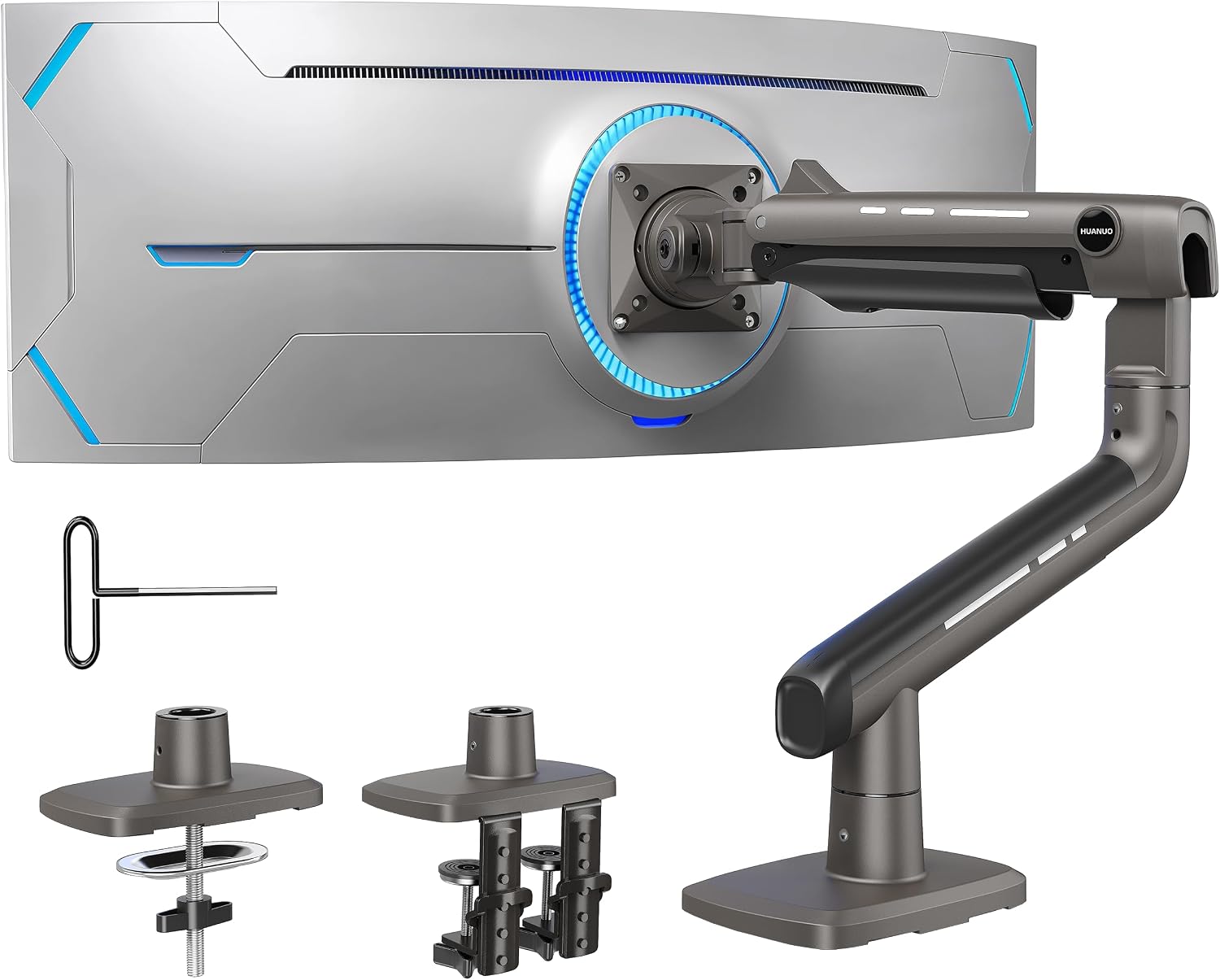
The HUANUO FlowLift Single Monitor Mount is a versatile and affordable monitor arm designed for anyone looking to reclaim desk space and improve their viewing ergonomics. It fits screens ranging from 13 to 32 inches and is compatible with the widely used 75x75mm and 100x100mm VESA mounting patterns, making it suitable for the vast majority of LCD monitors on the market today.
Where this arm truly stands out is in its range of motion and ease of adjustment. With a tilt range of -50 to +85 degrees, 90-degree swivel, and full 360-degree rotation, users can dial in the perfect viewing angle without any tools. The arm holds its position firmly once set, and the tension can be tuned to match the weight of your specific monitor, keeping everything locked in place throughout the workday.
HUANUO has invested heavily in build quality for this price point. The arm uses automotive-grade internal components and has been subjected to over 20,000 motion tests, which the brand claims translates to more than five years of continuous use. The 1-piece design simplifies installation dramatically, with most users reporting a setup time of around three minutes using only the included hardware.
There are a few things to keep in mind before purchasing. The maximum height lift of 15.75 inches is adequate for most users but may feel restrictive for those who prefer a very high monitor position. The arm also performs best on solid wood tabletops, and desks with metal frames or obstructions underneath may complicate installation. Users wanting a dual-monitor solution will need to purchase a second unit or opt for HUANUO's dedicated dual-arm model.
Overall, the HUANUO FlowLift Single Monitor Mount delivers impressive performance and durability at a very competitive price. It is a smart, practical upgrade for home offices, gaming setups, and corporate workstations alike. With a strong rating backed by a large number of verified buyers, it is one of the most reliable options in its category.
Monitor Size Compatibility: 13 to 32 inches
Weight Capacity: 4.4 to 19.8 lbs
VESA Compatibility: 75x75mm and 100x100mm
Maximum Height from Desktop: 15.75 inches (39.6 cm)
Maximum Extension: 17.32 inches
Tilt Range: -50 to +85 degrees
Swivel: Plus or minus 90 degrees
Rotation: 360 degrees
Mounting Options: C-clamp or grommet base
Desk Thickness Compatibility: 0.59 to 3.54 inches
Build Standard: Automotive-grade internal components
Motion Test Cycles: 20,000 (rated for 5+ years of use)
Installation Time: Approximately 3 minutes
Hardware Included: Yes, all mounting hardware included
Before purchasing a monitor arm, confirm that your monitor has a VESA mounting pattern on the back. This is typically a grid of four screw holes in either a 75x75mm or 100x100mm arrangement. The HUANUO FlowLift supports both, covering the majority of monitors sold today. If your monitor has a non-removable stand or no VESA holes, a monitor arm will not be compatible.
Next, check your desk. This arm works best on solid wood surfaces with a clean underside. Measure your desk thickness to ensure it falls between 0.59 and 3.54 inches. If your desk has a grommet hole, you can use that mounting option instead of the C-clamp for a cleaner, more stable installation.
Consider your monitor's weight carefully. The FlowLift handles monitors up to 19.8 lbs, which covers most standard displays. However, if you are using a large ultrawide or a particularly heavy professional monitor, you may want to consider HUANUO's Heavy Duty Monitor Arm, which supports up to 44 lbs and accommodates screens up to 49 inches.
If you run a dual-monitor setup, this single arm will only cover one screen. HUANUO offers a dual mount version at a slightly higher price that handles two monitors simultaneously, which may be a more cost-effective and space-efficient solution for multi-display users.

Pros
- Exceptional value with a very competitive price point for a full-motion monitor arm
- Genuinely tool-free VESA mounting makes setup fast and accessible for all skill levels
- Wide compatibility covers most standard monitors including curved and ultrawide displays
- Durable construction tested through 20,000 plus adjustment cycles ensures long-term reliability
- Dual mounting options, C-clamp and grommet, accommodate a wide range of desk types and thicknesses
Cons
- Maximum VESA compatibility is limited to 100x100mm, so monitors with larger VESA patterns such as 200x100mm are not supported
- The 19.8 lb weight limit may exclude some larger or heavier professional-grade monitors
- Arm reach of 18.1 inches may not be sufficient for users who need to position their monitor very far from the desk edge
The ErGear Single Monitor Arm is a fully adjustable desk mount designed for everyday users who want to improve their workspace ergonomics without a significant investment. It supports flat and curved monitors ranging from 13 to 34 inches and weighing up to 19.8 lbs, making it suitable for a broad range of home office, student, and gaming setups.
One of the most notable features is the tool-free VESA mounting system, which allows users to attach their monitor in just three steps and without any additional tools. Combined with a 40% wider VESA head bearing and tighter-fitting VESA panels, the arm delivers a stable, wobble-free hold that holds up well during daily adjustments. The full-motion range, including plus 80 and minus 50 degree tilt, plus or minus 90 degree swivel, and full 360 degree rotation, gives users precise control over their viewing angle to reduce neck and eye strain.
Build quality is solid for the price, with the internal mechanism tested through more than 20,000 adjustment cycles. The arm extends up to 18.1 inches and raises the screen up to 17.5 inches, freeing up a significant portion of the desk surface and promoting a cleaner, more organized workspace. The integrated cable management clips are also tool-free and easy to use, adding a polished finish to any setup.
There are a few limitations worth noting. The arm is capped at a 100x100mm VESA pattern, which means it will not work with monitors requiring larger mounting configurations. The 19.8 lb weight limit is also a consideration for users with heavier displays, and the reach distance may not satisfy those who need more flexibility in monitor placement.
Overall, the ErGear Single Monitor Arm punches well above its price point, offering genuine full-motion adjustability, reliable stability, and a hassle-free setup experience. For budget-conscious users looking to elevate their screen and reclaim desk space, this arm is a smart and practical choice.
Monitor Size Compatibility: 13 to 34 inches (flat or curved)
Maximum Load Capacity: 19.8 lbs per arm
VESA Compatibility: 75x75mm and 100x100mm
Maximum Height Adjustment: 17.5 inches
Maximum Arm Reach: 18.1 inches
Tilt Range: plus 80 degrees to minus 50 degrees
Swivel Range: plus or minus 90 degrees
Rotation: 360 degrees
C-Clamp Desk Thickness: 0.39 to 2.56 inches
Grommet Base Desk Thickness: 0.39 to 2.95 inches
Mounting Options: C-clamp or grommet base
Cable Management: Tool-free integrated cable clips
VESA Installation: Tool-free three-step setup
Durability Testing: 20,000 plus adjustment cycles
Brand: ErGear
Before purchasing this monitor arm, the most important step is to verify three things about your existing monitor: the screen size, the total weight, and the VESA mounting pattern on the back. This arm supports monitors between 13 and 34 inches weighing up to 19.8 lbs with VESA patterns of either 75x75mm or 100x100mm. If your monitor falls outside these ranges, you will need to consider a different model.
This arm is an excellent fit for users setting up a home office or study desk who want to improve posture and free up workspace. The full-motion adjustability makes it particularly useful for people who switch between sitting and standing, share a desk with others, or frequently alternate between work tasks and entertainment. Gamers who want to tilt or swivel their screen quickly will also appreciate the smooth adjustment mechanism.
If you need to mount a very large or heavy professional monitor, a dual-screen setup, or a display with a non-standard VESA pattern, you should explore ErGear's heavier duty or multi-monitor options. For the vast majority of everyday monitors in home and office environments, however, this single arm offers an outstanding balance of performance, versatility, and value.

Pros
- Tool-free height adjustment with a reliable spring mechanism that holds position without sagging
- Freestanding design is ideal for cubicles, privacy-wall desks, and renters who cannot drill or clamp
- Wide monitor compatibility spanning 17 to 32 inches with dual VESA support
- 360-degree rotation makes switching between landscape and portrait mode effortless
- Lifetime warranty adds strong long-term value for the price
Cons
- Minimum monitor weight of 4.4 lbs means very lightweight monitors may not work properly with the spring tension system
- Freestanding base takes up desk footprint, which could be a drawback on very small or crowded workspaces
- Limited to single-monitor setups, so multi-display users will need a separate solution
The Mount-It! Freestanding Single Monitor Arm is designed for anyone who wants the ergonomic benefits of a full-motion monitor mount without the hassle of drilling into a desk or attaching a clamp. It is particularly well-suited for cubicle workers, home office users, and renters who need a flexible, non-permanent solution that can move with them.
The standout feature here is the integrated tension-adjustable spring mechanism, which allows you to reposition your monitor height instantly using just your fingertips. Unlike many budget monitor arms that require loosening a knob or using a screwdriver, this arm holds its position reliably once set, with no reported sagging during normal use. The full motion range adds genuine versatility, offering 50 degrees of swivel, combined tilt of up to 25 degrees, and a full 360-degree screen rotation for portrait or landscape orientation.
Build quality is solid for the price range. The freestanding weighted base provides stability on flat desk surfaces, and the arm itself feels sturdy when handling monitors up to its 17.6 lb weight limit. The included cable management channel is a practical touch that keeps power and display cables routed neatly along the arm, reducing desk clutter without extra accessories.
There are a few things to keep in mind before purchasing. The spring mechanism requires a minimum monitor weight of 4.4 lbs to function correctly, so ultra-lightweight displays may not be a good match. The freestanding base also occupies desk real estate, which could feel cramped on smaller workspaces. Additionally, this is strictly a single-arm solution, so dual-monitor users will need to look elsewhere.
Overall, the Mount-It! Freestanding Single Monitor Arm delivers a well-rounded ergonomic upgrade for most standard monitor setups. The combination of tool-free adjustments, broad monitor compatibility, and a lifetime warranty makes it a compelling choice for anyone seeking a flexible, clamp-free monitor positioning solution for home or office use.
Compatible Monitor Sizes: 17 inches to 32 inches diagonal screen size. The arm is designed to handle a wide range of modern monitors commonly used in home and office environments.
Weight Capacity: Supports monitors weighing between 4.4 lbs (minimum for spring function) and 17.6 lbs maximum static load. Always verify your monitor weight before purchase.
VESA Compatibility: Supports both 75x75mm and 100x100mm VESA mounting patterns, covering the majority of consumer-grade monitors on the market today.
Motion Range: Swivel: 50 degrees. Tilt: 10 degrees upward and 15 degrees downward. Screen rotation: 360 degrees full portrait and landscape switching. Height adjustment is spring-assisted and tool-free.
Mounting Type: Freestanding weighted base. No clamp, grommet, or wall attachment required. All mounting hardware is included in the box. Color: Black. Backed by a lifetime manufacturer warranty.
Is this the right monitor arm for you? If you work in a cubicle, rent your space, or simply do not want to modify your desk, this freestanding arm removes all the usual installation barriers. There is no clamping, no grommet hole needed, and no tools required for height changes once it is set up.
Check your monitor before buying. The two most important compatibility checks are VESA pattern and weight. Confirm your monitor has a 75x75 or 100x100 VESA pattern on the back, and that it weighs between 4.4 and 17.6 lbs. Monitors outside this weight range will not work correctly with the spring tension system.
Consider your desk size. The freestanding base requires a stable, flat surface and does occupy some desk space. If you are working on a very small desk or a glass surface, measure your available space and confirm the base will sit securely before purchasing.
Single monitor users only. This product is designed for one display. If you are planning a dual-monitor setup, Mount-It offers dual-arm configurations that may better suit your needs. For single-screen ergonomic setups, this arm offers excellent value combined with a lifetime warranty that protects your investment long term.

Pros
- No-drill freestanding design works on virtually any desk surface, including glass and thin tabletops
- Full motion per-arm adjustability supports both productivity and ergonomic comfort throughout long work sessions
- Broad VESA compatibility and included hardware make installation quick and hassle-free
- Rated highly by a strong base of verified buyers, reflecting consistent real-world satisfaction
- Built-in cable management keeps your workspace tidy without extra accessories
Cons
- Freestanding base may take up more desk footprint compared to clamp or grommet-style mounts, which could be limiting on smaller desks
- Weight capacity of 19.8 lbs per arm may not accommodate heavier ultrawide or premium monitors
- Height adjustment is limited to the 16.5-inch pole range, which may not suit users who need very high or very low screen placement
The Mount-It! Dual Monitor Desk Stand is a freestanding, full-motion mount designed for anyone looking to upgrade to a dual-screen setup without permanently modifying their desk. It is equally at home in a home office, a corporate workstation, or a shared cubicle environment, and its no-drill base design makes it accessible to renters and frequent desk movers alike.
The standout feature of this mount is its combination of a freestanding heavy-duty base with genuinely full-motion arms. Each arm independently tilts, swivels, and rotates between landscape and portrait mode, giving users precise control over screen positioning. The 16.5-inch center pole provides meaningful height adjustment, which goes a long way toward reducing neck and eye strain during extended sessions.
Build quality feels solid for the price point. The heavy-duty base provides stability without requiring clamps or grommet holes, and the arms hold position reliably once adjusted. The integrated cable management is a practical touch that keeps the setup looking clean, and the detachable VESA plates make attaching monitors straightforward as long as you verify your monitor's VESA pattern beforehand.
There are a few trade-offs worth noting. The freestanding base occupies a larger footprint than clamp-style alternatives, which can feel restrictive on compact desks. The 19.8 lb per arm weight limit is generous for most monitors but may exclude heavier premium displays. Users who need extreme height ranges may also find the 16.5-inch pole limiting.
Overall, the Mount-It! Dual Monitor Stand delivers impressive value for its price. It combines practical freestanding versatility with full-motion flexibility and a clean cable management system, making it a strong recommendation for home and office users who want a reliable, ergonomic dual-monitor solution without a complicated installation process.
ASIN: B0CB774F3N
Brand: Mount-It!
Compatible Screen Size: Up to 32 inches per arm
Weight Capacity: 19.8 lbs per arm
VESA Compatibility: 75x75mm and 100x100mm
Center Pole Height: 16.5 inches
Adjustments: Height, Tilt, Swivel, Rotation (landscape and portrait)
Installation Type: Freestanding base (no clamp or grommet required)
Cable Management: Integrated built-in routing
Hardware Included: Yes, all assembly hardware included
Always verify your monitor's VESA mounting pattern before purchasing to ensure compatibility. The freestanding base is suitable for most standard desk surfaces, including glass and thin tabletops where clamping is not an option.
When choosing a dual monitor stand, the first question to ask is how you want to mount it. If your desk is against a wall, made of glass, or shared with others, a freestanding base like this one is the practical choice since it requires no permanent modifications. If you have a thick, sturdy desk edge and want to maximize surface space, a clamp-style mount might reclaim a bit more room.
Next, confirm your monitors are VESA compatible before purchasing. Most modern flat-panel monitors support either 75x75mm or 100x100mm VESA patterns, both of which are covered by this mount. Check the back of your monitor or your monitor's manual for this information. Curved monitors and ultrawide panels often have different or proprietary mounting systems that may not be compatible.
Consider your weight requirements carefully. At 19.8 lbs per arm, this mount handles the majority of standard monitors comfortably. However, if you are running two large, feature-rich displays, verify the weight of each before assuming compatibility. For users who frequently switch between landscape and portrait mode for tasks like coding or document review, the per-arm rotation feature on this mount is a meaningful productivity advantage worth prioritizing.

Pros
- Exceptionally stable dual C-clamp base eliminates screen wobble during use
- Wide compatibility covering monitors from 13 to 32 inches with standard VESA 75x75 and 100x100 patterns
- Smooth single-hand adjustment makes repositioning screens quick and effortless
- Integrated cable management keeps workstations neat and professional looking
- Both C-clamp and grommet mounting options offer flexible installation for different desk setups
Cons
- Only compatible with wooden desks within a specific thickness range, excluding glass and plastic surfaces
- Desks with cross beams or panels underneath cannot accommodate the clamp base, limiting compatibility
- Maximum arm extension of 17.32 inches may not reach far enough for very wide or unconventional desk configurations
The HUANUO FlowLift Dual Monitor Stand is a fully adjustable, dual-arm desk mount designed for users who want to elevate their workspace ergonomics without breaking the bank. It supports two monitors between 13 and 32 inches with VESA 75x75 or 100x100 mounting patterns, making it compatible with the vast majority of modern displays. Whether you are a gamer, a remote professional, or a content creator running a multi-screen setup, this stand is built to deliver comfort and flexibility.
The standout feature of this mount is its full-motion articulation. Each arm offers a generous tilt range, wide swivel, and full 360-degree rotation, allowing users to shift from landscape to portrait mode with ease. Screens can be raised up to 15.75 inches, which is enough to align most monitors with natural eye level and significantly reduce neck and shoulder strain during long sessions. The single-hand adjustment mechanism is smooth and responsive, making on-the-fly repositioning genuinely effortless.
Build quality is a clear strength here. The upgraded dual C-clamp base uses a larger platform and a two-point locking design that keeps both arms firmly anchored to the desk. During testing across typing, clicking, and gaming scenarios, there is minimal to no wobble, which is a common complaint with cheaper monitor arms. The grommet mounting option adds further versatility for desks with pre-drilled holes. Cable management channels are integrated along both arms, keeping wires organized and out of sight for a polished, professional look.
There are a few limitations worth noting. The stand is only recommended for wooden desks within a thickness range of 0.59 to 3.54 inches, which rules out glass, acrylic, and plastic surfaces. Desks with cross beams or support panels beneath the surface may also prevent proper clamp installation. Users with non-standard desk setups should carefully verify compatibility before purchasing to avoid disappointment.
Overall, the HUANUO FlowLift Dual Monitor Stand delivers exceptional value for its price point. It combines robust stability, broad monitor compatibility, and smooth full-motion adjustment in a package that is straightforward to install and genuinely improves daily comfort. For anyone running a dual-screen setup on a standard wooden desk, this is one of the most reliable and well-rounded monitor arms available in its category.
Monitor Size Compatibility: 13 to 32 inches per arm. Weight Capacity: 4.4 to 19.8 lbs per arm. VESA Compatibility: 75x75mm and 100x100mm mounting patterns.
Tilt Range: +85 to -50 degrees. Swivel Range: plus or minus 90 degrees. Rotation: 360 degrees. Maximum Height Adjustment: 15.75 inches. Maximum Arm Extension: 17.32 inches.
Desk Compatibility: Wooden desks only, thickness range 0.59 to 3.54 inches. Mounting Options: Dual C-clamp and grommet base. Cable Management: Built-in routing channels along both arms. Brand: HUANUO.
Before purchasing the HUANUO FlowLift Dual Monitor Stand, the most important step is verifying that both your monitors and your desk meet the compatibility requirements. Each monitor must be between 13 and 32 inches, weigh between 4.4 and 19.8 lbs, and have VESA mounting holes with a 75x75mm or 100x100mm pitch. Check the back of your monitor for these holes before ordering.
For your desk, confirm it is made of solid wood and falls within the 0.59 to 3.54 inch thickness range. Glass, plastic, and acrylic desks are not supported. Also check that the underside of your desk is clear of cross beams or support panels, as these will block the C-clamp from seating properly. If your desk has a pre-drilled grommet hole, you can use that mounting option as an alternative.
This stand is best suited for users who want a permanent or semi-permanent dual monitor setup with frequent adjustments throughout the day. It is an excellent fit for home offices, gaming stations, and creative workstations. If you only need a single monitor arm or require support for screens larger than 32 inches or heavier than 19.8 lbs, HUANUO offers other models in their lineup that may better meet your needs.

Pros
- Unique PrecisionView window removes all guesswork from tension adjustment, a feature rarely found at this price point
- MechaSpring design avoids the pressure-loss issues common with gas cylinder arms, promising longer-lasting performance
- Tool-free snap-in VESA plate makes initial setup and future monitor swaps fast and frustration-free
- ACA endorsement and TUV Rheinland certification add credible third-party validation to ergonomic and safety claims
- Wide compatibility range of 13 to 32 inches and up to 19.8 lbs covers the vast majority of popular monitors
Cons
- Recommended only for wood desks between 0.59 and 3.54 inches thick, limiting compatibility with glass, metal, or irregularly edged desks
- Curved screens have a lower maximum weight limit of 15.4 lbs compared to 19.8 lbs for flat panels, which may exclude some heavier ultrawide curved monitors
The HUANUO FlowLift Pro is a single monitor arm designed for screens between 13 and 32 inches, targeting home office professionals, gamers, and content creators who want a cleaner desk and a healthier viewing position. Backed by an endorsement from the American Chiropractic Association, it positions itself as a genuine ergonomic investment rather than just a desk accessory.
The standout engineering choice here is the MechaSpring mechanism, which replaces the gas cylinders found in many competing arms. Gas designs can gradually lose pressure and allow screen droop over months of use, while HUANUO claims the MechaSpring maintains consistent tension and lasts up to twice as long. Paired with the LockSteady anti-sag system, the arm moves smoothly under light pressure and holds its position firmly once released, making single-handed monitor adjustments genuinely effortless.
Setup is where the FlowLift Pro pulls further ahead of similarly priced rivals. The InstaMount VESA plate snaps onto the monitor back and clicks securely into the arm without any tools, and the PrecisionView window with its yellow indicator tells you at a glance whether the internal tension matches your monitor's weight. These two features together eliminate the trial-and-error frustration that plagues most monitor arm installations. The arm itself offers an impressive range of motion, with nearly 19 inches of horizontal extension, over 16 inches of height adjustment, and full tilt, swivel, and rotation capability.
The primary limitation to be aware of is desk compatibility. HUANUO specifically recommends this arm only for wood desks within a defined thickness range, and notes that irregular desk edges may not work well with the clamp or grommet base. Curved monitor users should also note the reduced maximum weight allowance. These are practical constraints worth checking before purchasing.
Overall, the FlowLift Pro delivers a well-engineered, feature-rich monitor arm that punches above its weight class. The combination of MechaSpring durability, tool-free installation, and visible tension calibration makes it one of the more thoughtfully designed options available, and it earns a confident recommendation for anyone upgrading a standard wood desk workstation.
Compatible Screen Sizes: 13 to 32 inches (flat screens up to 19.8 lbs, curved screens up to 15.4 lbs). VESA patterns supported are 75x75mm and 100x100mm.
Adjustment Range: Up to 18.7 inches of horizontal extension, 16.5 inches of height adjustment, tilt range of plus 85 degrees to minus 25 degrees, swivel of plus or minus 90 degrees, and rotation of plus or minus 90 degrees for portrait or landscape orientation.
Build and Mounting: 90% professional-grade metal construction. Mounts via C-clamp or grommet base. Recommended for wood desks with a thickness between 0.59 and 3.54 inches. Not recommended for glass, metal, or desks with irregular edges.
Certifications: TUV Rheinland certified. Tested at 3x rated load capacity. Endorsed by the American Chiropractic Association for ergonomic design.
Who should buy this: The FlowLift Pro is best suited for people who spend long hours at a desk and want to reduce neck and shoulder fatigue by raising their monitor to eye level. It is equally well suited to gamers who want to reclaim desk space and creators who need precise tilt control for color grading or glare reduction.
Check your desk first: Before ordering, confirm your desk is solid wood and falls within the 0.59 to 3.54 inch thickness range. The arm ships with both a C-clamp and a grommet base, so you have two mounting options, but neither is recommended for glass or metal surfaces. If your desk edge is rounded or irregular, measure carefully before committing.
Verify monitor compatibility: All three conditions must be met simultaneously: screen size between 13 and 32 inches, weight within the specified range, and a VESA 75x75mm or 100x100mm mounting pattern. Most modern monitors in the 24 to 27 inch range will qualify, but always check your monitor's spec sheet for VESA pattern and weight before purchasing.
Alternatives to consider: If you need to mount on a non-wood surface or require support for a heavier ultrawide monitor, consider stepping up to a heavy-duty arm with a wider desk compatibility range. For users whose monitors and desks meet all the listed requirements, however, the FlowLift Pro represents strong value with its above-average feature set.
Pros
- Exceptional value for the price, delivering premium ergonomic adjustability at an entry-level cost
- Wide compatibility with monitors 13 to 30 inches and desks 0.8 to 3.9 inches thick
- Full range of motion including tilt, rotation, and height adjustment for a truly customized setup
- Integrated cable management system keeps your workspace tidy and professional
- Straightforward installation with all hardware and tools included out of the box
Cons
- The arm's height range tops out at 14.2 inches, which may not be sufficient for taller users who prefer a higher eye-level position
- Clamp-style mounting may not suit desks with very thick frames or unusual edge profiles beyond 3.9 inches
- Build quality, while solid for the price, may feel less premium compared to higher-end monitor arm brands
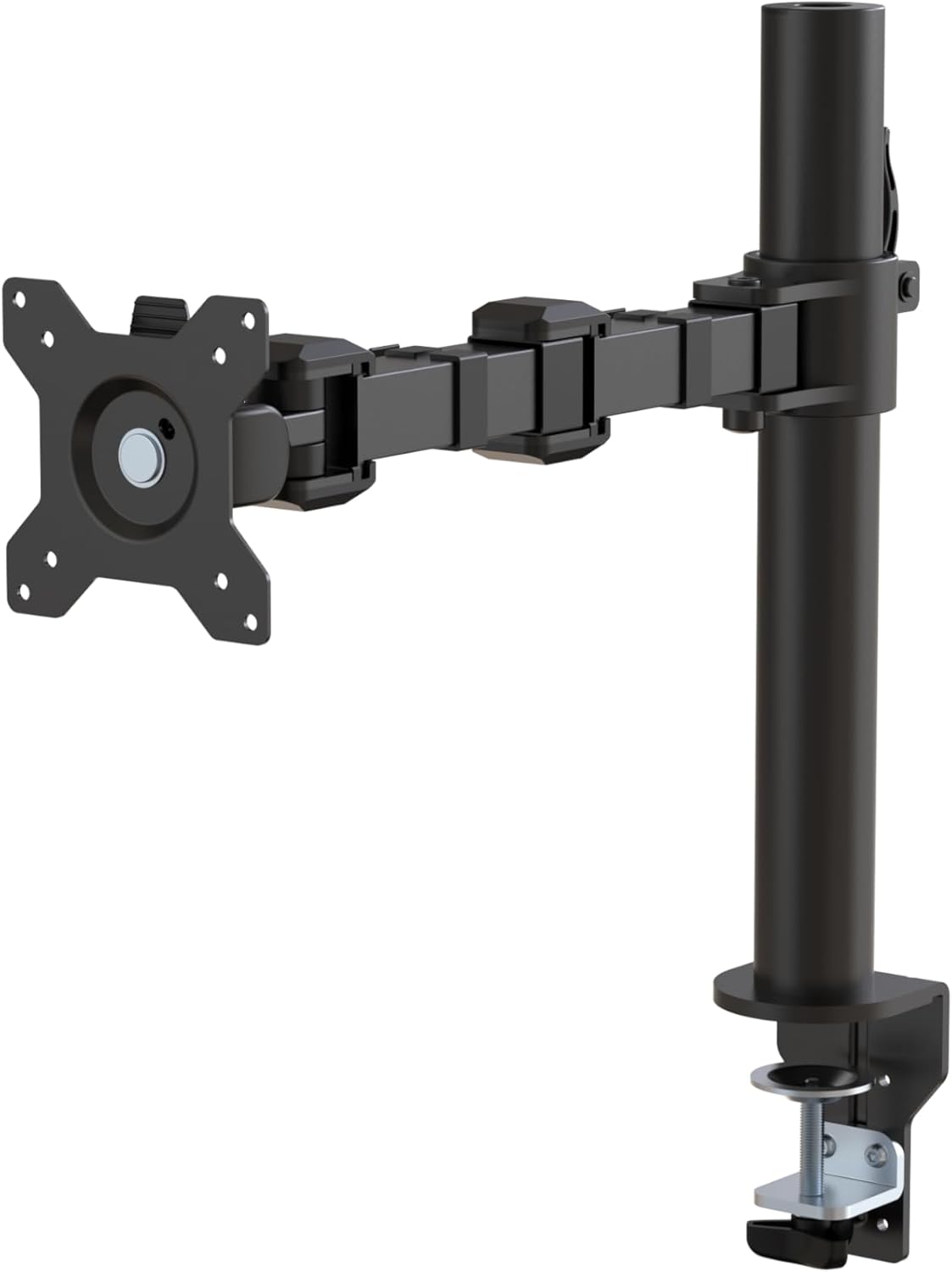
The Amazon Basics Single Monitor Arm is a desk-mounted VESA arm designed for anyone looking to improve their workspace ergonomics without a significant investment. It fits screens ranging from 13 to 30 inches and supports weights up to 22 pounds, making it compatible with the vast majority of consumer monitors on the market today. It is particularly well suited for home office workers, students, and remote professionals who want a cleaner, more adjustable setup.
The standout feature of this arm is its impressive range of motion. Users can tilt the screen from -15 to +85 degrees, rotate a full 360 degrees for portrait or landscape orientation, and adjust the height anywhere between 7.9 and 14.2 inches. In real-world use, this translates to effortless repositioning throughout the day, helping reduce neck and eye strain during long work sessions.
Build quality is solid given the price point. The arm is constructed from steel, which gives it a reassuring rigidity and stability once properly mounted. The integrated cable management channel keeps power and display cables routed neatly along the arm, contributing to a tidy and professional-looking desk. The detachable VESA plate supports both 100x100mm and 75x75mm mounting patterns, covering nearly all standard monitor configurations.
There are a few limitations worth noting. The maximum height of 14.2 inches may fall short for taller users who prefer their monitor at or above true eye level. The clamp mechanism also requires a desk edge between 0.8 and 3.9 inches thick, so unusually thick or thin desks may not be compatible. Those seeking ultra-smooth gas-spring adjustments or a more premium feel may want to consider a higher-tier option.
Overall, the Amazon Basics Single Monitor Arm delivers outstanding value for its price. It offers the core ergonomic benefits of a monitor arm, including flexibility, cable management, and desk space recovery, at a cost that makes it accessible to almost everyone. For budget-conscious buyers who want a reliable and functional monitor mount, this is a highly recommended pick.
Compatible Screen Sizes: 13 to 30 inches
Maximum Weight Capacity: 22 pounds (approximately 10 kg)
VESA Compatibility: 100x100mm and 75x75mm
Desk Thickness Compatibility: 0.8 to 3.9 inches
Height Adjustment Range: 7.9 to 14.2 inches
Tilt Range: -15 to +85 degrees
Rotation: 360 degrees (landscape and portrait)
Material: Steel
Color: Black
Cable Management: Yes, integrated routing channel
Mounting Type: Desk clamp
Tools and Hardware Included: Yes
Warranty: 1-year Amazon Basics limited warranty
Before purchasing a monitor arm, the most important factors to verify are screen size, weight, and VESA pattern. This arm supports screens up to 30 inches and 22 pounds, which covers most standard monitors. Check the back of your monitor for a VESA mounting pattern of either 100x100mm or 75x75mm to confirm compatibility.
Desk thickness is another critical consideration. This arm clamps onto desks between 0.8 and 3.9 inches thick. If your desk has a very thick frame, a grommet-mount version or a different arm may be a better fit. Glass desks are generally not recommended for clamp-style mounts.
If you frequently reposition your monitor throughout the day, consider whether a spring-loaded gas arm might be worth the additional investment for smoother one-handed adjustment. For users who set their monitor once and rarely move it, the friction-based adjustment on this arm is perfectly adequate and more stable at its price tier.
This arm is an excellent first monitor arm for anyone transitioning from a static stand. The ergonomic benefits, including reduced neck strain, improved posture, and a cleaner desk, are immediately noticeable. Pair it with an ergonomic chair and keyboard setup for the best results in a long-term home office environment.
Buying Guide: What to Look for in a Monitor Arm Without a Clamp
Freestanding Base vs. Grommet Mount
The most important distinction is how the arm anchors to your desk. A freestanding base, like the one on the Mount-It! Freestanding Single Monitor Arm, sits directly on the desk surface with no clamp or drilling required. This makes it ideal for glass tops, cubicle shelves, or any surface where clamping is not practical.
A grommet mount threads through an existing hole in the desk and is technically clamp-free at the edge. Many arms, including the HUANUO FlowLift series, offer both options so you are not locked into one method. Always confirm which mounting style is included before purchasing.
Weight Capacity and Screen Size Range
Every arm has a rated weight limit, and exceeding it leads to screen droop over time. The Mount-It! Dual Monitor Desk Stand supports up to 19.8 lbs per arm, which covers most modern 27-inch and 32-inch displays comfortably. Always verify your monitor’s actual weight, not just its screen size.
Screen size compatibility matters too. Most arms in this roundup accommodate 13-inch to 32-inch displays, but the ErGear Single Monitor Arm stretches that range to 34 inches, making it a strong choice for ultrawide users. Confirm your monitor’s VESA pattern (75x75mm or 100x100mm) matches the arm before committing.
Adjustability and Range of Motion
A monitor arm is only as useful as its range of movement. Look for tilt, swivel, and rotation at a minimum. The HUANUO FlowLift Pro offers tilt from -50 degrees to +85 degrees, plus 360-degree rotation, so you can shift from landscape to portrait in seconds for coding or document review.
Height adjustment range is equally critical for ergonomics. The AmazonBasics single arm raises your screen up to 14.2 inches, while the ErGear arm reaches 17.5 inches of vertical travel. More height range means you can dial in the exact eye-level position that reduces neck and shoulder strain during long sessions.
Build Quality and Long-Term Stability
Freestanding arms rely entirely on their base weight and footprint for stability, so build quality matters more here than with clamped designs. The AmazonBasics arm uses durable steel construction and carries a one-year warranty. The Mount-It! freestanding single arm goes further with a lifetime warranty, which signals strong confidence in its longevity.
HUANUO uses automotive-grade components in its FlowLift line and validates each arm through 20,000 motion cycles. The newer FlowLift Pro introduces a MechaSpring mechanism that avoids the pressure-loss issues sometimes seen in gas-based arms, promising up to twice the service life of conventional designs.
Final Thoughts
If you want a reliable, no-fuss freestanding solution that works on virtually any desk surface, the Mount-It! Dual Monitor Desk Stand is the standout choice for two-screen setups, with its heavy-duty base and full-motion adjustability requiring zero clamping or drilling. For a single-monitor option that balances ergonomic performance with straightforward installation, the HUANUO FlowLift Pro Monitor Arm delivers impressive engineering at an accessible level, complete with its MechaSpring mechanism and ACA-endorsed ergonomic design. Both represent the best of what this category has to offer in 2026.
Frequently Asked Questions
What is a monitor arm without a clamp?
A monitor arm without a clamp uses either a freestanding weighted base or a grommet hole to secure itself to your desk instead of gripping the desk edge. This makes it compatible with glass surfaces, thin tabletops, cubicle shelves, and other desks where a traditional C-clamp would not work. In 2026, freestanding designs have become much more stable and feature-rich than earlier generations.
Are freestanding monitor arms as stable as clamped ones?
High-quality freestanding arms, like the Mount-It! single and dual models, are engineered with wide, heavy bases that resist tipping and wobbling during normal use. They are generally stable for everyday work and gaming, though clamped arms do have a slight edge in rigidity for very heavy monitors. Staying within the rated weight limit is the most important factor for long-term stability regardless of mounting style.
Can I use a monitor arm on a glass desk?
Yes, freestanding monitor arms are one of the best solutions for glass desks because they require no clamping or drilling. Most manufacturers, including HUANUO, specifically recommend against using C-clamp designs on glass surfaces. For a detailed look at how to optimize any monitor setup, visit our monitor setup guide for additional tips and recommendations.
Do monitor arms without clamps work in cubicles?
Absolutely. Cubicle desks often have privacy panels, thin surfaces, or limited edge access that make traditional clamping difficult or impossible. A freestanding arm like the Mount-It! Freestanding Single Monitor Arm is specifically designed for exactly this scenario, sitting freely on the desk surface without any attachment hardware. It gives you all the ergonomic benefits of a full-motion arm without modifying your cubicle setup at all.



Write Your Review
No reviews yet. Be the first to share your experience!