

A clamp mount is the better default if your desk has a solid, unobstructed front edge 25 to 35 mm thick. A grommet mount is the better choice for glass desks, particleboard tops, desks without a clampable edge, or when you want the cleanest possible look. Most home office desks work fine with either.
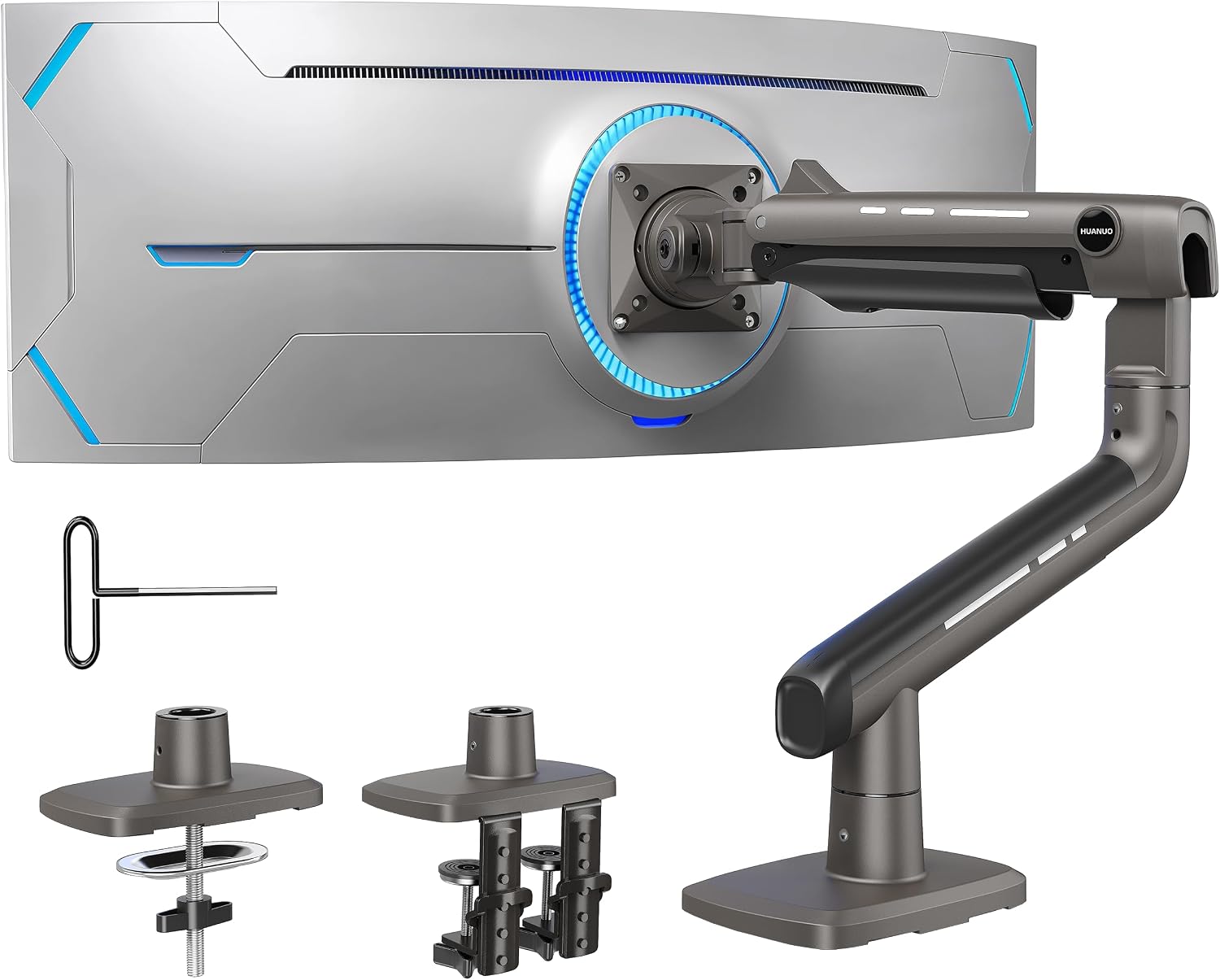
- Clamp mounts grip the desk edge and need no drilling, which makes them the faster, more reversible install.
- Grommet mounts pass a bolt through a hole in the desk, either an existing cable grommet or a new drilled hole, and hold a fixed position more rigidly.
- Desks under 20 mm thick, hollow-core doors, or laminate over particleboard can wobble under either mount unless the arm is rated for thin or soft surfaces specifically.
- Cornell’s ergonomics program treats a stable, non-moving monitor position as part of a correct workstation setup, not a cosmetic detail.
- Most monitor arms ship with both a clamp and a grommet plate in the box, so the choice usually costs nothing extra either way.
| Feature | Clamp Mount | Grommet Mount |
|---|---|---|
| Installation | Tightens onto the desk edge, no tools beyond an included hex key | Requires a hole through the desk, drilled or pre-existing |
| Reversibility | Removes cleanly, no marks left behind | Leaves a permanent hole once installed |
| Stability | Very good on a solid edge, can loosen on soft or thin desks | Generally more rigid once bolted through |
| Desk compatibility | Needs a flat, accessible front edge | Works on glass, particleboard, or desks without a usable edge |
| Appearance | Visible clamp housing under the desk edge | Lower profile, hardware mostly hidden under the desktop |
| Renter friendliness | Leaves the desk undamaged | Not reversible without a visible hole |

In this article:
- What is a clamp mount?
- What is a grommet mount?
- Installation
- Stability
- Desk compatibility
- When a clamp mount is the better choice
- When a grommet mount is the better choice
- Can you switch mount types later?
- Frequently asked questions
What Is a Clamp Mount?
A clamp mount grips the front and back edges of the desk with a C-shaped bracket, tightened down with a hex bolt or thumb screw until the whole assembly is locked in place by friction and pressure alone. Nothing passes through the desk. The arm’s post sits on top, and the clamp housing sits underneath the desk edge, out of sight when you’re seated.
Most clamp mounts are rated for a specific thickness range, commonly 10 to 60 mm, printed on the arm’s spec sheet or box. Going outside that range either leaves the clamp too loose to bite properly or makes it impossible to close around the edge at all. Measure your desk’s actual edge thickness with a tape measure before ordering rather than eyeballing it, since a difference of even a few millimeters can be the gap between a snug fit and a clamp that never quite locks down.
What Is a Grommet Mount?
A grommet mount bolts straight through the desktop using a hole, either one already there for cable routing or one drilled specifically for the mount. A base plate sits on top of the desk, a matching plate or washer sits underneath, and a long bolt cinches the two together with the desk surface sandwiched in between.
Many office desks already have a 2 to 3 inch cable grommet hole cut into the back corner, which doubles as a ready-made mounting point. If yours doesn’t, installing a grommet mount means drilling a new hole, a one-way decision on a desk you don’t own or plan to keep. Measure twice before drilling, and check the underside of the desk for any support bracket, cable channel, or drawer slide that could sit right where you’re planning to put the hole.
Clamp vs Grommet: Installation
Clamp mounts win here without much argument. Setting one up is a five to ten minute job: hook the clamp over the edge, tighten the bolt, done. No drilling, no measuring for a hole, and no risk of hitting a support bracket or wire hidden inside the desk. Moving the arm to a different spot on the same desk, or to a different desk entirely, takes about as long as the original install. That portability matters more than it sounds like on paper, since a desk rearrangement or a move to a new apartment is common enough over a few years that a mount you can relocate without tools saves real hassle later.
Grommet installation takes longer and carries more risk if you’re drilling a fresh hole. You need to check underneath the desk first for a support rail, wiring, or a drawer track that a drill bit could hit, then measure and drill carefully enough that the hole lines up with the base plate on top. If your desk already has a usable grommet hole, this step disappears and the install is nearly as fast as a clamp.
Clamp vs Grommet: Stability
A properly clamped arm on a solid desk edge is stable enough for normal use, adjusting the monitor’s height and angle several times a day without drifting. The difference shows up at the extremes: push hard against the monitor, or mount a heavier ultrawide display, and a clamp has more potential to shift slightly over time than a bolt running straight through the desk.
Cornell’s ergonomics program treats a stable, adjustable monitor position as a basic requirement of a correct workstation, not an upgrade, since a screen that drifts out of position undoes whatever height and distance you originally set it to (Cornell CUErgo, Computer Workstation Ergonomics Guidelines). A grommet mount removes most of that drift risk by design, which is why heavier arm and monitor combinations often lean grommet even when a clamp would technically fit the desk.
Desk construction matters more than mount type for a lot of real-world wobble complaints. A hollow-core door desk or a thin laminate top over particleboard can flex under either mount, since the material itself isn’t rigid enough to resist the leverage of a raised monitor arm. Reinforcing the desk, or picking a different mounting point closer to a support leg, fixes that regardless of which mount style you choose. A quick test before buying anything: press down firmly on the spot where the mount would sit. If the desk itself flexes noticeably under hand pressure, no mount hardware will fully solve that on its own.
Clamp vs Grommet: Desk Compatibility
Glass desks rule out clamp mounts almost entirely, since there’s no edge thick or grippable enough to bite into without risking a crack, and most manufacturers explicitly warn against clamping glass. A grommet mount through a pre-drilled hole, or a freestanding desk-bolt base that doesn’t require going through the glass at all, is the practical path there.
Standing desks and desks with a rounded or beveled front edge are the other common mismatch for clamps, since the clamp needs a flat, square surface to grip. Check the edge profile before assuming a clamp will fit, not just the overall desk thickness.

When a Clamp Mount Is the Better Choice
Pick a clamp if you’re renting and can’t leave holes in the furniture, your desk has a solid flat edge in the typical thickness range, or you expect to move or reposition the arm later. See our picks for clamp-on monitor arms for models built around this mount type specifically.
When a Grommet Mount Is the Better Choice
Pick a grommet mount if you own the desk long-term, you’re mounting a heavier monitor where extra rigidity matters, or your desk material (glass, thin laminate, no usable edge) rules out a clamp in the first place. Our picks for monitor arms built for heavy monitors lean toward grommet and bolt-through mounting for exactly this reason.
Can You Switch Mount Types Later?
Usually yes, since most monitor arms include both a clamp base and a grommet plate in the box, sharing the same post and arm assembly. Starting with a clamp and drilling a grommet hole later, once you’re sure of the desk and position, is a common and low-risk path. Going the other way, removing a grommet bolt to switch to a clamp, leaves a hole behind that needs a cap or cable grommet insert to look finished. If you’re still deciding between one monitor and two, our guide to single vs dual monitor arms covers that separate question.
Frequently Asked Questions
Can I use a clamp mount on a glass desk?
Not safely in most cases. Glass edges are prone to cracking under clamp pressure, and most monitor arm manufacturers advise against it. A grommet mount through a pre-drilled hole is the safer route for glass desks.
What desk thickness works with a clamp mount?
Most clamp mounts are rated for roughly 10 to 60 mm, though the exact range varies by model. Check your desk’s edge thickness against the specific arm’s spec sheet before buying.
What size hole do I need for a grommet mount?
Most grommet mounts use a hole between 2 and 3 inches in diameter, matching the size of a standard cable management grommet already found on many office desks.
Do clamp mounts loosen over time?
They can, especially on softer desk materials or with frequent height and angle adjustments. Checking and retightening the clamp bolt every few months keeps it snug.
Is a grommet mount necessary for a heavier monitor?
Not strictly necessary if your desk edge is solid and the clamp is rated for the monitor’s weight, but a grommet mount generally gives more margin for heavier or ultrawide displays.
Most home office desks handle a clamp mount just fine, and it’s the lower-risk starting point since it leaves no permanent marks. Switch to a grommet mount when the desk material, edge shape, or monitor weight pushes past what a clamp can reliably hold.
Related reading: Gas Spring vs Mechanical Monitor Arm · How to Manage Cables on a Monitor Arm



Write Your Review
No reviews yet. Be the first to share your experience!