

For most people, a standard ergonomic keyboard set up correctly is enough. A split keyboard is worth the learning curve mainly if you already have wrist or forearm discomfort, since it can cut ulnar deviation from around 12 degrees to within 5 degrees of neutral. If your hands feel fine, save the money and the adjustment period.
- A split keyboard mainly fixes ulnar deviation, the sideways bend of your wrists toward your pinky fingers, not wrist extension, which Cornell’s ergonomics program flags as the bigger injury risk factor.
- A controlled study found split and inclined keyboards reduced ulnar deviation from about 12 degrees to within 5 degrees of neutral, compared to a standard flat keyboard.
- Standard ergonomic keyboards (curved, contoured, but one piece) cost $30 to $100. Split keyboards run $100 to $350, more for fully programmable mechanical models.
- Typing speed usually drops for one to three weeks on a split keyboard before it recovers to your normal pace, longer on a fully separated model.
- OSHA’s guidance applies to both types equally: wrists straight and in line with the forearms is the goal, regardless of which keyboard shape gets you there.
In this article:
- What is a split keyboard?
- What is a standard ergonomic keyboard?
- Wrist posture
- Learning curve and typing speed
- Cost
- Desk space and portability
- When a split keyboard is the better choice
- When a standard ergonomic keyboard is enough
- How long it takes to adjust
- Frequently asked questions
| Factor | Split Keyboard | Standard Ergonomic Keyboard |
|---|---|---|
| Typical price | $100-$350 | $30-$100 |
| Wrist posture benefit | Reduces ulnar deviation directly | Some benefit from curved layout, less than split |
| Learning curve | 1-3 weeks to regain typing speed | Under a week for most people |
| Desk space | Wider, some fold or detach | Same footprint as a normal keyboard |
| Customization | Adjustable angle, tenting on higher-end models | Fixed curve, no angle adjustment |
| Best for | Existing wrist or forearm pain | Prevention, no current symptoms |
What Is a Split Keyboard?
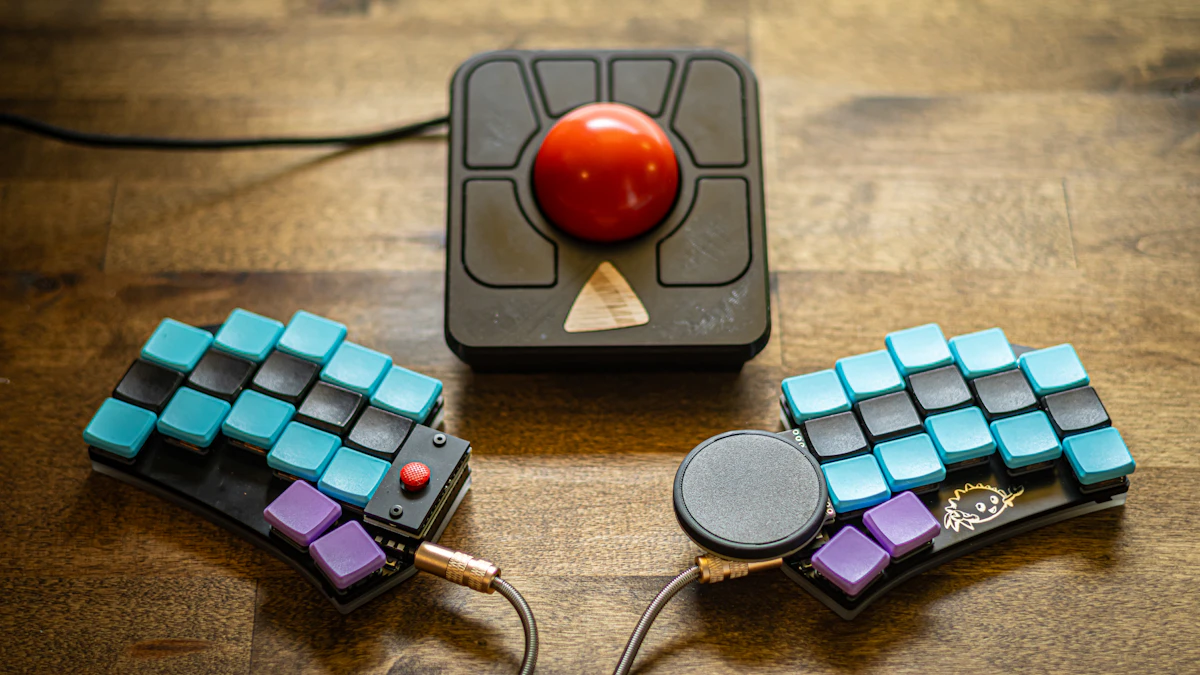
A split keyboard separates the left and right halves of the layout, either partially (a fixed gap in one case) or fully (two independent halves you can angle or place shoulder-width apart). The goal is to let your hands and wrists line up straight with your forearms instead of angling inward to reach a single, unified layout.
Some split keyboards add tenting, tilting each half upward toward the center, which further reduces forearm rotation. Fully split models also let you position each half independently, useful if your shoulders are wider or narrower than a standard keyboard assumes.
What Is a Standard Ergonomic Keyboard?
A standard ergonomic keyboard keeps the keys in one connected unit but curves the layout, usually a shallow V shape, so your hands sit at a slightly more natural angle than a flat, rectangular keyboard. Some models add a palm rest or a slight negative tilt. It looks closer to a regular keyboard and needs little to no relearning.
Split vs Standard: Wrist Posture

This is where the two designs actually differ, and the research is more nuanced than most keyboard marketing suggests. A controlled study on typing posture found that split and vertically inclined keyboards reduced ulnar deviation, the sideways bend of the wrist toward the pinky, from about 12 degrees on a standard flat keyboard to within 5 degrees of neutral (Wrist and Forearm Posture From Typing on Split and Vertically Inclined Computer Keyboards). That’s a real, measured improvement.
Cornell’s ergonomics program adds an important caveat: split keyboards mainly address ulnar deviation, but wrist extension, the upward bend of the hand, is the posture factor most consistently linked to injury risk, and a split layout alone doesn’t fix that (Cornell CUErgo, Neutral Posture Typing). A curved keyboard positioned at the correct height, with your wrists straight and in line with your forearms, gets you most of the way to neutral posture without the split design at all, a point OSHA’s own guidance backs up by focusing on wrist alignment generally rather than keyboard shape specifically (OSHA, Computer Workstations eTool: Keyboards).
In practice, that means keyboard height and tray angle matter more than which of these two you buy. Neither fixes a keyboard set too high or too low.
Split vs Standard: Learning Curve and Typing Speed
A standard ergonomic keyboard barely changes your typing. The keys sit in the same relative positions, just curved, so most people adapt within a day or two with no real speed loss.
A split keyboard is a bigger adjustment, especially a fully separated model where your hands are no longer touching or aligned the way they’ve been for years. Expect your typing speed to drop for one to three weeks before it climbs back to normal, longer if you’re also learning a new layout like columnar stagger. That tradeoff is worth knowing before you commit, particularly if your job depends on fast, accurate typing during the adjustment window.
Split vs Standard: Cost
Standard ergonomic keyboards run $30 to $100, and a decent membrane model covers most people’s needs at the low end of that range. Split keyboards start around $100 for basic wired models and climb to $350 or more for fully programmable mechanical versions with tenting and per-key remapping. The price gap mostly reflects the mechanical complexity of two independent halves rather than any single ergonomic feature.
Split vs Standard: Desk Space and Portability
A standard ergonomic keyboard takes up roughly the same footprint as any regular keyboard, so it drops into an existing desk setup without changing anything else. A split keyboard, especially a fully separated model spread to shoulder width, needs more desk width than most people expect the first time they set one up. On a smaller desk, that can mean giving up mouse space on one side or pushing your monitor back to make room.
Portability follows the same pattern. A standard ergonomic keyboard packs into a bag the same way a normal keyboard does. A fully split keyboard with two loose halves and a connecting cable is a more awkward carry, though some travel-oriented models fold or nest together specifically to solve that problem. If you work from more than one location during the week, check whether a split model you are considering is built to travel before assuming it will.
When a Split Keyboard Is the Better Choice
Go with a split keyboard if you already have wrist, hand, or forearm discomfort, since the measured reduction in ulnar deviation is a real mechanical change, not just marketing. It’s also worth it if you’re broad-shouldered and find a standard keyboard forces your arms inward, or if you type more than six hours a day and want to reduce cumulative strain before symptoms start. See our picks for ergonomic keyboards for wrist pain for models built specifically around that use case.
When a Standard Ergonomic Keyboard Is Enough
If your hands feel fine and you’re buying ahead of any problem, a standard ergonomic keyboard paired with a correct desk and chair height covers most of the benefit for a fraction of the price and with no adjustment period. It’s also the better pick if you share a keyboard with family members or coworkers, since a curved layout is comfortable for more hand sizes than a split design tuned to one person’s shoulder width. Our wireless ergonomic keyboard picks cover solid options in this category.
How Long Does It Take to Adjust to a Split Keyboard?
Most people regain their normal typing speed within one to three weeks on a split keyboard that keeps the standard key layout, just physically separated. That timeline stretches to a month or more if you’re also switching to an alternate layout at the same time, since you’re relearning two things at once. If you want to check whether a split keyboard is even the right starting point, our guide to what a split keyboard is covers the basic types before you buy.
A few things shorten the adjustment window. Keep the keyboard at the same split angle every day instead of experimenting constantly, since your hands need consistency to build new muscle memory. Slow down on purpose for the first week rather than pushing for speed, accuracy comes back faster than raw words per minute does. And if a model supports it, start with a narrower split and widen it gradually instead of jumping straight to shoulder width.
Frequently Asked Questions
Is a split keyboard worth it if I don’t have wrist pain?
Not necessarily. The main measured benefit is reduced ulnar deviation, which matters most if you already have discomfort. Without symptoms, a standard ergonomic keyboard at the correct height covers most of the benefit for less money.
Is it harder to type on a split keyboard?
At first, yes. Most people see typing speed drop for one to three weeks while they adjust, especially on fully separated models, before returning to their normal speed.
Is a standard ergonomic keyboard different from a regular keyboard?
Yes. It curves the layout, usually in a shallow V shape, so your hands and wrists sit closer to a neutral angle than on a flat, rectangular keyboard, without changing where the keys are relative to each other.
Can I use a split keyboard for gaming?
You can, though the learning curve and physical separation make fast-paced games with tight key clusters harder to adapt to at first. Many gamers keep a standard keyboard for gaming and a split model for typing-heavy work.
What’s the difference between a fully split and a fixed-split keyboard?
A fixed-split keyboard has a permanent gap built into one case, no relearning needed. A fully split keyboard has two independent halves you can angle or space apart, which offers more customization but a longer adjustment period.
Pick a split keyboard when you already have wrist or forearm discomfort and want the measured reduction in ulnar deviation it provides. Pick a standard ergonomic keyboard when your hands feel fine and you’d rather skip the adjustment period. Either way, keyboard height and tray angle matter more than the shape of the keyboard itself.



Write Your Review
No reviews yet. Be the first to share your experience!