

If you spend hours typing every day, you know how quickly wrist fatigue and discomfort can set in. Membrane ergonomic keyboards offer a softer, quieter typing experience while promoting better posture. In this guide, we review the best membrane ergonomic keyboards of 2026 to help you find a model that suits your workflow and budget. For more on relieving wrist pain, check our guide on how to reduce wrist pain from typing.
Membrane keys have less tactile feedback and can feel mushy to typists used to mechanical switches, so anyone coming from a mechanical board may be disappointed by the softer keystroke.
Disclosure: Ergonook is a participant in the Amazon Associates program. Links below are affiliate links, and we may earn a commission from qualifying purchases. This does not affect which products we recommend or how we rank them.

Pros
- Unique mecha-membrane switches offer a balanced typing experience that pleases both mechanical and membrane fans
- UV-coated keycaps are noticeably more durable than standard ABS keycaps
- Magnetic wrist rest provides excellent comfort and stays firmly attached
- Dedicated media keys with backlighting add convenience for everyday use
- Low-profile design reduces wrist fatigue over long sessions
Cons
- Mecha-membrane switches may not satisfy purists seeking a full mechanical switch feel
- Low-profile keys have shorter travel, which some users may find less tactile than traditional mechanical keyboards
- No USB passthrough or additional ports on the keyboard, limiting connectivity options
The Razer Ornata V3 is a low-profile gaming keyboard that bridges the gap between mechanical and membrane designs. It targets gamers and professionals who spend hours at their desk and want a comfortable, responsive typing experience without the bulk of traditional mechanical keyboards.
At the heart of the Ornata V3 are Razer's mecha-membrane switches, which combine a crisp clicky actuation with a soft bottom-out feel. In practice, this delivers the satisfying auditory feedback of a mechanical switch while retaining the cushioned, quiet landing that membrane users appreciate. The low-profile keycaps further enhance ergonomics by promoting a natural hand angle, reducing strain on wrists during marathon gaming sessions or long workdays.
Build quality is solid for its price point. The UV-coated keycaps resist fading and shine far better than standard ABS caps, and the magnetic wrist rest snaps on securely with a soft-touch surface that cradles your palms. The ultra-slim chassis looks modern and saves desk space, while Razer Chroma RGB provides vibrant, customizable lighting that can sync with other Razer gear.
Potential drawbacks include the hybrid switch feel, which may leave mechanical purists wanting more tactile feedback or deeper travel. Additionally, the keyboard lacks a USB passthrough or dedicated macro keys, which some power users might miss. The wrist rest, while comfortable, can attract dust and lint over time.
Overall, the Razer Ornata V3 is a well-rounded, ergonomic keyboard that excels in comfort and versatility. It is an excellent choice for anyone seeking a low-profile, hybrid typing experience with durable keycaps and customizable RGB lighting, all at an accessible price.
Pros
- Fully adjustable split design allows tailored positioning for natural alignment.
- Low-force membrane switches significantly reduce finger fatigue during extended typing.
- Standard Windows layout with hotkeys and embedded numpad ensures no learning curve.
- Plug-and-play compatibility works immediately with Windows, Linux, and Chrome.
- Lightweight and compact, suitable for use with external wrist rests or adjustable arms.
Cons
- No wrist rest or palm support included, requiring a separate purchase for added comfort.
- Membrane key switches may feel less crisp or responsive compared to mechanical alternatives.
- Wired only connection (USB), limiting placement flexibility for wireless setups.
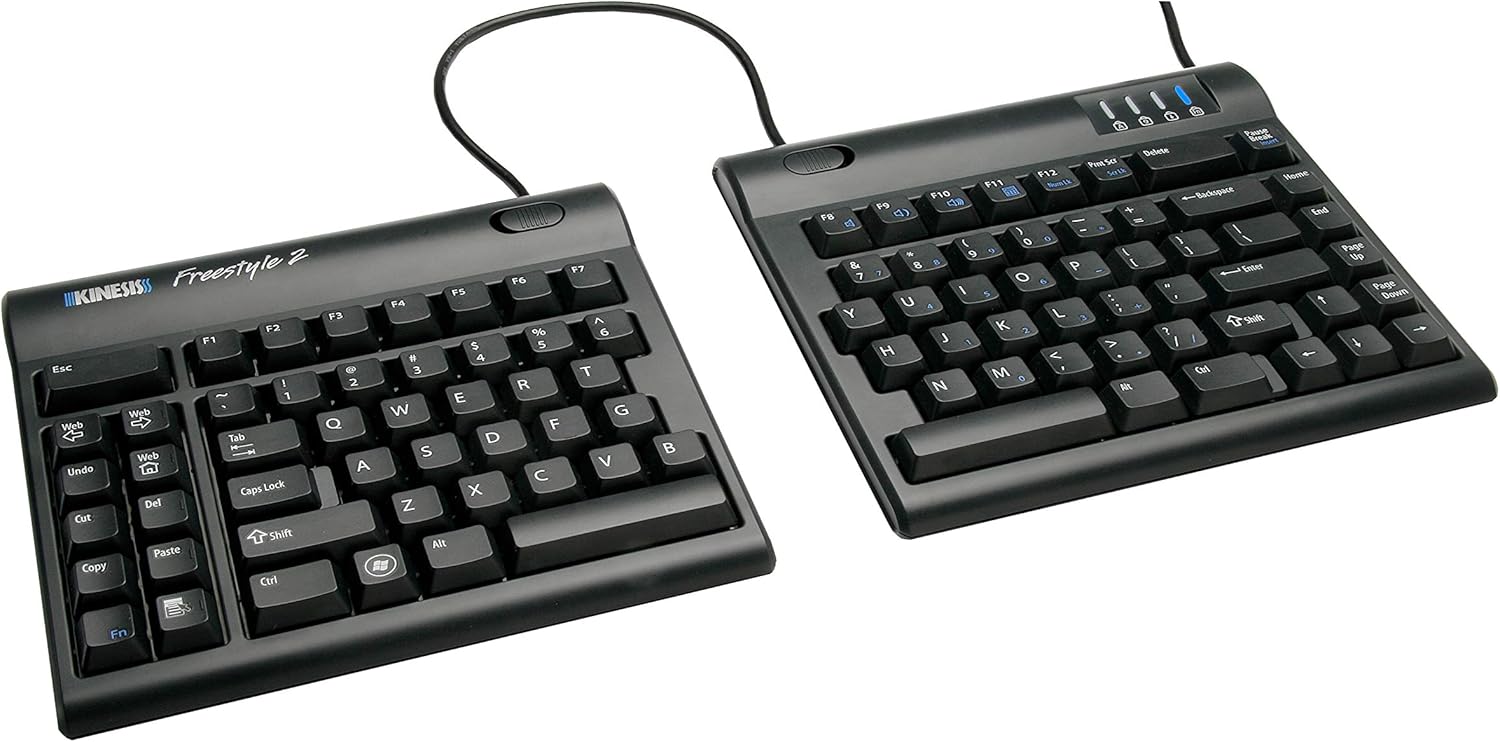
The Kinesis Freestyle2 Ergonomic Keyboard for PC is a top-tier solution designed for users who suffer from wrist pain, repetitive strain injuries, or simply want a more comfortable typing experience. Its award-winning split design sets it apart from fixed ergonomic keyboards, allowing you to separate and rotate the key modules up to 9 inches to match your unique body anatomy. This keyboard is ideal for heavy typists, programmers, and anyone spending long hours at a computer.
The standout feature is the fully adjustable split layout. Unlike traditional one-piece ergonomic keyboards, the Freestyle2 lets you position each half independently for optimal shoulder, arm, and wrist alignment. The low-force membrane key switches require minimal effort to press while still providing tactile feedback, which greatly reduces finger fatigue over extended use. Combined with the standard Windows layout, including cut, copy, paste, and multimedia hotkeys, productivity remains high without any learning curve.
In real-world use, the Freestyle2 performs admirably. The keys are quiet and comfortable, and the ability to adjust the separation and rotation helps minimize strain from the first day. Setup is truly plug-and-play on Windows, Linux, and Chrome devices, with no additional software needed. The detachable pivot tether adds further customization by allowing you to set the splay angle between the two halves.
Build quality is solid for its price point, though the plastic construction feels sturdy enough for daily office or home use. However, there are a few drawbacks: the keyboard does not include a wrist rest, so users will need to purchase one separately for maximum ergonomic benefit. Additionally, the membrane switches, while gentle, lack the tactile snap of mechanical keys, which may disappoint enthusiasts. Lastly, the wired-only connection means you are tethered to your desk.
Overall, the Kinesis Freestyle2 is an excellent investment for anyone prioritizing wrist health and typing comfort. Its adjustable split design and low-force keys offer genuine ergonomic advantages over conventional keyboards. While it has minor compromises in build simplicity and switch feel, its core function of reducing strain makes it a highly recommended choice for preventing repetitive stress injuries.
Brand: Kinesis
Model: Freestyle2
Interface: USB wired
Key Switch Type: Low-force membrane with tactile feedback
Layout: Standard Windows with embedded numeric keypad, Cut/Copy/Paste, and multimedia hotkeys
Separation: Up to 9 inches (rotatable key modules)
Compatibility: Windows 7-10, Linux, Chrome (plug-and-play, no drivers required)
In the Box: Keyboard, detachable pivot tether, Quick Start Guide

Pros
- Established, well-reviewed split ergonomic design
- Adjustable tenting and separation in one package
- Standard layout keeps a familiar typing experience
Cons
- Membrane switches rather than mechanical, which some typists prefer differently
- Wired USB connection only
The Freestyle2 separates into two independent modules that rotate and pull apart up to 9 inches, letting you match the keyboard to your own shoulder width.
It ships with the VIP3 tenting accessory pre-installed, offering 5, 10, or 15 degrees of tilt along with integrated cushioned palm supports.
It uses a standard Windows layout with hotkeys and a numeric keypad, so the transition feels familiar despite the split design.
Its low-force membrane switches are designed to reduce finger fatigue, and it's an established, well-reviewed option in this comparison.
It suits anyone who wants a proven, fully separable keyboard without a mechanical switch premium.
Separation: Up to 9 inches between modules.
Tenting: 5, 10, or 15 degrees via the included VIP3 accessory.
Switches: Low-force membrane.
Connectivity: Wired USB.
Dimensions: 19 inches long by 12.5 inches wide by 3.5 inches high.
Who should buy this keyboard? Anyone who wants a proven, fully separable split keyboard with adjustable tenting and a familiar layout.
Who might want to look elsewhere? Anyone who specifically wants mechanical switches should look at the Kinesis Freestyle Edge or Advantage360 instead.
Setup tip: Start with a narrower separation and a lower tenting angle, then widen and increase gradually as you adjust.

Pros
- Quiet membrane switches are ideal for shared or noise-sensitive environments
- Comfortable, detachable wrist rest reduces fatigue during long gaming sessions
- Customizable Chroma RGB lighting adds immersion and personalization
- Spill-resistant build provides peace of mind against accidental liquid spills
- Excellent value as a renewed product with reliable performance
Cons
- Membrane switches lack the tactile feedback and responsiveness of mechanical alternatives
- Renewed units may show minor cosmetic wear, though functionality is fully tested
- Low-profile keycaps may feel shallow for users accustomed to standard height keys
The Razer Ornata V3 X Gaming Keyboard (Renewed) is a budget-friendly option for those who crave a quiet, comfortable typing and gaming experience. Designed with low-profile keys and silent membrane switches, it targets users who prefer minimal noise and a more natural hand position. Whether you are a competitive gamer or a professional typist, this keyboard aims to deliver long-lasting comfort without sacrificing essential features.
Standout features include the ergonomic wrist rest, which aligns seamlessly with the keyboard to reduce wrist strain during marathon sessions. The silent membrane switches are a highlight, offering a soft, cushioned keystroke that is significantly quieter than traditional mechanical switches. The Chroma RGB lighting adds personality with 16.8 million colors and dynamic effects that sync with over 150 supported games. Real-world performance is solid: keys feel responsive enough for casual to moderate gaming, though enthusiasts may crave more tactile feedback.
Build quality is respectable, with a sturdy, spill-resistant frame that can handle minor accidents. The cable routing grooves are a thoughtful touch, allowing you to tuck the wire neatly and keep your desk tidy. As a renewed product, the keyboard arrives fully tested and in good condition, though some units may have slight cosmetic blemishes. Overall, the construction feels durable enough for daily use.
A few drawbacks to consider: membrane switches lack the crisp actuation and longevity of mechanical switches, which may disappoint hardcore gamers. The low-profile keys may feel too shallow for those accustomed to full-height keycaps. Additionally, being a renewed model, buyers should be prepared for potential minor wear, though Amazon's Renewed guarantee offers some reassurance.
Verdict: The Razer Ornata V3 X (Renewed) is an excellent choice for budget-conscious users who prioritize quiet operation, comfort, and RGB customization. It is not a mechanical keyboard, but its silent membrane switches and ergonomic design make it a strong contender for casual gamers and office workers alike. If you value a peaceful typing environment and a clutter-free desk, this keyboard delivers great value.

Pros
- Certified by an independent ergonomics organization
- Compact size closer to a standard keyboard footprint
- Long rated battery life
Cons
- Not fully split, so the wrist angle change is more subtle than the Kinesis or Perixx keyboards
- Membrane switches rather than mechanical
Wave Keys uses a gently wavy, contoured shape rather than a fully split layout, aiming to guide your hands into a more natural position without a steep learning curve.
Its built-in memory foam palm rest adds cushioned support, and it's certified by United States Ergonomics for posture and strain reduction.
It connects over Bluetooth or the included Logi Bolt receiver, with Easy-Switch letting you jump between paired devices, and a battery rated to last up to three years.
Because it isn't fully split, the wrist angle change is more subtle than the Kinesis or Perixx keyboards in this comparison.
It suits anyone who wants ergonomic support with minimal adjustment from a standard keyboard.
Dimensions: 14.8 inches long by 8.62 inches wide by 1.18 inches high.
Connectivity: Bluetooth or included Logi Bolt receiver.
Switch type: Membrane.
Battery life: Rated up to three years.
Weight: 2.1 pounds.
Who should buy this keyboard? Anyone who wants certified ergonomic support with a gentle learning curve from a standard keyboard.
Who might want to look elsewhere? Anyone who wants a fully split or mechanical layout should consider the Perixx or Kinesis keyboards instead.
Setup tip: Pair it with a compatible Logitech mouse through the same Easy-Switch profile for a consistent multi-device setup.

Pros
- Certified by an independent ergonomics organization
- Full-size layout keeps a familiar typing experience
- Quiet keys suited to shared workspaces
Cons
- Fixed split angle rather than fully separable key modules like the Kinesis models here
- Larger footprint than a standard compact keyboard
The Ergo K860 uses a curved, split keyframe that slopes outward, aiming to keep your wrists and forearms in a more natural position without fully separating the two halves.
Its memory foam wrist rest and three tilt angles let you fine-tune the typing posture whether you're sitting or standing, and it's certified by United States Ergonomics.
It connects over Bluetooth or the included USB receiver, and keeps a full-size layout with quiet keys, so the transition from a standard keyboard is relatively gentle.
Compared with the fully split Kinesis models in this comparison, its fixed curve is less adjustable but easier to adapt to.
It suits anyone who wants proven ergonomic credentials in a familiar, full-size keyboard shape.
Dimensions: 17.95 inches long by 9.17 inches wide by 1.89 inches high.
Connectivity: Bluetooth or included USB receiver.
Tilt options: 0, negative 4, or negative 7 degrees.
Layout: Full-size, 105 keys.
Weight: 2.6 pounds.
Who should buy this keyboard? Anyone who wants a certified ergonomic keyboard that still feels close to a standard full-size layout.
Who might want to look elsewhere? Anyone who wants fully separable key modules for maximum shoulder-width typing should look at the Kinesis Freestyle2 or Advantage360 instead.
Setup tip: Start at the flat 0 degree tilt and only add negative tilt once you're comfortable with the split shape.

Pros
- Exceptional battery life of up to 277 days without backlight.
- 15 customizable RGB lighting effects for personalization.
- Ergonomic wave design with leather wrist rest reduces strain.
- Whisper-quiet keys suitable for shared spaces.
- Plug-and-play 2.4GHz connection with 33ft range.
Cons
- Only 2.4GHz wireless, no Bluetooth option for multiple devices.
- Backlight reduces battery life to 10 days, requiring more frequent charging.
- Membrane keys may not satisfy mechanical keyboard enthusiasts.
The COLIKES Wireless Ergonomic Keyboard is a feature-rich peripheral designed for professionals and home users seeking comfort and style. Its wave-shaped layout and leather wrist rest cater to those who type for long hours, while the silent membrane keys make it ideal for quiet environments like offices or libraries.
With a massive 2500mAh battery, this keyboard offers up to 277 days of use without backlight, or 10 days with the 15 RGB lighting effects enabled. The customizable lighting includes breathing, wave, and static modes, letting you match your mood or setup. The 2.4GHz wireless connection ensures lag-free typing up to 33 feet away.
The ergonomic wave design promotes a natural hand position, and the included leather wrist rest adds plush support. Adjustable legs allow you to tilt the keyboard for better typing angle. The spill-resistant construction and durable membrane switches promise longevity, even with daily use.
However, the keyboard relies solely on a 2.4GHz USB receiver, lacking Bluetooth for easy multi-device switching. The backlight significantly drains the battery, so heavy RGB users will need to recharge every week or so. Also, the membrane keys lack the tactile feedback that mechanical enthusiasts prefer.
Overall, the COLIKES Wireless Ergonomic Keyboard delivers excellent battery life, customizable aesthetics, and ergonomic comfort at a reasonable price point. It is a solid choice for anyone who prioritizes typing comfort and long wireless operation over mechanical switches or Bluetooth connectivity.
Connection: 2.4GHz wireless with USB receiver
Battery: 2500mAh rechargeable, up to 277 days (backlight off) or 10 days (backlight on)
Charging: USB-C, full charge in 5 hours
Lighting: 15 RGB effects with 5 backlight modes and 3 brightness levels
Keys: Membrane, silent, spill-resistant
Wrist Rest: Leather, detachable
Compatibility: Windows, Mac, Chrome OS, Linux
Range: Up to 33 feet (10 meters)

Pros
- Delivers a creamy, satisfying typing sound that many users love
- Versatile tri-mode wireless and wired connection for multiple devices
- Ergonomic tilt adjustment reduces wrist strain during extended use
- Long-lasting 2000mAh battery minimizes downtime
- Affordable price point with full-size layout and RGB lighting
Cons
- Membrane switch feel may not satisfy mechanical keyboard enthusiasts
- Plastic build might feel less durable than metal-framed alternatives
- Limited key customization options compared to software-driven mechanical keyboards
The AULA S99 is a wireless gaming keyboard designed for budget-conscious users who crave a satisfying typing sound without breaking the bank. It uses membrane switches to produce a creamy auditory feedback that is especially pronounced for those with long nails. This keyboard is ideal for gamers, students, and office workers who want a quiet yet pleasant typing experience with full-size convenience.
Standout features include tri-mode connectivity (Bluetooth 5.0, 2.4GHz, and USB-C wired), allowing you to switch between up to five devices effortlessly. The RGB lighting is adjustable via FN+End, and the dual-mode rotary knob gives you quick control over volume and lighting. The 2000mAh battery provides long wireless uptime, so you can game or work all day without recharging.
The design is ergonomic with a three-stage kickstand and non-slip silicone feet, reducing fatigue during long sessions. The full-size layout with a numeric keypad is great for data entry and gaming macros. However, the plastic chassis may feel less premium than metal alternatives, and the membrane switches lack the tactile feel of mechanical keyboards.
Some users might miss dedicated media keys or software for macro programming. Also, the creamy sound is most noticeable with longer fingernails; short nails may produce a quieter, less distinctive sound. Despite these minor drawbacks, the AULA S99 offers excellent value for its price.
Verdict: The AULA S99 is a highly recommended budget keyboard for anyone seeking creamy typing sound, wireless flexibility, and ergonomic comfort. It is not for mechanical purists, but for general daily use and casual gaming, it delivers surprisingly well.

Pros
- Rechargeable battery with a long rated life per charge
- Simple plug-and-play setup, no Bluetooth pairing required
- One of the more affordable split keyboards in this comparison
Cons
- Fixed split angle rather than fully separable modules
- USB receiver only, no Bluetooth option
The Arteck split keyboard uses a fixed split layout with a soft cushioned wrist and palm rest, aimed at a more natural hand position than a flat keyboard.
It connects through a nano USB receiver stored in the keyboard itself, and its rechargeable battery is rated for about six months per charge based on typical daily use.
It's backed by a 24 month warranty, and is one of the more affordable split keyboards in this comparison.
It doesn't offer Bluetooth or fully separable key modules, so it's a more modest step up from a standard keyboard than the Kinesis models here.
It suits anyone who wants an affordable, low-effort introduction to a split keyboard layout.
Dimensions: 16.5 inches long by 9.6 inches wide by 1.02 inches high.
Connectivity: 2.4G USB wireless receiver.
Battery: Rechargeable, rated around six months per charge.
Warranty: 24 months.
Who should buy this keyboard? Anyone who wants an affordable, simple introduction to a split ergonomic layout.
Who might want to look elsewhere? Anyone who wants Bluetooth or fully separable key modules should consider the Logitech K860 or Kinesis models instead.
Setup tip: The nano receiver stores inside the keyboard when not in use, so check there first if you misplace it.
Buying Guide: What to Look for in a Membrane Ergonomic Keyboard
Split Design vs. Wave Layout
The most critical decision is whether you prefer a split keyboard that lets you position each half independently, or a fixed wave layout that curves your hands naturally. Split designs like the Kinesis Freestyle2 offer maximum adjustability, while wave keyboards such as the Logitech Wave Keys provide a simpler transition from standard keyboards. Both reduce forearm pronation, but split models are ideal if you have broad shoulders or specific joint needs. Learn more in our best split ergonomic keyboard guide.
Wrist Support and Palm Rest Quality
A good ergonomic keyboard should include a cushioned palm rest that keeps your wrists in a neutral position. Memory foam rests, like the one on the Logitech ERGO K860, provide 54% more wrist support than standard keyboards. Look for detachable or adjustable rests if you prefer a custom setup. Pairing your keyboard with a proper under desk keyboard tray can further improve alignment.
Connectivity and Battery Life
Most membrane ergonomic keyboards offer wireless options via Bluetooth or a USB receiver. Models like the Arteck Split Ergonomic Keyboard boast up to six months of battery life on a single charge, while the Logitech Wave Keys lasts up to three years. Consider whether you need multi-device switching (Easy-Switch) or a dedicated receiver for low-latency performance. For standing desk users, check our best keyboard tray for standing desk recommendations.
Key Feel and Quiet Operation
Membrane switches are naturally quieter than mechanical ones, making them ideal for shared offices or late-night work. Some keyboards, like the Razer Ornata V3, use mecha-membrane switches that combine a tactile bump with a soft bottom-out. Others, like the COLIKES wave keyboard, feature silent membrane keys and a soft wrist rest. Always check for spill resistance and keycap durability if you expect heavy use.
Final Thoughts
After evaluating the top contenders, we believe the Logitech ERGO K860 is the best all-around membrane ergonomic keyboard for its superior wrist support, curved split design, and wireless versatility. For those who need extreme adjustability and a proven split layout, the Kinesis Freestyle2 remains a trusted choice that can be customized with tenting kits. Whichever you choose, investing in an ergonomic keyboard will pay dividends in comfort and productivity for years to come.
Frequently Asked Questions
Are membrane keyboards good for ergonomics?
Yes, membrane keyboards can be excellent for ergonomics when designed with a split or wave layout, a cushioned palm rest, and low-force keys. They reduce muscle strain and are quieter than mechanical alternatives, making them suitable for long typing sessions. Many top ergonomic models in 2026 use membrane switches for their soft feel and reliability.
What is the difference between split and wave keyboards?
Split keyboards separate the key modules so you can position each half independently, ideal for aligning with your shoulder width. Wave keyboards have a fixed curved shape that guides your hands into a natural, pronation-free position. Both are effective, but split models offer more customization, while wave models are easier to adopt if you are new to ergonomic typing.
Can membrane keyboards help with wrist pain?
Absolutely. By promoting a neutral wrist posture and reducing the need to bend your wrists, membrane ergonomic keyboards can alleviate and prevent wrist pain. Pairing your keyboard with proper desk setup and taking regular breaks is also essential. For more tips, read our article on how to reduce wrist pain from typing.
How long do membrane keyboards last?
Quality membrane keyboards from reputable brands typically last 5 to 10 million keystrokes, which translates to several years of regular use. Models with replaceable keycaps or spill-resistant designs may last even longer. Always check warranty terms; many brands offer two years of coverage.



Write Your Review
No reviews yet. Be the first to share your experience!