

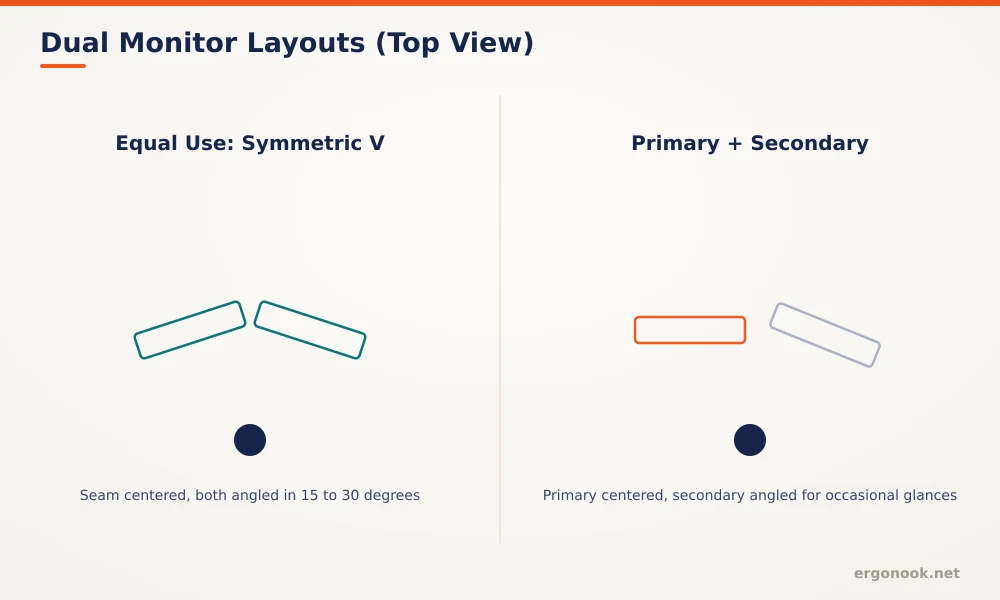
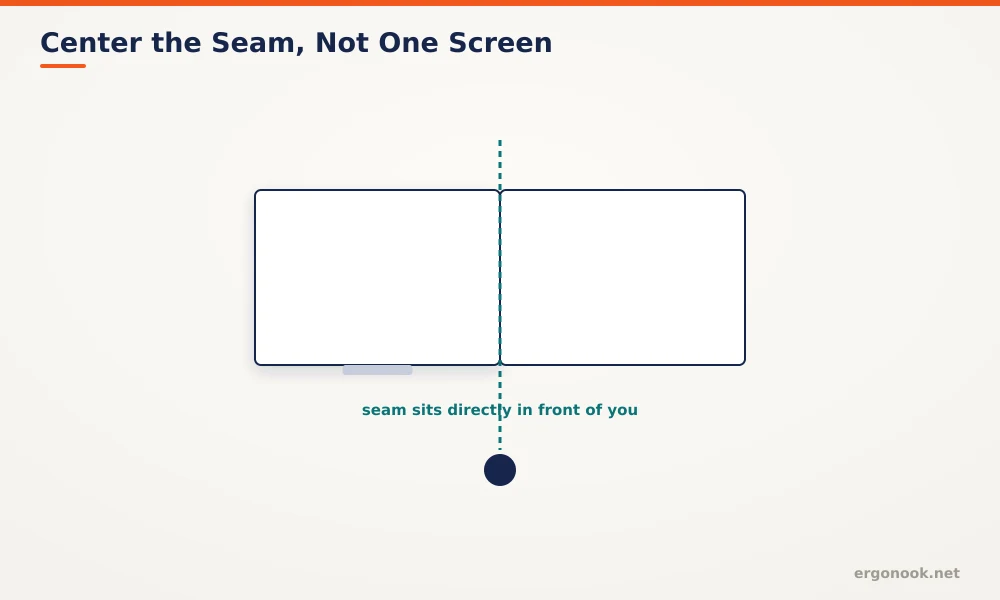
To set up dual monitors ergonomically, center the seam between them in front of you, not one screen, and angle each display 15 to 30 degrees inward if you use both equally. CCOHS recommends keeping the top of both screens at or slightly below eye level, the same target as a single monitor.
- If you split time evenly between two screens, center the seam between them directly in front of your body, not the middle of either individual screen.
- Angle each monitor 15 to 30 degrees inward so you can glance at it by moving your eyes, not turning your whole head.
- CCOHS recommends keeping the top of both screens at or slightly below eye level, the same rule as a single monitor setup.
- If one monitor is primary and the other is for occasional reference, keep the primary centered and angle only the secondary screen inward.
In this article:
- The quick answer: layout by how you use them
- Why dual monitor positioning matters
- How to position your screens
- How to adjust your desk for two monitors
- Special cases
- Signs your dual monitor setup is wrong
- Frequently asked questions
The Quick Answer: Layout by How You Use Them
| How You Use Them | Layout |
|---|---|
| Equally, switching back and forth often | Symmetric V, seam centered, both angled in 15 to 30 degrees |
| One primary, one for reference | Primary centered and flat, secondary angled inward only |
| Mismatched sizes | Align top edges, not bottom edges or centers, to keep eye level consistent |
| One landscape, one portrait | Keep the portrait screen for reading-heavy reference material, positioned to the non-dominant side |
Why Dual Monitor Positioning Matters
A single monitor only asks your neck to hold one position. Two monitors introduce a second variable, how far you have to turn to look at the one that isn’t directly in front of you, and that repeated twisting adds up over a full workday the same way a poorly angled single screen does. CCOHS’s guidance on monitor positioning applies the same core principle to multi-monitor setups: keep the screen you look at most centered and at the right height, and treat everything else as a secondary adjustment around that (CCOHS).
How to Position Your Screens
Start by deciding honestly whether you use both monitors equally or lean on one far more than the other, since that answer determines everything else. If usage is roughly equal, center the seam between the two monitors directly in front of your torso, then angle each screen 15 to 30 degrees inward, enough that a glance covers the far edge without a head turn.
If one monitor is clearly primary, keep that screen centered and flat, positioned exactly as you would a single monitor. Angle only the secondary screen inward, toward whichever side you naturally glance to check it. Keep both top edges at or slightly below eye level, matching the same standard used for a single-monitor setup.
How to Adjust Your Desk for Two Monitors
Two fixed stands rarely give you the fine control this setup needs, since angling and re-angling two separate stands to find the right spot is a lot of trial and error compared to a dual monitor arm that lets you adjust both screens independently and revisit the angle later without starting over. Our dual monitor arm for small desks roundup covers models built specifically for this two-screen adjustment range, including independent height and angle control for each side.
Special Cases
Mismatched monitor sizes are common when a second screen gets added later rather than bought as a matched pair. Align the top edges of both screens rather than the centers or bottoms, since eye level depends on the top edge, not the overall screen size. One landscape and one portrait monitor works well for reading-heavy secondary material, like documentation or chat, but the portrait screen should sit to your non-dominant side, since it’s rarely the screen you’re actively typing into.
Signs Your Dual Monitor Setup Is Wrong
Neck stiffness that’s worse on one side than the other is the clearest sign, and it usually points to a secondary monitor angled too sharply or positioned too far to that side. If you notice yourself rotating your whole torso rather than just your eyes to check the second screen, the angle needs adjusting. Mismatched eye levels between the two screens, where you tilt your head up or down switching between them, means the top edges aren’t aligned even if the overall setup looks fine at a glance.
Frequently Asked Questions
Should both monitors be the same distance away?
Ideally yes, especially in a symmetric equal-use layout. For a primary and secondary setup, the secondary screen can sit slightly farther back since you look at it less often.
Is an ultrawide curved monitor better than two separate screens?
It solves the seam problem entirely since there’s no gap between displays, but it loses the independent height and angle adjustment two separate monitors on an arm can offer.
Do I really need a monitor arm for two screens?
Not strictly, but it makes hitting the correct angle and height for both screens significantly easier than two separate fixed stands.
Does a three-monitor setup follow the same rules?
Yes, center the seam of your primary viewing area, keep top edges level, and angle the outer two screens inward more than you would with just two.
Setting up dual monitors ergonomically comes down to one decision: whether you use both screens equally or lean on one as primary. That answer determines where the seam or center sits, and everything else, angle, height, and distance, follows the same single-monitor rules from there.


Write Your Review
No reviews yet. Be the first to share your experience!